上两节课我们简单介绍了MySQL数据库的安装与配置及数据库可视化管理工具 Navicat Premium安装与使用,主要是为了学习Python如何操作MySQL数据库提供了环境支持,通过Navicat快速直观的查看Python操作数据的结果。本节课重点讲解通过Python编程语言如何操作数据库,实现数据的持久化存储。
1. Python操作MySQL数据库
1.1 首先安装Python MySQL连接库
安装pymysql第三方连接库,可以通过两种方式:
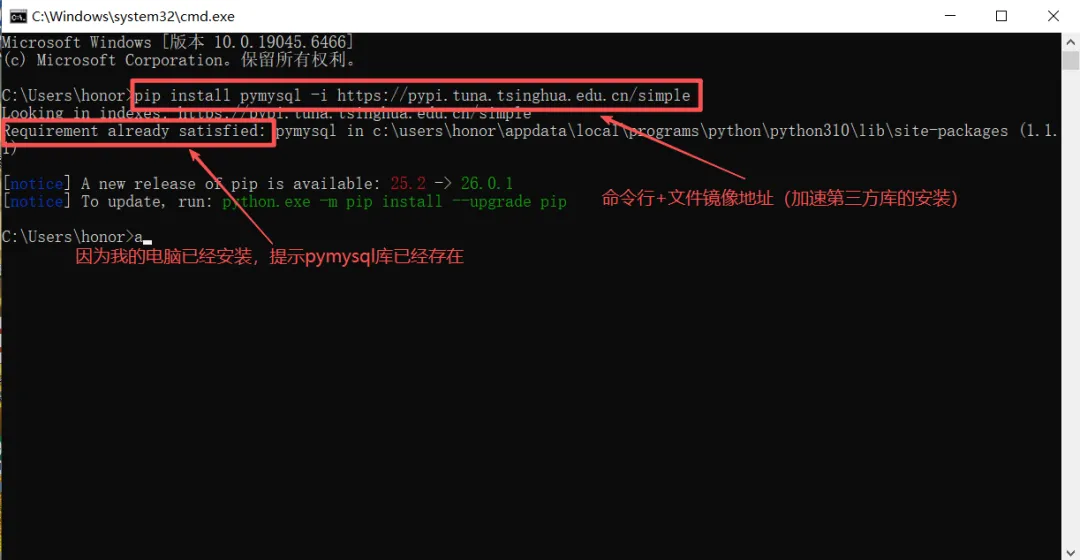
windows+R 打开运行窗口,输入cmd,打开命令行终端窗口,输入pip install pymysql -i https://pypi.tuna.tsinghua.edu.cn/simple (如图)
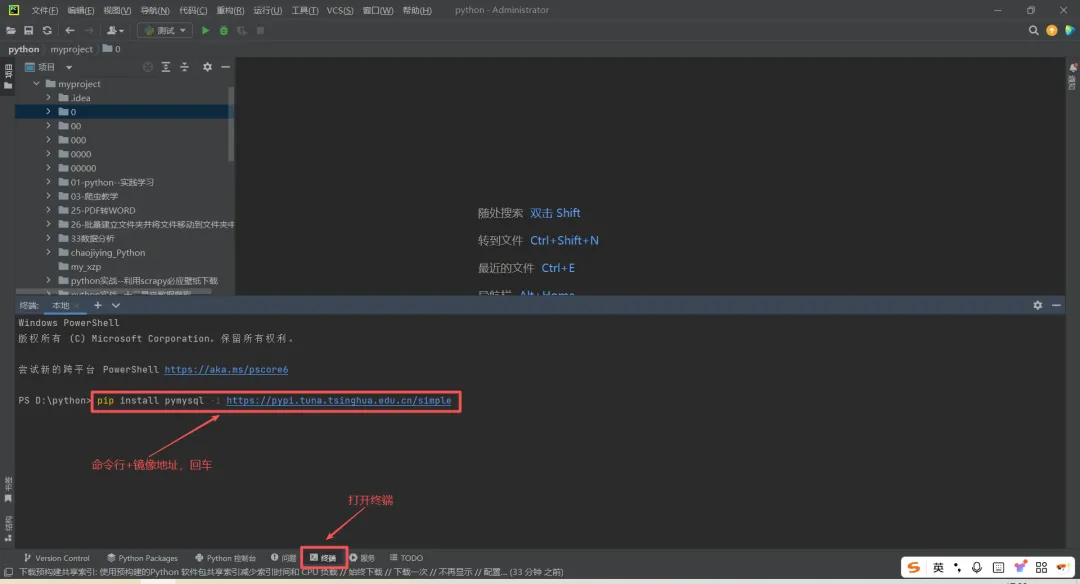
打开PyCharm编辑器,打开终端(如图)输入:pip install pymysql -i
https://pypi.tuna.tsinghua.edu.cn/simple ,回车
常用国内镜像源地址:
阿里云:http://mirrors.aliyun.com/pypi/simple/
豆瓣:http://pypi.douban.com/simple/
中国科学技术大学:https://pypi.mirrors.ustc.edu.cn/simple/
腾讯云:https://mirrors.cloud.tencent.com/pypi/simple
华为云:https://mirrors.huaweicloud.com/repository/pypi/simple/
1.2 验证安装
# 测试pymysql是否安装成功import pymysqlprint(pymysql.__version__) # 显示版本号即表示安装成功
2. 连接MySQL服务器
我们已经安装了MySQL数据库管理系统,在创建数据库和表之前,Python要建立与MySQL数据库服务器的连接。
示例代码:
import pymysql# 建立数据库连接connection = pymysql.connect( host='localhost', # 数据库主机地址 user='root', # 根用户root password='root', # 用户密码 )print("数据库连接成功!")connection.close() # 关闭连接
3. 创建数据库和表
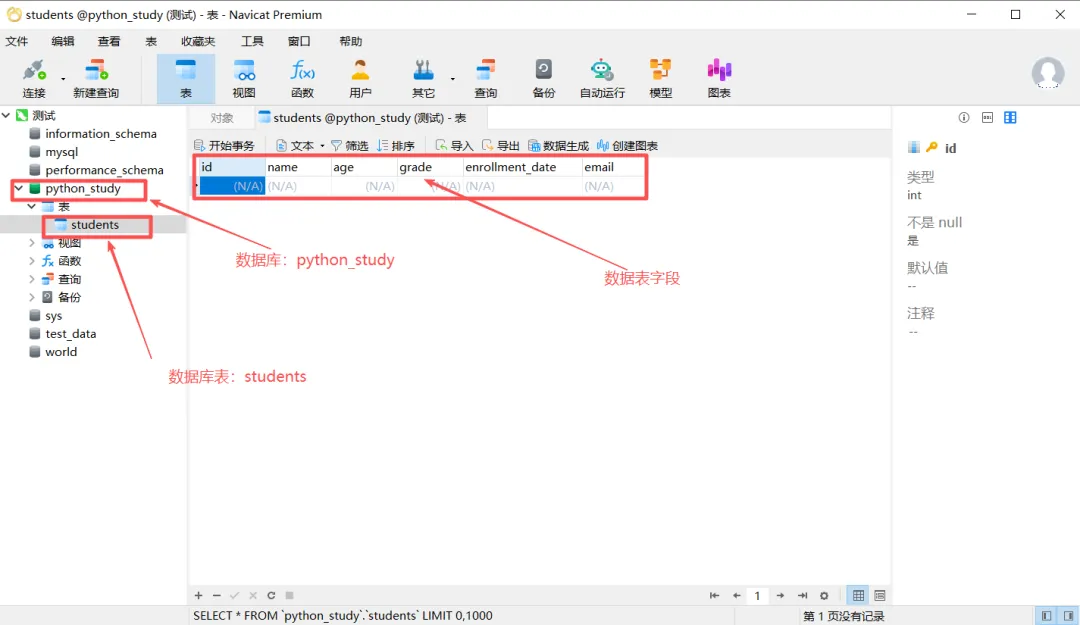
创建Python_study数据库,同时创建学生表students,学生表有六个字段,id(学生编号,自动增加,主键)、name(学生名字)、age(年龄)、grade(成绩)、enrollment_date(注册时间)、email(电子邮件)。
示例代码:
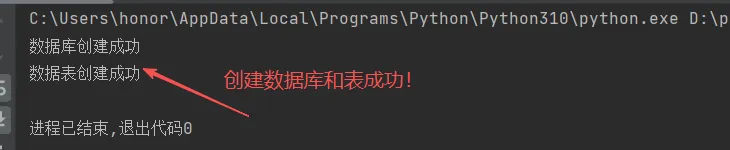
import pymysqltry: # 连接MySQL服务器 connection = pymysql.connect( host='localhost', user='root', password='root', ) # 创建游标对象(用于执行SQL语句) cursor = connection.cursor() # 创建数据库 cursor.execute("CREATE DATABASE IF NOT EXISTS python_study") print("数据库创建成功") # 打开数据库 cursor.execute("USE python_study") # 创建学生表 create_table_sql = """ CREATE TABLE IF NOT EXISTS students ( id INT AUTO_INCREMENT PRIMARY KEY, name VARCHAR(50) NOT NULL, age INT, grade FLOAT, enrollment_date DATE, email VARCHAR(100) UNIQUE ) """ cursor.execute(create_table_sql) print("数据表创建成功")except pymysql.Error as e: print(f"数据库操作失败:{e}")finally: # 关闭连接 if connection: connection.close()
运行结果:
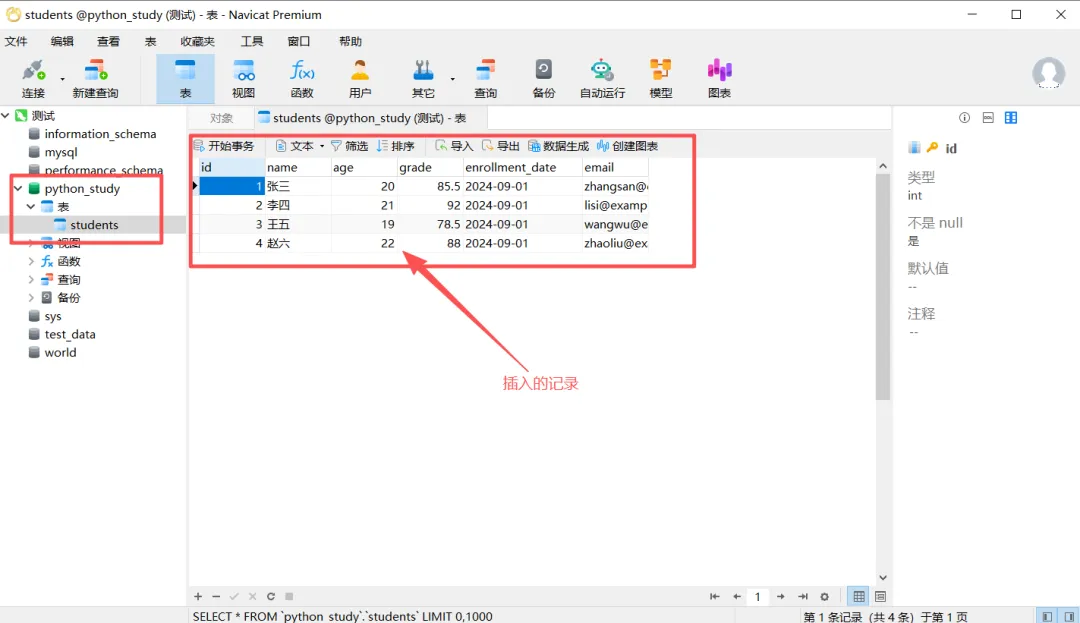
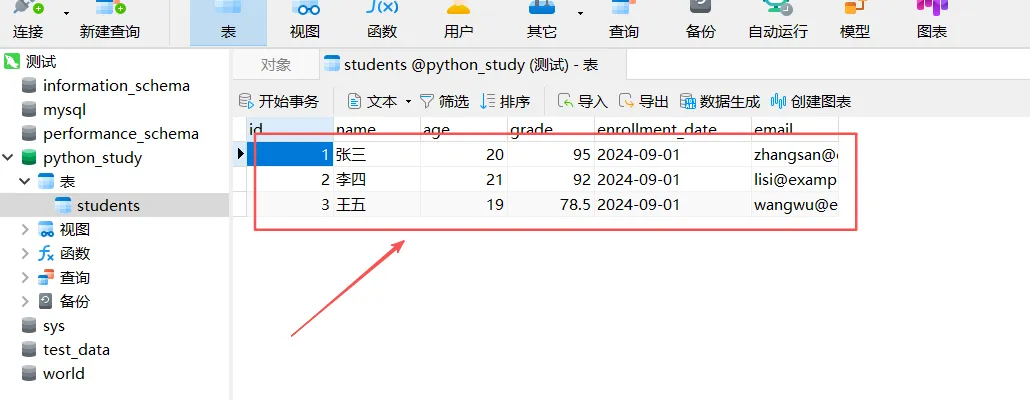
打开navicat premium查看运行结果:
可见,通过navicat premium我们可以方便直观地查看运行结果,测试代码运行是否正确,这就是我们学习navicat premium主要目的。推荐我们在创建数据库和表时,采用navicat premium可视化管理工具(上节课我们学内容),从而提高编程效率。
4. 基本操作 (增删改查CRUD)
4.1 插入数据(Create)
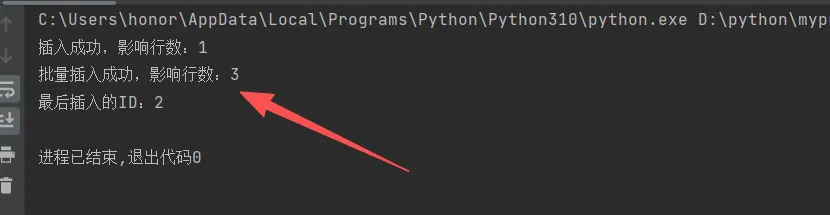
import pymysqltry: connection = pymysql.connect( host='localhost', user='root', password='root', database='python_study', charset='utf8mb4' ) cursor = connection.cursor() # 方式1:插入单条数据 insert_sql = "INSERT INTO students (name, age, grade, enrollment_date, email) VALUES (%s, %s, %s, %s, %s)" student_data = ('张三', 20, 85.5, '2024-09-01', 'zhangsan@example.com') cursor.execute(insert_sql, student_data) connection.commit() # 提交事务 print(f"插入成功,影响行数:{cursor.rowcount}") # 方式2:插入多条数据 students_data = [ ('李四', 21, 92.0, '2024-09-01', 'lisi@example.com'), ('王五', 19, 78.5, '2024-09-01', 'wangwu@example.com'), ('赵六', 22, 88.0, '2024-09-01', 'zhaoliu@example.com') ] cursor.executemany(insert_sql, students_data) connection.commit() print(f"批量插入成功,影响行数:{cursor.rowcount}") # 获取插入的最后一个ID last_id = cursor.lastrowid print(f"最后插入的ID:{last_id}")except pymysql.Error as e: print(f"插入失败:{e}") connection.rollback() # 发生错误时回滚finally: if connection: connection.close()
运行结果:
4.2 查询数据(Read)
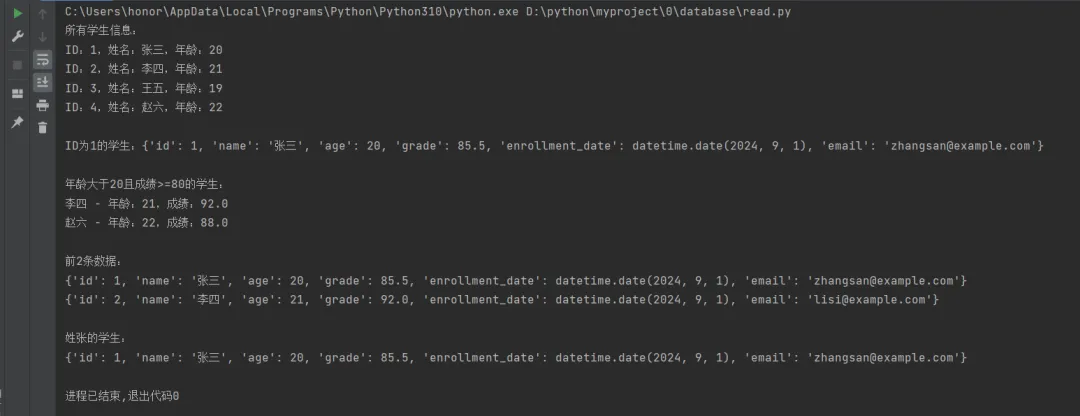
import pymysqltry: connection = pymysql.connect( host='localhost', user='root', password='root', database='python_study', charset='utf8mb4' ) # 使用DictCursor可以返回字典格式的结果 cursor = connection.cursor(pymysql.cursors.DictCursor) # 1. 查询所有数据 cursor.execute("SELECT * FROM students") all_students = cursor.fetchall() # 获取所有结果 print("所有学生信息:") for student in all_students: print(f"ID:{student['id']},姓名:{student['name']},年龄:{student['age']}") # 2. 查询单条数据 cursor.execute("SELECT * FROM students WHERE id = %s", (1,)) student = cursor.fetchone() # 获取一条结果 if student: print(f"\nID为1的学生:{student}") # 3. 条件查询 cursor.execute("SELECT * FROM students WHERE age > %s AND grade >= %s", (20, 80)) filtered_students = cursor.fetchall() print(f"\n年龄大于20且成绩>=80的学生:") for student in filtered_students: print(f"{student['name']} - 年龄:{student['age']},成绩:{student['grade']}") # 4. 查询前N条数据 cursor.execute("SELECT * FROM students LIMIT 2") top_2 = cursor.fetchall() print(f"\n前2条数据:") for student in top_2: print(student) # 5. 模糊查询 cursor.execute("SELECT * FROM students WHERE name LIKE %s", ('%张%',)) zhang_students = cursor.fetchall() print(f"\n姓张的学生:") for student in zhang_students: print(student)except pymysql.Error as e: print(f"查询失败:{e}")finally: if connection: connection.close()
运行结果:
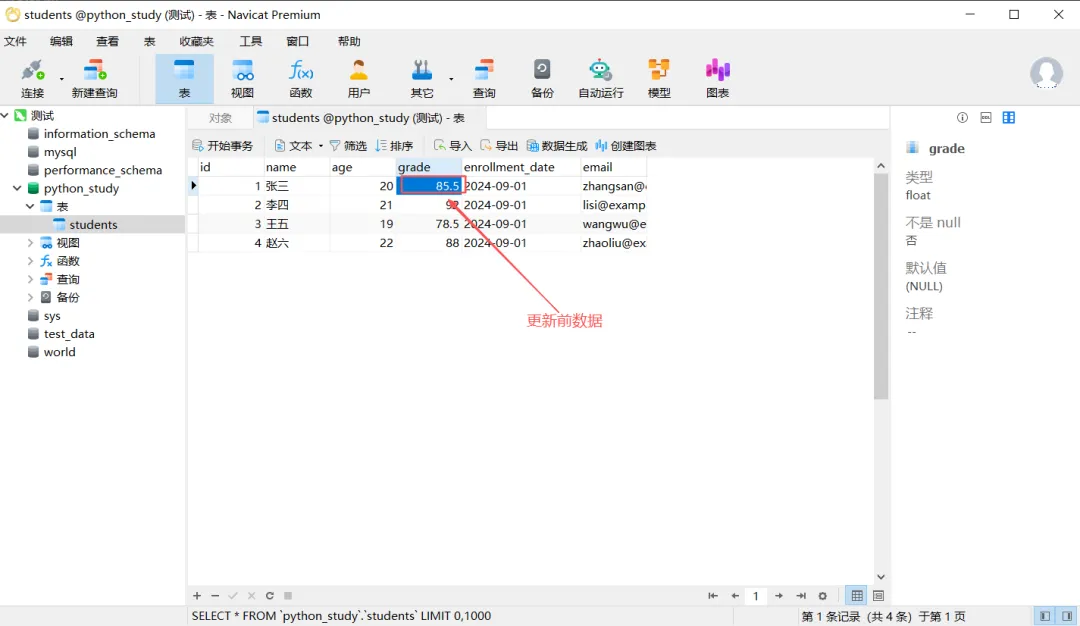
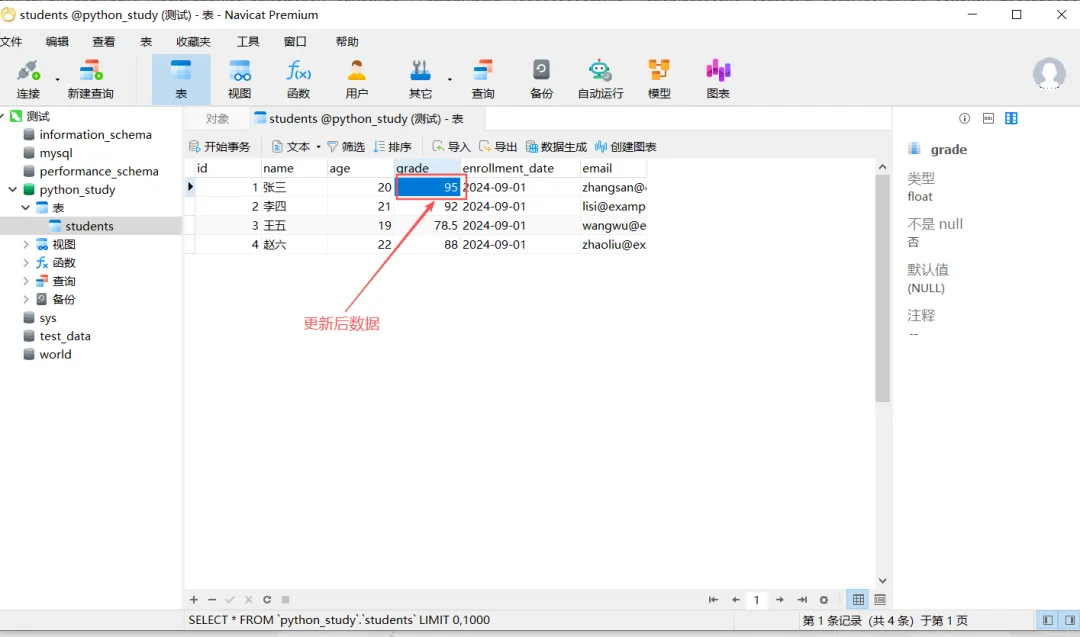
4.3 修改数据(Update)
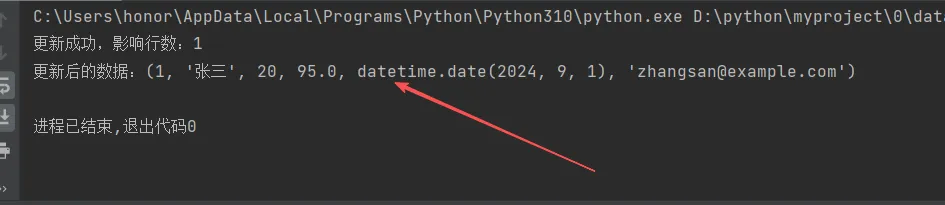
import pymysqltry: connection = pymysql.connect( host='localhost', user='root', password='root', database='python_study', charset='utf8mb4' ) cursor = connection.cursor() # 更新指定条件的数据 update_sql = "UPDATE students SET grade = %s WHERE name = %s" cursor.execute(update_sql, (95.0, '张三')) connection.commit() print(f"更新成功,影响行数:{cursor.rowcount}") # 查看更新后的数据 cursor.execute("SELECT * FROM students WHERE name = '张三'") result = cursor.fetchone() print(f"更新后的数据:{result}")except pymysql.Error as e: print(f"更新失败:{e}") connection.rollback()finally: if connection: connection.close()
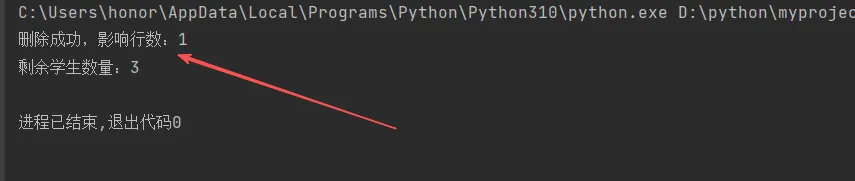
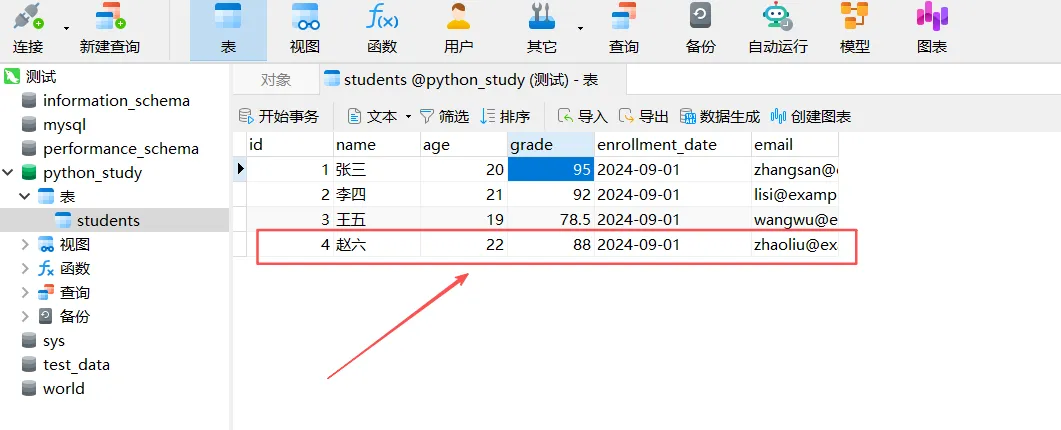
4.4 删除数据(Delete)
import pymysqltry: connection = pymysql.connect( host='localhost', user='root', password='root', database='python_study', charset='utf8mb4' ) cursor = connection.cursor() # 删除指定数据 delete_sql = "DELETE FROM students WHERE name = %s" cursor.execute(delete_sql, ('赵六',)) connection.commit() print(f"删除成功,影响行数:{cursor.rowcount}") # 查看剩余数据 cursor.execute("SELECT COUNT(*) as count FROM students") result = cursor.fetchone() print(f"剩余学生数量:{result[0]}")except pymysql.Error as e: print(f"删除失败:{e}") connection.rollback()finally: if connection: connection.close()
5. 核心知识点——事务处理
5.1 什么是事务?
事务(Transaction) 是数据库管理系统执行过程中的一个逻辑单元,它由一组SQL语句组成,这些语句要么全部执行成功,要么全部不执行。
举一个生活中的例子来理解事务:
小张给小李转账1000元,这个事务分两个步骤:
1. 从小张账户中扣1000元
2. 给小李账号加1000元
事务要求:这两步骤要要么全部成功,要么全部失败。
5.2 常用的事务处理场景
涉及金钱的操作(转账、支付、退款)
多表关联操作(下订单、注册账号)
数据一致性要求高(库存管理、票务系统)
批量数据处理(批量导入、批量更新
5.3 事务处理好处
错误恢复:出错能回到起点
并发安全:多人操作不乱套
业务完整:业务流程有保障
5.4 事务处理案例——银行转账
import pymysqldef transfer_money(from_id, to_id, amount): """ 转账示例:演示事务的使用 """ connection = None try: connection = pymysql.connect( host='localhost', user='root', password='root', database='python_study', charset='utf8mb4' ) # 开启事务 connection.begin() cursor = connection.cursor() # 扣除转出账户余额 cursor.execute("UPDATE accounts SET balance = balance - %s WHERE id = %s", (amount, from_id)) if cursor.rowcount == 0: raise Exception("转出账户不存在") # 增加转入账户余额 cursor.execute("UPDATE accounts SET balance = balance + %s WHERE id = %s", (amount, to_id)) if cursor.rowcount == 0: raise Exception("转入账户不存在") # 提交事务 connection.commit() print("转账成功!") except Exception as e: print(f"转账失败:{e}") if connection: connection.rollback() # 发生错误时回滚 finally: if connection: connection.close()
记住一句话:
当多个数据库操作必须作为一个整体时,就用事务来保护它们!
6. 编程实践技巧
6.1 防止SQL注入入侵
import pymysql# 错误示例:容易受到SQL注入攻击def unsafe_query(name): connection = pymysql.connect(...) cursor = connection.cursor() # 危险的写法! sql = f"SELECT * FROM students WHERE name = '{name}'" cursor.execute(sql) # 如果name包含恶意SQL代码,会执行# 正确示例:使用参数化查询def safe_query(name): connection = pymysql.connect(...) cursor = connection.cursor() # 安全的写法! sql = "SELECT * FROM students WHERE name = %s" cursor.execute(sql, (name,)) # 参数会自动转义
6.2 使用with语句管理连接
import pymysqlfrom contextlib import closingwith closing(pymysql.connect( host='localhost', user='root', password='123456', database='python_study', charset='utf8mb4')) as connection: with connection.cursor() as cursor: cursor.execute("SELECT * FROM students") results = cursor.fetchall() for row in results: print(row)
6.3 封装数据库操作类
import pymysqlfrom pymysql.cursors import DictCursorclass MySQLHelper: def __init__(self, host, user, password, database): self.config = { 'host': host, 'user': user, 'password': password, 'database': database, 'charset': 'utf8mb4', 'cursorclass': DictCursor } def __enter__(self): self.connection = pymysql.connect(**self.config) return self def __exit__(self, exc_type, exc_val, exc_tb): if self.connection: self.connection.close() def query(self, sql, params=None): with self.connection.cursor() as cursor: cursor.execute(sql, params or ()) return cursor.fetchall() def execute(self, sql, params=None): with self.connection.cursor() as cursor: cursor.execute(sql, params or ()) self.connection.commit() return cursor.rowcount# 使用示例with MySQLHelper('localhost', 'root', 'root', 'python_study') as db: students = db.query("SELECT * FROM students WHERE age > %s", (18,)) for student in students: print(student)
6.4 注意事项
资源管理
安全性
性能优化
异常处理
7. 常见错误处理
def safe_database_operation(): try: connection = pymysql.connect( host='localhost', user='your_username', password='your_password', database='python_demo' ) with connection.cursor() as cursor: # 你的数据库操作代码 pass except pymysql.err.OperationalError as e: print(f"连接数据库失败: {e}") except pymysql.err.ProgrammingError as e: print(f"SQL语法错误: {e}") except pymysql.err.IntegrityError as e: print(f"数据完整性错误(如重复键): {e}") except Exception as e: print(f"发生未知错误: {e}") finally: if 'connection' in locals() and connection: connection.close()
import pymysqlimport jsonimport datetimeclass DatabaseBackup: def __init__(self, host, user, password, database): self.connection = pymysql.connect( host=host, user=user, password=password, database=database, charset='utf8mb4' ) def backup_table(self, table_name, backup_file): """备份指定表""" try: cursor = self.connection.cursor(pymysql.cursors.DictCursor) # 查询所有数据 cursor.execute(f"SELECT * FROM {table_name}") data = cursor.fetchall() # 获取表结构 cursor.execute(f"SHOW CREATE TABLE {table_name}") create_table_sql = cursor.fetchone()[1] # 创建备份文件 backup_data = { 'table': table_name, 'create_sql': create_table_sql, 'data': data, 'backup_time': datetime.datetime.now().strftime('%Y-%m-%d %H:%M:%S') } with open(backup_file, 'w', encoding='utf-8') as f: json.dump(backup_data, f, ensure_ascii=False, indent=2, default=str) print(f"表 {table_name} 已备份到 {backup_file}") print(f"备份记录数:{len(data)}") except Exception as e: print(f"备份失败:{e}") def restore_table(self, backup_file): """从备份文件恢复表""" try: # 读取备份文件 with open(backup_file, 'r', encoding='utf-8') as f: backup_data = json.load(f) cursor = self.connection.cursor() # 删除原表 cursor.execute(f"DROP TABLE IF EXISTS {backup_data['table']}") # 重新创建表 cursor.execute(backup_data['create_sql']) # 插入数据 if backup_data['data']: columns = backup_data['data'][0].keys() placeholders = ','.join(['%s'] * len(columns)) insert_sql = f"INSERT INTO {backup_data['table']} ({','.join(columns)}) VALUES ({placeholders})" for row in backup_data['data']: cursor.execute(insert_sql, list(row.values())) self.connection.commit() print(f"从 {backup_file} 恢复成功") print(f"恢复记录数:{len(backup_data['data'])}") except Exception as e: self.connection.rollback() print(f"恢复失败:{e}")# 使用示例backup = DatabaseBackup('localhost', 'root', 'root', 'python_study')backup.backup_table('students', 'students_backup.json')# backup.restore_table('students_backup.json')
9. 最佳实践建议
始终使用参数化查询,防止SQL注入攻击
及时关闭数据库连接,避免资源泄露
使用事务确保数据一致性
添加适当的异常处理
不要在代码中硬编码数据库配置,使用配置文件
为频繁查询的字段创建索引
定期备份数据库
记住:实践是最好的老师。建议你:
这个教程涵盖了Python操作MySQL的基本操作,从安装配置到实际应用都有详细示例。建议你按照教程顺序练习,从简单的CRUD操作开始,逐步掌握更高级的功能。
参考资料:
1.《MySQL必知必会》——(英)福塔(Forta, B.)著;刘晓霞, 钟鸣译 . —北京:人民邮电出版社。