OpenClaw Skills 是 OpenClaw 开源 AI Agent 的核心扩展机制,通过标准化模块让 AI 具备文件处理、联网、自动化等复杂能力,今天重点介绍Python Skill的开发过程。1、引言:为什么要在 OpenClaw 中调用 Python 脚本?
OpenClaw 技能生态的核心价值:从对话到落地执行
Python 脚本调用的场景价值:数据处理、AI 模型推理、第三方库集成等
本文核心目标:掌握 OpenClaw 调用 Python 脚本的两种核心方式,实现技能能力扩展
2、前置准备:环境与基础认知
环境要求,自行安装准备
- OpenClaw 内核版本要求(支持 Python 调用的最低版本)
- Python 环境配置(版本、虚拟环境、依赖管理)
- 必要依赖安装(
@openclaw/core、python-shell/child_process等)
3、开发案例-手动创建Skill技能
1.拷贝创建skill和打包的脚本到workspace目录/opt/homebrew/lib/node_modules/openclaw/skills/skill-creator/scripts下的init-skill.py package_skill.py quick_validate.py拷贝到/Users/xxx/.openclaw/workspace/script在/Users/xxx/.openclaw/workspace目录下运行如下命令:scripts/init_skill.py python-script --path skills --resources scripts,references
Initializing skill: python-script Location: skills Resources: scripts, references[OK] Created skill directory: /Users/xxx/.openclaw/workspace/skills/python-script[OK] Created SKILL.md[OK] Created scripts/[OK] Created references/[OK] Skill 'python-script' initialized successfully at /Users/xxx/.openclaw/workspace/skills/python-scriptNext steps:1. Edit SKILL.md to complete the TODO items and update the description2. Add resources to scripts/, references/, and assets/ as needed3. Run the validator when ready to check the skill structure
2.创建python脚本
在/Users/xxx/.openclaw/workspace/skills/python-script/script目录创建python脚本run_code.py#!/usr/bin/env python3"""执行 Python 代码或脚本的通用工具。处理输出截断、错误捕获、超时控制。"""import argparseimport subprocessimport sysfrom pathlib import Pathdef run_code(code: str = None, file: str = None, cwd: str = None, timeout: int = 60): """ 执行 Python 代码。 Args: code: Python 代码字符串 file: .py 文件路径 cwd: 工作目录 timeout: 超时时间(秒) Returns: (stdout, stderr, returncode) """ if code and file: print("错误:不能同时指定 --code 和 --file", file=sys.stderr) sys.exit(1) if not code and not file: print("错误:必须指定 --code 或 --file", file=sys.stderr) sys.exit(1) if code: cmd = [sys.executable, "-c", code] else: file_path = Path(file).expanduser().resolve() if not file_path.exists(): print(f"错误:文件不存在:{file_path}", file=sys.stderr) sys.exit(1) cmd = [sys.executable, str(file_path)] try: result = subprocess.run( cmd, capture_output=True, text=True, timeout=timeout, cwd=cwd ) return result.stdout, result.stderr, result.returncode except subprocess.TimeoutExpired: print(f"错误:执行超时({timeout}秒)", file=sys.stderr) sys.exit(2) except Exception as e: print(f"错误:{e}", file=sys.stderr) sys.exit(3)def main(): parser = argparse.ArgumentParser(description="执行 Python 代码或脚本") parser.add_argument("--code", "-c", help="Python 代码字符串") parser.add_argument("--file", "-f", help=".py 文件路径") parser.add_argument("--cwd", help="工作目录") parser.add_argument("--timeout", "-t", type=int, default=60, help="超时时间(秒)") parser.add_argument("--output", "-o", help="输出到文件(可选)") args = parser.parse_args() stdout, stderr, returncode = run_code( code=args.code, file=args.file, cwd=args.cwd, timeout=args.timeout )输出结果 if args.output: with open(args.output, "w") as f: f.write(stdout) print(f"输出已写入:{args.output}") else: if stdout: print(stdout, end="") if stderr: print(stderr, end="", file=sys.stderr) sys.exit(returncode)if name == "main": main()
3.编写SKILL.md
---name: python-scrpitdescription: 执行 Python 代码或脚本。当用户说"跑 Python"、"执行脚本"、"运行.py 文件"、"帮我写个 Python 脚本"或需要数据处理、文件操作、自动化任务时触发。---使用方法### 跑代码片段用户给一段 Python 代码直接执行:bash</span></span></code><code><span leaf="">python3 -c "<代码>"</span></code><code><span leaf="">适合:快速计算、测试小功能、一次性操作### 跑脚本文件用户有 .py 文件要执行:bash</span></span></code><code><span leaf="">python3 /path/to/script.py</span></code><code><span leaf="">适合:完整的脚本、需要多次运行的代码### 用封装的脚本优先使用 scripts/run_code.py 来执行,它处理输出截断、错误处理:bash</span></span></code><code><span leaf="">python3 scripts/run_code.py --code "<代码>"</span></code><code><span leaf="">python3 scripts/run_code.py --file script.py</span></code><code><span leaf="">## 输出处理- 输出超过 100 行 → 建议写入文件再展示路径- 有错误 → 展示 stderr + returncode- 长时间运行 → 用后台执行(exec background)## 安全注意- 网络请求、文件删除、系统命令等危险操作,需用户明确确认- 不要执行来源不明的代码- 敏感数据(密码、token)不要硬编码## 依赖管理如果脚本需要第三方库:1. 先检查是否已安装:python3 -c "import xxx"2. 没有的话问用户是否可以 pip3 install xxx3. 或者建议用户用虚拟环境详细环境说明见 [references/environment.md](references/environment.md)## 示例触发场景- "帮我跑个 Python 算一下这个数据"- "执行这个脚本"- "写个 Python 把这两个文件合并一下"- "运行 test.py"- "用 Python 爬一下这个页面"
4.打包技能
scripts/package_skill.py skills/python-scrpit
Validating skill...[OK] Skill is valid! Added: python-script/SKILL.md Added: python-script/scripts/run_code.py[OK] Successfully packaged skill to: /Users/xxx/.openclaw/workspace/python-script.skill
5.检查skills加载情况
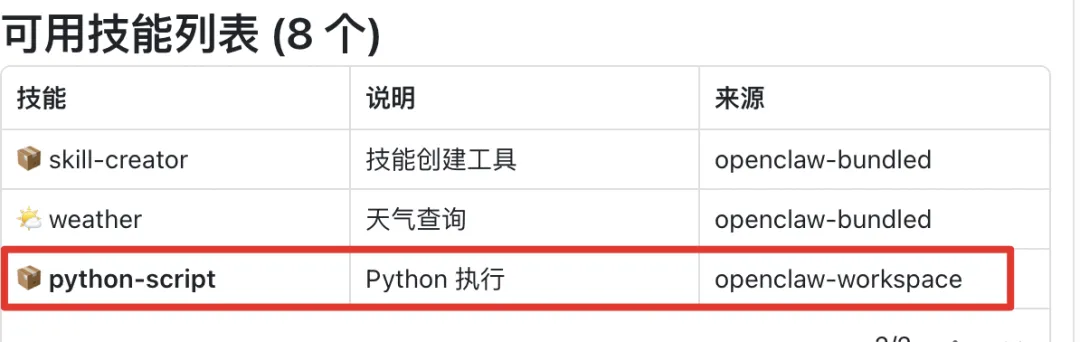
通过对话框输出skills list,发现python-script正常运行6.测试
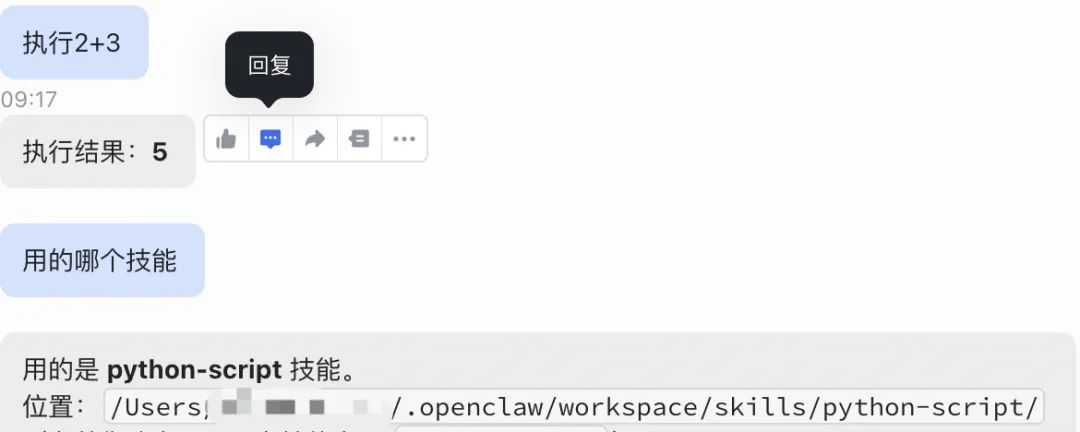
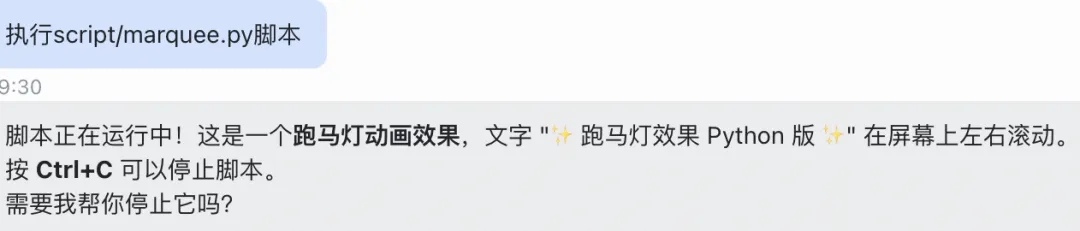
测试1:运行代码『执行2+3』,验证python skill运行正常测试2:运行文件『执行script/marquee.py脚本』综上所述步骤,我们已要成功创建了python技能脚本,该脚本可以python代码、python文件,可以帮助我们执行重复的任务、整体表格、抓取数据等。