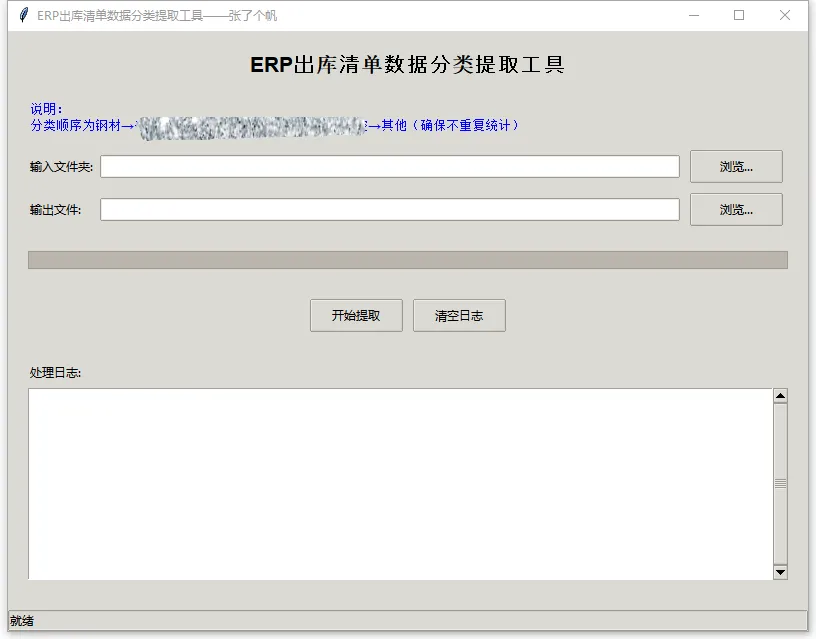
import osimport pandas as pdimport tkinter as tkfrom tkinter import filedialog, messagebox, ttkimport threadingimport tracebackfrom io import StringIOdef extract_data_from_excel(file_path): """ 从单个Excel文件中提取所需数据 """ try: # 尝试用不同的引擎读取Excel文件 df = None file_ext = os.path.splitext(file_path)[1].lower() # 根据文件扩展名选择合适的读取方式 if file_ext == '.xls': # 尝试使用xlrd引擎读取老版本Excel文件 try: df = pd.read_excel(file_path, dtype=str, engine='xlrd') except Exception as e: # 如果xlrd失败,尝试使用openpyxl try: df = pd.read_excel(file_path, dtype=str, engine='openpyxl') except Exception as e2: # 如果都失败,尝试使用默认引擎 try: df = pd.read_excel(file_path, dtype=str) except Exception as e3: return None, f"无法读取Excel文件: {str(e)}; {str(e2)}; {str(e3)}" elif file_ext == '.xlsx': # 对于.xlsx文件,使用openpyxl引擎 try: df = pd.read_excel(file_path, dtype=str, engine='openpyxl') except Exception as e: try: df = pd.read_excel(file_path, dtype=str) except Exception as e2: return None, f"无法读取Excel文件: {str(e)}; {str(e2)}" else: # 其他格式,尝试默认读取 try: df = pd.read_excel(file_path, dtype=str) except Exception as e: return None, f"无法读取文件: {str(e)}" if df is None or df.empty: return None, "Excel文件为空或读取失败" # 检查必要列是否存在 required_cols = ['施工号', '库房', '物料分类', '物料名称', '出库金额'] missing_cols = [] for col in required_cols: if col not in df.columns: missing_cols.append(col) if missing_cols: return None, f"缺少必要列: {', '.join(missing_cols)}" # 获取施工号(取第一个非空值) project_no = df['施工号'].dropna().iloc[0] if not df['施工号'].dropna().empty else "" # 将出库金额转换为数值类型(处理可能的格式问题) try: df['出库金额'] = pd.to_numeric(df['出库金额'], errors='coerce').fillna(0) except Exception as e: # 如果转换失败,尝试清理数据 df['出库金额'] = df['出库金额'].astype(str).str.replace(',', '').replace(' ', '') df['出库金额'] = pd.to_numeric(df['出库金额'], errors='coerce').fillna(0) # 识别并排除合计行(最后一行,且前面列多为空) # 计算每一行前几列的空值数量 if len(df.columns) >= 10: df['空值数量'] = df.iloc[:, :10].isnull().sum(axis=1) # 检查前10列 else: df['空值数量'] = df.isnull().sum(axis=1) # 排除可能是合计行的行(前10列大部分为空,但出库金额不为0) df_filtered = df[(df['空值数量'] < 8) | (df['出库金额'] == 0)].copy() # 如果过滤后为空,使用原始数据但排除最后一行 if len(df_filtered) == 0: df_filtered = df.iloc[:-1].copy() if len(df) > 1 else df.copy() # 1. 首先排除库房为"成品库"或"虚拟中间库"的数据 exclude_mask1 = df_filtered['库房'].astype(str).str.contains('成品库|虚拟中间库', na=False) # 2. 如果有"业务类型"列,排除业务类型为"销售出库"的数据 exclude_mask2 = pd.Series(False, index=df_filtered.index) if '业务类型' in df_filtered.columns: exclude_mask2 = df_filtered['业务类型'].astype(str).str.contains('销售出库', na=False) # 合并排除条件:库房条件或业务类型条件 exclude_mask = exclude_mask1 | exclude_mask2 # 应用排除条件 df_filtered = df_filtered[~exclude_mask].copy() if len(df_filtered) == 0: # 如果所有数据都被排除,返回0值 return { '施工号': project_no, '钢材金额': 0, '******金额': 0, '******金额': 0, '******金额': 0, '******金额': 0, '******金额': 0, '其他金额': 0 }, None # 3. 使用逐步筛选的方法,确保数据不重复统计 # 复制一份数据用于逐步筛选 df_remaining = df_filtered.copy() # 3.1 钢材金额:库房为"钢材库" steel_mask = df_remaining['库房'].astype(str).str.contains('钢材库', na=False) steel_amount = df_remaining.loc[steel_mask, '出库金额'].sum() # 从剩余数据中移除钢材库的数据 df_remaining = df_remaining[~steel_mask].copy() # 3.2 ******金额:物料分类包含"******" jack_mask = df_remaining['物料分类'].astype(str).str.contains('******|******', na=False) jack_amount = df_remaining.loc[jack_mask, '出库金额'].sum() # 从剩余数据中移除******的数据 df_remaining = df_remaining[~jack_mask].copy() # 3.3 ******金额:物料名称包含"******" hose_mask = df_remaining['物料名称'].astype(str).str.contains('******|******', na=False) hose_amount = df_remaining.loc[hose_mask, '出库金额'].sum() # 从剩余数据中移除******的数据 df_remaining = df_remaining[~hose_mask].copy() # 3.4 ******金额:物料名称包含"******" valve_mask = df_remaining['物料名称'].astype(str).str.contains('******|******', na=False) valve_amount = df_remaining.loc[valve_mask, '出库金额'].sum() # 从剩余数据中移除******的数据 df_remaining = df_remaining[~valve_mask].copy() # 3.5 ******金额:物料名称包含"******" welding_mask = df_remaining['物料名称'].astype(str).str.contains('******|******', na=False) welding_amount = df_remaining.loc[welding_mask, '出库金额'].sum() # 从剩余数据中移除******的数据 df_remaining = df_remaining[~welding_mask].copy() # 3.6 ******金额:物料名称包含"******" electro_hydraulic_mask = df_remaining['物料名称'].astype(str).str.contains('******', na=False) electro_hydraulic_amount = df_remaining.loc[electro_hydraulic_mask, '出库金额'].sum() # 从剩余数据中移除******的数据 df_remaining = df_remaining[~electro_hydraulic_mask].copy() # 3.7 其他金额:剩余的数据 other_amount = df_remaining['出库金额'].sum() # 验证数据:确保所有原始数据都被统计到 original_total = df_filtered['出库金额'].sum() calculated_total = steel_amount + jack_amount + hose_amount + valve_amount + welding_amount + electro_hydraulic_amount + other_amount # 允许小的浮点数差异 if abs(original_total - calculated_total) > 0.01: # 如果差异较大,记录警告 print(f"警告: 数据汇总不一致。原始总额: {original_total}, 计算总额: {calculated_total}") # 调整其他金额以确保总额一致 other_amount = original_total - (steel_amount + jack_amount + hose_amount + valve_amount + welding_amount + electro_hydraulic_amount) # 确保没有负值 other_amount = max(0, other_amount) result = { '施工号': project_no, '钢材金额': round(steel_amount, 2), '******金额': round(jack_amount, 2), '******金额': round(hose_amount, 2), '******金额': round(valve_amount, 2), '******金额': round(welding_amount, 2), '******金额': round(electro_hydraulic_amount, 2), '其他金额': round(other_amount, 2) } return result, None except Exception as e: return None, f"处理文件时出错: {str(e)}\n{traceback.format_exc()}"def process_excel_files(input_folder, output_file, progress_callback, log_callback): """ 批量处理Excel文件 """ results = [] failed_files = [] # 获取所有Excel文件 excel_files = [f for f in os.listdir(input_folder) if f.lower().endswith(('.xls', '.xlsx'))] total_files = len(excel_files) for i, file_name in enumerate(excel_files): try: file_path = os.path.join(input_folder, file_name) log_callback(f"正在处理: {file_name}") # 更新进度 progress = (i + 1) / total_files * 100 progress_callback(progress) # 提取数据 result, error = extract_data_from_excel(file_path) if error: failed_files.append((file_name, error)) log_callback(f"处理失败: {file_name} - {error.split(chr(10))[0]}") # 只显示第一行错误 else: results.append(result) log_callback(f"处理成功: {file_name}") except Exception as e: error_msg = f"未知错误: {str(e)}" failed_files.append((file_name, error_msg)) log_callback(f"处理失败: {file_name} - {error_msg}") # 保存结果到Excel if results: try: # 定义列的顺序 column_order = ['施工号', '钢材金额', '******金额', '******金额', '******金额', '******金额', '******金额', '其他金额'] df_results = pd.DataFrame(results) # 确保所有列都存在,如果不存在则添加空列 for col in column_order: if col not in df_results.columns: df_results[col] = 0 # 按指定顺序排列列 df_results = df_results[column_order] df_results.to_excel(output_file, index=False) # 同时保存一个CSV格式(可选) csv_output = output_file.replace('.xlsx', '.csv').replace('.xls', '.csv') df_results.to_csv(csv_output, index=False, encoding='utf-8-sig') except Exception as e: error_msg = f"保存结果时出错: {str(e)}" log_callback(error_msg) raise Exception(error_msg) return results, failed_files, total_filesclass ExcelProcessorApp: def __init__(self, root): self.root = root self.root.title("ERP出库清单数据分类提取工具——张了个帆") self.root.geometry("800x600") # 设置样式 self.setup_styles() # 创建UI组件 self.create_widgets() # 初始化变量 self.input_folder = "" self.output_file = "" def setup_styles(self): """设置UI样式""" style = ttk.Style() style.theme_use('clam') def create_widgets(self): """创建UI界面""" # 主框架 main_frame = ttk.Frame(self.root, padding="20") main_frame.grid(row=0, column=0, sticky=(tk.W, tk.E, tk.N, tk.S)) # 标题 title_label = ttk.Label(main_frame, text="ERP出库清单数据分类提取工具", font=('Arial', 16, 'bold')) title_label.grid(row=0, column=0, columnspan=3, pady=(0, 20)) # 说明标签 info_text = "说明:\n分类顺序为钢材→******→其他(确保不重复统计)" info_label = ttk.Label(main_frame, text=info_text, font=('Arial', 10), foreground="blue", wraplength=600) info_label.grid(row=1, column=0, columnspan=3, pady=(0, 10), sticky=tk.W) # 输入文件夹选择 ttk.Label(main_frame, text="输入文件夹:").grid(row=2, column=0, sticky=tk.W, pady=5) self.input_path_var = tk.StringVar() input_entry = ttk.Entry(main_frame, textvariable=self.input_path_var, width=50) input_entry.grid(row=2, column=1, padx=5, pady=5, sticky=(tk.W, tk.E)) input_btn = ttk.Button(main_frame, text="浏览...", command=self.browse_input_folder) input_btn.grid(row=2, column=2, padx=5, pady=5) # 输出文件选择 ttk.Label(main_frame, text="输出文件:").grid(row=3, column=0, sticky=tk.W, pady=5) self.output_path_var = tk.StringVar() output_entry = ttk.Entry(main_frame, textvariable=self.output_path_var, width=50) output_entry.grid(row=3, column=1, padx=5, pady=5, sticky=(tk.W, tk.E)) output_btn = ttk.Button(main_frame, text="浏览...", command=self.browse_output_file) output_btn.grid(row=3, column=2, padx=5, pady=5) # 进度条 self.progress_var = tk.DoubleVar() progress_bar = ttk.Progressbar(main_frame, variable=self.progress_var, maximum=100) progress_bar.grid(row=4, column=0, columnspan=3, sticky=(tk.W, tk.E), pady=20) # 操作按钮 button_frame = ttk.Frame(main_frame) button_frame.grid(row=5, column=0, columnspan=3, pady=10) self.process_btn = ttk.Button(button_frame, text="开始提取", command=self.start_processing) self.process_btn.pack(side=tk.LEFT, padx=5) self.clear_btn = ttk.Button(button_frame, text="清空日志", command=self.clear_log) self.clear_btn.pack(side=tk.LEFT, padx=5) # 日志框 ttk.Label(main_frame, text="处理日志:").grid(row=6, column=0, sticky=tk.W, pady=(20, 5)) # 创建带滚动条的文本框 log_frame = ttk.Frame(main_frame) log_frame.grid(row=7, column=0, columnspan=3, sticky=(tk.W, tk.E, tk.N, tk.S), pady=(0, 10)) # 配置网格权重 main_frame.columnconfigure(1, weight=1) main_frame.rowconfigure(7, weight=1) log_frame.columnconfigure(0, weight=1) log_frame.rowconfigure(0, weight=1) # 文本框和滚动条 self.log_text = tk.Text(log_frame, height=15, wrap=tk.WORD) log_scrollbar = ttk.Scrollbar(log_frame, orient=tk.VERTICAL, command=self.log_text.yview) self.log_text.configure(yscrollcommand=log_scrollbar.set) self.log_text.grid(row=0, column=0, sticky=(tk.W, tk.E, tk.N, tk.S)) log_scrollbar.grid(row=0, column=1, sticky=(tk.N, tk.S)) # 状态栏 self.status_var = tk.StringVar(value="就绪") status_bar = ttk.Label(self.root, textvariable=self.status_var, relief=tk.SUNKEN, anchor=tk.W) status_bar.grid(row=1, column=0, sticky=(tk.W, tk.E)) def browse_input_folder(self): """选择输入文件夹""" folder = filedialog.askdirectory(title="选择包含Excel文件的文件夹") if folder: self.input_path_var.set(folder) # 自动设置输出文件路径 output_path = os.path.join(folder, "提取结果.xlsx") self.output_path_var.set(output_path) def browse_output_file(self): """选择输出文件""" file = filedialog.asksaveasfilename( title="保存结果文件", defaultextension=".xlsx", filetypes=[("Excel文件", "*.xlsx"), ("Excel 97-2003", "*.xls"), ("CSV文件", "*.csv"), ("所有文件", "*.*")] ) if file: self.output_path_var.set(file) def log_message(self, message): """添加日志消息""" self.log_text.insert(tk.END, message + "\n") self.log_text.see(tk.END) self.root.update() def clear_log(self): """清空日志""" self.log_text.delete(1.0, tk.END) def update_progress(self, value): """更新进度条""" self.progress_var.set(value) def update_status(self, message): """更新状态栏""" self.status_var.set(message) def start_processing(self): """开始处理文件""" self.input_folder = self.input_path_var.get().strip() self.output_file = self.output_path_var.get().strip() # 验证输入 if not self.input_folder: messagebox.showerror("错误", "请选择输入文件夹!") return if not os.path.exists(self.input_folder): messagebox.showerror("错误", "输入文件夹不存在!") return if not self.output_file: messagebox.showerror("错误", "请指定输出文件路径!") return # 禁用按钮,防止重复点击 self.process_btn.config(state='disabled') # 在新线程中处理文件 thread = threading.Thread(target=self.process_files_thread) thread.daemon = True thread.start() def process_files_thread(self): """处理文件的线程函数""" try: self.log_message("=" * 50) self.log_message("开始批量处理Excel文件...") self.log_message("注意:排除'******库'和'******库'的数据") self.log_message("注意:排除业务类型为'******'的数据") self.log_message("分类顺序:钢材→********→其他(确保不重复统计)") self.update_status("正在处理文件...") # 处理文件 results, failed_files, total_files = process_excel_files( self.input_folder, self.output_file, self.update_progress, self.log_message ) # 显示结果 self.log_message("\n" + "=" * 50) self.log_message(f"处理完成!") self.log_message(f"总共处理文件: {total_files} 个") self.log_message(f"成功处理: {len(results)} 个") self.log_message(f"处理失败: {len(failed_files)} 个") if failed_files: self.log_message("\n失败文件列表:") for file_name, error in failed_files: # 只显示错误的前几行,避免日志过长 error_lines = error.split('\n') short_error = error_lines[0] if error_lines else error if len(error_lines) > 1: short_error += " ..." self.log_message(f" {file_name}: {short_error}") if results: self.log_message(f"\n结果已保存到: {self.output_file}") self.log_message("\n汇总结果预览:") for i, result in enumerate(results[:5], 1): # 只显示前5条 self.log_message(f" {i}. 施工号: {result['施工号']}, " f"钢材: {result['钢材金额']}, " f"******: {result['******金额']}, " f"******: {result['******金额']}, " f"******: {result['******金额']}, " f"******: {result['******金额']}, " f"******: {result['******金额']}, " f"其他: {result['其他金额']}") if len(results) > 5: self.log_message(f" ... 还有 {len(results)-5} 条记录") self.update_status(f"处理完成!成功: {len(results)}/{total_files}") # 显示完成对话框 messagebox.showinfo("完成", f"处理完成!\n成功: {len(results)}/{total_files}\n结果保存到: {self.output_file}") except Exception as e: error_msg = f"处理过程中发生错误: {str(e)}" self.log_message(error_msg) self.log_message(traceback.format_exc()) self.update_status("处理失败") messagebox.showerror("错误", error_msg) finally: # 恢复按钮状态 self.process_btn.config(state='normal') self.progress_var.set(0)def main(): """主函数""" root = tk.Tk() app = ExcelProcessorApp(root) # 配置网格权重 root.columnconfigure(0, weight=1) root.rowconfigure(0, weight=1) root.mainloop()if __name__ == "__main__": main()
 10个月宝宝每天需要喝多少奶粉?