当前位置:首页>Linux>Linux 多点电容触摸

Linux 多点电容触摸

  • 2026-03-26 09:16:21
Linux 多点电容触摸

多点电容触摸简介

  我手上使用的屏幕是 TFT LCD + 触摸屏组合起来的,底下是 LCD 面板,上面是触摸面板,将两个封装到一起就成了带有触摸屏的 LCD 屏幕。电容触摸屏也需要一个驱动 IC,驱动 IC 一般会提供一个 I2C 接口给主控制器,主控制器可以通过 I2C 接口来读取驱动 IC 的数据。我手上使用的触摸控制 IC 是 GT1151。

多点触摸(MT)协议

  我们已经知道以下几点:   ①、电容触摸屏是 I2C 接口,需要触摸 IC。   ②、触摸 IC 提供了中断信号引脚 (INT),可以通过中断来获取触摸信息。   ③、电容触摸屏得到的是触摸位置绝对信息以及触摸屏是否有按下。   结合以上几点我们可以得出电容触摸屏驱动起始就是以以下几种 Linux 驱动框架组合起来的:   ①、I2C 设备驱动,因为电容触摸 IC 基本都是 I2C 接口,因此大框架就是 I2C 设备驱动。   ②、通过中断引脚向 Linux 内核上报触摸信息,因此需要用到 Linux 的中断驱动框架。坐标的上报在中断服务函数中完成。   ③、触摸屏的坐标信息、屏幕按下和抬起信息属于 Linux 的 input 子系统,因此向 Linux 内核上报触摸屏坐标信息就得用 input 子系统。

  接下来我们来学习 input 子系统下的多点电容触摸协议。   触摸点的信息通过一系列的 ABS_MT 事件上报给 Linux 内核,只有 ABS_MT 事件是用于多点出没的,ABS_MT 时间定义在文件 include/dt-bindings/input/linux-event-codes.h 中,如下

#define ABS_MT_SLOT     0x2f     /* MT slot being modified */#define ABS_MT_TOUCH_MAJOR     0x30     /* Major axis of touching ellipse */#define ABS_MT_TOUCH_MINOR     0x31     /* Minor axis (omit if circular) */#define ABS_MT_WIDTH_MAJOR     0x32     /* Major axis of approaching ellipse */#define ABS_MT_WIDTH_MINOR     0x33     /* Minor axis (omit if circular) */#define ABS_MT_ORIENTATION     0x34     /* Ellipse orientation */#define ABS_MT_POSITION_X     0x35     /* Center X touch position */#define ABS_MT_POSITION_Y     0x36     /* Center Y touch position */#define ABS_MT_TOOL_TYPE     0x37     /* Type of touching device */#define ABS_MT_BLOB_ID     0x38     /* Group a set of packets as a blob */#define ABS_MT_TRACKING_ID     0x39     /* Unique ID of initiated contact */#define ABS_MT_PRESSURE     0x3a     /* Pressure on contact area */#define ABS_MT_DISTANCE     0x3b     /* Contact hover distance */#define ABS_MT_TOOL_X     0x3c     /* Center X tool position */#define ABS_MT_TOOL_Y     0x3d     /* Center Y tool position */

  在这么多的 ABS_MT 事件中,我们最常用的就是 ABS_MT_SLOT、ABS_MT_POSITION_X、ABS_MT_POSITION_Y 和 ABS_MT_TRACKING_ID。其中 ABS_MT_POSITION_X 和 ABS_MT_POSITION_Y,用来上报触摸点的(X,Y)坐标信息,ABS_MT_SLOT 用来上报触摸点的 ID。对于能区分触摸点的设备,使用 ABS_MT_TRACKING_ID 来区分触摸点。

  对于能区分触摸点的设备,我们上报触摸点信息的时候需要通过 input_mt_slot() 函数区分是哪一个触摸点,其原型如下

staticinlinevoidinput_mt_slot(struct input_dev *dev, int slot){    input_event(dev, EV_ABS, ABS_MT_SLOT, slot);}

  此函数有两个参数,第一个参数是 input_dev 设备,第二个参数 slot 用于指定当前上报的是哪个触摸点信息。input_mt_slot() 函数会触发 ABS_MT_SLOT 事件,此事件会告诉接收者当前正在更新的是哪个触摸点的数据。

  不管是什么类型的设备,最终都要调用 input_sync 函数来表示多点触摸信息传输完成,告诉接收者处理之前累积的所有信息,并准备好下一次接收。对于能区分触摸点的设备,其使用 slot 协议区分具体的触摸点,slot 需要用到 ABS_MT_TRACKING_ID 信息,这个 ID 需要硬件提供,这个设备需要给每个识别出的触摸点分配一个 slot,后面使用这个 slot 上报信息。设备驱动给每个识别出来的触摸点分配一个 slot,后面使用这个 slot 来上报触摸点信息,可以通过 slot 的 ABS_MT_TRACKING_ID 来新增、替换或删除触摸点。一个非负数的 ID 表示一个有效的触摸点,-1 这个 ID 表示未使用 slot。一个以前不存在的 ID 表示这是一个新加的触摸点,一个 ID 如果在也不存在就表示删除了。

  对于能区分触摸点的设备驱动,发送触摸点信息的时序如下,

ABS_MT_SLOT         0ABS_MT_TRACKING_ID  45ABS_MT_POSITION_X   x[0]ABS_MT_POSITION_Y   y[0]ABS_MY_SLOT         1ABS_MT_TRACKING_ID  46ABS_MT_POSITION_X   x[1]ABS_MT_POSITION_Y   y[1]SYN_REPORT

  首先上报 ABS_MT_SLOT 事件,也就是触摸点对应的 SLOT。每次上报一个触摸点坐标是前要先用 input_mt_slot 函数上报当前触摸点 SLOT,触摸点的 SLOT 就是触摸点 ID,需要由触摸 IC 提供。接下来根据要求,每个 SLOT 必须关联一个 ABS_MT_TRACKING_ID,通过修改 SLOT 关联的 ABS_MT_TRACKING_ID 来完成对触摸点的添加、替换和删除。具体用到的函数就是 input_mt_report_slot_state,如果是添加一个新的触摸点,那么此函数第三个参数要设置为 true,Linux 内核会自动分配一个 ABS_MT_TRACKING_ID 的值。然后就是上报触摸点的 X、Y 坐标。最后需要上报 SYN_REPORT 事件以保证同步。

  当一个触摸点移除后,同样需要通过 SLOT 关联的 ABS_MT_TRACKING_ID 来处理,时序如下所示

ABS_MT_TRACKING_ID      -1SYN_REPORT

  ili210x.c 文件上报触摸坐标信息函数如下:

staticboolili210x_report_events(struct ili210x *priv, u8 *touchdata){structinput_dev *input = priv->input;int i;bool contact = false, touch;unsignedint x = 0, y = 0, z = 0;for (i = 0; i < priv->chip->max_touches; i++) {        touch = priv->chip->parse_touch_data(touchdata, i, &x, &y, &z);        input_mt_slot(input, i);if (input_mt_report_slot_state(input, MT_TOOL_FINGER, touch)) {            touchscreen_report_pos(input, &priv->prop, x, y, true);if (priv->chip->has_pressure_reg)                input_report_abs(input, ABS_MT_PRESSURE, z);            contact = true;        }    }    input_mt_report_pointer_emulation(input, false);    input_sync(input);return contact;}

  我们后续编写代码也是按照这个框架来编写。

多点触摸所使用的 API 函数

1、input_mt_init_slots 函数  input_mt_init_slots 函数用于初始化 MT 的输入 slots,编写 MT 驱动的时候必须先调用此函数初始化 slots,此函数原型如下所示

intinput_mt_init_slots(struct input_dev *dev, unsignedint num_slots,unsignedint flags)

  dev 表示 MT 设备对应的 input_dev,因为 MT 设备属于 input_dev;num_slots 表示设备要使用的 SLOT 数量,也就是触摸点的数量;flags 表示其他一些flags 信息。返回值为 0 成功。

2、input_mt_slot  此函数用于产生 ABS_MT_SLOT 事件,告诉内核当前上报的是哪个触摸点的坐标数据,此函数原型如下:

staticinlinevoidinput_mt_slot(struct input_dev *dev, int slot){    input_event(dev, EV_ABS, ABS_MT_SLOT, slot);}

  其中,dev 就是 MT 设备对应的 input_dev,slot 就是当前发送的触摸点信息。

3、input_mt_report_slot_state  此函数用于产生 ABS_MT_TRACKING_ID 和 ABS_MT_TOOL_TYPE 事件,ABS_MT_TRACKING_ID 事件给 slot 关联一个 ABS_MT_TRACKING_ID,ABS_MT_TOOL_TYPE 事件指定触摸类型。

boolinput_mt_report_slot_state(struct input_dev *dev, unsignedint tool_type, bool active)

  其中,dev 表示 MT 设备对应的 input_dev。tool_type 表示触摸类型,可以选择手指、笔或手掌等等。active 为 true 时就表示连续触摸,input 子系统内核会自动分配一个 ABS_MT_TRACKING_ID 给 slot。false 表示触摸点抬起。

4、input_report_abs  所有触摸设备都使用此函数来上报触摸点坐标信息,通过 ABS_MT_POSITION_X 和 ABS_MT_POSITION_Y 实现坐标信息上报。其函数原型如下:

staticinlinevoidinput_report_abs(struct input_dev *dev, unsignedint code, int value){    input_event(dev, EV_ABS, code, value);}

5、input_mt_report_pointer_emulation 函数  若追踪到的触摸点数量大于当前上报的数量,驱动程序用 BTN_TOOL_TAP 事件来通知用户空间当前追踪到的触摸点总数,然后调用 input_mt_report_pointer_emulation 函数将 use_count 参数设置为 false,否则将 use_count 参数设置为 true,表示当前的触摸点数量。函数原型如下:

voidinput_mt_report_pointer_emulation(struct input_dev *dev, bool use_count);

  其中,dev 就是 MT 设备对应的 input_dev,use_count true 表示有效的触摸点数量,false 表示追踪到的触摸点数量大于当前上报的数量。

多点电容触摸驱动框架

  综上所述,多点电容触摸框架需要以下几个内容:   1、主框架为 I2C。   2、Linux 中多用中断来上报触摸点坐标信息,使用到中断框架。   3、input 子系统框架   4、在中断处理中使用 Linux 的 MT 协议上报坐标信息。

  接下来我们逐个回顾框架如何编写

1、I2C 驱动框架  驱动总体采用 I2C 框架,其参考代码如下所示

staticconststructi2c_device_idxxx_ts_id[] = {};staticconststructof_device_idxxx_of_match[] = {};staticstructi2c_driverxxx_tx_driver = {    .owner = THIS_MODULE,    ...};staticint __init xxx_init(void){int ret = 0;    ret = i2c_add_driver(&xxx_ts_driver);return ret;}staticint __exit xxx_exit(void){    i2c_del_driver(&xxx_ts_driver);}module_init(xxx_init);module_exit(xxx_exit);MODULE_LICENSE("GPL");MODULE_AUTHOR("hcw");

  当设备树中触摸 IC 的设备节点和驱动匹配以后,probe 函数就会执行,可以在此函数中初始化触摸 IC、中断、input 子系统等等。

2、初始化触摸 IC、中断和 input 子系统  初始化操作都是在 xxx_ts_probe 函数中完成,参考框架如下所示

staticintxxx_tx_probe(struct i2c_client &client, const struct i2c_device_id *id){structinput_dev *dev;/* 1、初始化 I2C */    ······/* 2、申请中断 */    devm_request_threaded_irq(&client->dev, client->irq, NULL, xxx_handler, IRQF_TRIGGER_FALLING | IRQF_ONESHOT, client->name , &xxx);    ······/* 3、input 设备申请与初始化 */    input = devm_input_allocate_device(&client->dev);    input->name = client->name;    input->id.bustype = BUS_I2C;    input->dev.parent = &client -> dev;    ······/* 4、初始化 input 和 MT */    __set_bit(EV_ABS, input->evbit);    __set_bit(BTN_TOUCH, input->keybit);    input_set_abs_params(input, ABS_X, 0, width, 00);    input_set_abs_params(input, ABS_Y, 0, height, 00);    input_set_abs_params(input, ABS_MT_POSITION_X, 0, width, 00);    input_set_abs_params(input, ABS_MT_POSITION_Y, 0, height, 00);    ······/* 5、注册 input_dev */    input_register_device(input);}

  首先初始化触摸芯片,包括芯片的相关 IO,比如复位、中断等 IO 引脚,然后就是芯片本身的初始化,配置触摸芯片相关的寄存器。接下来就是申请中断、input dev,接着设置 input_dev 的上报事件。

  值得注意的是,这里申请中断使用的函数是 devm_request_threaded_irq,这里的意思是将此中断线程化,可以保证高优先级的任务能被优先处理。devm_ 前缀的意思是让 Linux 自动释放资源。

3、上报坐标信息  最后就是在中断服务程序中上报读取到的坐标信息,根据所使用的多点电容触摸设备类型选择发送时序,对于能区分多个触摸点的设备参考框架如下:

staticirqreturn_txxx_handler(int irq, void *dev_id){int num;int x[n],y[n];/* 读取触摸点 */    ······/* 上报每一个触摸点坐标 */for(i = 0; i< num; i++)    {        input_mt_slot(input, id);        input_mt_report_slot_state(input, MT_TOOL_FINGER, true);        input_report_abs(input, ABS_MT_POSITION_X, x[i]);        input_report_abs(input, ABS_MT_POSITION_Y, y[i]);    }    ······    input_sync(input);    ······return IRQ_HANDLED;}

硬件分析

  我手上的触摸芯片为 GT1151,这是一颗支持多点触控(最高5点)的电容触摸屏控制器,它通过最常用的 I2C总线 与主控芯片进行通信。除此之外,还有两根非常重要的GPIO线:   复位引脚(RST): 用于对触摸芯片进行硬件复位。通常由主控控制,在驱动初始化时,先拉低再拉高,完成一次复位操作。   中断引脚(INT): 这是触摸芯片主动“通知”主控的关键。当有触摸事件(按下、移动、抬起)发生时,GT1151会通过这个引脚向主控发送一个中断信号。采用中断方式,而不是让主控不停地去查询(轮询),可以极大地节省CPU资源,降低系统功耗。

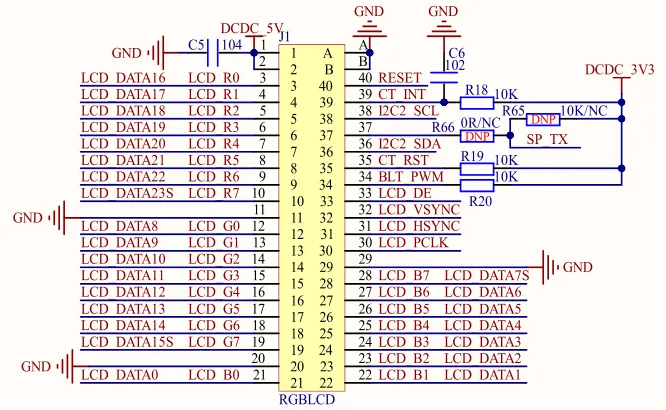
  查询底板原理图,可以得知 39、38、36、35 pin 对应的就是四根线,对应关系如下

触摸屏引脚
对应板级编号
MX引脚
CT_RST
A48
SNVS_TAMPERD9
CT_INT
B15
GPIO_9
I2C2_SDA
B32
UART5_RXD
I2C2_SCL
B31
UART5_TXD

图 1 原理图

程序编写

修改设备树

  打开 imx6ull-hcw-emmc.dtsi,找到 iomuxc 节点,添加以下 pinctrl 组

pinctrl_gt1151_int: gt1151intgrp{    fsl,pins = <        MX6UL_PAD_GPIO1_IO09__GPIO1_IO09    0xF080    >;};pinctrl_gt1151_reset: gt1151resetgrp{    fsl,pins = <        MX6UL_PAD_SNVS_TAMPER9__GPIO5_IO09  0x10B0    >;};

  接下来,在 i2c2 节点下添加设备,如下

gt1151@14{    compatible = "hcw,gt1151";    reg = <0x14>;    pinctrl-names = "default";    pinctrl-0 = <&pinctrl_gt1151_int                &pinctrl_gt1151_reset>;    interrupt-parent = <&gpio1>;    interrupts = <9 0>;    reset-gpios = <&gpio5 9 GPIO_ACTIVE_LOW>;    interrupt-gpios = <&gpio1 9 GPIO_ACTIVE_LOW>;};

  使用新编译好的设备树启动 Linux 内核。

编写代码

  创建 .c 文件,写入以下代码

/* * @Author: 胡城玮 * @FilePath: gt1151.c * @Date: 2026-03-24 * @Description:  * @Version: 0.1 */#include<linux/module.h>#include<linux/i2c.h>#include<linux/regmap.h>#include<linux/gpio/consumer.h>#include<linux/of_irq.h>#include<linux/interrupt.h>#include<linux/input.h>#include<linux/input/mt.h>#include<linux/debugfs.h>#include<linux/delay.h>#include<linux/slab.h>#include<linux/gpio.h>#include<linux/of_gpio.h>#include<linux/input/mt.h>#include<linux/input/touchscreen.h>#include<linux/i2c.h>#include<asm/unaligned.h>#define GT_CTRL_REG             0X8040  /* GT1151控制寄存器         */#define GT_MODSW_REG             0X804D  /* GT1151模式切换寄存器        */#define GT_1xx_CFGS_REG         0X8050  /* GT1151配置起始地址寄存器    */#define GT_CHECK_REG             0X80FF  /* GT1151校验和寄存器       */#define GT_PID_REG                 0X8140  /* GT1151产品ID寄存器       */#define GT_GSTID_REG             0X814E  /* GT1151当前检测到的触摸情况 */#define GT_TP1_REG                 0X8150  /* 第一个触摸点数据地址 */#define GT_TP2_REG                 0X8158    /* 第二个触摸点数据地址 */#define GT_TP3_REG                 0X8160  /* 第三个触摸点数据地址 */#define GT_TP4_REG                 0X8168  /* 第四个触摸点数据地址  */#define GT_TP5_REG                 0X8170    /* 第五个触摸点数据地址   */#define MAX_SUPPORT_POINTS      5       /* 最多5点电容触摸 */const u8 irq_table[] = {IRQ_TYPE_EDGE_RISING, IRQ_TYPE_EDGE_FALLING, IRQ_TYPE_LEVEL_LOW, IRQ_TYPE_LEVEL_HIGH};  /* 触发方式 */structgt1151_dev{int irq_pin, reset_pin;int irqnum;int irqtype;int max_x;int max_y;void *private_data;structinput_dev *input;structi2c_client *client;};staticstructgt1151_devgt1151dev;/** * @description: 硬件复位 * @param {i2c_client} *client * @param {gt1151_dev} *dev * @return {*} */staticintgt1151_dev_init(struct i2c_client *client, struct gt1151_dev *dev){int ret = 0;if (gpio_is_valid(dev->reset_pin))    {        ret = devm_gpio_request_one(&client->dev, dev->reset_pin,                                     GPIOF_OUT_INIT_HIGH, "gt1151 reset");if(ret)        {return ret;        }    }if (gpio_is_valid(dev->irq_pin))    {        ret = devm_gpio_request_one(&client->dev, dev->irq_pin,                                     GPIOF_OUT_INIT_HIGH, "gt1151 int");if(ret)        {return ret;        }    }    gpio_set_value(dev->reset_pin, 0); /* 复位GT1151 */    msleep(10);    gpio_set_value(dev->reset_pin, 1); /* 停止复位GT1151 */    msleep(10);    gpio_set_value(dev->irq_pin, 0);    /* 拉低INT引脚 */    msleep(50);    gpio_direction_input(dev->irq_pin); /* INT引脚设置为输入 */return0;}/** * @description: 读寄存器 * @param {gt1151_dev} *dev * @param {u16} reg * @param {u8} *buf * @param {int} len * @return {*} */staticintgt1151_read_regs(struct gt1151_dev *dev, u16 reg, u8 *buf, int len){int ret;    u8 regdata[2];structi2c_msgmsg[2];structi2c_client *client = (structi2c_client *)dev->client;    regdata[0] = reg >> 8;    regdata[1] = reg & 0xff;    msg[0].addr = client->addr;    msg[0].buf = &regdata[0];    msg[0].flags = !I2C_M_RD;    msg[0].len = 2;    msg[1].addr = client->addr;    msg[1].buf = buf;    msg[1].flags = I2C_M_RD;    msg[1].len = len;    ret = i2c_transfer(client->adapter, msg, 2);if(ret == 2)    {        ret = 0;    }else    {        ret = -EREMOTEIO;    }return ret;}/** * @description: 写寄存器 * @param {gt1151_dev} *dev * @param {u16} reg * @param {u8} *buf * @param {int} len * @return {*} */staticintgt1151_write_regs(struct gt1151_dev *dev, u16 reg, u8 *buf, int len){    u8 b[256];structi2c_msgmsg;structi2c_client *client = (structi2c_client *)dev->client;    b[0] = reg >> 8;    b[1] = reg & 0xff;memcpy(&b[2], buf, len);    msg.addr = client->addr;    msg.flags = 0;    msg.buf = b;    msg.len = len + 2;return i2c_transfer(client->adapter, &msg, 1);}staticirqreturn_tgt1151_irq_handler(int irq, void *dev_id){int touch_num = 0;int input_x, input_y;int id = 0;int ret = 0;    u8 data;    u8 touch_data[5];structgt1151_dev *dev = dev_id;    ret = gt1151_read_regs(dev, GT_GSTID_REG, &data, 1);if (data == 0x00)  {     /* 没有触摸数据,直接返回 */goto failed;    } else {                 /* 统计触摸点数据 */        touch_num = data & 0x0f;    }if(touch_num) {         /* 单点触摸按下 */        gt1151_read_regs(dev, GT_TP1_REG, touch_data, 5);        id = touch_data[0] & 0x0F;if(id == 0) {            input_x  = touch_data[1] | (touch_data[2] << 8);            input_y  = touch_data[3] | (touch_data[4] << 8);            input_mt_slot(dev->input, id);            input_mt_report_slot_state(dev->input, MT_TOOL_FINGER, true);            input_report_abs(dev->input, ABS_MT_POSITION_X, input_x);            input_report_abs(dev->input, ABS_MT_POSITION_Y, input_y);        }    } elseif(touch_num == 0){                /* 单点触摸释放 */        input_mt_slot(dev->input, id);        input_mt_report_slot_state(dev->input, MT_TOOL_FINGER, false);    }    input_mt_report_pointer_emulation(dev->input, false);    input_sync(dev->input);    data = 0x00;    gt1151_write_regs(dev, GT_GSTID_REG, &data, 1);failed:return IRQ_HANDLED;}staticintgt1151_read_firmware(struct i2c_client *client, struct gt1151_dev *dev){int ret = 0,version = 0;    u8 data[7] = {0};    gt1151_read_regs(dev, GT_1xx_CFGS_REG, data, 7);if (ret) {        dev_err(&client->dev, "Unable to read Firmware.\n");return ret;    }    dev->max_x = (data[2] << 8) + data[1];    dev->max_y = (data[4] << 8) + data[3];    dev->irqtype = data[6] & 0x3;    printk("X_MAX: %d, Y_MAX: %d, TRIGGER: 0x%02x", dev->max_x, dev->max_y, dev->irqtype);return0;}staticconststructof_device_idgt1151_of_match[] = {    {.compatible = "hcw,gt1151"},    {}};MODULE_DEVICE_TABLE(of, gt1151_of_match);staticintgt1151_i2c_probe(struct i2c_client *client, const struct i2c_device_id *id){    printk("matched!!\r\n");int ret = 0;    u8 data = 0;    gt1151dev.client = client;/* 初始化设备 */// 获取设备信息    gt1151dev.irq_pin = of_get_named_gpio(client->dev.of_node, "interrupt-gpios"0);    gt1151dev.reset_pin = of_get_named_gpio(client->dev.of_node, "reset-gpios"0);// 复位 gt1151    ret = gt1151_dev_init(client, &gt1151dev);if(ret < 0)goto failed;    data = 0x02;    gt1151_write_regs(&gt1151dev, GT_CTRL_REG, &data, 1); /* 软复位 */    mdelay(100);    data = 0x0;    gt1151_write_regs(&gt1151dev, GT_CTRL_REG, &data, 1); /* 停止软复位 */    mdelay(100);// 读取硬件信息    ret = gt1151_read_firmware(client, &gt1151dev);if(ret < 0)goto failed;// input 设备注册    gt1151dev.input = devm_input_allocate_device(&client->dev);if (!gt1151dev.input) {        ret = -ENOMEM;goto failed;    }    gt1151dev.input->name = client->name;       // 获取设备名    gt1151dev.input->id.bustype = BUS_I2C;      // 输入设备来自 IIC 总线    gt1151dev.input->dev.parent = &client->dev; // 设置父设备为 I2C 设备    __set_bit(EV_KEY, gt1151dev.input->evbit);          __set_bit(EV_ABS, gt1151dev.input->evbit);      // 设置支持的事件类型,按下和绝对坐标    __set_bit(BTN_TOUCH, gt1151dev.input->keybit);  // 设置支持的按键/* 配置 input 设备的坐标能力和多点触摸能力 */    input_set_abs_params(gt1151dev.input, ABS_X, 0, gt1151dev.max_x, 00);    input_set_abs_params(gt1151dev.input, ABS_Y, 0, gt1151dev.max_y, 00);    input_set_abs_params(gt1151dev.input, ABS_MT_POSITION_X,0, gt1151dev.max_x, 00);    input_set_abs_params(gt1151dev.input, ABS_MT_POSITION_Y,0, gt1151dev.max_y, 00);    ret = input_mt_init_slots(gt1151dev.input, MAX_SUPPORT_POINTS, 0);if (ret)goto failed;    ret = input_register_device(gt1151dev.input);if (ret) goto failed;    ret = devm_request_threaded_irq(&client->dev, client->irq, NULL, gt1151_irq_handler,                                    irq_table[gt1151dev.irqtype] | IRQF_ONESHOT, client->name, &gt1151dev);if (ret) {        dev_err(&client->dev, "Unable to request touchscreen IRQ.\n");return ret;    }failed:return ret;}staticvoidgt1151_i2c_remove(struct i2c_client *client){/* 进行资源释放 */}staticstructi2c_drivergt1151_i2c_driver = {    .probe = gt1151_i2c_probe,    .remove = gt1151_i2c_remove,    .driver = {        .name = "gt1151_drv",        .owner = THIS_MODULE,        .of_match_table = gt1151_of_match    }};staticint __init gt1151_init(void){int ret = 0;    ret = i2c_add_driver(&gt1151_i2c_driver);return ret;}staticvoid __exit gt1151_exit(void){    i2c_del_driver(&gt1151_i2c_driver);}module_init(gt1151_init);module_exit(gt1151_exit);MODULE_AUTHOR("hcw");MODULE_LICENSE("GPL");

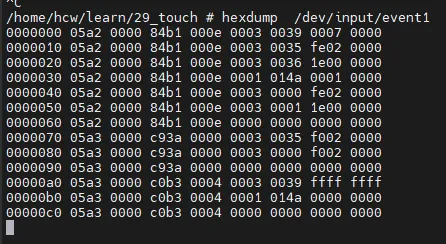
  由于内核中已经存在了 gtxxx 的驱动,所以我们暂时先将设备树和驱动程序中的设备名改为 "hcw,gt1"。装载模块,现在我们可以读取到触摸屏上传的数据了

                                                                图 2 input数据
最新文章

随机文章

基本 文件 流程 错误 SQL 调试
  1. 请求信息 : 2026-03-27 11:41:35 HTTP/2.0 GET : https://f.mffb.com.cn/a/482693.html
  2. 运行时间 : 0.259512s [ 吞吐率:3.85req/s ] 内存消耗:4,867.43kb 文件加载:140
  3. 缓存信息 : 0 reads,0 writes
  4. 会话信息 : SESSION_ID=53e5095f7b4630128319bc391811ea9f
  1. /yingpanguazai/ssd/ssd1/www/f.mffb.com.cn/public/index.php ( 0.79 KB )
  2. /yingpanguazai/ssd/ssd1/www/f.mffb.com.cn/vendor/autoload.php ( 0.17 KB )
  3. /yingpanguazai/ssd/ssd1/www/f.mffb.com.cn/vendor/composer/autoload_real.php ( 2.49 KB )
  4. /yingpanguazai/ssd/ssd1/www/f.mffb.com.cn/vendor/composer/platform_check.php ( 0.90 KB )
  5. /yingpanguazai/ssd/ssd1/www/f.mffb.com.cn/vendor/composer/ClassLoader.php ( 14.03 KB )
  6. /yingpanguazai/ssd/ssd1/www/f.mffb.com.cn/vendor/composer/autoload_static.php ( 4.90 KB )
  7. /yingpanguazai/ssd/ssd1/www/f.mffb.com.cn/vendor/topthink/think-helper/src/helper.php ( 8.34 KB )
  8. /yingpanguazai/ssd/ssd1/www/f.mffb.com.cn/vendor/topthink/think-validate/src/helper.php ( 2.19 KB )
  9. /yingpanguazai/ssd/ssd1/www/f.mffb.com.cn/vendor/topthink/think-orm/src/helper.php ( 1.47 KB )
  10. /yingpanguazai/ssd/ssd1/www/f.mffb.com.cn/vendor/topthink/think-orm/stubs/load_stubs.php ( 0.16 KB )
  11. /yingpanguazai/ssd/ssd1/www/f.mffb.com.cn/vendor/topthink/framework/src/think/Exception.php ( 1.69 KB )
  12. /yingpanguazai/ssd/ssd1/www/f.mffb.com.cn/vendor/topthink/think-container/src/Facade.php ( 2.71 KB )
  13. /yingpanguazai/ssd/ssd1/www/f.mffb.com.cn/vendor/symfony/deprecation-contracts/function.php ( 0.99 KB )
  14. /yingpanguazai/ssd/ssd1/www/f.mffb.com.cn/vendor/symfony/polyfill-mbstring/bootstrap.php ( 8.26 KB )
  15. /yingpanguazai/ssd/ssd1/www/f.mffb.com.cn/vendor/symfony/polyfill-mbstring/bootstrap80.php ( 9.78 KB )
  16. /yingpanguazai/ssd/ssd1/www/f.mffb.com.cn/vendor/symfony/var-dumper/Resources/functions/dump.php ( 1.49 KB )
  17. /yingpanguazai/ssd/ssd1/www/f.mffb.com.cn/vendor/topthink/think-dumper/src/helper.php ( 0.18 KB )
  18. /yingpanguazai/ssd/ssd1/www/f.mffb.com.cn/vendor/symfony/var-dumper/VarDumper.php ( 4.30 KB )
  19. /yingpanguazai/ssd/ssd1/www/f.mffb.com.cn/vendor/topthink/framework/src/think/App.php ( 15.30 KB )
  20. /yingpanguazai/ssd/ssd1/www/f.mffb.com.cn/vendor/topthink/think-container/src/Container.php ( 15.76 KB )
  21. /yingpanguazai/ssd/ssd1/www/f.mffb.com.cn/vendor/psr/container/src/ContainerInterface.php ( 1.02 KB )
  22. /yingpanguazai/ssd/ssd1/www/f.mffb.com.cn/app/provider.php ( 0.19 KB )
  23. /yingpanguazai/ssd/ssd1/www/f.mffb.com.cn/vendor/topthink/framework/src/think/Http.php ( 6.04 KB )
  24. /yingpanguazai/ssd/ssd1/www/f.mffb.com.cn/vendor/topthink/think-helper/src/helper/Str.php ( 7.29 KB )
  25. /yingpanguazai/ssd/ssd1/www/f.mffb.com.cn/vendor/topthink/framework/src/think/Env.php ( 4.68 KB )
  26. /yingpanguazai/ssd/ssd1/www/f.mffb.com.cn/app/common.php ( 0.03 KB )
  27. /yingpanguazai/ssd/ssd1/www/f.mffb.com.cn/vendor/topthink/framework/src/helper.php ( 18.78 KB )
  28. /yingpanguazai/ssd/ssd1/www/f.mffb.com.cn/vendor/topthink/framework/src/think/Config.php ( 5.54 KB )
  29. /yingpanguazai/ssd/ssd1/www/f.mffb.com.cn/config/app.php ( 0.95 KB )
  30. /yingpanguazai/ssd/ssd1/www/f.mffb.com.cn/config/cache.php ( 0.78 KB )
  31. /yingpanguazai/ssd/ssd1/www/f.mffb.com.cn/config/console.php ( 0.23 KB )
  32. /yingpanguazai/ssd/ssd1/www/f.mffb.com.cn/config/cookie.php ( 0.56 KB )
  33. /yingpanguazai/ssd/ssd1/www/f.mffb.com.cn/config/database.php ( 2.48 KB )
  34. /yingpanguazai/ssd/ssd1/www/f.mffb.com.cn/vendor/topthink/framework/src/think/facade/Env.php ( 1.67 KB )
  35. /yingpanguazai/ssd/ssd1/www/f.mffb.com.cn/config/filesystem.php ( 0.61 KB )
  36. /yingpanguazai/ssd/ssd1/www/f.mffb.com.cn/config/lang.php ( 0.91 KB )
  37. /yingpanguazai/ssd/ssd1/www/f.mffb.com.cn/config/log.php ( 1.35 KB )
  38. /yingpanguazai/ssd/ssd1/www/f.mffb.com.cn/config/middleware.php ( 0.19 KB )
  39. /yingpanguazai/ssd/ssd1/www/f.mffb.com.cn/config/route.php ( 1.89 KB )
  40. /yingpanguazai/ssd/ssd1/www/f.mffb.com.cn/config/session.php ( 0.57 KB )
  41. /yingpanguazai/ssd/ssd1/www/f.mffb.com.cn/config/trace.php ( 0.34 KB )
  42. /yingpanguazai/ssd/ssd1/www/f.mffb.com.cn/config/view.php ( 0.82 KB )
  43. /yingpanguazai/ssd/ssd1/www/f.mffb.com.cn/app/event.php ( 0.25 KB )
  44. /yingpanguazai/ssd/ssd1/www/f.mffb.com.cn/vendor/topthink/framework/src/think/Event.php ( 7.67 KB )
  45. /yingpanguazai/ssd/ssd1/www/f.mffb.com.cn/app/service.php ( 0.13 KB )
  46. /yingpanguazai/ssd/ssd1/www/f.mffb.com.cn/app/AppService.php ( 0.26 KB )
  47. /yingpanguazai/ssd/ssd1/www/f.mffb.com.cn/vendor/topthink/framework/src/think/Service.php ( 1.64 KB )
  48. /yingpanguazai/ssd/ssd1/www/f.mffb.com.cn/vendor/topthink/framework/src/think/Lang.php ( 7.35 KB )
  49. /yingpanguazai/ssd/ssd1/www/f.mffb.com.cn/vendor/topthink/framework/src/lang/zh-cn.php ( 13.70 KB )
  50. /yingpanguazai/ssd/ssd1/www/f.mffb.com.cn/vendor/topthink/framework/src/think/initializer/Error.php ( 3.31 KB )
  51. /yingpanguazai/ssd/ssd1/www/f.mffb.com.cn/vendor/topthink/framework/src/think/initializer/RegisterService.php ( 1.33 KB )
  52. /yingpanguazai/ssd/ssd1/www/f.mffb.com.cn/vendor/services.php ( 0.14 KB )
  53. /yingpanguazai/ssd/ssd1/www/f.mffb.com.cn/vendor/topthink/framework/src/think/service/PaginatorService.php ( 1.52 KB )
  54. /yingpanguazai/ssd/ssd1/www/f.mffb.com.cn/vendor/topthink/framework/src/think/service/ValidateService.php ( 0.99 KB )
  55. /yingpanguazai/ssd/ssd1/www/f.mffb.com.cn/vendor/topthink/framework/src/think/service/ModelService.php ( 2.04 KB )
  56. /yingpanguazai/ssd/ssd1/www/f.mffb.com.cn/vendor/topthink/think-trace/src/Service.php ( 0.77 KB )
  57. /yingpanguazai/ssd/ssd1/www/f.mffb.com.cn/vendor/topthink/framework/src/think/Middleware.php ( 6.72 KB )
  58. /yingpanguazai/ssd/ssd1/www/f.mffb.com.cn/vendor/topthink/framework/src/think/initializer/BootService.php ( 0.77 KB )
  59. /yingpanguazai/ssd/ssd1/www/f.mffb.com.cn/vendor/topthink/think-orm/src/Paginator.php ( 11.86 KB )
  60. /yingpanguazai/ssd/ssd1/www/f.mffb.com.cn/vendor/topthink/think-validate/src/Validate.php ( 63.20 KB )
  61. /yingpanguazai/ssd/ssd1/www/f.mffb.com.cn/vendor/topthink/think-orm/src/Model.php ( 23.55 KB )
  62. /yingpanguazai/ssd/ssd1/www/f.mffb.com.cn/vendor/topthink/think-orm/src/model/concern/Attribute.php ( 21.05 KB )
  63. /yingpanguazai/ssd/ssd1/www/f.mffb.com.cn/vendor/topthink/think-orm/src/model/concern/AutoWriteData.php ( 4.21 KB )
  64. /yingpanguazai/ssd/ssd1/www/f.mffb.com.cn/vendor/topthink/think-orm/src/model/concern/Conversion.php ( 6.44 KB )
  65. /yingpanguazai/ssd/ssd1/www/f.mffb.com.cn/vendor/topthink/think-orm/src/model/concern/DbConnect.php ( 5.16 KB )
  66. /yingpanguazai/ssd/ssd1/www/f.mffb.com.cn/vendor/topthink/think-orm/src/model/concern/ModelEvent.php ( 2.33 KB )
  67. /yingpanguazai/ssd/ssd1/www/f.mffb.com.cn/vendor/topthink/think-orm/src/model/concern/RelationShip.php ( 28.29 KB )
  68. /yingpanguazai/ssd/ssd1/www/f.mffb.com.cn/vendor/topthink/think-helper/src/contract/Arrayable.php ( 0.09 KB )
  69. /yingpanguazai/ssd/ssd1/www/f.mffb.com.cn/vendor/topthink/think-helper/src/contract/Jsonable.php ( 0.13 KB )
  70. /yingpanguazai/ssd/ssd1/www/f.mffb.com.cn/vendor/topthink/think-orm/src/model/contract/Modelable.php ( 0.09 KB )
  71. /yingpanguazai/ssd/ssd1/www/f.mffb.com.cn/vendor/topthink/framework/src/think/Db.php ( 2.88 KB )
  72. /yingpanguazai/ssd/ssd1/www/f.mffb.com.cn/vendor/topthink/think-orm/src/DbManager.php ( 8.52 KB )
  73. /yingpanguazai/ssd/ssd1/www/f.mffb.com.cn/vendor/topthink/framework/src/think/Log.php ( 6.28 KB )
  74. /yingpanguazai/ssd/ssd1/www/f.mffb.com.cn/vendor/topthink/framework/src/think/Manager.php ( 3.92 KB )
  75. /yingpanguazai/ssd/ssd1/www/f.mffb.com.cn/vendor/psr/log/src/LoggerTrait.php ( 2.69 KB )
  76. /yingpanguazai/ssd/ssd1/www/f.mffb.com.cn/vendor/psr/log/src/LoggerInterface.php ( 2.71 KB )
  77. /yingpanguazai/ssd/ssd1/www/f.mffb.com.cn/vendor/topthink/framework/src/think/Cache.php ( 4.92 KB )
  78. /yingpanguazai/ssd/ssd1/www/f.mffb.com.cn/vendor/psr/simple-cache/src/CacheInterface.php ( 4.71 KB )
  79. /yingpanguazai/ssd/ssd1/www/f.mffb.com.cn/vendor/topthink/think-helper/src/helper/Arr.php ( 16.63 KB )
  80. /yingpanguazai/ssd/ssd1/www/f.mffb.com.cn/vendor/topthink/framework/src/think/cache/driver/File.php ( 7.84 KB )
  81. /yingpanguazai/ssd/ssd1/www/f.mffb.com.cn/vendor/topthink/framework/src/think/cache/Driver.php ( 9.03 KB )
  82. /yingpanguazai/ssd/ssd1/www/f.mffb.com.cn/vendor/topthink/framework/src/think/contract/CacheHandlerInterface.php ( 1.99 KB )
  83. /yingpanguazai/ssd/ssd1/www/f.mffb.com.cn/app/Request.php ( 0.09 KB )
  84. /yingpanguazai/ssd/ssd1/www/f.mffb.com.cn/vendor/topthink/framework/src/think/Request.php ( 55.78 KB )
  85. /yingpanguazai/ssd/ssd1/www/f.mffb.com.cn/app/middleware.php ( 0.25 KB )
  86. /yingpanguazai/ssd/ssd1/www/f.mffb.com.cn/vendor/topthink/framework/src/think/Pipeline.php ( 2.61 KB )
  87. /yingpanguazai/ssd/ssd1/www/f.mffb.com.cn/vendor/topthink/think-trace/src/TraceDebug.php ( 3.40 KB )
  88. /yingpanguazai/ssd/ssd1/www/f.mffb.com.cn/vendor/topthink/framework/src/think/middleware/SessionInit.php ( 1.94 KB )
  89. /yingpanguazai/ssd/ssd1/www/f.mffb.com.cn/vendor/topthink/framework/src/think/Session.php ( 1.80 KB )
  90. /yingpanguazai/ssd/ssd1/www/f.mffb.com.cn/vendor/topthink/framework/src/think/session/driver/File.php ( 6.27 KB )
  91. /yingpanguazai/ssd/ssd1/www/f.mffb.com.cn/vendor/topthink/framework/src/think/contract/SessionHandlerInterface.php ( 0.87 KB )
  92. /yingpanguazai/ssd/ssd1/www/f.mffb.com.cn/vendor/topthink/framework/src/think/session/Store.php ( 7.12 KB )
  93. /yingpanguazai/ssd/ssd1/www/f.mffb.com.cn/vendor/topthink/framework/src/think/Route.php ( 23.73 KB )
  94. /yingpanguazai/ssd/ssd1/www/f.mffb.com.cn/vendor/topthink/framework/src/think/route/RuleName.php ( 5.75 KB )
  95. /yingpanguazai/ssd/ssd1/www/f.mffb.com.cn/vendor/topthink/framework/src/think/route/Domain.php ( 2.53 KB )
  96. /yingpanguazai/ssd/ssd1/www/f.mffb.com.cn/vendor/topthink/framework/src/think/route/RuleGroup.php ( 22.43 KB )
  97. /yingpanguazai/ssd/ssd1/www/f.mffb.com.cn/vendor/topthink/framework/src/think/route/Rule.php ( 26.95 KB )
  98. /yingpanguazai/ssd/ssd1/www/f.mffb.com.cn/vendor/topthink/framework/src/think/route/RuleItem.php ( 9.78 KB )
  99. /yingpanguazai/ssd/ssd1/www/f.mffb.com.cn/route/app.php ( 1.72 KB )
  100. /yingpanguazai/ssd/ssd1/www/f.mffb.com.cn/vendor/topthink/framework/src/think/facade/Route.php ( 4.70 KB )
  101. /yingpanguazai/ssd/ssd1/www/f.mffb.com.cn/vendor/topthink/framework/src/think/route/dispatch/Controller.php ( 4.74 KB )
  102. /yingpanguazai/ssd/ssd1/www/f.mffb.com.cn/vendor/topthink/framework/src/think/route/Dispatch.php ( 10.44 KB )
  103. /yingpanguazai/ssd/ssd1/www/f.mffb.com.cn/app/controller/Index.php ( 4.81 KB )
  104. /yingpanguazai/ssd/ssd1/www/f.mffb.com.cn/app/BaseController.php ( 2.05 KB )
  105. /yingpanguazai/ssd/ssd1/www/f.mffb.com.cn/vendor/topthink/think-orm/src/facade/Db.php ( 0.93 KB )
  106. /yingpanguazai/ssd/ssd1/www/f.mffb.com.cn/vendor/topthink/think-orm/src/db/connector/Mysql.php ( 5.44 KB )
  107. /yingpanguazai/ssd/ssd1/www/f.mffb.com.cn/vendor/topthink/think-orm/src/db/PDOConnection.php ( 52.47 KB )
  108. /yingpanguazai/ssd/ssd1/www/f.mffb.com.cn/vendor/topthink/think-orm/src/db/Connection.php ( 8.39 KB )
  109. /yingpanguazai/ssd/ssd1/www/f.mffb.com.cn/vendor/topthink/think-orm/src/db/ConnectionInterface.php ( 4.57 KB )
  110. /yingpanguazai/ssd/ssd1/www/f.mffb.com.cn/vendor/topthink/think-orm/src/db/builder/Mysql.php ( 16.58 KB )
  111. /yingpanguazai/ssd/ssd1/www/f.mffb.com.cn/vendor/topthink/think-orm/src/db/Builder.php ( 24.06 KB )
  112. /yingpanguazai/ssd/ssd1/www/f.mffb.com.cn/vendor/topthink/think-orm/src/db/BaseBuilder.php ( 27.50 KB )
  113. /yingpanguazai/ssd/ssd1/www/f.mffb.com.cn/vendor/topthink/think-orm/src/db/Query.php ( 15.71 KB )
  114. /yingpanguazai/ssd/ssd1/www/f.mffb.com.cn/vendor/topthink/think-orm/src/db/BaseQuery.php ( 45.13 KB )
  115. /yingpanguazai/ssd/ssd1/www/f.mffb.com.cn/vendor/topthink/think-orm/src/db/concern/TimeFieldQuery.php ( 7.43 KB )
  116. /yingpanguazai/ssd/ssd1/www/f.mffb.com.cn/vendor/topthink/think-orm/src/db/concern/AggregateQuery.php ( 3.26 KB )
  117. /yingpanguazai/ssd/ssd1/www/f.mffb.com.cn/vendor/topthink/think-orm/src/db/concern/ModelRelationQuery.php ( 20.07 KB )
  118. /yingpanguazai/ssd/ssd1/www/f.mffb.com.cn/vendor/topthink/think-orm/src/db/concern/ParamsBind.php ( 3.66 KB )
  119. /yingpanguazai/ssd/ssd1/www/f.mffb.com.cn/vendor/topthink/think-orm/src/db/concern/ResultOperation.php ( 7.01 KB )
  120. /yingpanguazai/ssd/ssd1/www/f.mffb.com.cn/vendor/topthink/think-orm/src/db/concern/WhereQuery.php ( 19.37 KB )
  121. /yingpanguazai/ssd/ssd1/www/f.mffb.com.cn/vendor/topthink/think-orm/src/db/concern/JoinAndViewQuery.php ( 7.11 KB )
  122. /yingpanguazai/ssd/ssd1/www/f.mffb.com.cn/vendor/topthink/think-orm/src/db/concern/TableFieldInfo.php ( 2.63 KB )
  123. /yingpanguazai/ssd/ssd1/www/f.mffb.com.cn/vendor/topthink/think-orm/src/db/concern/Transaction.php ( 2.77 KB )
  124. /yingpanguazai/ssd/ssd1/www/f.mffb.com.cn/vendor/topthink/framework/src/think/log/driver/File.php ( 5.96 KB )
  125. /yingpanguazai/ssd/ssd1/www/f.mffb.com.cn/vendor/topthink/framework/src/think/contract/LogHandlerInterface.php ( 0.86 KB )
  126. /yingpanguazai/ssd/ssd1/www/f.mffb.com.cn/vendor/topthink/framework/src/think/log/Channel.php ( 3.89 KB )
  127. /yingpanguazai/ssd/ssd1/www/f.mffb.com.cn/vendor/topthink/framework/src/think/event/LogRecord.php ( 1.02 KB )
  128. /yingpanguazai/ssd/ssd1/www/f.mffb.com.cn/vendor/topthink/think-helper/src/Collection.php ( 16.47 KB )
  129. /yingpanguazai/ssd/ssd1/www/f.mffb.com.cn/vendor/topthink/framework/src/think/facade/View.php ( 1.70 KB )
  130. /yingpanguazai/ssd/ssd1/www/f.mffb.com.cn/vendor/topthink/framework/src/think/View.php ( 4.39 KB )
  131. /yingpanguazai/ssd/ssd1/www/f.mffb.com.cn/vendor/topthink/framework/src/think/Response.php ( 8.81 KB )
  132. /yingpanguazai/ssd/ssd1/www/f.mffb.com.cn/vendor/topthink/framework/src/think/response/View.php ( 3.29 KB )
  133. /yingpanguazai/ssd/ssd1/www/f.mffb.com.cn/vendor/topthink/framework/src/think/Cookie.php ( 6.06 KB )
  134. /yingpanguazai/ssd/ssd1/www/f.mffb.com.cn/vendor/topthink/think-view/src/Think.php ( 8.38 KB )
  135. /yingpanguazai/ssd/ssd1/www/f.mffb.com.cn/vendor/topthink/framework/src/think/contract/TemplateHandlerInterface.php ( 1.60 KB )
  136. /yingpanguazai/ssd/ssd1/www/f.mffb.com.cn/vendor/topthink/think-template/src/Template.php ( 46.61 KB )
  137. /yingpanguazai/ssd/ssd1/www/f.mffb.com.cn/vendor/topthink/think-template/src/template/driver/File.php ( 2.41 KB )
  138. /yingpanguazai/ssd/ssd1/www/f.mffb.com.cn/vendor/topthink/think-template/src/template/contract/DriverInterface.php ( 0.86 KB )
  139. /yingpanguazai/ssd/ssd1/www/f.mffb.com.cn/runtime/temp/067d451b9a0c665040f3f1bdd3293d68.php ( 11.98 KB )
  140. /yingpanguazai/ssd/ssd1/www/f.mffb.com.cn/vendor/topthink/think-trace/src/Html.php ( 4.42 KB )
  1. CONNECT:[ UseTime:0.001030s ] mysql:host=127.0.0.1;port=3306;dbname=f_mffb;charset=utf8mb4
  2. SHOW FULL COLUMNS FROM `fenlei` [ RunTime:0.001444s ]
  3. SELECT * FROM `fenlei` WHERE `fid` = 0 [ RunTime:0.002634s ]
  4. SELECT * FROM `fenlei` WHERE `fid` = 63 [ RunTime:0.002663s ]
  5. SHOW FULL COLUMNS FROM `set` [ RunTime:0.001593s ]
  6. SELECT * FROM `set` [ RunTime:0.002506s ]
  7. SHOW FULL COLUMNS FROM `article` [ RunTime:0.001460s ]
  8. SELECT * FROM `article` WHERE `id` = 482693 LIMIT 1 [ RunTime:0.006826s ]
  9. UPDATE `article` SET `lasttime` = 1774582895 WHERE `id` = 482693 [ RunTime:0.007933s ]
  10. SELECT * FROM `fenlei` WHERE `id` = 67 LIMIT 1 [ RunTime:0.001738s ]
  11. SELECT * FROM `article` WHERE `id` < 482693 ORDER BY `id` DESC LIMIT 1 [ RunTime:0.013222s ]
  12. SELECT * FROM `article` WHERE `id` > 482693 ORDER BY `id` ASC LIMIT 1 [ RunTime:0.009740s ]
  13. SELECT * FROM `article` WHERE `id` < 482693 ORDER BY `id` DESC LIMIT 10 [ RunTime:0.012770s ]
  14. SELECT * FROM `article` WHERE `id` < 482693 ORDER BY `id` DESC LIMIT 10,10 [ RunTime:0.017700s ]
  15. SELECT * FROM `article` WHERE `id` < 482693 ORDER BY `id` DESC LIMIT 20,10 [ RunTime:0.020527s ]
0.263252s