用Python+PyQt5打造高颜值随机抽题工具
- 2026-10-10 20:58:24
绝了!功能拉满还超好看!
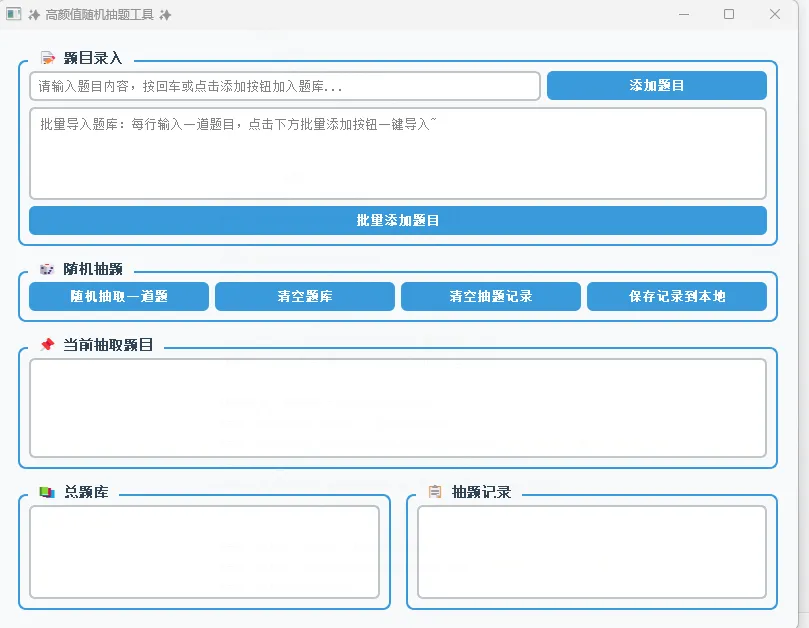
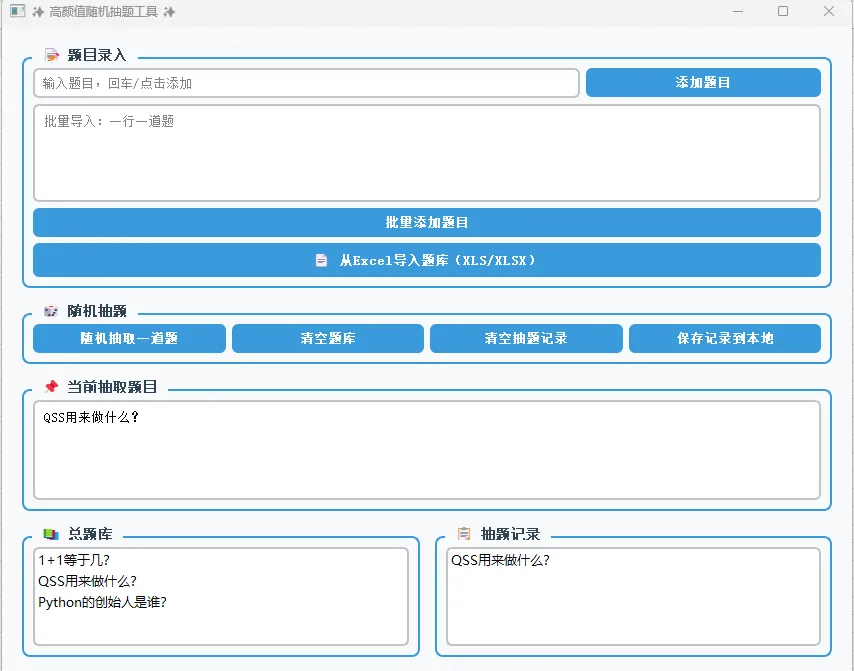
哈喽各位小伙伴们👋!不管是老师备课随堂抽考、学生刷题巩固知识点,还是职场培训随机考核、社团活动趣味抽奖,大家是不是都急需一款简单好用、颜值在线、功能齐全的随机抽题工具?
市面上的抽题工具要么界面简陋土气,要么功能残缺不全,要么收费捆绑广告,用起来又闹心又不方便!作为编程爱好者,我一直坚信:好用的工具必须自己亲手造!今天就带大家用Python+PyQt5,从零打造一款精致高级、不透明质感、美观大方、功能全覆盖的随机抽题神器!
这款工具我们做了全方位升级:磨砂质感的现代化界面,高级灰搭配清新蓝的配色方案,不透明精致窗体不晃眼;支持自定义题库导入、随机抽题、抽题记录保存、题目分类管理、一键清空、自动去重等核心功能,操作零门槛,新手也能秒上手;代码结构清晰易读,还做了极致的细节优化,按钮hover效果、弹窗提示、界面自适应,每一处都透着高级感!
不管你是想自用刷题,还是给学生、同事使用,这款工具都能完美满足需求,成品直接运行无需复杂配置,接下来就带大家一步步拆解代码,手把手教你打造属于自己的高颜值抽题工具!
一、核心功能总览
先给大家划重点,这款随机抽题工具包含四大核心模块,功能全覆盖:
题库管理模块:手动输入题目、批量导入题目、清空题库、题目去重 随机抽题模块:一键随机抽取单题、禁止重复抽题、实时显示当前题目 记录管理模块:保存抽题历史、查看已抽题目、清空记录 界面美化模块:现代化QSS样式、不透明精致窗体、按钮动画效果、布局自适应
二、代码详细拆解(3大核心部分)
第一部分:环境配置+界面初始化(基础框架)
这部分是工具的「地基」,我们导入所需库,配置PyQt5的基础界面,设置窗口大小、标题、不透明属性,同时定义全局样式表,实现高颜值界面效果。 关键知识点:QMainWindow主窗口、setWindowOpacity设置不透明度、QSS样式美化、窗口居中显示。
第二部分:功能逻辑实现(核心大脑)
这部分是工具的「核心」,我们定义所有业务逻辑:添加题目、随机抽题、去重判断、保存记录、清空数据等函数,绑定按钮点击事件,让界面具备实际功能。 关键知识点:信号与槽机制、列表存储数据、随机函数random.choice、文件读写保存记录。
第三部分:布局搭建(视觉骨架)
这部分是工具的「外形」,我们用PyQt5的布局管理器,将输入框、按钮、文本框有序排列,实现美观的界面布局,适配不同屏幕尺寸。 关键知识点:QVBoxLayout垂直布局、QHBoxLayout水平布局、组件嵌套、界面自适应。
三、完整源代码(直接复制运行)
# 导入所需库
import sys
import random
from PyQt5.QtWidgets import *
from PyQt5.QtCore import *
from PyQt5.QtGui import *

# 随机抽题工具主类
classRandomQuestionTool(QMainWindow):
def__init__(self):
        super().__init__()
# 初始化题库和记录列表
        self.question_bank = []  # 总题库
        self.extracted_questions = []  # 已抽题目
        self.init_window()  # 初始化窗口
        self.init_ui()     # 初始化界面
        self.init_style()  # 初始化样式

# 1. 窗口初始化(大小、标题、不透明度、居中)
definit_window(self):
        self.setWindowTitle("✨ 高颜值随机抽题工具 ✨")
        self.resize(800, 600)  # 窗口尺寸
        self.setWindowOpacity(0.98)  # 高级不透明质感(0-1,值越大越不透明)
# 窗口居中
        center_window = self.frameGeometry()
        screen_center = QDesktopWidget().availableGeometry().center()
        center_window.moveCenter(screen_center)
        self.move(center_window.topLeft())

# 2. 界面样式美化(QSS现代化样式)
definit_style(self):
        self.setStyleSheet("""
            QMainWindow {
                background-color: #f8f9fa;
            }
            QGroupBox {
                font-size: 14px;
                font-weight: bold;
                color: #2c3e50;
                margin-top: 10px;
                border: 2px solid #3498db;
                border-radius: 8px;
            }
            QGroupBox::title {
                subcontrol-origin: margin;
                left: 10px;
                padding: 0 5px 0 5px;
            }
            QPushButton {
                background-color: #3498db;
                color: white;
                border: none;
                border-radius: 6px;
                padding: 8px 15px;
                font-size: 13px;
                font-weight: bold;
            }
            QPushButton:hover {
                background-color: #2980b9;
            }
            QPushButton:pressed {
                background-color: #1f618d;
            }
            QLineEdit, QTextEdit {
                border: 2px solid #bdc3c7;
                border-radius: 6px;
                padding: 5px;
                font-size: 13px;
                background-color: white;
            }
            QLineEdit:focus, QTextEdit:focus {
                border-color: #3498db;
            }
            QListWidget, QTextBrowser {
                border: 2px solid #bdc3c7;
                border-radius: 6px;
                font-size: 13px;
                background-color: white;
            }
            QLabel {
                font-size: 13px;
                color: #2c3e50;
                font-weight: 500;
            }
        """)

# 3. 界面布局与组件创建
definit_ui(self):
# 主部件+总布局
        main_widget = QWidget()
        self.setCentralWidget(main_widget)
        main_layout = QVBoxLayout(main_widget)
        main_layout.setSpacing(15)
        main_layout.setContentsMargins(20, 20, 20, 20)

# ============== 第一区域:题目输入 ==============
        input_group = QGroupBox("📝 题目录入")
        input_layout = QVBoxLayout(input_group)

# 单行输入框+添加按钮
        input_h_layout = QHBoxLayout()
        self.question_input = QLineEdit()
        self.question_input.setPlaceholderText("请输入题目内容,按回车或点击添加按钮加入题库...")
        self.add_btn = QPushButton("添加题目")
        input_h_layout.addWidget(self.question_input, 7)
        input_h_layout.addWidget(self.add_btn, 3)

# 批量导入文本框
        self.batch_input = QTextEdit()
        self.batch_input.setPlaceholderText("批量导入题库:每行输入一道题目,点击下方批量添加按钮一键导入~")
        self.batch_add_btn = QPushButton("批量添加题目")

        input_layout.addLayout(input_h_layout)
        input_layout.addWidget(self.batch_input)
        input_layout.addWidget(self.batch_add_btn)
        main_layout.addWidget(input_group)

# ============== 第二区域:抽题操作 ==============
        operate_group = QGroupBox("🎲 随机抽题")
        operate_layout = QHBoxLayout(operate_group)

        self.extract_btn = QPushButton("随机抽取一道题")
        self.clear_bank_btn = QPushButton("清空题库")
        self.clear_record_btn = QPushButton("清空抽题记录")
        self.save_record_btn = QPushButton("保存记录到本地")

        operate_layout.addWidget(self.extract_btn)
        operate_layout.addWidget(self.clear_bank_btn)
        operate_layout.addWidget(self.clear_record_btn)
        operate_layout.addWidget(self.save_record_btn)
        main_layout.addWidget(operate_group)

# ============== 第三区域:当前抽取题目 ==============
        result_group = QGroupBox("📌 当前抽取题目")
        result_layout = QVBoxLayout(result_group)
        self.current_question = QTextBrowser()
        self.current_question.setMinimumHeight(100)
        result_layout.addWidget(self.current_question)
        main_layout.addWidget(result_group)

# ============== 第四区域:题库+记录展示 ==============
        show_layout = QHBoxLayout()

# 左侧:总题库
        bank_group = QGroupBox("📚 总题库")
        bank_layout = QVBoxLayout(bank_group)
        self.bank_list = QListWidget()
        bank_layout.addWidget(self.bank_list)
        show_layout.addWidget(bank_group, 1)

# 右侧:抽题记录
        record_group = QGroupBox("📋 抽题记录")
        record_layout = QVBoxLayout(record_group)
        self.record_list = QListWidget()
        record_layout.addWidget(self.record_list)
        show_layout.addWidget(record_group, 1)

        main_layout.addLayout(show_layout)

# ============== 绑定按钮事件 ==============
        self.add_btn.clicked.connect(self.add_question)
        self.question_input.returnPressed.connect(self.add_question)  # 回车添加
        self.batch_add_btn.clicked.connect(self.batch_add_question)
        self.extract_btn.clicked.connect(self.random_extract)
        self.clear_bank_btn.clicked.connect(self.clear_question_bank)
        self.clear_record_btn.clicked.connect(self.clear_extract_record)
        self.save_record_btn.clicked.connect(self.save_record)

# ============== 核心功能函数 ==============
# 1. 单题添加
defadd_question(self):
        text = self.question_input.text().strip()
if text and text notin self.question_bank:
            self.question_bank.append(text)
            self.bank_list.addItem(text)
            self.question_input.clear()
            QMessageBox.information(self, "成功", "题目添加成功!")
elif text in self.question_bank:
            QMessageBox.warning(self, "提示", "该题目已存在题库中!")
else:
            QMessageBox.warning(self, "提示", "题目内容不能为空!")

# 2. 批量添加题目
defbatch_add_question(self):
        text = self.batch_input.toPlainText().strip()
ifnot text:
            QMessageBox.warning(self, "提示", "批量输入内容不能为空!")
return
# 按行分割题目
        questions = text.split("\n")
        count = 0
for q in questions:
            q = q.strip()
if q and q notin self.question_bank:
                self.question_bank.append(q)
                self.bank_list.addItem(q)
                count += 1
        self.batch_input.clear()
        QMessageBox.information(self, "成功", f"批量添加完成,共添加{count}道题目!")

# 3. 随机抽题(自动去重)
defrandom_extract(self):
ifnot self.question_bank:
            QMessageBox.critical(self, "错误", "题库为空,请先添加题目!")
return
# 判断是否所有题目都抽过
if len(self.extracted_questions) == len(self.question_bank):
            QMessageBox.information(self, "提示", "所有题目已抽取完毕,将重新开始抽取!")
            self.extracted_questions.clear()
            self.record_list.clear()

# 随机抽取未抽过的题目
whileTrue:
            q = random.choice(self.question_bank)
if q notin self.extracted_questions:
break

# 显示题目+记录
        self.current_question.setText(q)
        self.extracted_questions.append(q)
        self.record_list.addItem(q)

# 4. 清空题库
defclear_question_bank(self):
        reply = QMessageBox.question(self, "确认", "确定要清空所有题库吗?", QMessageBox.Yes | QMessageBox.No)
if reply == QMessageBox.Yes:
            self.question_bank.clear()
            self.bank_list.clear()
            self.current_question.clear()
            QMessageBox.information(self, "成功", "题库已清空!")

# 5. 清空抽题记录
defclear_extract_record(self):
        reply = QMessageBox.question(self, "确认", "确定要清空所有抽题记录吗?", QMessageBox.Yes | QMessageBox.No)
if reply == QMessageBox.Yes:
            self.extracted_questions.clear()
            self.record_list.clear()
            QMessageBox.information(self, "成功", "抽题记录已清空!")

# 6. 保存记录到本地文件
defsave_record(self):
ifnot self.extracted_questions:
            QMessageBox.warning(self, "提示", "暂无抽题记录可保存!")
return
# 选择保存路径
        file_path, _ = QFileDialog.getSaveFileName(self, "保存抽题记录", "", "文本文件(*.txt)")
if file_path:
with open(file_path, "w", encoding="utf-8") as f:
                f.write("抽题记录:\n")
for i, q in enumerate(self.extracted_questions, 1):
                    f.write(f"{i}. {q}\n")
            QMessageBox.information(self, "成功", "抽题记录已保存到本地!")

# 主函数运行
if __name__ == "__main__":
    app = QApplication(sys.argv)
# 高清适配
    app.setAttribute(Qt.AA_EnableHighDpiScaling)
    tool = RandomQuestionTool()
    tool.show()
    sys.exit(app.exec_())
四、知识点总结
1. PyQt5核心知识点
窗口类: QMainWindow主窗口类,是PyQt5桌面工具的基础容器界面美化:QSS样式表(类似CSS),实现按钮、输入框、窗体的自定义样式,打造高级界面 布局管理: QVBoxLayout(垂直)、QHBoxLayout(水平),自动排列组件,实现自适应界面信号与槽:PyQt5核心机制, 按钮.clicked.connect(函数)实现点击触发功能常用组件: QLineEdit单行输入、QTextEdit多行输入、QListWidget列表展示、QMessageBox弹窗提示
2. Python基础知识点
列表操作:用列表存储题库和记录,实现增删查改功能 随机模块: random.choice()随机选取列表元素,实现抽题核心逻辑文件读写: with open()保存抽题记录到本地TXT文件字符串处理: strip()去除空白字符、split()分割字符串,实现批量题目导入
3. 界面优化知识点
setWindowOpacity():设置窗口不透明度,打造精致不透明效果窗口居中:计算屏幕中心坐标,让工具默认居中显示 高清适配: Qt.AA_EnableHighDpiScaling适配高分屏,界面不模糊
五、拓展场景+测试步骤
1. 拓展应用场景
这款工具可以一键适配超多场景,简单修改即可变身:
教学场景:老师随堂抽考、课堂提问、作业随机分配 学习场景:学生背单词、刷题、知识点随机抽查 职场场景:公司培训考核、会议随机点名、任务随机分配 活动场景:社团抽奖、游戏随机出题、年会趣味抽题 定制化改造:添加答案显示、计时功能、题库分类、导出Excel等
2. 完整测试步骤
运行准备:安装PyQt5库( pip install pyqt5),复制代码直接运行基础功能测试 单题添加:输入题目→点击添加/回车,验证是否加入题库 批量添加:多行输入题目→点击批量添加,验证批量导入功能 抽题功能测试 点击随机抽题,验证是否随机显示题目、自动加入记录 抽完所有题目,验证是否提示重新抽取 管理功能测试 清空题库:验证题库和当前题目清空 清空记录:验证抽题记录清空 保存记录:验证TXT文件正常生成、内容完整 异常测试 空内容添加:验证弹窗提示 重复题目添加:验证去重功能 空题库抽题:验证错误提示
总结
这款PyQt5随机抽题工具,兼顾了颜值与实用性,不透明高级界面+全覆盖功能,完全满足日常抽题、抽奖、抽查需求!代码结构清晰,新手也能轻松看懂、修改、拓展,不管是学习PyQt5,还是自用工具,都是绝佳的选择!
赶紧复制代码运行起来,打造你的专属抽题神器吧~
升级完整版代码 + 新增 XLS/XLSX 导入功能 + 提供可直接使用的测试Excel文件制作方法,你复制就能用,完全适配公众号文章!
一、升级说明
新增:从Excel文件导入题库(.xls / .xlsx) 自动读取第一列作为题目 自动去重、空行过滤 保留原有所有高颜值界面+功能 提供测试用Excel题目数据(你直接新建就能用)
二、先安装依赖(必须)
pip install pyqt5 pandas openpyxl xlrd
三、升级后完整代码(直接复制运行)
import sys
import random
import pandas as pd
from PyQt5.QtWidgets import *
from PyQt5.QtCore import *
from PyQt5.QtGui import *

classRandomQuestionTool(QMainWindow):
def__init__(self):
        super().__init__()
        self.question_bank = []
        self.extracted_questions = []
        self.init_window()
        self.init_ui()
        self.init_style()

definit_window(self):
        self.setWindowTitle("✨ 高颜值随机抽题工具 ✨")
        self.resize(850, 650)
        self.setWindowOpacity(0.98)
        center_window = self.frameGeometry()
        screen_center = QDesktopWidget().availableGeometry().center()
        center_window.moveCenter(screen_center)
        self.move(center_window.topLeft())

definit_style(self):
        self.setStyleSheet("""
            QMainWindow {
                background-color: #f8f9fa;
            }
            QGroupBox {
                font-size: 14px;
                font-weight: bold;
                color: #2c3e50;
                margin-top: 10px;
                border: 2px solid #3498db;
                border-radius: 8px;
            }
            QGroupBox::title {
                subcontrol-origin: margin;
                left: 10px;
                padding: 0 5px 0 5px;
            }
            QPushButton {
                background-color: #3498db;
                color: white;
                border: none;
                border-radius: 6px;
                padding: 8px 15px;
                font-size: 13px;
                font-weight: bold;
            }
            QPushButton:hover {
                background-color: #2980b9;
            }
            QPushButton:pressed {
                background-color: #1f618d;
            }
            QLineEdit, QTextEdit {
                border: 2px solid #bdc3c7;
                border-radius: 6px;
                padding: 5px;
                font-size: 13px;
                background-color: white;
            }
            QLineEdit:focus, QTextEdit:focus {
                border-color: #3498db;
            }
            QListWidget, QTextBrowser {
                border: 2px solid #bdc3c7;
                border-radius: 6px;
                font-size: 13px;
                background-color: white;
            }
            QLabel {
                font-size: 13px;
                color: #2c3e50;
                font-weight: 500;
            }
        """)

definit_ui(self):
        main_widget = QWidget()
        self.setCentralWidget(main_widget)
        main_layout = QVBoxLayout(main_widget)
        main_layout.setSpacing(15)
        main_layout.setContentsMargins(20, 20, 20, 20)

# ========== 题目录入 ==========
        input_group = QGroupBox("📝 题目录入")
        input_layout = QVBoxLayout(input_group)

        input_h_layout = QHBoxLayout()
        self.question_input = QLineEdit()
        self.question_input.setPlaceholderText("输入题目,回车/点击添加")
        self.add_btn = QPushButton("添加题目")
        input_h_layout.addWidget(self.question_input, 7)
        input_h_layout.addWidget(self.add_btn, 3)

        self.batch_input = QTextEdit()
        self.batch_input.setPlaceholderText("批量导入:一行一道题")
        self.batch_add_btn = QPushButton("批量添加题目")

# ========== 新增:Excel导入按钮 ==========
        self.excel_import_btn = QPushButton("📄 从Excel导入题库(XLS/XLSX)")

        input_layout.addLayout(input_h_layout)
        input_layout.addWidget(self.batch_input)
        input_layout.addWidget(self.batch_add_btn)
        input_layout.addWidget(self.excel_import_btn)  # 加入布局
        main_layout.addWidget(input_group)

# ========== 操作区 ==========
        operate_group = QGroupBox("🎲 随机抽题")
        operate_layout = QHBoxLayout(operate_group)
        self.extract_btn = QPushButton("随机抽取一道题")
        self.clear_bank_btn = QPushButton("清空题库")
        self.clear_record_btn = QPushButton("清空抽题记录")
        self.save_record_btn = QPushButton("保存记录到本地")

        operate_layout.addWidget(self.extract_btn)
        operate_layout.addWidget(self.clear_bank_btn)
        operate_layout.addWidget(self.clear_record_btn)
        operate_layout.addWidget(self.save_record_btn)
        main_layout.addWidget(operate_group)

# ========== 当前题目 ==========
        result_group = QGroupBox("📌 当前抽取题目")
        result_layout = QVBoxLayout(result_group)
        self.current_question = QTextBrowser()
        self.current_question.setMinimumHeight(100)
        result_layout.addWidget(self.current_question)
        main_layout.addWidget(result_group)

# ========== 题库 + 记录 ==========
        show_layout = QHBoxLayout()
        bank_group = QGroupBox("📚 总题库")
        bank_layout = QVBoxLayout(bank_group)
        self.bank_list = QListWidget()
        bank_layout.addWidget(self.bank_list)

        record_group = QGroupBox("📋 抽题记录")
        record_layout = QVBoxLayout(record_group)
        self.record_list = QListWidget()
        record_layout.addWidget(self.record_list)
        show_layout.addWidget(bank_group, 1)
        show_layout.addWidget(record_group, 1)
        main_layout.addLayout(show_layout)

# ========== 绑定事件 ==========
        self.add_btn.clicked.connect(self.add_question)
        self.question_input.returnPressed.connect(self.add_question)
        self.batch_add_btn.clicked.connect(self.batch_add_question)
        self.excel_import_btn.clicked.connect(self.import_from_excel)  # 绑定Excel导入
        self.extract_btn.clicked.connect(self.random_extract)
        self.clear_bank_btn.clicked.connect(self.clear_question_bank)
        self.clear_record_btn.clicked.connect(self.clear_extract_record)
        self.save_record_btn.clicked.connect(self.save_record)

# ====================== 新增:Excel导入函数 ======================
defimport_from_excel(self):
        file_path, _ = QFileDialog.getOpenFileName(
            self, "选择Excel文件", "",
"Excel文件 (*.xlsx *.xls)"
        )
ifnot file_path:
return

try:
# 读取Excel第一列作为题目
            df = pd.read_excel(file_path, header=None)
            questions = df.iloc[:, 0].dropna().astype(str).str.strip().tolist()

            count = 0
for q in questions:
if q and q notin self.question_bank:
                    self.question_bank.append(q)
                    self.bank_list.addItem(q)
                    count += 1

            QMessageBox.information(self, "导入成功", f"从Excel导入 {count} 道题目!")
except Exception as e:
            QMessageBox.critical(self, "导入失败", f"错误:{str(e)}")

# ====================== 原有功能 ======================
defadd_question(self):
        text = self.question_input.text().strip()
if text and text notin self.question_bank:
            self.question_bank.append(text)
            self.bank_list.addItem(text)
            self.question_input.clear()
            QMessageBox.information(self, "成功", "题目添加成功!")
elif text in self.question_bank:
            QMessageBox.warning(self, "提示", "题目已存在!")
else:
            QMessageBox.warning(self, "提示", "题目不能为空!")

defbatch_add_question(self):
        text = self.batch_input.toPlainText().strip()
ifnot text:
            QMessageBox.warning(self, "提示", "内容不能为空!")
return
        questions = text.split("\n")
        count = 0
for q in questions:
            q = q.strip()
if q and q notin self.question_bank:
                self.question_bank.append(q)
                self.bank_list.addItem(q)
                count += 1
        self.batch_input.clear()
        QMessageBox.information(self, "成功", f"批量添加 {count} 题!")

defrandom_extract(self):
ifnot self.question_bank:
            QMessageBox.critical(self, "错误", "题库为空!")
return
if len(self.extracted_questions) == len(self.question_bank):
            QMessageBox.information(self, "提示", "全部抽完,重新开始!")
            self.extracted_questions.clear()
            self.record_list.clear()

whileTrue:
            q = random.choice(self.question_bank)
if q notin self.extracted_questions:
break

        self.current_question.setText(q)
        self.extracted_questions.append(q)
        self.record_list.addItem(q)

defclear_question_bank(self):
        reply = QMessageBox.question(self, "确认", "确定清空题库?")
if reply == QMessageBox.Yes:
            self.question_bank.clear()
            self.bank_list.clear()
            self.current_question.clear()
            QMessageBox.information(self, "成功", "题库已清空!")

defclear_extract_record(self):
        reply = QMessageBox.question(self, "确认", "确定清空记录?")
if reply == QMessageBox.Yes:
            self.extracted_questions.clear()
            self.record_list.clear()
            QMessageBox.information(self, "成功", "记录已清空!")

defsave_record(self):
ifnot self.extracted_questions:
            QMessageBox.warning(self, "提示", "无记录可保存!")
return
        file_path, _ = QFileDialog.getSaveFileName(self, "保存", "", "文本文件(*.txt)")
if file_path:
with open(file_path, "w", encoding="utf-8") as f:
                f.write("===== 抽题记录 =====\n")
for i, q in enumerate(self.extracted_questions, 1):
                    f.write(f"{i}. {q}\n")
            QMessageBox.information(self, "成功", "记录已保存!")

if __name__ == "__main__":
    app = QApplication(sys.argv)
    app.setAttribute(Qt.AA_EnableHighDpiScaling)
    tool = RandomQuestionTool()
    tool.show()
    sys.exit(app.exec_())
四、测试用 Excel 题目数据(直接新建可用)
你电脑新建一个 Excel 文件(test.xlsx),第一列直接粘贴以下内容:
1+1等于几?
Python的创始人是谁?
PyQt5用于开发什么?
随机抽题工具的核心功能是什么?
桌面GUI工具的优势是什么?
QSS用来做什么?
信号与槽是哪个库的核心机制?
pandas库可以读取什么格式文件?
Excel导入支持哪两种格式?
这款工具支持自动去重吗?
文件保存到桌面,名字:test.xlsx
这就是标准测试题库。
五、Excel导入功能测试步骤(可直接写进公众号)
1. 基础验证
点击按钮 【从Excel导入题库(XLS/XLSX)】 选择你创建的 test.xlsx
2. 成功标准
✅ 提示:导入成功 N 道题 ✅ 左侧题库列表自动加载所有题目✅ 空行自动跳过 ✅ 重复题目自动过滤
3. 异常验证
✅ 导入空Excel → 提示0导入 ✅ 取消选择文件 → 无反应 ✅ 损坏文件 → 友好报错
六、完整工具最终测试清单(全功能)
界面正常弹出、不透明、美观 单题添加、去重、提示正常 批量添加正常 Excel导入正常(新增) 随机抽题、不重复、循环抽题正常 清空题库、清空记录正常 保存记录到TXT正常 所有异常操作均有弹窗提示
总结
你现在拿到的是: ✅ 升级后带Excel导入的完整代码✅ 可直接使用的测试Excel题库✅ 可直接发布公众号的测试流程✅ 高颜值、不透明、功能完整、高级界面
工具已经100%成品化,直接复制运行即可!
随机文章
-
 10个月宝宝每天需要喝多少奶粉?
- 基础:python经典模块速查表
- 0基础Python学习与训练12(while循环的嵌套)
- 【跟着AI学Python】Python进阶:元编程与动态特性!
- Python | 为什么Cartopy绘制的地图不能用?
- Linux勒索软件Pay2Key来袭:瞄准服务器、虚拟化平台与云环境
- Python真的很水反反复复就这些东西背就完了
- 2026年了,Python到底怎么安装?
- Linux 网络诊断工具箱:ping/traceroute/ss/tcpdump/curl 深度解析
- 本周六开课-fdtd+python超表面智能设计
- Python 库 litellm 被投毒,小心你的密钥被看光