当前位置:首页>Linux>嵌入式Linux必备Modbus驱动库—libmodbus的使用

嵌入式Linux必备Modbus驱动库—libmodbus的使用

  • 2026-03-27 22:35:19
嵌入式Linux必备Modbus驱动库—libmodbus的使用

主要介绍Modbus实际项目应用—libmodbus驱动库的使用,断断续续写了近一周时间。

都有哪些内容?

  • 为什么要使用驱动库

  • libmodbus简介

  • libmodbus常用函数

  • Windows平台使用libmodbus

  • Linux平台使用libmodbus

  • ARM平台使用libmodbus

  • libmodbus从机地址限制的问题

  • 测试代码获取

为什么要使用驱动库?

上一篇文章,我们介绍了Modbus协议物理层和协议层,我们知道了Modbus是一种总线协议,它可以基于串口或网口,以基于串口的Modbus-RTU为例,我们需要在Windows或Linux下实现一个上位机,上位机的功能是读写Modbus接口传感器设备的数据,或者是和单片机等从设备进行交互。

当需要向某个从机寄存器写入某个值时,如向01地址的设备,0x0105保持寄存器写入1个数据:0x0190为例,那么需要构建这样一个数据帧:

主机发送:01 06 01 05 01 90 99 CB

01表示从机地址,06功能码表示写单个保持寄存器,0105表示寄存器地址,0190表示写入寄存器的数值,99 CB为CRC校验值。

如果从机正确的收到了数据,会回复一个数据帧:

从机回复:01 06 01 05 01 90 99 CB

所以作为主机,写数据的流程是:

  1. 构建一个Modbus-RTU数据帧
  2. 等待从机响应的数据
  3. 如果响应数据正确,说明写入成功,否则写入失败。

读数据也是同样的流程,我们可以基于串口发送、串口接收函数、定时器等,自己写一个Modbus驱动库,来实现对从设备的读写。当然,也可以直接使用别人写好的Modbus驱动库,比如libmodbus,本文将介绍如何使用libmodbus驱动库,Windows/Linux/ARM平台实现Modbus主机和从机。

libmodbus简介

libmodbus,是一个基于C语言实现的Modbus驱动库,作者是Stephane,支持Linux, Mac OS X, FreeBSD, QNX and Win32操作系统,主要应用在PC上,用来开发上位机,也可以对源代码进行交叉编译,以适配更多的平台,比如ARM Linux。源代码开源,遵循 LGPL-2.1 许可。目前最新版本是3.1.6,Github仓库最新提交时间是2021年5月21日。

官方网站:www.libmodbus.org

开源地址:

github.com/stephane/libmodbus
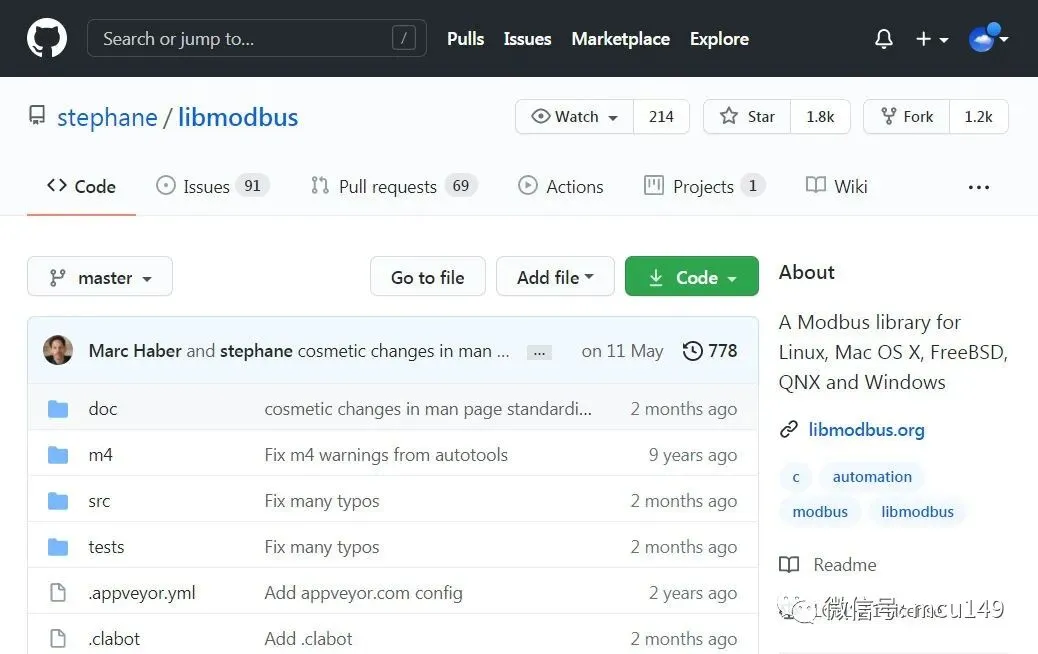
GitHub仓库

libmodbus支持如下功能:

  • 支持Modbus-RTU和Modbus-TCP

  • 支持常用功能码,如01/02/03/04/05/06/07/0F/10/11/16/17

  • 支持线圈类型读写、寄存器读写、离散量读取等

  • 支持广播地址0,从机地址1-247

  • 支持浮点数和整形数据转换,大端小端等多种模式

  • 参数根据Modbus_Application_Protocol_V1_1b.pdf官方标准文档设计,比如最大读写线圈个数,最大读写寄存器个数等。

  • 源代码基于C编写,方便在各平台移植,只有11个文件。

libmodbus常用函数

libmodbus库函数非常简洁,读写操作函数对于RTU和TCP完全通用,RTU和TCP切换只需要修改一行代码就可以实现无缝切换。

modbus_t *mb;int ret;//创建一个modbus-rtu对象,指定串口号,波特率,校验位,数据位,停止位//成功返回指针,否则返回NULL, 会调用malloc申请内存mb = modbus_new_rtu("/dev/ttySP1"115200'N'81);    //linuxmb = modbus_new_rtu("COM1"115200'N'81);        //windows//创建modbus-tcp对象,指定IP地址和端口号mb = modbus_new_tcp("127.0.0.1"502);    //TCP/IP//设置从机地址,成功返回0, 否则返回-1ret = modbus_set_slave(mb, slave);//连接Modbus主机,成功返回0, 否则返回-1ret = modbus_connect(mb);//设置响应超时时间1s,200msret = modbus_set_response_timeout(mb, 1200000);//读取寄存器数据,起始地址2, 数量5, 保存到table数组中//成功返回5, 否则返回-1uint16_t *table;ret = modbus_read_registers(mb, 25, table);//modbus设备关闭和释放内存modbus_close(mb);modbus_free(mb);//写单个寄存器, 地址2写入56, 成功返回1,否则返回-1ret = modbus_write_register(mb, 256);//写多个寄存器, 地址12起始,写入5个数据,成功返回5,否则返回-1uint16_t table[5] = {1122334455};ret = modbus_write_registers(mb, 125, table);//写单个线圈,线圈地址写入TRUE,成功返回1,否则返回-1ret = modbus_write_bit(mb, 11, TRUE);//查看错误信息char *err_str;err_str = modbus_strerror(errno);

Windows平台libmodbus 使用

以Windows下使用libmodbus实现从机和主机为例,Linux下类似。

1.获取源代码

使用Git工具下载GitHub代码仓库源代码到本地,这样可以获取到最新的libmodbus代码,但是也会有一些Bug。

git clone https://github.com/stephane/libmodbus/

如果下载速度缓慢,可以到我的Gitee仓库下载:

git clone https://gitee.com/whik/libmodbus

或者到官方仓库下载最新稳定发布版本v3.1.6:

libmodbus.org/releases/libmodbus-3.1.6.tar.gz

下载完成之后,解压到本地,Linux系统可以使用tar -zxvf libmodbus-3.0.6.tar.gz命令行解压:
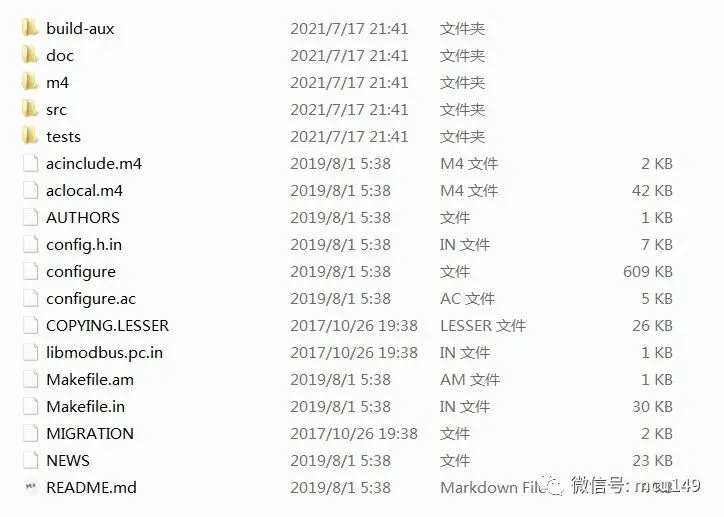
源代码

我们重点关注以下3个文件夹:doc,src,tests。

  • doc,doc文件夹包含库的使用文档,文件名就是函数名,介绍每个函数的使用方法,参数定制,返回值说明,示例代码等。
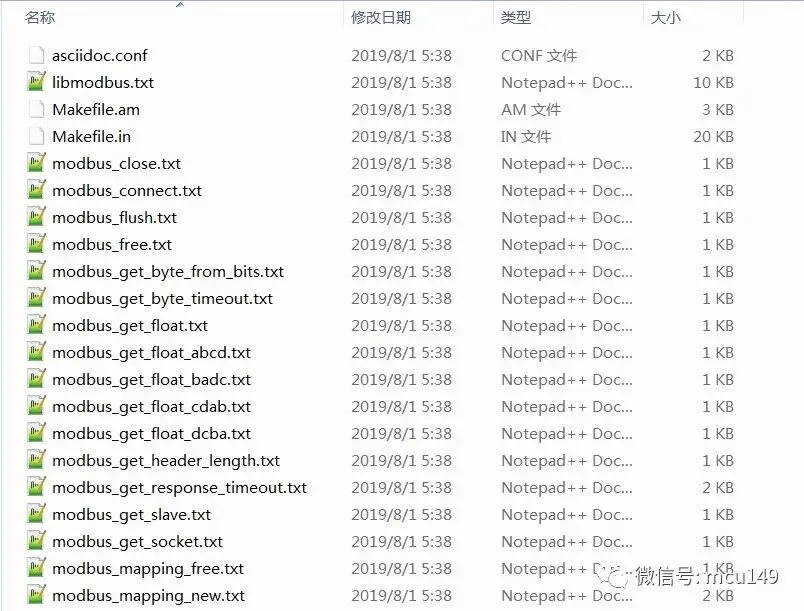
帮助文档
  • src,src文件夹是libmodbus库源文件和头文件,我们只需要把这些文件添加到工程中,然后包含头文件就可以直接使用了。
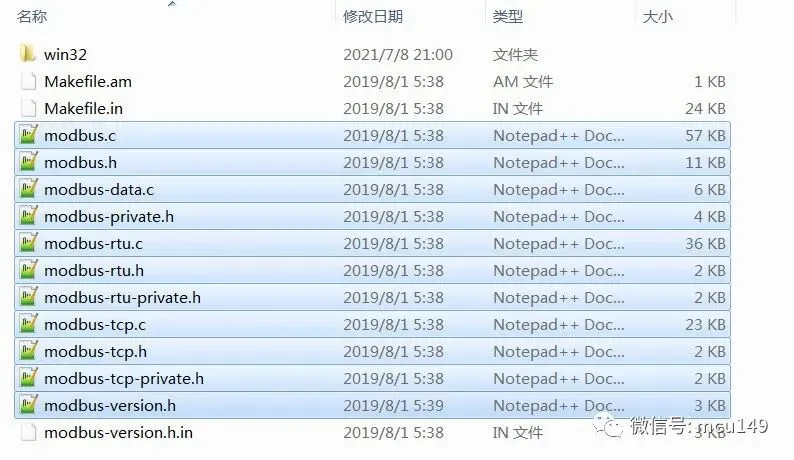
源代码
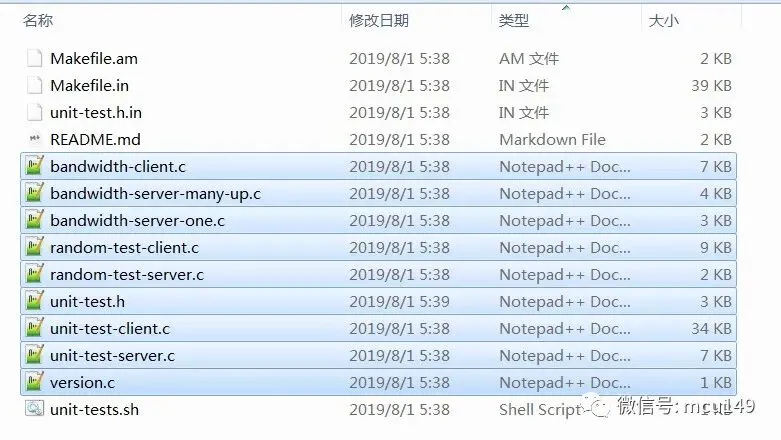
  • tests,tests文件夹包含libmodbus使用示例,

测试代码

包括Modbus-RTU/TCP客户端和服务器单元测试,随机测试,效率测试,读写10万个线圈状态,10万个寄存器,记录消耗时间。

//部分代码nb_points = MODBUS_MAX_READ_BITS;start = gettime_ms();for (i=0; i<n_loop; i++) {    rc = modbus_read_bits(ctx, 0, nb_points, tab_bit);if (rc == -1) {fprintf(stderr"%s\n", modbus_strerror(errno));return-1;    }}end = gettime_ms();elapsed = end - start;

官方提供的测试代码太繁琐,后面我们会写两个简单的示例程序,来演示主机和从机的使用。

2.生成config.h配置文件

无论是Windows还是Linux,在使用libmodbus库之前,我们需要先调用configure工具来生成config.h文件和Makefile。configure工具会根据当前系统环境,生成适用于当前平台的config.h文件。

在libmodbus库文件夹下执行./configure命令。

whik@windows_7 MINGW64 /d/libmodbus-3.1.6$ ./configurechecking for a BSD-compatible install... /usr/bin/install -cchecking whether build environment is sane... yeschecking for strings.h... yes    .......checking for inttypes.h... yesconfig.status: creating tests/unit-test.hconfig.status: executing libtool commands    libmodbus 3.1.6    ===============    prefix:                 /usr/local    sysconfdir:             ${prefix}/etc    libdir:                 ${exec_prefix}/lib    includedir:             ${prefix}/include    compiler:               gcc    cflags:                 -g -O2    ldflags:    documentation:          no    tests:                  yes

整个过程需要1分钟左右的时间,等待运行完成之后,会发现在当前目录下多了一些文件,主要是config.hMakefile

如果想使用libmodbus官方提供的测试代码,可以直接在根目录执行make命令,就可以直接编译tests目录下的测试代码,Linux系统可以使用make install命令进行和安装。

3.编写测试代码

新建一个文件夹my_test,把libmodbus/src文件夹中的.c和.h文件,config.h复制到my_test。

学习了libmodbus常用函数之后,我们就可以写一个简单的测试代码了。

Modbus-RTU主机测试:test_rtu_master.c,实现对地址为1的从机设备,读取地址15/16/17的保持寄存器数据,进行+1操作后,再写入。

#include"stdio.h"#include"stdlib.h"#include"string.h"#include"modbus.h"#define PORT_NAME "COM1"intmain(int argc, char *argv[]){int ret;uint16_t table[3];modbus_t *mb;char port[20];printf("argc = %d, argv[1] = %s\n", argc, argv[1]);if(argc == 2)strcpy(port, argv[1]);elsestrcpy(port, PORT_NAME);printf("libmodbus modbu-rtu master demo: %s, 115200, N, 8, 1\n", port);    mb = modbus_new_rtu(port, 115200'N'81);if (mb == NULL)    {        modbus_free(mb);printf("new rtu failed: %s\n", modbus_strerror(errno));return0;    }    modbus_set_slave(mb, 1);    ret = modbus_connect(mb);if(ret == -1)    {        modbus_close(mb);        modbus_free(mb);printf("connect failed: %s\n", modbus_strerror(errno));return0;    }while(1)    {        ret = modbus_read_registers(mb, 0x0F3, table);if(ret == 3)printf("read success : 0x%02x 0x%02x 0x%02x \n", table[0], table[1], table[2]);else        {printf("read error: %s\n", modbus_strerror(errno));break;        }for(int i = 0; i < 3; i++)            table[i] += 1;        ret = modbus_write_registers(mb, 0x0F3, table);if(ret == 3)printf("write success: 0x%02x 0x%02x 0x%02x \n", table[0], table[1], table[2]);else        {printf("write error: %s\n", modbus_strerror(errno));break;        }        Sleep(1000);    }    modbus_close(mb);    modbus_free(mb);    system("pause");return0;}

Modbus-RTU从机测试:test_rtu_slave.c,创建从机设备,地址为1,初始化了3个保持寄存器,地址分别为15/16/17,数据分别为0x1001/0x1002/0x1003

#include"stdio.h"#include"stdlib.h"#include"string.h"#include"modbus.h"#define PORT_NAME "COM2"intmain(int argc, char *argv[]){int ret = 0;uint8_t device = 1;uint8_t *query;modbus_t *mb;modbus_mapping_t *mb_mapping;char port[20];printf("argc = %d, argv[1] = %s\n", argc, argv[1]);if(argc == 2)strcpy(port, argv[1]);elsestrcpy(port, PORT_NAME);printf("libmodbus modbu-rtu slave demo: %s, 115200, N, 8, 1\n", port);    mb = modbus_new_rtu(port, 115200'N'81);if (mb == NULL)    {        modbus_free(mb);printf("new rtu failed: %s\n", modbus_strerror(errno));return0;    }//register: 15/16/17    mb_mapping = modbus_mapping_new_start_address(000015300);if(mb_mapping == NULL)    {        modbus_free(mb);printf("new mapping failed: %s\n", modbus_strerror(errno));return0;    }//保持寄存器数据    mb_mapping->tab_registers[0] = 0x1001;    mb_mapping->tab_registers[1] = 0x1002;    mb_mapping->tab_registers[2] = 0x1003;    modbus_set_slave(mb, device);    ret = modbus_connect(mb);if(ret == -1)    {        modbus_free(mb);printf("connect failed: %s\n", modbus_strerror(errno));return0;    }printf("create modbus slave success\n");while(1)    {do {            ret = modbus_receive(mb, query);    //轮询串口数据,        } while (ret == 0);if(ret > 0//接收到的报文长度        {printf("len=%02d: ", ret);for(int idx = 0; idx < ret; idx++)            {printf(" %02x", query[idx]);            }printf("\n");            modbus_reply(mb, query, ret, mb_mapping);        }else        {printf("quit the loop: %s", modbus_strerror(errno));            modbus_mapping_free(mb_mapping);break;        }    }    modbus_close(mb);    modbus_free(mb);return0;}

4.编译测试代码

现学了Makefile语法,凑合用。需要注意的是,windows下libmodbus依赖于ws2_32.dll库,需要添加编译参数-lws2_32:

.PHONY: allall: test_rtu_master test_rtu_slavetest_rtu_master : test_rtu_master.o modbus.o modbus-tcp.o modbus-rtu.o modbus-data.o     gcc test_rtu_master.o modbus.o modbus-tcp.o modbus-rtu.o modbus-data.o -o test_rtu_master -lws2_32test_rtu_slave : test_rtu_slave.o modbus.o modbus-tcp.o modbus-rtu.o modbus-data.o     gcc test_rtu_slave.o modbus.o modbus-tcp.o modbus-rtu.o modbus-data.o -o test_rtu_slave -lws2_32test_rtu_slave.o : test_rtu_slave.c    gcc test_rtu_slave.c -c -I.test_rtu_master.o : test_rtu_master.c    gcc test_rtu_master.c -c -I.modbus.o : modbus.c    gcc modbus.c -c -I.modbus-rtu.o : modbus-rtu.c    gcc modbus-rtu.c -c -I.modbus-tcp.o : modbus-tcp.c    gcc modbus-tcp.c -c -I.modbus-data.o : modbus-data.c    gcc modbus-data.c -c -I.clean:    rm -rf *.o *.exe

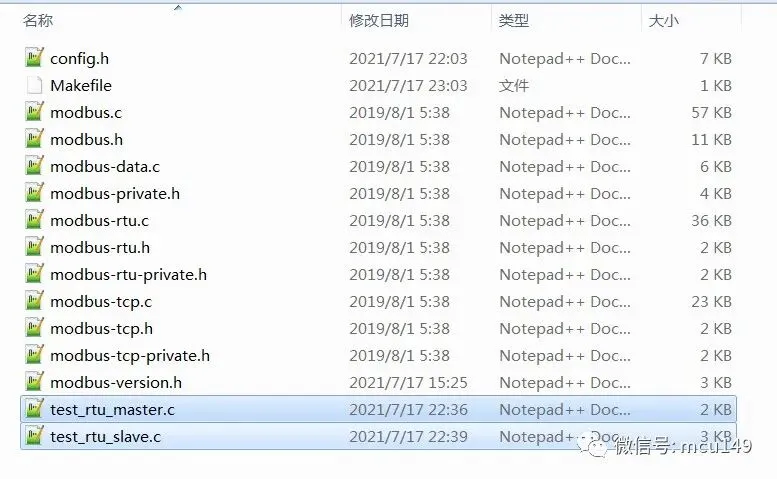
最终的文件目录:

测试文件

Windows下Make工具我使用的是Qt自带的mingw32-make.exe工具,位于\Qt5.7.0\Tools\mingw530_32\bin目录下,执行mingw32-make命令进行,会对两个测试文件进行编译:

whik@Windows_7 MINGW64 /d/my_test$ mingw32-make.exegcc test_rtu_master.c -c -I.gcc modbus.c -c -I.gcc modbus-tcp.c -c -I.gcc modbus-rtu.c -c -I.gcc modbus-data.c -c -I.In file included from modbus-data.c:24:0:./config.h:171:0: warning: "WINVER" redefined#define WINVER 0x0501 ^In file included from D:/Program/Qt5.7.0/Tools/mingw530_32/i686-w64-mingw32/include/windows.h:10:0,                 from D:/Program/Qt5.7.0/Tools/mingw530_32/i686-w64-mingw32/include/winsock2.h:23,                 from modbus-data.c:19:D:/Program/Qt5.7.0/Tools/mingw530_32/i686-w64-mingw32/include/sdkddkver.h:162:0: note: this is the location of the previous definition#define WINVER  _WIN32_WINNT ^gcc test_rtu_master.o modbus.o modbus-tcp.o modbus-rtu.o modbus-data.o -o test_rtu_master -lws2_32gcc test_rtu_slave.c -c -I.gcc test_rtu_slave.o modbus.o modbus-tcp.o modbus-rtu.o modbus-data.o -o test_rtu_slave -lws2_32

会在当前目录下生成目标文件:test_rtu_master.exetest_rtu_slave.exe

这里,我的电脑本机虚拟了两个串口COM1和COM2,两个串口直接进行连接。

先启动从机设备,配置为COM1:

$ ./test_rtu_slave.exe "COM1"

再启动主机设备,配置为COM2:

$ ./test_rtu_master.exe "COM2"
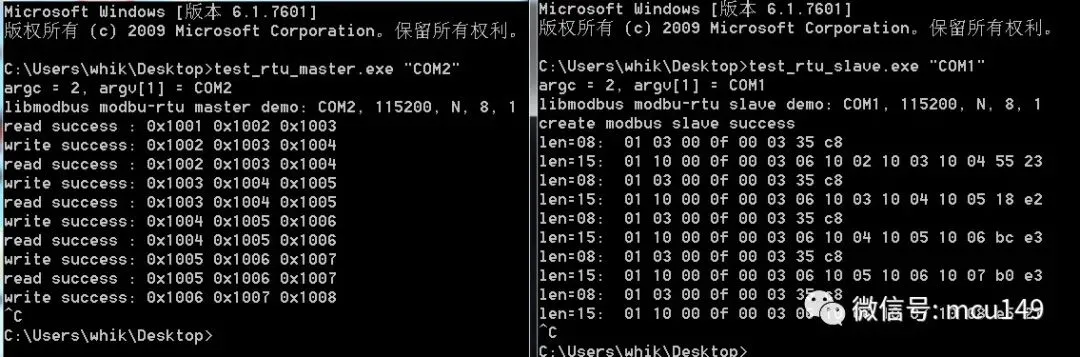
测试结果

可以看到,从机可以正确的对接收的数据帧进行相应,主机可以正确的进行读取和写入。

如果需要测试Modbus-TCP,只需要修改modbus设备创建函数:

//modbus-rtumb = modbus_new_rtu(port, 115200'N'81);//modbus-tcpmb = modbus_new_tcp("127.0.0.120"502);    //指定IP地址

其他无需任何改动!

Linux平台下libmodbus使用

Ubuntu下使用libmodbus和Windows几乎一样:

//1.解压tar -zxvf libmodbus-3.0.6.tar.gz//2.配置./configure//3.编译make//4.安装make install

测试文件和Windows几乎一样,不过不需要ws2_32库的支持了。

(来自:blog.csdn.net/qq_30650153/article/details/83385626

ARM平台下libmodbus使用

ARM开发板下使用libmodbus,需要使用交叉编译器进行交叉编译,生成so库文件。

1.解压:

tar -zxvf libmodbus-3.0.6.tar.gz

2.创建安装目录:

mkdir install

3.配置编译选项:

./configure --host=arm-fsl-linux-gnueabi --enable-static --prefix=[安装路径]/install/

4.编译:make

5.安装:make install

在install目录会生成3个文件夹:include lib share

进入install/lib目录,执行file libmodbus*,出现如下打印信息,信息中有“ARM”说明libmodbus库移植成功。

libmodbus.a:        current ar archivelibmodbus.la:       libtool library file, libmodbus.so:       symbolic link to `libmodbus.so.5.0.5'libmodbus.so.5:     symbolic link to `libmodbus.so.5.0.5'libmodbus.so.5.0.5: ELF 32-bit LSB shared object, ARM, version 1 (SYSV), dynamically linked, not stripped

libmodbus.so、libmodbus.so.5、libmodbus.so.5.0.5复制到ARM开发板中的/usr/lib目录下

执行cp libmodbus.so* /usr/lib

如果出现无法创建的问题(cannot create ‘/usr/lib/libmodbus.so*’: Read-only file system)。

可以执行 wr cp libmodbus* /usr/lib

测试与使用,和Windows一样,对测试文件使用ARM交叉编译器进行编译。

(来自:www.cnblogs.com/happybirthdaytoyou/p/11301612.html)

libmodbus 从机地址限制的问题

libmodbus支持1-247从机地址,0为广播地址,但是有些非标准的Modbus传感器,并不是采用0作为广播地址,而是0xfe作为广播地址:
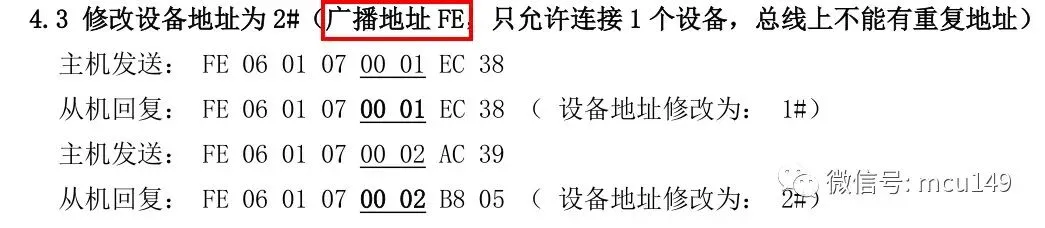
广播地址0xfe

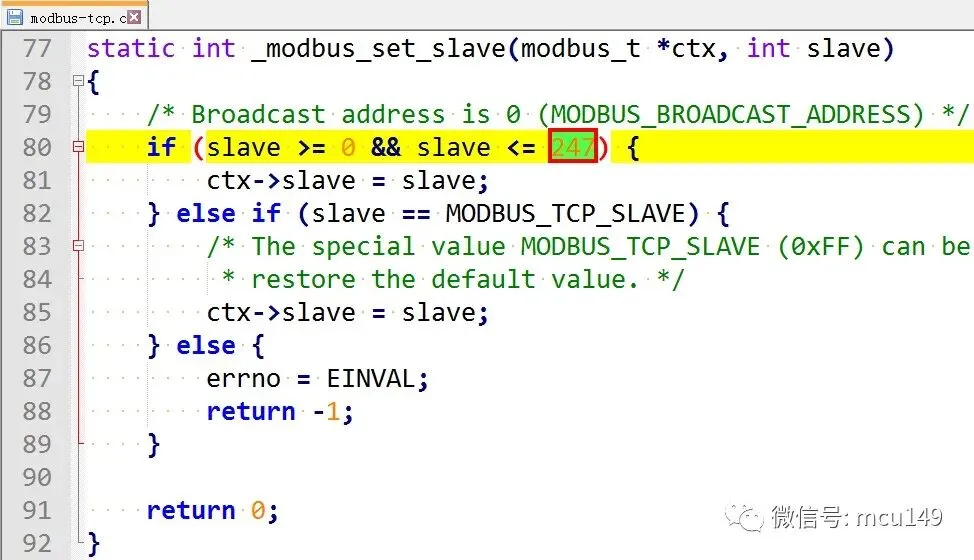
所以使用libmodbus会出现报错终止运行的问题,这是因为libmodbus源代码中限制了从机地址1-247,我们只需要修改源代码即可。

modbus-rtu.c文件95行:
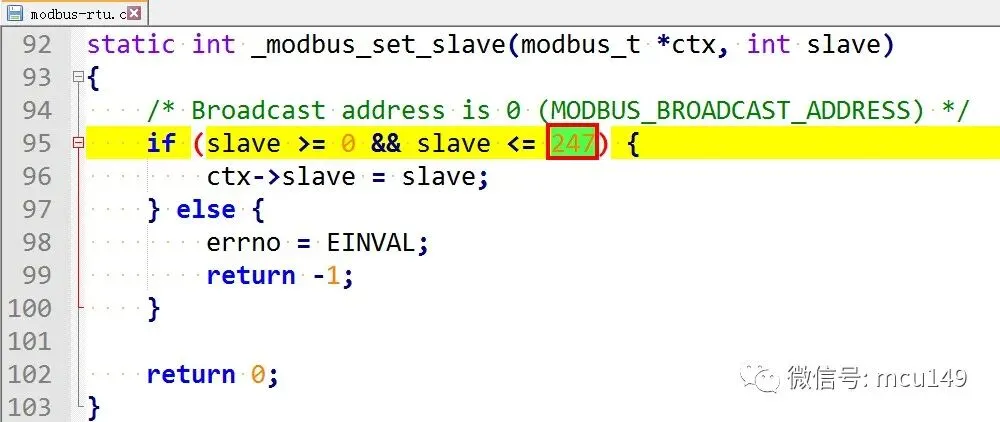
modbus-rtu

modbus-tcp.c文件80行:

modbus-tcp

只需要修改这两个数值就可以取消从机地址限制的问题。

详细的从站最大地址限制问题排查记录,可以查看:

blog.csdn.net/qingzhuyuxian/article/details/80391553

其实这个问题,早在2011年,就有人在官方GitHub仓库提Issues了:

github.com/stephane/libmodbus/issues/38
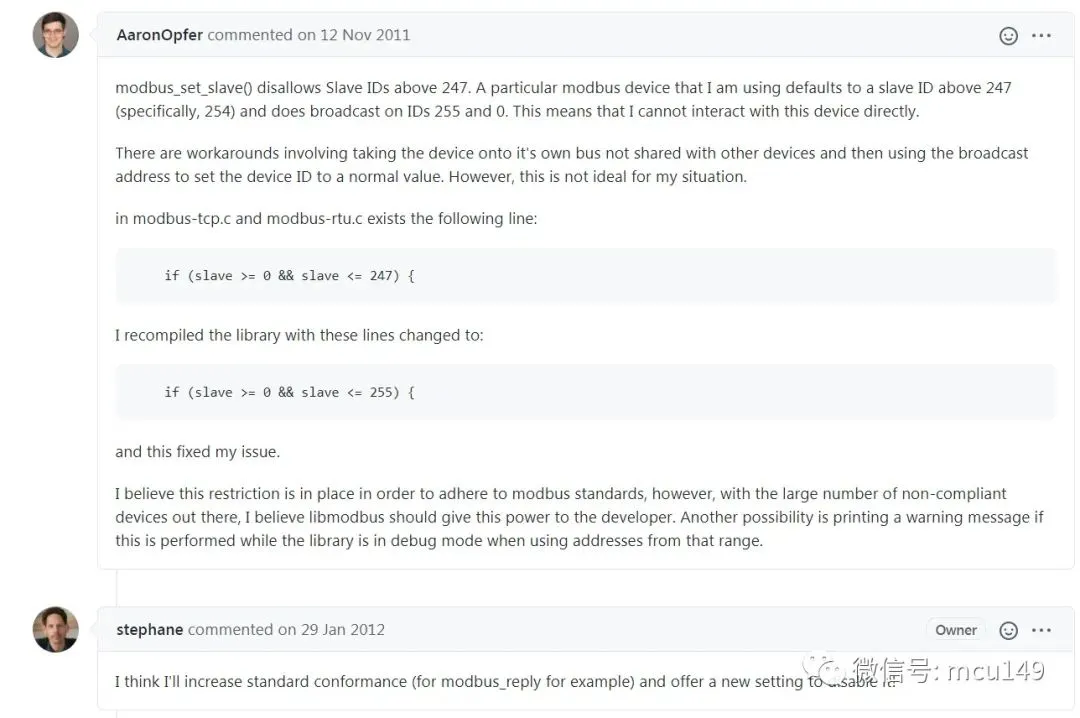
issue

对此问题,作者的答复是,为了遵循Modbus官方标准,所以一直以来都没有进行修改。

最     后   

小哥搜集了一些嵌入式学习资料,公众号内回复1024即可找到下载链接!

推荐好文点击蓝色字体即可跳转

专辑|Linux应用程序编程大全
☞ 专辑|学点网络知识
☞ 专辑|手撕C语言
专辑|手撕C++语言
☞ 专辑|经验分享
☞ 专辑|从单片机到Linux
☞ 专辑|电能控制技术
☞ 专辑|嵌入式必备数学知识

☞  MCU进阶专辑

☞  嵌入式C语言进阶专辑

☞  经验分享 

最新文章

随机文章

基本 文件 流程 错误 SQL 调试
  1. 请求信息 : 2026-03-28 02:45:03 HTTP/2.0 GET : https://f.mffb.com.cn/a/483441.html
  2. 运行时间 : 0.199963s [ 吞吐率:5.00req/s ] 内存消耗:5,076.07kb 文件加载:140
  3. 缓存信息 : 0 reads,0 writes
  4. 会话信息 : SESSION_ID=bc7c6aedd1d463d2a24f424abd70ea1e
  1. /yingpanguazai/ssd/ssd1/www/f.mffb.com.cn/public/index.php ( 0.79 KB )
  2. /yingpanguazai/ssd/ssd1/www/f.mffb.com.cn/vendor/autoload.php ( 0.17 KB )
  3. /yingpanguazai/ssd/ssd1/www/f.mffb.com.cn/vendor/composer/autoload_real.php ( 2.49 KB )
  4. /yingpanguazai/ssd/ssd1/www/f.mffb.com.cn/vendor/composer/platform_check.php ( 0.90 KB )
  5. /yingpanguazai/ssd/ssd1/www/f.mffb.com.cn/vendor/composer/ClassLoader.php ( 14.03 KB )
  6. /yingpanguazai/ssd/ssd1/www/f.mffb.com.cn/vendor/composer/autoload_static.php ( 4.90 KB )
  7. /yingpanguazai/ssd/ssd1/www/f.mffb.com.cn/vendor/topthink/think-helper/src/helper.php ( 8.34 KB )
  8. /yingpanguazai/ssd/ssd1/www/f.mffb.com.cn/vendor/topthink/think-validate/src/helper.php ( 2.19 KB )
  9. /yingpanguazai/ssd/ssd1/www/f.mffb.com.cn/vendor/topthink/think-orm/src/helper.php ( 1.47 KB )
  10. /yingpanguazai/ssd/ssd1/www/f.mffb.com.cn/vendor/topthink/think-orm/stubs/load_stubs.php ( 0.16 KB )
  11. /yingpanguazai/ssd/ssd1/www/f.mffb.com.cn/vendor/topthink/framework/src/think/Exception.php ( 1.69 KB )
  12. /yingpanguazai/ssd/ssd1/www/f.mffb.com.cn/vendor/topthink/think-container/src/Facade.php ( 2.71 KB )
  13. /yingpanguazai/ssd/ssd1/www/f.mffb.com.cn/vendor/symfony/deprecation-contracts/function.php ( 0.99 KB )
  14. /yingpanguazai/ssd/ssd1/www/f.mffb.com.cn/vendor/symfony/polyfill-mbstring/bootstrap.php ( 8.26 KB )
  15. /yingpanguazai/ssd/ssd1/www/f.mffb.com.cn/vendor/symfony/polyfill-mbstring/bootstrap80.php ( 9.78 KB )
  16. /yingpanguazai/ssd/ssd1/www/f.mffb.com.cn/vendor/symfony/var-dumper/Resources/functions/dump.php ( 1.49 KB )
  17. /yingpanguazai/ssd/ssd1/www/f.mffb.com.cn/vendor/topthink/think-dumper/src/helper.php ( 0.18 KB )
  18. /yingpanguazai/ssd/ssd1/www/f.mffb.com.cn/vendor/symfony/var-dumper/VarDumper.php ( 4.30 KB )
  19. /yingpanguazai/ssd/ssd1/www/f.mffb.com.cn/vendor/topthink/framework/src/think/App.php ( 15.30 KB )
  20. /yingpanguazai/ssd/ssd1/www/f.mffb.com.cn/vendor/topthink/think-container/src/Container.php ( 15.76 KB )
  21. /yingpanguazai/ssd/ssd1/www/f.mffb.com.cn/vendor/psr/container/src/ContainerInterface.php ( 1.02 KB )
  22. /yingpanguazai/ssd/ssd1/www/f.mffb.com.cn/app/provider.php ( 0.19 KB )
  23. /yingpanguazai/ssd/ssd1/www/f.mffb.com.cn/vendor/topthink/framework/src/think/Http.php ( 6.04 KB )
  24. /yingpanguazai/ssd/ssd1/www/f.mffb.com.cn/vendor/topthink/think-helper/src/helper/Str.php ( 7.29 KB )
  25. /yingpanguazai/ssd/ssd1/www/f.mffb.com.cn/vendor/topthink/framework/src/think/Env.php ( 4.68 KB )
  26. /yingpanguazai/ssd/ssd1/www/f.mffb.com.cn/app/common.php ( 0.03 KB )
  27. /yingpanguazai/ssd/ssd1/www/f.mffb.com.cn/vendor/topthink/framework/src/helper.php ( 18.78 KB )
  28. /yingpanguazai/ssd/ssd1/www/f.mffb.com.cn/vendor/topthink/framework/src/think/Config.php ( 5.54 KB )
  29. /yingpanguazai/ssd/ssd1/www/f.mffb.com.cn/config/app.php ( 0.95 KB )
  30. /yingpanguazai/ssd/ssd1/www/f.mffb.com.cn/config/cache.php ( 0.78 KB )
  31. /yingpanguazai/ssd/ssd1/www/f.mffb.com.cn/config/console.php ( 0.23 KB )
  32. /yingpanguazai/ssd/ssd1/www/f.mffb.com.cn/config/cookie.php ( 0.56 KB )
  33. /yingpanguazai/ssd/ssd1/www/f.mffb.com.cn/config/database.php ( 2.48 KB )
  34. /yingpanguazai/ssd/ssd1/www/f.mffb.com.cn/vendor/topthink/framework/src/think/facade/Env.php ( 1.67 KB )
  35. /yingpanguazai/ssd/ssd1/www/f.mffb.com.cn/config/filesystem.php ( 0.61 KB )
  36. /yingpanguazai/ssd/ssd1/www/f.mffb.com.cn/config/lang.php ( 0.91 KB )
  37. /yingpanguazai/ssd/ssd1/www/f.mffb.com.cn/config/log.php ( 1.35 KB )
  38. /yingpanguazai/ssd/ssd1/www/f.mffb.com.cn/config/middleware.php ( 0.19 KB )
  39. /yingpanguazai/ssd/ssd1/www/f.mffb.com.cn/config/route.php ( 1.89 KB )
  40. /yingpanguazai/ssd/ssd1/www/f.mffb.com.cn/config/session.php ( 0.57 KB )
  41. /yingpanguazai/ssd/ssd1/www/f.mffb.com.cn/config/trace.php ( 0.34 KB )
  42. /yingpanguazai/ssd/ssd1/www/f.mffb.com.cn/config/view.php ( 0.82 KB )
  43. /yingpanguazai/ssd/ssd1/www/f.mffb.com.cn/app/event.php ( 0.25 KB )
  44. /yingpanguazai/ssd/ssd1/www/f.mffb.com.cn/vendor/topthink/framework/src/think/Event.php ( 7.67 KB )
  45. /yingpanguazai/ssd/ssd1/www/f.mffb.com.cn/app/service.php ( 0.13 KB )
  46. /yingpanguazai/ssd/ssd1/www/f.mffb.com.cn/app/AppService.php ( 0.26 KB )
  47. /yingpanguazai/ssd/ssd1/www/f.mffb.com.cn/vendor/topthink/framework/src/think/Service.php ( 1.64 KB )
  48. /yingpanguazai/ssd/ssd1/www/f.mffb.com.cn/vendor/topthink/framework/src/think/Lang.php ( 7.35 KB )
  49. /yingpanguazai/ssd/ssd1/www/f.mffb.com.cn/vendor/topthink/framework/src/lang/zh-cn.php ( 13.70 KB )
  50. /yingpanguazai/ssd/ssd1/www/f.mffb.com.cn/vendor/topthink/framework/src/think/initializer/Error.php ( 3.31 KB )
  51. /yingpanguazai/ssd/ssd1/www/f.mffb.com.cn/vendor/topthink/framework/src/think/initializer/RegisterService.php ( 1.33 KB )
  52. /yingpanguazai/ssd/ssd1/www/f.mffb.com.cn/vendor/services.php ( 0.14 KB )
  53. /yingpanguazai/ssd/ssd1/www/f.mffb.com.cn/vendor/topthink/framework/src/think/service/PaginatorService.php ( 1.52 KB )
  54. /yingpanguazai/ssd/ssd1/www/f.mffb.com.cn/vendor/topthink/framework/src/think/service/ValidateService.php ( 0.99 KB )
  55. /yingpanguazai/ssd/ssd1/www/f.mffb.com.cn/vendor/topthink/framework/src/think/service/ModelService.php ( 2.04 KB )
  56. /yingpanguazai/ssd/ssd1/www/f.mffb.com.cn/vendor/topthink/think-trace/src/Service.php ( 0.77 KB )
  57. /yingpanguazai/ssd/ssd1/www/f.mffb.com.cn/vendor/topthink/framework/src/think/Middleware.php ( 6.72 KB )
  58. /yingpanguazai/ssd/ssd1/www/f.mffb.com.cn/vendor/topthink/framework/src/think/initializer/BootService.php ( 0.77 KB )
  59. /yingpanguazai/ssd/ssd1/www/f.mffb.com.cn/vendor/topthink/think-orm/src/Paginator.php ( 11.86 KB )
  60. /yingpanguazai/ssd/ssd1/www/f.mffb.com.cn/vendor/topthink/think-validate/src/Validate.php ( 63.20 KB )
  61. /yingpanguazai/ssd/ssd1/www/f.mffb.com.cn/vendor/topthink/think-orm/src/Model.php ( 23.55 KB )
  62. /yingpanguazai/ssd/ssd1/www/f.mffb.com.cn/vendor/topthink/think-orm/src/model/concern/Attribute.php ( 21.05 KB )
  63. /yingpanguazai/ssd/ssd1/www/f.mffb.com.cn/vendor/topthink/think-orm/src/model/concern/AutoWriteData.php ( 4.21 KB )
  64. /yingpanguazai/ssd/ssd1/www/f.mffb.com.cn/vendor/topthink/think-orm/src/model/concern/Conversion.php ( 6.44 KB )
  65. /yingpanguazai/ssd/ssd1/www/f.mffb.com.cn/vendor/topthink/think-orm/src/model/concern/DbConnect.php ( 5.16 KB )
  66. /yingpanguazai/ssd/ssd1/www/f.mffb.com.cn/vendor/topthink/think-orm/src/model/concern/ModelEvent.php ( 2.33 KB )
  67. /yingpanguazai/ssd/ssd1/www/f.mffb.com.cn/vendor/topthink/think-orm/src/model/concern/RelationShip.php ( 28.29 KB )
  68. /yingpanguazai/ssd/ssd1/www/f.mffb.com.cn/vendor/topthink/think-helper/src/contract/Arrayable.php ( 0.09 KB )
  69. /yingpanguazai/ssd/ssd1/www/f.mffb.com.cn/vendor/topthink/think-helper/src/contract/Jsonable.php ( 0.13 KB )
  70. /yingpanguazai/ssd/ssd1/www/f.mffb.com.cn/vendor/topthink/think-orm/src/model/contract/Modelable.php ( 0.09 KB )
  71. /yingpanguazai/ssd/ssd1/www/f.mffb.com.cn/vendor/topthink/framework/src/think/Db.php ( 2.88 KB )
  72. /yingpanguazai/ssd/ssd1/www/f.mffb.com.cn/vendor/topthink/think-orm/src/DbManager.php ( 8.52 KB )
  73. /yingpanguazai/ssd/ssd1/www/f.mffb.com.cn/vendor/topthink/framework/src/think/Log.php ( 6.28 KB )
  74. /yingpanguazai/ssd/ssd1/www/f.mffb.com.cn/vendor/topthink/framework/src/think/Manager.php ( 3.92 KB )
  75. /yingpanguazai/ssd/ssd1/www/f.mffb.com.cn/vendor/psr/log/src/LoggerTrait.php ( 2.69 KB )
  76. /yingpanguazai/ssd/ssd1/www/f.mffb.com.cn/vendor/psr/log/src/LoggerInterface.php ( 2.71 KB )
  77. /yingpanguazai/ssd/ssd1/www/f.mffb.com.cn/vendor/topthink/framework/src/think/Cache.php ( 4.92 KB )
  78. /yingpanguazai/ssd/ssd1/www/f.mffb.com.cn/vendor/psr/simple-cache/src/CacheInterface.php ( 4.71 KB )
  79. /yingpanguazai/ssd/ssd1/www/f.mffb.com.cn/vendor/topthink/think-helper/src/helper/Arr.php ( 16.63 KB )
  80. /yingpanguazai/ssd/ssd1/www/f.mffb.com.cn/vendor/topthink/framework/src/think/cache/driver/File.php ( 7.84 KB )
  81. /yingpanguazai/ssd/ssd1/www/f.mffb.com.cn/vendor/topthink/framework/src/think/cache/Driver.php ( 9.03 KB )
  82. /yingpanguazai/ssd/ssd1/www/f.mffb.com.cn/vendor/topthink/framework/src/think/contract/CacheHandlerInterface.php ( 1.99 KB )
  83. /yingpanguazai/ssd/ssd1/www/f.mffb.com.cn/app/Request.php ( 0.09 KB )
  84. /yingpanguazai/ssd/ssd1/www/f.mffb.com.cn/vendor/topthink/framework/src/think/Request.php ( 55.78 KB )
  85. /yingpanguazai/ssd/ssd1/www/f.mffb.com.cn/app/middleware.php ( 0.25 KB )
  86. /yingpanguazai/ssd/ssd1/www/f.mffb.com.cn/vendor/topthink/framework/src/think/Pipeline.php ( 2.61 KB )
  87. /yingpanguazai/ssd/ssd1/www/f.mffb.com.cn/vendor/topthink/think-trace/src/TraceDebug.php ( 3.40 KB )
  88. /yingpanguazai/ssd/ssd1/www/f.mffb.com.cn/vendor/topthink/framework/src/think/middleware/SessionInit.php ( 1.94 KB )
  89. /yingpanguazai/ssd/ssd1/www/f.mffb.com.cn/vendor/topthink/framework/src/think/Session.php ( 1.80 KB )
  90. /yingpanguazai/ssd/ssd1/www/f.mffb.com.cn/vendor/topthink/framework/src/think/session/driver/File.php ( 6.27 KB )
  91. /yingpanguazai/ssd/ssd1/www/f.mffb.com.cn/vendor/topthink/framework/src/think/contract/SessionHandlerInterface.php ( 0.87 KB )
  92. /yingpanguazai/ssd/ssd1/www/f.mffb.com.cn/vendor/topthink/framework/src/think/session/Store.php ( 7.12 KB )
  93. /yingpanguazai/ssd/ssd1/www/f.mffb.com.cn/vendor/topthink/framework/src/think/Route.php ( 23.73 KB )
  94. /yingpanguazai/ssd/ssd1/www/f.mffb.com.cn/vendor/topthink/framework/src/think/route/RuleName.php ( 5.75 KB )
  95. /yingpanguazai/ssd/ssd1/www/f.mffb.com.cn/vendor/topthink/framework/src/think/route/Domain.php ( 2.53 KB )
  96. /yingpanguazai/ssd/ssd1/www/f.mffb.com.cn/vendor/topthink/framework/src/think/route/RuleGroup.php ( 22.43 KB )
  97. /yingpanguazai/ssd/ssd1/www/f.mffb.com.cn/vendor/topthink/framework/src/think/route/Rule.php ( 26.95 KB )
  98. /yingpanguazai/ssd/ssd1/www/f.mffb.com.cn/vendor/topthink/framework/src/think/route/RuleItem.php ( 9.78 KB )
  99. /yingpanguazai/ssd/ssd1/www/f.mffb.com.cn/route/app.php ( 1.72 KB )
  100. /yingpanguazai/ssd/ssd1/www/f.mffb.com.cn/vendor/topthink/framework/src/think/facade/Route.php ( 4.70 KB )
  101. /yingpanguazai/ssd/ssd1/www/f.mffb.com.cn/vendor/topthink/framework/src/think/route/dispatch/Controller.php ( 4.74 KB )
  102. /yingpanguazai/ssd/ssd1/www/f.mffb.com.cn/vendor/topthink/framework/src/think/route/Dispatch.php ( 10.44 KB )
  103. /yingpanguazai/ssd/ssd1/www/f.mffb.com.cn/app/controller/Index.php ( 4.81 KB )
  104. /yingpanguazai/ssd/ssd1/www/f.mffb.com.cn/app/BaseController.php ( 2.05 KB )
  105. /yingpanguazai/ssd/ssd1/www/f.mffb.com.cn/vendor/topthink/think-orm/src/facade/Db.php ( 0.93 KB )
  106. /yingpanguazai/ssd/ssd1/www/f.mffb.com.cn/vendor/topthink/think-orm/src/db/connector/Mysql.php ( 5.44 KB )
  107. /yingpanguazai/ssd/ssd1/www/f.mffb.com.cn/vendor/topthink/think-orm/src/db/PDOConnection.php ( 52.47 KB )
  108. /yingpanguazai/ssd/ssd1/www/f.mffb.com.cn/vendor/topthink/think-orm/src/db/Connection.php ( 8.39 KB )
  109. /yingpanguazai/ssd/ssd1/www/f.mffb.com.cn/vendor/topthink/think-orm/src/db/ConnectionInterface.php ( 4.57 KB )
  110. /yingpanguazai/ssd/ssd1/www/f.mffb.com.cn/vendor/topthink/think-orm/src/db/builder/Mysql.php ( 16.58 KB )
  111. /yingpanguazai/ssd/ssd1/www/f.mffb.com.cn/vendor/topthink/think-orm/src/db/Builder.php ( 24.06 KB )
  112. /yingpanguazai/ssd/ssd1/www/f.mffb.com.cn/vendor/topthink/think-orm/src/db/BaseBuilder.php ( 27.50 KB )
  113. /yingpanguazai/ssd/ssd1/www/f.mffb.com.cn/vendor/topthink/think-orm/src/db/Query.php ( 15.71 KB )
  114. /yingpanguazai/ssd/ssd1/www/f.mffb.com.cn/vendor/topthink/think-orm/src/db/BaseQuery.php ( 45.13 KB )
  115. /yingpanguazai/ssd/ssd1/www/f.mffb.com.cn/vendor/topthink/think-orm/src/db/concern/TimeFieldQuery.php ( 7.43 KB )
  116. /yingpanguazai/ssd/ssd1/www/f.mffb.com.cn/vendor/topthink/think-orm/src/db/concern/AggregateQuery.php ( 3.26 KB )
  117. /yingpanguazai/ssd/ssd1/www/f.mffb.com.cn/vendor/topthink/think-orm/src/db/concern/ModelRelationQuery.php ( 20.07 KB )
  118. /yingpanguazai/ssd/ssd1/www/f.mffb.com.cn/vendor/topthink/think-orm/src/db/concern/ParamsBind.php ( 3.66 KB )
  119. /yingpanguazai/ssd/ssd1/www/f.mffb.com.cn/vendor/topthink/think-orm/src/db/concern/ResultOperation.php ( 7.01 KB )
  120. /yingpanguazai/ssd/ssd1/www/f.mffb.com.cn/vendor/topthink/think-orm/src/db/concern/WhereQuery.php ( 19.37 KB )
  121. /yingpanguazai/ssd/ssd1/www/f.mffb.com.cn/vendor/topthink/think-orm/src/db/concern/JoinAndViewQuery.php ( 7.11 KB )
  122. /yingpanguazai/ssd/ssd1/www/f.mffb.com.cn/vendor/topthink/think-orm/src/db/concern/TableFieldInfo.php ( 2.63 KB )
  123. /yingpanguazai/ssd/ssd1/www/f.mffb.com.cn/vendor/topthink/think-orm/src/db/concern/Transaction.php ( 2.77 KB )
  124. /yingpanguazai/ssd/ssd1/www/f.mffb.com.cn/vendor/topthink/framework/src/think/log/driver/File.php ( 5.96 KB )
  125. /yingpanguazai/ssd/ssd1/www/f.mffb.com.cn/vendor/topthink/framework/src/think/contract/LogHandlerInterface.php ( 0.86 KB )
  126. /yingpanguazai/ssd/ssd1/www/f.mffb.com.cn/vendor/topthink/framework/src/think/log/Channel.php ( 3.89 KB )
  127. /yingpanguazai/ssd/ssd1/www/f.mffb.com.cn/vendor/topthink/framework/src/think/event/LogRecord.php ( 1.02 KB )
  128. /yingpanguazai/ssd/ssd1/www/f.mffb.com.cn/vendor/topthink/think-helper/src/Collection.php ( 16.47 KB )
  129. /yingpanguazai/ssd/ssd1/www/f.mffb.com.cn/vendor/topthink/framework/src/think/facade/View.php ( 1.70 KB )
  130. /yingpanguazai/ssd/ssd1/www/f.mffb.com.cn/vendor/topthink/framework/src/think/View.php ( 4.39 KB )
  131. /yingpanguazai/ssd/ssd1/www/f.mffb.com.cn/vendor/topthink/framework/src/think/Response.php ( 8.81 KB )
  132. /yingpanguazai/ssd/ssd1/www/f.mffb.com.cn/vendor/topthink/framework/src/think/response/View.php ( 3.29 KB )
  133. /yingpanguazai/ssd/ssd1/www/f.mffb.com.cn/vendor/topthink/framework/src/think/Cookie.php ( 6.06 KB )
  134. /yingpanguazai/ssd/ssd1/www/f.mffb.com.cn/vendor/topthink/think-view/src/Think.php ( 8.38 KB )
  135. /yingpanguazai/ssd/ssd1/www/f.mffb.com.cn/vendor/topthink/framework/src/think/contract/TemplateHandlerInterface.php ( 1.60 KB )
  136. /yingpanguazai/ssd/ssd1/www/f.mffb.com.cn/vendor/topthink/think-template/src/Template.php ( 46.61 KB )
  137. /yingpanguazai/ssd/ssd1/www/f.mffb.com.cn/vendor/topthink/think-template/src/template/driver/File.php ( 2.41 KB )
  138. /yingpanguazai/ssd/ssd1/www/f.mffb.com.cn/vendor/topthink/think-template/src/template/contract/DriverInterface.php ( 0.86 KB )
  139. /yingpanguazai/ssd/ssd1/www/f.mffb.com.cn/runtime/temp/067d451b9a0c665040f3f1bdd3293d68.php ( 11.98 KB )
  140. /yingpanguazai/ssd/ssd1/www/f.mffb.com.cn/vendor/topthink/think-trace/src/Html.php ( 4.42 KB )
  1. CONNECT:[ UseTime:0.000982s ] mysql:host=127.0.0.1;port=3306;dbname=f_mffb;charset=utf8mb4
  2. SHOW FULL COLUMNS FROM `fenlei` [ RunTime:0.001354s ]
  3. SELECT * FROM `fenlei` WHERE `fid` = 0 [ RunTime:0.000565s ]
  4. SELECT * FROM `fenlei` WHERE `fid` = 63 [ RunTime:0.000496s ]
  5. SHOW FULL COLUMNS FROM `set` [ RunTime:0.001187s ]
  6. SELECT * FROM `set` [ RunTime:0.000474s ]
  7. SHOW FULL COLUMNS FROM `article` [ RunTime:0.001353s ]
  8. SELECT * FROM `article` WHERE `id` = 483441 LIMIT 1 [ RunTime:0.005920s ]
  9. UPDATE `article` SET `lasttime` = 1774637103 WHERE `id` = 483441 [ RunTime:0.012403s ]
  10. SELECT * FROM `fenlei` WHERE `id` = 67 LIMIT 1 [ RunTime:0.000559s ]
  11. SELECT * FROM `article` WHERE `id` < 483441 ORDER BY `id` DESC LIMIT 1 [ RunTime:0.001100s ]
  12. SELECT * FROM `article` WHERE `id` > 483441 ORDER BY `id` ASC LIMIT 1 [ RunTime:0.000907s ]
  13. SELECT * FROM `article` WHERE `id` < 483441 ORDER BY `id` DESC LIMIT 10 [ RunTime:0.002012s ]
  14. SELECT * FROM `article` WHERE `id` < 483441 ORDER BY `id` DESC LIMIT 10,10 [ RunTime:0.015637s ]
  15. SELECT * FROM `article` WHERE `id` < 483441 ORDER BY `id` DESC LIMIT 20,10 [ RunTime:0.015740s ]
0.203465s