- 系统:主流 Linux 发行版(Ubuntu/Debian 等)
- 网络:能访问 GitHub、npm 仓库(国内服务器可能需要代理)
- AI模型:OpenAI、Claude、MiniMax、Kimi、DeepSeek 等任一 Api Key
二、环境配置,安装 Node.js,版本必须22以上# 使用官方脚本安装 nvm:curl -o- https://raw.githubusercontent.com/nvm-sh/nvm/v0.40.4/install.sh | bash# 加载 nvm:\. "$HOME/.nvm/nvm.sh"# 安装 Node.js:nvm install 24# 验证 Node.js 版本(应该输出"v24.14.0"):node -v# 验证 npm 版本(应该输出"11.11.0"):npm -v
三、安装 OpenClaw
第1种,使用官方一键安装脚本:
# 1.使用官方脚本安装,并启动设置向导。curl -fsSL https://openclaw.ai/install.sh | bash
第2种,只安装程序,跳过设置引导:
# 2.使用官方脚本安装,跳过设置向导(后续再设置)curl -fsSL https://openclaw.ai/install.sh | bash -s -- --no-onboard# 启动设置向导openclaw onboard --install-daemon
1.开始安装,这里以第1种方式为例,安装并快速设置:
root@VM-0-16-debian:~# curl -fsSL https://openclaw.ai/install.sh | bash 🦞 OpenClaw Installer I'm not magic—I'm just extremely persistent with retries and coping strategies.✓ Detected: linuxInstall planOS: linuxInstall method: npmRequested version: latestOnboarding: skipped[1/3] Preparing environment✓ Node.js v24.14.1 found· Active Node.js: v24.14.1 (/root/.nvm/versions/node/v24.14.1/bin/node)· Active npm: 11.11.0 (/root/.nvm/versions/node/v24.14.1/bin/npm)[2/3] Installing OpenClaw· Git not found, installing it now✓ Git installed· Installing OpenClaw v2026.3.24✓ OpenClaw npm package installed✓ OpenClaw installed[3/3] Finalizing setup🦞 OpenClaw installed successfully (OpenClaw 2026.3.24 (cff6dc9))!I'm in. Let's cause some responsible chaos.Starting setup🦞 OpenClaw 2026.3.24 (cff6dc9) — Your AI assistant, now without the $3,499 headset.▄▄▄▄▄▄▄▄▄▄▄▄▄▄▄▄▄▄▄▄▄▄▄▄▄▄▄▄▄▄▄▄▄▄▄▄▄▄▄▄▄▄▄▄▄▄▄▄▄▄▄▄██░▄▄▄░██░▄▄░██░▄▄▄██░▀██░██░▄▄▀██░████░▄▄▀██░███░████░███░██░▀▀░██░▄▄▄██░█░█░██░█████░████░▀▀░██░█░█░████░▀▀▀░██░█████░▀▀▀██░██▄░██░▀▀▄██░▀▀░█░██░██▄▀▄▀▄██▀▀▀▀▀▀▀▀▀▀▀▀▀▀▀▀▀▀▀▀▀▀▀▀▀▀▀▀▀▀▀▀▀▀▀▀▀▀▀▀▀▀▀▀▀▀▀▀▀▀▀▀ 🦞 OPENCLAW 🦞 ┌ OpenClaw setup│◇ Security ─────────────────────────────────────────────────────────────────────────────────╮│ ││ Security warning — please read. ││ ││ OpenClaw is a hobby project and still in beta. Expect sharp edges. ││ By default, OpenClaw is a personal agent: one trusted operator boundary. ││ This bot can read files and run actions if tools are enabled. ││ A bad prompt can trick it into doing unsafe things. ││ ││ OpenClaw is not a hostile multi-tenant boundary by default. ││ If multiple users can message one tool-enabled agent, they share that delegated tool ││ authority. ││ ││ If you’re not comfortable with security hardening and access control, don’t run ││ OpenClaw. ││ Ask someone experienced to help before enabling tools or exposing it to the internet. ││ ││ Recommended baseline: ││ - Pairing/allowlists + mention gating. ││ - Multi-user/shared inbox: split trust boundaries (separate gateway/credentials, ideally ││ separate OS users/hosts). ││ - Sandbox + least-privilege tools. ││ - Shared inboxes: isolate DM sessions (`session.dmScope: per-channel-peer`) and keep ││ tool access minimal. ││ - Keep secrets out of the agent’s reachable filesystem. ││ - Use the strongest available model for any bot with tools or untrusted inboxes. ││ ││ Run regularly: ││ openclaw security audit --deep ││ openclaw security audit --fix ││ ││ Must read: https://docs.openclaw.ai/gateway/security ││ │├────────────────────────────────────────────────────────────────────────────────────────────╯│◆ I understand this is personal-by-default and shared/multi-user use requires lock-down. Continue?│ ● Yes / ○ No└
2.到这里已安装完成,这里是风险提示,需要选 yes,回车继续:
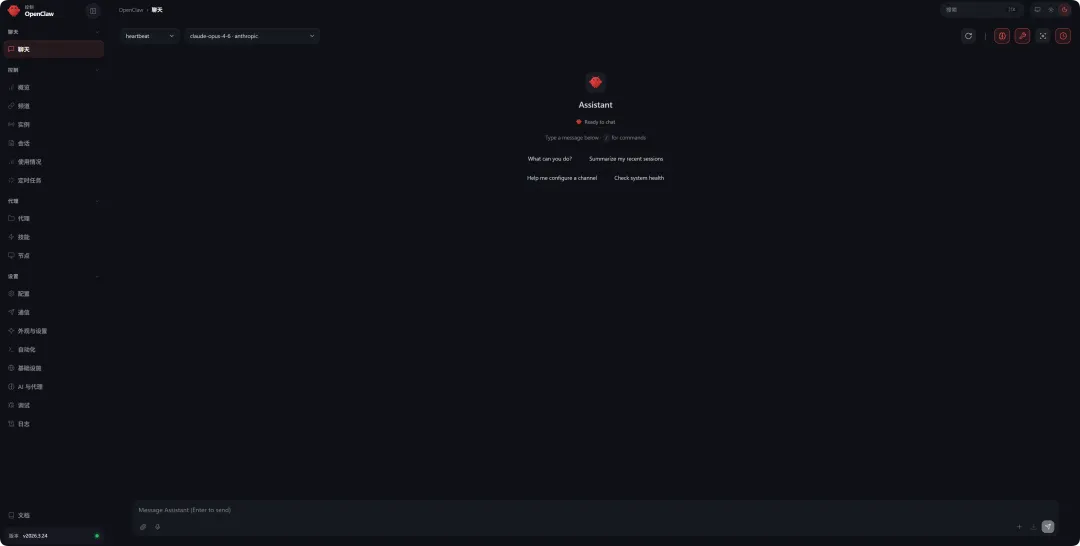
# 选 Yes 回车继续◆ I understand this is personal-by-default and shared/multi-user use requires lock-down. Continue?│ ● Yes / ○ No└# 选 QuickStart (快速开始)◆ Onboarding mode│ ● QuickStart (Configure details later via openclaw configure.)│ ○ Manual└# 这里是选择模型服务商# 如果有API KEY,可以选择对应的模型,如果还没有,可先跳过# 这里选 Skip for now 先跳过◆ Model/auth provider│ ○ Anthropic│ ○ BytePlus│ ○ Chutes│ ○ Cloudflare AI Gateway│ ○ Copilot│ ○ Custom Provider│ ○ DeepSeek│ ○ Google│ ○ Hugging Face│ ○ Kilo Gateway│ ○ Kimi Code│ ○ LiteLLM│ ○ MiniMax│ ○ Mistral AI│ ○ Moonshot AI (Kimi K2.5)│ ○ Ollama│ ○ OpenAI│ ○ OpenCode│ ○ OpenRouter│ ○ Qianfan│ ○ Qwen│ ○ Qwen (Alibaba Cloud Model Studio)│ ○ SGLang│ ○ Synthetic│ ○ Together AI│ ○ Venice AI│ ○ Vercel AI Gateway│ ○ vLLM│ ○ Volcano Engine│ ○ xAI (Grok)│ ○ Xiaomi│ ○ Z.AI│ ● Skip for now└# 上面没配置模型服务商,这里选 All providers 继续◆ Filter models by provider│ ● All providers│ ○ amazon-bedrock│ ○ anthropic│ ○ azure-openai-responses│ ○ cerebras│ ○ github-copilot│ ○ google│ ○ google-antigravity│ ○ google-gemini-cli│ ○ google-vertex│ ○ groq│ ○ huggingface│ ○ kimi-coding│ ○ minimax│ ○ minimax-cn│ ○ mistral│ ○ openai│ ○ openai-codex│ ○ opencode│ ○ opencode-go│ ○ openrouter│ ○ vercel-ai-gateway│ ○ xai│ ○ zai└# 默认模型,选Keep current即可◆ Default model│ ● Keep current (default: anthropic/claude-opus-4-6)│ ○ Enter model manually│ ○ amazon-bedrock/anthropic.claude-3-haiku-20240307-v1:0│ ○ amazon-bedrock/anthropic.claude-3-5-haiku-20241022-v1:0│ ○ amazon-bedrock/anthropic.claude-haiku-4-5-20251001-v1:0│ ○ amazon-bedrock/eu.anthropic.claude-haiku-4-5-20251001-v1:0│ ○ amazon-bedrock/global.anthropic.claude-haiku-4-5-20251001-v1:0│ ○ amazon-bedrock/us.anthropic.claude-haiku-4-5-20251001-v1:0│ ○ amazon-bedrock/anthropic.claude-opus-4-20250514-v1:0│ ○ amazon-bedrock/us.anthropic.claude-opus-4-20250514-v1:0│ ...└# 选择接入哪个消息渠道(比如QQ、微信,这里没有,选Skip for now跳过)◆ Select channel (QuickStart)│ ○ Telegram (Bot API)│ ○ WhatsApp (QR link)│ ○ Discord (Bot API)│ ○ IRC (Server + Nick)│ ○ Google Chat (Chat API)│ ○ Slack (Socket Mode)│ ○ Signal (signal-cli)│ ○ iMessage (imsg)│ ○ LINE (Messaging API)│ ○ Feishu/Lark (飞书)│ ○ Nostr (NIP-04 DMs)│ ○ Microsoft Teams (Bot Framework)│ ○ Mattermost (plugin)│ ○ Nextcloud Talk (self-hosted)│ ○ Matrix (plugin)│ ○ BlueBubbles (macOS app)│ ○ Zalo (Bot API)│ ○ Zalo (Personal Account)│ ○ Synology Chat (Webhook)│ ○ Tlon (Urbit)│ ● Skip for now (You can add channels later via `openclaw channels add`)└# 设置搜索服务商,选默认的 DuckDuckGo 即可◆ Search provider│ ○ Brave Search│ ● DuckDuckGo Search (experimental) (Free web search fallback with no API key required · key-free)│ ○ Exa Search│ ○ Firecrawl Search│ ○ Gemini (Google Search)│ ○ Grok (xAI)│ ○ Kimi (Moonshot)│ ○ Perplexity Search│ ○ Tavily Search│ ○ Skip for now└# 配置技能,选 NO 继续◆ Configure skills now? (recommended)│ ○ Yes / ● No└# 启用 hooks,选 session-memory (方向键选择,按空格键选中,回车继续)◆ Enable hooks?│ ◻ Skip for now│ ◻ 🚀 boot-md│ ◻ 📎 bootstrap-extra-files│ ◻ 📝 command-logger│ ◼ 💾 session-memory (Save session context to memory when /new or /reset command is issued)└# 远程访问选择◆ How do you want to hatch your bot?│ ○ Hatch in TUI (终端版)│ ● Open the Web UI (网页版,新手选这个)│ ○ Do this later└◆ Dashboard ready ────────────────────────────────────────────────────────────────╮│ ││ Dashboard link (with token): ││ http://127.0.0.1:18789/#token=996ad7a121ca85......aa5811d8a8c3d0xxxxxxxxx61334 ││ Copy/paste this URL in a browser on this machine to control OpenClaw. ││ No GUI detected. Open from your computer: ││ ssh -N -L 18789:127.0.0.1:18789 root@<host> ││ Then open: ││ http://localhost:18789/ ││ http://localhost:18789/#token=996ad7a121ca85......aa5811d8a8c3d0xxxxxxxxx61334 ││ Docs: ││ https://docs.openclaw.ai/gateway/remote ││ https://docs.openclaw.ai/web/control-ui ││ │├──────────────────────────────────────────────────────────────────────────────────╯# 到这里,初始化就完成了# 然后在本地电脑打开终端输入如下命令,后面替换成对应用户名和IP地址ssh -N -L 18789:127.0.0.1:18789 用户名@云服务器公网IP# 在本地电脑打开浏览器,复制粘贴上方链接,格式:http://127.0.0.1:18789/#token=996ad7a121ca85......aa5811d8a8c3d0xxxxxxxxx61334# ⚠️注意:这个链接里的 token 就是你的登录凭证,一定要保存好,不要泄露给别人,后续访问控制面板都需要这个 token。# 如果忘了 token,在终端输入 cat ~/.openclaw/openclaw.json 就能查看。
# 查看版本openclaw --version# 启动 Gatewayopenclaw gateway start# 停止 Gatewayopenclaw gateway stop# 重启 Gatewayopenclaw gateway restart# 配置管理openclaw configure# 查看配置openclaw config list# 完整设置向导openclaw onboard# 检查配置问题openclaw doctor# Gateway 网关状态openclaw status# 打开浏览器 UIopenclaw dashboard
 10个月宝宝每天需要喝多少奶粉?