Linux也有百度云喔~
- 2026-10-07 05:10:24
Linux也有百度云喔~
经常有粉丝向我抱怨,为什么每次发放资料都用百度云,自己下载了一遍之后还得再上传一遍服务器才能分析。其实大家大可不必这么周转,百度云也有Linux的发行版本,利用python包bypy来管理/传输百度云盘资源也很方便(别问我为什么不用阿里云、腾讯云。。。,我用了这些还会有人提出相同的问题)。 本教程基于Linux环境演示,计算资源不足的同学可参考:足够支持你完成硕博生涯的生信环境忘记宣传了,独享用户连技术支持都是独享的 RTX5090、4080S、5070显卡上机 访问链接:https://biomamba.xiyoucloud.net/ 欢迎联系客服微信[Biomamba_zhushou]获取帮助 如果你对下面的教程比较迷茫,那么你可以先行学习编程教程: 十小时学会Linux 生信Linux及服务器使用技巧 5.5h入门R语言 

首先需要确保你的Linux环境中有python(生信Python速查手册)我这里的版本是3.10.0。 会返回以下页面: 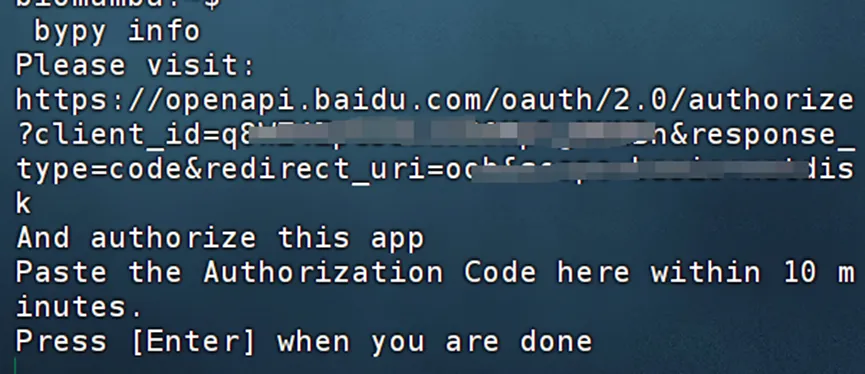
用浏览器访问上面提供的网址,登录自己的百度云盘账号: 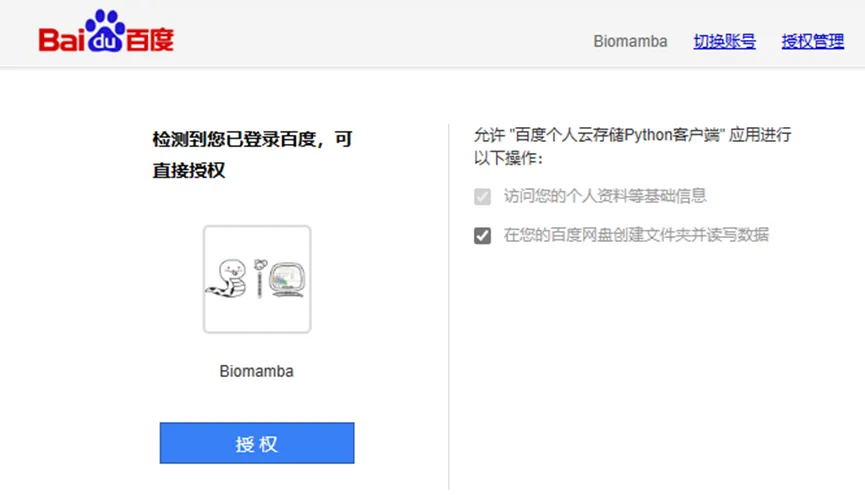
授权后会返回授权码,复制授权码: 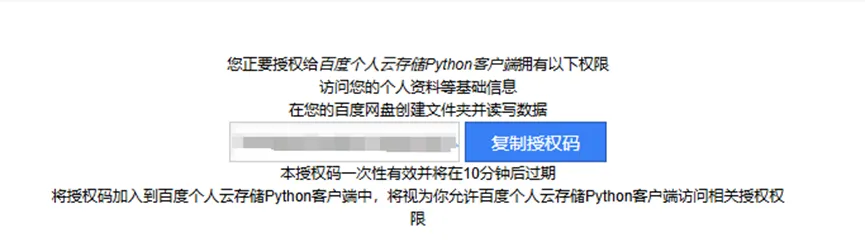
回到终端粘贴授权码,回车后会自动配置百度网盘账号密码及初始设置,返回百度云盘的存储信息,下面的信息会与各位的windows客户端相一致: 
配置好之后,在Windows客户端会多出这么一个文件夹,这个文件夹就是Linux和windows交换文件的桥梁: 
在Linux终端使用百度云,大家就得使用命令行啦,最常用的是: 1、查看目录下包含哪些内容: 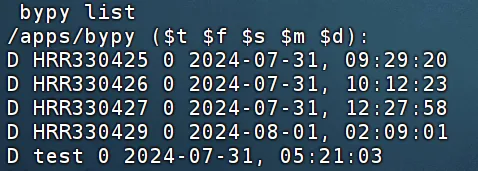
/apps/bypy/即为bypy访问的根目录 假如我在“我的网盘/我的应用数据/bypy”下有一个名为test的文件夹,我希望把它下载到我的家目录中,那么我应该: 下载时也会有进度条: 更多用法: 
本教程参考:https://github.com/houtianze/bypy 


留一个领取资料、开箱即用的单细胞分析镜像的微信号[Biomamba_zhushou],方便各位随时交流。同时我们也构建了交流群矩阵,欢迎大家入群讨论。 大家可以阅读完这几篇之后添加 给生信入门初学者的小贴士 没有检索,就没有发言权 

您点的每个赞和在看,我都认真当成了喜欢
一、写在前面
二、通过bypy使用百度云
# 安装bypypip install bypy# 配置账号密码:bypy info
bypy list2、上传文件
bypy upload /path/to/local/file /remote/path3、下载文件
bypy download /remote/path /path/to/local/filebypy download test /home/biomamba
大文件建议大家挂载在后台下载:程序可以自己跑的,不用盯着
positional arguments:command operations (quota,list, etc)options:-h, --help show this helpmessage and exit-V, --version show program'sversion number andexit-d, --debug set debugging level(-dd to increasedebugging level,-ddd to enable HTPPtraffic debugging aswell (verytalkative))[default: 0]-v, --verbose set verbosity level[default: 0]-r RETRY, --retry RETRYnumber of retryattempts on networkerror [default: 5times]-q, --quit-when-failquit when maximumnumber of retryfailed [default:False]-t TIMEOUT, --timeout TIMEOUTnetwork timeout inseconds [default:300]-s SLICE, --slice SLICEsize of file uploadslice (can use'1024', '2k', '3MB',etc) [default: 20MB]--chunk CHUNK size of filedownload chunk (canuse'1024', '2k','3MB', etc)[default: 20 MB]-e, --verify verify upload /download [default :False]-f, --force-hash force file MD5 /CRC32 calculationinstead ofusingcached value--no-resume-downloadresume instead ofrestarting whendownloading iflocalfile already exists[default: True]--include-regex INCREGEXregular expressionof files to include.ifnot specified(default),everything isincluded. fordownload, the regexapplies to theremote files; forupload, the regexapplies to the localfiles. to excludefiles, think aboutyour regex, sometips here: https://stackoverflow.com/questions/406230/regular-expression-to-match-string-not-containing-a-word[default: ]--on-dup ONDUP what to do when thesame file / folderexists in thedestination:'overwrite', 'skip','prompt' [default:overwrite]--no-symlink DON'T follow symbollinks when uploading/ syncing up--disable-ssl-check DON'T verify hostSSL cerificate--cacerts CACERTS Specify the path forCA Bundle [default:None]--mirror MIRROR Specify the PCSmirror (e.g.bj.baidupcs.com.Open 'https://pcs.baidu.com/rest/2.0/pcs/manage?method=listhost' to get thelist) to use.[default:pcs.baidu.com]--select-fastest-mirrorLet the program runsome tests andselect the fastestPCS mirror itdetectes. [default:False]--rapid-upload-only only upload largefiles that can berapidly uploaded--resume-download-revert-back RCOUNTRevert back atleastRCOUNT downloadchunk(s) and aligntochunk boundarywhen resuming thedownload. A negativevalue means NOreverts. [default:1]--move Delete sourcefiles/directoriesafter download/upload/syncdown/syncup issuccessful (Thiswill forceverification of thefiles). [default:False]--processes PROCESSESNumberofparallelprocesses. (Onlyapplies to dirsync/dl/ul).[default: 1]--downloader DOWNLOADERdownloader touse(use python ifnotspecified). validvalues: ['aria2'][default: ]--downloader-arguments DOWNLOADER_ARGSarguments for thedownloader:normally, the stringis the arguments tobe passed to thedownloader. however,when it begins with'@', it will betreated as the nameoffile, whosecontents will beused as thedownloader arguments(example: whenspecifying'@args.txt', filecontentsof'args.txt' will beused as thedownloaderarguments, not thestring'@args.txt'itself). you canalso use environmentvariable'DOWNLOADER_ARGUMENTS'tospecify thedownloader arguments(the environmentvariable has lowerpriority compared tothis argument).defaultvalues:{'aria2': '-c -k10M-x4 -s4 --file-allocation=none'}--config-dir CONFIGDIRspecify the configpath [default: /home/biomamba/.bypy]-c, --clean remove the tokenfile (need re-auth)and upload progressfile, -cc: cleanhashcachefileaswellCommands:help <command> - provide some information for the commandcdl_add <source_url> [save_path] [timeout] - add an offline (cloud) download taskcdl_addmon <source_url> [save_path] [timeout] - add an offline (cloud) download task and monitor the download progresscdl_cancel <task_id> - cancel an offline (cloud) download taskcdl_list - listoffline (cloud) download taskscdl_query <task_ids> - query existing offline (cloud) download taskscleancache - remove invalid entries fromhashcachefilecombine <remotefile> [localfile] [md5s] - try tocreate a fileat PCS by combining slices, having MD5s specifiedcompare [remotedir] [localdir] - compare the remote directorywith the localdirectorycopy/cp <from> <to> - copy a file / dir remotely at Baidu Yundelete/remove/rm <remotepath> - delete a file / dir remotely at Baidu Yundowndir [remotedir] [localdir] - download a remote directory (recursively)downfile <remotefile> [localpath] - download a remote file.download [remotepath] [localpath] - download a remote directory (recursively) / filedumpcache - display filehashcachelist/ls [remotepath] [format] [sort] [order] - list the 'remotepath'directoryat Baidu PCSlistrecycle [start] [limit] - list the recyclecontentsmeta <remotepath> [format] - get information of the given path (dir / file) at Baidu Yun.mkdir <remotedir> - create a directoryat Baidu Yunmove/mv/rename/ren <from> <to> - move a file / dir remotely at Baidu Yunquota/info - display the quota informationrefreshtoken - refresh the access tokenrestore <remotepath> - restore a filefrom the recyclebinsearch <keyword> [remotepath] [recursive] - searchfor a fileusing keyword at Baidu Yunstream <remotefile> <localpipe> [format] [chunk] - stream a video / audio file converted to M3U formatat cloud side, to a pipe.syncdown [remotedir] [localdir] [deletelocal] - sync down from the remote directoryto the localdirectorysyncup [localdir] [remotedir] [deleteremote] - sync up from the localdirectoryto the remote directoryupload [localpath] [remotepath] [ondup] - upload a fileordirectory (recursively)whoami - display the user information
如何联系我们
已有生信基地联系方式的同学无需重复添加
本文来自网友投稿或网络内容,如有侵犯您的权益请联系我们删除,联系邮箱:596563534@qq.com 。
随机文章
-
 10个月宝宝每天需要喝多少奶粉?
- Linux“圣经”书籍分享
- 救命!Linux守护进程竟是“系统熬夜人”,24小时不摸鱼
- Windows+Mac+Linux全覆盖!OpenClaw一站式安装配置教程,小白也能一次看懂
- Python零代码批量制作精美奖状
- linux常用命令:压缩命令
- 老王linux-初识内核kernel,了解系统“心脏”
- 趣谈 Linux Command⑤:Network篇——你以为你在连网,其实你在操作协议栈
- 什么是汽车操作系统之Safety Linux (3/4)|EEA系列研究笔记2026
- LINUX DO 注册:Github注册达到3年即可
- Linux:谁把根目录卸载了?