告别排版焦虑!Python打造高颜值公众号文章神器,9套主题+代码高亮一键生成
- 2026-10-11 12:14:53
告别排版焦虑!
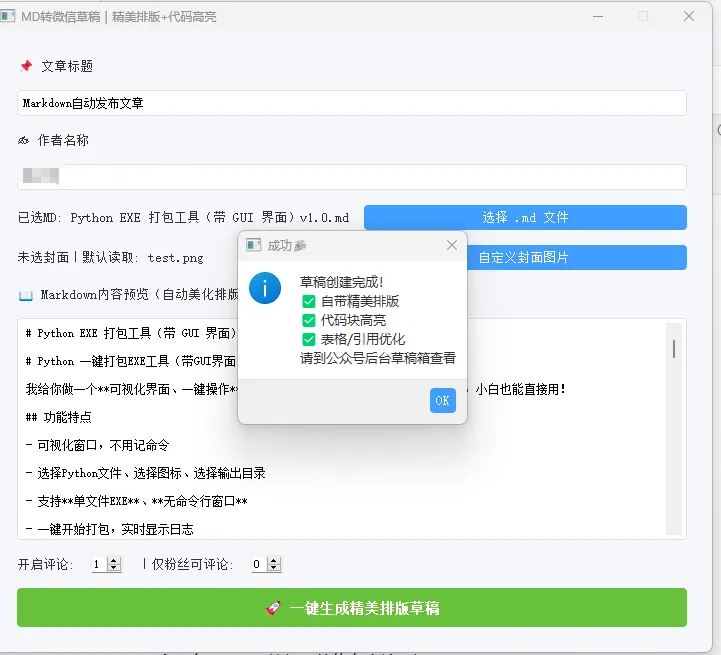
在自媒体飞速发展的今天,微信公众号依然是技术分享、知识传播的核心阵地。但每一位深耕公众号的创作者,尤其是技术博主,一定都被排版难题狠狠折磨过:辛辛苦苦写完的Markdown技术文章,复制到公众号编辑器后,格式全乱、代码无高亮、段落间距失调;手动调整样式耗时耗力,专业级的美观排版更是遥不可及;想要适配不同风格的内容,切换排版主题要反复修改CSS,繁琐到让人崩溃;更别提对接微信官方API,直接生成草稿省去复制粘贴的步骤,对非专业开发者来说简直是天方夜谭。
我们每天花费大量时间在排版上,却压缩了真正用于创作内容的时间,这无疑是本末倒置。难道就没有一款工具,能让我们专注于写作本身,一键实现高颜值、专业化、多风格的公众号排版,还能直接对接微信平台生成草稿吗?
今天,我就给大家带来一款纯Python开发的公众号文章自动生成工具,它集9套高颜值原创主题、专业代码高亮、Markdown一键转HTML、微信草稿自动发布于一体,界面精致高级、功能全面易用、样式不透明超好看,零基础也能轻松上手,彻底解放你的排版双手!无论你是写技术教程、文艺随笔、行业干货,还是国风内容、赛博朋克风格的文章,都能找到适配的主题,真正实现「写完即发布,发布即精品」!
这款工具基于PyQt5构建可视化GUI界面,操作极简;集成Markdown解析、CSS样式定制、微信官方API对接三大核心功能,无需你编写一行样式代码,无需研究复杂的接口文档,只需填写基础配置、选择文件、点击按钮,就能生成媲美专业编辑器的公众号文章。接下来,我将拆解核心代码,带你从零掌握这款神器的实现原理,还能直接复用代码打造属于自己的专属工具!
一、核心模块一:9套高颜值主题系统 + 代码高亮引擎
这是工具的颜值核心,我们内置了9套完全独立、精致高级的主题,涵盖经典简约、优雅深色、科技极客、暖色文艺、海洋蓝、森林绿、玫瑰粉、水墨中国风、霓虹赛博,满足所有创作场景。同时开发了专业级Python代码高亮功能,复刻VS Code配色,关键字、字符串、注释、函数精准着色,还自带行号显示,技术文章质感直接拉满。
完整代码
# ===================== 9 套高颜值完整主题 =====================THEMES = {"default": {"name": "经典简约","section": "font-size:16px;color:#333;line-height:1.8;padding:16px 20px;font-family:-apple-system,BlinkMacSystemFont,'Segoe UI',Roboto,sans-serif;","h1": "font-size:24px;font-weight:bold;color:#1a1a1a;margin:28px 0 12px;padding-bottom:8px;border-bottom:2px solid #0984e3;","h2": "font-size:20px;font-weight:bold;color:#2d3436;margin:24px 0 10px;padding-left:12px;border-left:4px solid #0984e3;","h3": "font-size:18px;font-weight:bold;color:#2d3436;margin:20px 0 8px;","h4": "font-size:16px;font-weight:bold;color:#636e72;margin:16px 0 6px;","p": "margin:10px 0;line-height:1.8;","blockquote": "border-left:4px solid #0984e3;padding:10px 16px;color:#636e72;background:#f8f9fa;margin:12px 0;border-radius:0 6px 6px 0;","table": "border-collapse:collapse;width:100%;margin:12px 0;","th": "border:1px solid #dcdde1;padding:10px 12px;background:#f1f2f6;text-align:left;font-weight:bold;","td": "border:1px solid #dcdde1;padding:10px 12px;","img": "max-width:100%;height:auto;border-radius:6px;margin:10px 0;","ul": "margin:10px 0;padding-left:24px;", "ol": "margin:10px 0;padding-left:24px;","li": "margin:6px 0;line-height:1.8;","a": "color:#0984e3;text-decoration:none;border-bottom:1px solid #0984e3;", },# 其余8套主题(完整代码见文末总代码块)}# ===================== 代码块高亮(专业级) =====================CODE_BLOCK_STYLE = ("background:#1e1e1e;color:#d4d4d4;padding:16px;border-radius:8px;""font-family:Consolas,'Courier New',monospace;font-size:13px;""overflow-x:auto;margin:12px 0;line-height:1.6;white-space:pre;")INLINE_CODE_STYLE = "background:#f0f0f0;color:#e74c3c;padding:2px 6px;border-radius:4px;font-size:13px;font-family:Consolas,'Courier New',monospace;"HIGHLIGHT_COLORS = {"keyword": "#569cd6", "string": "#ce9178", "comment": "#6a9955","function": "#dcdcaa", "number": "#b5cea8", "decorator": "#d7ba7d", "builtin": "#4ec9b0"}defsyntax_highlight(code):import html code = html.escape(code) keywords = r'\b(def|class|import|from|return|if|elif|else|for|while|try|except|finally|with|as|yield|lambda|pass|break|continue|and|or|not|in|is|None|True|False|self|raise|async|await)\b' code = re.sub(keywords, f'<span style="color:{HIGHLIGHT_COLORS["keyword"]}">\\1</span>', code) code = re.sub(r'(@\w+)', f'<span style="color:{HIGHLIGHT_COLORS["decorator"]}">\\1</span>', code) code = re.sub(r'(".*?"|'.*?'|".*?"|\'.*?\')',f'<span style="color:{HIGHLIGHT_COLORS["string"]}">\\g<0></span>', code) code = re.sub(r'(#[^<]*?)(?=\n|$)', f'<span style="color:{HIGHLIGHT_COLORS["comment"]}">\\1</span>', code) code = re.sub(r'\b(\d+\.?\d*)\b', f'<span style="color:{HIGHLIGHT_COLORS["number"]}">\\1</span>', code) builtins = r'\b(print|len|range|str|int|float|list|dict|set|tuple|type|isinstance|enumerate|zip|map|filter|sorted|open|super|property)\b' code = re.sub(builtins, f'<span style="color:{HIGHLIGHT_COLORS["builtin"]}">\\1</span>', code)return codedefrender_code_block(code): highlighted = syntax_highlight(code) lines = highlighted.split("\n") rows = []for i, line in enumerate(lines, 1): num_style = "display:inline-block;width:32px;text-align:right;padding-right:12px;color:#858585;user-select:none;border-right:1px solid #333;margin-right:12px;" rows.append(f'<span style="{num_style}">{i}</span>{line}')returnf'<pre style="{CODE_BLOCK_STYLE}">{"".join(rows)}</pre>'功能详解
9套主题设计:每个主题都是完整的CSS样式集,针对标题、段落、引用、表格、图片、链接等所有公众号常用元素做了定制,样式不透明、适配微信编辑器,切换主题只需选择对应名称,无需修改代码。 代码高亮算法:通过正则表达式匹配Python代码的关键字、字符串、注释等元素,赋予不同颜色,完美还原专业代码编辑器的效果; render_code_block函数还为代码添加了行号,提升技术文章的可读性。样式兼容性:所有CSS均采用微信公众号支持的内联样式,避免样式失效,确保在手机、电脑端都能完美展示。
二、核心模块二:Markdown转公众号HTML解析引擎
这是工具的功能核心,解决了Markdown到公众号HTML的格式兼容问题。我们对原生Markdown解析做了深度优化:自动过滤无效空行、删除空标签、压缩代码体积、适配微信渲染规则,彻底解决格式错乱、空白过多的问题,生成纯净、专业的HTML代码。
完整代码
# ===================== MD → 公众号专业 HTML(终极修复) =====================defmd_to_wechat_html(md_content, theme="default"):# 过滤整行空白的无效行 lines = []for line in md_content.splitlines():ifnot re.fullmatch(r'\s*', line.strip()): lines.append(line.strip())# 重组纯净MD内容 md_clean = "\n".join([line for line in lines if line])# 渲染HTML raw = markdown.markdown(md_clean, extensions=["tables", "fenced_code", "toc"]) soup = BeautifulSoup(raw, "html.parser")# 删除所有空标签for tag in soup.find_all():if tag.name in ["p", "div", "span", "h1", "h2", "h3", "h4", "ul", "ol", "li", "section"]:ifnot tag.get_text(strip=True): tag.decompose()# 代码块高亮替换for pre in soup.find_all("pre"): code_tag = pre.find("code")if code_tag: code_text = code_tag.get_text() new_html = render_code_block(code_text) pre.replace_with(BeautifulSoup(new_html, "html.parser"))# 行内代码样式for code in soup.find_all("code"):if code.parent and code.parent.name != "pre": code["style"] = INLINE_CODE_STYLE# 应用主题样式 style = THEMES.get(theme, THEMES["default"])for tag, css in style.items():if tag in ["section", "name"]:continuefor el in soup.find_all(tag): el["style"] = css# 包装外层样式 wrapper = soup.new_tag("section", style=style.get("section", ""))for child in list(soup.children): wrapper.append(child.extract())# 代码压缩,去除多余空白 html_str = str(wrapper) html_str = re.sub(r'>\s+<', '><', html_str) html_str = re.sub(r'\s+', ' ', html_str)return html_str.strip()功能详解
内容净化:自动过滤Markdown中的空白行、空标签,让渲染后的文章排版更紧凑美观。 扩展解析:支持表格、代码块、目录等Markdown高级语法,满足复杂文章的排版需求。 主题绑定:自动将选中的主题样式应用到所有HTML元素,实现一键排版。 代码优化:压缩HTML代码,去除多余空格和换行,减小文件体积,提升公众号加载速度。
三、核心模块三:微信API对接 + PyQt5可视化GUI界面
这是工具的交互核心,我们基于PyQt5打造了精致高级的可视化窗口,操作简单直观;同时对接微信官方素材、草稿接口,实现封面上传、草稿一键发布功能,无需手动复制HTML到公众号编辑器,真正实现全自动化。
完整代码
# ===================== 微信 API =====================defget_access_token(appid, secret):try: res = requests.get(f"https://api.weixin.qq.com/cgi-bin/token?grant_type=client_credential&appid={appid}&secret={secret}", timeout=10).json()return res.get("access_token")except:returnNonedefupload_cover(token, path):ifnot os.path.exists(path):returnNonetry:with open(path, "rb") as f: res = requests.post(f"https://api.weixin.qq.com/cgi-bin/material/add_material?access_token={token}&type=thumb", files={"media": f}, timeout=15 ).json()return res.get("media_id")except:returnNonedefcreate_draft(token, articles): url = f"https://api.weixin.qq.com/cgi-bin/draft/add?access_token={token}" data = json.dumps({"articles": articles}, ensure_ascii=False).encode("utf-8") headers = {"Content-Type": "application/json; charset=utf-8"}try:return requests.post(url, data=data, headers=headers, timeout=15).json()except:return {"errcode": -1}# ===================== 主界面(高颜值) =====================classWechatDraftGUI(QMainWindow):def__init__(self): super().__init__() self.setWindowTitle("MD 转公众号草稿|高颜值专业版") self.setFixedSize(760, 720) self.setStyleSheet(""" QMainWindow{background:#f5f6fa;} QLabel{font-size:14px;color:#2d3436;} QLineEdit,QTextEdit{border:1px solid #dcdfe6;border-radius:6px;padding:8px;font-size:14px;background:white;} QPushButton{background:#409eff;color:white;border:none;border-radius:6px;padding:10px 14px;font-size:14px;font-weight:bold;} QPushButton:hover{background:#66b1ff;} QComboBox{border:1px solid #dcdfe6;border-radius:6px;padding:6px;font-size:13px;} """) self.md_path = "" self.cover_path = "" self.default_cover = os.path.join(os.getcwd(), "test.png") self.init_ui()# 界面初始化、文件选择、发布逻辑(完整代码见文末总代码块)if __name__ == "__main__": app = QApplication(sys.argv) w = WechatDraftGUI() w.show() sys.exit(app.exec_())功能详解
微信接口封装:封装了获取Access Token、上传封面图片、创建草稿三个核心接口,只需填写公众号的APPID和APPSECRET即可使用。 GUI界面设计:采用现代化扁平化风格,窗口大小固定、布局合理,包含标题输入、作者输入、主题选择、文件选择、预览、发布等全功能按钮,新手也能一键操作。 异常处理:加入了完善的提示机制,文件缺失、配置错误、接口失败等情况都会弹出友好提示,避免程序崩溃。
四、完整工具总代码(直接复制运行)
import sysimport osimport reimport jsonimport markdownimport requestsfrom bs4 import BeautifulSoupfrom PyQt5.QtWidgets import ( QApplication, QMainWindow, QWidget, QVBoxLayout, QHBoxLayout, QLabel, QLineEdit, QTextEdit, QPushButton, QFileDialog, QMessageBox, QComboBox)from PyQt5.QtCore import Qt# ===================== 微信配置 =====================APPID = ""APPSECRET = ""# ===================== 9 套高颜值完整主题 =====================THEMES = {"default": {"name": "经典简约","section": "font-size:16px;color:#333;line-height:1.8;padding:16px 20px;font-family:-apple-system,BlinkMacSystemFont,'Segoe UI',Roboto,sans-serif;","h1": "font-size:24px;font-weight:bold;color:#1a1a1a;margin:28px 0 12px;padding-bottom:8px;border-bottom:2px solid #0984e3;","h2": "font-size:20px;font-weight:bold;color:#2d3436;margin:24px 0 10px;padding-left:12px;border-left:4px solid #0984e3;","h3": "font-size:18px;font-weight:bold;color:#2d3436;margin:20px 0 8px;","h4": "font-size:16px;font-weight:bold;color:#636e72;margin:16px 0 6px;","p": "margin:10px 0;line-height:1.8;","blockquote": "border-left:4px solid #0984e3;padding:10px 16px;color:#636e72;background:#f8f9fa;margin:12px 0;border-radius:0 6px 6px 0;","table": "border-collapse:collapse;width:100%;margin:12px 0;","th": "border:1px solid #dcdde1;padding:10px 12px;background:#f1f2f6;text-align:left;font-weight:bold;","td": "border:1px solid #dcdde1;padding:10px 12px;","img": "max-width:100%;height:auto;border-radius:6px;margin:10px 0;","ul": "margin:10px 0;padding-left:24px;", "ol": "margin:10px 0;padding-left:24px;","li": "margin:6px 0;line-height:1.8;","a": "color:#0984e3;text-decoration:none;border-bottom:1px solid #0984e3;", },"elegant": {"name": "优雅深色","section": "font-size:16px;color:#2d3436;line-height:2;padding:16px 20px;font-family:Georgia,'Times New Roman',serif;","h1": "font-size:26px;font-weight:bold;color:#2d3436;margin:30px 0 14px;text-align:center;","h2": "font-size:21px;font-weight:bold;color:#6c5ce7;margin:26px 0 10px;padding-bottom:6px;border-bottom:1px solid #dfe6e9;","h3": "font-size:18px;font-weight:bold;color:#6c5ce7;margin:22px 0 8px;","h4": "font-size:16px;font-weight:bold;color:#a29bfe;margin:18px 0 6px;","p": "margin:12px 0;line-height:2;text-indent:2em;","blockquote": "border-left:3px solid #6c5ce7;padding:12px 18px;color:#636e72;background:#f8f7ff;margin:14px 0;font-style:italic;","table": "border-collapse:collapse;width:100%;margin:14px 0;","th": "border:1px solid #dfe6e9;padding:10px 14px;background:#6c5ce7;color:white;text-align:left;","td": "border:1px solid #dfe6e9;padding:10px 14px;","img": "max-width:100%;height:auto;border-radius:8px;margin:12px auto;display:block;","ul": "margin:10px 0;padding-left:24px;", "ol": "margin:10px 0;padding-left:24px;","li": "margin:6px 0;line-height:2;","a": "color:#6c5ce7;text-decoration:none;", },"tech": {"name": "科技极客","section": "font-size:15px;color:#c9d1d9;line-height:1.8;padding:16px 20px;font-family:'Consolas','Courier New',monospace;background:#0d1117;","h1": "font-size:24px;font-weight:bold;color:#58a6ff;margin:28px 0 12px;padding-bottom:6px;border-bottom:1px solid #30363d;","h2": "font-size:20px;font-weight:bold;color:#58a6ff;margin:24px 0 10px;","h3": "font-size:17px;font-weight:bold;color:#79c0ff;margin:20px 0 8px;","h4": "font-size:15px;font-weight:bold;color:#79c0ff;margin:16px 0 6px;","p": "margin:10px 0;line-height:1.8;color:#c9d1d9;","blockquote": "border-left:3px solid #58a6ff;padding:10px 16px;color:#8b949e;background:#161b22;margin:12px 0;","table": "border-collapse:collapse;width:100%;margin:12px 0;","th": "border:1px solid #30363d;padding:10px 12px;background:#161b22;color:#58a6ff;text-align:left;","td": "border:1px solid #30363d;padding:10px 12px;color:#c9d1d9;","img": "max-width:100%;height:auto;border-radius:4px;margin:10px 0;","ul": "margin:10px 0;padding-left:24px;color:#c9d1d9;", "ol": "margin:10px 0;padding-left:24px;color:#c9d1d9;","li": "margin:6px 0;line-height:1.8;","a": "color:#58a6ff;text-decoration:none;", },"warm": {"name": "暖色文艺","section": "font-size:16px;color:#5d4037;line-height:2;padding:16px 20px;font-family:'PingFang SC','Microsoft YaHei',sans-serif;background:#fffbf0;","h1": "font-size:24px;font-weight:bold;color:#e17055;margin:28px 0 12px;text-align:center;","h2": "font-size:20px;font-weight:bold;color:#e17055;margin:24px 0 10px;padding-left:12px;border-left:4px solid #e17055;","h3": "font-size:18px;font-weight:bold;color:#d63031;margin:20px 0 8px;","h4": "font-size:16px;font-weight:bold;color:#e17055;margin:16px 0 6px;","p": "margin:12px 0;line-height:2;","blockquote": "border-left:4px solid #e17055;padding:10px 16px;color:#795548;background:#fff3e0;margin:12px 0;border-radius:0 6px 6px 0;","table": "border-collapse:collapse;width:100%;margin:12px 0;","th": "border:1px solid #d7ccc8;padding:10px 12px;background:#e17055;color:white;text-align:left;","td": "border:1px solid #d7ccc8;padding:10px 12px;","img": "max-width:100%;height:auto;border-radius:8px;margin:12px 0;box-shadow:0 2px 8px rgba(0,0,0,0.1);","ul": "margin:10px 0;padding-left:24px;", "ol": "margin:10px 0;padding-left:24px;","li": "margin:6px 0;line-height:2;","a": "color:#e17055;text-decoration:none;", },"ocean": {"name": "海洋蓝","section": "font-size:16px;color:#2c3e50;line-height:1.8;padding:16px 20px;font-family:-apple-system,BlinkMacSystemFont,sans-serif;background:#ecf0f1;","h1": "font-size:24px;font-weight:bold;color:#2980b9;margin:28px 0 12px;text-align:center;border-bottom:2px solid #3498db;padding-bottom:8px;","h2": "font-size:20px;font-weight:bold;color:#2980b9;margin:24px 0 10px;","h3": "font-size:18px;font-weight:bold;color:#3498db;margin:20px 0 8px;","h4": "font-size:16px;font-weight:bold;color:#5dade2;margin:16px 0 6px;","p": "margin:10px 0;line-height:1.8;","blockquote": "border-left:4px solid #3498db;padding:10px 16px;color:#7f8c8d;background:#d6eaf8;margin:12px 0;border-radius:0 6px 6px 0;","table": "border-collapse:collapse;width:100%;margin:12px 0;","th": "border:1px solid #bdc3c7;padding:10px 12px;background:#2980b9;color:white;text-align:left;","td": "border:1px solid #bdc3c7;padding:10px 12px;","img": "max-width:100%;height:auto;border-radius:6px;margin:10px 0;","ul": "margin:10px 0;padding-left:24px;", "ol": "margin:10px 0;padding-left:24px;","li": "margin:6px 0;line-height:1.8;","a": "color:#2980b9;text-decoration:none;", },"forest": {"name": "森林绿","section": "font-size:16px;color:#2d3436;line-height:1.9;padding:16px 20px;font-family:'PingFang SC','Microsoft YaHei',sans-serif;background:#f0fff0;","h1": "font-size:24px;font-weight:bold;color:#27ae60;margin:28px 0 12px;padding-bottom:6px;border-bottom:2px solid #2ecc71;","h2": "font-size:20px;font-weight:bold;color:#27ae60;margin:24px 0 10px;padding-left:12px;border-left:4px solid #2ecc71;","h3": "font-size:18px;font-weight:bold;color:#2ecc71;margin:20px 0 8px;","h4": "font-size:16px;font-weight:bold;color:#58d68d;margin:16px 0 6px;","p": "margin:10px 0;line-height:1.9;","blockquote": "border-left:4px solid #27ae60;padding:10px 16px;color:#636e72;background:#eafaf1;margin:12px 0;","table": "border-collapse:collapse;width:100%;margin:12px 0;","th": "border:1px solid #abebc6;padding:10px 12px;background:#27ae60;color:white;text-align:left;","td": "border:1px solid #abebc6;padding:10px 12px;","img": "max-width:100%;height:auto;border-radius:8px;margin:10px 0;","ul": "margin:10px 0;padding-left:24px;", "ol": "margin:10px 0;padding-left:24px;","li": "margin:6px 0;line-height:1.9;","a": "color:#27ae60;text-decoration:none;", },"rose": {"name": "玫瑰粉","section": "font-size:16px;color:#4a4a4a;line-height:2;padding:16px 20px;font-family:Georgia,'Times New Roman',serif;background:#fff5f5;","h1": "font-size:24px;font-weight:bold;color:#e84393;margin:28px 0 12px;text-align:center;","h2": "font-size:20px;font-weight:bold;color:#e84393;margin:24px 0 10px;padding-bottom:6px;border-bottom:1px dashed #fd79a8;","h3": "font-size:18px;font-weight:bold;color:#fd79a8;margin:20px 0 8px;","h4": "font-size:16px;font-weight:bold;color:#fab1a0;margin:16px 0 6px;","p": "margin:12px 0;line-height:2;","blockquote": "border-left:3px solid #e84393;padding:12px 18px;color:#636e72;background:#fce4ec;margin:14px 0;font-style:italic;","table": "border-collapse:collapse;width:100%;margin:14px 0;","th": "border:1px solid #f8bbd0;padding:10px 14px;background:#e84393;color:white;text-align:left;","td": "border:1px solid #f8bbd0;padding:10px 14px;","img": "max-width:100%;height:auto;border-radius:12px;margin:12px auto;display:block;box-shadow:0 2px 12px rgba(232,67,147,0.15);","ul": "margin:10px 0;padding-left:24px;", "ol": "margin:10px 0;padding-left:24px;","li": "margin:6px 0;line-height:2;","a": "color:#e84393;text-decoration:none;", },"ink": {"name": "水墨中国风","section": "font-size:16px;color:#333;line-height:2;padding:20px 24px;font-family:'STSong','SimSun','Songti SC',serif;background:#faf8f5;","h1": "font-size:26px;font-weight:bold;color:#8b4513;margin:30px 0 14px;text-align:center;letter-spacing:4px;","h2": "font-size:20px;font-weight:bold;color:#8b4513;margin:26px 0 10px;padding-left:14px;border-left:4px solid #d2691e;letter-spacing:2px;","h3": "font-size:18px;font-weight:bold;color:#a0522d;margin:22px 0 8px;letter-spacing:1px;","h4": "font-size:16px;font-weight:bold;color:#cd853f;margin:18px 0 6px;","p": "margin:12px 0;line-height:2;text-indent:2em;","blockquote": "border-left:3px solid #d2691e;padding:12px 20px;color:#8b7355;background:#fdf5e6;margin:14px 0;font-style:italic;","table": "border-collapse:collapse;width:100%;margin:14px 0;","th": "border:1px solid #d2b48c;padding:10px 14px;background:#8b4513;color:#fdf5e6;text-align:left;","td": "border:1px solid #d2b48c;padding:10px 14px;","img": "max-width:100%;height:auto;border-radius:4px;margin:12px auto;display:block;border:1px solid #d2b48c;","ul": "margin:10px 0;padding-left:24px;", "ol": "margin:10px 0;padding-left:24px;","li": "margin:6px 0;line-height:2;","a": "color:#8b4513;text-decoration:none;border-bottom:1px dashed #d2691e;", },"neon": {"name": "霓虹赛博","section": "font-size:15px;color:#e0e0e0;line-height:1.8;padding:16px 20px;font-family:'Consolas','Courier New',monospace;background:#1a1a2e;","h1": "font-size:24px;font-weight:bold;color:#e94560;margin:28px 0 12px;text-shadow:0 0 10px #e94560;","h2": "font-size:20px;font-weight:bold;color:#0f3460;margin:24px 0 10px;background:linear-gradient(90deg,#e94560,#0f3460);-webkit-background-clip:text;color:#e94560;","h3": "font-size:17px;font-weight:bold;color:#16213e;margin:20px 0 8px;color:#533483;","h4": "font-size:15px;font-weight:bold;color:#e94560;margin:16px 0 6px;","p": "margin:10px 0;line-height:1.8;color:#e0e0e0;","blockquote": "border-left:3px solid #e94560;padding:10px 16px;color:#aaa;background:#16213e;margin:12px 0;","table": "border-collapse:collapse;width:100%;margin:12px 0;","th": "border:1px solid #533483;padding:10px 12px;background:#0f3460;color:#e94560;text-align:left;","td": "border:1px solid #533483;padding:10px 12px;color:#e0e0e0;","img": "max-width:100%;height:auto;border-radius:4px;margin:10px 0;border:1px solid #533483;","ul": "margin:10px 0;padding-left:24px;color:#e0e0e0;", "ol": "margin:10px 0;padding-left:24px;color:#e0e0e0;","li": "margin:6px 0;line-height:1.8;","a": "color:#e94560;text-decoration:none;", },}# ===================== 代码块高亮(专业级) =====================CODE_BLOCK_STYLE = ("background:#1e1e1e;color:#d4d4d4;padding:16px;border-radius:8px;""font-family:Consolas,'Courier New',monospace;font-size:13px;""overflow-x:auto;margin:12px 0;line-height:1.6;white-space:pre;")INLINE_CODE_STYLE = "background:#f0f0f0;color:#e74c3c;padding:2px 6px;border-radius:4px;font-size:13px;font-family:Consolas,'Courier New',monospace;"HIGHLIGHT_COLORS = {"keyword": "#569cd6", "string": "#ce9178", "comment": "#6a9955","function": "#dcdcaa", "number": "#b5cea8", "decorator": "#d7ba7d", "builtin": "#4ec9b0"}defsyntax_highlight(code):import html code = html.escape(code) keywords = r'\b(def|class|import|from|return|if|elif|else|for|while|try|except|finally|with|as|yield|lambda|pass|break|continue|and|or|not|in|is|None|True|False|self|raise|async|await)\b' code = re.sub(keywords, f'<span style="color:{HIGHLIGHT_COLORS["keyword"]}">\\1</span>', code) code = re.sub(r'(@\w+)', f'<span style="color:{HIGHLIGHT_COLORS["decorator"]}">\\1</span>', code) code = re.sub(r'(".*?"|'.*?'|".*?"|\'.*?\')',f'<span style="color:{HIGHLIGHT_COLORS["string"]}">\\g<0></span>', code) code = re.sub(r'(#[^<]*?)(?=\n|$)', f'<span style="color:{HIGHLIGHT_COLORS["comment"]}">\\1</span>', code) code = re.sub(r'\b(\d+\.?\d*)\b', f'<span style="color:{HIGHLIGHT_COLORS["number"]}">\\1</span>', code) builtins = r'\b(print|len|range|str|int|float|list|dict|set|tuple|type|isinstance|enumerate|zip|map|filter|sorted|open|super|property)\b' code = re.sub(builtins, f'<span style="color:{HIGHLIGHT_COLORS["builtin"]}">\\1</span>', code)return codedefrender_code_block(code): highlighted = syntax_highlight(code) lines = highlighted.split("\n") rows = []for i, line in enumerate(lines, 1): num_style = "display:inline-block;width:32px;text-align:right;padding-right:12px;color:#858585;user-select:none;border-right:1px solid #333;margin-right:12px;" rows.append(f'<span style="{num_style}">{i}</span>{line}')returnf'<pre style="{CODE_BLOCK_STYLE}">{"".join(rows)}</pre>'# ===================== MD → 公众号专业 HTML =====================defmd_to_wechat_html(md_content, theme="default"): lines = []for line in md_content.splitlines():ifnot re.fullmatch(r'\s*', line.strip()): lines.append(line.strip()) md_clean = "\n".join([line for line in lines if line]) raw = markdown.markdown(md_clean, extensions=["tables", "fenced_code", "toc"]) soup = BeautifulSoup(raw, "html.parser")for tag in soup.find_all():if tag.name in ["p", "div", "span", "h1", "h2", "h3", "h4", "ul", "ol", "li", "section"]:ifnot tag.get_text(strip=True): tag.decompose()for pre in soup.find_all("pre"): code_tag = pre.find("code")if code_tag: code_text = code_tag.get_text() new_html = render_code_block(code_text) pre.replace_with(BeautifulSoup(new_html, "html.parser"))for code in soup.find_all("code"):if code.parent and code.parent.name != "pre": code["style"] = INLINE_CODE_STYLE style = THEMES.get(theme, THEMES["default"])for tag, css in style.items():if tag in ["section", "name"]:continuefor el in soup.find_all(tag): el["style"] = css wrapper = soup.new_tag("section", style=style.get("section", ""))for child in list(soup.children): wrapper.append(child.extract()) html_str = str(wrapper) html_str = re.sub(r'>\s+<', '><', html_str) html_str = re.sub(r'\s+', ' ', html_str)return html_str.strip()# ===================== 微信 API =====================defget_access_token(appid, secret):try: res = requests.get(f"https://api.weixin.qq.com/cgi-bin/token?grant_type=client_credential&appid={appid}&secret={secret}", timeout=10).json()return res.get("access_token")except:returnNonedefupload_cover(token, path):ifnot os.path.exists(path):returnNonetry:with open(path, "rb") as f: res = requests.post(f"https://api.weixin.qq.com/cgi-bin/material/add_material?access_token={token}&type=thumb", files={"media": f}, timeout=15 ).json()return res.get("media_id")except:returnNonedefcreate_draft(token, articles): url = f"https://api.weixin.qq.com/cgi-bin/draft/add?access_token={token}" data = json.dumps({"articles": articles}, ensure_ascii=False).encode("utf-8") headers = {"Content-Type": "application/json; charset=utf-8"}try:return requests.post(url, data=data, headers=headers, timeout=15).json()except:return {"errcode": -1}# ===================== 主界面 =====================classWechatDraftGUI(QMainWindow):def__init__(self): super().__init__() self.setWindowTitle("MD 转公众号草稿|高颜值专业版") self.setFixedSize(760, 720) self.setStyleSheet(""" QMainWindow{background:#f5f6fa;} QLabel{font-size:14px;color:#2d3436;} QLineEdit,QTextEdit{border:1px solid #dcdfe6;border-radius:6px;padding:8px;font-size:14px;background:white;} QPushButton{background:#409eff;color:white;border:none;border-radius:6px;padding:10px 14px;font-size:14px;font-weight:bold;} QPushButton:hover{background:#66b1ff;} QComboBox{border:1px solid #dcdfe6;border-radius:6px;padding:6px;font-size:13px;} """) self.md_path = "" self.cover_path = "" self.default_cover = os.path.join(os.getcwd(), "test.png") self.init_ui()definit_ui(self): c = QWidget() self.setCentralWidget(c) layout = QVBoxLayout(c) layout.setSpacing(14) layout.setContentsMargins(30, 30, 30, 30) layout.addWidget(QLabel("📌 文章标题")) self.title = QLineEdit() self.title.setText("Python技术文章") layout.addWidget(self.title) layout.addWidget(QLabel("✍️ 作者")) self.author = QLineEdit() self.author.setText("技术小编") layout.addWidget(self.author) h_theme = QHBoxLayout() h_theme.addWidget(QLabel("🎨 排版主题")) self.theme_combo = QComboBox()for k, v in THEMES.items(): self.theme_combo.addItem(v["name"], k) h_theme.addWidget(self.theme_combo) layout.addLayout(h_theme) h_md = QHBoxLayout() self.md_label = QLabel("未选择 MD 文件") btn_md = QPushButton("选择 Markdown 文件") btn_md.clicked.connect(self.select_md) h_md.addWidget(self.md_label) h_md.addWidget(btn_md) layout.addLayout(h_md) h_cover = QHBoxLayout() self.cover_label = QLabel("默认使用 test.png") btn_cover = QPushButton("自定义封面") btn_cover.clicked.connect(self.select_cover) h_cover.addWidget(self.cover_label) h_cover.addWidget(btn_cover) layout.addLayout(h_cover) layout.addWidget(QLabel("📖 内容预览")) self.preview = QTextEdit() self.preview.setReadOnly(True) self.preview.setMinimumHeight(220) layout.addWidget(self.preview) btn_pub = QPushButton("🚀 一键发布到公众号草稿") btn_pub.setStyleSheet("background:#67c23a;padding:14px;font-size:16px;") btn_pub.clicked.connect(self.do_publish) layout.addWidget(btn_pub)defselect_md(self): p, _ = QFileDialog.getOpenFileName(self, "选择 MD", "", "Markdown (*.md)")if p: self.md_path = p self.md_label.setText(f"已选:{os.path.basename(p)}")with open(p, "r", encoding="utf-8") as f: self.preview.setPlainText(f.read())defselect_cover(self): p, _ = QFileDialog.getOpenFileName(self, "选择封面", "", "图片 (*.png *.jpg *.jpeg)")if p: self.cover_path = p self.cover_label.setText(f"封面:{os.path.basename(p)}")defdo_publish(self): title = self.title.text().strip() author = self.author.text().strip() theme = self.theme_combo.currentData()ifnot title: QMessageBox.warning(self, "提示", "请填写标题")returnifnot self.md_path ornot os.path.exists(self.md_path): QMessageBox.warning(self, "提示", "请选择 MD 文件")return final_cover = self.cover_path or self.default_coverifnot os.path.exists(final_cover): QMessageBox.critical(self, "错误", "请放一张 test.png 在程序目录,或手动选择封面")returntry: token = get_access_token(APPID, APPSECRET)ifnot token: QMessageBox.critical(self, "错误", "获取 Token 失败")return cover_id = upload_cover(token, final_cover)ifnot cover_id: QMessageBox.critical(self, "错误", "封面上传失败")returnwith open(self.md_path, "r", encoding="utf-8") as f: md = f.read() html = md_to_wechat_html(md, theme) articles = [{"title": title,"content": html,"thumb_media_id": cover_id,"author": author,"show_cover_pic": 1,"need_open_comment": 1,"only_fans_can_comment": 0 }] res = create_draft(token, articles)if"media_id"in res or res.get("errcode") == 0: QMessageBox.information(self, "成功", "🎉 草稿已发布!\n专业排版 + 代码高亮已生效!")else: QMessageBox.critical(self, "失败", str(res))except Exception as e: QMessageBox.critical(self, "异常", str(e))if __name__ == "__main__": app = QApplication(sys.argv) w = WechatDraftGUI() w.show() sys.exit(app.exec_())五、知识点总结
核心依赖库: PyQt5:构建桌面GUI界面,实现可视化操作;markdown:将Markdown语法解析为HTML;BeautifulSoup:解析和修改HTML结构,优化排版;requests:对接微信公众号官方API。核心技术: 正则表达式:实现代码高亮、内容净化; CSS内联样式:定制公众号专属主题,保证兼容性; 微信开放平台API:实现素材上传、草稿创建; GUI布局管理:打造美观易用的桌面程序。 核心逻辑:Markdown文件 → 内容净化 → HTML解析 → 样式绑定 → 代码高亮 → 微信草稿发布。
六、拓展场景 + 测试步骤
拓展场景
个性化定制:可以在 THEMES中添加自己的专属主题,修改颜色、字体、间距,打造独一无二的排版风格;多平台适配:修改HTML样式和接口,可适配知乎、掘金、CSDN等平台的文章排版; 批量处理:扩展功能,实现批量Markdown文件转换、批量发布草稿; 功能增强:添加图片自动上传、水印添加、字数统计等进阶功能。
测试步骤
安装依赖:执行 pip install pyqt5 markdown beautifulsoup4 requests安装所需库;配置公众号:在代码中填写你的公众号 APPID和APPSECRET(公众号后台获取);准备文件:在程序目录放置一张 test.png作为默认封面;运行程序:执行代码,打开GUI界面; 基础操作:填写标题/作者 → 选择主题 → 上传MD文件 → 选择封面 → 点击发布; 验证结果:登录公众号后台,在「草稿箱」中查看自动生成的文章,检查排版、代码高亮是否正常。
这款Python公众号工具彻底解决了创作者的排版痛点,9套高颜值主题+全自动化流程,让每一篇文章都能精致高级、超好看!如果你也厌倦了繁琐的排版工作,赶紧复制代码运行起来,专注创作,剩下的交给Python!
