用Python绘制出超萌「一二和布布」!
- 2026-09-07 08:57:26
用Python绘制出超萌「一二和布布」!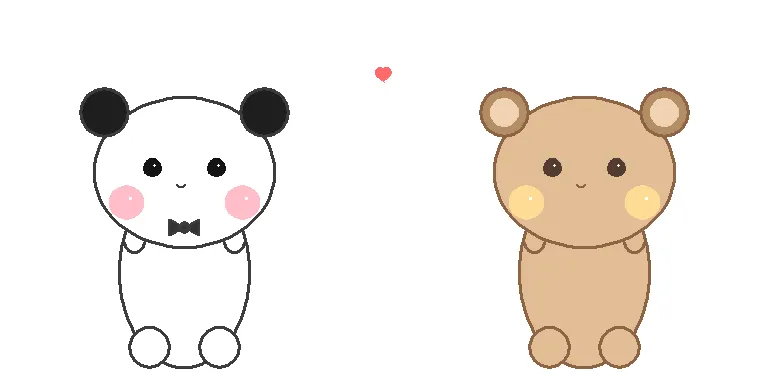
是不是每次用Python的turtle模块,画出来的都是歪歪扭扭的火柴人?😭 今天教你如何用数学椭圆公式+图层叠加技巧,画出圆润可爱的卡通形象!
🎯 核心技术点:为什么你画的"turtle"总是不好看?
很多教程教你用t.circle()画圆,但卡通形象的头其实是扁的,身体是长的!我们需要椭圆,不是正圆。
1️⃣ 椭圆绘制算法(核心技巧)
放弃简单的circle(),我们用参数方程画椭圆:
def draw_ellipse(self, t, cx, cy, rx, ry, fill_color, outline_color):"""绘制椭圆:cx,cy为中心,rx为横向半径,ry为纵向半径"""points = []for angle in range(0, 361, 5):rad = math.radians(angle)x = cx + rx * math.cos(rad)y = cy + ry * math.sin(rad)points.append((x, y))t.goto(points[0])t.color(outline_color, fill_color)t.begin_fill()for x, y in points[1:]:t.goto(x, y)t.end_fill()
关键点:通过调整rx(横向半径)和ry(纵向半径),我们可以画出:
扁圆:
rx > ry(用于头部,像压扁的汤圆)长圆:
rx < ry(用于身体,修长显瘦)
2️⃣ 图层顺序的艺术
turtle没有图层概念,绘制顺序决定遮挡关系!
# 正确顺序:先画身体,再画头self.draw_ellipse(body) # 身体在下层self.draw_ellipse(head) # 头部在上层,自然覆盖身体上部
这样头部底部就会被身体"吃掉"一部分,形成自然的脖颈连接,而不是头身分家的怪异感。
🎨 分步拆解:如何构建一只小熊
第一步:身体(纵向椭圆)
颜色:
#E1BE96(布布的暖棕色)或纯白(一二)比例:
rx=65, ry=95(瘦长型)位置:屏幕偏下
第二步:头部(横向椭圆)
比例:
rx=90, ry=75(扁圆型,宽大于高!)位置:与身体上沿重叠约30像素
这是可爱的关键:头必须比身体宽,且是扁的
第三步:五官定位(黄金比例)
耳朵位置 = 头部中心 + (头部宽度-10, 头部高度-15)眼睛位置 = 头部中心 + (±32, +5) # 偏上显精神腮红位置 = 头部中心 + (±58, -30) # 偏下显脸圆嘴巴位置 = 头部中心 - (0, 12) # 中间偏下
第四步:特征装饰
一二:深灰色领结(两个三角形+中间圆点)
布布:耳朵内部加浅色内耳(
ear_inner颜色)
💻 完整代码(可直接复制运行)
import turtleimport mathclass CuteBears:def __init__(self):turtle.setup(1000, 600)turtle.title("一二 & 布布")turtle.colormode(255)turtle.bgcolor(255, 255, 255)turtle.tracer(0, 0)def draw_ellipse(self, t, cx, cy, rx, ry, fill_color, outline_color):"""绘制椭圆"""t.penup()points = []for angle in range(0, 361, 5):rad = math.radians(angle)x = cx + rx * math.cos(rad)y = cy + ry * math.sin(rad)points.append((x, y))t.goto(points[0])t.pendown()t.pensize(3)t.color(outline_color, fill_color)t.begin_fill()for x, y in points[1:]:t.goto(x, y)t.end_fill()def draw_circle(self, t, cx, cy, r, fill_color, outline_color):"""绘制圆"""t.penup()t.goto(cx, cy - r)t.setheading(0)t.pendown()t.pensize(3)t.color(outline_color, fill_color)t.begin_fill()t.circle(r)t.end_fill()def draw_bear(self, x_offset, colors, is_yiyi=True):t = turtle.Turtle()t.hideturtle()t.speed(0)# ========== 头部:横向椭圆(扁圆)==========# 原图头部很宽很扁,像汤圆压扁head_rx = 90 # 头部半宽head_ry = 75 # 头部半高(扁)head_cy = 40 # 头部中心高度# 先画身体,再画头,让头覆盖身体上部# ========== 身体:纵向椭圆(修长)==========body_rx = 65 # 身体较窄body_ry = 95 # 身体较长body_cy = -60 # 身体中心(在头部下方)self.draw_ellipse(t, x_offset, body_cy, body_rx, body_ry,colors['body'], colors['outline'])# ========== 脚(底部两侧,填充色)==========foot_r = 20foot_y = body_cy - body_ry + foot_rfor fx in [-35, 35]:self.draw_circle(t, x_offset + fx, foot_y, foot_r,colors['body'], colors['outline'])# ========== 手(身体两侧的小括号)==========hand_y = body_cy + 20hand_x = body_rx - 5for side in [-1, 1]:t.penup()t.goto(x_offset + side * hand_x, hand_y + 10)t.setheading(-90)t.pendown()t.pensize(3)t.color(colors['outline'])if side == -1:t.circle(10, 180)else:t.circle(-10, 180)# ========== 画头部(覆盖身体上部)==========self.draw_ellipse(t, x_offset, head_cy, head_rx, head_ry,colors['body'], colors['outline'])# ========== 耳朵(头部两侧,与头顶平齐)==========# 原图耳朵在头部左右两侧,与头顶同高或略低ear_y = head_cy + head_ry - 15 # 耳朵高度(略低于头顶)ear_x_offset = head_rx - 10 # 耳朵水平位置(头部边缘内侧)for side in [-1, 1]:ear_cx = x_offset + side * ear_x_offset# 外耳self.draw_circle(t, ear_cx, ear_y, 24,colors['ear'], colors['outline'])# 内耳(布布)if colors.get('ear_inner'):self.draw_circle(t, ear_cx, ear_y, 13,colors['ear_inner'], colors['ear_inner'])# ========== 眼睛(小圆点,位置适中)==========eye_y = head_cy + 5for side in [-1, 1]:eye_cx = x_offset + side * 32self.draw_circle(t, eye_cx, eye_y, 8,colors['eye'], colors['eye'])# 高光t.penup()t.goto(eye_cx + 2, eye_y + 2)t.dot(3, (255, 255, 255))# ========== 腮红(大圆,位置偏低)==========cheek_y = head_cy - 30for side in [-1, 1]:cheek_cx = x_offset + side * 58self.draw_circle(t, cheek_cx, cheek_y, 16,colors['cheek'], colors['cheek'])# 高光t.penup()t.goto(cheek_cx + 4, cheek_y + 4)t.dot(4, (255, 255, 255))# ========== 嘴巴(小波浪)==========t.penup()t.goto(x_offset - 8, head_cy - 12)t.setheading(-60)t.pendown()t.pensize(2)t.color(colors['outline'])t.circle(5, 120)t.circle(5, -120)t.circle(5, 120)# ========== 领结(仅一二)==========if is_yiyi:bow_y = head_cy - head_ry + 20# 左半t.penup()t.goto(x_offset, bow_y)t.pendown()t.color(colors['outline'], colors['bow'])t.begin_fill()t.goto(x_offset - 15, bow_y - 8)t.goto(x_offset - 15, bow_y + 8)t.goto(x_offset, bow_y)# 右半t.goto(x_offset + 15, bow_y + 8)t.goto(x_offset + 15, bow_y - 8)t.goto(x_offset, bow_y)t.end_fill()# 中间结self.draw_circle(t, x_offset, bow_y, 5, colors['bow'], colors['outline'])def draw_heart(self):t = turtle.Turtle()t.hideturtle()t.speed(0)t.penup()t.goto(0, 130)t.color(255, 105, 105)t.pendown()t.begin_fill()t.setheading(0)t.left(140)t.forward(10)t.circle(-5, 180)t.setheading(0)t.left(40)t.circle(-5, 180)t.forward(10)t.end_fill()def draw_all(self):# 一二yiyi_colors = {'body': (255, 255, 255),'ear': (30, 30, 30),'eye': (20, 20, 20),'cheek': (255, 190, 200),'outline': (60, 60, 60),'bow': (50, 50, 50),'ear_inner': None}self.draw_bear(-200, yiyi_colors, True)# 布布bubu_colors = {'body': (225, 190, 150),'ear': (180, 140, 100),'eye': (80, 60, 50),'cheek': (255, 220, 150),'outline': (140, 100, 70),'bow': None,'ear_inner': (240, 210, 180)}self.draw_bear(200, bubu_colors, False)self.draw_heart()turtle.update()if __name__ == "__main__":bears = CuteBears()bears.draw_all()turtle.done()
运行结果(有点小丑,我继续改进):
🧠 知识点总结
椭圆公式:
x = a·cosθ, y = b·sinθ是绘制任意比例椭圆的基础视觉欺骗:卡通形象的"圆"其实是扁椭圆(头)和长椭圆(身体)的组合
Z轴管理:在2D绘图中,绘制顺序=图层顺序,后画的会覆盖先画的
配色方案:使用RGB元组
(R, G, B),一二用冷色调(黑白粉),布布用暖色调(棕黄)
🚀 扩展玩法
挑战1:给布布也加个领结,或者给一二换个蓝色腮黄?
挑战2:修改draw_ellipse中的range(0, 361, 5),把5改成10或20,看看会发生什么(低多边形风格!)
挑战3:在draw_all()中加入time.sleep()和t.clear(),让两只熊眨眼或摇摆(动画效果)
本文来自网友投稿或网络内容,如有侵犯您的权益请联系我们删除,联系邮箱:596563534@qq.com 。
