PHP 进阶实战:基于 Aspose.Words 实现 Word 模板转 HTML + 动态表单 + PDF定制化生成
- 2026-10-11 07:53:57
它是我第四代检测系统中选定的核心文档处理利器:为什么最终放弃各类开源方案独选 Aspose.Words?能给项目带来哪些能力提升?环境配置、模板解析、控件适配、字体兼容全套避坑指南,本文一次性讲透。
1、起源:一切均来自“客户说”
《圣经·创世纪》里说,上帝通过言语创造了世界——“要有光,于是就有了光”。
在项目开发中,客户需求就是我们开发的那束 “光”。
为打磨好这套企业级文档处理产品,我们团队全程加班攻坚,主动配合多轮联调测试,全程为客户资质合规与终端使用体验做好兜底保障。
如果项目验收与流程结算能够得到顺畅推进,不辜负团队的全力以赴,那就更完美了!!!。
客户明确提出硬性需求:
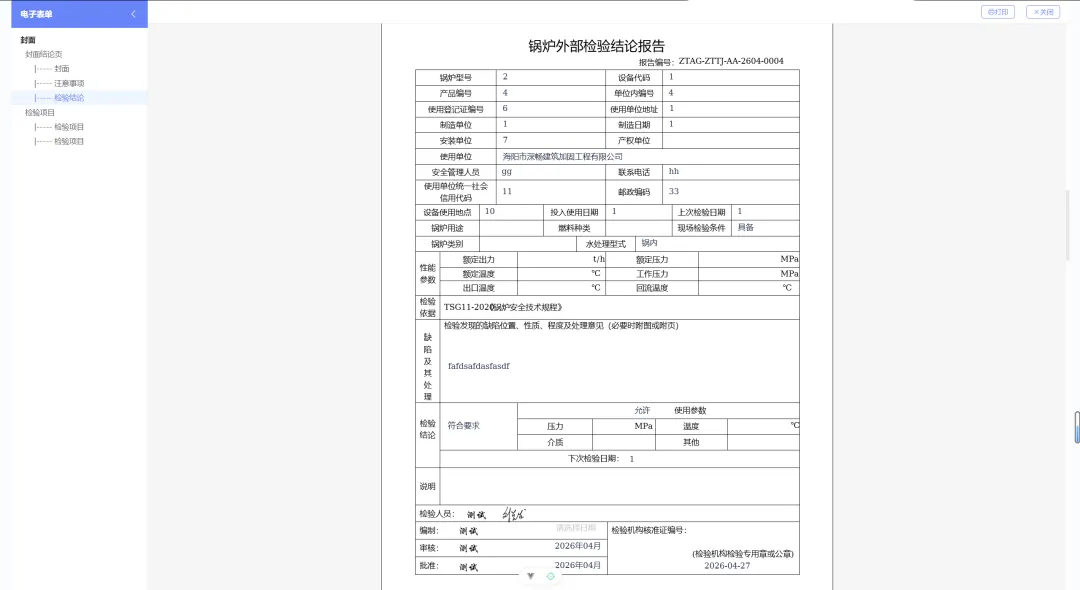
操作极简,后台网页编辑体验要和本地 Word 一致; 数据智能回填,可后台自动抓取的绝不人工手动录入; PDF 批量导出,排版格式必须和原 Word 完全一致、零错乱; 支持在 Word 模板内任意上传、缩放、旋转图片; 交付周期严格:2 个月内完成全流程开发并上线交付。
为了落地这套高标准需求,Aspose.Words 正式登场。
看完业务需求,下面我们开始技术选型与整体实现流程拆解。
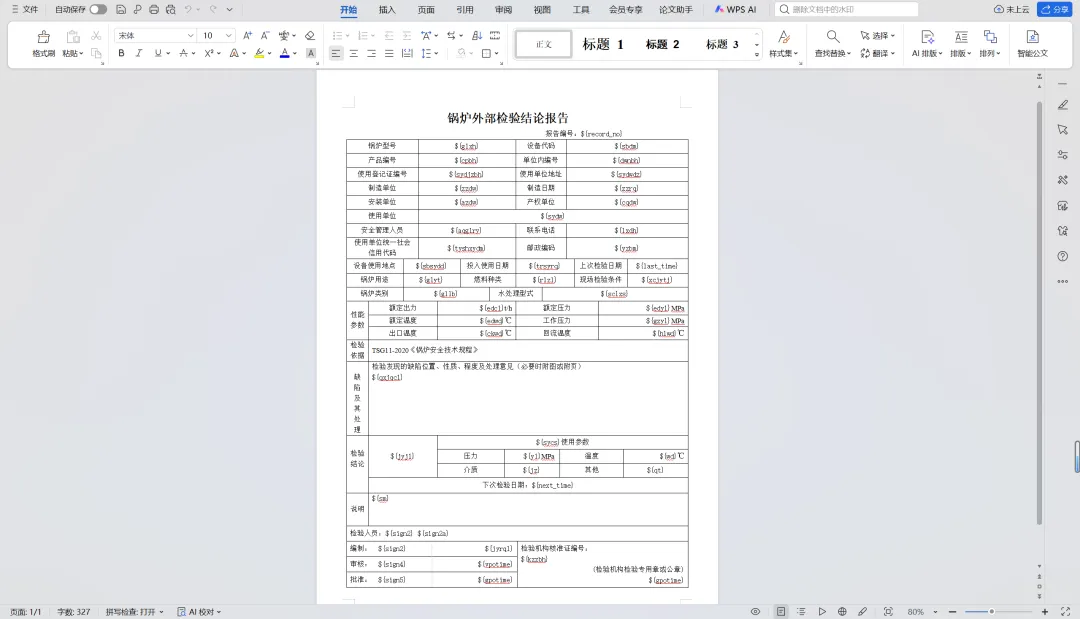
①客户的Word模板
客户使用 WPS 或 Microsoft Office 编辑文档,需要动态替换的位置统一标记 ${变量名} 占位符,后续系统根据占位符自动匹配渲染。
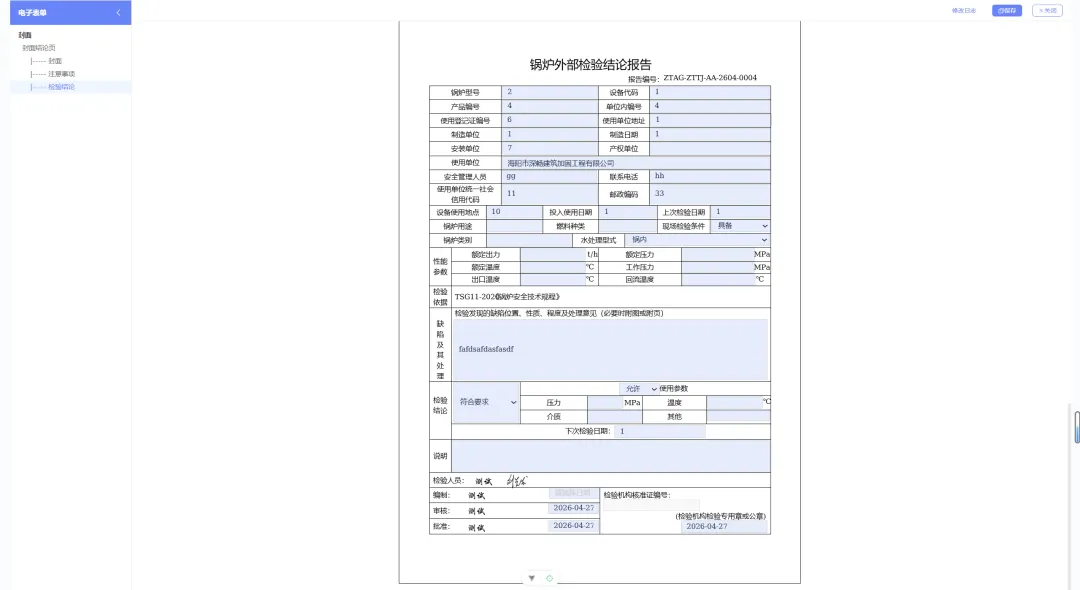
${变量} 批量渲染为 Input 输入框;同时支持根据业务自定义控件类型:文本输入、下拉选择、复选框、日期选择、图片上传、纯占位符自动迭代等。若内置类型不满足业务,还可自行扩展个性化控件类型。核心实现代码见文末。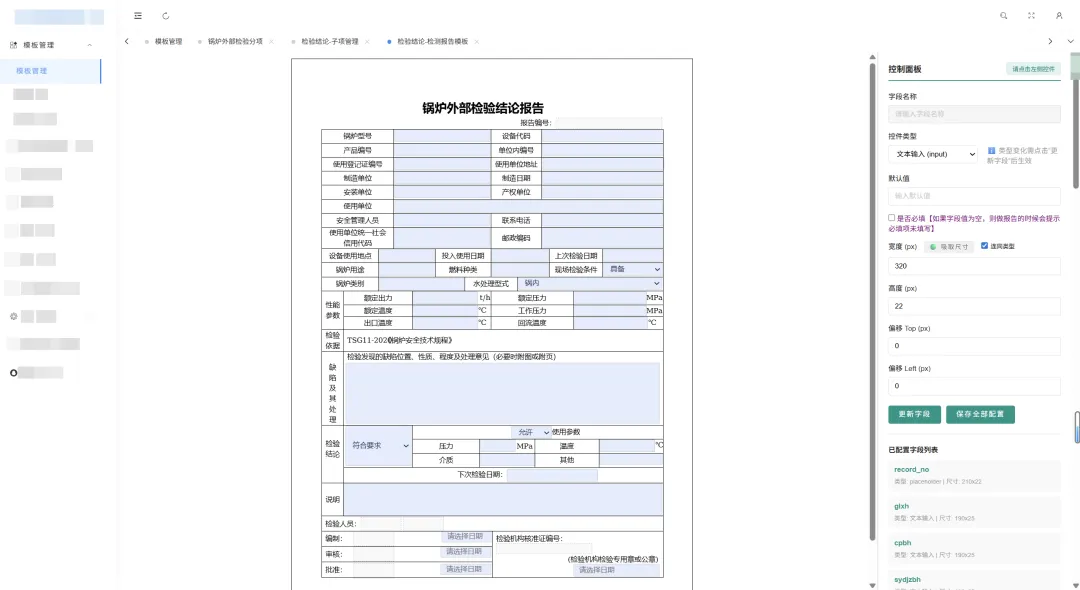
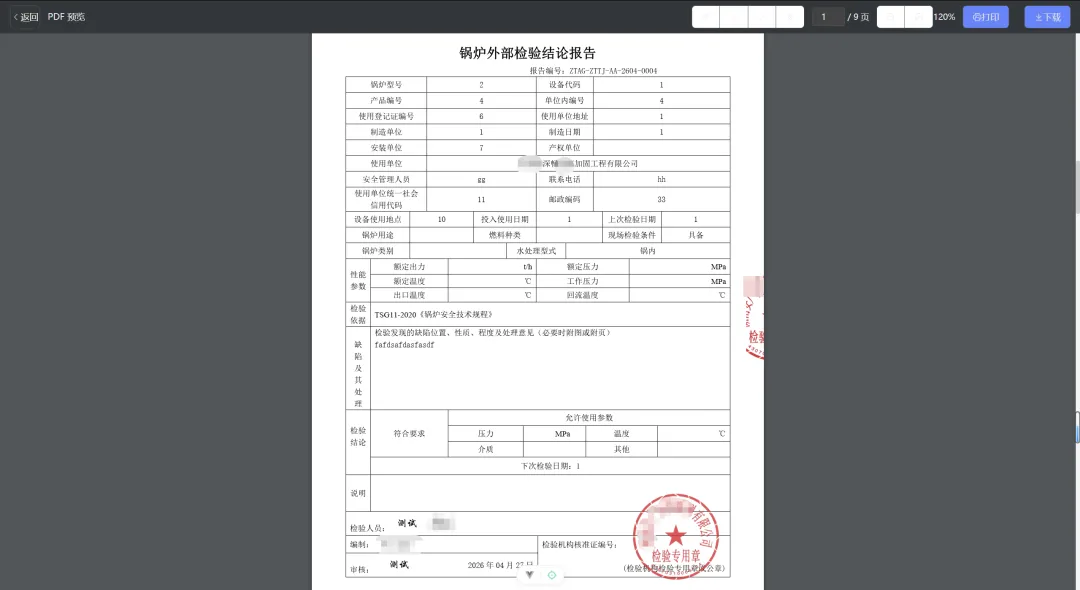
前期批量测试了市面上主流 Word 处理方案,全部踩坑放弃:
- PHPWord:丢失页眉页脚、排版格式错乱严重,无明显优势,放弃;
- PHPDocX:分免费 / 收费版,格式还原度略高于 PHPWord,但仍存在样式丢失,无法满足精密报告排版,放弃;
- docx-preview:纯前端渲染无需后端,存在表格错乱、页面布局变形,放弃;
- Mammoth.js:纯前端解析,不支持页眉、页脚、分页符,复杂模板直接崩版,放弃;
- Python + python-docx:样式兼容差、复杂图文排版丢失,放弃;
- Pandoc:艺术字、文本框、复杂图文样式无法在 HTML 中高保真还原,放弃。选型陷入困境、一度觉得需求无法落地时,偶然发现 Aspose.Words
Aspose.Words 是一款企业级商业文档处理库,无需本地安装 Office,即可对 DOC、DOCX、RTF、PDF、HTML、EPUB 等格式进行创建、编辑、互转与高保真渲染。
跨平台支持 .NET、Java、Python、C++ 等,非常适合文档自动化、报告批量生成类项目。
软件授权费用偏高,建议按项目实际需求按需选购授权,节约成本。
官网文档:https://reference.aspose.com/words/zh/
3、DOCX 转 HTML 核心实现
本项目采用 Java 17 版本 Aspose.Words,服务器需提前安装 JDK 17 环境。
PHP 调用 Java 实现 DOCX 转 HTML(支持进程复用 + 命令行降级)
/*** DOCX转HTML(使用Aspose)* @param string $docxPath DOCX文件路径* @return string|false 成功返回HTML路径,失败返回false*/public static function docxToHtmlWithAspose(string $docxPath){$toolsDir = public_path() . '/tools';$jar = $toolsDir . '/aspose-words.jar';$javaSrc = $toolsDir . '/AsposeDocxConverter.java';$htmlPath = str_replace('.docx', '.html', $docxPath);if(!is_dir($toolsDir)) {self::logError("tools 目录不存在: {$toolsDir}");return false;}if(!file_exists($jar)) {self::logError("JAR 文件不存在: {$jar}");return false;}if(!file_exists($docxPath)) {self::logError("DOCX 文件不存在: {$docxPath}");return false;}$jdk17Paths = ['/usr/lib/jvm/java-17-openjdk',];$java17 = 'java';$javac17 = 'javac';// 编译 Java 辅助程序$classFile = $toolsDir . '/AsposeDocxConverter.class';if(!file_exists($classFile)) {$compileCmd = sprintf('%s -cp "%s" -d "%s" "%s" 2>&1', $javac17, $jar, $toolsDir, $javaSrc);exec($compileCmd, $out1, $ret1);if($ret1 !== 0 || !file_exists($classFile)) {self::logError("Java 编译失败, 返回码: {$ret1}, 输出: " . implode("\n", $out1 ?? []));if($processedDocxPath !== $docxPath && file_exists($processedDocxPath)) {unlink($processedDocxPath);}return false;}}// 尝试进程复用转换$reuseSuccess = self::convertWithReusableProcess($java17, $toolsDir, $jar, $processedDocxPath, $htmlPath);if(!$reuseSuccess) {self::logError("进程复用转换失败,回退到命令行方式");// 回退到命令行方式// 添加 -Djava.awt.headless=true 解决无图形界面服务器的 X11 问题$separator = DIRECTORY_SEPARATOR === '\\' ? ';' : ':';$runCmd = sprintf('%s -Djava.awt.headless=true -cp "%s%s%s" AsposeDocxConverter "%s" "%s" 2>&1',$java17, $toolsDir, $separator, $jar, $processedDocxPath, $htmlPath);$out2 = [];exec($runCmd, $out2, $ret2);if($ret2 !== 0 || !file_exists($htmlPath)) {self::logError("命令行转换失败, 命令: {$runCmd}, 返回码: {$ret2}, 输出: " . implode("\n", $out2 ?? []));if($processedDocxPath !== $docxPath && file_exists($processedDocxPath)) {unlink($processedDocxPath);}return false;}}// 清理临时文件if($processedDocxPath !== $docxPath && file_exists($processedDocxPath)) {unlink($processedDocxPath);}return $htmlPath;}
/*** 使用可复用Java进程进行转换*/public static function convertWithReusableProcess($java17, $toolsDir, $jar, $docxPath, $htmlPath) {static $process = null;static $pipes = null;// 检查进程是否仍然有效if($process !== null) {$status = proc_get_status($process);if(!$status['running']) {// 进程已终止,清理资源self::cleanupProcess($process, $pipes);$process = null;$pipes = null;}}if($process === null) {$separator = DIRECTORY_SEPARATOR === '\\' ? ';' : ':';// 添加 -Djava.awt.headless=true 解决无图形界面服务器的 X11 问题$cmd = sprintf('%s -Djava.awt.headless=true -cp "%s%s%s" AsposeDocxConverter --server',$java17, $toolsDir, $separator, $jar);$descriptorspec = [0 => ["pipe", "r"],1 => ["pipe", "w"],2 => ["pipe", "w"]];$process = proc_open($cmd, $descriptorspec, $pipes);if(!is_resource($process)) {return false;}stream_set_blocking($pipes[0], false);stream_set_blocking($pipes[1], false);// 等待进程准备就绪$startTime = microtime(true);$ready = false;while(microtime(true) - $startTime < 5) {$status = fgets($pipes[1]);if($status !== false && trim($status) === 'READY') {$ready = true;break;}usleep(100000);}// 如果进程未能就绪,清理并返回失败if(!$ready) {self::cleanupProcess($process, $pipes);$process = null;$pipes = null;return false;}}// 发送转换请求(添加错误处理)$request = $docxPath . '|' . $htmlPath . "\n";$writeResult = @fwrite($pipes[0], $request);// 如果写入失败,可能是管道已断开if($writeResult === false || $writeResult === 0) {self::cleanupProcess($process, $pipes);$process = null;$pipes = null;return false;}@fflush($pipes[0]);// 等待响应$startTime = microtime(true);while(microtime(true) - $startTime < 10) {$response = @fgets($pipes[1]);if($response !== false) {$response = trim($response);if(strpos($response, 'SUCCESS:') === 0) {return true;} elseif(strpos($response, 'ERROR:') === 0) {return false;}}usleep(100000);// 检查进程是否仍在运行$status = proc_get_status($process);if(!$status['running']) {self::cleanupProcess($process, $pipes);$process = null;$pipes = null;return false;}}return false;}/*** 清理进程资源*/private static function cleanupProcess($process, $pipes) {if(is_array($pipes)) {foreach($pipes as $pipe) {if(is_resource($pipe)) {@fclose($pipe);}}}if(is_resource($process)) {@proc_terminate($process);@proc_close($process);}}
Java 转换工具类 AsposeDocxConverter.java
import com.aspose.words.Document;import com.aspose.words.HtmlFixedSaveOptions;import java.io.BufferedReader;import java.io.InputStreamReader;import java.io.PrintWriter;//javac -cp "aspose-words.jar" AsposeDocxConverter.javapublic class AsposeDocxConverter {publicstaticvoidmain(String[] args) throws Exception {// 启动一个长时间运行的转换服务if (args.length > 0 && "--server".equals(args[0])) {runServerMode();return;}// 原有的命令行模式if (args.length < 2) {System.err.println("Usage: AsposeDocxConverter <input.docx> <output.html>");System.exit(1);}convertDocxToHtml(args[0], args[1]);}/*** 运行服务器模式,监听标准输入进行转换任务*/privatestaticvoidrunServerMode() throws Exception {BufferedReader reader = new BufferedReader(new InputStreamReader(System.in));PrintWriter writer = new PrintWriter(System.out, true);writer.println("READY");writer.flush();String line;while ((line = reader.readLine()) != null) {if ("EXIT".equals(line)) {break;}String[] parts = line.split("\\|");if (parts.length == 2) {try {convertDocxToHtml(parts[0], parts[1]);writer.println("SUCCESS:" + parts[1]);} catch (Exception e) {writer.println("ERROR:" + e.getMessage());}} else {writer.println("ERROR:Invalid input format");}writer.flush();}}/*** 将DOCX转换为HTML的核心方法*/publicstaticvoidconvertDocxToHtml(String inputPath, String outputPath) throws Exception {Document doc = new Document(inputPath);HtmlFixedSaveOptions options = new HtmlFixedSaveOptions();// 优化性能的配置选项options.setExportEmbeddedCss(true);options.setExportEmbeddedFonts(true);options.setExportEmbeddedImages(true);options.setExportGeneratorName(false); // 禁用generator标签options.setCssClassNamesPrefix("YC");options.setSaveFontFaceCssSeparately(true);options.setUseTargetMachineFonts(false); // 不使用目标机器字体,使用嵌入字体doc.save(outputPath, options);}}
4、转换后 HTML 效果示例
<!DOCTYPE html><html><head><meta http-equiv="Content-Type" content="text/html; charset=utf-8" /><title></title><style type="text/css">@font-face { font-family:'SimSun'; font-style:normal; font-weight:normal; src:local('☺'), url('data:application/x-font-woff;base64,xxxxxxx') format('woff'); } .YCdiv { position:absolute; } .YCspan { position:absolute; white-space:pre; color:#000000; font-size:12pt; } .YCimg { position:absolute; } .YCsvg { position:absolute; } .YCpage { position:relative; border:solid 1pt black; margin:10pt auto 10pt auto; overflow:hidden; } @media print { body { margin:0pt; padding:0pt; } .YCpage { page-break-after:always; margin:0pt; padding:0pt; } } .YCtext001 { font-family:'SimSun'; font-style:normal; font-weight:normal; } .YCtext002 { font-family:'SimSun'; font-style:normal; font-weight:bold; }</style></head><body><divclass="YCdiv YCpage"style="width:595.3pt; height:841.9pt;"><divclass="YCdiv"style="left:89.85pt; top:56.7pt;"><divclass="YCdiv"style="left:123pt;"><divclass="YCdiv"style="clip:rect(0pt,298pt,23.7pt,0pt);"><divclass="YCdiv"style="left:5.4pt;"><spanclass="YCspan YCtext001"style="left:98.2pt; top:5.44pt; line-height:13.69pt;">文件编号:ZTAG-ZB1-R01A-2025</span></div></div><divclass="YCdiv"style="top:22.7pt;"><divclass="YCdiv"style="clip:rect(0pt,298pt,23.7pt,0pt);"><divclass="YCdiv"style="left:5.4pt;"><spanclass="YCspan YCtext001"style="left:134.2pt; top:5.44pt; line-height:13.69pt;">报告编号:${record_no}</span></div></div></div></div><divclass="YCdiv"style="top:61pt;"><spanclass="YCspan YCtext001"style="left:0pt; top:1.89pt; line-height:13.69pt;">${qrcode}</span></div><divclass="YCdiv"style="top:139pt;"><spanclass="YCspan YCtext002"style="font-size:26pt; left:31.36pt; top:10.6pt; line-height:29.66pt;">固定式压力容器${nature}报告</span></div><divclass="YCdiv"style="left:-4pt; top:310.6pt;"><divclass="YCdiv"style="clip:rect(0pt,104.65pt,32.2pt,0pt);"><divclass="YCdiv"style="left:5.4pt;"><spanclass="YCspan YCtext002"style="font-size:14pt; letter-spacing:0.37pt; left:0pt; top:8.71pt; line-height:15.97pt;">设 备 品 种:</span></div></div><divclass="YCdiv"style="left:104.65pt; clip:rect(0pt,318.95pt,32.2pt,0pt);"><divclass="YCdiv"style="left:5.4pt;"><spanclass="YCspan YCtext001"style="font-size:14pt; left:0pt; top:8.71pt; line-height:15.97pt;">${sbpz}</span></div></div><divclass="YCdiv"style="top:31.2pt;"><divclass="YCdiv"style="clip:rect(0pt,104.65pt,32.7pt,0pt);"><divclass="YCdiv"style="left:5.4pt; top:0.5pt;"><spanclass="YCspan YCtext002"style="font-size:14pt; letter-spacing:0.37pt; left:0pt; top:8.71pt; line-height:15.97pt;">使 用 单 位:</span></div></div><divclass="YCdiv"style="left:104.65pt; clip:rect(0.5pt,318.95pt,32.7pt,0pt);"><divclass="YCdiv"style="left:5.4pt; top:0.5pt;"><spanclass="YCspan YCtext001"style="font-size:14pt; left:0pt; top:8.71pt; line-height:15.97pt;">${sydw}</span></div></div></div><divclass="YCdiv"style="top:62.9pt;"><divclass="YCdiv"style="clip:rect(0pt,104.65pt,32.7pt,0pt);"><divclass="YCdiv"style="left:5.4pt; top:0.5pt;"><spanclass="YCspan YCtext002"style="font-size:14pt; letter-spacing:0.37pt; left:0pt; top:8.71pt; line-height:15.97pt;">产 品 编 号:</span></div></div><divclass="YCdiv"style="left:104.65pt; clip:rect(0.5pt,318.95pt,32.7pt,0pt);"><divclass="YCdiv"style="left:5.4pt; top:0.5pt;"><spanclass="YCspan YCtext001"style="font-size:14pt; left:0pt; top:8.71pt; line-height:15.97pt;">${cpbh}</span></div></div></div><divclass="YCdiv"style="top:94.6pt;"><divclass="YCdiv"style="clip:rect(0pt,104.65pt,32.7pt,0pt);"><divclass="YCdiv"style="left:5.4pt; top:0.5pt;"><spanclass="YCspan YCtext002"style="font-size:14pt; letter-spacing:0.37pt; left:0pt; top:8.71pt; line-height:15.97pt;">检 验 类 别:</span></div></div><divclass="YCdiv"style="left:104.65pt; clip:rect(0.5pt,318.95pt,32.7pt,0pt);"><divclass="YCdiv"style="left:5.4pt; top:0.5pt;"><spanclass="YCspan YCtext001"style="font-size:14pt; left:0pt; top:8.71pt; line-height:15.97pt;">${nature}</span></div></div></div><divclass="YCdiv"style="top:126.3pt;"><divclass="YCdiv"style="clip:rect(0pt,104.65pt,32.7pt,0pt);"><divclass="YCdiv"style="left:5.4pt; top:0.5pt;"><spanclass="YCspan YCtext002"style="font-size:14pt; letter-spacing:0.37pt; left:0pt; top:8.71pt; line-height:15.97pt;">检 验 日 期:</span></div></div><divclass="YCdiv"style="left:104.65pt; clip:rect(0.5pt,318.95pt,32.7pt,0pt);"><divclass="YCdiv"style="left:5.4pt; top:0.5pt;"><spanclass="YCspan YCtext001"style="font-size:14pt; left:0pt; top:8.71pt; line-height:15.97pt;">${jyrq}-${jyrq1}</span></div></div></div><divclass="YCdiv"style="left:104.65pt; top:31.2pt; width:318.95pt; height:0pt; border-top:solid 0.75pt#000000;"></div><div class="YCdiv" style="left:104.65pt; top:62.9pt; width:318.95pt; height:0pt; border-top:solid 0.75pt#000000;"></div><div class="YCdiv" style="left:104.65pt; top:94.6pt; width:318.95pt; height:0pt; border-top:solid 0.75pt#000000;"></div><div class="YCdiv" style="left:104.65pt; top:126.3pt; width:318.95pt; height:0pt; border-top:solid 0.75pt#000000;"></div><div class="YCdiv" style="left:104.65pt; top:158pt; width:318.95pt; height:0pt; border-top:solid 0.75pt#000000;"></div></div><div class="YCdiv" style="top:593.9pt;"><span class="YCspan YCtext002" style="font-size:18pt; left:63.22pt; top:6.74pt; line-height:20.53pt;">中特安广(湖南)智能科技有限公司</span></div></div></div></body></html>
5、模板变量提取与数据库存储结构
转换 HTML 后,通过 JS 正则提取所有 ${变量} 占位符,自动解析控件类型、尺寸、默认值等配置,入库结构化数据如下:
{"record_no": "record_no,record_no,placeholder,'',default='',[180,22,0,0],[0,0,0]","nature": "nature,nature,placeholder,'',default='',[100,35,0,0],[0,0,0]","sbpz": "sbpz,sbpz,placeholder,'',default='',[420,28,0,-6],[0,0,0]","sydw": "sydw,sydw,placeholder,'',default='',[420,28,0,-6],[0,0,0]","cpbh": "cpbh,cpbh,placeholder,'',default='',[420,28,0,-6],[0,0,0]","nature_2": "nature_2,nature,[select],[['0','首次定期检验'],['1','定期检验'],['2','委托检验']],default='0',[180,40,-10,-6],[0,0,0]","qrcode": "qrcode,qrcode,placeholder,'',default='',[80,80,0,0],[0,0,0]","jyrq": "jyrq,jyrq,[date,'ymd'],'',default='',[180,40,-10,-6],[0,0,0]","jyrq1": "jyrq1,jyrq1,[date,'ymd'],'',default='',[180,40,-10,0],[0,0,0]"}
字段结构说明表
${变量} 内部名称,用于模板绑定映射 | ||
[类型,'模式'] | ||
[宽,高,上边距,左边距],解析失败自动兜底默认尺寸 |
变量提取通过前端 JS 批量抓取存入数组,未单独配置的变量默认渲染为普通 Input 输入框,自定义配置则按设定控件类型渲染。
前端加载转换后的 HTML 时,做数据预处理:读取数据库字段配置与已录入数据,自动回填渲染到对应占位符位置。
6、默认值替换工具方法
/*** 将配置串中的 default='...' 或 default="..." 替换为指定值(供报告级占位符 qrcode/sign 等写回使用)* 兼容历史模板拼写 default=;若无 default 子句则在末段尺寸 [w,h,top,left] 前插入*/public static functionreplaceDefaultInDefinition(string$definition, string$newValue): string{$escaped = str_replace(['\\', "'"], ['\\\\', "\\'"], $newValue);$replacement = "default='" . $escaped . "'";$pattern = "/(?:default|default)\s*=\s*(['\"])([^'\"]*)\\1/i";$out = preg_replace($pattern, $replacement, $definition, 1, $count);if($count > 0) {return $out;}if(stripos($definition, 'default=') !== false || stripos($definition, 'default=') !== false) {return $definition;}if(preg_match_all('/\[(\d+),(\d+),(-?\d+),(-?\d+)\]/', $definition, $m, PREG_OFFSET_CAPTURE)) {$last = $m[0][array_key_last($m[0])];$start = (int) $last[1];return substr($definition, 0, $start) . $replacement . ',' . substr($definition, $start);}return $definition;}
7、服务器字体兼容兜底方案
参照前文《PHP | Word 转 PDF 实用方案,技术选型与填坑经验》环境部署:服务器缺失字体时,在项目 public/fonts 目录自行上传对应字体文件,作为系统字体兜底,解决转换后乱码、字体缺失、排版错位问题。
服务器字体检测方法
/*** 检查服务器是否安装了数学字体(通过系统命令)** @return array 返回字体检查结果 ['font_name' => true/false]*/public static function checkMathFontsInstalled(): array {$fonts = ['Cambria Math' => false,'STIX' => false,'Latin Modern Math' => false,'Asana Math' => false,'DejaVu' => false,'Liberation' => false,'Symbol' => false,];// 检查 fontconfig 是否可用if(!function_exists('exec')) {return $fonts; // 如果 exec 被禁用,返回默认值}// 使用 fc-list 检查字体$output = [];$returnVar = 0;@exec('fc-list 2>/dev/null', $output, $returnVar);if($returnVar !== 0 || empty($output)) {return $fonts; // 如果命令失败,返回默认值}$fontList = implode("\n", $output);// 检查每个字体foreach($fonts as $fontName => &$installed) {if(stripos($fontList, $fontName) !== false) {$installed = true;}}return $fonts;}
如果你想深入了解第四代检测系统完整架构、模板引擎定制、PDF 定制化生成、多端适配等细节,欢迎私聊交流。
如果觉得这篇文章对你有用,欢迎点赞、在看、转发三连支持!
关注我们,获取更多 PHP 实战教程与技术干货!
愿每一个做技术、做服务的人,都能被温柔以待,不负努力,不负自己,越来越好。
随机文章
-
 10个月宝宝每天需要喝多少奶粉?
- Linux 最小权限实践指南 权限精细化管理:从 0 到精细化 sudo 配置(超详细)
- Linux内核迎来了第一行AI生成的代码:用GPT-5.5写的驱动,给AMD主板测温
- 从月薪五千到年薪三十万,我的Python学习路线图,今天免费公开
- 用python写了一个整理文件的程序
- 2python之同步索引数据及指定同步研究
- Linux 运维必备 50+ 命令速查手册,新手老手都用得上
- Linux运维里一个让我少加了两天班的通用调试...
- 救命!文件系统崩了怎么办?Linux系统文件系统错误检查修复完全指南
- Linux系统——磁盘分区格式(MBR和GPT)
- PHP 8.4 数组函数全新升级:array_find 系列让你彻底告别手写循环