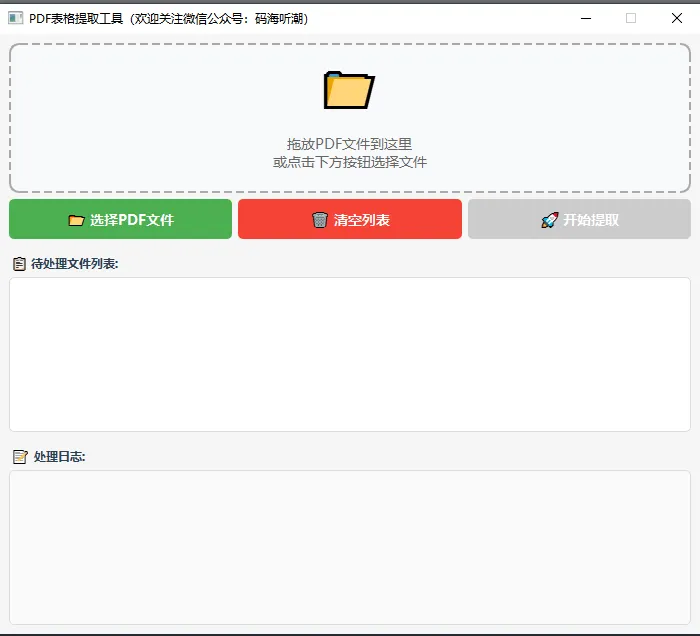
import sysimport osfrom PyQt6.QtWidgets import (QApplication, QMainWindow, QWidget, QVBoxLayout, QHBoxLayout, QPushButton, QListWidget, QTextEdit, QLabel, QFileDialog, QMessageBox, QFrame)from PyQt6.QtCore import Qt, QThread, pyqtSignalfrom PyQt6.QtGui import QDragEnterEvent, QDropEventclass TableExtractorThread(QThread): log_message = pyqtSignal(str) file_finished = pyqtSignal(str, str) error_occurred = pyqtSignal(str, str) finished_all = pyqtSignal() def __init__(self, pdf_files): super().__init__() self.pdf_files = pdf_files def run(self): # 线程运行逻辑 passclass DropArea(QFrame): files_dropped = pyqtSignal(list) def __init__(self): super().__init__() self.setAcceptDrops(True) self.setMinimumHeight(150) self.setFrameStyle(QFrame.Shape.StyledPanel) self.setStyleSheet(""" DropArea { border: 2px dashed #aaa; border-radius: 10px; background-color: #f8f9fa; } DropArea:hover { border-color: #4CAF50; background-color: #f0f8f0; } """) layout = QVBoxLayout() self.setLayout(layout) icon_label = QLabel("📁") icon_label.setAlignment(Qt.AlignmentFlag.AlignCenter) icon_label.setStyleSheet("font-size: 48px;") label = QLabel("拖放PDF文件到这里\n或点击下方按钮选择文件") label.setAlignment(Qt.AlignmentFlag.AlignCenter) label.setStyleSheet("color: #666; font-size: 14px;") layout.addWidget(icon_label) layout.addWidget(label) def dragEnterEvent(self, event: QDragEnterEvent): if event.mimeData().hasUrls(): event.acceptProposedAction() self.setStyleSheet(""" DropArea { border: 2px solid #4CAF50; border-radius: 10px; background-color: #e8f5e9; } """) def dragLeaveEvent(self, event): self.setStyleSheet(""" DropArea { border: 2px dashed #aaa; border-radius: 10px; background-color: #f8f9fa; } """) def dropEvent(self, event: QDropEvent): files = [] for url in event.mimeData().urls(): file_path = url.toLocalFile() if file_path.lower().endswith('.pdf'): files.append(file_path) if files: self.files_dropped.emit(files) self.setStyleSheet(""" DropArea { border: 2px dashed #aaa; border-radius: 10px; background-color: #f8f9fa; } """)class MainWindow(QMainWindow): def __init__(self): super().__init__() self.pdf_files = [] self.init_ui() self.apply_styles() def init_ui(self): self.setWindowTitle("PDF表格提取工具") self.setGeometry(100, 100, 800, 600) central_widget = QWidget() self.setCentralWidget(central_widget) main_layout = QVBoxLayout() central_widget.setLayout(main_layout) title_label = QLabel("PDF表格提取与合并工具") title_label.setAlignment(Qt.AlignmentFlag.AlignCenter) title_label.setStyleSheet("font-size: 20px; font-weight: bold; padding: 10px; color: #2c3e50;") main_layout.addWidget(title_label) self.drop_area = DropArea() self.drop_area.files_dropped.connect(self.add_files) main_layout.addWidget(self.drop_area) button_layout = QHBoxLayout() self.select_btn = QPushButton("📂 选择PDF文件") self.select_btn.clicked.connect(self.select_files) self.select_btn.setStyleSheet(""" QPushButton { background-color: #4CAF50; color: white; border: none; padding: 10px 20px; border-radius: 5px; font-size: 14px; font-weight: bold; } QPushButton:hover { background-color: #45a049; } QPushButton:pressed { background-color: #3d8b40; } """) self.clear_btn = QPushButton("🗑️ 清空列表") self.clear_btn.clicked.connect(self.clear_files) self.clear_btn.setStyleSheet(""" QPushButton { background-color: #f44336; color: white; border: none; padding: 10px 20px; border-radius: 5px; font-size: 14px; font-weight: bold; } QPushButton:hover { background-color: #da190b; } """) self.start_btn = QPushButton("🚀 开始提取") self.start_btn.clicked.connect(self.start_extraction) self.start_btn.setEnabled(False) self.start_btn.setStyleSheet(""" QPushButton { background-color: #2196F3; color: white; border: none; padding: 10px 20px; border-radius: 5px; font-size: 14px; font-weight: bold; } QPushButton:hover { background-color: #0b7dda; } QPushButton:disabled { background-color: #cccccc; } """) button_layout.addWidget(self.select_btn) button_layout.addWidget(self.clear_btn) button_layout.addWidget(self.start_btn) main_layout.addLayout(button_layout) file_label = QLabel("📋 待处理文件列表:") file_label.setStyleSheet("font-weight: bold; margin-top: 10px; color: #2c3e50;") main_layout.addWidget(file_label) self.file_list = QListWidget() self.file_list.setStyleSheet(""" QListWidget { border: 1px solid #ddd; border-radius: 5px; padding: 5px; background-color: white; } QListWidget::item { padding: 8px; border-bottom: 1px solid #f0f0f0; } QListWidget::item:selected { background-color: #e3f2fd; color: #000; } QListWidget::item:hover { background-color: #f5f5f5; } """) main_layout.addWidget(self.file_list) log_label = QLabel("📝 处理日志:") log_label.setStyleSheet("font-weight: bold; margin-top: 10px; color: #2c3e50;") main_layout.addWidget(log_label) self.log_text = QTextEdit() self.log_text.setReadOnly(True) self.log_text.setStyleSheet(""" QTextEdit { border: 1px solid #ddd; border-radius: 5px; padding: 10px; font-family: Consolas, monospace; font-size: 12px; background-color: #fafafa; } """) main_layout.addWidget(self.log_text) def apply_styles(self): self.setStyleSheet(""" QMainWindow { background-color: #f5f5f5; } QLabel { color: #333; } """) def select_files(self): files, _ = QFileDialog.getOpenFileNames( self, "选择PDF文件", "", "PDF文件 (*.pdf)" ) if files: self.add_files(files) def add_files(self, files): for file in files: if file not in self.pdf_files: self.pdf_files.append(file) self.file_list.addItem(os.path.basename(file)) self.log_text.append(f"✓ 添加文件: {os.path.basename(file)}") self.start_btn.setEnabled(len(self.pdf_files) > 0) def clear_files(self): self.pdf_files.clear() self.file_list.clear() self.start_btn.setEnabled(False) self.log_text.append("✓ 清空了文件列表") def start_extraction(self): if not self.pdf_files: QMessageBox.warning(self, "警告", "请先添加PDF文件!") return self.select_btn.setEnabled(False) self.clear_btn.setEnabled(False) self.start_btn.setEnabled(False) self.extract_thread = TableExtractorThread(self.pdf_files) self.extract_thread.log_message.connect(self.update_log) self.extract_thread.file_finished.connect(self.on_file_finished) self.extract_thread.error_occurred.connect(self.on_error) self.extract_thread.finished_all.connect(self.on_extraction_finished) self.extract_thread.start() self.log_text.append("\n" + "="*50) self.log_text.append("开始批量处理...") self.log_text.append("="*50) def update_log(self, message): self.log_text.append(message) scrollbar = self.log_text.verticalScrollBar() scrollbar.setValue(scrollbar.maximum()) def on_file_finished(self, input_file, output_file): self.log_text.append(f" 输出文件: {os.path.basename(output_file)}") def on_error(self, filename, error): QMessageBox.warning(self, "处理错误", f"处理文件 {filename} 时发生错误:\n{error}") def on_extraction_finished(self): self.select_btn.setEnabled(True) self.clear_btn.setEnabled(True) self.start_btn.setEnabled(True) self.log_text.append("\n" + "="*50) self.log_text.append("✓ 所有文件处理完成!") self.log_text.append("="*50) QMessageBox.information(self, "完成", "所有PDF文件处理完成!\n请查看生成的Excel文件。")def main(): app = QApplication(sys.argv) app.setStyle('Fusion') window = MainWindow() window.show() sys.exit(app.exec())if __name__ == '__main__': main()