Linux TC 限速原理与 mlx5 硬件卸载
- 2026-10-11 07:36:01
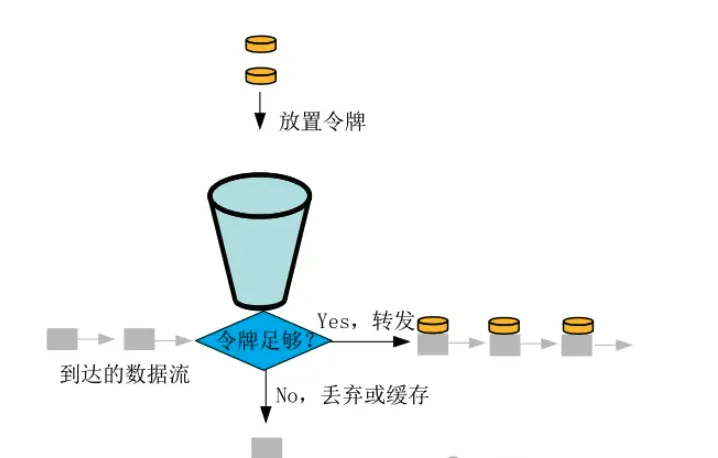
令牌桶工作原理
egress 限速(SW Traffic Shaping)
Traffic Shaping
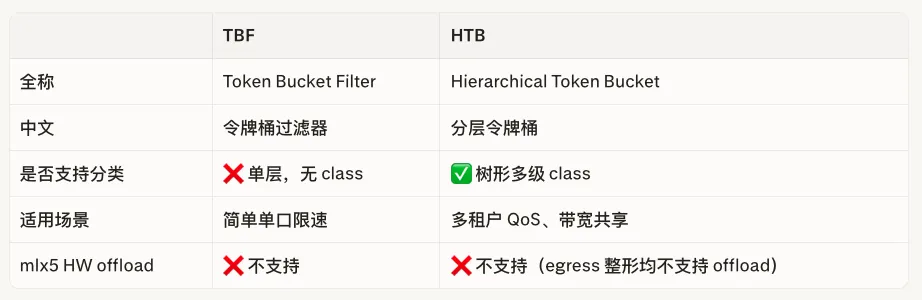
完整配置步骤(SW egress HTB + flower 限速)
对 egress 限速需用 HTB(Hierarchical Token Bucket):
# 出方向根 qdisc(HTB)
tc qdisc add dev p0 root handle 1: htb default 10
# 限速 class:上限 10Gbps
tc class add dev p0 parent 1: classid 1:10 htb \
rate 10gbit burst 100mb
# flower filter 将匹配流量引入该 class
tc filter add dev p0 parent 1: \
protocol ip priority 100 \
flower \
src_ip 10.0.0.0/24 \
flowid 1:10
Ingress 限速 tc police (mlx5)
Policing
完整配置步骤(mlx5 ingress 限速)
切换网卡到 switchdev(eSwitch)模式
devlink dev eswitch set pci/0000:03:00.0 mode switchdev
# 开启硬件 TC offload 能力
ethtool -K p0 hw-tc-offload on
ethtool -K pf0vf0 hw-tc-offload on # VF representor 也要开
tc qdisc add dev p0 ingress handle ffff:
注:ffff: 是 ingress qdisc 的内核保留固定句柄,不可更改。
# 对所有入方向 IP 流量限速 10Gbps
tc filter add dev p0 ingress protocol ip flower skip_sw dst_ip 10.0.0.0/24 ip_proto tcp action police rate 10gbit burst 1mb conform-exceed pipe/drop action gact pass
# 查看 filter,确认出现 in_hw 标志
tc -s -d filter show dev p0 ingress
# 示例输出:
filter protocol ip pref 49148 flower chain 0
filter protocol ip pref 49148 flower chain 0 handle 0x1
eth_type ipv4
ip_proto tcp
dst_ip 10.0.0.0/24
skip_sw
in_hw in_hw_count 1
action order 1: police 0x5 rate 10Gbit burst 1046250b mtu 2Kb action pipe/drop overhead 0b linklayer ethernet
ref 1 bind 1 installed 27 sec used 27 sec
Action statistics:
Sent 0 bytes 0 pkt (dropped 0, overlimits 0 requeues 0)
backlog 0b 0p requeues 0
used_hw_stats delayed
action order 2: gact action pass
random type none pass val 0
index 3 ref 1 bind 1 installed 27 sec used 27 sec
Action statistics:
Sent 0 bytes 0 pkt (dropped 0, overlimits 0 requeues 0)
backlog 0b 0p requeues 0
used_hw_stats delayed
# in_hw in_hw_count 1 ← 说明已卸载到硬件
# 查看 police action 统计(含硬件命中计数)
tc -s -d actions list action police
# 查看网卡硬件计数器
ethtool -S p0 | grep -i drop
# 删除 ingress qdisc(同时删除其下所有 filter)
tc qdisc del dev p0 ingress
常见场景速查
关键约束
skip_sw 走HW卸载,只支持tc police;对egress HTB/TBF会报错。对于egress 硬件限速有强需求可以考虑vQoS:MLX5 限速原理详解:vQoS、Meter、PPS/BPS 限速 mlx5 硬件要求 burst > 0。 内核版本 ≥ 5.12:tc police HW offload 的最低内核要求。 需 ConnectX-5 及以上:CX-4 不支持 tc police offload。 mtu 建议显式设置:使用 jumbo frame(9000)时不设置会导致大包无法匹配。
https://geek-blogs.com/blog/linux-tc-qdisc/
随机文章
-
 10个月宝宝每天需要喝多少奶粉?
- 零基础玩转Python!行空板M10官方入门教程16课全收录
- Linux shell 美化
- 从 devfs 到 sysfs:Linux 设备文件系统演化
- Linux实时内核:Linux 跑 EtherCAT 为什么总和 PREEMPT_RT 一起出现?
- Python零基础必学:变量和数据类型,搞懂这4种就够了
- Linux一键性能调优神器tuned-adm|实测数据对比
- Linux自学第10天
- Linux 设备驱动模型解析:device、driver 与 bus 的关系
- Linux 排障为什么不能乱敲命令?从启动、进程到性能看系统逻辑
- 《Python 从入门到精通》071|从现实世界理解类与对象:OOP 并不抽象