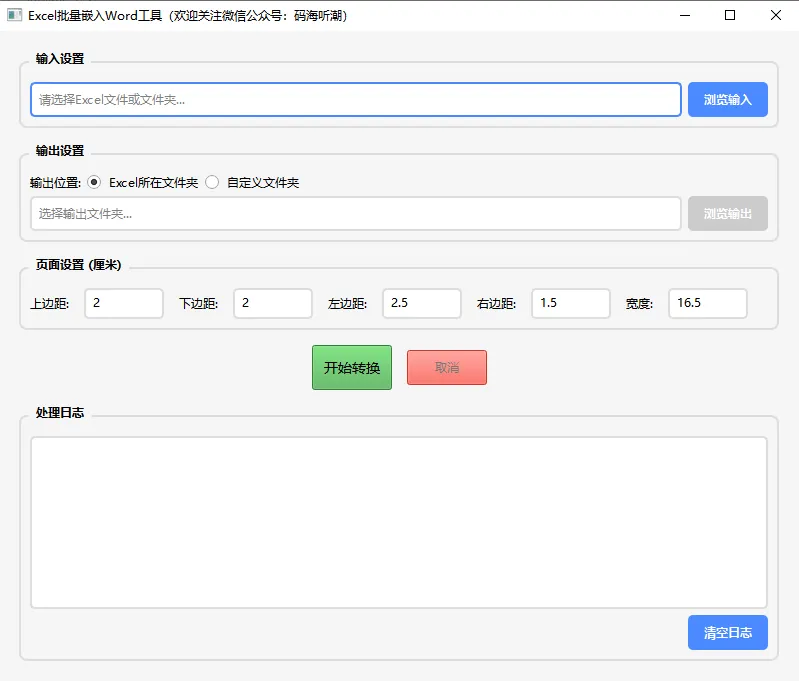
import sysimport osfrom pathlib import Pathfrom typing import Optionalfrom datetime import datetimefrom PyQt6.QtWidgets import ( QApplication, QMainWindow, QWidget, QVBoxLayout, QHBoxLayout, QPushButton, QLabel, QLineEdit, QFileDialog, QTextEdit, QGroupBox, QRadioButton, QMessageBox, QComboBox, QSpinBox, QDoubleSpinBox)from PyQt6.QtCore import Qtfrom PyQt6.QtGui import QFont, QTextCursorclass ModernButton(QPushButton): """现代化按钮样式""" def __init__(self, text: str, parent=None): super().__init__(text, parent) self.setCursor(Qt.CursorShape.PointingHandCursor) self.setMinimumHeight(35) self.setStyleSheet(""" QPushButton { background-color: #4a8aff; color: white; border: none; border-radius: 5px; padding: 8px 16px; font-weight: bold; } QPushButton:hover { background-color: #5c9eff; } QPushButton:pressed { background-color: #3a7ae5; } QPushButton:disabled { background-color: #cccccc; } """)class MainWindow(QMainWindow): """主窗口""" def __init__(self): super().__init__() self.init_ui() def init_ui(self): """初始化UI""" self.setWindowTitle("Excel批量嵌入Word工具") self.setMinimumSize(900, 700) # 中央部件 central_widget = QWidget() self.setCentralWidget(central_widget) # 主布局 main_layout = QVBoxLayout(central_widget) main_layout.setSpacing(15) main_layout.setContentsMargins(20, 20, 20, 20) # 输入区域 input_group = QGroupBox("输入设置") input_layout = QVBoxLayout(input_group) # 输入路径选择 input_path_layout = QHBoxLayout() self.input_path_edit = QLineEdit() self.input_path_edit.setPlaceholderText("请选择Excel文件或文件夹...") self.input_path_edit.setMinimumHeight(35) input_browse_btn = ModernButton("浏览输入") input_browse_btn.clicked.connect(self.browse_input) input_path_layout.addWidget(self.input_path_edit) input_path_layout.addWidget(input_browse_btn) input_layout.addLayout(input_path_layout) main_layout.addWidget(input_group) # 输出区域 output_group = QGroupBox("输出设置") output_layout = QVBoxLayout(output_group) # 输出模式选择 output_mode_layout = QHBoxLayout() output_mode_layout.addWidget(QLabel("输出位置:")) self.same_folder_radio = QRadioButton("Excel所在文件夹") self.same_folder_radio.setChecked(True) self.custom_folder_radio = QRadioButton("自定义文件夹") self.same_folder_radio.toggled.connect(lambda checked: self.toggle_output_path(not checked)) self.custom_folder_radio.toggled.connect(lambda checked: self.toggle_output_path(checked)) output_mode_layout.addWidget(self.same_folder_radio) output_mode_layout.addWidget(self.custom_folder_radio) output_mode_layout.addStretch() output_layout.addLayout(output_mode_layout) # 自定义输出路径 output_path_layout = QHBoxLayout() self.output_path_edit = QLineEdit() self.output_path_edit.setPlaceholderText("选择输出文件夹...") self.output_path_edit.setEnabled(False) self.output_path_edit.setMinimumHeight(35) output_browse_btn = ModernButton("浏览输出") output_browse_btn.clicked.connect(self.browse_output) output_browse_btn.setEnabled(False) output_path_layout.addWidget(self.output_path_edit) output_path_layout.addWidget(output_browse_btn) output_layout.addLayout(output_path_layout) main_layout.addWidget(output_group) # 页面设置区域 page_group = QGroupBox("页面设置 (厘米)") page_layout = QHBoxLayout(page_group) page_layout.setSpacing(15) # 上边距 page_layout.addWidget(QLabel("上边距:")) self.top_margin_spin = QSpinBox() self.top_margin_spin.setRange(0, 10) self.top_margin_spin.setValue(2) self.top_margin_spin.setSuffix(" cm") self.top_margin_spin.setMinimumWidth(80) page_layout.addWidget(self.top_margin_spin) # 下边距 page_layout.addWidget(QLabel("下边距:")) self.bottom_margin_spin = QSpinBox() self.bottom_margin_spin.setRange(0, 10) self.bottom_margin_spin.setValue(2) self.bottom_margin_spin.setSuffix(" cm") self.bottom_margin_spin.setMinimumWidth(80) page_layout.addWidget(self.bottom_margin_spin) # 左边距 page_layout.addWidget(QLabel("左边距:")) self.left_margin_spin = QDoubleSpinBox() self.left_margin_spin.setRange(0, 10) self.left_margin_spin.setValue(2.5) self.left_margin_spin.setSuffix(" cm") self.left_margin_spin.setSingleStep(0.5) self.left_margin_spin.setMinimumWidth(80) page_layout.addWidget(self.left_margin_spin) # 右边距 page_layout.addWidget(QLabel("右边距:")) self.right_margin_spin = QDoubleSpinBox() self.right_margin_spin.setRange(0, 10) self.right_margin_spin.setValue(1.5) self.right_margin_spin.setSuffix(" cm") self.right_margin_spin.setSingleStep(0.5) self.right_margin_spin.setMinimumWidth(80) page_layout.addWidget(self.right_margin_spin) # 嵌入对象宽度 page_layout.addWidget(QLabel("宽度:")) self.page_width_spin = QDoubleSpinBox() self.page_width_spin.setRange(5, 30) self.page_width_spin.setValue(16.5) self.page_width_spin.setSuffix(" cm") self.page_width_spin.setSingleStep(0.5) self.page_width_spin.setMinimumWidth(80) page_layout.addWidget(self.page_width_spin) page_layout.addStretch() main_layout.addWidget(page_group) # 控制按钮 control_layout = QHBoxLayout() self.convert_btn = ModernButton("开始转换") self.convert_btn.setMinimumHeight(45) self.convert_btn.setStyleSheet(""" QPushButton { background-color: #4caf50; font-size: 14px; } QPushButton:hover { background-color: #66bb6a; } """) self.cancel_btn = ModernButton("取消") self.cancel_btn.setEnabled(False) self.cancel_btn.setStyleSheet(""" QPushButton { background-color: #f44336; } QPushButton:hover { background-color: #ef5350; } """) control_layout.addStretch() control_layout.addWidget(self.convert_btn) control_layout.addWidget(self.cancel_btn) control_layout.addStretch() main_layout.addLayout(control_layout) # 日志区域 log_group = QGroupBox("处理日志") log_layout = QVBoxLayout(log_group) self.log_text = QTextEdit() self.log_text.setReadOnly(True) self.log_text.setMaximumHeight(300) self.log_text.setFont(QFont("Consolas", 10)) log_control_layout = QHBoxLayout() clear_log_btn = ModernButton("清空日志") clear_log_btn.clicked.connect(self.clear_log) log_control_layout.addStretch() log_control_layout.addWidget(clear_log_btn) log_layout.addWidget(self.log_text) log_layout.addLayout(log_control_layout) main_layout.addWidget(log_group) # 应用样式 self.apply_styles() def apply_styles(self): """应用样式表""" self.setStyleSheet(""" QMainWindow { background-color: #f5f5f5; } QGroupBox { font-weight: bold; border: 2px solid #ddd; border-radius: 8px; margin-top: 10px; padding-top: 10px; } QGroupBox::title { subcontrol-origin: margin; left: 10px; padding: 0 5px 0 5px; } QLineEdit { border: 2px solid #ddd; border-radius: 5px; padding: 5px; background-color: white; } QLineEdit:focus { border-color: #4a8aff; } QTextEdit { border: 2px solid #ddd; border-radius: 5px; background-color: white; font-family: Consolas; } QCheckBox, QRadioButton { spacing: 8px; } QComboBox { border: 2px solid #ddd; border-radius: 5px; padding: 5px; min-height: 25px; } QSpinBox, QDoubleSpinBox { border: 2px solid #ddd; border-radius: 5px; padding: 5px; min-height: 25px; } """) def browse_input(self): """浏览输入路径""" file_paths, _ = QFileDialog.getOpenFileNames( self, "选择Excel文件", "", "Excel文件 (*.xlsx *.xls *.xlsm)" ) if file_paths: if len(file_paths) == 1: self.input_path_edit.setText(file_paths[0]) else: folder_path = os.path.dirname(file_paths[0]) self.input_path_edit.setText(folder_path) self.add_log(f"选择了 {len(file_paths)} 个文件", "info") else: folder = QFileDialog.getExistingDirectory(self, "选择文件夹") if folder: self.input_path_edit.setText(folder) def browse_output(self): """浏览输出路径""" folder = QFileDialog.getExistingDirectory(self, "选择输出文件夹") if folder: self.output_path_edit.setText(folder) def toggle_output_path(self, enabled: bool): """切换输出路径编辑框状态""" self.output_path_edit.setEnabled(enabled) for child in self.findChildren(QPushButton): if child.text() == "浏览输出": child.setEnabled(enabled) break def add_log(self, message: str, level: str = "info"): """添加日志""" timestamp = datetime.now().strftime("%H:%M:%S") color = "#000000" if level == "error": color = "#f44336" elif level == "success": color = "#4caf50" elif level == "info": color = "#2196f3" formatted_msg = f'<span style="color: #888;">[{timestamp}]</span> <span style="color: {color};">{message}</span>' self.log_text.append(formatted_msg) cursor = self.log_text.textCursor() cursor.movePosition(QTextCursor.MoveOperation.End) self.log_text.setTextCursor(cursor) def clear_log(self): """清空日志""" self.log_text.clear()def main(): """主函数""" app = QApplication(sys.argv) app.setStyle('Fusion') window = MainWindow() window.show() sys.exit(app.exec())if __name__ == "__main__": main()