HyperMesh Python 二次开发 提高脚本运行速度的方法(以每个solid建立一个component为例)
- 2026-10-11 05:58:56
HyperMesh Python 二次开发 提高脚本运行速度的方法(以每个solid建立一个component为例)
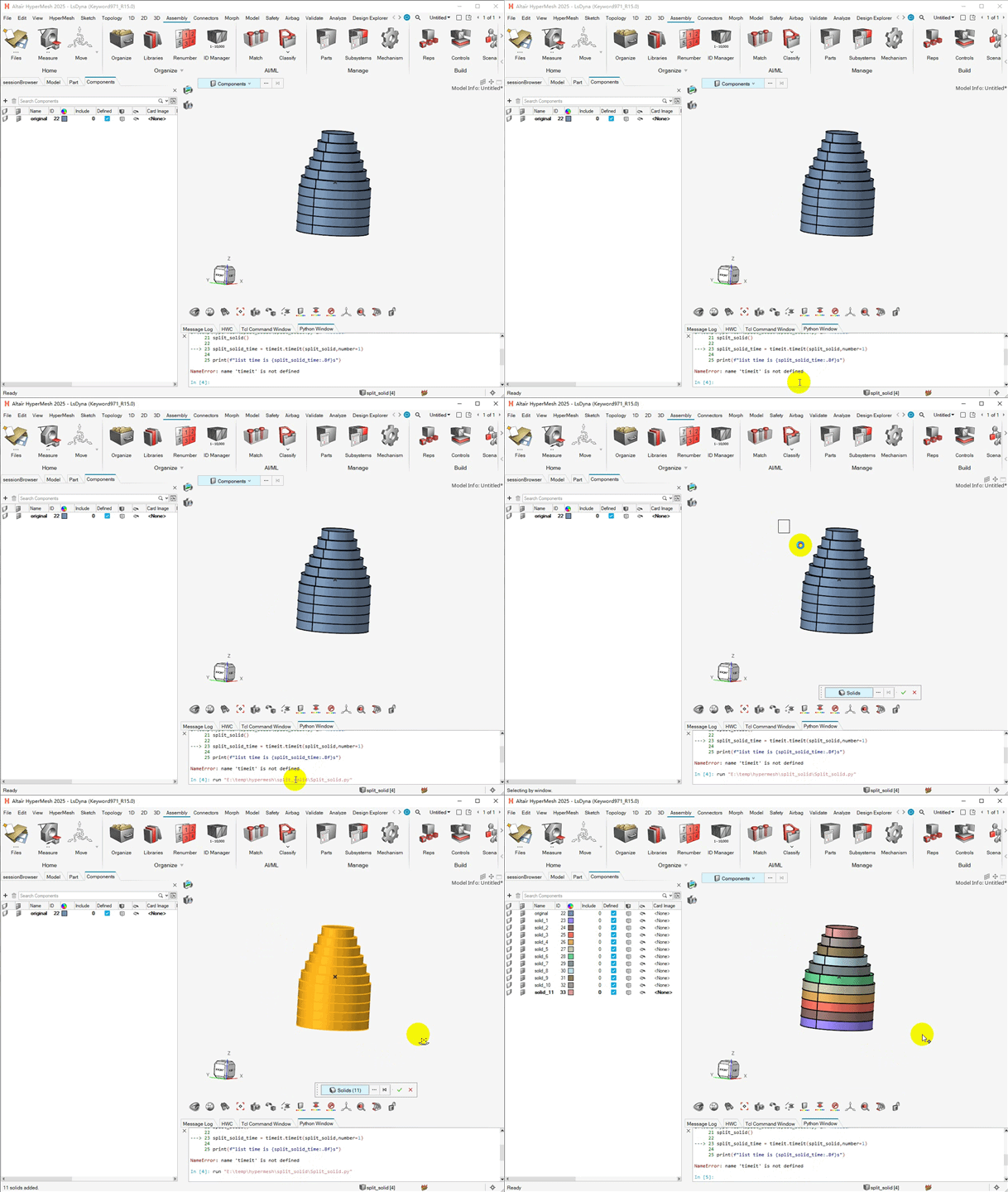
本篇代码应用场景,客户提供的CAD数据所有solid在一个component中,仿真工程师需要将每个solid单独移动到独立的component中,solid数量较多时候,每个solid需要新建component,然后shift+F11移动一次,耗费大量时间,使用代码几秒搞定(新界面的HyperMesh在导入的时候可以自动完成了),这里主要基于此代码学习提高脚本运行效率的方法。 观察上图gif动画中,左侧Component Browser,代码运行过程中,Browser是实时更新,我们可以设置它不更新,这样可以提高代码运行速度,还有其它一些提高方法,见下方代码中performance函数,timeit模块用来测试脚本运行时间,此示例模型中10个solid,加入performance函数,代码运行使时间1.6s左右,未加performance函数,代码运行时间4.6s左右,运行速度提升非常明显!!!!!!
「CAE仿真记」
愿与您一同,用代码提升效率!
import hmimport hm.entities as ent# 测试脚本运行时间用 timeitimport timeitdef performance(model, switch):if switch == True: hm.setoption(# 控制图形界面是否刷新# Controls the graphics redraw# 0 Allows redraw# 1 Blocks redraw block_redraw=1,# 是否写出command# The state of writing to the command file.# 0 - Disable writing to the command file# 1 - Enable writing to the command file command_file_state=0,# 是否预高亮选择的entity# The mode for pre-highlighting selected entities.# 0 - Do not pre-highlight. This may improve script performance.# 1 - Pre-highlight entity_highlighting=0, )# Controls the update of the browsers in HyperMesh client# 0 – Unblocks the browser updates and populates the buffered data into the browser.# 1 – Blocks the browser updates and starts buffering the data. model.hm_blockbrowserupdate(mode=1)else: hm.setoption( block_redraw=0, command_file_state=1, entity_highlighting=1, ) model.hm_blockbrowserupdate(mode=0)def split_solid(): model = hm.Model()# 为需要分组的solid 新建collection solidcol = hm.CollectionByInteractiveSelection(model, ent.Solid)#使用for循环,遍历每一个solid,并创建一个component,以solid ID 命名component#然后将solid移动中对应的component中 performance(model, True)for solid in solidcol:#创建component comp = ent.Component(model)#重命名component comp.name = f"solid_{solid.id}"# Organize (move) the solid to the new component# 老版本hypermesh中的Shift+F11功能# 为solid 新建一个collection filterBen = hm.FilterByEnumeration(ent.Solid, list([solid.id])) solid_col = hm.Collection(model, filterBen)# organize solid 到对应conponent (Shift+F11) model.movemark(collection=solid_col, name=f"solid_{solid.id}") performance(model, False)split_solid()split_solid_time = timeit.timeit(split_solid,number=1)print(f"split solid time is {split_solid_time:.8f}s")# 1.60715560s💡提示
文中代码来自HyperMesh帮组文档,基于帮组文档有微调。
往期文章
CAE仿真 网格评价中的雅可比为什么是0-1?及参数单元是什么
HyperMesh Python二次开发 选择实体对象(Entity Selection)collection基础用法
HyperMesh Python二次开发-自动修改Component名字
10分钟快速了解HyperMesh Python 二次开发(附源码-创建一个4节点shell单元)
本文来自网友投稿或网络内容,如有侵犯您的权益请联系我们删除,联系邮箱:596563534@qq.com 。
随机文章
-
 10个月宝宝每天需要喝多少奶粉?
- Claude 自己偷偷用着 Linux,却不给 Linux 用户一个桌面版
- Python 获取开盘委托大单
- 都说Python做评分卡好,我偏用R做了一版,结果出乎意料
- Python自动化帮普通人做哪些重复工作
- Python迭代器与生成器 (学习笔记6)
- 全网疯传!字节新发布的《Python知识手册》高清PDF版,真的太清晰了
- Python办公自动化连载09:自动整理文件,自动分类归档、按日期新建文件夹
- 2026年最狠的AI技能:不学Python也能做数据分析,10分钟出报告
- python+PTrade实盘交易:如何使用PTrade实现自动发送策略信号、交易记录、异常预警等信息到邮箱!
- 2026年了,还有必要学Python吗?