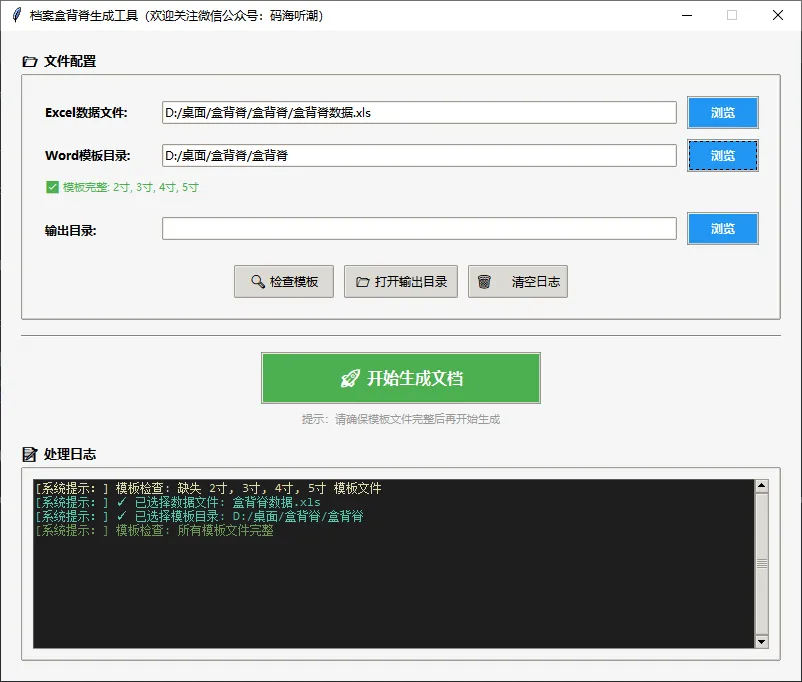
import tkinter as tkfrom tkinter import ttk, messagebox, filedialogimport osfrom datetime import datetimeclass WordGeneratorApp: def __init__(self, root): self.root = root self.root.title("档案盒背脊生成工具(欢迎关注微信公众号:码海听潮)") self.root.geometry("800x650") self.root.resizable(True, True) # 设置样式 self.setup_styles() # 变量 self.excel_path = tk.StringVar() self.template_dir = tk.StringVar(value=os.getcwd()) self.output_dir = tk.StringVar(value=os.getcwd()) self.status_var = tk.StringVar(value="就绪") # 创建界面 self.create_widgets() # 绑定关闭事件 self.root.protocol("WM_DELETE_WINDOW", self.on_closing) def setup_styles(self): """设置界面样式""" style = ttk.Style() style.theme_use('clam') # 配置颜色 self.bg_color = "#f5f5f5" self.primary_color = "#2196F3" self.success_color = "#4CAF50" self.warning_color = "#FF9800" self.danger_color = "#f44336" self.root.configure(bg=self.bg_color) # 自定义按钮样式 style.configure("Primary.TButton", background=self.primary_color, foreground="white", font=("微软雅黑", 9, "bold"), padding=5) style.map("Primary.TButton", background=[('active', '#1976D2')]) style.configure("Success.TButton", background=self.success_color, foreground="white", font=("微软雅黑", 12, "bold"), padding=12) style.map("Success.TButton", background=[('active', '#45a049')]) style.configure("TLabel", background=self.bg_color, font=("微软雅黑", 9)) style.configure("Title.TLabel", font=("微软雅黑", 16, "bold"), foreground="#333333") style.configure("TFrame", background=self.bg_color) style.configure("TLabelframe", background=self.bg_color) style.configure("TLabelframe.Label", background=self.bg_color, font=("微软雅黑", 10, "bold")) def create_widgets(self): """创建界面组件""" # 主容器 main_frame = ttk.Frame(self.root, padding="20") main_frame.pack(fill=tk.BOTH, expand=True) # 文件配置区域 config_frame = ttk.LabelFrame(main_frame, text="📂 文件配置", padding="20") config_frame.pack(fill=tk.X, pady=(0, 15)) # 配置网格权重,使输入框可以扩展 config_frame.columnconfigure(1, weight=1) # Excel数据文件 ttk.Label(config_frame, text="Excel数据文件:", font=("微软雅黑", 9, "bold"), width=15, anchor=tk.W).grid( row=0, column=0, sticky=tk.W, pady=(0, 5), padx=(0, 10)) excel_frame = ttk.Frame(config_frame) excel_frame.grid(row=0, column=1, sticky=tk.EW, pady=(0, 5)) ttk.Entry(excel_frame, textvariable=self.excel_path).pack(side=tk.LEFT, fill=tk.X, expand=True, padx=(0, 10)) ttk.Button(excel_frame, text="浏览", command=self.select_excel_file, style="Primary.TButton", width=8).pack(side=tk.RIGHT) # 模板目录 ttk.Label(config_frame, text="Word模板目录:", font=("微软雅黑", 9, "bold"), width=15, anchor=tk.W).grid( row=1, column=0, sticky=tk.W, pady=(5, 5), padx=(0, 10)) template_frame = ttk.Frame(config_frame) template_frame.grid(row=1, column=1, sticky=tk.EW, pady=(5, 5)) ttk.Entry(template_frame, textvariable=self.template_dir).pack(side=tk.LEFT, fill=tk.X, expand=True, padx=(0, 10)) ttk.Button(template_frame, text="浏览", command=self.select_template_dir, style="Primary.TButton", width=8).pack(side=tk.RIGHT) # 模板文件状态显示 self.template_status_label = ttk.Label(config_frame, text="", font=("微软雅黑", 8)) self.template_status_label.grid(row=2, column=0, columnspan=2, sticky=tk.W, pady=(0, 10), padx=(0, 10)) # 输出目录 ttk.Label(config_frame, text="输出目录:", font=("微软雅黑", 9, "bold"), width=15, anchor=tk.W).grid( row=3, column=0, sticky=tk.W, pady=(5, 5), padx=(0, 10)) output_frame = ttk.Frame(config_frame) output_frame.grid(row=3, column=1, sticky=tk.EW, pady=(5, 10)) ttk.Entry(output_frame, textvariable=self.output_dir).pack(side=tk.LEFT, fill=tk.X, expand=True, padx=(0, 10)) ttk.Button(output_frame, text="浏览", command=self.select_output_dir, style="Primary.TButton", width=8).pack(side=tk.RIGHT) # 快捷操作按钮行 quick_frame = ttk.Frame(config_frame) quick_frame.grid(row=4, column=0, columnspan=2, pady=(10, 0)) ttk.Button(quick_frame, text="🔍 检查模板", command=self.check_template_files, width=12).pack(side=tk.LEFT, padx=5) ttk.Button(quick_frame, text="📂 打开输出目录", command=self.open_output_dir, width=14).pack(side=tk.LEFT, padx=5) ttk.Button(quick_frame, text="🗑️ 清空日志", command=self.clear_log, width=12).pack(side=tk.LEFT, padx=5) # 开始生成按钮区域(单独突出显示) button_container = ttk.Frame(main_frame) button_container.pack(fill=tk.X, pady=(0, 15)) # 添加分隔线 separator = ttk.Separator(button_container, orient='horizontal') separator.pack(fill=tk.X, pady=(0, 15)) # 开始生成按钮 - 居中大按钮 button_frame = ttk.Frame(button_container) button_frame.pack() self.start_button = ttk.Button(button_frame, text="🚀 开始生成文档", command=self.start_generation, style="Success.TButton", width=25) self.start_button.pack() # 提示文字 tip_label = ttk.Label(button_container, text="提示:请确保模板文件完整后再开始生成", font=("微软雅黑", 8), foreground="#999999") tip_label.pack(pady=(5, 0)) # 日志显示区域 log_frame = ttk.LabelFrame(main_frame, text="📝 处理日志", padding="10") log_frame.pack(fill=tk.BOTH, expand=True) # 日志文本框 log_text_frame = ttk.Frame(log_frame) log_text_frame.pack(fill=tk.BOTH, expand=True) scrollbar = ttk.Scrollbar(log_text_frame) scrollbar.pack(side=tk.RIGHT, fill=tk.Y) self.log_text = tk.Text(log_text_frame, wrap=tk.WORD, font=("Consolas", 9), yscrollcommand=scrollbar.set, bg="#1e1e1e", fg="#d4d4d4", insertbackground="white", height=15) self.log_text.pack(fill=tk.BOTH, expand=True) scrollbar.config(command=self.log_text.yview) # 配置标签样式 self.log_text.tag_config("INFO", foreground="#4EC9B0") self.log_text.tag_config("SUCCESS", foreground="#6A9955") self.log_text.tag_config("ERROR", foreground="#F48771") self.log_text.tag_config("WARNING", foreground="#DCDCAA") # 底部状态栏 self.create_status_bar() def create_status_bar(self): """创建状态栏""" status_frame = ttk.Frame(self.root) status_frame.pack(side=tk.BOTTOM, fill=tk.X) status_label = ttk.Label(status_frame, textvariable=self.status_var, relief=tk.SUNKEN, anchor=tk.W, font=("微软雅黑", 8)) status_label.pack(side=tk.LEFT, fill=tk.X, expand=True) # ==================== 占位方法(仅保持接口完整) ==================== def select_excel_file(self): """选择Excel文件(占位)""" pass def select_template_dir(self): """选择模板目录(占位)""" pass def check_template_files(self): """检查模板文件(占位)""" pass def select_output_dir(self): """选择输出目录(占位)""" pass def open_output_dir(self): """打开输出目录(占位)""" pass def add_log(self, message, level="INFO"): """添加日志(占位)""" timestamp = datetime.now().strftime("%H:%M:%S") log_message = f"[{timestamp}] {message}\n" self.log_text.insert(tk.END, log_message, level) self.log_text.see(tk.END) self.root.update_idletasks() def clear_log(self): """清空日志(占位)""" self.log_text.delete(1.0, tk.END) self.add_log("日志已清空", "INFO") def start_generation(self): """开始生成文档(占位)""" self.add_log("此版本为界面演示,未集成生成功能", "WARNING") def on_closing(self): """关闭窗口时的处理""" if messagebox.askokcancel("退出", "确定要退出程序吗?"): self.root.destroy()def main(): root = tk.Tk() app = WordGeneratorApp(root) root.mainloop()if __name__ == "__main__": main()