期刊图片复现|Python绘制多区域特征重要性与SHAP蜂巢图组图
- 2026-09-04 09:09:05
期刊图片复现|Python绘制多区域特征重要性与SHAP蜂巢图组图

论文:As cities sprawl: Unraveling the nonlinear impacts of urban spatial evolution on outdoor crime patterns through machine learning and causal inference 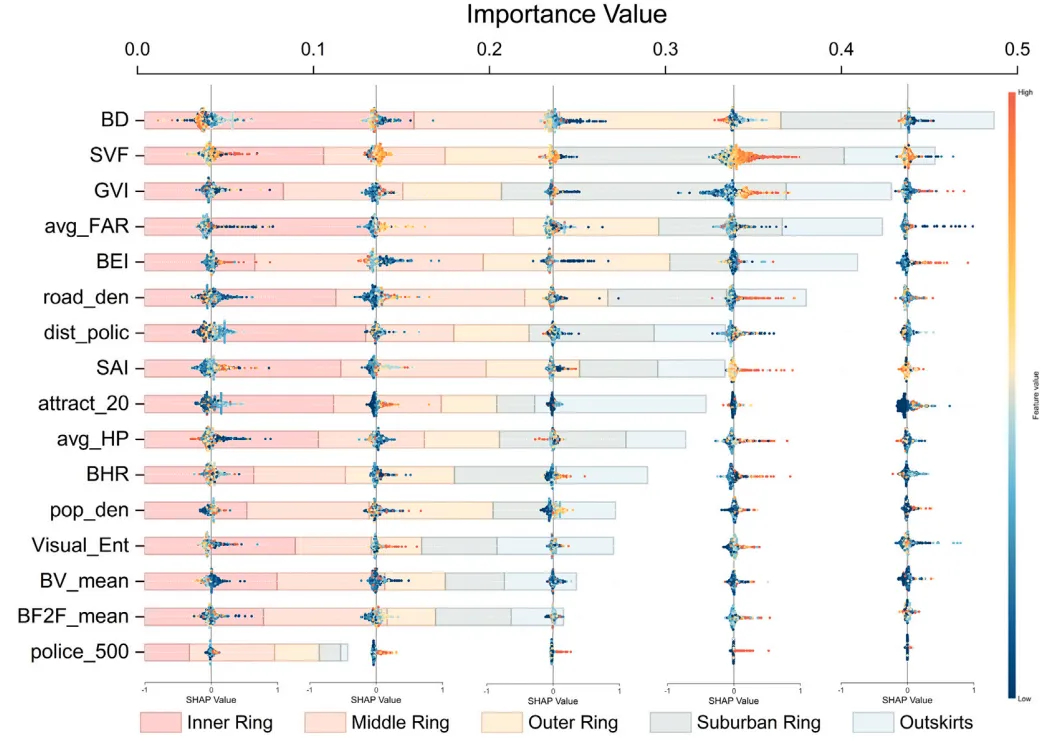
论文原图 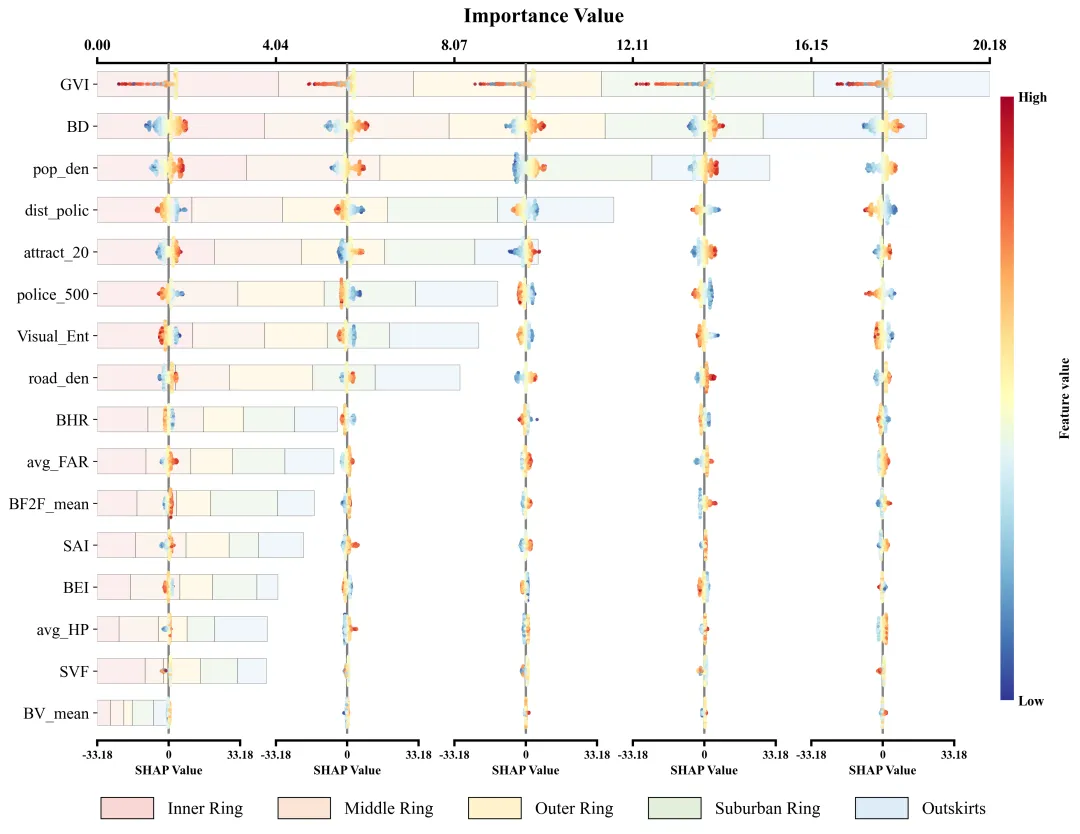
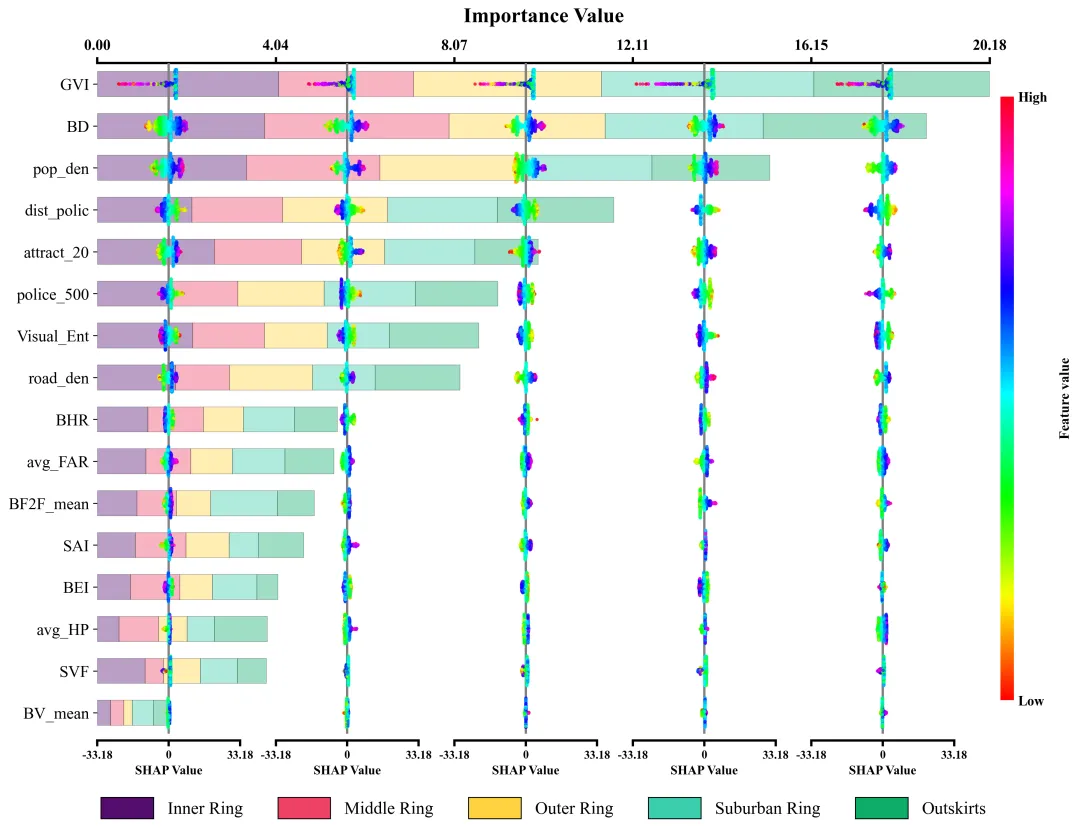
仿图 此图深入剖析了各项特征在五个不同空间区域中对模型预测的边际影响及特征重要性分布。左侧的Y轴依全局重要性由高至低排列了16组输入特征;图表顶部的X轴标示了整体特征重要性值,其对应的横向堆叠柱状图直观地量化了各特征贡献度的累计总和。底部的图例标明了组成柱状图的五段色块分别代表的区域。在每个区域特征重要性色块的相应区间内,嵌套了五列SHAP蜂巢图子图,其中贯穿各子图的灰色垂直线为零值基准线,零线右侧(正SHAP值)表明该特征促使目标预测值增加,零线左侧(负SHAP值)则导致预测值降低。子图中的每一个散点代表一个真实样本;点的颜色代表特征的原始数值大小。 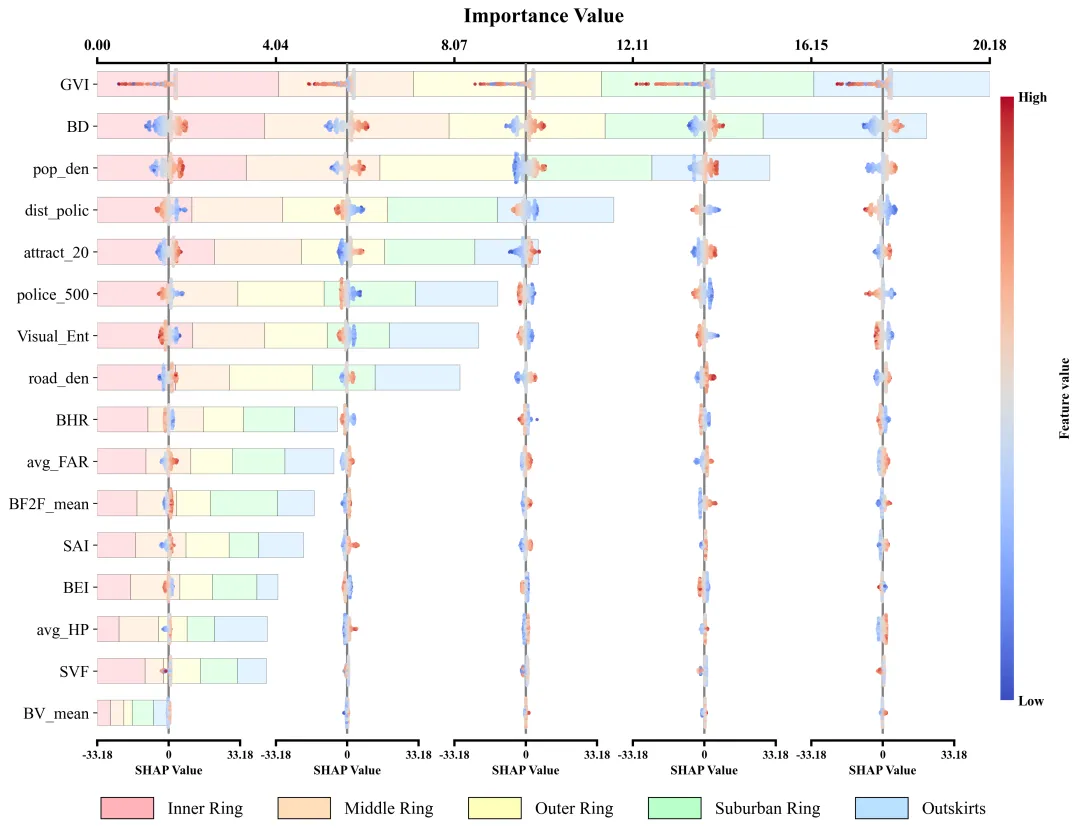
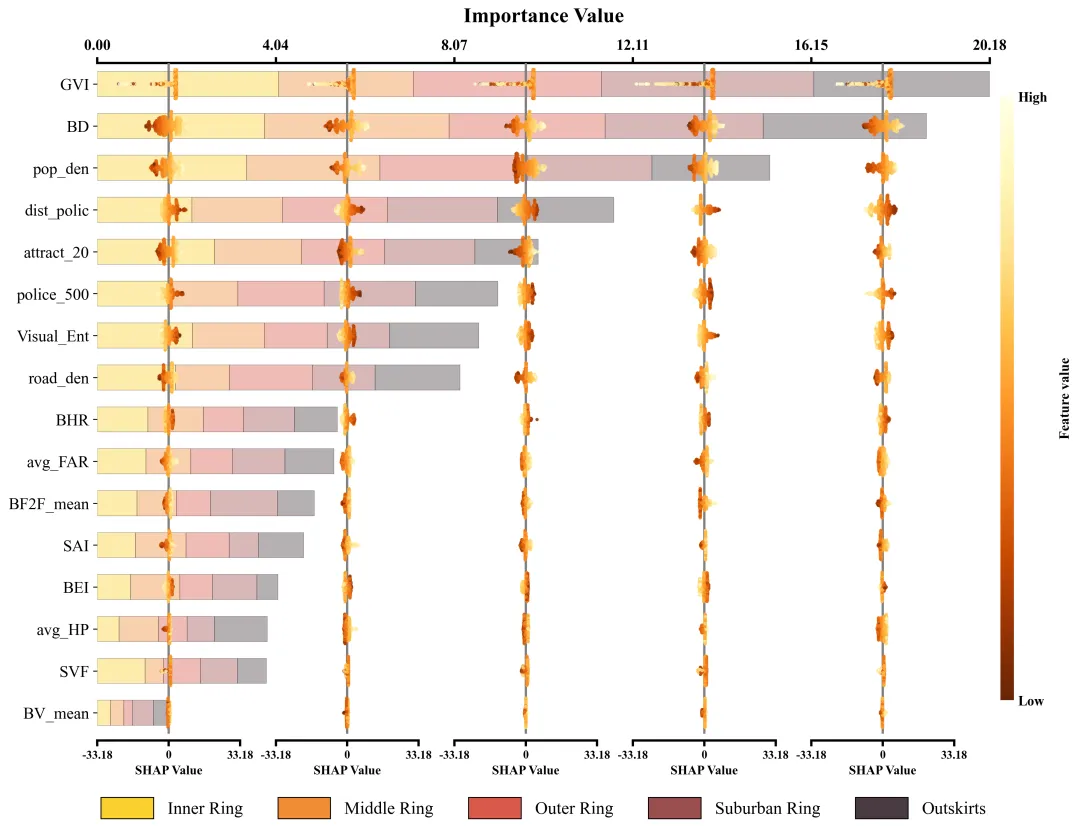
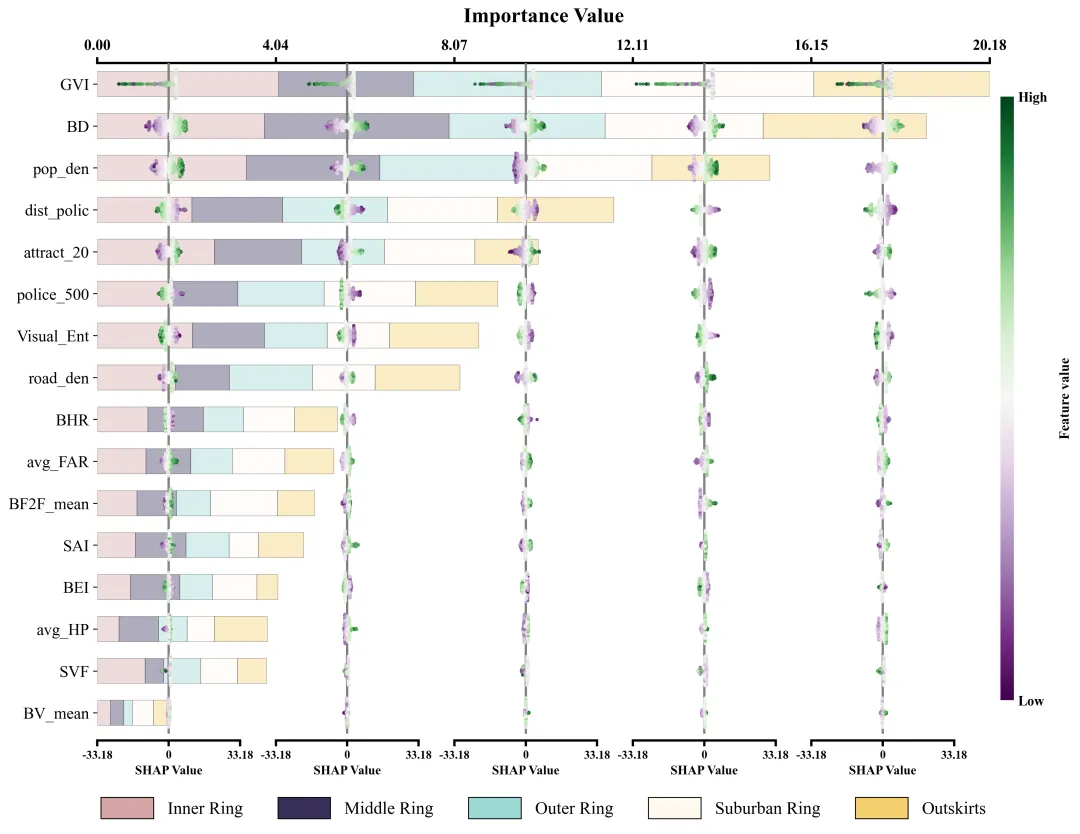
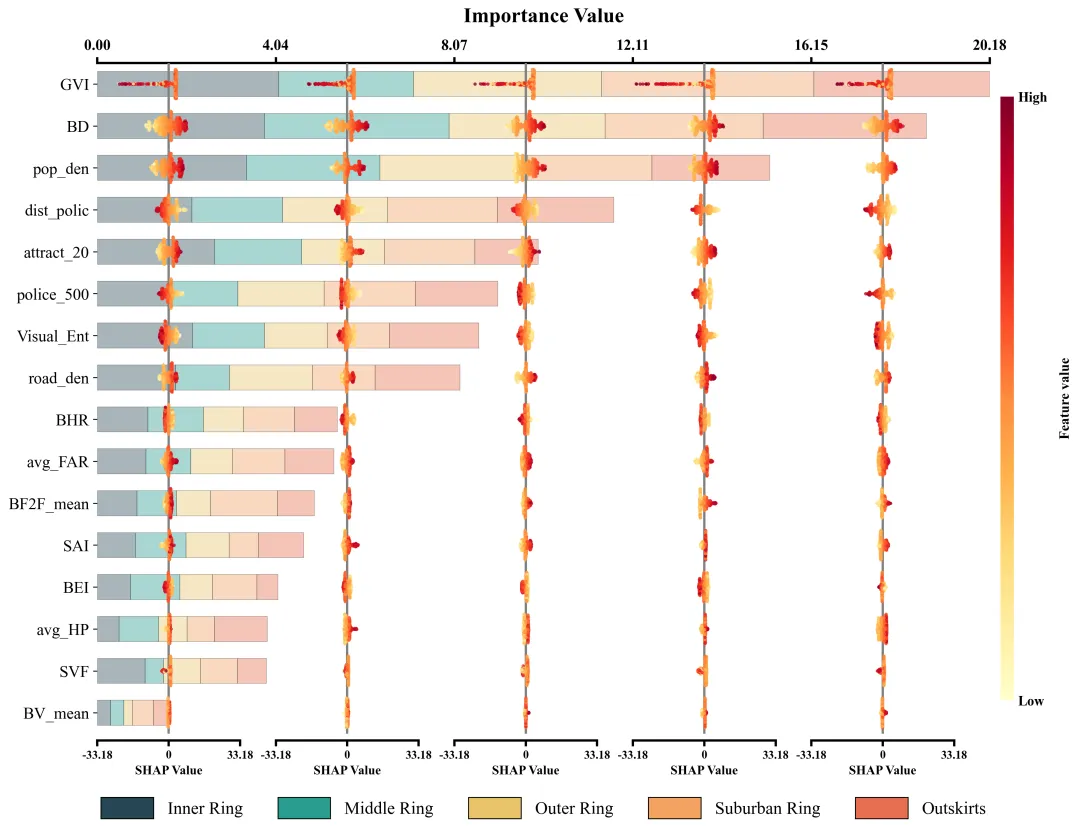
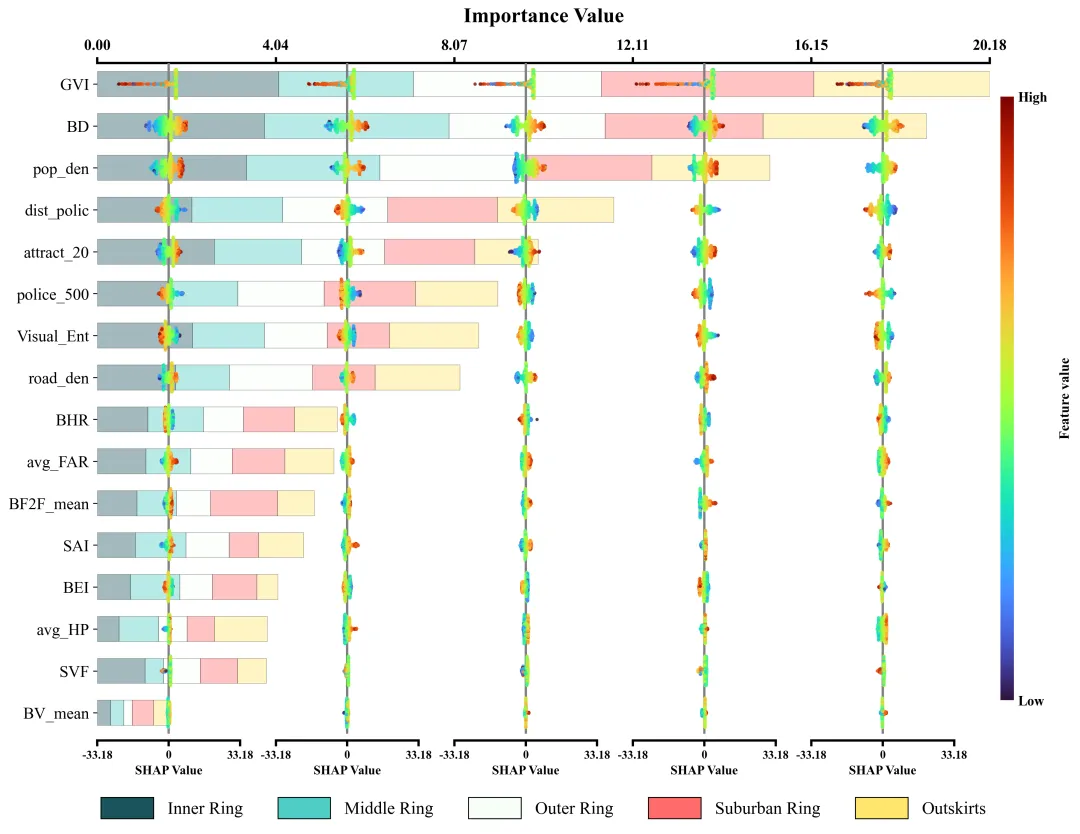
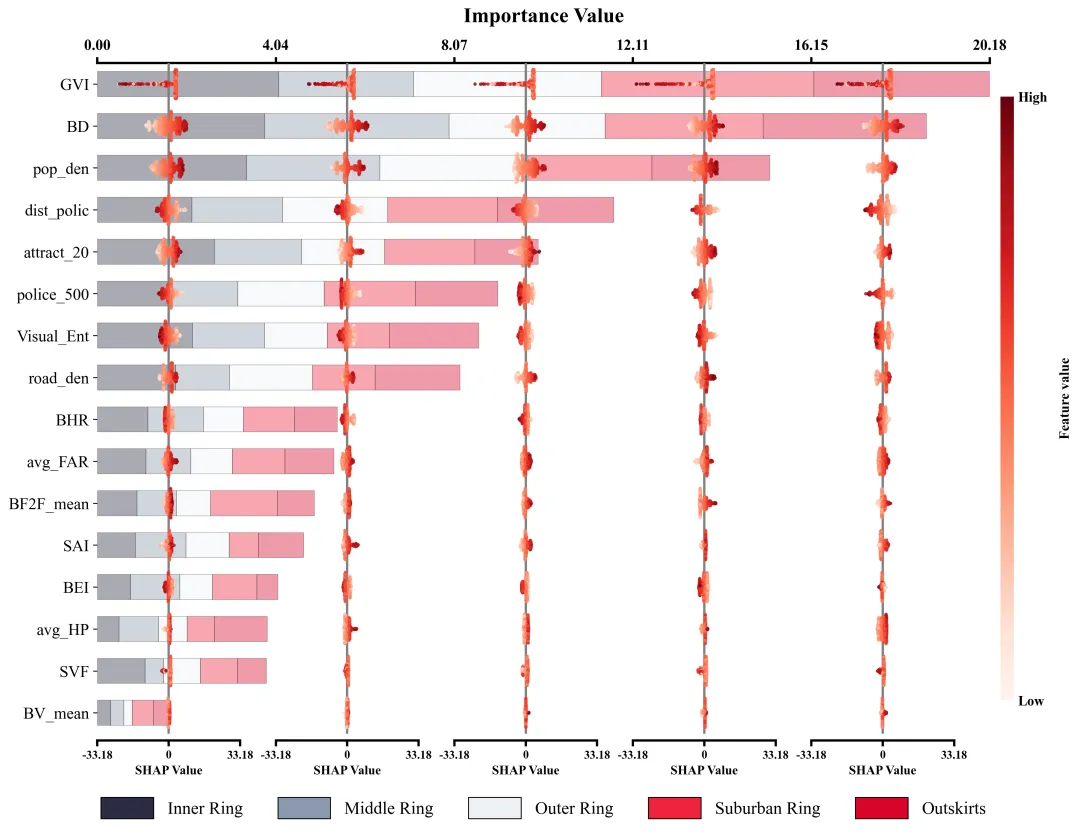
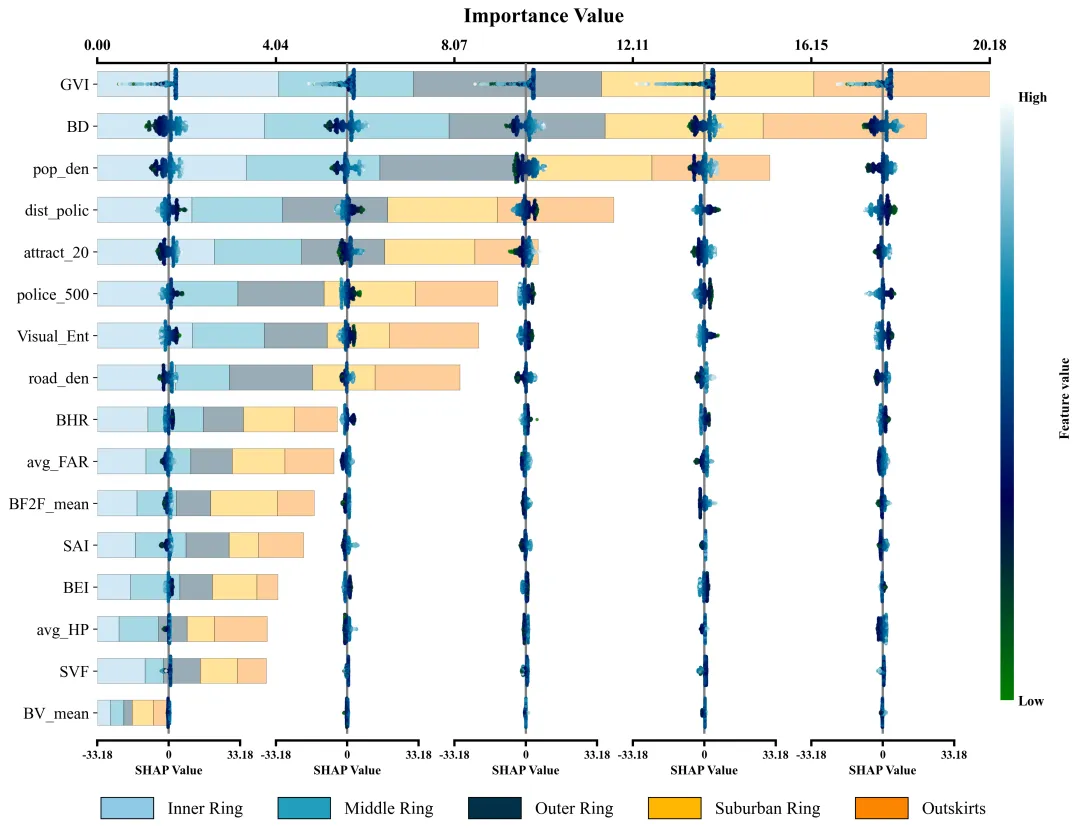
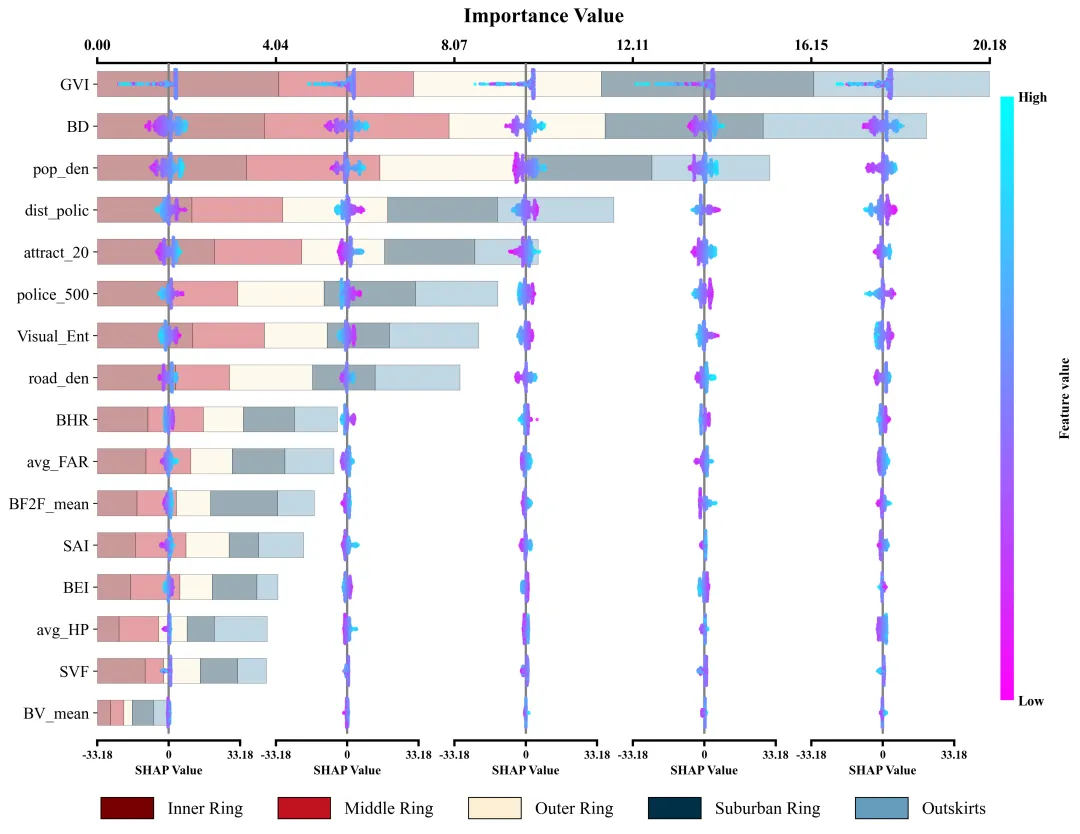
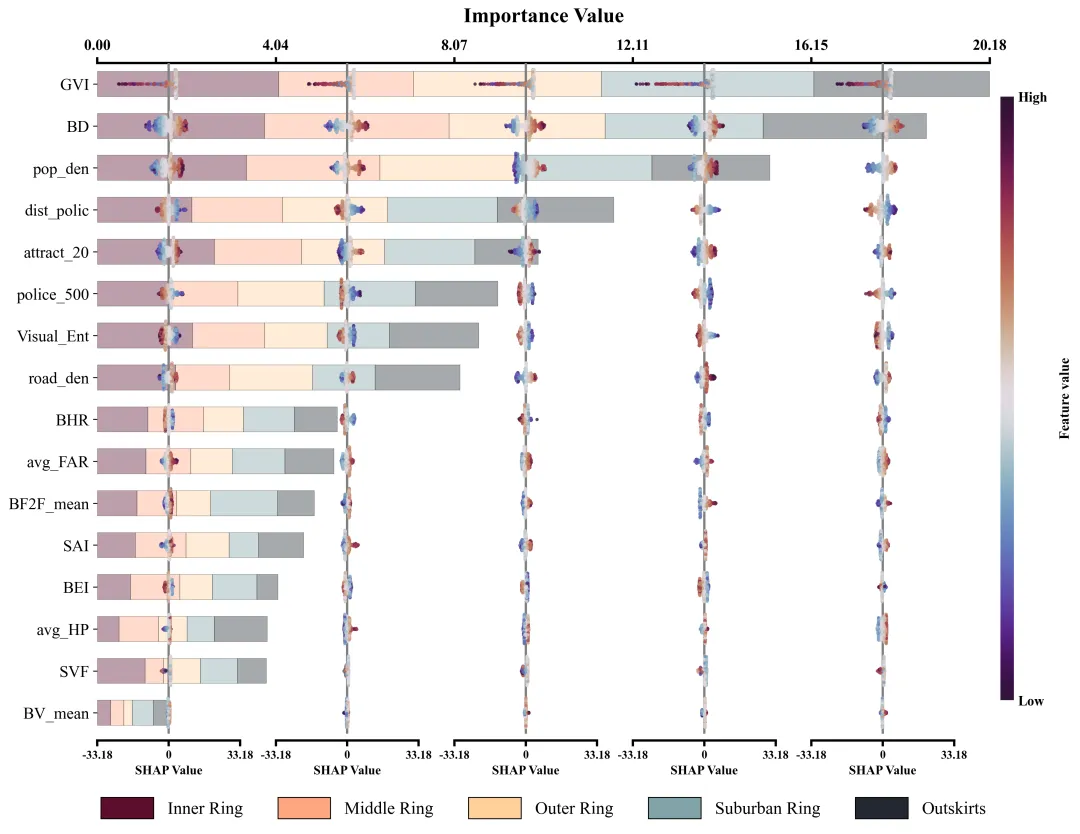
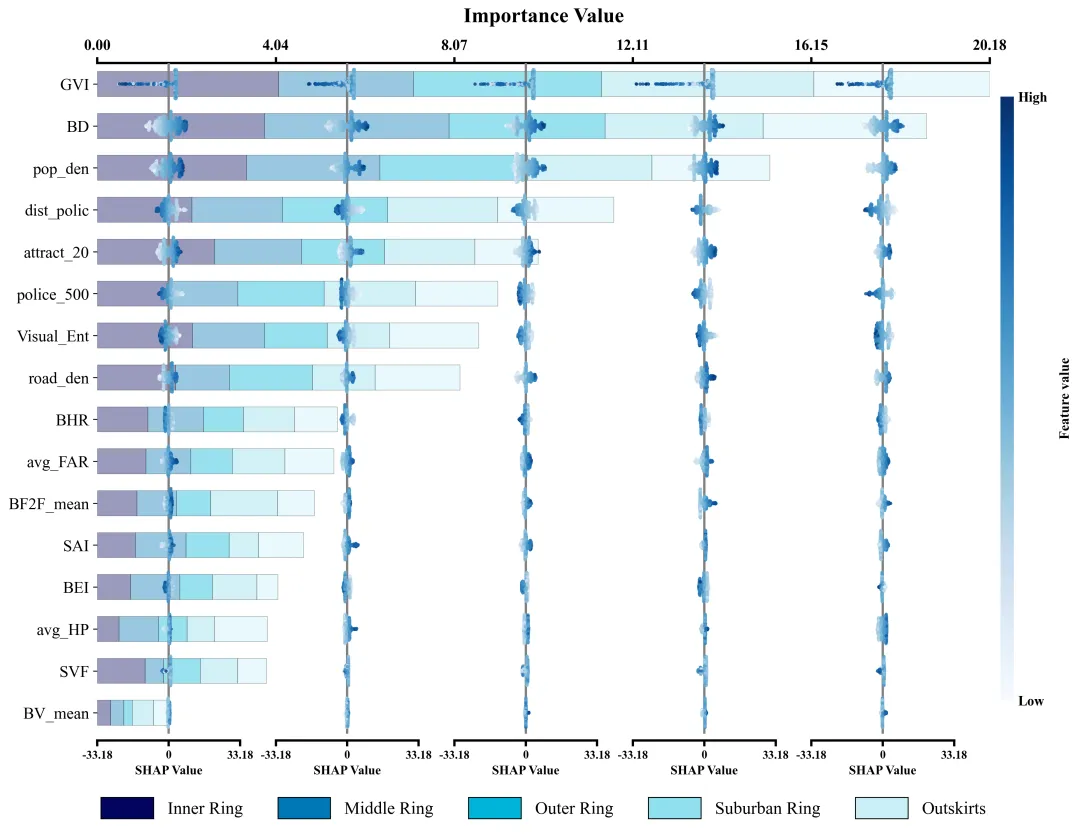
多种配色 



库的导入以及字体设置 

设置颜色库 

蜂巢图设置辅助函数 

绘图函数:数据提取与画布创建 

绘图函数:绘制特征重要性堆叠柱状图 

绘图函数:主图坐标轴设置 

绘图函数:各个区域的蜂巢图子图绘制 

绘图函数:绘制颜色条和图例 

执行部分:数据读取以及基础设置 

执行部分:遍历每个区域寻找各区域最佳模型以及模型性能评估 

执行部分:shap分析 

执行部分:数据收集与绘图执行 



期刊图片复现|Python绘制二维偏依赖PDP图 期刊复现|python绘制基于SHAP分析和GAM模型拟合的单特征依赖图 期刊图片复现|python绘制带有渐变颜色shap特征重要性组合图(条形图+蜂巢图) 期刊复现|用Python绘制SHAP特征重要性总览图、依赖图、双特征交互效应SHAP图,解锁XGBoost模型的终极奥秘 期刊图片复现|Python绘制shap重要性蜂巢图+单特征依赖图+交互效应强度气泡图+交互效应依赖图(回归+二分类+分类) 

公众号中的所有所有的免费代码都已经下架了,都并入到付费部分里了,付费合集代码和数据的购买通道已经开通,全部合集100元,后续将会持续更新,决定购买请后台私信我,注意只会分享练习数据和代码文件,不会提供答疑服务,代码文件中已经包含了每行代码的完整注释,购买前请确保真的需要!!!
代码绘制成果展示
代码解释
第一部分
# =========================================================================================# ====================================== 1. 环境设置 =======================================# =========================================================================================import matplotlib.pyplot as pltimport numpy as npimport pandas as pdfrom matplotlib.cm import ScalarMappablefrom matplotlib.colors import Normalize
第二部分
# =========================================================================================# ======================================2.颜色库=======================================# =========================================================================================COLOR_SCHEMES = {1: (['#F9D6D5', '#FCE4D6', '#FFF2CC', '#E2EFDA', '#DDEBF7'], 'RdYlBu_r'),}
第三部分
# =========================================================================================# ======================================3.蜂群图辅助函数=======================================# =========================================================================================def simple_beeswarm(x_values, nbins=40, width=0.1):np.random.seed(42)hist_range = (np.min(x_values), np.max(x_values)) #数据的最小值和最大值范围if hist_range[0] == hist_range[1]: # 如果最大值等于最小值hist_range = (hist_range[0] - 0.1, hist_range[1] + 0.1) #手动扩展范围counts, edges = np.histogram(x_values, bins=nbins, range=hist_range) #计算直方图,获取各区间的计数和边界bin_indices = np.digitize(x_values, edges) - 1 # 计算每个数据点所属的箱子索引current_width = (counts[i] / max_count) * width # 根据当前箱子的密度计算抖动宽度ys = np.linspace(-current_width, current_width, len(idxs)) # 在宽度范围内生成均匀分布的Y值np.random.shuffle(ys) # 打乱Y值顺序y_values[idxs] = ys # 将计算好的Y值赋给对应的数据点return y_values # 返回计算好的Y轴抖动坐标
第四部分
# =========================================================================================# ======================================4.绘图函数=======================================# =========================================================================================def plot_advanced_forest_chart():features = data_dict['features'] #特征名rings = data_dict['rings'] #区域名y_positions = np.arange(len(features)) #特征的y坐标left_positions = np.zeros(len(features)) #记录堆叠柱子画到哪了
第五部分
#遍历各区域for i, ring in enumerate(rings):widths = importance_data[:, i] #特征重要性数值也就是柱子长#绘制条形图main_xticks = np.array([i * step for i in range(len(rings) + 1)]) #顶端X轴的刻度标注x_limit = main_xticks[-1] #右边界
第六部分
# Y轴上下线y_min = y_positions[0] - 0.5y_max = y_positions[-1] + 0.5ax_main.set_xlim(0.0, x_limit) #x轴范围ax_main.set_ylim(y_min, y_max) #y轴范围ax_main.tick_params(axis='x', #xlabelsize=13, #大小width=2, #粗细length=5) #长#刻度标注加粗for label in ax_main.get_xticklabels():label.set_fontweight('bold')#去掉边框ax_main.spines['right'].set_visible(False)ax_main.spines['bottom'].set_visible(False)ax_main.spines['left'].set_visible(False)
第七部分
center_x_data_coords = main_xticks[:-1] # 扔掉最后一位坐标,前面的就拿来当画右侧SHAP散点图左起点的基准shap_plot_width_ratio = 0.8 # 每个蜂巢图在所在区域多占比例col_width_data = step * shap_plot_width_ratio #子图宽度ax_col.set_ylim(y_min, y_max) #子图y范围ax_col.set_xlim(-shap_limit, shap_limit) #子图x范围ax_col.patch.set_alpha(0) #子图底色ax_col.set_yticks([]) #子图y坐标轴都去掉#去掉边框ax_col.spines['left'].set_visible(False)ax_col.spines['right'].set_visible(False)ax_col.spines['top'].set_visible(False)#设置底边框ax_col.spines['bottom'].set_visible(True)ax_col.spines['bottom'].set_linewidth(2)ax_col.spines['bottom'].set_position(('axes', -0.01)) #位置ax_col.set_xticks([-shap_tick, 0, shap_tick]) # 刻度#刻度标注ax_col.set_xticklabels([f'{-shap_tick:.2f}', #左边格式化'0', #中间f'{shap_tick:.2f}'], #右边格式化fontsize=10, #大小fontweight='bold') #加粗#x轴标题ax_col.set_xlabel('SHAP Value', #文本fontsize=11, #大小labelpad=4, #间隔fontweight='bold') #加粗ax_col.xaxis.set_tick_params(width=2, length=5) #刻度线
第八部分
sm = ScalarMappable(cmap=colormap, norm=Normalize(vmin=0, vmax=1)) #创建颜色条sm.set_array([]) #占位cbar = plt.colorbar(sm, ax=ax_main, pad=0.01, aspect=45, shrink=0.9) #绘制颜色条ax_main.legend(handles=legend_elements, #句柄loc='lower center', #位置bbox_to_anchor=(0.5, -0.15), #坐标ncol=5, #列fontsize=15, #大小frameon=False, #去掉外框handlelength=3, #长handleheight=1.5) #高
第九部分
# =========================================================================================# ======================================5.执行部分=======================================# =========================================================================================if __name__ == "__main__":df = pd.ExcelFile(r'data.xlsx') #读取数据rings_list = df.sheet_names #获取表名就是区域名sample_df = pd.read_excel(df, sheet_name=rings_list[0]) #读取第一个表数features_list_raw = [col for col in sample_df.columns if col != 'Crime_Count'] #提取特征名
第十部分
#遍历几个区域的数据for j, ring in enumerate(rings_list):subset = pd.read_excel(df, sheet_name=ring) #读取#初始化模型model = CatBoostRegressor(verbose=False) # 弄个回归树骨架出来,关掉啰嗦打字功能别把控制台刷屏了grid_search = GridSearchCV(estimator=model, param_grid=param_grid, cv=3, scoring='r2', n_jobs=-1) #初始化网格搜索grid_search.fit(X_train, y_train) #执行best_model = grid_search.best_estimator_ #获取最佳模型# 预测y_test_pred = best_model.predict(X_test)y_train_pred = best_model.predict(X_train)#训练集评估r2_train = r2_score(y_train, y_train_pred)rmse_train = np.sqrt(mean_squared_error(y_train, y_train_pred))mae_train = mean_absolute_error(y_train, y_train_pred)#测试集评估r2_test = r2_score(y_test, y_test_pred)rmse_test = np.sqrt(mean_squared_error(y_test, y_test_pred))mae_test = mean_absolute_error(y_test, y_test_pred)
第十一部分
explainer = shap.TreeExplainer(best_model) #初始化shap解释起shap_values = explainer.shap_values(X_test) #分析all_shap_values_flat.extend(shap_values.flatten()) #保存importance_matrix[:, j] = np.abs(shap_values).mean(axis=0) #重要性#遍历特征for i, f in enumerate(features_list_raw):shap_dict[f][ring]['shap_vals'] = shap_values[:, i] #shap值shap_dict[f][ring]['feat_vals'] = X_test[f].values #特征数据
第十二部分
global_importance = importance_matrix.sum(axis=1) #各个区域重要性相加sorted_idx = np.argsort(global_importance) #排序features_sorted = [features_list_raw[i] for i in sorted_idx] #重写排序放置importance_matrix_sorted = importance_matrix[sorted_idx, :] #同样处理plot_all = Trueif plot_all:for scheme_id in COLOR_SCHEMES.keys():print(f'正在绘制并保存方案:{scheme_id}')plot_advanced_forest_chart()else:scheme_id = 3print(f'正在绘制并保存方案:{scheme_id}')plot_advanced_forest_chart()
如何应用到你自己的数据
1.设置原始数据的保存路径,执行部分:
df = pd.ExcelFile(r'data.xlsx') 2.设置目标变量,执行部分:
y = subset['Crime_Count'] #y3.设置数据划分,执行部分:
X_train, X_test, y_train, y_test = train_test_split(X, y, test_size=0.2, random_state=42)4.设置模型的超参数,执行部分:
param_grid = {'depth': [4, 6], 'learning_rate': [0.05, 0.1], 'iterations': [100, 150]}5.初始化网格搜索,执行部分:
grid_search = GridSearchCV(estimator=model param_grid=param_grid, cv=3, scoring='r2', n_jobs=-1) #初始化网格搜索6.设置是否要进行批量绘图,执行部分:
plot_all = True7.设置绘图结果的保存地址,绘图函数部分:
plt.savefig(fr'chart_scheme_{scheme_id}.png', dpi=300, bbox_inches='tight')推荐
获取方式
本文来自网友投稿或网络内容,如有侵犯您的权益请联系我们删除,联系邮箱:596563534@qq.com 。
随机文章
-
 10个月宝宝每天需要喝多少奶粉?
- (附源代码)Python模拟龙卷风路径:我在灾难里写了一段“逃生代码”
- 做复合材料微观力学建模的,都来学Python自动化脚本,发文效率起飞!
- Python字典最全详解:核心特点+避坑指南+全套实战案例,零基础也能一眼看懂
- Java+AI 第2课Python环境搭建
- Rust / Python / Java 部署在摄像头、交换机嵌入式设备完整对比
- 普学汇志|Python编程比赛
- Pupil:工业级图像处理Python库
- 第九篇:Python趣味实战!2个零基础入门小游戏,边玩边巩固所有基础语法
- Python | PCA主成分分析+分组散点+变量载荷箭头+核密度等高线图
- Python网络安全实战(1/10):编写端口扫描器