user@user-pc:/network$ cat devices.csv ip,username,password,device_type,description,conn_timeoutxx.xx.xx.xx,admin,password,hp_comware,核心交换机,30xx.xx.xx.xx,admin,password,huawei,接入交换机,30# ip填写您自己交换机的ip#username,password,device_type根据您自己情况填写。
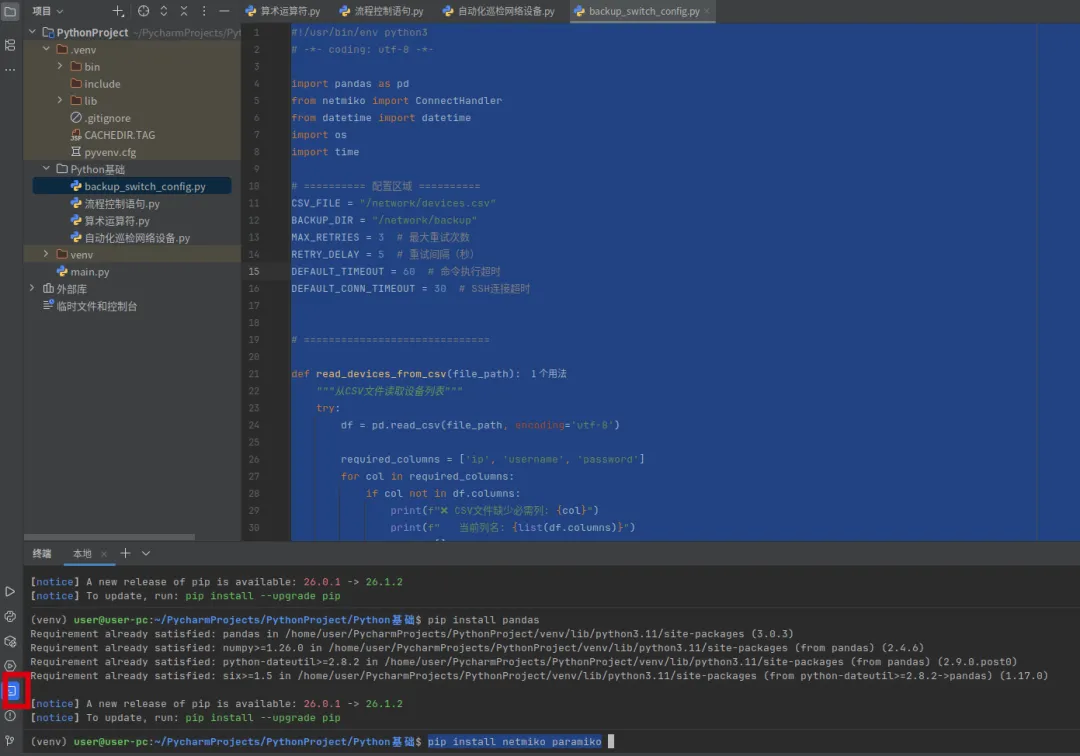
user@user-pc:/network$ cat backup_switch_config.py#!/usr/bin/env python3# -*- coding: utf-8 -*-# ============================================================# 第一部分:导入需要的库(Python的"工具箱")# ============================================================import pandas as pd # pandas是数据分析库,用来读取CSV文件(类似Excel表格)# 我们把设备清单保存在CSV里,用pandas可以轻松读取from netmiko import ConnectHandler # netmiko是网络设备自动化核心库# ConnectHandler是它的"连接器",专门用来SSH登录网络设备from datetime import datetime # datetime是日期时间库,用来获取当前时间# 我们用它给备份文件打上时间戳,比如 20260701_143000import os # os是操作系统接口库,用来操作文件和目录# 我们用它来检查/创建备份文件夹import time # time是时间库,用来让程序"等待"# 我们用它来实现重试间隔(连接失败后等几秒再试)# ============================================================# 第二部分:配置区域(你需要修改的地方)# ============================================================CSV_FILE = "/network/devices.csv" # CSV文件的存放路径,里面记录了所有设备的信息# 格式:ip,username,password,device_type,description,conn_timeoutBACKUP_DIR = "/network/backup" # 备份文件的存放目录,所有配置备份都会保存在这里MAX_RETRIES = 3 # 最大重试次数:如果连接失败,最多尝试3次# 网络有时候不稳定,多试几次能提高成功率RETRY_DELAY = 5 # 重试间隔(秒):每次重试之间等待5秒# 给设备一点"喘息"时间,避免频繁连接导致设备拒绝DEFAULT_TIMEOUT = 60 # 命令执行超时(秒):执行一条命令最多等60秒# 如果设备响应慢(比如配置很大),60秒应该足够了DEFAULT_CONN_TIMEOUT = 30 # SSH连接超时(秒):建立SSH连接最多等30秒# 如果网络延迟高,可以调大这个值# ============================================================# 第三部分:函数1 - 从CSV读取设备列表# ============================================================def read_devices_from_csv(file_path): """ 从CSV文件读取设备列表 参数:file_path = CSV文件的路径 返回值:设备列表(每个设备是一个字典) """ try: # try = "尝试执行",如果出错就跳到except # 用pandas读取CSV文件,编码用utf-8(支持中文) df = pd.read_csv(file_path, encoding='utf-8') # df是DataFrame,可以理解为"表格数据" # 定义必需的列名(这些列必须存在) required_columns = ['ip', 'username', 'password'] # 循环检查每一列是否都在表格里 for col in required_columns: if col not in df.columns: # 如果某列不存在 print(f"❌ CSV文件缺少必需列: {col}") print(f" 当前列名: {list(df.columns)}") return [] # 返回空列表,表示读取失败 # 把表格转换为字典列表 # 每行数据变成一个字典,比如: # {'ip': '192.168.1.1', 'username': 'admin', 'password': '123'} devices = df.to_dict('records') # 打印成功读取的设备数量 print(f"✅ 从CSV读取到 {len(devices)} 台设备") # 打印设备列表预览(让用户确认读对了) print("\n📋 设备列表预览:") for i, device in enumerate(devices): # enumerate给每个设备编号(从0开始) desc = device.get('description', '未命名') # 获取描述,如果没有则显示"未命名" dev_type = device.get('device_type', 'hp_comware') # 获取设备类型,默认H3C # 安全获取超时值,处理可能的空值 raw_timeout = device.get('conn_timeout', DEFAULT_CONN_TIMEOUT) try: if pd.isna(raw_timeout): timeout = DEFAULT_CONN_TIMEOUT else: timeout = int(float(raw_timeout)) except (ValueError, TypeError): timeout = DEFAULT_CONN_TIMEOUT print(f" {i + 1}. {device['ip']} ({desc}) [类型: {dev_type}, 超时: {timeout}s]") # 打印:序号. IP (描述) [类型: xxx, 超时: xx秒] print() # 打印空行 return devices # 返回设备列表 except FileNotFoundError: # 如果文件不存在 print(f"❌ 找不到文件: {file_path}") print("💡 请确保CSV文件在 /network 目录下") return [] # 返回空列表 except Exception as e: # 捕获其他所有异常 print(f"❌ 读取CSV失败: {e}") return [] # 返回空列表# ============================================================# 第四部分:函数2 - 备份单台设备(核心逻辑)# ============================================================def backup_single_device(device_info): """ 备份单台设备(支持H3C和华为,带重试机制) 参数:device_info = 一个字典,包含设备的所有信息 返回值:(是否成功, 错误信息) """ # ----- 从字典中提取设备信息 ----- ip = device_info['ip'] # 设备IP地址 username = device_info['username'] # 登录用户名 password = device_info['password'] # 登录密码 device_type = device_info.get('device_type', 'hp_comware') # 设备类型,默认H3C description = device_info.get('description', '未知设备') # 设备描述 # 读取自定义超时,如果没有则使用默认值 # 安全处理conn_timeout,防止空值导致错误 raw_timeout = device_info.get('conn_timeout', DEFAULT_CONN_TIMEOUT) try: if pd.isna(raw_timeout): # 处理空值 conn_timeout = DEFAULT_CONN_TIMEOUT else: conn_timeout = int(float(raw_timeout)) # 兼容各种数字格式 except (ValueError, TypeError): conn_timeout = DEFAULT_CONN_TIMEOUT # ----- 构建连接信息(告诉netmiko怎么连)----- connect_info = { 'device_type': device_type, # 设备类型(hp_comware=H3C, huawei=华为) 'ip': ip, # IP地址 'username': username, # 用户名 'password': password, # 密码 'timeout': DEFAULT_TIMEOUT, # 命令执行超时 'conn_timeout': conn_timeout, # SSH连接超时 } # H3C设备需要secret(enable密码,相当于进入特权模式的密码) if device_type == 'hp_comware': connect_info['secret'] = password # 如果enable密码和登录密码相同 # ----- 生成备份文件名 ----- timestamp = datetime.now().strftime("%Y%m%d_%H%M%S") # 获取当前时间,格式:年月日_时分秒,例如 20260701_143000 safe_desc = description.replace('/', '_').replace('\\', '_') # 把描述中的 / 和 \ 替换成 _,防止文件名出错 filename = f"{BACKUP_DIR}/{ip}_{safe_desc}_{timestamp}.txt" # 完整文件名:/network/backup/192.168.1.1_核心交换机_20260701_143000.txt # 打印连接信息,让用户知道正在操作哪台设备 print(f"🔗 [{description}] 正在连接 {ip} (类型: {device_type}, 超时: {conn_timeout}s) ...") # ===== 重试循环 ===== # range(1, 4) 会生成 1, 2, 3(从1到3,不包含4) for attempt in range(1, MAX_RETRIES + 1): try: # 如果不是第一次尝试(attempt > 1),说明之前失败了 if attempt > 1: print(f" 🔄 第 {attempt} 次重试 (等待{RETRY_DELAY}秒后)...") time.sleep(RETRY_DELAY) # 等待5秒再重试 # ----- 建立SSH连接 ----- conn = ConnectHandler(**connect_info) # **connect_info 表示把字典拆成关键字参数 # 相当于 ConnectHandler(device_type='hp_comware', ip='...', ...) print(f" ✅ SSH连接成功") # ----- 关闭分页显示(防止输出被截断)----- # H3C设备的命令:terminal length 0(0表示不分页) if device_type == 'hp_comware': conn.send_command("terminal length 0") # 华为设备的命令:screen-length 0 temporary(0表示不分页) elif device_type == 'huawei': conn.send_command("screen-length 0 temporary") else: # 其他未知设备,尝试H3C的命令 conn.send_command("terminal length 0") # ----- 获取配置 ----- print(f" 📥 正在获取配置...") # send_command = "发送命令并等待返回结果" # display current-configuration = 显示当前所有配置(华为/H3C通用) config = conn.send_command("display current-configuration") # display version = 显示系统版本信息 version = conn.send_command("display version") # ----- 断开SSH连接(养成好习惯)----- conn.disconnect() # ----- 保存备份到文件 ----- os.makedirs(BACKUP_DIR, exist_ok=True) # 创建备份目录,如果已存在则忽略(exist_ok=True) # 等效于 mkdir -p /network/backup # with open = 打开文件,自动处理关闭(即使出错也会关闭) # 'w' = 写入模式,encoding='utf-8' = 支持中文 with open(filename, 'w', encoding='utf-8') as f: # f.write = 写入内容到文件 f.write("=" * 70 + "\n") # 70个等号,做分隔线 f.write(f"设备IP: {ip}\n") f.write(f"设备描述: {description}\n") f.write(f"设备类型: {device_type}\n") f.write(f"备份时间: {datetime.now().strftime('%Y-%m-%d %H:%M:%S')}\n") f.write("=" * 70 + "\n\n") f.write("【系统信息】\n") f.write("-" * 40 + "\n") f.write(version + "\n\n") f.write("【当前配置】\n") f.write("-" * 40 + "\n") f.write(config + "\n") print(f" ✅ 备份成功 → {filename}") return True, None # 返回(成功, 无错误) except Exception as e: # 如果上面的try中任何一步出错 error_msg = str(e) # 把错误信息转为字符串 # 如果是最后一次尝试(attempt == MAX_RETRIES) if attempt == MAX_RETRIES: print(f" ❌ 备份失败(已重试{MAX_RETRIES}次): {error_msg[:150]}") # 记录错误日志 error_log = f"{BACKUP_DIR}/backup_error.log" # 'a' = append模式,追加写入(不会覆盖之前的日志) with open(error_log, "a", encoding='utf-8') as log: log.write( f"{datetime.now().strftime('%Y-%m-%d %H:%M:%S')} | {ip} | {description} | {device_type} | 失败: {error_msg}\n" ) return False, error_msg # 返回(失败, 错误信息) else: # 不是最后一次,打印警告并继续重试 print(f" ⚠️ 连接失败 ({attempt}/{MAX_RETRIES}): {error_msg[:80]}") # 如果循环结束还没有返回(理论上不会执行到这里) return False, "未知错误"# ============================================================# 第五部分:主程序(程序的入口)# ============================================================def main(): """主程序 - 控制整个备份流程""" # ----- 打印程序标题 ----- print("=" * 70) print("🚀 多厂商交换机批量配置备份工具 (H3C + 华为)") print(f"📅 开始时间: {datetime.now().strftime('%Y-%m-%d %H:%M:%S')}") print(f"📁 CSV文件: {CSV_FILE}") print(f"📁 备份目录: {BACKUP_DIR}") print(f"🔄 最大重试次数: {MAX_RETRIES}") print("=" * 70) # ----- 检查备份目录,不存在则创建 ----- if not os.path.exists(BACKUP_DIR): # 如果目录不存在 os.makedirs(BACKUP_DIR) # 创建目录 print(f"✅ 创建备份目录: {BACKUP_DIR}") # ----- 读取设备列表 ----- devices = read_devices_from_csv(CSV_FILE) if not devices: # 如果列表为空(读取失败) print("❌ 没有读取到任何设备,程序退出") return # 退出程序 # ============================================================ # 修改点:取消用户确认,实现自动化 # ============================================================ print(f"ℹ️ 自动模式:即将备份 {len(devices)} 台设备...") # 自动化备份不需要用户确认,直接继续执行 # ============================================================ # ----- 开始备份每一台设备 ----- print("\n" + "=" * 70) success_count = 0 # 成功计数器 failed_devices = [] # 失败设备列表 # enumerate(devices, 1) 从1开始编号 for i, device in enumerate(devices, 1): print(f"\n📌 进度: {i}/{len(devices)}") success, error = backup_single_device(device) # 调用备份函数 if success: success_count += 1 # 成功数+1 else: # 记录失败设备 failed_devices.append({ 'ip': device['ip'], 'description': device.get('description', '未知'), 'error': error }) print("-" * 50) # 分隔线 # ----- 打印最终结果汇总 ----- print("\n" + "=" * 70) print("📊 备份完成!") print(f" ✅ 成功: {success_count}/{len(devices)} 台") if failed_devices: # 如果有失败的设备 print(f" ❌ 失败: {len(failed_devices)} 台") print("\n失败设备列表:") for dev in failed_devices: print(f" - {dev['ip']} ({dev['description']})") print(f"\n💡 详细错误请查看: {BACKUP_DIR}/backup_error.log") else: # 全部成功 print("🎉 全部设备备份成功!") print("=" * 70)# ============================================================# 第六部分:程序入口判断# ============================================================if __name__ == "__main__": """ 这个判断的含义: - 如果这个文件是直接运行的(python backup_switch_config.py) 则执行 main() 函数 - 如果这个文件是被其他文件导入的(import backup_switch_config) 则不执行 main(),只提供函数供其他文件调用 这是一个标准的Python编程规范 """ main()user@user-pc:/network$
 10个月宝宝每天需要喝多少奶粉?