office办公python代码:文本仿表格对齐显示
- 2026-09-02 16:28:09
office办公python代码:文本仿表格对齐显示

office办公python代码:.txt文本转pdf工具 Python项目81:Excel工作表批量重命名工具1.0(tkinter+openpyxl) Python项目源码69:Excel数据筛选器1.0(tkinter+sqlite3+pandas) pandas读取Excel数据(.xlsx和.xls)到treeview _format_table_to_text方法说明 dates 参数:当传入日期列表时,表头自动生成为 ["类型"] + dates,每行数据的第一个元素作为行标签,其余按顺序对应日期列。这种模式适合展示多时间点的数据(如月度排行榜)。 无 dates 参数:要求 table_data 的第一行已经是表头,后续行为数据行。该方法会自动识别并调整列宽。 中文对齐:display_width 函数将中文字符宽度计为 2,英文字符和数字计为 1,确保中英混排时列对齐。 列表处理:如果某个单元格是列表(如多个值),会自动用分号连接成字符串。 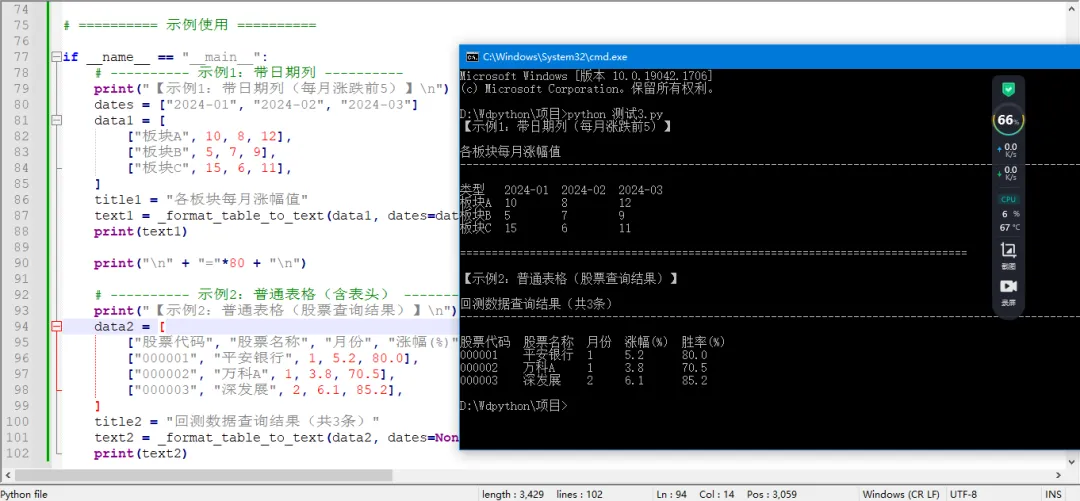


Python速成心法
敲代码,查资料,问Ai
练习,探索,总结,优化
★★★★★博文创作不易,源码代码的过程中,如有疑问的地方,欢迎大家指正留言交流。喜欢的老铁可以多多点赞+收藏分享+置顶,小红牛在此表示感谢。★★★★★
office办公python代码:reportlab模块参数的用法及示例
office办公python代码:PDF书籍封面生成器1.0(tk+reportlab)
office办公python代码:批量对所有.pdf文件生成水印(pypdf+reportlab)
运行后,您将看到类似下面的输出(对齐效果良好):
【示例1:带日期列(每月涨跌前5)】各板块每月涨幅值------------------------------------------------------------------------------------------------------------------------类型 2024-01 2024-02 2024-03板块A 10 8 12板块B 5 7 9板块C 15 6 11================================================================================【示例2:普通表格(股票查询结果)】回测数据查询结果(共3条)------------------------------------------------------------------------------------------------------------------------股票代码 股票名称 月份 涨幅(%) 胜率(%)000001 平安银行 1 5.2 80.0000002 万科A 1 3.8 70.5000003 深发展 2 6.1 85.2
↓ 完整源码如下 ↓
# -*- coding: utf-8 -*-# @Author : 小红牛# 微信公众号:wdPythondef _format_table_to_text(table_data, dates=None, title=""):"""将表格数据格式化为对齐的文本。如果 dates 不为空,则 table_data 的每一行第一个元素为行标签,后续对应 dates 各列。如果 dates 为空,则 table_data 第一行视为表头,其余为数据行。"""# 构建二维字符串列表rows = []if dates:# 有日期列:表头为 "类型" + 日期header = ["类型"] + datesrows.append(header)for row in table_data:cells = []for cell in row:if isinstance(cell, list):cells.append(";".join(str(c) for c in cell))else:cells.append(str(cell) if cell is not None else "")rows.append(cells)else:# 无日期列:table_data 已经包含表头行(第一行)for row in table_data:cells = []for cell in row:if isinstance(cell, list):cells.append(";".join(str(c) for c in cell))else:cells.append(str(cell) if cell is not None else "")rows.append(cells)# 计算每列显示宽度(中文字符按2计)def display_width(s):width = 0for ch in s:if ord(ch) > 127: # 非 ASCII 字符(中文等)width += 2else:width += 1return widthcol_count = len(rows[0])col_widths = [0] * col_countfor row in rows:for i, cell in enumerate(row):w = display_width(cell)if w > col_widths[i]:col_widths[i] = w# 左右各加一个空格作为边距col_widths = [w + 2 for w in col_widths]lines = []if title:lines.append(title)lines.append("-" * 120) # 分隔线# 格式化每行for row in rows:line = ""for i, cell in enumerate(row):current_width = display_width(cell)padding = col_widths[i] - current_widthline += cell + " " * paddinglines.append(line.rstrip())return "\n".join(lines)# ========== 示例使用 ==========if __name__ == "__main__":# ---------- 示例1:带日期列 ----------print("【示例1:带日期列(每月涨跌前5)】\n")dates = ["2024-01", "2024-02", "2024-03"]data1 = [["板块A", 10, 8, 12],["板块B", 5, 7, 9],["板块C", 15, 6, 11],]title1 = "各板块每月涨幅值"text1 = _format_table_to_text(data1, dates=dates, title=title1)print(text1)print("\n" + "="*80 + "\n")# ---------- 示例2:普通表格(含表头) ----------print("【示例2:普通表格(股票查询结果)】\n")data2 = [["股票代码", "股票名称", "月份", "涨幅(%)", "胜率(%)"],["000001", "平安银行", 1, 5.2, 80.0],["000002", "万科A", 1, 3.8, 70.5],["000003", "深发展", 2, 6.1, 85.2],]title2 = "回测数据查询结果(共3条)"text2 = _format_table_to_text(data2, dates=None, title=title2)print(text2)
完毕!!感谢您的收看
------★★历史博文集合★★------
本文来自网友投稿或网络内容,如有侵犯您的权益请联系我们删除,联系邮箱:596563534@qq.com 。
