大家好,我是木木。
今天给大家分享一个数据装载的 Python 库,dlt。
dlt
dlt 是一个面向数据装载和轻量 ETL 的 Python 库。它的思路很务实:你用生成器、resource 和 pipeline 描述数据来源,dlt 负责 schema 推断、规范化、加载和状态管理。对需要把 API、文件或业务对象稳定落到 DuckDB、Postgres、BigQuery 等目标端的团队来说,它比手写一堆临时脚本更容易维护。
项目地址:https://github.com/dlt-hub/dlt
官方文档:https://dlthub.com/docs/intro
三大特点
声明资源
用 @dlt.resource 描述数据来源,提取逻辑和加载逻辑分开。
自动建模
嵌套对象可以自动规范化为表,减少手写建表和展开字段的工作。
目标灵活
同一套提取代码可以切换 DuckDB、数据库或云数仓等 destination。
最佳实践
安装方式:pip install dlt。如果要使用特定目标端,按文档安装对应 extras 或驱动;本文使用本地 DuckDB 目标端。
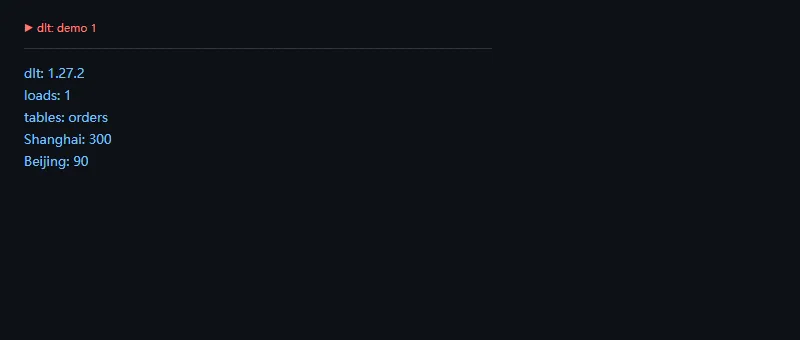
第一段代码解决的问题是:把 Python 生成器里的订单数据加载到 DuckDB,并直接查询聚合结果。
importosimporttempfileimportwarningsfrompathlibimportPathwarnings.filterwarnings("ignore")os.environ["DLT_TELEMETRY"]="False"os.environ["RUNTIME__LOG_LEVEL"]="ERROR"importdltwork=Path(tempfile.mkdtemp(prefix="dlt_demo_"))os.chdir(work)@dlt.resource(name="orders",write_disposition="replace")deforders():yield{"order_id":1,"city":"Shanghai","amount":120}yield{"order_id":2,"city":"Beijing","amount":90}yield{"order_id":3,"city":"Shanghai","amount":180}pipeline=dlt.pipeline(pipeline_name="daily_python_dlt_demo",destination="duckdb",dataset_name="demo_sales",)info=pipeline.run(orders())print("dlt:",dlt.__version__)print("loads:",len(info.loads_ids))print("tables:",", ".join(sorted(t["name"]fortinpipeline.default_schema.data_tables())))withpipeline.sql_client()asclient:rows=client.execute_sql("select city, sum(amount) as total from orders group by city order by total desc")forcity,totalinrows:print(f"{city}: {total}")
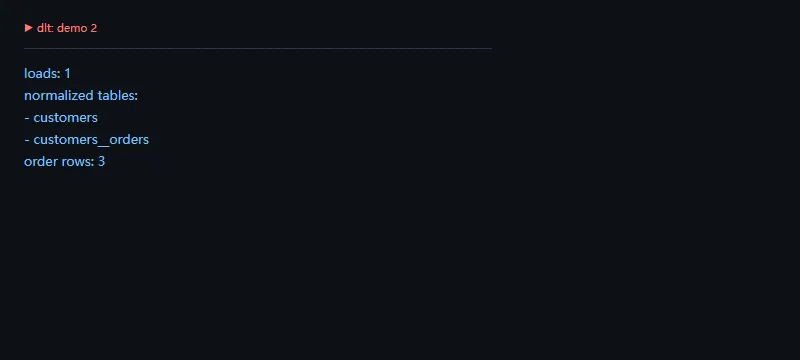
第二段代码解决的问题是:处理嵌套结构,观察 dlt 如何把 customers 和 customers__orders 拆成关系表。
importosimporttempfileimportwarningsfrompathlibimportPathwarnings.filterwarnings("ignore")os.environ["DLT_TELEMETRY"]="False"os.environ["RUNTIME__LOG_LEVEL"]="ERROR"importdltwork=Path(tempfile.mkdtemp(prefix="dlt_nested_"))os.chdir(work)@dlt.resource(name="customers",write_disposition="replace")defcustomers():yield{"customer_id":1,"name":"Ada","orders":[{"order_id":"A-1","amount":120},{"order_id":"A-2","amount":80}]}yield{"customer_id":2,"name":"Lin","orders":[{"order_id":"B-1","amount":60}]}pipeline=dlt.pipeline(pipeline_name="daily_python_dlt_nested",destination="duckdb",dataset_name="nested_sales")info=pipeline.run(customers())print("loads:",len(info.loads_ids))print("normalized tables:")fortableinsorted(t["name"]fortinpipeline.default_schema.data_tables()):print("-",table)withpipeline.sql_client()asclient:rows=client.execute_sql("select count(*) from customers__orders")print("order rows:",rows[0][0])
环境与版本信息
本文示例使用 Python 3.11.0、dlt 1.27.2,并使用本地 DuckDB 作为 destination。截图里关闭了遥测和普通运行日志,让输出集中在业务结果上。
高级功能
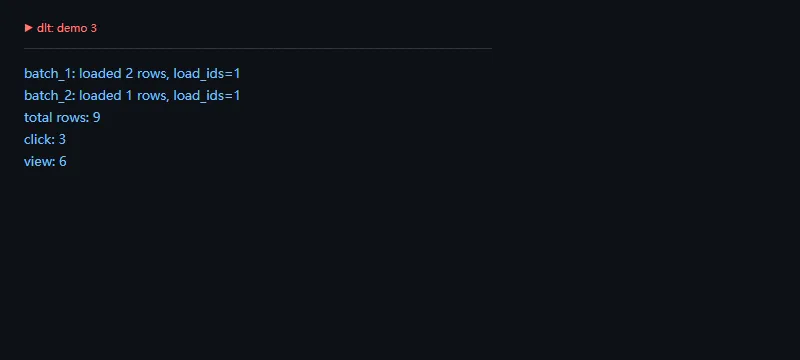
dlt 的高级价值在于把加载批次、schema 和目标端写入流程收拢起来。即使只是小项目,也建议从一开始就保留 pipeline 名称、dataset 名称和写入策略。
importosimporttempfileimportwarningsfrompathlibimportPathwarnings.filterwarnings("ignore")os.environ["DLT_TELEMETRY"]="False"os.environ["RUNTIME__LOG_LEVEL"]="ERROR"importdltwork=Path(tempfile.mkdtemp(prefix="dlt_append_"))os.chdir(work)pipeline=dlt.pipeline(pipeline_name="daily_python_dlt_append",destination="duckdb",dataset_name="event_log")defrun_batch(batch_name,rows):@dlt.resource(name="events",write_disposition="append")defevents():forrowinrows:yieldrowinfo=pipeline.run(events())print(f"{batch_name}: loaded {len(rows)} rows, load_ids={len(info.loads_ids)}")run_batch("batch_1",[{"event_id":1,"kind":"view"},{"event_id":2,"kind":"click"}])run_batch("batch_2",[{"event_id":3,"kind":"view"}])withpipeline.sql_client()asclient:total=client.execute_sql("select count(*) from events")[0][0]rows=client.execute_sql("select kind, count(*) from events group by kind order by kind")print("total rows:",total)forkind,countinrows:print(f"{kind}: {count}")
适用场景
适合 API/文件数据入仓、轻量 ELT、嵌套 JSON 规范化、本地 DuckDB 原型到云数仓迁移。
不适用场景
不适合复杂低延迟流处理,也不适合已经由 Airflow、Flink、Spark Streaming 完整托管的重型链路直接替换。
上线检查
- 固定 pipeline_name 和 dataset_name。2. 明确 write_disposition 是 replace、append 还是 merge。3. 对 schema 变化设置告警。4. 为目标端凭据和重试策略做单独配置。
总结
dlt 适合把“能跑的数据脚本”整理成“能长期维护的装载流程”。它不抢调度器的工作,但能把提取、建模和写入做得更省心。
 10个月宝宝每天需要喝多少奶粉?