自学编程第68课: Python入门当学--当需要同时满足多个条件时,怎么办?
- 2026-10-11 06:42:25
点击蓝字 关注我们

你遇到过“同时满足两个条件才能做一件事”的情况吗?
比如游乐园里的过山车,告示牌上写着:身高≥140cm 且 年龄≥12岁。两个条件都要满足,才能上车。
如果只检查身高不够,只检查年龄也不够。必须两个条件同时成立,才能放行。
Python里也有这种需求。你想写一段判断逻辑,但条件不是一个,是两个甚至三个——这时候就需要逻辑运算。
今天课程,我们把 `and`、`or`、`not` 三种逻辑运算一次学透。
1
`and`——两个条件都要满足
回到过山车的例子:
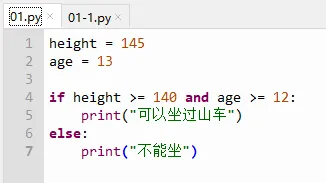
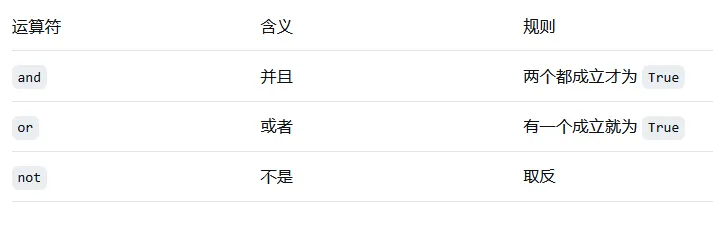
`and` 的意思是“并且”。两个条件都成立,整个结果才是 `True`。
拆开看:
- `height >= 140` → `True`
- `age >= 12` → `True`
- `True and True` → `True` → 可以上车
只要有一个不成立,结果就是 `False`:
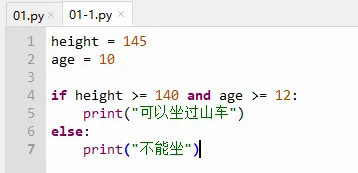
`age >= 12` 不成立(10<12),所以 `True and False` → `False` → 不能上车。
Tyree说:“所以 `and` 就是‘一个都不能少’。”
“对,少一个都不行。”
2
`or`——只要有一个条件满足就行
用 `or` 的情况:比如游乐场的“亲子票”,大人陪同或者身高满120cm,其中任意一个条件满足就可以买票。
height = 115
has_parent = True
if height >= 120 or has_parent:
print("可以买亲子票")
else:
print("不能买")
`or` 的意思是“或者”。至少有一个条件成立,整个结果就是 `True`。
拆开看:
- `height >= 120` → `False`
- `has_parent` → `True`
- `False or True` → `True` → 可以买票
只有两个都不成立时,结果才是 `False`。
Tyree说:“所以 `or` 是‘有一个就行’?”
“对,有一个就行。”
3
`not`——取反
`not` 最简单,就是把 `True` 变成 `False`,把 `False` 变成 `True`。
is_raining = False
if not is_raining:
print("出门不用带伞")
`is_raining` 是 `False`,`not False` → `True`,所以打印“出门不用带伞”。
实际用法:判断用户输入是否为空。
name = input("请输入名字:").strip()
if not name:
print("名字不能为空")
4
三种逻辑运算对比
我们一起来看看三种逻辑运算对比
5
优先级
逻辑运算符的优先级从高到低:
1. `not`
2. `and`
3. `or`
# 实际执行顺序
if not age >= 12 and height >= 140:
# 先算 not age >= 12,再 and height >= 140
# 建议:用括号明确顺序
if (not age >= 12) and height >= 140:
# 更清晰
6
真实场景
场景一:活动资格判断
age = 15
is_student = True
has_parent = False
if age >= 12 and (is_student or has_parent):
print("可以参加活动")
场景二:输入验证
username = input("用户名:")
password = input("密码:")
if not username or not password:
print("用户名和密码都不能为空")
场景三:条件组合判断
score = 85
attendance = 90
if score >= 60 and attendance >= 80:
print("通过")
else:
print("不通过")
7
课后小挑战
挑战1:写一个程序,判断一个年份是否是闰年。闰年条件:能被400整除,或者能被4整除但不能被100整除。
挑战2:用户输入用户名和密码,如果用户名为空或密码为空,提示“信息不完整”,否则判断用户名是否为 `"admin"` 且密码为 `"123"`。
8
动动手
输入下面代码,并运行观察结果
a = True
b = False
print(a and b) # False
print(a or b) # True
print(not a) # False
print(not b) # True
OK,今天就到这!
下节课:for循环——让程序重复干活不喊累
————热门推荐————
自学编程第51课:爬虫入门让Python帮你从网页“拿”数据
自学编程第一步:安装Python和Thonny 零基础图文教程
本系列教程持续更新,欢迎关注收藏

点赞
收藏
分享
