在 Ubuntu 等 Linux 系统中,系统预装了用于盲文显示器的无障碍服务 brltty,该服务会自动扫描所有 USB 转串口设备。CH340 作为常用 USB 转串口芯片,接入电脑后会被 brltty 误判为盲文外设,随即抢占串口硬件资源,造成串口设备消失、串口工具提示设备占用、单片机烧录失败等问题。
Bus 002 Device 002: ID 0424:5744 Microchip Technology, Inc. (formerly SMSC) HubBus 002 Device 001: ID 1d6b:0003 Linux Foundation 3.0 root hubBus 001 Device 006: ID 0bda:c822 Realtek Semiconductor Corp. Bluetooth RadioBus 001 Device 003: ID 1a40:0101 Terminus Technology Inc. HubBus 001 Device 005: ID 0424:2740 Microchip Technology, Inc. (formerly SMSC) Hub ControllerBus 001 Device 007: ID 1a86:7523 QinHeng Electronics CH340 serial converterBus 001 Device 002: ID 0424:2744 Microchip Technology, Inc. (formerly SMSC) HubBus 001 Device 001: ID 1d6b:0002 Linux Foundation 2.0 root hub
/: Bus 02.Port 1: Dev 1, Class=root_hub, Driver=tegra-xusb/4p, 10000M |__ Port 1: Dev 2, If 0, Class=Hub, Driver=hub/4p, 5000M/: Bus 01.Port 1: Dev 1, Class=root_hub, Driver=tegra-xusb/4p, 480M |__ Port 2: Dev 2, If 0, Class=Hub, Driver=hub/5p, 480M |__ Port 5: Dev 5, If 0, Class=Vendor Specific Class, Driver=, 480M |__ Port 3: Dev 7, If 0, Class=Vendor Specific Class, Driver=, 12M |__ Port 3: Dev 3, If 0, Class=Hub, Driver=hub/4p, 480M |__ Port 1: Dev 6, If 0, Class=Wireless, Driver=btusb, 12M |__ Port 1: Dev 6, If 1, Class=Wireless, Driver=btusb, 12M
[ 1260.598900] usb 1-2.3: USB disconnect, device number 4[ 1265.943665] usb 1-2.3: new full-speed USB device number 7 using tegra-xusb[ 1266.053069] ch341 1-2.3:1.0: ch341-uart converter detected[ 1266.059796] ch341-uart ttyUSB0: break control not supported, using simulated break[ 1266.059999] usb 1-2.3: ch341-uart converter now attached to ttyUSB0[ 1266.127298] usb 1-2.3: usbfs: interface 0 claimed by ch341 while 'brltty' sets config #1[ 1266.129106] ch341-uart ttyUSB0: ch341-uart converter now disconnected from ttyUSB0[ 1266.129325] ch341 1-2.3:1.0: device disconnected
核心报错关键行(故障根源)
[ 1266.127298] usb 1-2.3: usbfs: interface 0 claimed by ch341 while 'brltty' sets config #1
错误解释:
串口接口 0 已经被ch341内核驱动占用,但后台服务brltty(盲文终端服务)又强行去重新配置 USB 设备,出现驱动抢占冲突。
现象总结:
CH340 能被识别、驱动能加载、短暂生成 ttyUSB0,但瞬间被brltty服务抢占资源,设备直接掉线,串口无法使用。
根治方案:
1、彻底卸载 brltty
sudo apt remove --purge brltty -ysudo apt autoremove -y
2、重启设备或重新插拔 CH340
3、验证日志不再出现断开提示
重新插模块,只会出现attached to ttyUSB0,不会再有 disconnected。
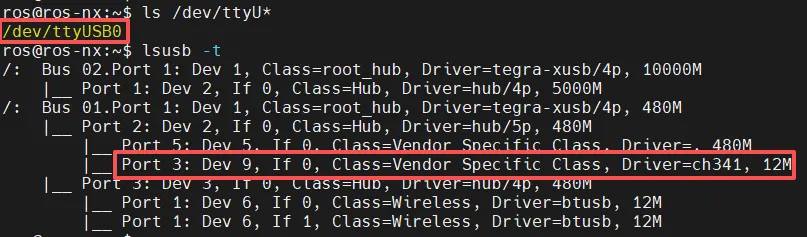
再验证一下设备加载的驱动和识别出来的串口名称
临时应急方案:
停止并禁用 brltty 服务:
sudo systemctl stop brlttysudo systemctl disable brltty
重启后不会自动抢占串口。

 10个月宝宝每天需要喝多少奶粉?