当前位置:首页>python>使用python管理VMware探索之旅(十)

使用python管理VMware探索之旅(十)

  • 2026-02-06 08:26:44
使用python管理VMware探索之旅(十)

探索之旅将分为两个主要篇章:

  1. Home Lab搭建篇

    记录整个环境的搭建过程,记录一些知识的细节。

    1). Home Lab搭建篇--环境规划

    2). Home Lab搭建篇--AD以及vCenter安装

    3). Home Lab环境搭建—证书服务器安装(上)

    4). Home Lab环境搭建—证书服务器安装(下)

    5). Home Lab环境搭建--ADFS以及ESXi安装

  2. Python编程篇

    记录如何通过Python进行ESXi主机的自动配置。

    1). Python编程篇—环境准备

    2). Python编程篇—示例扩展

    3). Python编程篇—网络修改和函数创建

  3.  4). Python编程篇—主程序创建和函数调用

  4.  5).Python编程篇—主程序参数输入部分增强

  5.  6).  Python编程篇—vCenter连接和主机加入


本章内容为:Python编程篇—vCenter连接和主机加入

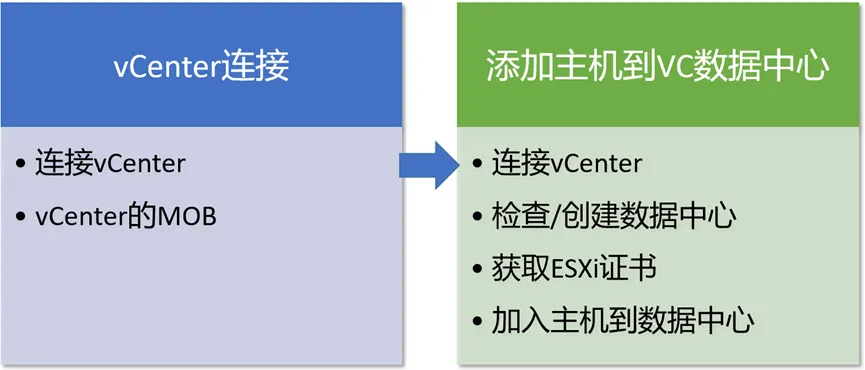
本章内容主要信息如下:

vCenter连接
虽然上面多个篇幅介绍的ESXi的配置只针对主机网络配置和NTP配置,因为其它配置都是遵循相同的方法,所以就没有每一个配置都列举出来。

ESXi配置完成后,需要将其加入vCenter,所以第一步就是连接vCenter。

1. 连接vCenter

vCenter的连接方式跟ESXi相同,同样使用smartconnect()函数进行连接,只是连接的主机换成vCenter即可。如果按照本系列文章前半部分的配置,vCenter已经是CA颁发的证书,那么可以不用加sslcontext参数。

基本的命令就是:

context = ssl._create_unverified_context()esxi_connect = SmartConnect(host=host, user=username, pwd=password, sslContext=context)

可以复用《Python编程篇—网络修改和函数创建》中描述的连接函数进行vCenter连接。连接结果如下:

2. vCenter的MOB(Management Object Browser)

vCenter的MOB访问方式跟ESXi的完全一样,访问地址为:http://vCenter_ip_or_fqdn/mob,只是vCenter的MOB网页是默认开启的,不像ESXi那样需要开启一个参数才行。vCenter的MOB网页打开如下:
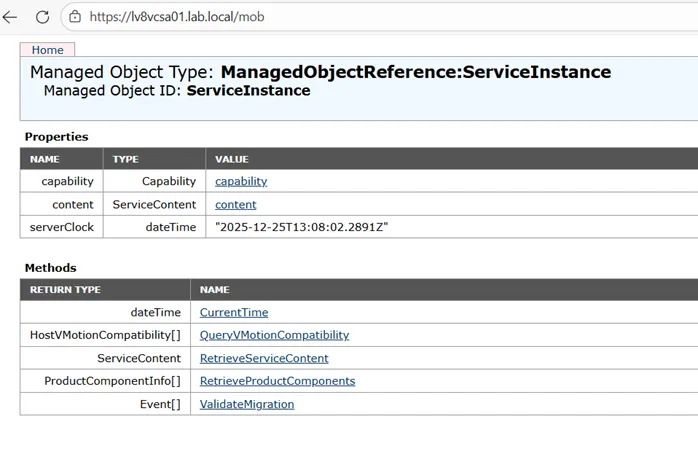
所以对于vCenter的配置方法跟ESXi是完全一样的,只是vCenter下多了很多容器:数据中心,集群,资源组等等。

加入主机
将ESXi主机加入vCenter管理主要需要以下几个步骤:
1. 连接vCenter
直接复用ESXi的连接函数即可。
2. 检查并创建数据中心

Datacenter所在的配置位置为:

dc_folder = vc_connect.content.rootFolderdcs = dc_folder.childEntity

现有的配置信息:无任何数据中心存在。
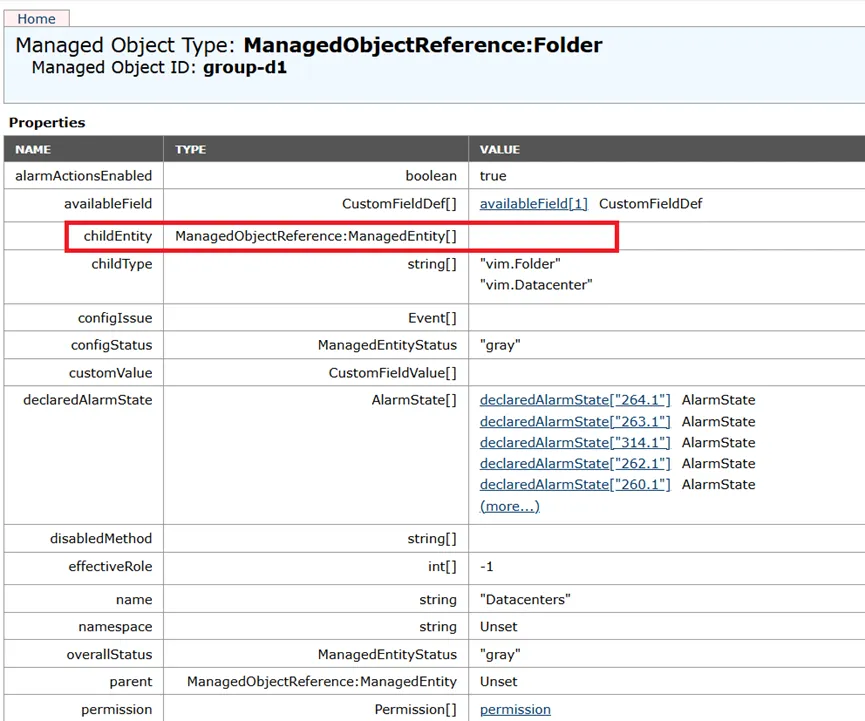
用到的method为:CreateDatacenter()
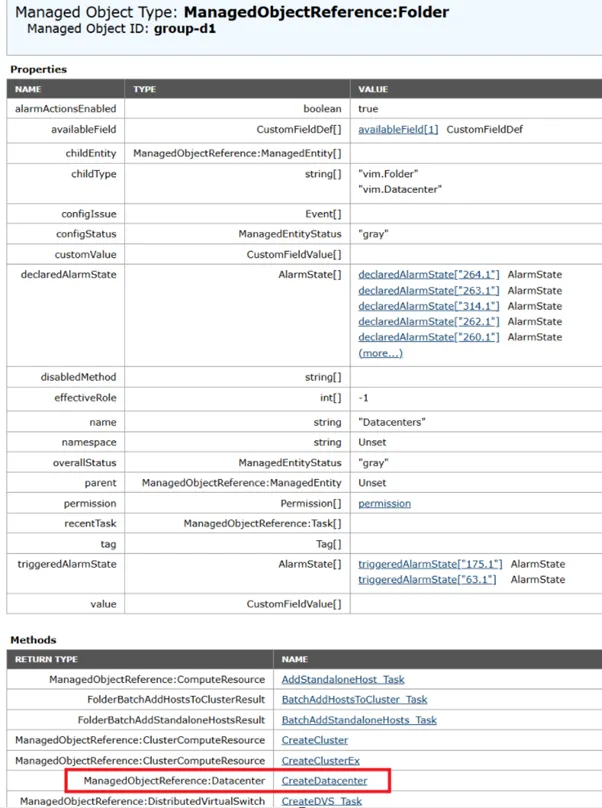
根据vSphere Web Service API手册,链接:

https://developer.broadcom.com/xapis/vsphere-web-services-api/8.0u3/vim.Folder.html#createDatacenter

可以看到,参数只有一个,就是数据中心的名称(name),即需要配置的Data Object。如图:
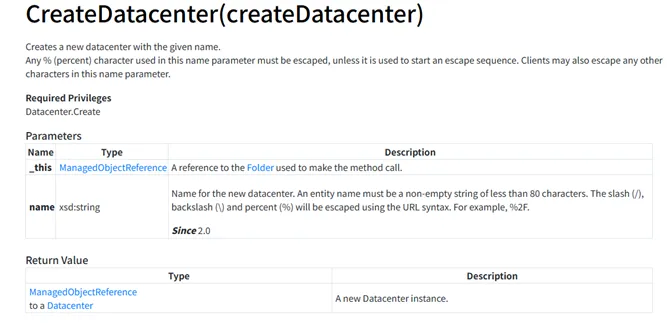
这里创建之前需要检查数据中心是否已经存在,如果已经存在则直接跳过。

创建数据中心的函数代码为:

from fun_con_esx import connect_esxifrom pyVim.connect import Disconnectfrom pyVmomi import vim, vmodlimport maskpassdef datacenter_create(vc_connect,dc_name):    """    检查/创建数据中心    :param vc_connect: vCenter连接信息    :param dc_name: 数据中心名称    """    dc_list = []    dc_folder = vc_connect.content.rootFolder    dcs = dc_folder.childEntity    for dc in dcs:        if isinstance(dc, vim.Datacenter):            dc_list.append(dc.name.lower())    if dc_name.lower() in dc_list:         print(f"✅数据中心{dc_name}已经存在,无需创建")         return(f"数据中心{dc_name}已经存在,无需创建")    else:         try:             dc_folder.CreateDatacenter(name=dc_name)             print(f"名称为{dc_name}的数据中心已经成功创建")         except vim.fault.DuplicateName as error:             print(f"创建数据中心{dc_name}失败,数据中心重名,具体信息{error.msg}")         except vim.fault.InvalidName as error:             print(f"创建数据中心{dc_name}失败,名称无效,具体信息{error.msg}"         except vmodl.RuntimeFault as error:              print(f"创建数据中心{dc_name}失败,Runtime Fault,具体信息{error.msg}"if __name__ == "__main__":        print("开始执行")        vc_host= "lv8vcsa01.lab.local"        vc_user = "administrator@vsphere.local"        vc_password = maskpass.askpass(        "请输入vCenter主机的密码: ", mask="*"        )        dc_name = input("请输入数据中心的名称: ")        vc_connect = connect_esxi(host=vc_host,username=vc_user,password=vc_password)        print(f"vc已经连接{vc_host}")        datacenter_create(vc_connect,dc_name)        Disconnect(vc_connect)

执行结果为:

3. 获取ESXi证书

这里不是VMware的API直接获取,需要使用socket和hashlib函数进行获取,函数代码如下:

import socketimport sslimport hashlibdef get_ssl_thumbprint(host):    """    获取ESXi主机的证书指纹    :param host: ESXi主机的IP地址或FQDN    """    port = 443    conn = socket.create_connection((host, port))    context = ssl._create_unverified_context()    sock = context.wrap_socket(conn, server_hostname=host)    der_cert = sock.getpeercert(binary_form=True)    thumb_sha1 = hashlib.sha1(der_cert).hexdigest().upper()    thumbprint = ":".join(thumb_sha1[i:i+2for i in range(0len(thumb_sha1), 2))    return thumbprintif __name__ == "__main__":    host = "192.168.50.171"    hostsslthumb = get_ssl_thumbprint(host)    print(f"ESXi主机{host}的证书指纹为:{hostsslthumb}")

执行结果如下:

4. 加入ESXi主机到数据中心

此步骤涉及4个过程,3个自行编写函数,概要如下:
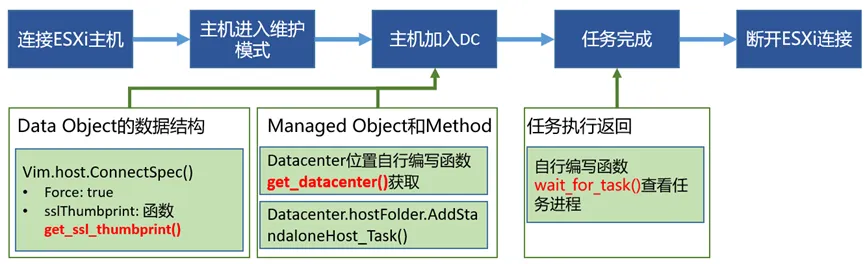
1)连接ESXi主机

使用之前编写的连接函数fun_con_esx()即可。

2)主机进入维护模式

这里进行一个判断,如果没有在维护模式,则执行进入维护模式的操作。

进入维护模式的Managed Object为ESXi主机的位置:

host_info =  esxi_connect.content.rootFolder.childEntity[0].hostFolder.childEntity[0].host[0]

Method为:

EnterMaintenanceMode_Task()

Data Object参数为timeout,这里设置20秒

代码信息为:

    #将主机至于维护模式    host_info =  esxi_connect.content.rootFolder.childEntity[0].hostFolder.childEntity[0].host[0]    maintenance_status = host_info.runtime.inMaintenanceMode    if maintenance_status:         print(f"✅ESXi主机{host}已经处于维护模式,无需设置。")    else:         try:             host_info.EnterMaintenanceMode_Task(timeout=20)             print(f"✅ESXi主机{host}成功进入维护模式")         except vim.fault.InvalidState as e:             print(f"❌ESXi主机{host}进入维护模式错误:{e}")         except vmodl.RuntimeFault as e:             print(f"❌ESXi主机{host}进入维护模式错误:{e}"         except vim.fault.Timedout as e:             print(f"❌ESXi主机{host}进入维护模式超时:{e}"

3)主机加入数据中心

有2个函数需要注意:

获取ESXi证书信息的函数(上面已经写过)。

根据数据中心的名称获取数据中心在API中的位置的函数。函数的代码信息如下:

def get_datacenter(dc_name,vc_connect):    """获取指定名称的数据中心对象"""    vc_datacenter = None    content = vc_connect.content    container = content.viewManager.CreateContainerView(        content.rootFolder, [vim.Datacenter], True    )    for dc in container.view:        if dc.name == dc_name:            vc_datacenter = dc            break    container.Destroy()    return vc_datacenter

将主机加入数据中心时:

Managed Object为:上一步获取的数据中心在vCenter的位置

Method为:

AddStandaloneHost_Task()

Data Object:

按照vSphere Web Services API的手册,链接:

https://developer.broadcom.com/xapis/vsphere-web-services-api/8.0u3/vim.Folder.html#addStandaloneHost

可以看到主要为一个vim.host.ConnectSpec()类型的spec。spec的参数设置代码如下:

    vc_datacenter = get_datacenter(dc_name=dc_name,vc_connect=vc_connect)    thumbprint = get_ssl_thumbprint(host)    host_spec = vim.host.ConnectSpec()    host_spec.force = True    host_spec.sslThumbprint = thumbprint    host_spec.hostName = host    host_spec.password = esxi_password    host_spec.userName = esxi_user

添加主机到数据中心的执行方法如下:

task = vc_datacenter.hostFolder.AddStandaloneHost_Task(spec=host_spec,addConnected=True)

4)任务完成

因为整个任务返回是一个Task对象,所以如果需要看到结果,需要有一个函数查看task的进度。这里直接通过一个函数的形式来查看,函数代码如下:

#检查任务完成状态def wait_for_task(task_name,task, timeout=300):    start_time = time.time()    while task.info.state not in ['success''error']:        if time.time() - start_time > timeout:            raise TimeoutError(f"⏰ 任务超时({timeout}s)")        print(f"任务{task_name}等待中... 当前状态: {task.info.state}")        time.sleep(2)    if task.info.state == 'success':        print(f"✅ 任务{task_name}成功完成")        return task.info.result    else:        print(f"❌ 任务{task_name}失败: {task.info.error.msg if task.info.error else'未知错误'}")        raise task.info.error  # 抛出 VMware 错误对象

主体调用信息如下:

    task_name = "将主机加入数据中心"    wait_for_task(task_name,task)

至此加入数据中心的工作完成。执行结果信息如下:

执行前,vCenter中无任何信息:
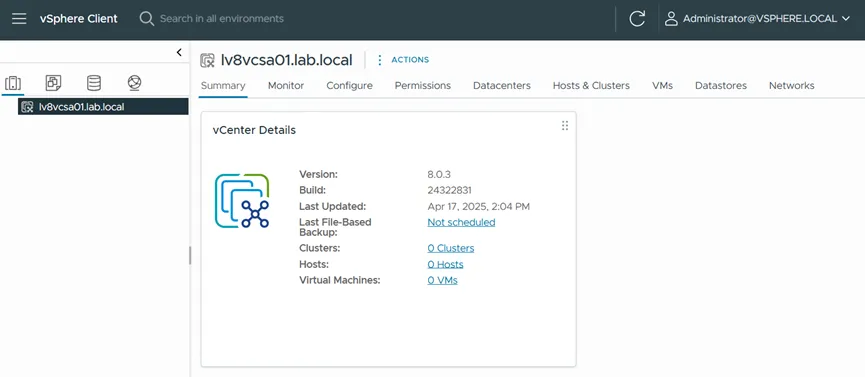
执行程序时输出信息如下:
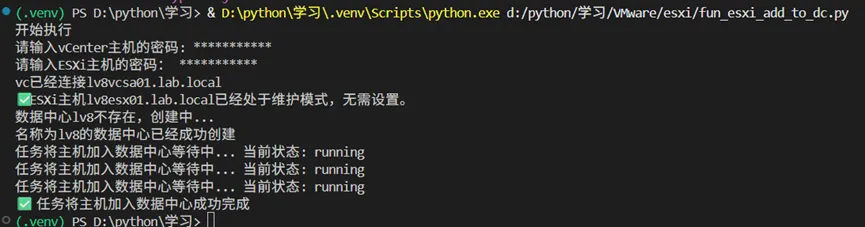
执行完成后,vCenter中信息如下:
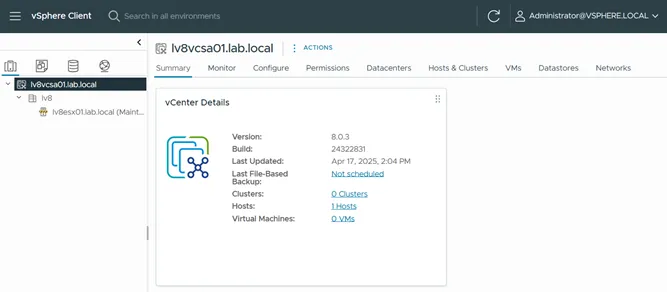
至此,将主机加入数据中心的任务已经完成。原始代码如下:

from fun_con_esx import connect_esxifrom fun_datacenter_create import datacenter_createfrom pyVim.connect import SmartConnect, Disconnectfrom pyVmomi import vim, vmodlfrom fun_get_ssl_thinmbprint import get_ssl_thumbprintimport timeimport maskpassdef get_datacenter(dc_name,vc_connect):    """获取指定名称的数据中心对象"""    vc_datacenter = None    content = vc_connect.content    container = content.viewManager.CreateContainerView(        content.rootFolder, [vim.Datacenter], True    )    for dc in container.view:        if dc.name == dc_name:            vc_datacenter = dc            break    container.Destroy()    return vc_datacenter#检查任务完成状态def wait_for_task(task_name,task, timeout=300):    start_time = time.time()    while task.info.state not in ['success''error']:        if time.time() - start_time > timeout:            raise TimeoutError(f"⏰ 任务超时({timeout}s)")        print(f"任务{task_name}等待中... 当前状态: {task.info.state}")        time.sleep(2)    if task.info.state == 'success':        print(f"✅ 任务{task_name}成功完成")        return task.info.result    else:        print(f"❌ 任务{task_name}失败: {task.info.error.msg if task.info.error else'未知错误'}")        raise task.info.error  # 抛出 VMware 错误对象def add_host_to_datacenter(vc_connect,dc_name,host,username,password):    """    将ESXi主机加入到vCenter中的数据中心中    :param dc_name: 数据中心名称    :param host: esxi的FQDN    :param esxi_connect: ESXi的连接信息    """    #连接ESXi主机    esxi_host = host    esxi_user = username    esxi_password = password    esxi_connect = connect_esxi(esxi_host,esxi_user,esxi_password)    #将主机至于维护模式    host_info =  esxi_connect.content.rootFolder.childEntity[0].hostFolder.childEntity[0].host[0]    maintenance_status = host_info.runtime.inMaintenanceMode    if maintenance_status:         print(f"✅ESXi主机{host}已经处于维护模式,无需设置。")    else:         try:             host_info.EnterMaintenanceMode_Task(timeout=20)             print(f"✅ESXi主机{host}成功进入维护模式")         except vim.fault.InvalidState as e:             print(f"❌ESXi主机{host}进入维护模式错误:{e}")         except vmodl.RuntimeFault as e:             print(f"❌ESXi主机{host}进入维护模式错误:{e}"         except vim.fault.Timedout as e:             print(f"❌ESXi主机{host}进入维护模式超时:{e}"    #检查数据中心是否存在,如果不存在则创建    vc_datacenter = get_datacenter(dc_name=dc_name,vc_connect=vc_connect)    if vc_datacenter == None:        print(f"数据中心{dc_name}不存在,创建中...")        datacenter_create(vc_connect,dc_name)    #添加主机到数据中心内    vc_datacenter = get_datacenter(dc_name=dc_name,vc_connect=vc_connect)    thumbprint = get_ssl_thumbprint(host)    host_spec = vim.host.ConnectSpec()    host_spec.force = True    host_spec.sslThumbprint = thumbprint    host_spec.hostName = host    host_spec.password = esxi_password    host_spec.userName = esxi_user    #print(content.rootFolder)    task = vc_datacenter.hostFolder.AddStandaloneHost_Task(spec=host_spec,addConnected=True)    task_name = "将主机加入数据中心"    wait_for_task(task_name,task)    Disconnect(esxi_connect)if __name__ == "__main__":    print("开始执行")    vc_host= "lv8vcsa01.lab.local"    vc_user = "administrator@vsphere.local"    vc_password = maskpass.askpass(    "请输入vCenter主机的密码: ", mask="*"    )    dc_name = "lv8"    esxi_host = "lv8esx01.lab.local"    esxi_user = "root"    esxi_password = maskpass.askpass(        "请输入ESXi主机的密码: ", mask="*"    )    vc_connect = connect_esxi(host=vc_host,username=vc_user,password=vc_password)    print(f"vc已经连接{vc_host}")    add_host_to_datacenter(vc_connect,dc_name,esxi_host,esxi_user,esxi_password)    Disconnect(vc_connect)

下一章将开始:Python编程篇—集群创建和ESXi主机移入集群

主要内容包含:

  1. 1. 集群创建

  2. 2. ESXi主机移入集群

最新文章

随机文章

基本 文件 流程 错误 SQL 调试
  1. 请求信息 : 2026-02-09 04:08:22 HTTP/2.0 GET : https://f.mffb.com.cn/a/459981.html
  2. 运行时间 : 0.524944s [ 吞吐率:1.90req/s ] 内存消耗:4,787.63kb 文件加载:140
  3. 缓存信息 : 0 reads,0 writes
  4. 会话信息 : SESSION_ID=357c568890dd7f3201c303f796041e33
  1. /yingpanguazai/ssd/ssd1/www/f.mffb.com.cn/public/index.php ( 0.79 KB )
  2. /yingpanguazai/ssd/ssd1/www/f.mffb.com.cn/vendor/autoload.php ( 0.17 KB )
  3. /yingpanguazai/ssd/ssd1/www/f.mffb.com.cn/vendor/composer/autoload_real.php ( 2.49 KB )
  4. /yingpanguazai/ssd/ssd1/www/f.mffb.com.cn/vendor/composer/platform_check.php ( 0.90 KB )
  5. /yingpanguazai/ssd/ssd1/www/f.mffb.com.cn/vendor/composer/ClassLoader.php ( 14.03 KB )
  6. /yingpanguazai/ssd/ssd1/www/f.mffb.com.cn/vendor/composer/autoload_static.php ( 4.90 KB )
  7. /yingpanguazai/ssd/ssd1/www/f.mffb.com.cn/vendor/topthink/think-helper/src/helper.php ( 8.34 KB )
  8. /yingpanguazai/ssd/ssd1/www/f.mffb.com.cn/vendor/topthink/think-validate/src/helper.php ( 2.19 KB )
  9. /yingpanguazai/ssd/ssd1/www/f.mffb.com.cn/vendor/topthink/think-orm/src/helper.php ( 1.47 KB )
  10. /yingpanguazai/ssd/ssd1/www/f.mffb.com.cn/vendor/topthink/think-orm/stubs/load_stubs.php ( 0.16 KB )
  11. /yingpanguazai/ssd/ssd1/www/f.mffb.com.cn/vendor/topthink/framework/src/think/Exception.php ( 1.69 KB )
  12. /yingpanguazai/ssd/ssd1/www/f.mffb.com.cn/vendor/topthink/think-container/src/Facade.php ( 2.71 KB )
  13. /yingpanguazai/ssd/ssd1/www/f.mffb.com.cn/vendor/symfony/deprecation-contracts/function.php ( 0.99 KB )
  14. /yingpanguazai/ssd/ssd1/www/f.mffb.com.cn/vendor/symfony/polyfill-mbstring/bootstrap.php ( 8.26 KB )
  15. /yingpanguazai/ssd/ssd1/www/f.mffb.com.cn/vendor/symfony/polyfill-mbstring/bootstrap80.php ( 9.78 KB )
  16. /yingpanguazai/ssd/ssd1/www/f.mffb.com.cn/vendor/symfony/var-dumper/Resources/functions/dump.php ( 1.49 KB )
  17. /yingpanguazai/ssd/ssd1/www/f.mffb.com.cn/vendor/topthink/think-dumper/src/helper.php ( 0.18 KB )
  18. /yingpanguazai/ssd/ssd1/www/f.mffb.com.cn/vendor/symfony/var-dumper/VarDumper.php ( 4.30 KB )
  19. /yingpanguazai/ssd/ssd1/www/f.mffb.com.cn/vendor/topthink/framework/src/think/App.php ( 15.30 KB )
  20. /yingpanguazai/ssd/ssd1/www/f.mffb.com.cn/vendor/topthink/think-container/src/Container.php ( 15.76 KB )
  21. /yingpanguazai/ssd/ssd1/www/f.mffb.com.cn/vendor/psr/container/src/ContainerInterface.php ( 1.02 KB )
  22. /yingpanguazai/ssd/ssd1/www/f.mffb.com.cn/app/provider.php ( 0.19 KB )
  23. /yingpanguazai/ssd/ssd1/www/f.mffb.com.cn/vendor/topthink/framework/src/think/Http.php ( 6.04 KB )
  24. /yingpanguazai/ssd/ssd1/www/f.mffb.com.cn/vendor/topthink/think-helper/src/helper/Str.php ( 7.29 KB )
  25. /yingpanguazai/ssd/ssd1/www/f.mffb.com.cn/vendor/topthink/framework/src/think/Env.php ( 4.68 KB )
  26. /yingpanguazai/ssd/ssd1/www/f.mffb.com.cn/app/common.php ( 0.03 KB )
  27. /yingpanguazai/ssd/ssd1/www/f.mffb.com.cn/vendor/topthink/framework/src/helper.php ( 18.78 KB )
  28. /yingpanguazai/ssd/ssd1/www/f.mffb.com.cn/vendor/topthink/framework/src/think/Config.php ( 5.54 KB )
  29. /yingpanguazai/ssd/ssd1/www/f.mffb.com.cn/config/app.php ( 0.95 KB )
  30. /yingpanguazai/ssd/ssd1/www/f.mffb.com.cn/config/cache.php ( 0.78 KB )
  31. /yingpanguazai/ssd/ssd1/www/f.mffb.com.cn/config/console.php ( 0.23 KB )
  32. /yingpanguazai/ssd/ssd1/www/f.mffb.com.cn/config/cookie.php ( 0.56 KB )
  33. /yingpanguazai/ssd/ssd1/www/f.mffb.com.cn/config/database.php ( 2.48 KB )
  34. /yingpanguazai/ssd/ssd1/www/f.mffb.com.cn/vendor/topthink/framework/src/think/facade/Env.php ( 1.67 KB )
  35. /yingpanguazai/ssd/ssd1/www/f.mffb.com.cn/config/filesystem.php ( 0.61 KB )
  36. /yingpanguazai/ssd/ssd1/www/f.mffb.com.cn/config/lang.php ( 0.91 KB )
  37. /yingpanguazai/ssd/ssd1/www/f.mffb.com.cn/config/log.php ( 1.35 KB )
  38. /yingpanguazai/ssd/ssd1/www/f.mffb.com.cn/config/middleware.php ( 0.19 KB )
  39. /yingpanguazai/ssd/ssd1/www/f.mffb.com.cn/config/route.php ( 1.89 KB )
  40. /yingpanguazai/ssd/ssd1/www/f.mffb.com.cn/config/session.php ( 0.57 KB )
  41. /yingpanguazai/ssd/ssd1/www/f.mffb.com.cn/config/trace.php ( 0.34 KB )
  42. /yingpanguazai/ssd/ssd1/www/f.mffb.com.cn/config/view.php ( 0.82 KB )
  43. /yingpanguazai/ssd/ssd1/www/f.mffb.com.cn/app/event.php ( 0.25 KB )
  44. /yingpanguazai/ssd/ssd1/www/f.mffb.com.cn/vendor/topthink/framework/src/think/Event.php ( 7.67 KB )
  45. /yingpanguazai/ssd/ssd1/www/f.mffb.com.cn/app/service.php ( 0.13 KB )
  46. /yingpanguazai/ssd/ssd1/www/f.mffb.com.cn/app/AppService.php ( 0.26 KB )
  47. /yingpanguazai/ssd/ssd1/www/f.mffb.com.cn/vendor/topthink/framework/src/think/Service.php ( 1.64 KB )
  48. /yingpanguazai/ssd/ssd1/www/f.mffb.com.cn/vendor/topthink/framework/src/think/Lang.php ( 7.35 KB )
  49. /yingpanguazai/ssd/ssd1/www/f.mffb.com.cn/vendor/topthink/framework/src/lang/zh-cn.php ( 13.70 KB )
  50. /yingpanguazai/ssd/ssd1/www/f.mffb.com.cn/vendor/topthink/framework/src/think/initializer/Error.php ( 3.31 KB )
  51. /yingpanguazai/ssd/ssd1/www/f.mffb.com.cn/vendor/topthink/framework/src/think/initializer/RegisterService.php ( 1.33 KB )
  52. /yingpanguazai/ssd/ssd1/www/f.mffb.com.cn/vendor/services.php ( 0.14 KB )
  53. /yingpanguazai/ssd/ssd1/www/f.mffb.com.cn/vendor/topthink/framework/src/think/service/PaginatorService.php ( 1.52 KB )
  54. /yingpanguazai/ssd/ssd1/www/f.mffb.com.cn/vendor/topthink/framework/src/think/service/ValidateService.php ( 0.99 KB )
  55. /yingpanguazai/ssd/ssd1/www/f.mffb.com.cn/vendor/topthink/framework/src/think/service/ModelService.php ( 2.04 KB )
  56. /yingpanguazai/ssd/ssd1/www/f.mffb.com.cn/vendor/topthink/think-trace/src/Service.php ( 0.77 KB )
  57. /yingpanguazai/ssd/ssd1/www/f.mffb.com.cn/vendor/topthink/framework/src/think/Middleware.php ( 6.72 KB )
  58. /yingpanguazai/ssd/ssd1/www/f.mffb.com.cn/vendor/topthink/framework/src/think/initializer/BootService.php ( 0.77 KB )
  59. /yingpanguazai/ssd/ssd1/www/f.mffb.com.cn/vendor/topthink/think-orm/src/Paginator.php ( 11.86 KB )
  60. /yingpanguazai/ssd/ssd1/www/f.mffb.com.cn/vendor/topthink/think-validate/src/Validate.php ( 63.20 KB )
  61. /yingpanguazai/ssd/ssd1/www/f.mffb.com.cn/vendor/topthink/think-orm/src/Model.php ( 23.55 KB )
  62. /yingpanguazai/ssd/ssd1/www/f.mffb.com.cn/vendor/topthink/think-orm/src/model/concern/Attribute.php ( 21.05 KB )
  63. /yingpanguazai/ssd/ssd1/www/f.mffb.com.cn/vendor/topthink/think-orm/src/model/concern/AutoWriteData.php ( 4.21 KB )
  64. /yingpanguazai/ssd/ssd1/www/f.mffb.com.cn/vendor/topthink/think-orm/src/model/concern/Conversion.php ( 6.44 KB )
  65. /yingpanguazai/ssd/ssd1/www/f.mffb.com.cn/vendor/topthink/think-orm/src/model/concern/DbConnect.php ( 5.16 KB )
  66. /yingpanguazai/ssd/ssd1/www/f.mffb.com.cn/vendor/topthink/think-orm/src/model/concern/ModelEvent.php ( 2.33 KB )
  67. /yingpanguazai/ssd/ssd1/www/f.mffb.com.cn/vendor/topthink/think-orm/src/model/concern/RelationShip.php ( 28.29 KB )
  68. /yingpanguazai/ssd/ssd1/www/f.mffb.com.cn/vendor/topthink/think-helper/src/contract/Arrayable.php ( 0.09 KB )
  69. /yingpanguazai/ssd/ssd1/www/f.mffb.com.cn/vendor/topthink/think-helper/src/contract/Jsonable.php ( 0.13 KB )
  70. /yingpanguazai/ssd/ssd1/www/f.mffb.com.cn/vendor/topthink/think-orm/src/model/contract/Modelable.php ( 0.09 KB )
  71. /yingpanguazai/ssd/ssd1/www/f.mffb.com.cn/vendor/topthink/framework/src/think/Db.php ( 2.88 KB )
  72. /yingpanguazai/ssd/ssd1/www/f.mffb.com.cn/vendor/topthink/think-orm/src/DbManager.php ( 8.52 KB )
  73. /yingpanguazai/ssd/ssd1/www/f.mffb.com.cn/vendor/topthink/framework/src/think/Log.php ( 6.28 KB )
  74. /yingpanguazai/ssd/ssd1/www/f.mffb.com.cn/vendor/topthink/framework/src/think/Manager.php ( 3.92 KB )
  75. /yingpanguazai/ssd/ssd1/www/f.mffb.com.cn/vendor/psr/log/src/LoggerTrait.php ( 2.69 KB )
  76. /yingpanguazai/ssd/ssd1/www/f.mffb.com.cn/vendor/psr/log/src/LoggerInterface.php ( 2.71 KB )
  77. /yingpanguazai/ssd/ssd1/www/f.mffb.com.cn/vendor/topthink/framework/src/think/Cache.php ( 4.92 KB )
  78. /yingpanguazai/ssd/ssd1/www/f.mffb.com.cn/vendor/psr/simple-cache/src/CacheInterface.php ( 4.71 KB )
  79. /yingpanguazai/ssd/ssd1/www/f.mffb.com.cn/vendor/topthink/think-helper/src/helper/Arr.php ( 16.63 KB )
  80. /yingpanguazai/ssd/ssd1/www/f.mffb.com.cn/vendor/topthink/framework/src/think/cache/driver/File.php ( 7.84 KB )
  81. /yingpanguazai/ssd/ssd1/www/f.mffb.com.cn/vendor/topthink/framework/src/think/cache/Driver.php ( 9.03 KB )
  82. /yingpanguazai/ssd/ssd1/www/f.mffb.com.cn/vendor/topthink/framework/src/think/contract/CacheHandlerInterface.php ( 1.99 KB )
  83. /yingpanguazai/ssd/ssd1/www/f.mffb.com.cn/app/Request.php ( 0.09 KB )
  84. /yingpanguazai/ssd/ssd1/www/f.mffb.com.cn/vendor/topthink/framework/src/think/Request.php ( 55.78 KB )
  85. /yingpanguazai/ssd/ssd1/www/f.mffb.com.cn/app/middleware.php ( 0.25 KB )
  86. /yingpanguazai/ssd/ssd1/www/f.mffb.com.cn/vendor/topthink/framework/src/think/Pipeline.php ( 2.61 KB )
  87. /yingpanguazai/ssd/ssd1/www/f.mffb.com.cn/vendor/topthink/think-trace/src/TraceDebug.php ( 3.40 KB )
  88. /yingpanguazai/ssd/ssd1/www/f.mffb.com.cn/vendor/topthink/framework/src/think/middleware/SessionInit.php ( 1.94 KB )
  89. /yingpanguazai/ssd/ssd1/www/f.mffb.com.cn/vendor/topthink/framework/src/think/Session.php ( 1.80 KB )
  90. /yingpanguazai/ssd/ssd1/www/f.mffb.com.cn/vendor/topthink/framework/src/think/session/driver/File.php ( 6.27 KB )
  91. /yingpanguazai/ssd/ssd1/www/f.mffb.com.cn/vendor/topthink/framework/src/think/contract/SessionHandlerInterface.php ( 0.87 KB )
  92. /yingpanguazai/ssd/ssd1/www/f.mffb.com.cn/vendor/topthink/framework/src/think/session/Store.php ( 7.12 KB )
  93. /yingpanguazai/ssd/ssd1/www/f.mffb.com.cn/vendor/topthink/framework/src/think/Route.php ( 23.73 KB )
  94. /yingpanguazai/ssd/ssd1/www/f.mffb.com.cn/vendor/topthink/framework/src/think/route/RuleName.php ( 5.75 KB )
  95. /yingpanguazai/ssd/ssd1/www/f.mffb.com.cn/vendor/topthink/framework/src/think/route/Domain.php ( 2.53 KB )
  96. /yingpanguazai/ssd/ssd1/www/f.mffb.com.cn/vendor/topthink/framework/src/think/route/RuleGroup.php ( 22.43 KB )
  97. /yingpanguazai/ssd/ssd1/www/f.mffb.com.cn/vendor/topthink/framework/src/think/route/Rule.php ( 26.95 KB )
  98. /yingpanguazai/ssd/ssd1/www/f.mffb.com.cn/vendor/topthink/framework/src/think/route/RuleItem.php ( 9.78 KB )
  99. /yingpanguazai/ssd/ssd1/www/f.mffb.com.cn/route/app.php ( 1.72 KB )
  100. /yingpanguazai/ssd/ssd1/www/f.mffb.com.cn/vendor/topthink/framework/src/think/facade/Route.php ( 4.70 KB )
  101. /yingpanguazai/ssd/ssd1/www/f.mffb.com.cn/vendor/topthink/framework/src/think/route/dispatch/Controller.php ( 4.74 KB )
  102. /yingpanguazai/ssd/ssd1/www/f.mffb.com.cn/vendor/topthink/framework/src/think/route/Dispatch.php ( 10.44 KB )
  103. /yingpanguazai/ssd/ssd1/www/f.mffb.com.cn/app/controller/Index.php ( 4.81 KB )
  104. /yingpanguazai/ssd/ssd1/www/f.mffb.com.cn/app/BaseController.php ( 2.05 KB )
  105. /yingpanguazai/ssd/ssd1/www/f.mffb.com.cn/vendor/topthink/think-orm/src/facade/Db.php ( 0.93 KB )
  106. /yingpanguazai/ssd/ssd1/www/f.mffb.com.cn/vendor/topthink/think-orm/src/db/connector/Mysql.php ( 5.44 KB )
  107. /yingpanguazai/ssd/ssd1/www/f.mffb.com.cn/vendor/topthink/think-orm/src/db/PDOConnection.php ( 52.47 KB )
  108. /yingpanguazai/ssd/ssd1/www/f.mffb.com.cn/vendor/topthink/think-orm/src/db/Connection.php ( 8.39 KB )
  109. /yingpanguazai/ssd/ssd1/www/f.mffb.com.cn/vendor/topthink/think-orm/src/db/ConnectionInterface.php ( 4.57 KB )
  110. /yingpanguazai/ssd/ssd1/www/f.mffb.com.cn/vendor/topthink/think-orm/src/db/builder/Mysql.php ( 16.58 KB )
  111. /yingpanguazai/ssd/ssd1/www/f.mffb.com.cn/vendor/topthink/think-orm/src/db/Builder.php ( 24.06 KB )
  112. /yingpanguazai/ssd/ssd1/www/f.mffb.com.cn/vendor/topthink/think-orm/src/db/BaseBuilder.php ( 27.50 KB )
  113. /yingpanguazai/ssd/ssd1/www/f.mffb.com.cn/vendor/topthink/think-orm/src/db/Query.php ( 15.71 KB )
  114. /yingpanguazai/ssd/ssd1/www/f.mffb.com.cn/vendor/topthink/think-orm/src/db/BaseQuery.php ( 45.13 KB )
  115. /yingpanguazai/ssd/ssd1/www/f.mffb.com.cn/vendor/topthink/think-orm/src/db/concern/TimeFieldQuery.php ( 7.43 KB )
  116. /yingpanguazai/ssd/ssd1/www/f.mffb.com.cn/vendor/topthink/think-orm/src/db/concern/AggregateQuery.php ( 3.26 KB )
  117. /yingpanguazai/ssd/ssd1/www/f.mffb.com.cn/vendor/topthink/think-orm/src/db/concern/ModelRelationQuery.php ( 20.07 KB )
  118. /yingpanguazai/ssd/ssd1/www/f.mffb.com.cn/vendor/topthink/think-orm/src/db/concern/ParamsBind.php ( 3.66 KB )
  119. /yingpanguazai/ssd/ssd1/www/f.mffb.com.cn/vendor/topthink/think-orm/src/db/concern/ResultOperation.php ( 7.01 KB )
  120. /yingpanguazai/ssd/ssd1/www/f.mffb.com.cn/vendor/topthink/think-orm/src/db/concern/WhereQuery.php ( 19.37 KB )
  121. /yingpanguazai/ssd/ssd1/www/f.mffb.com.cn/vendor/topthink/think-orm/src/db/concern/JoinAndViewQuery.php ( 7.11 KB )
  122. /yingpanguazai/ssd/ssd1/www/f.mffb.com.cn/vendor/topthink/think-orm/src/db/concern/TableFieldInfo.php ( 2.63 KB )
  123. /yingpanguazai/ssd/ssd1/www/f.mffb.com.cn/vendor/topthink/think-orm/src/db/concern/Transaction.php ( 2.77 KB )
  124. /yingpanguazai/ssd/ssd1/www/f.mffb.com.cn/vendor/topthink/framework/src/think/log/driver/File.php ( 5.96 KB )
  125. /yingpanguazai/ssd/ssd1/www/f.mffb.com.cn/vendor/topthink/framework/src/think/contract/LogHandlerInterface.php ( 0.86 KB )
  126. /yingpanguazai/ssd/ssd1/www/f.mffb.com.cn/vendor/topthink/framework/src/think/log/Channel.php ( 3.89 KB )
  127. /yingpanguazai/ssd/ssd1/www/f.mffb.com.cn/vendor/topthink/framework/src/think/event/LogRecord.php ( 1.02 KB )
  128. /yingpanguazai/ssd/ssd1/www/f.mffb.com.cn/vendor/topthink/think-helper/src/Collection.php ( 16.47 KB )
  129. /yingpanguazai/ssd/ssd1/www/f.mffb.com.cn/vendor/topthink/framework/src/think/facade/View.php ( 1.70 KB )
  130. /yingpanguazai/ssd/ssd1/www/f.mffb.com.cn/vendor/topthink/framework/src/think/View.php ( 4.39 KB )
  131. /yingpanguazai/ssd/ssd1/www/f.mffb.com.cn/vendor/topthink/framework/src/think/Response.php ( 8.81 KB )
  132. /yingpanguazai/ssd/ssd1/www/f.mffb.com.cn/vendor/topthink/framework/src/think/response/View.php ( 3.29 KB )
  133. /yingpanguazai/ssd/ssd1/www/f.mffb.com.cn/vendor/topthink/framework/src/think/Cookie.php ( 6.06 KB )
  134. /yingpanguazai/ssd/ssd1/www/f.mffb.com.cn/vendor/topthink/think-view/src/Think.php ( 8.38 KB )
  135. /yingpanguazai/ssd/ssd1/www/f.mffb.com.cn/vendor/topthink/framework/src/think/contract/TemplateHandlerInterface.php ( 1.60 KB )
  136. /yingpanguazai/ssd/ssd1/www/f.mffb.com.cn/vendor/topthink/think-template/src/Template.php ( 46.61 KB )
  137. /yingpanguazai/ssd/ssd1/www/f.mffb.com.cn/vendor/topthink/think-template/src/template/driver/File.php ( 2.41 KB )
  138. /yingpanguazai/ssd/ssd1/www/f.mffb.com.cn/vendor/topthink/think-template/src/template/contract/DriverInterface.php ( 0.86 KB )
  139. /yingpanguazai/ssd/ssd1/www/f.mffb.com.cn/runtime/temp/067d451b9a0c665040f3f1bdd3293d68.php ( 11.98 KB )
  140. /yingpanguazai/ssd/ssd1/www/f.mffb.com.cn/vendor/topthink/think-trace/src/Html.php ( 4.42 KB )
  1. CONNECT:[ UseTime:0.000422s ] mysql:host=127.0.0.1;port=3306;dbname=f_mffb;charset=utf8mb4
  2. SHOW FULL COLUMNS FROM `fenlei` [ RunTime:0.000548s ]
  3. SELECT * FROM `fenlei` WHERE `fid` = 0 [ RunTime:0.007769s ]
  4. SELECT * FROM `fenlei` WHERE `fid` = 63 [ RunTime:0.005328s ]
  5. SHOW FULL COLUMNS FROM `set` [ RunTime:0.000535s ]
  6. SELECT * FROM `set` [ RunTime:0.019739s ]
  7. SHOW FULL COLUMNS FROM `article` [ RunTime:0.000727s ]
  8. SELECT * FROM `article` WHERE `id` = 459981 LIMIT 1 [ RunTime:0.010634s ]
  9. UPDATE `article` SET `lasttime` = 1770581302 WHERE `id` = 459981 [ RunTime:0.007447s ]
  10. SELECT * FROM `fenlei` WHERE `id` = 66 LIMIT 1 [ RunTime:0.000622s ]
  11. SELECT * FROM `article` WHERE `id` < 459981 ORDER BY `id` DESC LIMIT 1 [ RunTime:0.008972s ]
  12. SELECT * FROM `article` WHERE `id` > 459981 ORDER BY `id` ASC LIMIT 1 [ RunTime:0.015744s ]
  13. SELECT * FROM `article` WHERE `id` < 459981 ORDER BY `id` DESC LIMIT 10 [ RunTime:0.217510s ]
  14. SELECT * FROM `article` WHERE `id` < 459981 ORDER BY `id` DESC LIMIT 10,10 [ RunTime:0.056986s ]
  15. SELECT * FROM `article` WHERE `id` < 459981 ORDER BY `id` DESC LIMIT 20,10 [ RunTime:0.100247s ]
0.526566s