【教程】无需服务器!零成本部署 Python 网页应用
- 2026-09-04 15:18:31
🚀 白嫖指南:无需服务器!使用 Hugging Face + Docker 零成本部署 Python 网页应用
前言
在这个 Heroku 收费、Oracle 难注册、各种 PaaS 平台休眠严重的时代,想找一个免费、稳定、无需绑定信用卡的地方托管 Python 脚本真的太难了。
经过多次踩坑和测试,我发现 Hugging Face Spaces (抱脸) 配合 Docker 是目前的版本答案。虽然它是做 AI 的,但它本质上提供了一个免费的容器服务,非常适合跑各类 Python 小工具、API 代理或轻量级 Web 应用。
这篇文章将手把手教你如何用 Docker 方式部署一个 Flask 应用,并以“M3U8 流媒体代理”为例。
✅ 为什么选择 Hugging Face Spaces?
• 完全免费:注册仅需邮箱,不需要信用卡。 • 硬件不错:免费层提供 2 vCPU + 16GB 内存(共享资源,跑脚本绰绰有余)。 • 支持 Docker:这意味着环境完全由你掌控,不用担心依赖冲突。 • 相对稳定:只要有流量就不会休眠,冷启动速度也很快。
🛠 第一步:创建 Space
1. 注册并登录 Hugging Face。 2. 点击右上角头像,选择 New Space。 3. 填写配置(关键步骤):
• Space Name: 给项目起个名(例如 flask)。• License: 随便选,例如 MIT。• Space SDK: 一定要选 Docker (不要选 Streamlit 或 Gradio)。 • Docker Template: 选 Blank (空白模板)。 • Space Hardware: 保持默认的 Free。
4. 点击 Create Space。
📂 第二步:准备四个核心文件
进入 Space 的 Files 页面,我们需要创建四个文件。你可以直接在网页上 + Add file -> Create a new file,也可以在本地写好上传。
1. requirements.txt (依赖清单)
告诉 Docker 需要安装哪些 Python 库。
flaskrequestsurllib32. Dockerfile (容器构建说明)
这是部署成功的关键。Hugging Face 对权限有要求,建议使用下面的标准模板。
# 使用官方轻量级 Python 镜像FROM python:3.9-slim# 设置工作目录WORKDIR /app# 复制依赖文件并安装COPY requirements.txt .RUN pip install --no-cache-dir -r requirements.txt# 复制当前目录下所有文件到容器COPY . .# 【重要】赋予权限,解决 HF 的 Permission Denied 问题RUNchmod -R 777 /app# 【重要】暴露 7860 端口 (HF 强制规定)EXPOSE7860# 启动命令CMD ["python", "app.py"]3. templates/index.html (创建 HTML 页面)
重点来了:在文件名输入框里,不要只写 index.html,而是手动输入: templates/index.html (当你输入斜杠 / 时,HF 会自动帮你创建一个文件夹)
页面内容(一个好看的IOS风格播放器测试页):
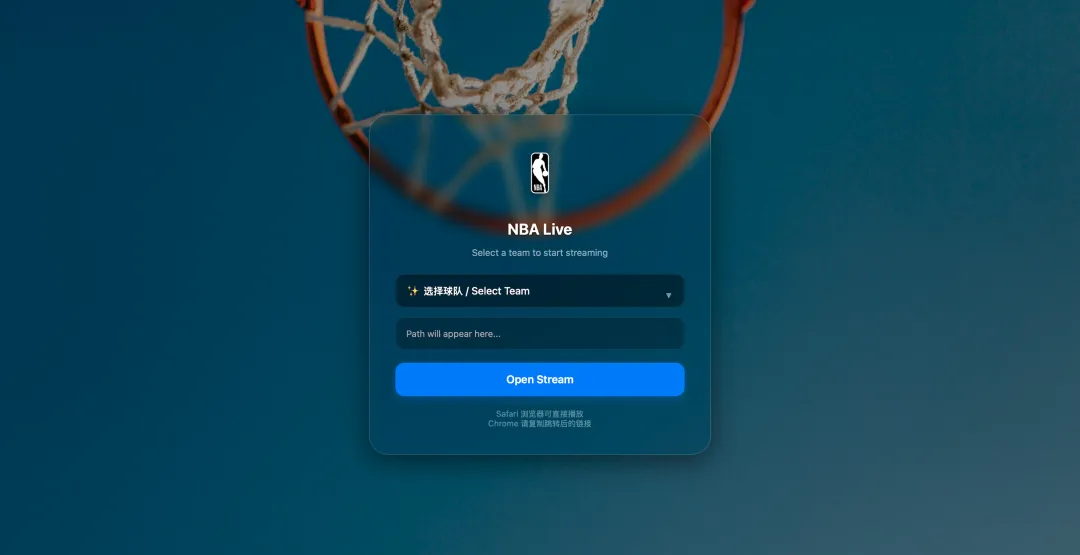
<!DOCTYPE html><htmllang="zh-CN"><head><metacharset="UTF-8"><metaname="viewport"content="width=device-width, initial-scale=1.0"><title>HF NBA 代理</title><style>body {/* 背景图 */background-image: url('https://images.unsplash.com/photo-1567158186373-2cdd94855eac?q=80&w=1920&auto=format&fit=crop');background-size: cover;background-position: center;background-repeat: no-repeat;background-attachment: fixed;font-family: -apple-system, BlinkMacSystemFont, "SF Pro Text", "Helvetica Neue", Arial, sans-serif;display: flex;flex-direction: column;align-items: center;justify-content: center;height: 100vh;margin: 0;box-shadow: inset 0002000pxrgba(0, 0, 0, 0.4); /* 加深一点背景遮罩,突出Logo */ }.container {text-align: center;padding: 2.5rem;width: 85%;max-width: 450px;/* 方案 A:极致通透 */background-color: rgba(20, 20, 20, 0.2); backdrop-filter: blur(10px) saturate(150%); -webkit-backdrop-filter: blur(10px) saturate(150%);border: 1px solid rgba(255, 255, 255, 0.2);border-radius: 30px;box-shadow: 010px40pxrgba(0, 0, 0, 0.5);/* 让内容平滑过渡 */transition: all 0.3s ease; }/* 球队 Logo 样式 */.team-logo {width: 100px;height: 100px;object-fit: contain;margin-bottom: 10px;filter: drop-shadow(04px6pxrgba(0,0,0,0.3)); /* 给 Logo 加投影 */transition: transform 0.3scubic-bezier(0.175, 0.885, 0.32, 1.275); /* 弹跳动画 */ }.team-logo.active {transform: scale(1.1); /* 选中时放大一下 */ }h1 { color: #fff;margin: 10px05px0;font-weight: 700;font-size: 1.5rem;text-shadow: 02px4pxrgba(0,0,0,0.5); }p { color: rgba(255, 255, 255, 0.6);margin-bottom: 25px; font-size: 0.9rem; }select {width: 100%;padding: 16px;background-color: rgba(0, 0, 0, 0.4);border: 1px solid rgba(255, 255, 255, 0.1);color: white;border-radius: 14px;margin-bottom: 15px;font-size: 16px;outline: none;appearance: none; -webkit-appearance: none;cursor: pointer;text-align: center;font-weight: 500; }.select-wrapper {position: relative;width: 100%; }.select-wrapper::after {content: '▼';font-size: 12px;color: rgba(255, 255, 255, 0.5);position: absolute;right: 20px;top: 50%;transform: translateY(-50%);pointer-events: none; }selectoption {background-color: #1c1c1e;color: white;padding: 10px; }input {width: 100%;box-sizing: border-box;padding: 16px;background: rgba(0, 0, 0, 0.25);border: 1px solid rgba(255, 255, 255, 0.1);color: rgba(255, 255, 255, 0.8);border-radius: 14px;margin-bottom: 20px;font-size: 14px;outline: none;transition: 0.3s; }button {width: 100%;background: #007AFF; color: white;border: none;padding: 16px;border-radius: 14px;cursor: pointer;font-weight: 600;font-size: 17px;transition: all 0.2s;box-shadow: 04px12pxrgba(0, 122, 255, 0.3); }button:hover { background: #0062cc;transform: scale(0.98); }.tips { margin-top: 20px; font-size: 0.8rem; color: rgba(255, 255, 255, 0.4); }</style></head><body><divclass="container"><imgid="teamLogo"src="https://cdn.nba.com/headshots/nba/latest/1040x760/logoman.png"class="team-logo"alt="Team Logo"><h1>NBA Live</h1><p>Select a team to start streaming</p><divclass="select-wrapper"><selectid="channelSelect"onchange="updateUI()"><optionvalue=""disabledselecteddata-logo="https://cdn.nba.com/headshots/nba/latest/1040x760/logoman.png">✨ 选择球队 / Select Team</option> {% for channel in channels %}<optionvalue="{{ channel.url }}"data-logo="{{ channel.logo }}">{{ channel.name }}</option> {% endfor %}</select></div><inputtype="text"id="pathInput"placeholder="Path will appear here..."readonly><buttononclick="play()">Open Stream</button><divclass="tips"> Safari 浏览器可直接播放<br>Chrome 请复制跳转后的链接</div></div><script>// 核心逻辑:同时更新输入框和图片functionupdateUI() {var select = document.getElementById("channelSelect");var input = document.getElementById("pathInput");var logo = document.getElementById("teamLogo");// 1. 更新路径 input.value = select.value;// 2. 获取当前选中项的 logo URLvar selectedOption = select.options[select.selectedIndex];var logoUrl = selectedOption.getAttribute('data-logo');// 3. 更新图片并添加动画效果if (logoUrl) { logo.style.transform = "scale(0.8)"; // 先缩小setTimeout(() => { logo.src = logoUrl; logo.style.transform = "scale(1)"; // 再弹回正常 }, 150); } }functionplay() {let path = document.getElementById('pathInput').value;if (!path) returnalert("请先选择球队"); path = path.trim();if (!path.startsWith('/')) path = '/' + path;window.location.href = window.location.origin + path; }</script></body></html>4. app.py (实战案例)
实战案例:一个 M3U8 流媒体直连代理。它的功能是:代理 m3u8 文件,修复相对路径,但让视频流直接走源站(节省服务器流量,速度更快)。
“为了演示方便,这里只提供了一个最基础的 Web 框架。如果需要做流媒体转发(比如 HLS/M3U8 处理),可以在此基础上引入 requests 库进行二次开发。具体的业务逻辑请遵守相关法律法规。”
app.py 示例代码
from flask import Flask, render_templateapp = Flask(__name__)@app.route('/')defhome():return render_template('index.html')if __name__ == '__main__': app.run(host='0.0.0.0', port=7860)⚙️ 第三步:设置公开 (Public) —— 最容易被坑的一步!
如果你发现代码部署成功了,Chrome 能访问,但是 Safari 或播放器报 404,绝对是因为这里没设置!
1. 点击 Space 上方的 Settings 标签。 2. 向下滚动找到 Change Space Visibility。 3. 将状态从 Private改为 Public。
原理:
• Private: 只有登录了 HF 账号的浏览器才能访问(类似于开了登录墙)。播放器无法登录,所以会被拦截。 • Public: 任何人都可以访问,这样播放器才能直接连接 API。
🚀 第四步:构建与测试
1. 文件上传完毕后,点击 App 标签。 2. 你会看到状态从 Building变为Running(通常需要 1-3 分钟)。3. 当看到 Running时,你的服务就上线了!
你的访问地址格式为:https://你的用户名-空间名.hf.space
例如:https://cody-flask.hf.space/nba/index.m3u8
❓ 常见问题 (FAQ)
Q1: 为什么我的 Docker 构建失败?
检查
Dockerfile文件名是否正确(首字母 D 大写),检查requirements.txt里的库名是否拼写正确。
Q2: 为什么日志里显示 Running,但我访问网页是 502 Bad Gateway?
99% 是因为你的
app.py端口没写对。HF 强制要求监听 7860。请检查app.run(host='0.0.0.0', port=7860)。
Q3: 我能部署多个项目吗?
可以!直接再去 New Space 创建一个新的即可。每个 Space 都是独立的容器,互不干扰。
Q4: 这种方式适合生产环境吗?
不适合。它是免费的共享资源,虽然稳定但不能保证 100% SLA。适合个人学习、测试、自用工具或小规模分享。
结语
通过 Hugging Face Spaces + Docker,我们成功白嫖了一个高可用、支持 HTTPS 的 Python 运行环境。无需维护服务器,不用担心账单,这绝对是目前最香的轻量级部署方案。
如果你觉得这篇文章有用,欢迎分享给更多需要的朋友!🌟
回复“26004”获取链接