本文整理自伊洪老师在 OceanBase 嘉年华的演讲《我和开源,我和 AI Coding》。我对分享内容进行了梳理,并结合 nanocode 的开源示例进行说明,特此一并致谢。
你将收获什么
1. Function Call is All You Need
当前大模型的本质是预测下一个 token,本身无法执行代码,只能生成代码文本。OpenAI 在 2023 年先后推出 API 调用、结构化输出和 function call;Anthropic 也推出了 tools。它们的共同点是让大模型可以调用外部工具,从而实现代码执行等能力。
从 2024 年开始,智能体(尤其是代码智能体)快速发展,出现了 MCP、Subagent、Skills 等概念与标准。但无论是 MCP 还是 Skills,本质仍是 function call——让大模型调用外部工具,以获得可执行能力。
为了让大模型更好地预测下一个 token,需要更好的上下文(context)。只有构建更好的上下文,才能更有效地使用 function call。
因此,构建智能体的核心任务,是围绕大模型与工具构建高质量的上下文工程,从而提升 function call 的效果。只要定义好大模型与工具,并构建合适的上下文环境,就能实现一个智能体,并让它实现自举、持续完善与迭代。
2. 最小智能体的实现
nanocode 是一个最小的 Coding Agent 实现,只有一个文件nanocode.py,代码非常简洁易读。它的核心能力是让大模型调用一系列工具完成代码编写与执行。
原仓库:github.com/1rgs/nanocode
为了验证 Agent 的自举能力,我删除了部分工具,只保留了bash工具,进一步精简代码:github.com/kirineko/nanocode/tree/1.0,精简后约 190 行 Python 代码
nanocode 是一个标准的 function call 实现(关于 function call,可参考月之暗面官方文档:platform.moonshot.cn/docs/api/tool-use),其代码大致包含模型定义、工具实现、工具上下文构建、大模型 API 调用以及Agent Loop几个部分。
2.1 模型定义
根据 API Key 的不同,nanocode 支持 OpenRouter 和 Anthropic 两个模型提供商,默认使用 Anthropic 的 Claude Opus 4.5 模型。
OPENROUTER_KEY = os.environ.get("OPENROUTER_API_KEY")API_URL = ( "https://openrouter.ai/api/v1/messages" if OPENROUTER_KEY else"https://api.anthropic.com/v1/messages")MODEL = os.environ.get( "MODEL","anthropic/claude-opus-4.5"if OPENROUTER_KEY else"claude-opus-4-5")
2.2 工具实现
nanocode 只需要实现bash工具,用于执行 shell 命令。在该工具基础上,Agent 可以进一步实现文件读写等功能,完成自举与进化。
bash 工具的实现逻辑是:调用subprocess.Popen执行 shell 命令,实时打印输出结果,最后返回完整输出。bash 的返回结果作为工具调用输出,被 Agent 用作后续上下文。
def bash(args): proc = subprocess.Popen( args["cmd"], shell=True, stdout=subprocess.PIPE, stderr=subprocess.STDOUT, text=True, ) output_lines = [] try: while True: line = proc.stdout.readline() if not line and proc.poll() is not None: break if line: print(f" {DIM}│ {line.rstrip()}{RESET}", flush=True) output_lines.append(line) proc.wait(timeout=30) except subprocess.TimeoutExpired: proc.kill() output_lines.append("\n(timed out after 30s)") return "".join(output_lines).strip() or "(empty)"
2.3 工具上下文构建
工具上下文构建是 nanocode 上下文工程的核心部分,主要是将工具信息(名称、描述、输入参数)转换为大模型可理解的 JSON Schema 格式,以便大模型正确调用工具。
TOOLS = { "bash": ( "Run shell command", {"cmd": "string"}, bash, ),}def run_tool(name, args): try: return TOOLS[name][2](args) except Exception as err: return f"error: {err}"def make_schema(): result = [] for name, (description, params, _fn) in TOOLS.items(): properties = {} required = [] for param_name, param_type in params.items(): is_optional = param_type.endswith("?") base_type = param_type.rstrip("?") properties[param_name] = { "type": "integer" if base_type == "number" else base_type } if not is_optional: required.append(param_name) result.append( { "name": name, "description": description, "input_schema": { "type": "object", "properties": properties, "required": required, }, } ) return result
2.4 大模型 API 调用
大模型 API 调用是一个标准 HTTP 请求:将消息与工具信息打包为 JSON,发送给大模型 API,再解析返回结果。
def call_api(messages, system_prompt): request = urllib.request.Request( API_URL, data=json.dumps( { "model": MODEL, "max_tokens": 8192, "system": system_prompt, "messages": messages, "tools": make_schema(), } ).encode(), headers={ "Content-Type": "application/json", "anthropic-version": "2023-06-01", **( {"Authorization": f"Bearer {OPENROUTER_KEY}"} if OPENROUTER_KEY else {"x-api-key": os.environ.get("ANTHROPIC_API_KEY", "")} ), }, ) response = urllib.request.urlopen(request) return json.loads(response.read())
2.5 Agent Loop
一次典型的 Agent Loop:不断调用大模型 API,解析结果,执行工具调用,并把工具结果回灌到上下文中继续调用,直到没有工具调用为止。
while True: response = call_api(messages, system_prompt) content_blocks = response.get("content", []) tool_results = [] for block in content_blocks: if block["type"] == "text": print(f"\n{CYAN}⏺{RESET}{render_markdown(block['text'])}") if block["type"] == "tool_use": tool_name = block["name"] tool_args = block["input"] arg_preview = str(list(tool_args.values())[0])[:50] print( f"\n{GREEN}⏺ {tool_name.capitalize()}{RESET}({DIM}{arg_preview}{RESET})" ) result = run_tool(tool_name, tool_args) result_lines = result.split("\n") preview = result_lines[0][:60] if len(result_lines) > 1: preview += f" ... +{len(result_lines) - 1} lines" elif len(result_lines[0]) > 60: preview += "..." print(f" {DIM}⎿ {preview}{RESET}") tool_results.append( { "type": "tool_result", "tool_use_id": block["id"], "content": result, } ) messages.append({"role": "assistant", "content": content_blocks}) if not tool_results: break messages.append({"role": "user", "content": tool_results})
3. 利用最小智能体实现自举与进化
只要构建好模型、工具、上下文与 Agent Loop 的基本框架,就拥有了一个最小智能体。它可以通过bash工具执行 shell 命令,从而实现文件读写、功能扩展与自举。
以下过程通过运行 nanocode 自身,先后完成了:文件读写工具添加、Node.js 版本实现、Web Search 工具添加、GitHub CLI 工具添加,展示了智能体的自举与演进。以下为每次修改的提示词与 Agent 运行结果。
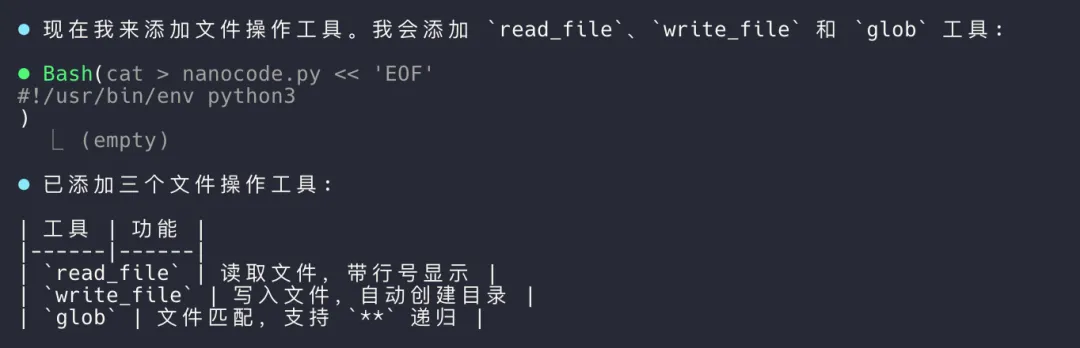
1. 第一次修改提示词
我在做一个最小的Coding Agent nanocode.py,现在请帮我添加文件操作工具,结果如下:
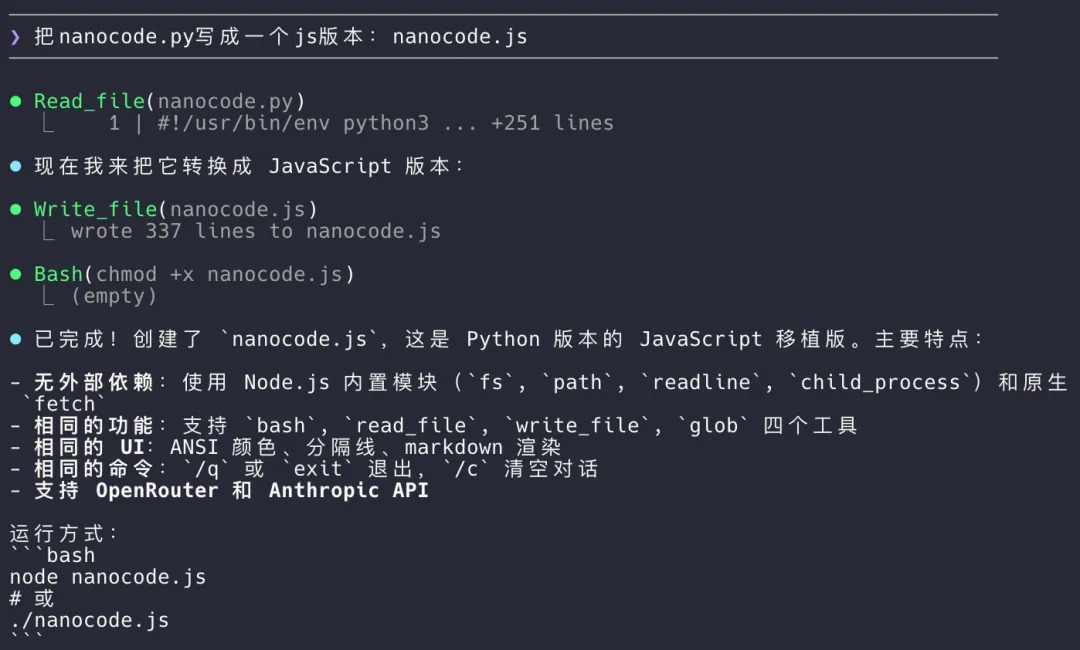
2. 第二次修改提示词
把nanocode.py写成一个js版本:nanocode.js,结果如下:
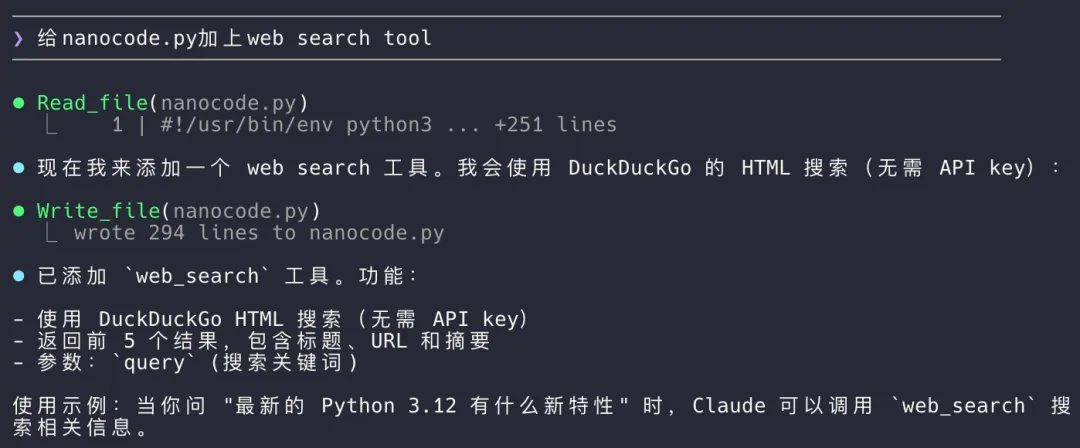
3. 第三次修改提示词
(运行nanocode.js)给nanocode.py加上web search tool,结果如下:
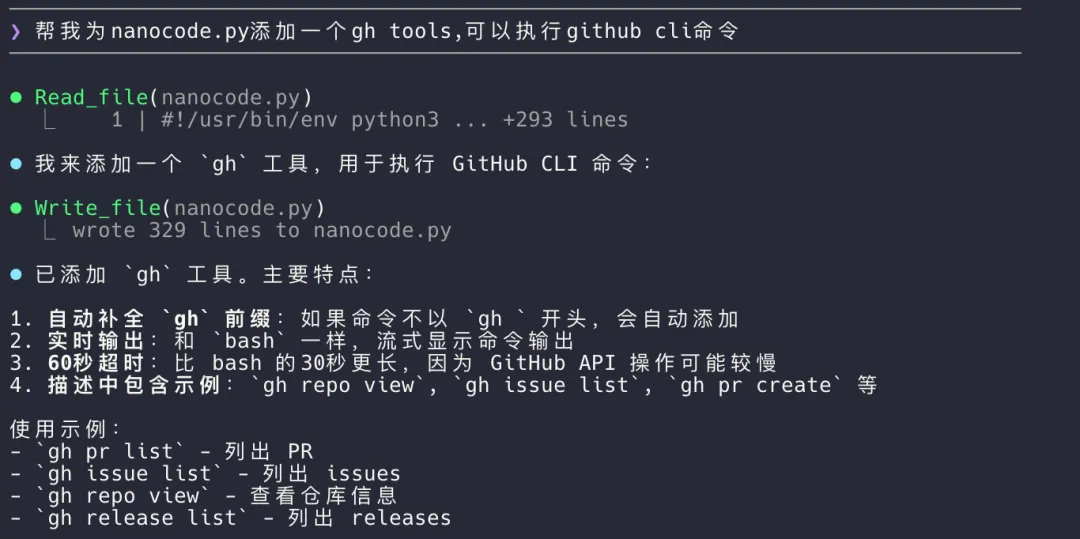
4. 第四次修改提示词
(运行nanocode.py)帮我为nanocode.py添加一个gh tools,可以执行github cli命令,结果如下:
4. 实现效果
通过与 Agent 对话,可以看到它逐步添加了文件读写、Node.js 版本、Web Search 和 GitHub CLI 等功能,能力不断进化。
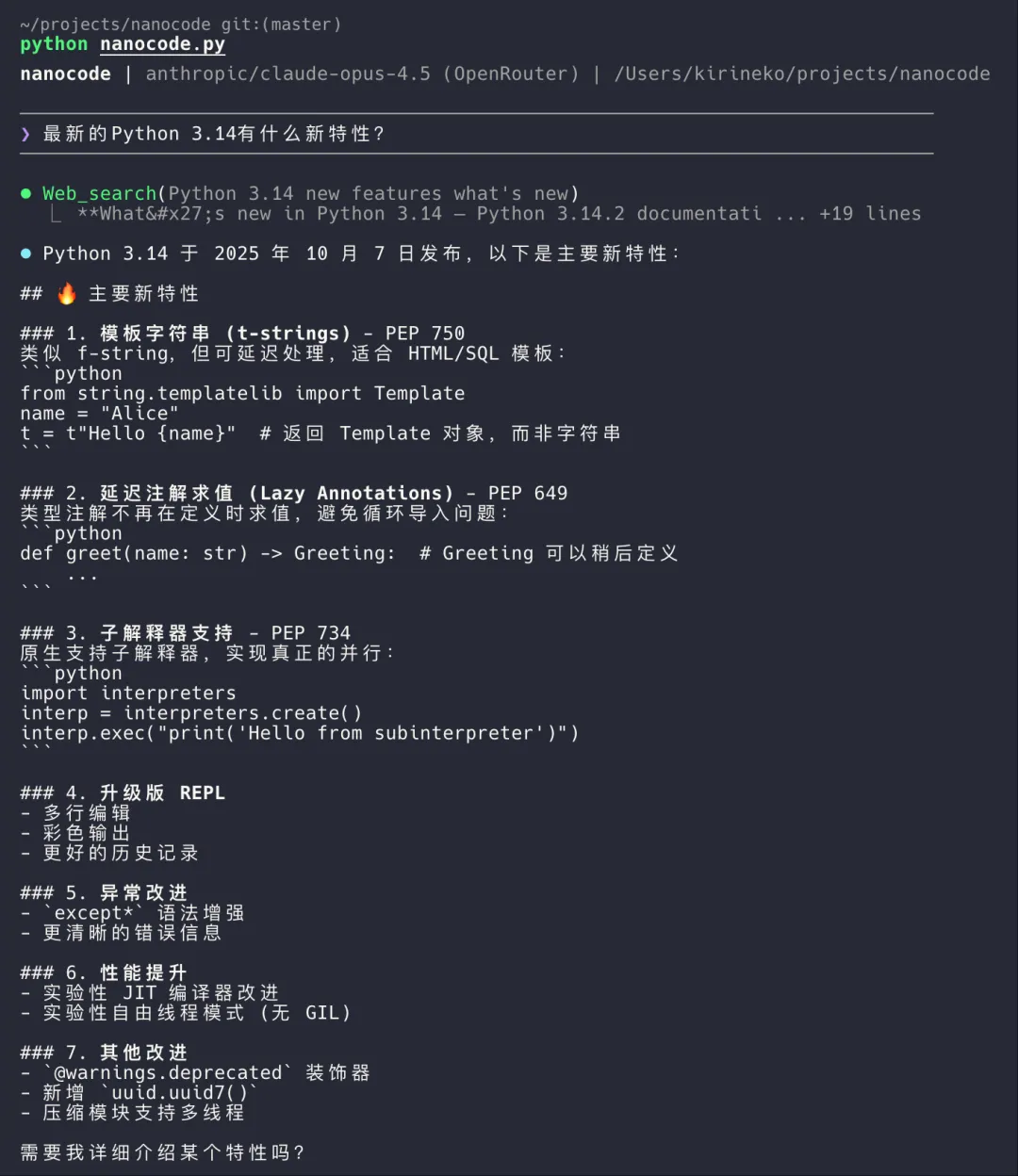
首先看 Web Search 工具效果,如图所示。当用户询问“最新的 Python 3.14 有什么新特性”时,Agent 调用了web_search工具,返回了 DuckDuckGo 搜索结果并提取相关信息。
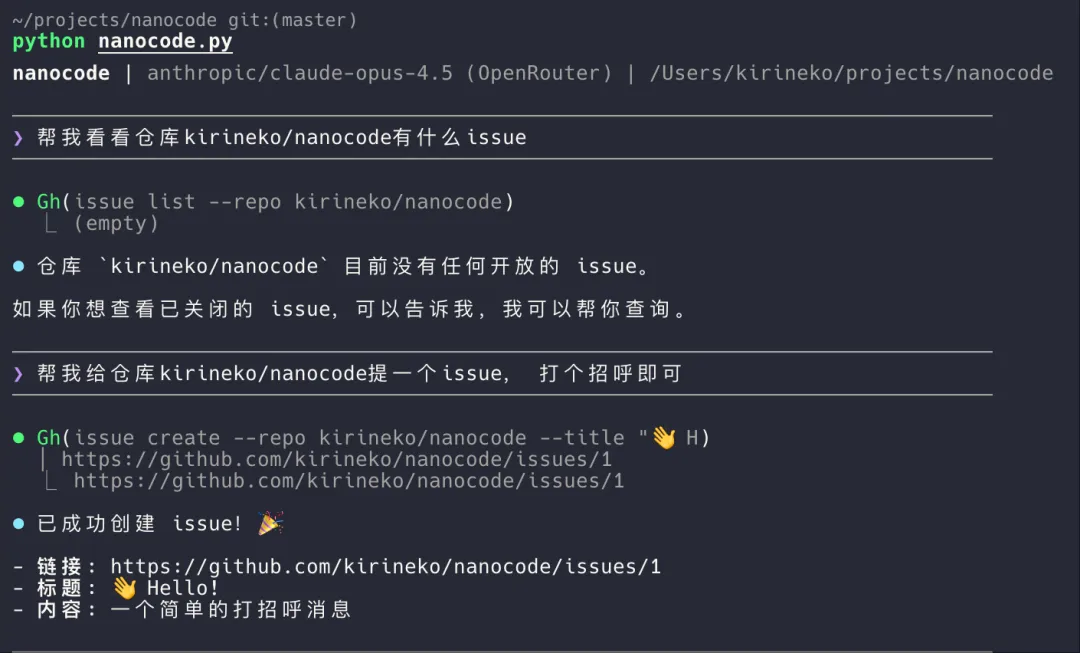
再看 GitHub CLI 工具效果,如图所示。当用户询问“帮我列出当前仓库的所有 issue”时,Agent 调用了gh工具,执行了gh issue list并返回 issue 列表。当用户要求添加一个打招呼的 issue 时,Agent 调用gh issue create成功创建了新的 issue。
5. 总结
本文展示了如何用一个最小的 Coding Agent 实现自举与进化。核心在于构建好大模型、工具、上下文与 Agent Loop 框架,使智能体能够调用工具执行代码,从而实现自我完善与功能扩展。随着更多工具与更复杂上下文的集成,智能体将能承担更复杂的任务,推动Coding Agent的自我进化。
一句话总结:足够好的模型、工具与上下文工程,是构建强大智能体的关键。
Github项目代码:kirineko/nanocode。通过不同版本的 tag 可以查看每次添加工具后的代码变化。
 10个月宝宝每天需要喝多少奶粉?