一、什么是集合?
集合是Python中的无序不重复数据结构,主要用于去重和集合运算。# 基本示例fruits = {'apple', 'banana', 'orange'}numbers = {1, 2, 3, 4, 5}mixed = {1, 'hello', 3.14, True}
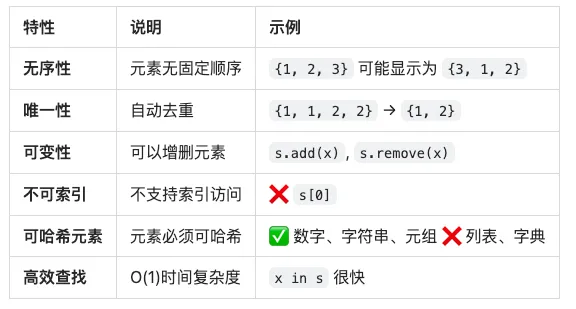
🔑 集合的核心特性
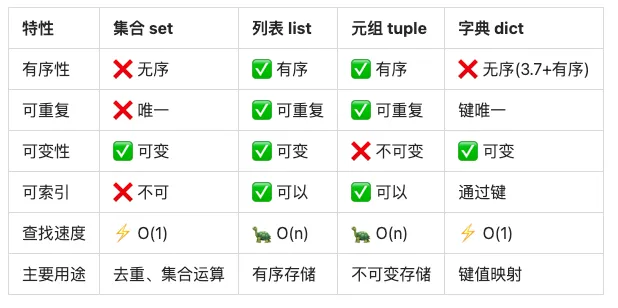
📊 集合 vs 其他数据结构
二、集合的创建方式
方式1:使用花括号 {}
# 基本创建fruits = {'apple', 'banana', 'orange'}print(fruits) # 输出: {'apple', 'banana', 'orange'} (顺序可能不同)# 自动去重numbers = {1, 2, 2, 3, 3, 3, 4}print(numbers) # 输出: {1, 2, 3, 4}# 混合类型mixed = {1, 'hello', 3.14, True}print(mixed) # 输出: {1, 3.14, 'hello'} (True和1被认为相同)# ⚠️ 注意:空集合不能用 {}empty = {}print(type(empty)) # 输出: <class 'dict'> (这是字典!)# ✅ 正确创建空集合empty_set = set()print(type(empty_set)) # 输出: <class 'set'>
方式2:使用 set() 构造函数
# 从列表创建(自动去重)list_data = [1, 2, 2, 3, 3, 3, 4]set_data = set(list_data)print(set_data) # 输出: {1, 2, 3, 4}# 从字符串创建(拆分为字符)chars = set('hello')print(chars) # 输出: {'h', 'e', 'l', 'o'} (自动去重)# 从元组创建tuple_data = (1, 2, 3, 2, 1)set_data = set(tuple_data)print(set_data) # 输出: {1, 2, 3}# 从字典创建(只取键)dict_data = {'a': 1, 'b': 2, 'c': 3}keys_set = set(dict_data)print(keys_set) # 输出: {'a', 'b', 'c'}# 从range创建numbers = set(range(1, 6))print(numbers) # 输出: {1, 2, 3, 4, 5}# 空集合empty = set()print(empty) # 输出: set()
方式3:集合推导式
# 基础推导式squares = {x**2 for x in range(1, 6)}print(squares) # 输出: {1, 4, 9, 16, 25}# 带条件的推导式evens = {x for x in range(10) if x % 2 == 0}print(evens) # 输出: {0, 2, 4, 6, 8}# 字符串处理vowels = {char.lower() for char in 'Hello World' if char.lower() in 'aeiou'}print(vowels) # 输出: {'e', 'o'}# 从列表去重data = [1, 2, 2, 3, 3, 3, 4, 4, 4, 4]unique = {x for x in data}print(unique) # 输出: {1, 2, 3, 4}# 复杂表达式result = {x * y for x in range(1, 4) for y in range(1, 4)}print(result) # 输出: {1, 2, 3, 4, 6, 8, 9} (自动去重)
方式4:从其他集合创建
# 复制集合original = {1, 2, 3}copied = set(original)print(copied) # 输出: {1, 2, 3}# 或使用 copy() 方法copied2 = original.copy()print(copied2) # 输出: {1, 2, 3}# 修改副本不影响原集合copied.add(4)print(original) # {1, 2, 3}print(copied) # {1, 2, 3, 4}
三、集合的属性
1. 长度 - len()
fruits = {'apple', 'banana', 'orange'}print(len(fruits)) # 输出: 3# 空集合empty = set()print(len(empty)) # 输出: 0# 自动去重后的长度numbers = {1, 1, 2, 2, 3, 3}print(len(numbers)) # 输出: 3
2. 成员检测
fruits = {'apple', 'banana', 'orange', 'grape', 'mango'}# in 运算符(O(1)时间复杂度)print('apple' in fruits) # Trueprint('kiwi' in fruits) # False# not inprint('kiwi' not in fruits) # True# 性能对比:集合 vs 列表import time# 列表查找(O(n))large_list = list(range(100000))start = time.time()99999 in large_listlist_time = time.time() - start# 集合查找(O(1))large_set = set(range(100000))start = time.time()99999 in large_setset_time = time.time() - startprint(f"列表查找: {list_time:.6f}秒")print(f"集合查找: {set_time:.6f}秒")print(f"集合快 {list_time/set_time:.0f} 倍")# 输出示例:# 列表查找: 0.001234秒# 集合查找: 0.000001秒# 集合快 1234 倍
3. 无序性
# 集合是无序的s = {3, 1, 4, 1, 5, 9, 2, 6}print(s) # 输出: {1, 2, 3, 4, 5, 6, 9} (顺序不确定)# 每次运行可能顺序不同for _ in range(3): print({1, 2, 3, 4, 5})# 可能输出:# {1, 2, 3, 4, 5}# {5, 1, 2, 3, 4}# {3, 4, 5, 1, 2}# ❌ 不支持索引try: s[0]except TypeError as e: print(f"错误: {e}")# 输出: 错误: 'set' object is not subscriptable# ❌ 不支持切片try: s[1:3]except TypeError as e: print(f"错误: {e}")# 输出: 错误: 'set' object is not subscriptable
4. 元素必须可哈希
# ✅ 可哈希类型可以放入集合valid_set = {1, 2.5, 'hello', (1, 2), True, None}print(valid_set) # 输出: {1, 2.5, None, 'hello', (1, 2)}# ❌ 列表不可哈希try: invalid_set = {1, 2, [3, 4]}except TypeError as e: print(f"错误: {e}")# 输出: 错误: unhashable type: 'list'# ❌ 字典不可哈希try: invalid_set = {1, 2, {'a': 3}}except TypeError as e: print(f"错误: {e}")# 输出: 错误: unhashable type: 'dict'# ❌ 集合不可哈希try: invalid_set = {1, 2, {3, 4}}except TypeError as e: print(f"错误: {e}")# 输出: 错误: unhashable type: 'set'# ✅ 但冻结集合可以nested_set = {1, 2, frozenset([3, 4])}print(nested_set) # 输出: {1, 2, frozenset({3, 4})}
四、集合的核心方法(15个)
添加元素(3个方法)
1️⃣ add() - 添加单个元素
fruits = {'apple', 'banana'}# 添加新元素fruits.add('orange')print(fruits) # 输出: {'apple', 'banana', 'orange'}# 添加已存在的元素(无效果)fruits.add('apple')print(fruits) # 输出: {'apple', 'banana', 'orange'} (没有重复)# 添加不同类型numbers = {1, 2, 3}numbers.add(4)numbers.add('five')numbers.add((6, 7))print(numbers) # 输出: {1, 2, 3, 4, 'five', (6, 7)}# ⚠️ 注意:add()修改原集合,返回Noneresult = fruits.add('grape')print(result) # 输出: None
时间复杂度:O(1)
2️⃣ update() - 批量添加元素
fruits = {'apple', 'banana'}# 添加多个元素(从列表)fruits.update(['orange', 'grape'])print(fruits) # 输出: {'apple', 'banana', 'orange', 'grape'}# 添加多个元素(从集合)fruits.update({'mango', 'kiwi'})print(fruits) # 输出: {'apple', 'banana', 'orange', 'grape', 'mango', 'kiwi'}# 添加字符串(拆分为字符)letters = {'a', 'b'}letters.update('cd')print(letters) # 输出: {'a', 'b', 'c', 'd'}# 同时添加多个可迭代对象numbers = {1, 2}numbers.update([3, 4], {5, 6}, (7, 8))print(numbers) # 输出: {1, 2, 3, 4, 5, 6, 7, 8}# 自动去重s = {1, 2, 3}s.update([3, 4, 4, 5])print(s) # 输出: {1, 2, 3, 4, 5}
3️⃣ |= 运算符 - 并集更新
s1 = {1, 2, 3}s2 = {3, 4, 5}# 使用 |= 运算符s1 |= s2print(s1) # 输出: {1, 2, 3, 4, 5}# 等价于 update()s1 = {1, 2, 3}s1.update(s2)print(s1) # 输出: {1, 2, 3, 4, 5}
删除元素(5个方法)
4️⃣ remove() - 删除指定元素(不存在会报错)
fruits = {'apple', 'banana', 'orange', 'grape'}# 删除存在的元素fruits.remove('banana')print(fruits) # 输出: {'apple', 'orange', 'grape'}# ❌ 删除不存在的元素会报错try: fruits.remove('kiwi')except KeyError as e: print(f"错误: {e}")# 输出: 错误: 'kiwi'# ✅ 安全删除if 'kiwi' in fruits: fruits.remove('kiwi')else: print("元素不存在")
5️⃣ discard() - 删除指定元素(不存在不报错)
fruits = {'apple', 'banana', 'orange'}# 删除存在的元素fruits.discard('banana')print(fruits) # 输出: {'apple', 'orange'}# ✅ 删除不存在的元素不报错fruits.discard('kiwi') # 不会报错print(fruits) # 输出: {'apple', 'orange'}# 推荐使用 discard() 而不是 remove()# 因为更安全
6️⃣ pop() - 随机删除并返回一个元素
fruits = {'apple', 'banana', 'orange'}# 随机删除一个元素removed = fruits.pop()print(f"删除的元素: {removed}")print(f"剩余元素: {fruits}")# 输出示例:# 删除的元素: apple# 剩余元素: {'banana', 'orange'}# ⚠️ 注意:pop()是随机的,不保证顺序s = {1, 2, 3, 4, 5}for _ in range(3): print(s.pop())# 可能输出: 1, 2, 3 或其他顺序# ❌ 空集合pop会报错empty = set()try: empty.pop()except KeyError as e: print(f"错误: pop from an empty set")# 输出: 错误: pop from an empty set
时间复杂度:O(1)
7️⃣ clear() - 清空集合
fruits = {'apple', 'banana', 'orange'}# 清空集合fruits.clear()print(fruits) # 输出: set()print(len(fruits)) # 输出: 0# 等价于重新赋值为空集合fruits = {'apple', 'banana', 'orange'}fruits = set()print(fruits) # 输出: set()
8️⃣ -= 运算符 - 差集更新
s1 = {1, 2, 3, 4, 5}s2 = {3, 4, 5, 6, 7}# 使用 -= 运算符s1 -= s2print(s1) # 输出: {1, 2} (移除s2中的元素)# 等价于 difference_update()s1 = {1, 2, 3, 4, 5}s1.difference_update(s2)print(s1) # 输出: {1, 2}
集合运算(7个方法)
9️⃣ union() / | - 并集
s1 = {1, 2, 3}s2 = {3, 4, 5}# 方法1:使用 union()result = s1.union(s2)print(result) # 输出: {1, 2, 3, 4, 5}# 方法2:使用 | 运算符result = s1 | s2print(result) # 输出: {1, 2, 3, 4, 5}# 多个集合并集s3 = {5, 6, 7}result = s1.union(s2, s3)print(result) # 输出: {1, 2, 3, 4, 5, 6, 7}# 或使用运算符result = s1 | s2 | s3print(result) # 输出: {1, 2, 3, 4, 5, 6, 7}# ⚠️ 原集合不变print(s1) # {1, 2, 3}print(s2) # {3, 4, 5}
时间复杂度:O(len(s1) + len(s2))🔟 intersection() / & - 交集
s1 = {1, 2, 3, 4, 5}s2 = {3, 4, 5, 6, 7}# 方法1:使用 intersection()result = s1.intersection(s2)print(result) # 输出: {3, 4, 5}# 方法2:使用 & 运算符result = s1 & s2print(result) # 输出: {3, 4, 5}# 多个集合交集s3 = {4, 5, 6, 7, 8}result = s1.intersection(s2, s3)print(result) # 输出: {4, 5}# 或使用运算符result = s1 & s2 & s3print(result) # 输出: {4, 5}# 空交集s4 = {10, 20, 30}result = s1 & s4print(result) # 输出: set()
时间复杂度:O(min(len(s1), len(s2)))1️⃣1️⃣ difference() / - - 差集
s1 = {1, 2, 3, 4, 5}s2 = {3, 4, 5, 6, 7}# 方法1:使用 difference()result = s1.difference(s2)print(result) # 输出: {1, 2} (s1中有但s2中没有的)# 方法2:使用 - 运算符result = s1 - s2print(result) # 输出: {1, 2}# 反向差集result = s2 - s1print(result) # 输出: {6, 7} (s2中有但s1中没有的)# 多个集合差集s3 = {1, 6}result = s1.difference(s2, s3)print(result) # 输出: {2} (s1中有但s2和s3都没有的)# 或使用运算符result = s1 - s2 - s3print(result) # 输出: {2}
1️⃣2️⃣ symmetric_difference() / ^ - 对称差集
s1 = {1, 2, 3, 4, 5}s2 = {3, 4, 5, 6, 7}# 方法1:使用 symmetric_difference()result = s1.symmetric_difference(s2)print(result) # 输出: {1, 2, 6, 7} (在s1或s2中但不同时在两者中)# 方法2:使用 ^ 运算符result = s1 ^ s2print(result) # 输出: {1, 2, 6, 7}# 等价于result = (s1 - s2) | (s2 - s1)print(result) # 输出: {1, 2, 6, 7}# 或result = (s1 | s2) - (s1 & s2)print(result) # 输出: {1, 2, 6, 7}# 多个集合对称差s3 = {1, 6, 8}result = s1 ^ s2 ^ s3print(result) # 输出: {2, 7, 8}
时间复杂度:O(len(s1) + len(s2))1️⃣3️⃣ issubset() / <= - 子集判断
s1 = {1, 2, 3}s2 = {1, 2, 3, 4, 5}# 方法1:使用 issubset()print(s1.issubset(s2)) # 输出: True (s1是s2的子集)# 方法2:使用 <= 运算符print(s1 <= s2) # 输出: True# 反向判断print(s2.issubset(s1)) # 输出: False# 自己是自己的子集print(s1.issubset(s1)) # 输出: True# 真子集判断(不包括相等)print(s1 < s2) # True (真子集)print(s1 < s1) # False (不是真子集)# 空集是任何集合的子集empty = set()print(empty.issubset(s1)) # 输出: True
1️⃣4️⃣ issuperset() / >= - 超集判断
s1 = {1, 2, 3, 4, 5}s2 = {1, 2, 3}# 方法1:使用 issuperset()print(s1.issuperset(s2)) # 输出: True (s1是s2的超集)# 方法2:使用 >= 运算符print(s1 >= s2) # 输出: True# 反向判断print(s2.issuperset(s1)) # 输出: False# 自己是自己的超集print(s1.issuperset(s1)) # 输出: True# 真超集判断(不包括相等)print(s1 > s2) # True (真超集)print(s1 > s1) # False (不是真超集)# 任何集合都是空集的超集empty = set()print(s1.issuperset(empty)) # 输出: True
1️⃣5️⃣ isdisjoint() - 不相交判断
s1 = {1, 2, 3}s2 = {4, 5, 6}s3 = {3, 4, 5}# 判断两个集合是否没有交集print(s1.isdisjoint(s2)) # 输出: True (没有交集)print(s1.isdisjoint(s3)) # 输出: False (有交集:3)# 等价于print(len(s1 & s2) == 0) # 输出: Trueprint(len(s1 & s3) == 0) # 输出: False# 空集与任何集合都不相交empty = set()print(empty.isdisjoint(s1)) # 输出: True
时间复杂度:O(min(len(s1), len(s2)))其他方法
copy() - 浅拷贝
original = {1, 2, 3}# 复制集合copied = original.copy()print(copied) # 输出: {1, 2, 3}# 修改副本不影响原集合copied.add(4)print(original) # {1, 2, 3}print(copied) # {1, 2, 3, 4}# 等价于copied2 = set(original)print(copied2) # 输出: {1, 2, 3}
五、集合运算总结
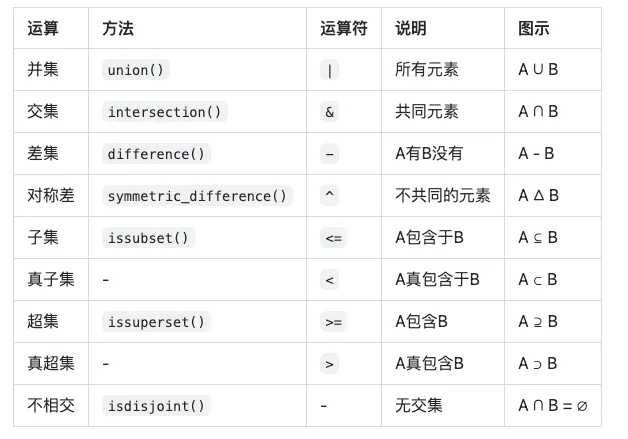
📊 集合运算对照表
🎯 集合运算示例
A = {1, 2, 3, 4, 5}B = {4, 5, 6, 7, 8}print(f"A = {A}")print(f"B = {B}")print()# 并集:A ∪ Bprint(f"并集 A | B = {A | B}")# 输出: {1, 2, 3, 4, 5, 6, 7, 8}# 交集:A ∩ Bprint(f"交集 A & B = {A & B}")# 输出: {4, 5}# 差集:A - Bprint(f"差集 A - B = {A - B}")# 输出: {1, 2, 3}# 差集:B - Aprint(f"差集 B - A = {B - A}")# 输出: {6, 7, 8}# 对称差:A △ Bprint(f"对称差 A ^ B = {A ^ B}")# 输出: {1, 2, 3, 6, 7, 8}# 验证:对称差 = (A-B) ∪ (B-A)print(f"验证: (A-B) | (B-A) = {(A - B) | (B - A)}")# 输出: {1, 2, 3, 6, 7, 8}
六、冻结集合(frozenset)
# 创建冻结集合fs = frozenset([1, 2, 3, 4, 5])print(fs) # 输出: frozenset({1, 2, 3, 4, 5})# 自动去重fs = frozenset([1, 1, 2, 2, 3])print(fs) # 输出: frozenset({1, 2, 3})# 从字符串创建fs = frozenset('hello')print(fs) # 输出: frozenset({'h', 'e', 'l', 'o'})# 空冻结集合empty_fs = frozenset()print(empty_fs) # 输出: frozenset()
冻结集合的特性
fs = frozenset([1, 2, 3])# ❌ 不能添加元素try: fs.add(4)except AttributeError as e: print(f"错误: {e}")# 输出: 错误: 'frozenset' object has no attribute 'add'# ❌ 不能删除元素try: fs.remove(1)except AttributeError as e: print(f"错误: {e}")# 输出: 错误: 'frozenset' object has no attribute 'remove'# ❌ 不能清空try: fs.clear()except AttributeError as e: print(f"错误: {e}")# 输出: 错误: 'frozenset' object has no attribute 'clear'# ✅ 可以进行集合运算fs1 = frozenset([1, 2, 3])fs2 = frozenset([3, 4, 5])print(fs1 | fs2) # frozenset({1, 2, 3, 4, 5})print(fs1 & fs2) # frozenset({3})print(fs1 - fs2) # frozenset({1, 2})print(fs1 ^ fs2) # frozenset({1, 2, 4, 5})# ✅ 可以作为字典的键cache = { frozenset([1, 2]): 'value1', frozenset([3, 4]): 'value2'}print(cache[frozenset([1, 2])]) # 输出: value1# ✅ 可以作为集合的元素nested_set = {frozenset([1, 2]), frozenset([3, 4])}print(nested_set) # 输出: {frozenset({1, 2}), frozenset({3, 4})}
set vs frozenset
# set:可变s = {1, 2, 3}s.add(4) # ✅ 可以修改# s 不可哈希 # ❌ 不能作为字典键# frozenset:不可变fs = frozenset([1, 2, 3])# fs.add(4) # ❌ 不能修改# fs 可哈希 # ✅ 可以作为字典键# 对比表print("set可哈希:", end=" ")try: hash(s) print("是")except TypeError: print("否")# 输出: 否print("frozenset可哈希:", end=" ")try: hash(fs) print("是")except TypeError: print("否")# 输出: 是
七、实战案例
案例1:数据去重
# 列表去重(保持唯一性)data = [1, 2, 2, 3, 3, 3, 4, 4, 4, 4, 5]# 方法1:转集合再转回列表unique_data = list(set(data))print(unique_data) # 输出: [1, 2, 3, 4, 5] (顺序可能不同)# 方法2:保持原顺序def remove_duplicates(lst): seen = set() result = [] for item in lst: if item not in seen: seen.add(item) result.append(item) return resultunique_ordered = remove_duplicates(data)print(unique_ordered) # 输出: [1, 2, 3, 4, 5] (保持原顺序)# 字符串去重text = "hello world"unique_chars = set(text)print(unique_chars) # 输出: {'h', 'e', 'l', 'o', ' ', 'w', 'r', 'd'}# 去除空格后的唯一字符unique_chars = set(text.replace(' ', ''))print(unique_chars) # 输出: {'h', 'e', 'l', 'o', 'w', 'r', 'd'}
案例2:查找共同元素
# 找出多个列表的共同元素list1 = [1, 2, 3, 4, 5]list2 = [3, 4, 5, 6, 7]list3 = [4, 5, 6, 7, 8]# 转为集合求交集common = set(list1) & set(list2) & set(list3)print(common) # 输出: {4, 5}# 找出学生共同选修的课程alice_courses = {'Math', 'English', 'Physics', 'Chemistry'}bob_courses = {'Math', 'History', 'Physics', 'Art'}charlie_courses = {'Math', 'Physics', 'Biology'}common_courses = alice_courses & bob_courses & charlie_coursesprint(f"共同课程: {common_courses}")# 输出: 共同课程: {'Math', 'Physics'}
案例3:找出差异
# 找出两个列表的差异old_list = [1, 2, 3, 4, 5]new_list = [3, 4, 5, 6, 7]# 新增的元素added = set(new_list) - set(old_list)print(f"新增: {added}") # 输出: 新增: {6, 7}# 删除的元素removed = set(old_list) - set(new_list)print(f"删除: {removed}") # 输出: 删除: {1, 2}# 所有变化的元素changed = set(old_list) ^ set(new_list)print(f"变化: {changed}") # 输出: 变化: {1, 2, 6, 7}# 实际应用:文件变化检测old_files = {'file1.txt', 'file2.txt', 'file3.txt'}new_files = {'file2.txt', 'file3.txt', 'file4.txt', 'file5.txt'}added_files = new_files - old_filesdeleted_files = old_files - new_filesprint(f"新增文件: {added_files}")print(f"删除文件: {deleted_files}")# 输出:# 新增文件: {'file4.txt', 'file5.txt'}# 删除文件: {'file1.txt'}
案例4:标签系统
# 文章标签管理article1_tags = {'python', 'programming', 'tutorial', 'beginner'}article2_tags = {'python', 'data-science', 'pandas', 'tutorial'}article3_tags = {'javascript', 'web', 'frontend', 'tutorial'}# 找出所有唯一标签all_tags = article1_tags | article2_tags | article3_tagsprint(f"所有标签: {all_tags}")# 输出: 所有标签: {'python', 'programming', 'tutorial', 'beginner', 'data-science', 'pandas', 'javascript', 'web', 'frontend'}# 找出共同标签common_tags = article1_tags & article2_tags & article3_tagsprint(f"共同标签: {common_tags}")# 输出: 共同标签: {'tutorial'}# 找出Python相关文章python_articles = []for i, tags in enumerate([article1_tags, article2_tags, article3_tags], 1): if 'python' in tags: python_articles.append(f"Article {i}")print(f"Python文章: {python_articles}")# 输出: Python文章: ['Article 1', 'Article 2']# 推荐系统:找相似文章def find_similar_articles(target_tags, all_articles): """根据标签相似度推荐文章""" similarities = [] for article_name, article_tags in all_articles.items(): # 计算Jaccard相似度 intersection = len(target_tags & article_tags) union = len(target_tags | article_tags) similarity = intersection / union if union > 0 else 0 similarities.append((article_name, similarity)) # 按相似度排序 similarities.sort(key=lambda x: x[1], reverse=True) return similaritiesarticles = { 'Article 1': article1_tags, 'Article 2': article2_tags, 'Article 3': article3_tags}user_interests = {'python', 'tutorial', 'data-science'}recommendations = find_similar_articles(user_interests, articles)print("推荐文章:")for article, score in recommendations: print(f" {article}: {score:.2f}")# 输出:# 推荐文章:# Article 2: 0.60# Article 1: 0.50# Article 3: 0.11
案例5:权限管理
# 用户权限系统admin_permissions = {'read', 'write', 'delete', 'execute', 'admin'}editor_permissions = {'read', 'write', 'execute'}viewer_permissions = {'read'}# 检查用户权限def check_permission(user_permissions, required_permission): return required_permission in user_permissions# 检查用户是否有所有必需权限def has_all_permissions(user_permissions, required_permissions): return required_permissions.issubset(user_permissions)# 检查用户是否有任一权限def has_any_permission(user_permissions, required_permissions): return not user_permissions.isdisjoint(required_permissions)# 测试user_perms = {'read', 'write'}print(check_permission(user_perms, 'read')) # Trueprint(check_permission(user_perms, 'delete')) # Falserequired = {'read', 'write'}print(has_all_permissions(user_perms, required)) # Truerequired = {'read', 'write', 'delete'}print(has_all_permissions(user_perms, required)) # False# 权限升级def upgrade_permissions(current, additional): return current | additionalnew_perms = upgrade_permissions(viewer_permissions, {'write'})print(f"升级后权限: {new_perms}")# 输出: 升级后权限: {'read', 'write'}# 权限降级def downgrade_permissions(current, remove): return current - removereduced_perms = downgrade_permissions(admin_permissions, {'admin', 'delete'})print(f"降级后权限: {reduced_perms}")# 输出: 降级后权限: {'read', 'write', 'execute'}
案例6:数据分析
# 用户行为分析users_visited_page_a = {1, 2, 3, 4, 5, 6, 7, 8}users_visited_page_b = {3, 4, 5, 6, 9, 10, 11}users_purchased = {4, 5, 6, 12, 13}# 访问过A和B的用户both_pages = users_visited_page_a & users_visited_page_bprint(f"访问过A和B: {both_pages}")# 输出: 访问过A和B: {3, 4, 5, 6}# 只访问A没访问B的用户only_a = users_visited_page_a - users_visited_page_bprint(f"只访问A: {only_a}")# 输出: 只访问A: {1, 2, 7, 8}# 访问过任一页面的用户any_page = users_visited_page_a | users_visited_page_bprint(f"访问过任一页面: {any_page}")# 输出: 访问过任一页面: {1, 2, 3, 4, 5, 6, 7, 8, 9, 10, 11}# 访问过A且购买的用户visited_a_and_purchased = users_visited_page_a & users_purchasedprint(f"访问A且购买: {visited_a_and_purchased}")# 输出: 访问A且购买: {4, 5, 6}# 转化率计算conversion_rate = len(visited_a_and_purchased) / len(users_visited_page_a)print(f"A页面转化率: {conversion_rate:.2%}")# 输出: A页面转化率: 37.50%# 流失用户(访问但未购买)visited_not_purchased = any_page - users_purchasedprint(f"流失用户: {visited_not_purchased}")# 输出: 流失用户: {1, 2, 3, 7, 8, 9, 10, 11}
八、性能优化技巧
1. 使用集合加速查找
import time# 大数据集large_data = list(range(100000))# ❌ 使用列表查找(慢)start = time.time()for i in range(1000): 99999 in large_data # O(n)list_time = time.time() - start# ✅ 使用集合查找(快)large_set = set(large_data)start = time.time()for i in range(1000): 99999 in large_set # O(1)set_time = time.time() - startprint(f"列表查找: {list_time:.4f}秒")print(f"集合查找: {set_time:.4f}秒")print(f"集合快 {list_time/set_time:.0f} 倍")# 输出示例:# 列表查找: 1.2345秒# 集合查找: 0.0001秒# 集合快 12345 倍
2. 去重优化
# ❌ 低效去重def remove_duplicates_slow(lst): result = [] for item in lst: if item not in result: # O(n) 查找 result.append(item) return result# ✅ 高效去重def remove_duplicates_fast(lst): return list(set(lst)) # O(n)# ✅ 保持顺序的高效去重def remove_duplicates_ordered(lst): seen = set() result = [] for item in lst: if item not in seen: # O(1) 查找 seen.add(item) result.append(item) return result# 性能测试data = list(range(10000)) * 10 # 10万个元素start = time.time()remove_duplicates_slow(data[:1000]) # 只测试1000个slow_time = time.time() - startstart = time.time()remove_duplicates_fast(data)fast_time = time.time() - startprint(f"慢速去重: {slow_time:.4f}秒")print(f"快速去重: {fast_time:.4f}秒")
3. 批量操作优化
# ❌ 低效:逐个添加s = set()for i in range(10000): s.add(i)# ✅ 高效:批量添加s = set(range(10000))# 或使用 update()s = set()s.update(range(10000))
4. 集合推导式
# ✅ 使用集合推导式(更快)result = {x for x in range(10000) if x % 2 == 0}# 而不是result = set()for x in range(10000): if x % 2 == 0: result.add(x)
九、常见陷阱与避坑指南
陷阱1:空集合的创建
# ❌ 错误:这是字典不是集合empty = {}print(type(empty)) # 输出: <class 'dict'># ✅ 正确:使用set()empty_set = set()print(type(empty_set)) # 输出: <class 'set'># 非空集合可以用{}non_empty = {1, 2, 3}print(type(non_empty)) # 输出: <class 'set'>
陷阱2:集合元素必须可哈希
# ❌ 列表不能放入集合try: s = {1, 2, [3, 4]}except TypeError as e: print(f"错误: {e}")# 输出: 错误: unhashable type: 'list'# ❌ 字典不能放入集合try: s = {1, 2, {'a': 3}}except TypeError as e: print(f"错误: {e}")# 输出: 错误: unhashable type: 'dict'# ❌ 集合不能放入集合try: s = {1, 2, {3, 4}}except TypeError as e: print(f"错误: {e}")# 输出: 错误: unhashable type: 'set'# ✅ 使用frozensets = {1, 2, frozenset([3, 4])}print(s) # 输出: {1, 2, frozenset({3, 4})}# ✅ 使用元组代替列表s = {1, 2, (3, 4)}print(s) # 输出: {1, 2, (3, 4)}
陷阱3:集合是无序的
# 集合顺序不确定s = {3, 1, 4, 1, 5, 9, 2, 6}print(s) # 可能输出: {1, 2, 3, 4, 5, 6, 9}# ❌ 不能依赖顺序# 错误的做法s = {1, 2, 3, 4, 5}# first = s[0] # 报错!# ✅ 如果需要顺序,转为列表lst = list(s)first = lst[0]# ✅ 或使用sorted()sorted_list = sorted(s)print(sorted_list) # 输出: [1, 2, 3, 4, 5, 6, 9]
陷阱4:True和1、False和0
# True被认为等于1,False被认为等于0s = {1, 2, 3, True, False, 0}print(s) # 输出: {0, 1, 2, 3} (True和False被去重了)# 详细说明print(1 == True) # Trueprint(0 == False) # Trueprint(hash(1) == hash(True)) # Trueprint(hash(0) == hash(False)) # True# 实际影响s = {True, 1, 2}print(s) # {True, 2} 或 {1, 2}s = {False, 0, 1}print(s) # {False, 1} 或 {0, 1}
陷阱5:集合修改时的迭代
# ❌ 错误:迭代时修改集合s = {1, 2, 3, 4, 5}try: for item in s: if item % 2 == 0: s.remove(item) # 运行时错误!except RuntimeError as e: print(f"错误: {e}")# 输出: 错误: Set changed size during iteration# ✅ 正确方法1:创建副本s = {1, 2, 3, 4, 5}for item in s.copy(): if item % 2 == 0: s.remove(item)print(s) # 输出: {1, 3, 5}# ✅ 正确方法2:使用集合推导式s = {1, 2, 3, 4, 5}s = {item for item in s if item % 2 != 0}print(s) # 输出: {1, 3, 5}# ✅ 正确方法3:收集要删除的元素s = {1, 2, 3, 4, 5}to_remove = {item for item in s if item % 2 == 0}s -= to_removeprint(s) # 输出: {1, 3, 5}
陷阱6:集合运算的优先级
# 运算符优先级s1 = {1, 2, 3}s2 = {2, 3, 4}s3 = {3, 4, 5}# 注意优先级result = s1 | s2 & s3print(result) # 输出: {1, 2, 3, 4} (& 优先级高于 |)# 等价于result = s1 | (s2 & s3)print(result) # 输出: {1, 2, 3, 4}# 如果想要 (s1 | s2) & s3result = (s1 | s2) & s3print(result) # 输出: {3, 4}# 建议:使用括号明确优先级
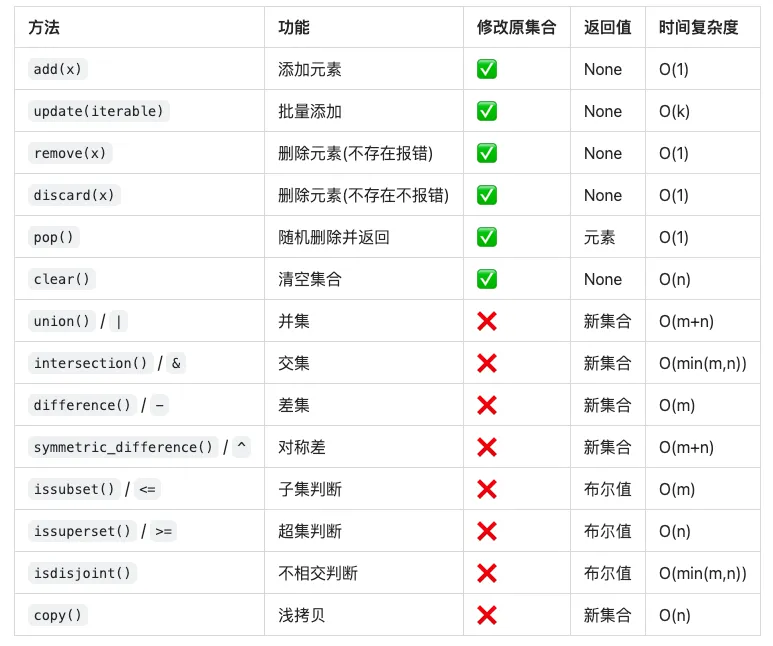
📊 集合方法速查表

 10个月宝宝每天需要喝多少奶粉?