Python项目97:Tkinter+NetworkX图编辑器1.0
- 2026-10-12 01:56:47


Python,速成心法
敲代码,查资料,问Ai
练习,探索,总结,优化

★★★★★博文创作不易,我的博文不需要打赏,也不需要知识付费,可以白嫖学习编程小技巧。使用代码的过程中,如有疑问的地方,欢迎大家指正留言交流。喜欢的老铁可以多多点赞+收藏分享+置顶,小红牛在此表示感谢。★★★★★
------★Python练手项目源码★------
Python项目94:全球疫情模拟数据可视化大屏(dash+plotly+pandas)
Python项目91:绘制红楼梦人物关系图(NetworkX+Matplotlib)
Python项目89:NetworkX最短路径规划(城市交通)
Python项目88:文件备份与压缩系统2.0(tkinter+shutil+zipfile)
Python项目86:增强版画板2.0(tk.Canvas)
Python项目81:Excel工作表批量重命名工具1.0(tkinter+openpyxl)
Python项目78:学生成绩分析系统(Tkinter+SQLite3)
Python项目77:模拟炒股训练系统3.0(Mplfinance+tkinter)
Python项目76:员工排班表系统1.0(tkinter+sqlite3+tkcalendar)
Python项目74:多线程数据可视化工具2.0(tkinter+matplotlib+mplcursors)
Python项目73:自动化文件备份系统1.0(tkinter)
Python项目源码71:药品管理系统1.0(tkinter+sqlite3)
Python项目源码69:Excel数据筛选器1.0(tkinter+sqlite3+pandas)
Python项目源码63:病历管理系统1.0(tkinter+sqlite3+matplotlib)
Python源码62:酒店住房管理系统1.0(tkinter+sqlite3)
Python项目源码57:数据格式转换工具1.0(csv+json+excel+sqlite3)
Python项目源码56:食堂饭卡管理系统1.0(tkinter+splite3)
Python项目源码54:员工信息管理系统2.0(tkinter+sqlite3)
Python项目源码52:模拟银行卡系统1.0(账户管理、存款、取款、转账和交易记录查询)
Python项目源码50:理发店会员管理系统1.0(tkinter+sqlite3)
Python项目源码48:正则表达式调试工具3.0(tkinter+re+requests)
Python项目源码44:图书管理系统1.0(tkinter+sqlite3)
Python项目源码42:仓库商品管理系统1.0(tkinter+sqlite3+Excel)
Python项目源码40:字符串处理工具(tkinter+入门练习)
Python项目源码39:学生积分管理系统1.0(命令行界面+Json)
Python项目源码35:音乐播放器2.0(Tkinter+mutagen)
Python项目源码33:待办事项列表应用2.0(命令行界面+Json+类)
Python项目32:订单销售额管理系统1.0(Tkinter+CSV)
Python项目源码29:学生缴费管理系统(Tkinter+CSV)
Python项目28:设计日志管理系统2.0(Tkinter+Json)
pip install networkx matplotlib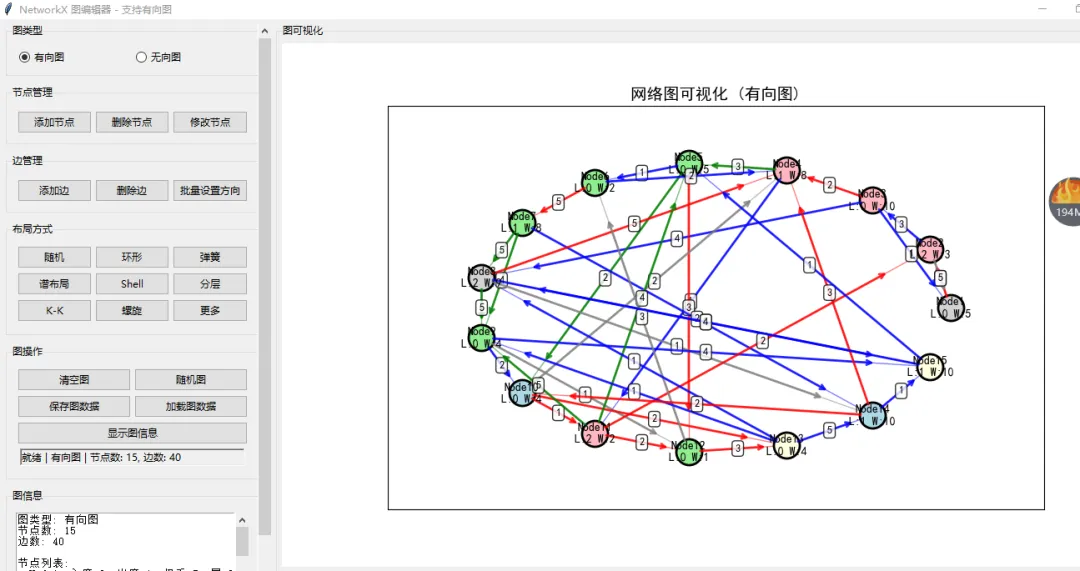
↓ 完整源码如下 ↓
# -*- coding: utf-8 -*-# @Author : 小红牛# 微信公众号:wdPythonimport tkinter as tkfrom tkinter import ttk, messagebox, simpledialog, filedialogimport networkx as nximport matplotlib.pyplot as pltfrom matplotlib.backends.backend_tkagg import FigureCanvasTkAgg, NavigationToolbar2Tkfrom matplotlib.figure import Figureimport randomimport jsonimport osfrom collections import OrderedDictimport numpy as np# 设置中文字体,解决中文显示问题plt.rcParams['font.sans-serif'] = ['SimHei', 'Microsoft YaHei', 'DejaVu Sans']plt.rcParams['axes.unicode_minus'] = Falseclass GraphEditorApp:def __init__(self, root):self.root = rootself.root.title("NetworkX 图编辑器1.0 - 支持有向图")self.root.geometry("1300x900") # 增加高度# 创建 NetworkX 图对象 - 现在支持有向图self.G = nx.DiGraph() # 默认为有向图# 节点属性存储self.node_positions = {}self.node_colors = {}self.default_node_color = "lightblue"self.default_edge_color = "gray"# 当前选中的节点self.selected_node = None# 图类型(有向/无向)self.graph_type = "directed"# 布局self.setup_ui()# 绑定事件self.bind_events()# 初始化示例图self.create_sample_graph()def setup_ui(self):# 创建主框架main_frame = ttk.Frame(self.root)main_frame.pack(fill=tk.BOTH, expand=True, padx=5, pady=5)# 创建带滚动条的左侧控制面板left_container = ttk.Frame(main_frame)left_container.pack(side=tk.LEFT, fill=tk.Y, padx=(0, 5))# 创建Canvas和滚动条canvas = tk.Canvas(left_container, width=300, height=800)scrollbar = ttk.Scrollbar(left_container, orient="vertical", command=canvas.yview)scrollable_frame = ttk.Frame(canvas)# 配置Canvascanvas.configure(yscrollcommand=scrollbar.set)canvas.bind('<Configure>', lambda e: canvas.configure(scrollregion=canvas.bbox("all")))# 将可滚动框架放入Canvascanvas_window = canvas.create_window((0, 0), window=scrollable_frame, anchor="nw")# 当可滚动框架大小变化时,更新滚动区域scrollable_frame.bind("<Configure>", lambda e: canvas.configure(scrollregion=canvas.bbox("all")))# 当Canvas大小变化时,调整窗口宽度canvas.bind('<Configure>', lambda e: canvas.itemconfig(canvas_window, width=e.width))# 布局Canvas和滚动条canvas.pack(side="left", fill="both", expand=True)scrollbar.pack(side="right", fill="y")# 绑定鼠标滚轮事件def _on_mousewheel(event):canvas.yview_scroll(int(-1*(event.delta/120)), "units")canvas.bind_all("<MouseWheel>", _on_mousewheel)# 左侧控制面板内容control_frame = scrollable_frame# 图类型选择部分graph_type_frame = ttk.LabelFrame(control_frame, text="图类型", padding="10")graph_type_frame.pack(fill=tk.X, pady=(0, 10))self.graph_type_var = tk.StringVar(value="directed")type_btn_frame = ttk.Frame(graph_type_frame)type_btn_frame.pack(fill=tk.X)ttk.Radiobutton(type_btn_frame, text="有向图", variable=self.graph_type_var,value="directed", command=self.change_graph_type).pack(side=tk.LEFT, fill=tk.X, expand=True, padx=2)ttk.Radiobutton(type_btn_frame, text="无向图", variable=self.graph_type_var,value="undirected", command=self.change_graph_type).pack(side=tk.LEFT, fill=tk.X, expand=True, padx=2)# 节点管理部分node_frame = ttk.LabelFrame(control_frame, text="节点管理", padding="10")node_frame.pack(fill=tk.X, pady=(0, 10))# 使用网格布局使按钮更紧凑node_btn_frame = ttk.Frame(node_frame)node_btn_frame.pack(fill=tk.X)ttk.Button(node_btn_frame, text="添加节点", command=self.add_node_dialog).grid(row=0, column=0, sticky=tk.EW, padx=2, pady=2)ttk.Button(node_btn_frame, text="删除节点", command=self.delete_node_dialog).grid(row=0, column=1, sticky=tk.EW, padx=2, pady=2)ttk.Button(node_btn_frame, text="修改节点", command=self.edit_node_dialog).grid(row=0, column=2, sticky=tk.EW, padx=2, pady=2)# 配置网格权重node_btn_frame.columnconfigure(0, weight=1)node_btn_frame.columnconfigure(1, weight=1)node_btn_frame.columnconfigure(2, weight=1)# 边管理部分edge_frame = ttk.LabelFrame(control_frame, text="边管理", padding="10")edge_frame.pack(fill=tk.X, pady=(0, 10))edge_btn_frame = ttk.Frame(edge_frame)edge_btn_frame.pack(fill=tk.X)ttk.Button(edge_btn_frame, text="添加边", command=self.add_edge_dialog).grid(row=0, column=0, sticky=tk.EW, padx=2, pady=2)ttk.Button(edge_btn_frame, text="删除边", command=self.delete_edge_dialog).grid(row=0, column=1, sticky=tk.EW, padx=2, pady=2)ttk.Button(edge_btn_frame, text="批量设置方向", command=self.batch_set_edge_direction).grid(row=0, column=2, sticky=tk.EW, padx=2, pady=2)# 配置网格权重edge_btn_frame.columnconfigure(0, weight=1)edge_btn_frame.columnconfigure(1, weight=1)edge_btn_frame.columnconfigure(2, weight=1)# 布局管理部分layout_frame = ttk.LabelFrame(control_frame, text="布局方式", padding="10")layout_frame.pack(fill=tk.X, pady=(0, 10))# 第一行布局按钮row1_frame = ttk.Frame(layout_frame)row1_frame.pack(fill=tk.X, pady=(0, 5))ttk.Button(row1_frame, text="随机", command=self.random_layout, width=8).pack(side=tk.LEFT, fill=tk.X, expand=True, padx=2)ttk.Button(row1_frame, text="环形", command=self.circular_layout, width=8).pack(side=tk.LEFT, fill=tk.X, expand=True, padx=2)ttk.Button(row1_frame, text="弹簧", command=self.spring_layout, width=8).pack(side=tk.LEFT, fill=tk.X, expand=True, padx=2)# 第二行布局按钮row2_frame = ttk.Frame(layout_frame)row2_frame.pack(fill=tk.X, pady=(0, 5))ttk.Button(row2_frame, text="谱布局", command=self.spectral_layout, width=8).pack(side=tk.LEFT, fill=tk.X, expand=True, padx=2)ttk.Button(row2_frame, text="Shell", command=self.shell_layout, width=8).pack(side=tk.LEFT, fill=tk.X, expand=True, padx=2)ttk.Button(row2_frame, text="分层", command=self.multipartite_layout_dialog, width=8).pack(side=tk.LEFT, fill=tk.X, expand=True, padx=2)# 第三行布局按钮row3_frame = ttk.Frame(layout_frame)row3_frame.pack(fill=tk.X, pady=(0, 5))ttk.Button(row3_frame, text="K-K", command=self.kamada_kawai_layout, width=8).pack(side=tk.LEFT, fill=tk.X, expand=True, padx=2)ttk.Button(row3_frame, text="螺旋", command=self.spiral_layout, width=8).pack(side=tk.LEFT, fill=tk.X, expand=True, padx=2)ttk.Button(row3_frame, text="更多", command=self.more_layouts_dialog, width=8).pack(side=tk.LEFT, fill=tk.X, expand=True, padx=2)# 图操作部分 - 重新组织为两列graph_frame = ttk.LabelFrame(control_frame, text="图操作", padding="10")graph_frame.pack(fill=tk.X, pady=(0, 10))# 第一行图操作按钮graph_row1 = ttk.Frame(graph_frame)graph_row1.pack(fill=tk.X, pady=(0, 5))ttk.Button(graph_row1, text="清空图", command=self.clear_graph).pack(side=tk.LEFT, fill=tk.X, expand=True, padx=2)ttk.Button(graph_row1, text="随机图", command=self.generate_random_graph).pack(side=tk.LEFT, fill=tk.X, expand=True, padx=2)# 第二行图操作按钮graph_row2 = ttk.Frame(graph_frame)graph_row2.pack(fill=tk.X, pady=(0, 5))ttk.Button(graph_row2, text="保存图数据", command=self.save_graph_data).pack(side=tk.LEFT, fill=tk.X, expand=True, padx=2)ttk.Button(graph_row2, text="加载图数据", command=self.load_graph_data).pack(side=tk.LEFT, fill=tk.X, expand=True, padx=2)# 第三行图操作按钮graph_row3 = ttk.Frame(graph_frame)graph_row3.pack(fill=tk.X)ttk.Button(graph_row3, text="显示图信息", command=self.show_graph_info).pack(side=tk.LEFT, fill=tk.X, expand=True, padx=2)# 状态栏self.status_var = tk.StringVar()self.status_var.set("就绪 | 有向图 | 节点数: 0, 边数: 0")status_bar = ttk.Label(graph_frame, textvariable=self.status_var, relief=tk.SUNKEN)status_bar.pack(side=tk.BOTTOM, fill=tk.X, padx=5, pady=5)# 信息显示部分info_frame = ttk.LabelFrame(control_frame, text="图信息", padding="10")info_frame.pack(fill=tk.X, pady=(0, 10))# 使用Text小部件显示信息,并添加滚动条info_container = ttk.Frame(info_frame)info_container.pack(fill=tk.BOTH, expand=True)self.info_text = tk.Text(info_container, height=12, width=25)info_scrollbar = ttk.Scrollbar(info_container, orient="vertical", command=self.info_text.yview)self.info_text.configure(yscrollcommand=info_scrollbar.set)self.info_text.pack(side=tk.LEFT, fill=tk.BOTH, expand=True)info_scrollbar.pack(side=tk.RIGHT, fill=tk.Y)# 右侧图显示区域graph_display_frame = ttk.LabelFrame(main_frame, text="图可视化", padding="5")graph_display_frame.pack(side=tk.RIGHT, fill=tk.BOTH, expand=True)# 创建 Matplotlib 图形self.fig = Figure(figsize=(10, 2), dpi=100)self.ax = self.fig.add_subplot(111)self.ax.set_title("网络图可视化 (有向图)", fontsize=14)self.ax.set_xticks([])self.ax.set_yticks([])# 将 Matplotlib 图形嵌入到 Tkinter 中self.canvas = FigureCanvasTkAgg(self.fig, master=graph_display_frame)self.canvas.draw()self.canvas.get_tk_widget().pack(side=tk.TOP, fill=tk.BOTH, expand=True)# 添加 Matplotlib 工具栏toolbar = NavigationToolbar2Tk(self.canvas, graph_display_frame)toolbar.update()self.canvas.get_tk_widget().pack(side=tk.TOP, fill=tk.BOTH, expand=True)def bind_events(self):# 绑定画布点击事件self.canvas.mpl_connect('button_press_event', self.on_click)def change_graph_type(self):"""改变图类型(有向/无向)"""new_type = self.graph_type_var.get()if new_type == self.graph_type:returnif len(self.G.nodes()) > 0:if not messagebox.askyesno("确认切换",f"切换图类型将重新创建图结构,当前图中的边方向信息可能会丢失。确定要切换到{'有向图'if new_type == 'directed'else'无向图'}吗?"):self.graph_type_var.set(self.graph_type) # 重置选择return# 保存当前节点和边信息nodes = list(self.G.nodes())edges = list(self.G.edges())node_attrs = {node: dict(self.G.nodes[node]) for node in nodes}edge_attrs = {edge: dict(self.G.edges[edge]) for edge in edges}# 创建新图if new_type == "directed":self.G = nx.DiGraph()else:self.G = nx.Graph()# 恢复节点for node in nodes:self.G.add_node(node, **node_attrs[node])# 恢复边for edge in edges:self.G.add_edge(edge[0], edge[1], **edge_attrs[edge])self.graph_type = new_typeself.selected_node = None# 更新界面self.ax.set_title(f"网络图可视化 ({'有向图'if new_type == 'directed'else'无向图'})", fontsize=14)self.update_status()self.update_graph_display()def create_sample_graph(self):"""创建示例图"""# 添加一些节点nodes = ['A', 'B', 'C', 'D', 'E', 'F']for node in nodes:self.G.add_node(node, label=node, weight=random.randint(1, 10), layer=random.randint(0, 2))self.node_colors[node] = self.default_node_color# 添加一些边(有向边)edges = [('A', 'B'), ('B', 'C'), ('C', 'D'), ('D', 'E'), ('E', 'F'),('F', 'A'), ('A', 'C'), ('B', 'D'), ('C', 'E'), ('D', 'F')]for edge in edges:self.G.add_edge(edge[0], edge[1], weight=random.randint(1, 5),color=random.choice(["gray", "blue", "red", "green"]))# 使用弹簧布局self.spring_layout()self.update_graph_display()def update_graph_display(self):"""更新图的可视化显示"""self.ax.clear()if len(self.G.nodes()) == 0:self.ax.text(0.5, 0.5, "图为空\n点击控制面板添加节点",ha='center', va='center', fontsize=12, transform=self.ax.transAxes)self.ax.set_title(f"网络图可视化 ({'有向图'if self.graph_type == 'directed'else'无向图'})", fontsize=14)self.canvas.draw()self.update_status()return# 获取节点位置,如果没有则使用默认位置if not self.node_positions:self.spring_layout()# 绘制边for edge in self.G.edges():x1, y1 = self.node_positions[edge[0]]x2, y2 = self.node_positions[edge[1]]# 确定边颜色edge_color = self.G[edge[0]][edge[1]].get('color', self.default_edge_color)# 绘制边if self.graph_type == "directed":# 有向边:使用箭头dx, dy = x2 - x1, y2 - y1# 缩短箭头长度,避免覆盖节点shorten = 0.1x2_adj = x1 + (1 - shorten) * dxy2_adj = y1 + (1 - shorten) * dy# 绘制箭头self.ax.annotate("", xy=(x2_adj, y2_adj), xytext=(x1, y1),arrowprops=dict(arrowstyle="->", color=edge_color,lw=2, alpha=0.8, shrinkA=10, shrinkB=10))# 绘制边线self.ax.plot([x1, x2], [y1, y2], color=edge_color, linewidth=1, zorder=1, alpha=0.5)else:# 无向边:只绘制线self.ax.plot([x1, x2], [y1, y2], color=edge_color, linewidth=2, zorder=1)# 显示边的权重(如果有)if 'weight' in self.G[edge[0]][edge[1]]:weight = self.G[edge[0]][edge[1]]['weight']mid_x = (x1 + x2) / 2mid_y = (y1 + y2) / 2self.ax.text(mid_x, mid_y, str(weight),fontsize=9, ha='center', va='center',bbox=dict(boxstyle="round,pad=0.3", facecolor="white", alpha=0.8))# 绘制节点for node in self.G.nodes():x, y = self.node_positions[node]# 确定节点颜色color = self.node_colors.get(node, self.default_node_color)if node == self.selected_node:color = "red"# 绘制节点self.ax.scatter(x, y, s=500, c=color, edgecolors='black', linewidth=2, zorder=2)# 显示节点标签和权重label = nodeweight = self.G.nodes[node].get('weight', '')if weight:label = f"{node}\n({weight})"# 如果有层属性,显示层信息layer = self.G.nodes[node].get('layer', '')if layer is not None and layer != '':label = f"{node}\nL:{layer}"if weight:label = f"{node}\nL:{layer} W:{weight}"self.ax.text(x, y, label, ha='center', va='center',fontsize=10, fontweight='bold', zorder=3)self.ax.set_title(f"网络图可视化 ({'有向图'if self.graph_type == 'directed'else'无向图'})", fontsize=14)self.ax.set_xticks([])self.ax.set_yticks([])# 动态调整坐标轴范围self.adjust_axes()self.canvas.draw()self.update_status()self.update_info_text()def adjust_axes(self):"""根据节点位置动态调整坐标轴范围"""if not self.node_positions:returnxs = [pos[0] for pos in self.node_positions.values()]ys = [pos[1] for pos in self.node_positions.values()]if xs and ys:x_min, x_max = min(xs), max(xs)y_min, y_max = min(ys), max(ys)# 添加一些边距x_margin = max(0.2, (x_max - x_min) * 0.2)y_margin = max(0.2, (y_max - y_min) * 0.2)self.ax.set_xlim(x_min - x_margin, x_max + x_margin)self.ax.set_ylim(y_min - y_margin, y_max + y_margin)def update_status(self):"""更新状态栏"""node_count = len(self.G.nodes())edge_count = len(self.G.edges())graph_type_text = "有向图" if self.graph_type == "directed" else "无向图"selected_text = f" | 选中: {self.selected_node}" if self.selected_node else ""self.status_var.set(f"就绪 | {graph_type_text} | 节点数: {node_count}, 边数: {edge_count}{selected_text}")def update_info_text(self):"""更新信息文本框"""self.info_text.delete(1.0, tk.END)# 基本信息graph_type_text = "有向图" if self.graph_type == "directed" else "无向图"self.info_text.insert(tk.END, f"图类型: {graph_type_text}\n")self.info_text.insert(tk.END, f"节点数: {len(self.G.nodes())}\n")self.info_text.insert(tk.END, f"边数: {len(self.G.edges())}\n")# 节点列表self.info_text.insert(tk.END, "\n节点列表:\n")for node in sorted(self.G.nodes()):if self.graph_type == "directed":in_degree = self.G.in_degree(node)out_degree = self.G.out_degree(node)degree_info = f"入度={in_degree}, 出度={out_degree}"else:degree = self.G.degree(node)degree_info = f"度={degree}"weight = self.G.nodes[node].get('weight', 'N/A')layer = self.G.nodes[node].get('layer', 'N/A')self.info_text.insert(tk.END, f" {node}: {degree_info}, 权重={weight}, 层={layer}\n")# 边列表self.info_text.insert(tk.END, "\n边列表:\n")for edge in sorted(self.G.edges()):weight = self.G[edge[0]][edge[1]].get('weight', 'N/A')color = self.G[edge[0]][edge[1]].get('color', 'gray')direction = f"{edge[0]} → {edge[1]}" if self.graph_type == "directed" else f"{edge[0]} - {edge[1]}"self.info_text.insert(tk.END, f" {direction}: 权重={weight}, 颜色={color}\n")def on_click(self, event):"""处理图上的点击事件"""if event.xdata is None or event.ydata is None:return# 检查是否点击了节点clicked_node = Nonemin_distance = float('inf')for node, (x, y) in self.node_positions.items():distance = ((x - event.xdata)**2 + (y - event.ydata)**2)**0.5# 考虑到节点的大小if distance < 0.1 and distance < min_distance:min_distance = distanceclicked_node = node# 设置选中的节点if clicked_node:if self.selected_node == clicked_node:# 双击取消选中self.selected_node = Noneelse:self.selected_node = clicked_nodeelse:self.selected_node = Noneself.update_graph_display()def add_node_dialog(self):"""添加节点对话框"""dialog = tk.Toplevel(self.root)dialog.title("添加节点")dialog.geometry("300x350") # 增加高度以容纳层属性dialog.transient(self.root)dialog.grab_set()# 对话框内容框架content_frame = ttk.Frame(dialog, padding="20")content_frame.pack(fill=tk.BOTH, expand=True)ttk.Label(content_frame, text="节点名称:").grid(row=0, column=0, sticky=tk.W, pady=(0, 5))name_entry = ttk.Entry(content_frame, width=25)name_entry.grid(row=0, column=1, pady=(0, 5))name_entry.focus()ttk.Label(content_frame, text="节点权重:").grid(row=1, column=0, sticky=tk.W, pady=(0, 5))weight_entry = ttk.Entry(content_frame, width=25)weight_entry.grid(row=1, column=1, pady=(0, 5))weight_entry.insert(0, "1")ttk.Label(content_frame, text="节点层(分层布局用):").grid(row=2, column=0, sticky=tk.W, pady=(0, 5))layer_entry = ttk.Entry(content_frame, width=25)layer_entry.grid(row=2, column=1, pady=(0, 5))layer_entry.insert(0, "0")ttk.Label(content_frame, text="节点颜色:").grid(row=3, column=0, sticky=tk.W, pady=(0, 5))color_var = tk.StringVar(value="lightblue")color_combo = ttk.Combobox(content_frame, textvariable=color_var,values=["lightblue", "lightgreen", "lightcoral","lightyellow", "lightpink", "lightgray"],state="readonly", width=23)color_combo.grid(row=3, column=1, pady=(0, 5))button_frame = ttk.Frame(content_frame)button_frame.grid(row=4, column=0, columnspan=2, pady=(20, 0))def add_node():name = name_entry.get().strip()weight_str = weight_entry.get().strip()layer_str = layer_entry.get().strip()color = color_var.get()if not name:messagebox.showerror("错误", "节点名称不能为空")returnif name in self.G.nodes():messagebox.showerror("错误", f"节点 '{name}' 已存在")returntry:weight = int(weight_str) if weight_str else 1except ValueError:messagebox.showerror("错误", "权重必须是整数")returntry:layer = int(layer_str) if layer_str else 0except ValueError:messagebox.showerror("错误", "层必须是整数")return# 添加节点self.G.add_node(name, weight=weight, layer=layer)self.node_colors[name] = color# 为新节点设置随机位置if len(self.node_positions) == 0:self.node_positions[name] = (0, 0)else:# 在现有节点附近添加新节点existing_node = random.choice(list(self.node_positions.keys()))x, y = self.node_positions[existing_node]self.node_positions[name] = (x + random.uniform(-0.3, 0.3),y + random.uniform(-0.3, 0.3))self.update_graph_display()dialog.destroy()ttk.Button(button_frame, text="添加", command=add_node).pack(side=tk.LEFT, padx=5)ttk.Button(button_frame, text="取消", command=dialog.destroy).pack(side=tk.LEFT, padx=5)def delete_node_dialog(self):"""删除节点对话框"""if len(self.G.nodes()) == 0:messagebox.showinfo("提示", "图中没有节点可以删除")returnif self.selected_node:# 如果已选中节点,直接删除self.delete_node(self.selected_node)returndialog = tk.Toplevel(self.root)dialog.title("删除节点")dialog.geometry("300x300")dialog.transient(self.root)dialog.grab_set()# 对话框内容框架content_frame = ttk.Frame(dialog, padding="20")content_frame.pack(fill=tk.BOTH, expand=True)ttk.Label(content_frame, text="选择要删除的节点:").pack(pady=(20, 10))node_var = tk.StringVar()node_combo = ttk.Combobox(content_frame, textvariable=node_var,values=list(self.G.nodes()), state="readonly", width=25)node_combo.pack(pady=10)node_combo.current(0)# 显示节点信息info_label = ttk.Label(content_frame, text="", wraplength=250)info_label.pack(pady=10)def update_info(event):node = node_var.get()if node:if self.graph_type == "directed":in_degree = self.G.in_degree(node)out_degree = self.G.out_degree(node)degree_info = f"入度={in_degree}, 出度={out_degree}"else:degree = self.G.degree(node)degree_info = f"度={degree}"weight = self.G.nodes[node].get('weight', 'N/A')layer = self.G.nodes[node].get('layer', 'N/A')info_label.config(text=f"节点: {node}\n{degree_info}\n权重: {weight}\n层: {layer}")node_combo.bind("<<ComboboxSelected>>", update_info)update_info(None) # 初始更新button_frame = ttk.Frame(content_frame)button_frame.pack(pady=(20, 0))def delete_node():node = node_var.get()if node:self.delete_node(node)dialog.destroy()ttk.Button(button_frame, text="删除", command=delete_node).pack(side=tk.LEFT, padx=5)ttk.Button(button_frame, text="取消", command=dialog.destroy).pack(side=tk.LEFT, padx=5)def delete_node(self, node):"""删除指定节点"""if node not in self.G.nodes():messagebox.showerror("错误", f"节点 '{node}' 不存在")return# 确认删除if not messagebox.askyesno("确认删除", f"确定要删除节点 '{node}' 及其所有连接边吗?"):return# 删除节点self.G.remove_node(node)# 从位置和颜色字典中移除if node in self.node_positions:del self.node_positions[node]if node in self.node_colors:del self.node_colors[node]# 清除选中状态if self.selected_node == node:self.selected_node = Noneself.update_graph_display()def edit_node_dialog(self):"""修改节点对话框"""if len(self.G.nodes()) == 0:messagebox.showinfo("提示", "图中没有节点可以修改")returnif self.selected_node:# 如果已选中节点,直接编辑node = self.selected_nodeelse:# 否则弹出对话框选择节点dialog = tk.Toplevel(self.root)dialog.title("选择节点")dialog.geometry("300x200")dialog.transient(self.root)dialog.grab_set()ttk.Label(dialog, text="选择要修改的节点:", padding="20").pack()node_var = tk.StringVar()node_combo = ttk.Combobox(dialog, textvariable=node_var,values=list(self.G.nodes()), state="readonly", width=20)node_combo.pack(pady=10)node_combo.current(0)def select_node():nonlocal nodenode = node_var.get()dialog.destroy()if node:self.show_edit_dialog(node)ttk.Button(dialog, text="选择", command=select_node).pack(pady=10)dialog.wait_window()return# 直接显示编辑对话框self.show_edit_dialog(node)def show_edit_dialog(self, node):"""显示编辑节点对话框"""dialog = tk.Toplevel(self.root)dialog.title("修改节点")dialog.geometry("300x350")dialog.transient(self.root)dialog.grab_set()# 对话框内容框架content_frame = ttk.Frame(dialog, padding="20")content_frame.pack(fill=tk.BOTH, expand=True)ttk.Label(content_frame, text=f"修改节点: {node}").grid(row=0, column=0, columnspan=2, pady=(0, 20))ttk.Label(content_frame, text="新节点名称:").grid(row=1, column=0, sticky=tk.W, pady=(0, 5))name_entry = ttk.Entry(content_frame, width=25)name_entry.grid(row=1, column=1, pady=(0, 5))name_entry.insert(0, node)current_weight = self.G.nodes[node].get('weight', 1)ttk.Label(content_frame, text="节点权重:").grid(row=2, column=0, sticky=tk.W, pady=(0, 5))weight_entry = ttk.Entry(content_frame, width=25)weight_entry.grid(row=2, column=1, pady=(0, 5))weight_entry.insert(0, str(current_weight))current_layer = self.G.nodes[node].get('layer', 0)ttk.Label(content_frame, text="节点层:").grid(row=3, column=0, sticky=tk.W, pady=(0, 5))layer_entry = ttk.Entry(content_frame, width=25)layer_entry.grid(row=3, column=1, pady=(0, 5))layer_entry.insert(0, str(current_layer))current_color = self.node_colors.get(node, self.default_node_color)ttk.Label(content_frame, text="节点颜色:").grid(row=4, column=0, sticky=tk.W, pady=(0, 5))color_var = tk.StringVar(value=current_color)color_combo = ttk.Combobox(content_frame, textvariable=color_var,values=["lightblue", "lightgreen", "lightcoral","lightyellow", "lightpink", "lightgray", "red"],state="readonly", width=23)color_combo.grid(row=4, column=1, pady=(0, 5))button_frame = ttk.Frame(content_frame)button_frame.grid(row=5, column=0, columnspan=2, pady=(20, 0))def edit_node():new_name = name_entry.get().strip()weight_str = weight_entry.get().strip()layer_str = layer_entry.get().strip()color = color_var.get()if not new_name:messagebox.showerror("错误", "节点名称不能为空")returntry:weight = int(weight_str) if weight_str else 1except ValueError:messagebox.showerror("错误", "权重必须是整数")returntry:layer = int(layer_str) if layer_str else 0except ValueError:messagebox.showerror("错误", "层必须是整数")return# 如果节点名称改变if new_name != node:if new_name in self.G.nodes():messagebox.showerror("错误", f"节点 '{new_name}' 已存在")return# 重命名节点self.G = nx.relabel_nodes(self.G, {node: new_name})# 更新位置和颜色字典if node in self.node_positions:self.node_positions[new_name] = self.node_positions[node]del self.node_positions[node]if node in self.node_colors:self.node_colors[new_name] = self.node_colors[node]del self.node_colors[node]# 更新选中状态if self.selected_node == node:self.selected_node = new_nameelse:# 只更新权重和层self.G.nodes[node]['weight'] = weightself.G.nodes[node]['layer'] = layer# 更新颜色self.node_colors[new_name if new_name != node else node] = colorself.update_graph_display()dialog.destroy()ttk.Button(button_frame, text="保存", command=edit_node).pack(side=tk.LEFT, padx=5)ttk.Button(button_frame, text="取消", command=dialog.destroy).pack(side=tk.LEFT, padx=5)def add_edge_dialog(self):"""添加边对话框"""if len(self.G.nodes()) < 2:messagebox.showinfo("提示", "至少需要两个节点才能添加边")returndialog = tk.Toplevel(self.root)dialog.title("添加边")dialog.geometry("300x400") # 增加高度以容纳方向选择dialog.transient(self.root)dialog.grab_set()# 对话框内容框架content_frame = ttk.Frame(dialog, padding="20")content_frame.pack(fill=tk.BOTH, expand=True)ttk.Label(content_frame, text="起点节点:").grid(row=0, column=0, sticky=tk.W, pady=(0, 5))node1_var = tk.StringVar()node1_combo = ttk.Combobox(content_frame, textvariable=node1_var,values=list(self.G.nodes()), state="readonly", width=25)node1_combo.grid(row=0, column=1, pady=(0, 5))node1_combo.current(0)ttk.Label(content_frame, text="终点节点:").grid(row=1, column=0, sticky=tk.W, pady=(0, 5))node2_var = tk.StringVar()node2_combo = ttk.Combobox(content_frame, textvariable=node2_var,values=list(self.G.nodes()), state="readonly", width=25)node2_combo.grid(row=1, column=1, pady=(0, 5))node2_combo.current(1 if len(self.G.nodes()) > 1 else 0)ttk.Label(content_frame, text="边权重:").grid(row=2, column=0, sticky=tk.W, pady=(0, 5))weight_entry = ttk.Entry(content_frame, width=25)weight_entry.grid(row=2, column=1, pady=(0, 5))weight_entry.insert(0, "1")ttk.Label(content_frame, text="边颜色:").grid(row=3, column=0, sticky=tk.W, pady=(0, 5))color_var = tk.StringVar(value="gray")color_combo = ttk.Combobox(content_frame, textvariable=color_var,values=["gray", "black", "red", "blue", "green", "orange"],state="readonly", width=23)color_combo.grid(row=3, column=1, pady=(0, 5))# 如果有向图,显示方向选项if self.graph_type == "directed":ttk.Label(content_frame, text="边方向:").grid(row=4, column=0, sticky=tk.W, pady=(0, 5))direction_var = tk.StringVar(value="forward")direction_frame = ttk.Frame(content_frame)direction_frame.grid(row=4, column=1, pady=(0, 5), sticky=tk.W)ttk.Radiobutton(direction_frame, text="正向", variable=direction_var,value="forward").pack(side=tk.LEFT)ttk.Radiobutton(direction_frame, text="反向", variable=direction_var,value="reverse").pack(side=tk.LEFT, padx=(10, 0))else:direction_var = Nonebutton_frame = ttk.Frame(content_frame)button_frame.grid(row=5, column=0, columnspan=2, pady=(20, 0))def add_edge():node1 = node1_var.get()node2 = node2_var.get()weight_str = weight_entry.get().strip()color = color_var.get()if node1 == node2:messagebox.showerror("错误", "起点和终点不能相同")returntry:weight = int(weight_str) if weight_str else 1except ValueError:messagebox.showerror("错误", "权重必须是整数")return# 检查边是否已存在if self.G.has_edge(node1, node2):messagebox.showerror("错误", f"边 '{node1} -> {node2}' 已存在")return# 如果是无向图,检查反向边是否存在if self.graph_type == "undirected" and self.G.has_edge(node2, node1):messagebox.showerror("错误", f"边 '{node2} - {node1}' 已存在")return# 确定边的方向if direction_var and direction_var.get() == "reverse":# 交换起点和终点node1, node2 = node2, node1# 添加边self.G.add_edge(node1, node2, weight=weight, color=color)self.update_graph_display()dialog.destroy()ttk.Button(button_frame, text="添加", command=add_edge).pack(side=tk.LEFT, padx=5)ttk.Button(button_frame, text="取消", command=dialog.destroy).pack(side=tk.LEFT, padx=5)def delete_edge_dialog(self):"""删除边对话框"""if len(self.G.edges()) == 0:messagebox.showinfo("提示", "图中没有边可以删除")returndialog = tk.Toplevel(self.root)dialog.title("删除边")dialog.geometry("300x300")dialog.transient(self.root)dialog.grab_set()# 对话框内容框架content_frame = ttk.Frame(dialog, padding="20")content_frame.pack(fill=tk.BOTH, expand=True)ttk.Label(content_frame, text="选择要删除的边:").pack(pady=(20, 10))# 创建边列表if self.graph_type == "directed":edge_list = [f"{u} → {v}" for u, v in self.G.edges()]else:edge_list = [f"{u} - {v}" for u, v in self.G.edges()]edge_var = tk.StringVar()edge_combo = ttk.Combobox(content_frame, textvariable=edge_var,values=edge_list, state="readonly", width=25)edge_combo.pack(pady=10)edge_combo.current(0)# 显示边信息info_label = ttk.Label(content_frame, text="", wraplength=250)info_label.pack(pady=10)def update_info(event):edge_str = edge_var.get()if edge_str:if self.graph_type == "directed":node1, node2 = edge_str.split(" → ")else:node1, node2 = edge_str.split(" - ")weight = self.G[node1][node2].get('weight', 'N/A')color = self.G[node1][node2].get('color', 'gray')info_label.config(text=f"边: {node1} -> {node2}\n权重: {weight}\n颜色: {color}")edge_combo.bind("<<ComboboxSelected>>", update_info)update_info(None) # 初始更新button_frame = ttk.Frame(content_frame)button_frame.pack(pady=(20, 0))def delete_edge():edge_str = edge_var.get()if not edge_str:returnif self.graph_type == "directed":node1, node2 = edge_str.split(" → ")else:node1, node2 = edge_str.split(" - ")# 检查边是否存在if not self.G.has_edge(node1, node2):messagebox.showerror("错误", f"边 '{edge_str}' 不存在")return# 删除边self.G.remove_edge(node1, node2)self.update_graph_display()dialog.destroy()ttk.Button(button_frame, text="删除", command=delete_edge).pack(side=tk.LEFT, padx=5)ttk.Button(button_frame, text="取消", command=dialog.destroy).pack(side=tk.LEFT, padx=5)def batch_set_edge_direction(self):"""批量设置边方向(用于有向图)"""if self.graph_type != "directed":messagebox.showinfo("提示", "此功能仅适用于有向图")returnif len(self.G.edges()) == 0:messagebox.showinfo("提示", "图中没有边可以设置方向")returndialog = tk.Toplevel(self.root)dialog.title("批量设置边方向")dialog.geometry("400x500")dialog.transient(self.root)dialog.grab_set()# 对话框内容框架content_frame = ttk.Frame(dialog, padding="20")content_frame.pack(fill=tk.BOTH, expand=True)ttk.Label(content_frame, text="选择边并设置新方向:", font=("Arial", 12, "bold")).pack(pady=(0, 10))# 边列表edges_listbox = tk.Listbox(content_frame, selectmode=tk.MULTIPLE, height=10)edges_listbox.pack(fill=tk.BOTH, expand=True, pady=(0, 10))for edge in self.G.edges():edges_listbox.insert(tk.END, f"{edge[0]} → {edge[1]}")# 方向选择ttk.Label(content_frame, text="新方向:").pack(anchor=tk.W, pady=(0, 5))direction_var = tk.StringVar(value="keep")direction_frame = ttk.Frame(content_frame)direction_frame.pack(fill=tk.X, pady=(0, 10))ttk.Radiobutton(direction_frame, text="保持原方向", variable=direction_var,value="keep").pack(side=tk.LEFT, padx=5)ttk.Radiobutton(direction_frame, text="反转方向", variable=direction_var,value="reverse").pack(side=tk.LEFT, padx=5)ttk.Radiobutton(direction_frame, text="设为双向", variable=direction_var,value="both").pack(side=tk.LEFT, padx=5)def apply_directions():selected_indices = edges_listbox.curselection()if not selected_indices:messagebox.showwarning("警告", "请选择至少一条边")returndirection = direction_var.get()edges_to_modify = []# 收集要修改的边for idx in selected_indices:edge_str = edges_listbox.get(idx)node1, node2 = edge_str.split(" → ")edges_to_modify.append((node1, node2))# 应用修改for node1, node2 in edges_to_modify:edge_attrs = dict(self.G[node1][node2])# 删除原边self.G.remove_edge(node1, node2)if direction == "reverse":# 反转方向self.G.add_edge(node2, node1, **edge_attrs)elif direction == "both":# 添加双向边self.G.add_edge(node1, node2, **edge_attrs)self.G.add_edge(node2, node1, **edge_attrs)else:# 保持原方向(重新添加,确保边存在)self.G.add_edge(node1, node2, **edge_attrs)messagebox.showinfo("成功", f"已修改 {len(edges_to_modify)} 条边的方向")self.update_graph_display()dialog.destroy()button_frame = ttk.Frame(content_frame)button_frame.pack(fill=tk.X, pady=(10, 0))ttk.Button(button_frame, text="应用", command=apply_directions).pack(side=tk.LEFT, padx=5)ttk.Button(button_frame, text="取消", command=dialog.destroy).pack(side=tk.LEFT, padx=5)# ===========================# 布局方法# ===========================def random_layout(self):"""随机布局 - 节点随机分布"""for node in self.G.nodes():self.node_positions[node] = (random.uniform(-1, 1),random.uniform(-1, 1))self.update_graph_display()def circular_layout(self):"""环形布局 - 节点均匀分布在圆环上"""try:pos = nx.circular_layout(self.G)self.node_positions = posself.update_graph_display()except Exception as e:messagebox.showerror("错误", f"环形布局失败: {str(e)}")def spring_layout(self):"""弹簧布局 - 基于力导向算法"""try:pos = nx.spring_layout(self.G, seed=42, k=0.8)self.node_positions = posself.update_graph_display()except Exception as e:messagebox.showerror("错误", f"弹簧布局失败: {str(e)}")def spectral_layout(self):"""谱布局 - 基于图的拉普拉斯矩阵特征向量"""try:pos = nx.spectral_layout(self.G)self.node_positions = posself.update_graph_display()except Exception as e:messagebox.showerror("错误", f"谱布局失败: {str(e)}")def shell_layout(self):"""Shell布局 - 节点分布在多个同心圆上"""try:# 根据节点度将节点分成几个shellnodes = list(self.G.nodes())if len(nodes) == 0:return# 按节点度排序(有向图使用总度数,无向图使用度)if self.graph_type == "directed":nodes_sorted = sorted(nodes, key=lambda n: self.G.in_degree(n) + self.G.out_degree(n))else:nodes_sorted = sorted(nodes, key=lambda n: self.G.degree(n))# 将节点分成2-3个shellnum_shells = min(3, len(nodes))shell_list = []for i in range(num_shells):start_idx = i * len(nodes) // num_shellsend_idx = (i + 1) * len(nodes) // num_shellsshell_list.append(nodes_sorted[start_idx:end_idx])pos = nx.shell_layout(self.G, nlist=shell_list)self.node_positions = posself.update_graph_display()except Exception as e:messagebox.showerror("错误", f"Shell布局失败: {str(e)}")def multipartite_layout_dialog(self):"""分层布局对话框"""if len(self.G.nodes()) == 0:messagebox.showinfo("提示", "图中没有节点")returndialog = tk.Toplevel(self.root)dialog.title("分层布局设置")dialog.geometry("400x500")dialog.transient(self.root)dialog.grab_set()# 对话框内容框架content_frame = ttk.Frame(dialog, padding="20")content_frame.pack(fill=tk.BOTH, expand=True)ttk.Label(content_frame, text="分层布局设置", font=("Arial", 12, "bold")).pack(pady=(0, 20))# 分层方式选择ttk.Label(content_frame, text="分层方式:").pack(anchor=tk.W, pady=(0, 5))method_var = tk.StringVar(value="layer_attr")method_frame = ttk.Frame(content_frame)method_frame.pack(fill=tk.X, pady=(0, 15))ttk.Radiobutton(method_frame, text="使用节点的'layer'属性",variable=method_var, value="layer_attr").pack(anchor=tk.W)ttk.Radiobutton(method_frame, text="按节点度数分层",variable=method_var, value="by_degree").pack(anchor=tk.W)ttk.Radiobutton(method_frame, text="手动设置分层",variable=method_var, value="manual").pack(anchor=tk.W)# 手动设置分层的层数输入ttk.Label(content_frame, text="层数 (仅手动模式):").pack(anchor=tk.W, pady=(0, 5))layer_count_var = tk.StringVar(value="3")layer_count_entry = ttk.Entry(content_frame, textvariable=layer_count_var, width=10)layer_count_entry.pack(anchor=tk.W, pady=(0, 15))# 显示当前节点的层属性layer_info_frame = ttk.LabelFrame(content_frame, text="节点层属性", padding="10")layer_info_frame.pack(fill=tk.BOTH, expand=True, pady=(0, 15))layer_info_text = tk.Text(layer_info_frame, height=6, width=30)layer_info_text.pack(fill=tk.BOTH, expand=True)# 填充层信息for node in self.G.nodes():layer = self.G.nodes[node].get('layer', '未设置')if self.graph_type == "directed":in_degree = self.G.in_degree(node)out_degree = self.G.out_degree(node)degree_info = f"入度={in_degree}, 出度={out_degree}"else:degree = self.G.degree(node)degree_info = f"度={degree}"layer_info_text.insert(tk.END, f"{node}: 层={layer}, {degree_info}\n")layer_info_text.config(state=tk.DISABLED)def apply_layout():method = method_var.get()try:if method == "layer_attr":# 使用节点的layer属性layers = {}for node in self.G.nodes():layer = self.G.nodes[node].get('layer', 0)layers[node] = layer# 检查是否所有节点都有layer属性missing_layers = [node for node in self.G.nodes() if 'layer' not in self.G.nodes[node]]if missing_layers:if not messagebox.askyesno("警告",f"以下节点没有layer属性: {', '.join(missing_layers[:5])}{'...'iflen(missing_layers) > 5else''}\n是否使用默认值(0)?"):returnfor node in missing_layers:layers[node] = 0pos = nx.multipartite_layout(self.G, subset_key=layers)self.node_positions = poselif method == "by_degree":# 按节点度数分层layers = {}nodes = list(self.G.nodes())if self.graph_type == "directed":# 有向图:按总度数(入度+出度)分层degrees = [(node, self.G.in_degree(node) + self.G.out_degree(node))for node in nodes]else:# 无向图:按度数分层degrees = [(node, self.G.degree(node)) for node in nodes]# 按度数排序degrees.sort(key=lambda x: x[1])# 分成3层num_layers = 3for i, (node, _) in enumerate(degrees):layers[node] = i * num_layers // len(degrees)pos = nx.multipartite_layout(self.G, subset_key=layers)self.node_positions = poselif method == "manual":# 手动设置分层try:num_layers = int(layer_count_var.get())if num_layers < 1:messagebox.showerror("错误", "层数必须大于0")returnexcept ValueError:messagebox.showerror("错误", "层数必须是整数")return# 弹出新对话框让用户为每个节点选择层self.manual_layer_selection_dialog(num_layers, dialog)returnself.update_graph_display()dialog.destroy()except Exception as e:messagebox.showerror("错误", f"分层布局失败: {str(e)}")button_frame = ttk.Frame(content_frame)button_frame.pack(fill=tk.X)ttk.Button(button_frame, text="应用", command=apply_layout).pack(side=tk.LEFT, padx=5)ttk.Button(button_frame, text="取消", command=dialog.destroy).pack(side=tk.LEFT, padx=5)def manual_layer_selection_dialog(self, num_layers, parent_dialog):"""手动分层选择对话框"""dialog = tk.Toplevel(self.root)dialog.title("手动设置节点分层")dialog.geometry("500x600")dialog.transient(parent_dialog)dialog.grab_set()# 对话框内容框架content_frame = ttk.Frame(dialog, padding="20")content_frame.pack(fill=tk.BOTH, expand=True)ttk.Label(content_frame, text=f"为每个节点选择层 (0-{num_layers-1}):",font=("Arial", 12, "bold")).pack(pady=(0, 10))# 创建滚动框架canvas = tk.Canvas(content_frame)scrollbar = ttk.Scrollbar(content_frame, orient="vertical", command=canvas.yview)scrollable_frame = ttk.Frame(canvas)scrollable_frame.bind("<Configure>",lambda e: canvas.configure(scrollregion=canvas.bbox("all")))canvas.create_window((0, 0), window=scrollable_frame, anchor="nw")canvas.configure(yscrollcommand=scrollbar.set)# 节点层选择器node_layer_vars = {}for i, node in enumerate(self.G.nodes()):frame = ttk.Frame(scrollable_frame)frame.pack(fill=tk.X, pady=2)ttk.Label(frame, text=node, width=10).pack(side=tk.LEFT, padx=(0, 10))current_layer = self.G.nodes[node].get('layer', 0)var = tk.IntVar(value=current_layer)node_layer_vars[node] = varfor layer in range(num_layers):ttk.Radiobutton(frame, text=str(layer), variable=var,value=layer).pack(side=tk.LEFT, padx=5)# 将canvas和scrollbar放入内容框架canvas.pack(side="left", fill="both", expand=True)scrollbar.pack(side="right", fill="y")def apply_layers():# 应用层设置layers = {}for node, var in node_layer_vars.items():layers[node] = var.get()# 更新节点的layer属性self.G.nodes[node]['layer'] = var.get()try:pos = nx.multipartite_layout(self.G, subset_key=layers)self.node_positions = posself.update_graph_display()dialog.destroy()parent_dialog.destroy()except Exception as e:messagebox.showerror("错误", f"应用分层失败: {str(e)}")button_frame = ttk.Frame(content_frame)button_frame.pack(fill=tk.X, pady=(10, 0))ttk.Button(button_frame, text="应用", command=apply_layers).pack(side=tk.LEFT, padx=5)ttk.Button(button_frame, text="取消", command=dialog.destroy).pack(side=tk.LEFT, padx=5)def kamada_kawai_layout(self):"""Kamada-Kawai布局 - 基于能量最小化"""try:pos = nx.kamada_kawai_layout(self.G)self.node_positions = posself.update_graph_display()except Exception as e:messagebox.showerror("错误", f"Kamada-Kawai布局失败: {str(e)}")def spiral_layout(self):"""螺旋布局 - 节点沿螺旋线分布"""try:pos = nx.spiral_layout(self.G)self.node_positions = posself.update_graph_display()except Exception as e:messagebox.showerror("错误", f"螺旋布局失败: {str(e)}")def more_layouts_dialog(self):"""更多布局选项对话框"""dialog = tk.Toplevel(self.root)dialog.title("更多布局选项")dialog.geometry("400x500")dialog.transient(self.root)dialog.grab_set()# 对话框内容框架content_frame = ttk.Frame(dialog, padding="20")content_frame.pack(fill=tk.BOTH, expand=True)ttk.Label(content_frame, text="选择布局方式:", font=("Arial", 12, "bold")).pack(pady=(0, 20))# 布局按钮列表layouts = [("Fruchterman-Reingold布局", self.fruchterman_reingold_layout),("平面布局", self.planar_layout),("二分图布局", self.bipartite_layout),("布局缩放 (0.5x)", lambda: self.rescale_layout(0.5)),("布局缩放 (1.5x)", lambda: self.rescale_layout(1.5)),("布局缩放 (2.0x)", lambda: self.rescale_layout(2.0)),("重置布局缩放", lambda: self.rescale_layout(1.0)),]for layout_name, layout_func in layouts:ttk.Button(content_frame, text=layout_name,command=lambda func=layout_func: self.execute_layout(func, dialog)).pack(fill=tk.X, pady=2)# 分隔线ttk.Separator(content_frame, orient='horizontal').pack(fill=tk.X, pady=20)# 布局说明info_frame = ttk.LabelFrame(content_frame, text="布局说明", padding="10")info_frame.pack(fill=tk.X, pady=(0, 10))info_text = tk.Text(info_frame, height=6, width=30, wrap=tk.WORD)info_text.pack(fill=tk.BOTH, expand=True)info_text.insert(tk.END,"• 弹簧布局: 基于力导向算法,模拟弹簧系统\n""• 谱布局: 基于图的拉普拉斯矩阵特征向量\n""• Shell布局: 节点分布在多个同心圆上\n""• 分层布局: 节点按层排列,适用于多层网络\n""• Kamada-Kawai: 基于能量最小化算法\n""• 螺旋布局: 节点沿螺旋线分布\n")info_text.config(state=tk.DISABLED)ttk.Button(content_frame, text="关闭", command=dialog.destroy).pack(fill=tk.X, pady=(10, 0))def execute_layout(self, layout_func, dialog):"""执行布局函数并关闭对话框"""try:layout_func()dialog.destroy()except Exception as e:messagebox.showerror("错误", f"执行布局时出错: {str(e)}")def fruchterman_reingold_layout(self):"""Fruchterman-Reingold布局 - 另一种力导向布局"""try:# NetworkX的spring_layout实际上就是Fruchterman-Reingold算法pos = nx.spring_layout(self.G, k=0.5, iterations=100)self.node_positions = posself.update_graph_display()except Exception as e:messagebox.showerror("错误", f"Fruchterman-Reingold布局失败: {str(e)}")def planar_layout(self):"""平面布局 - 适用于平面图"""try:# 检查图是否是平面图if not nx.check_planarity(self.G)[0]:messagebox.showwarning("警告", "该图不是平面图,可能无法生成有效的平面布局")# 尝试生成平面布局pos = nx.planar_layout(self.G)self.node_positions = posself.update_graph_display()except Exception as e:messagebox.showerror("错误", f"平面布局失败: {str(e)}")def bipartite_layout(self):"""二分图布局 - 用于二分图"""try:# 尝试将节点分成两组if len(self.G.nodes()) < 2:messagebox.showinfo("提示", "二分图布局需要至少2个节点")return# 简单地将节点按名称分为两组nodes = list(self.G.nodes())group1 = nodes[:len(nodes)//2]group2 = nodes[len(nodes)//2:]pos = nx.bipartite_layout(self.G, group1)self.node_positions = posself.update_graph_display()except Exception as e:messagebox.showerror("错误", f"二分图布局失败: {str(e)}")def rescale_layout(self, scale_factor=1.0):"""缩放布局 - 调整布局的比例"""try:if not self.node_positions:messagebox.showinfo("提示", "请先使用其他布局方式")return# 缩放所有节点的位置scaled_positions = {}for node, (x, y) in self.node_positions.items():scaled_positions[node] = (x * scale_factor, y * scale_factor)self.node_positions = scaled_positionsself.update_graph_display()except Exception as e:messagebox.showerror("错误", f"缩放布局失败: {str(e)}")def clear_graph(self):"""清空整个图"""if len(self.G.nodes()) == 0:returnif not messagebox.askyesno("确认清空", "确定要清空整个图吗?"):returnself.G.clear()self.node_positions.clear()self.node_colors.clear()self.selected_node = Noneself.update_graph_display()def generate_random_graph(self):"""生成随机图"""if len(self.G.nodes()) > 0:if not messagebox.askyesno("确认生成", "生成随机图将替换当前图,确定吗?"):return# 清空当前图self.G.clear()self.node_positions.clear()self.node_colors.clear()self.selected_node = None# 生成随机节点和边num_nodes = random.randint(8, 15)nodes = [f"Node{i}" for i in range(1, num_nodes + 1)]for node in nodes:self.G.add_node(node, weight=random.randint(1, 10), layer=random.randint(0, 2))self.node_colors[node] = random.choice(["lightblue", "lightgreen", "lightcoral","lightyellow", "lightpink", "lightgray"])# 随机添加边,确保图是连通的# 首先创建一棵生成树确保连通性for i in range(1, num_nodes):self.G.add_edge(nodes[i-1], nodes[i], weight=random.randint(1, 5),color=random.choice(["gray", "blue", "red", "green"]))# 再随机添加一些边for i in range(num_nodes * 2):node1 = random.choice(nodes)node2 = random.choice(nodes)if node1 != node2 and not self.G.has_edge(node1, node2):self.G.add_edge(node1, node2, weight=random.randint(1, 5),color=random.choice(["gray", "blue", "red", "green"]))# 使用弹簧布局self.spring_layout()self.update_graph_display()def show_graph_info(self):"""显示详细的图信息"""if len(self.G.nodes()) == 0:messagebox.showinfo("图信息", "图为空")returninfo_window = tk.Toplevel(self.root)info_window.title("图详细信息")info_window.geometry("600x700")# 创建文本框和滚动条text_frame = ttk.Frame(info_window)text_frame.pack(fill=tk.BOTH, expand=True, padx=10, pady=10)text_widget = tk.Text(text_frame, wrap=tk.WORD)scrollbar = ttk.Scrollbar(text_frame, orient="vertical", command=text_widget.yview)text_widget.configure(yscrollcommand=scrollbar.set)text_widget.pack(side=tk.LEFT, fill=tk.BOTH, expand=True)scrollbar.pack(side=tk.RIGHT, fill=tk.Y)# 添加图信息text_widget.insert(tk.END, f"========== 图信息 ==========\n\n")# 基本信息text_widget.insert(tk.END, f"图类型: {'有向图'if self.graph_type == 'directed'else'无向图'}\n")text_widget.insert(tk.END, f"节点数: {len(self.G.nodes())}\n")text_widget.insert(tk.END, f"边数: {len(self.G.edges())}\n\n")# 节点详细信息text_widget.insert(tk.END, f"========== 节点信息 ==========\n\n")for node in sorted(self.G.nodes()):text_widget.insert(tk.END, f"节点: {node}\n")# 节点属性for attr_name, attr_value in self.G.nodes[node].items():text_widget.insert(tk.END, f" {attr_name}: {attr_value}\n")# 节点度信息if self.graph_type == "directed":in_degree = self.G.in_degree(node)out_degree = self.G.out_degree(node)text_widget.insert(tk.END, f" 入度: {in_degree}, 出度: {out_degree}, 总度数: {in_degree + out_degree}\n")else:degree = self.G.degree(node)text_widget.insert(tk.END, f" 度: {degree}\n")# 连接信息if self.graph_type == "directed":predecessors = list(self.G.predecessors(node))successors = list(self.G.successors(node))text_widget.insert(tk.END, f" 前驱节点: {', '.join(predecessors) if predecessors else'无'}\n")text_widget.insert(tk.END, f" 后继节点: {', '.join(successors) if successors else'无'}\n")else:neighbors = list(self.G.neighbors(node))text_widget.insert(tk.END, f" 邻居节点: {', '.join(neighbors) if neighbors else'无'}\n")text_widget.insert(tk.END, "\n")# 边详细信息text_widget.insert(tk.END, f"========== 边信息 ==========\n\n")for edge in sorted(self.G.edges()):text_widget.insert(tk.END, f"边: {edge[0]} -> {edge[1]}\n")# 边属性for attr_name, attr_value in self.G[edge[0]][edge[1]].items():text_widget.insert(tk.END, f" {attr_name}: {attr_value}\n")text_widget.insert(tk.END, "\n")text_widget.config(state=tk.DISABLED)# 关闭按钮ttk.Button(info_window, text="关闭", command=info_window.destroy).pack(pady=10)def save_graph_data(self):"""保存图数据到文件"""if len(self.G.nodes()) == 0:messagebox.showinfo("提示", "图为空,无法保存")return# 打开文件保存对话框file_path = filedialog.asksaveasfilename(defaultextension=".json",filetypes=[("JSON files", "*.json"), ("所有文件", "*.*")],title="保存图数据")if file_path:try:# 准备要保存的数据 - 使用OrderedDict保持键的顺序graph_data = OrderedDict()# 保存元数据graph_data["metadata"] = {"format_version": "1.1","graph_type": self.graph_type,"node_count": len(self.G.nodes()),"edge_count": len(self.G.edges()),"created_with": "NetworkX Graph Editor"}# 保存节点信息nodes_data = []for node in self.G.nodes():node_data = OrderedDict()node_data["id"] = str(node) # 确保ID是字符串node_data["label"] = str(node)# 收集所有节点属性for attr_name, attr_value in self.G.nodes[node].items():node_data[attr_name] = attr_value# 添加位置信息if node in self.node_positions:pos = self.node_positions[node]node_data["x"] = float(pos[0])node_data["y"] = float(pos[1])# 添加颜色信息node_data["color"] = self.node_colors.get(node, self.default_node_color)nodes_data.append(node_data)graph_data["nodes"] = nodes_data# 保存边信息edges_data = []for edge in self.G.edges():edge_data = OrderedDict()edge_data["source"] = str(edge[0])edge_data["target"] = str(edge[1])# 收集所有边属性for attr_name, attr_value in self.G[edge[0]][edge[1]].items():edge_data[attr_name] = attr_valueedges_data.append(edge_data)graph_data["edges"] = edges_data# 写入JSON文件,确保使用ensure_ascii=False支持中文with open(file_path, 'w', encoding='utf-8') as f:json.dump(graph_data, f, indent=2, ensure_ascii=False, default=str)messagebox.showinfo("成功", f"图数据已保存到:\n{file_path}\n\n图类型: {'有向图'if self.graph_type == 'directed'else'无向图'}\n节点数: {len(self.G.nodes())}\n边数: {len(self.G.edges())}")except Exception as e:messagebox.showerror("错误", f"保存图数据时出错:\n{str(e)}")def load_graph_data(self):"""从文件加载图数据"""# 打开文件选择对话框file_path = filedialog.askopenfilename(filetypes=[("JSON files", "*.json"), ("所有文件", "*.*")],title="选择要加载的图数据文件")if file_path:try:# 读取JSON文件with open(file_path, 'r', encoding='utf-8') as f:graph_data = json.load(f)# 检查文件格式if "nodes" not in graph_data or "edges" not in graph_data:messagebox.showerror("错误", "文件格式错误:缺少节点或边数据")return# 确认是否覆盖当前图if len(self.G.nodes()) > 0:if not messagebox.askyesno("确认加载", "加载图数据将替换当前图,确定吗?"):return# 获取图类型metadata = graph_data.get("metadata", {})graph_type = metadata.get("graph_type", "directed")# 创建相应类型的图if graph_type == "directed":self.G = nx.DiGraph()else:self.G = nx.Graph()self.graph_type = graph_typeself.graph_type_var.set(graph_type)# 清空当前数据self.node_positions.clear()self.node_colors.clear()self.selected_node = None# 加载节点nodes_loaded = 0for node_data in graph_data["nodes"]:try:node_id = node_data.get("id")if node_id is None:continue# 创建节点self.G.add_node(node_id)# 添加节点属性for attr_name, attr_value in node_data.items():if attr_name not in ["id", "x", "y", "color"]:self.G.nodes[node_id][attr_name] = attr_value# 添加位置信息if "x" in node_data and "y" in node_data:self.node_positions[node_id] = (float(node_data["x"]),float(node_data["y"]))# 添加颜色信息if "color" in node_data:self.node_colors[node_id] = node_data["color"]else:self.node_colors[node_id] = self.default_node_colornodes_loaded += 1except Exception as e:print(f"加载节点时出错: {str(e)}")# 加载边edges_loaded = 0for edge_data in graph_data["edges"]:try:source = edge_data.get("source")target = edge_data.get("target")if source is None or target is None:continue# 确保节点存在if source not in self.G.nodes():self.G.add_node(source)self.node_colors[source] = self.default_node_colorif target not in self.G.nodes():self.G.add_node(target)self.node_colors[target] = self.default_node_color# 创建边self.G.add_edge(source, target)# 添加边属性for attr_name, attr_value in edge_data.items():if attr_name not in ["source", "target"]:self.G[source][target][attr_name] = attr_valueedges_loaded += 1except Exception as e:print(f"加载边时出错: {str(e)}")# 如果没有位置信息,使用弹簧布局if not self.node_positions:self.spring_layout()self.ax.set_title(f"网络图可视化 ({'有向图'if self.graph_type == 'directed'else'无向图'})", fontsize=14)messagebox.showinfo("成功",f"图数据已从文件加载:\n{file_path}\n\n"f"图类型: {'有向图'if self.graph_type == 'directed'else'无向图'}\n"f"加载节点数: {nodes_loaded}\n"f"加载边数: {edges_loaded}")self.update_graph_display()except json.JSONDecodeError:messagebox.showerror("错误", "文件格式错误,不是有效的JSON文件")except KeyError as e:messagebox.showerror("错误", f"图数据格式不完整: {str(e)}")except Exception as e:messagebox.showerror("错误", f"加载图数据时出错:\n{str(e)}")def main():root = tk.Tk()app = GraphEditorApp(root)root.mainloop()if __name__ == "__main__":main()
完毕!!感谢您的收看
------★★历史博文集合★★------