Linux运维-综合架构-Nginx 基础入门
- 2026-08-25 07:32:12
Nginx 基础入门
涉及的技能点
nginx 基本概念 nginx 使用场景 nginx 组成结构 nginx 目录结构 nginx 访问原理 使用 Nginx 构建游戏网站演示 nginx 虚拟主机三种工作模式 ---演示
什么是 Nginx
Nginx 是一个开源且高性能、可靠的 Http Web 服务、代理服务。
开源,体现在直接获取 Nginx 的源代码(F5 公司收购)附有上夜班; 高性能,体现在支持海量的并发; 高可靠,体现在服务稳定;
高性能、高并发
通常正常情况下,单次请求会得到更快的响应。另一方面在高峰期(如有数以万计的并发请求),Nginx 可以比其他 Web 服务器更快地响应请求。采用的模型如下 epool:O(1)
高扩展性
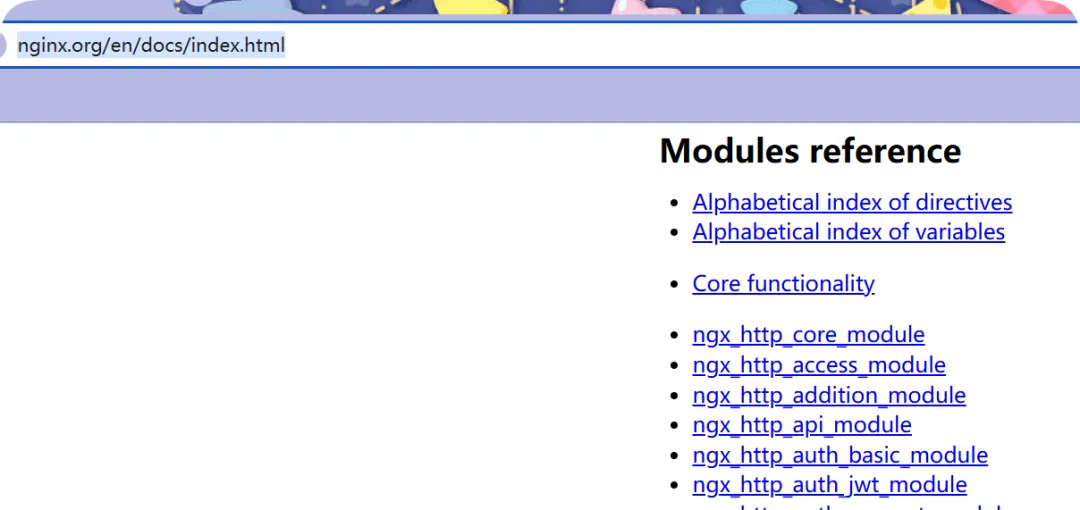
Nginx 官方、第三方,提供了非常多优秀的模块提供使用,这些模块都可以实现快速增加和减少。 额外的模块,比如 nginx 处理不了 py 文件,需要借用如下: nginx ---> uwsgi ---> python--> py 脚本文件
高可靠性
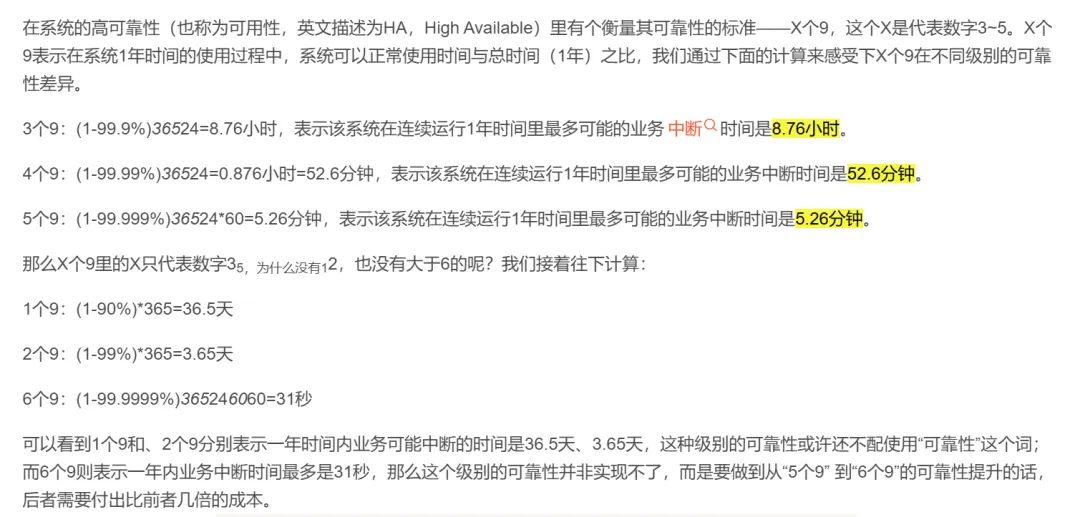
所谓高可靠性,是指 Nginx 可以在服务器上持续不间断的运行,而很多 web 服务器往往运行几周或几个月就需要 进行一次重启,比如 windows 的 IIS; 对于 nginx 这样的一个高并发、高性能的反向代理服务器而言,他往往运行网站架构的最前端,那么此时如果我 们企业如果想提供 9999、99999,对于 nginx 持续运行能够宕机的时间,一年可能只能以秒来计算,所以在这样 的一个角色中,nginx 的高可靠性为我们提供了非常好的保证
热部署
热部署是指在不停服务的情况下升级 nginx,这个功能非常的重要。 对于普通的服务,只需要 kill 掉进程在启动,但对于 Nginx 而言,如果 Nginx 有很多的客户端连接,那么 kill 掉 Nginx。Nginx 会像客户端发送 tcp reset 复位包,但很多客户端无法很好的理解 reset 包,就会造成异常。 由于 Nginx 的 master 管理进程与 worker 工作进程的分离设计,使得 Nginx 能够在 7×24 小时不间断服务的前提下,升级 Nginx 的可执行文件。 支持不停止服务更新配置、更换日志文件等功能。
应用广泛
首先 Nginx 技术成熟,具备企业最常使用的功能,如代理、代理缓存、负载均衡、静态资源、动静分离、 Https、lnmp、lnmt 等等
其次使用 Nginx 统一技术栈,降低维护成本,同时降低技术更新成本。(配置语法简洁等)
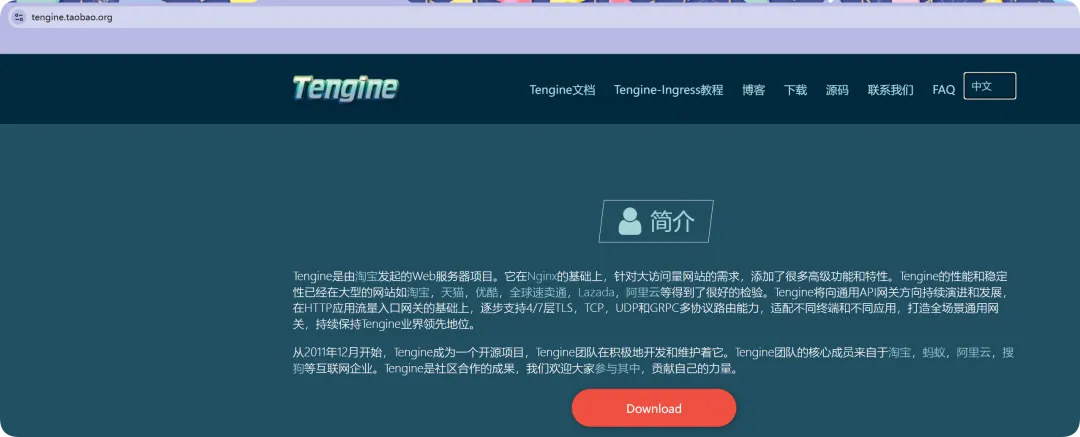
市面其他产品,比如 tengine(淘宝研发)\OpenResty 都是基于 Nginx 进行的二次开发(需要学习 C 语言);
网络模型
Nginx 使用 Epool 网络模型 Apache 采用的是 Select 网络模型。 Select:当用户发起一次请求,select 模型就会进行一次遍历扫描,从而导致性能低下。 Epoll:当用户发起请求,epoll 模型会直接进行处理, 效率高效。
Nginx 应用场景
Nginx 的主要使用场景我归纳为三个,
静态资源服务 代理资源服务 安全服务
首先用户请求先到达 nginx 然后在到 tomcat 或 php 这样的应用服务器(若是请求后端服务,nginx 无法处理) 应用服务器在去访问 redis、mysql 这样的数据库,提供基本的数据功能
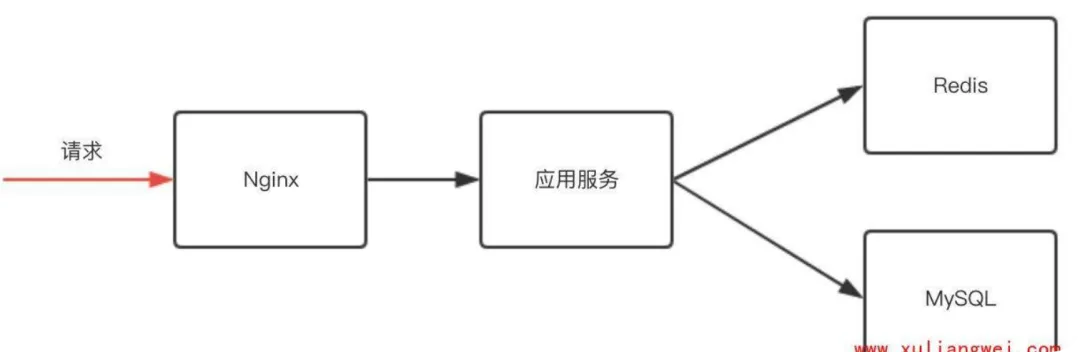
负载均衡场景
那么这里有一个问题,我们的程序代码要求开发效率高,所以他的运行效率是很低的,或者说它并发是受限,所以我们需要很多应用服务组成一个集群,为更多用户提供访问。而应用服务一但构成集群,则需要我们的 nginx 具有反向代理功能,这样可以将动态请求传倒给集群服务。但很多应用构成集群,那么一定会带来两个需求。
应用服务器需要动态扩展。(手动扩展|自动扩展) 有些服务出问题需要做容灾。
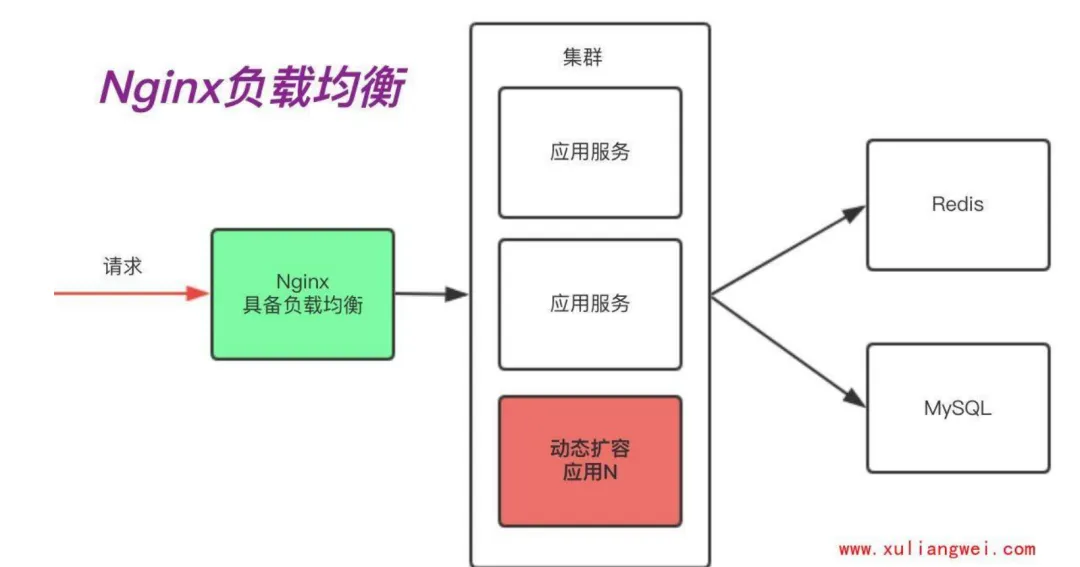
代理缓存场景
其次,随着我们网络链路的增长,用户体验到的时延则会增加。如果我们能把一段时间内不会发生变化的"动 态"内容,缓存在 Nginx,由 Nginx 直接向用户提供访问,那么这样用户请求的时延就会减少很多,所以在这里反向代理会演生出另外一个功能 "缓存",因为它能加速我们的访问
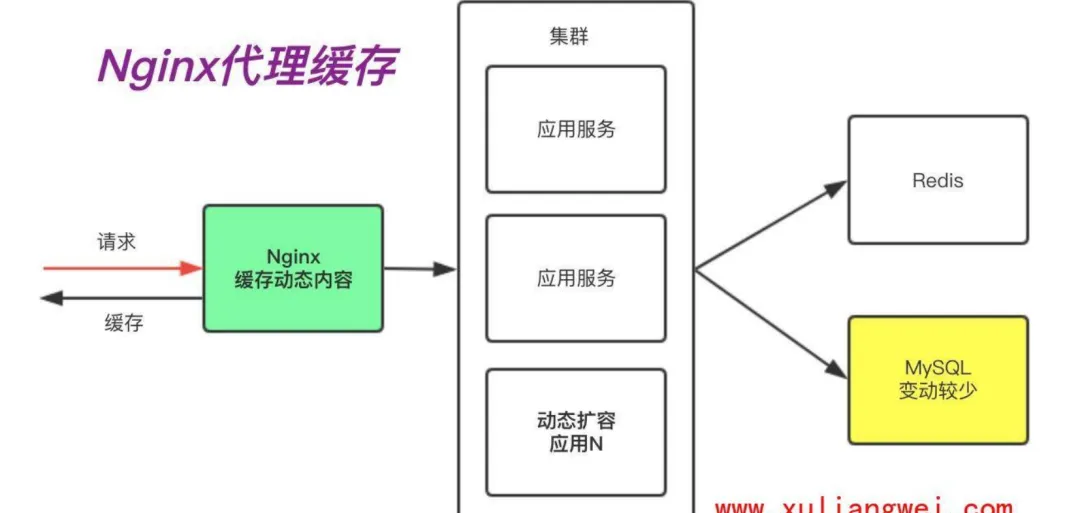
静态资源场景
在很多时候我们访问 docs、pdf、mp4、png 等这样的静 态资源时,是没有必要将这些请求通过 Nginx 交给后端 的应用服务,我们只需要通过 Nginx 直接处理“静态资源” 即可。这是 Nginx 的静态资源功能。
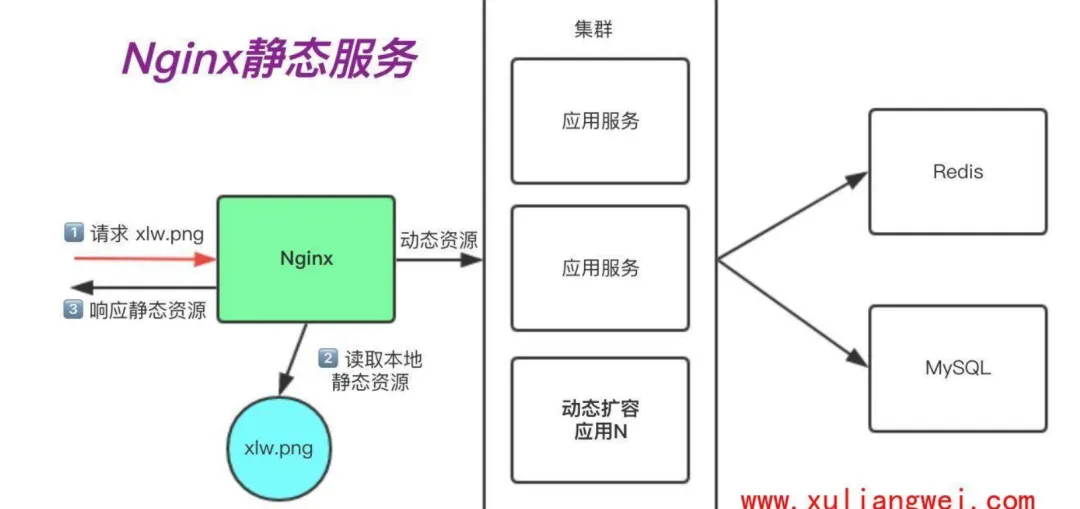
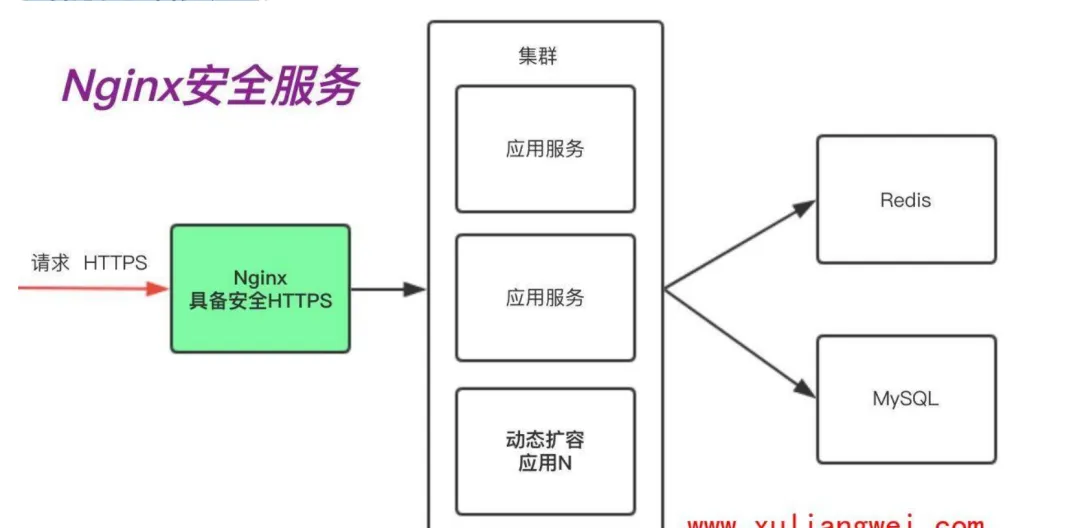
安全应用场景
当我们使用 http 网站时,可能会遭遇到篡改,如果使用 https 安全通讯协议,那么数据在传输过程中是加密 的,从而能有效的避免黑客窃取或者篡改数据信息,同时也能避免网站在传输过程中的信息泄露。大大的提升们网站安全
Nginx 组成部分
在这里我们将 Nginx 的组成架构比喻为一辆汽车:这个汽车提供了基本的驾驶功能,但是还需要一个驾驶员控制这辆汽车开往哪个方向,同时该汽车行驶过的地方还会形成 GPS 轨迹,如果汽车在行驶的过程中出现了任何问题,我们需要一个黑匣子,分析是汽车本身的问题,还是驾驶人员的操作出现了问题
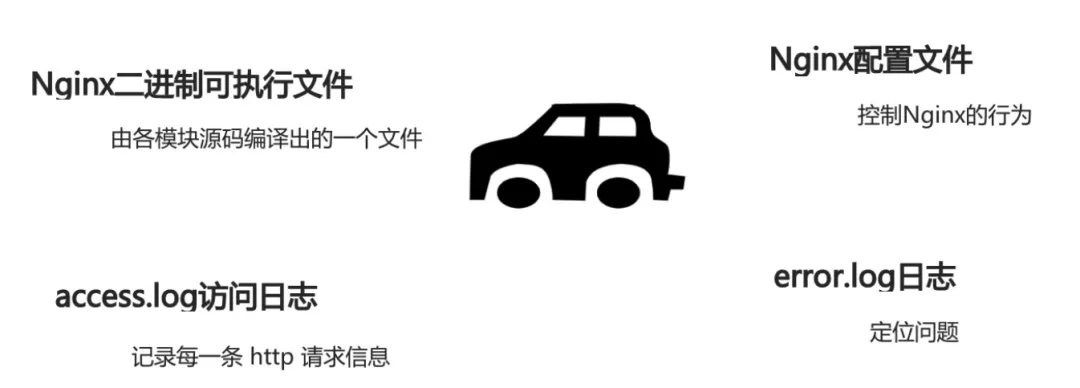
第一个组成部分 Nginx 二进制可执行文件:它是 Nginx 本身框架以及相关模块等构建的一个二进制文件,这个 文件就相当于汽车本身,所有的功能都由它提供。 第二个组成部分 Nginx.conf 文件:它相当于驾驶人 员,虽然二进制可执行文件已经提供了许多的功能,但 是这些功能究竟有没有开启,或者开启后定义怎样的行 为去处理请求,都是由 nginx.conf 这个文件决定的,所 以他就相当于这个汽车的驾驶员,控制这个汽车的行 为。 第三个组成部分 access.log:它相当于这辆汽车经过所 有地方形成的 GPS 轨迹,access.log 会记录 Nginx 处理过 的每一条 HTTP 的请求信息、响应信息。 第四个组成部分 error.log:它相当于黑匣子,当出现 了一些不可预期的问题时,可以通过 error.log 将问题定 位出来。
Nginx 组成部分小结
Nginx 的组成部分是相辅相成,Nginx 二进制文件和 Nginx.conf 文件,它定义了 Nginx 处理请求的方式。 而如果我们想对 nginx 服务做一些 web 的运营和运维,需 要对 access.log 做进一步分析。 而如果出现了任何未知的错误,或者预期的行为不一致 时,应该通过 error.log 去定位根本性的问题。
Nginx 安装部署
安装 Nginx 方式
安装 Nginx 软件的方式有很多种,分为如下几种:
源码编译
版本随意 安装复杂 升级繁琐
epel 源安装
版本较低 安装简单 配置不易读(比如注释内容太懂,感觉很乱)
3. 官方仓库安装(墙裂推荐)
版本较新 安装简单 配置易读
nginx 安装
安装 nginx 先决条件(解决依赖包)
//解决依赖包[root@web01_0.21[ /] yum install -y gcc gcc-c++ autoconf pcre pcre-devel make automake httpd-toolshttps://nginx.org/en/download.html nginx 软件包官方下载链接 https://nginx.org/en/linux_packages.html 预构建软件包适用于稳定版和主线版本的 Linux 软件包。
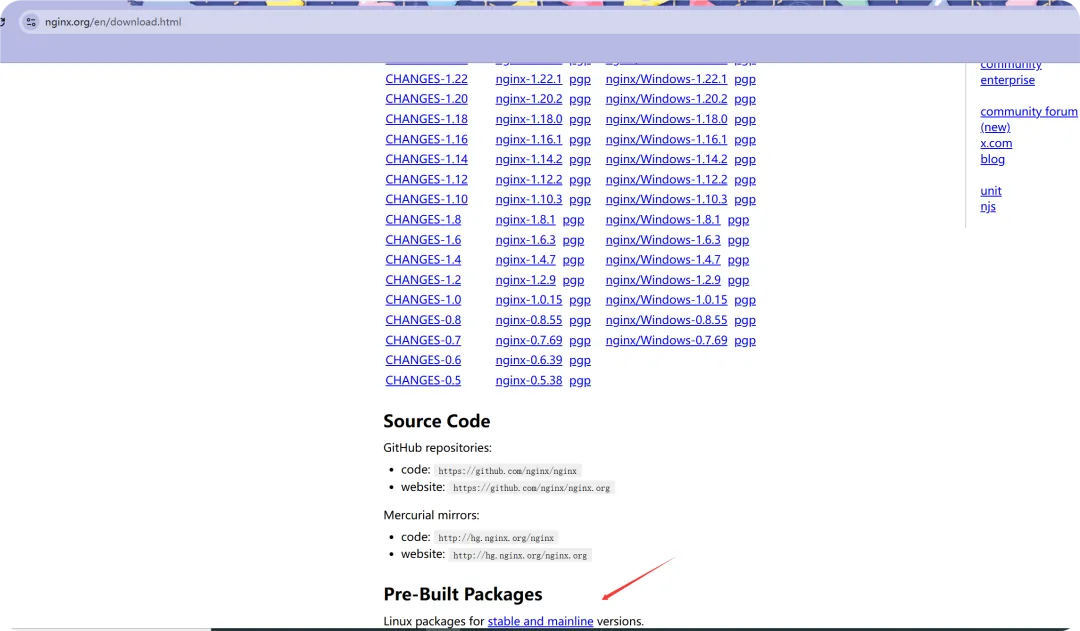
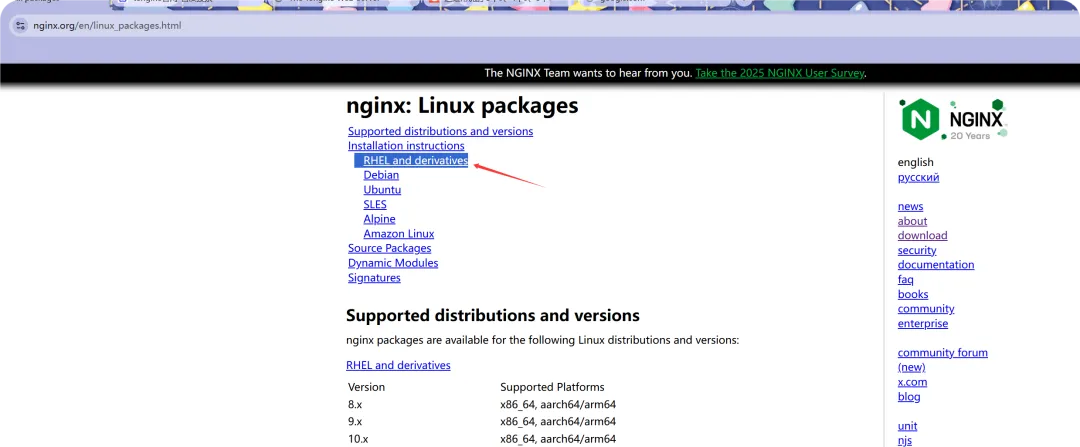
本节适用于红帽企业 Linux 及其衍生版本,例如 CentOS、Oracle Linux、Rocky Linux 和 AlmaLinux 在描述中,安装先决条件:我忽略安装 Yum 因为我之前安过;
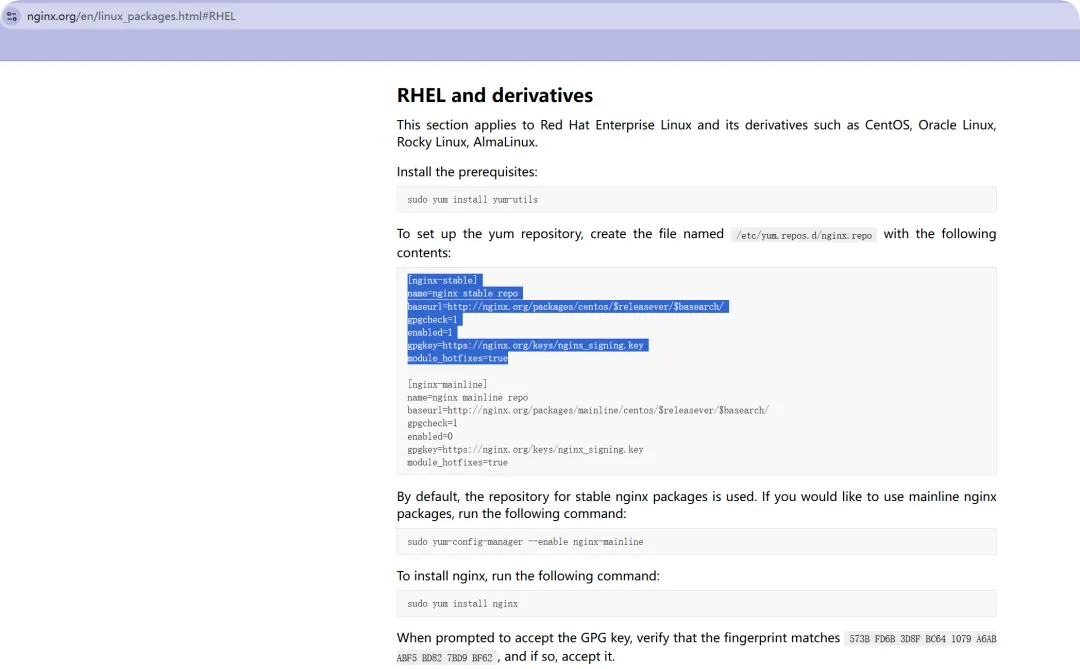
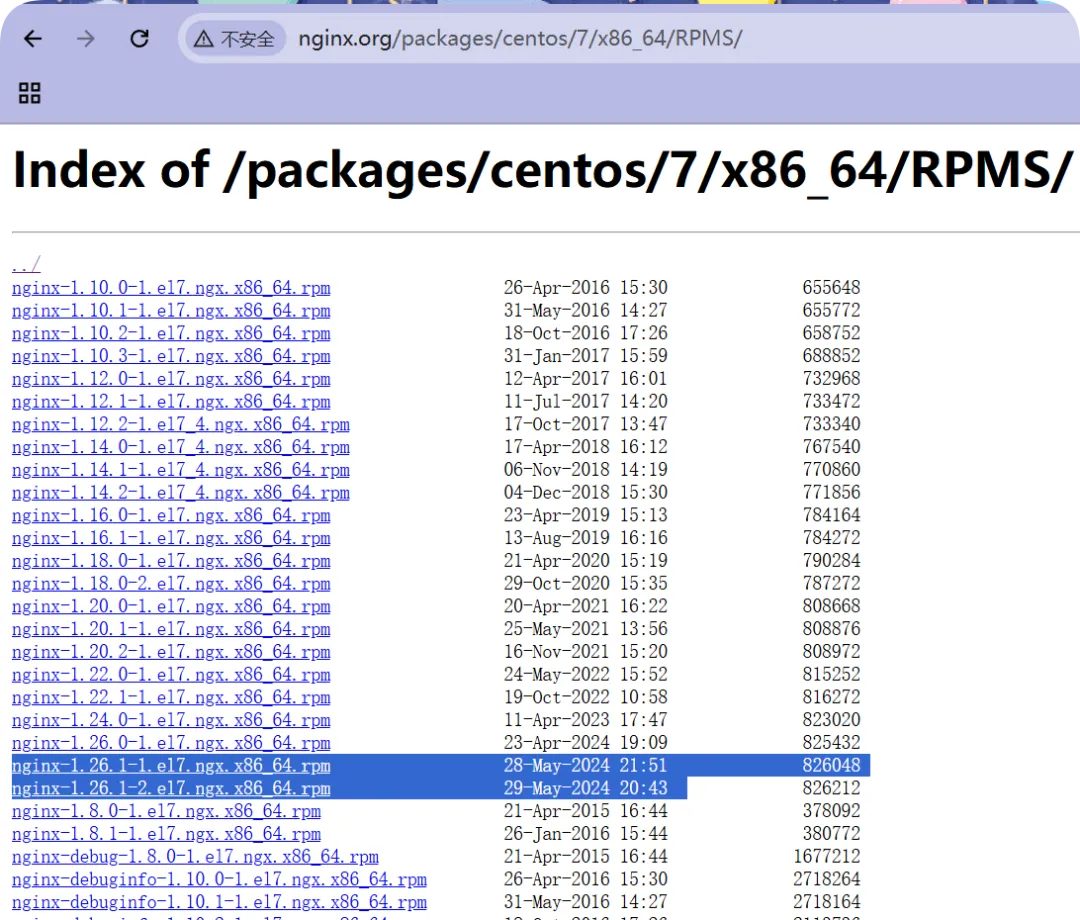
//设置yum 仓库,请创建名为 /etc/yum.repos.d/nginx.repo 的文件,并将以下内容添加到该文件中://Nginx官方源的文件内容,这里的文件名可以随意,只不过为了更清楚目的而已;[root@web01_0.21[ /]# cat /etc/yum.repos.d/nginx.repo[nginx-stable]name=nginx stable repobaseurl=http://nginx.org/packages/centos/$releasever/$basearch/gpgcheck=1enabled=1gpgkey=https://nginx.org/keys/nginx_signing.keymodule_hotfixes=true//更新yum源缓存[root@web01_0.21[ /]# yum makecache//清理yum缓存[root@web01_0.21[ /]# yum clean all// 暂不要+y,看下是否从Nginx官方下载[root@web01_0.21[ /] yum install nginx已加载插件:fastestmirrorLoading mirror speeds from cached hostfile * base: mirrors.aliyun.com * extras: mirrors.aliyun.com * updates: mirrors.aliyun.com正在解决依赖关系--> 正在检查事务---> 软件包 nginx.x86_64.1.1.26.1-2.el7.ngx 将被 安装--> 正在处理依赖关系 libpcre2-8.so.0()(64bit),它被软件包 1:nginx-1.26.1-2.el7.ngx.x86_64 需要--> 正在检查事务---> 软件包 pcre2.x86_64.0.10.23-2.el7 将被 安装--> 解决依赖关系完成依赖关系解决=================================================================================================================================================================================================================================================== Package 架构 版本 源 大小===================================================================================================================================================================================================================================================正在安装: nginx x86_64 1:1.26.1-2.el7.ngx //看到了安装版本为1.26 nginx-stable //正常 807 k为依赖而安装: pcre2 x86_64 10.23-2.el7 base 201 k事务概要===================================================================================================================================================================================================================================================安装 1 软件包 (+1 依赖软件包)总下载量:1.0 M安装大小:3.4 MIs this ok [y/d/N]: //查看yum源无误和最新版本后,执行覆盖安装已安装: nginx.x86_64 1:1.26.1-2.el7.ngx作为依赖被安装: pcre2.x86_64 0:10.23-2.el7完毕!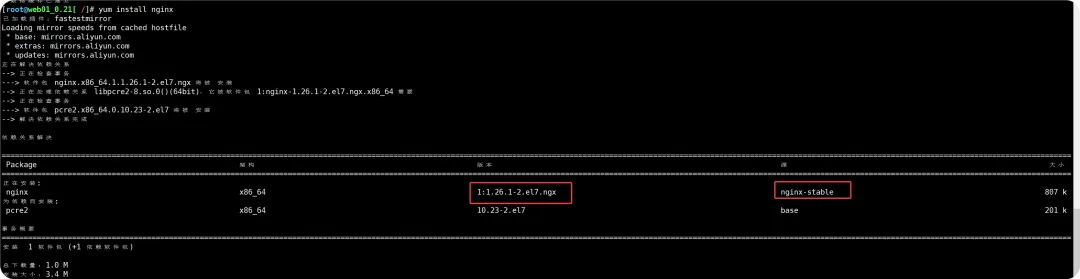
//开机自启动并启动Nginx服务[root@web01_0.21[ /]# systemctl enable nginxCreated symlink from /etc/systemd/system/multi-user.target.wants/nginx.service to /usr/lib/systemd/system/nginx.service.[root@web01_0.21[ /]# systemctl start nginx//查看nginx端口和进程[root@web01_0.21[ /]# netstat -lntup | grep nginxtcp 0 0 0.0.0.0:80 0.0.0.0:* LISTEN 2035/nginx: master[root@web01_0.21[ /]# ps -ef | grep nginxroot 2035 1 0 21:59 ? 00:00:00 nginx: master process /usr/sbin/nginx -c /etc/nginx/nginx.confnginx 2036 2035 0 21:59 ? 00:00:00 nginx: worker processnginx 2037 2035 0 21:59 ? 00:00:00 nginx: worker processnginx 2038 2035 0 21:59 ? 00:00:00 nginx: worker processnginx 2039 2035 0 21:59 ? 00:00:00 nginx: worker processroot 2048 1724 0 22:00 pts/0 00:00:00 grep --color=auto nginx[root@web01_0.21[ /]#

nginx 目录结构
//可使用rpm -ql nginx查看软件整体目录结构[root@web01_0.21[ ~] rpm -ql nginx/etc/logrotate.d/nginx/etc/nginx //安装目录路径/etc/nginx/conf.d/etc/nginx/conf.d/default.conf //默认的站点/etc/nginx/fastcgi_params //通过模块链接php,传递的变量/etc/nginx/mime.types //支持的文件类型,回传浏览器/etc/nginx/modules //模块,缺省值是空;/etc/nginx/nginx.conf //重点掌握,主配置文件/etc/nginx/scgi_params //调用py,内容是变量/etc/nginx/uwsgi_params/usr/lib/systemd/system/nginx-debug.service ///usr/lib/systemd/system/nginx.service //服务的启动与停止文件/usr/lib64/nginx ///usr/lib64/nginx/modules/usr/libexec/initscripts/legacy-actions/nginx/usr/libexec/initscripts/legacy-actions/nginx/check-reload/usr/libexec/initscripts/legacy-actions/nginx/upgrade/usr/sbin/nginx //二进制文件,Nginx的命令/usr/sbin/nginx-debug/usr/share/doc/nginx-1.26.1/usr/share/doc/nginx-1.26.1/COPYRIGHT/usr/share/man/man8/nginx.8.gz/usr/share/nginx //默认的站点路径可以更改/usr/share/nginx/html/usr/share/nginx/html/50x.html/usr/share/nginx/html/index.html/var/cache/nginx //缓存目录/var/log/nginx //日志文件路径如图所示:默认站点的页面内容就在此路径下,并且可以删掉新建自己写好的内容,减轻了主配置文件的臃肿;
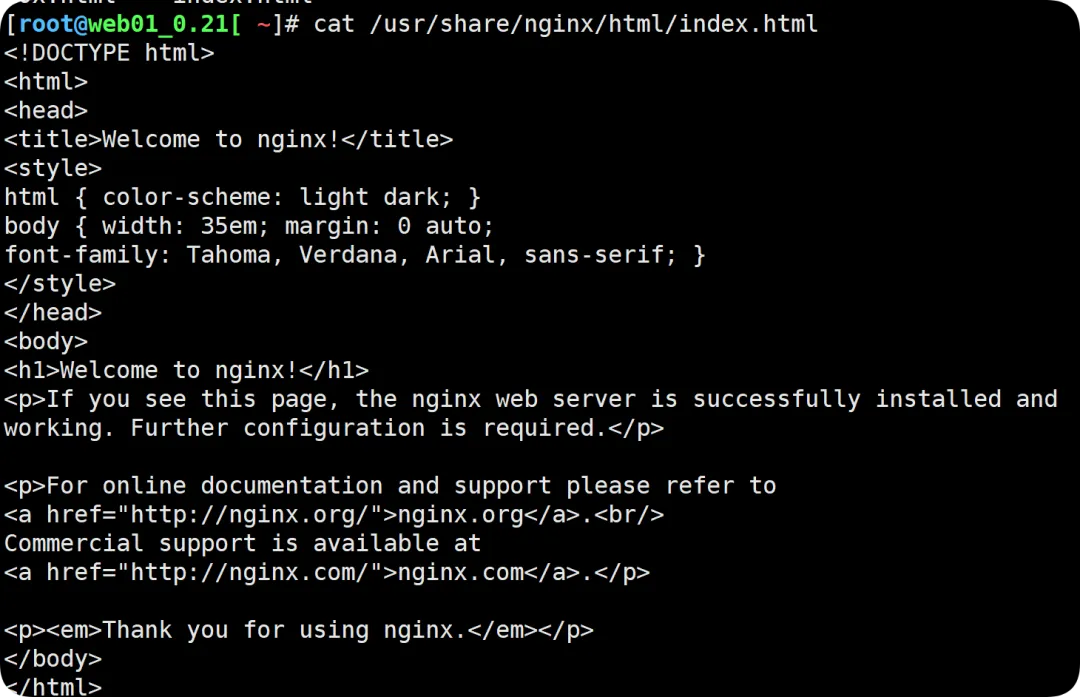
后端 PHP 程序是拿不到变量的值,通过 nginx 取才可以;
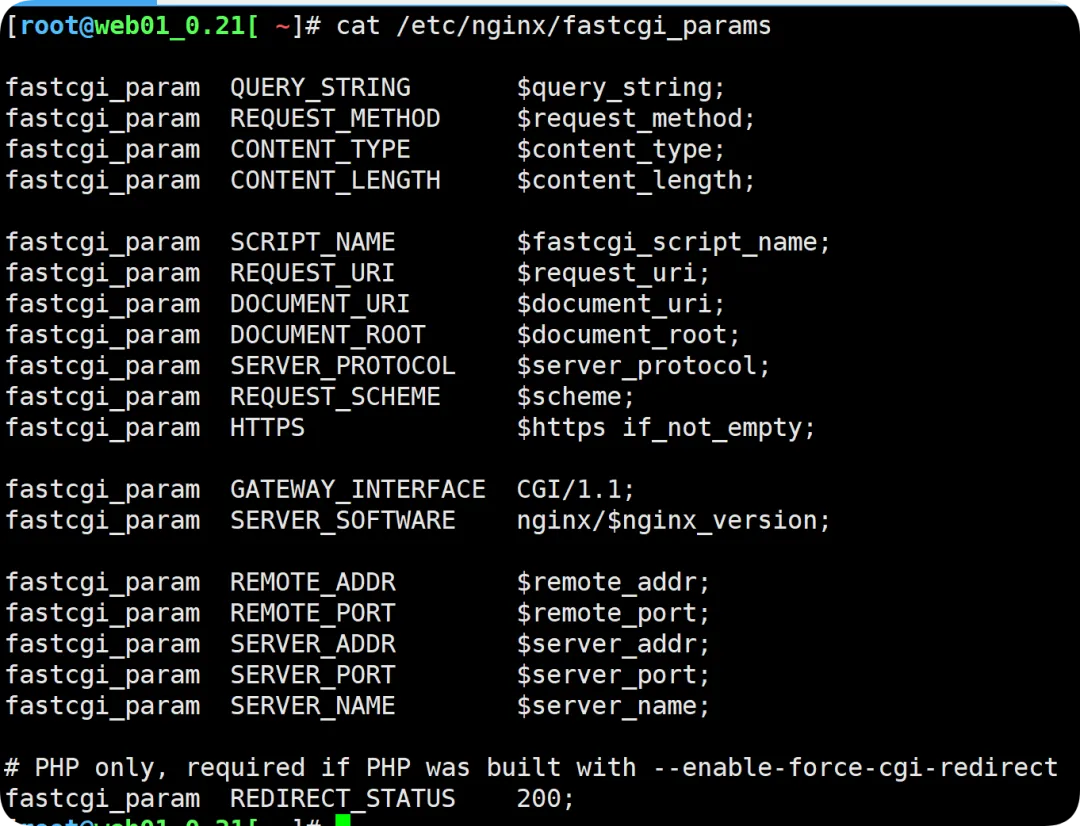
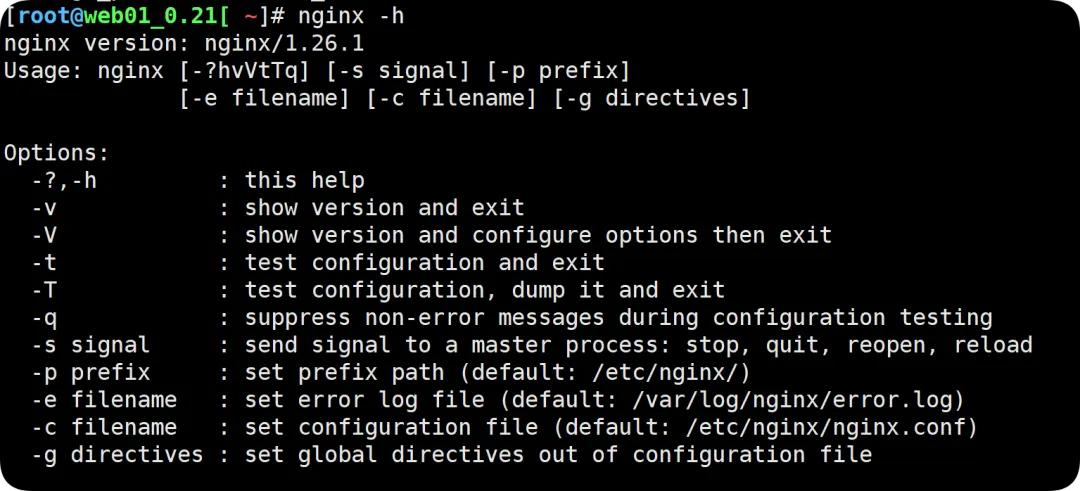
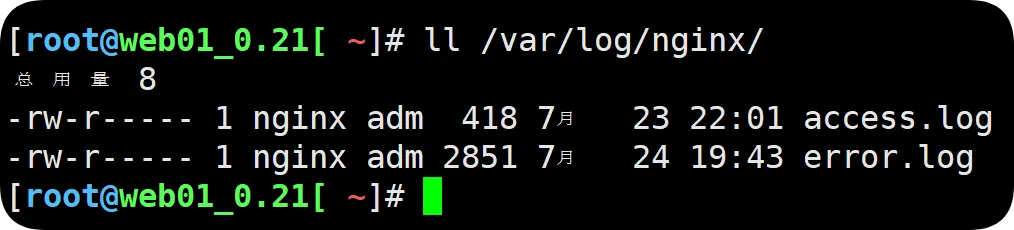
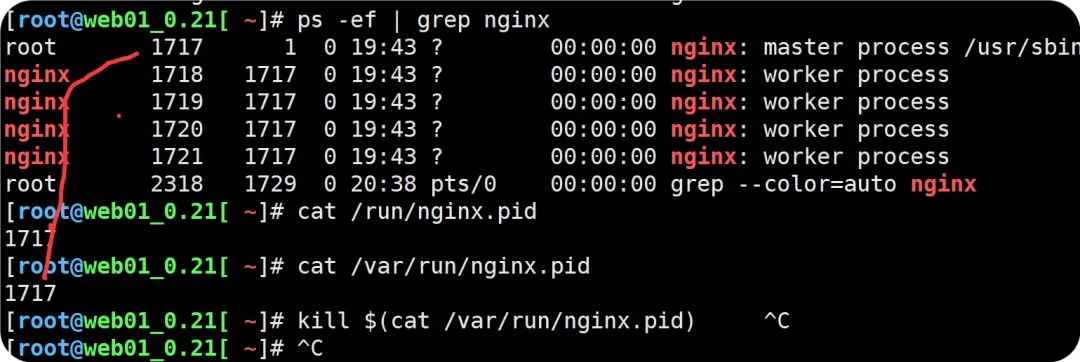
nginx 主配置文件介绍
Nginx 主配置文件/etc/nginx/nginx.conf 是一个纯文本类型的文件; Nginx 整个配置文件是以区块的形式组织的。一般每个区块以一对大括号{}来表示开始与结束。
//看起来是一个纯文本格式的文件[root@web01_0.21[ ~]# cat /etc/nginx/nginx.conf//全局,作用域最高user nginx; //nginx运行身份,为Nginx用户worker_processes auto; //启动的进程数量,缺省为自动,进程数量取决于CPU核心数,通常与cpu核心数保持一致error_log /var/log/nginx/error.log notice; //错误日志的路径,从notice(通知)级别开始体现pid /var/run/nginx.pid; //存储进程的pid,用来杀掉进程的用法//局部events { //events事件模块 worker_connections 1024; //一个worker最大连接数;}//http层,主要负责接收与相应Http请求;http { //关联server标签内的内容,定义网站 include /etc/nginx/mime.types; //包含了所有的支持类型; default_type application/octet-stream; //默认的类型(识别不了就提供了下载的方式);//定义日志格式 log_format main '$remote_addr - $remote_user [$time_local] "$request" ''$status $body_bytes_sent "$http_referer" ''"$http_user_agent" "$http_x_forwarded_for"'; access_log /var/log/nginx/access.log main; sendfile on; //优化用#tcp_nopush on; //优化用 keepalive_timeout 65; //长连接超时时间。#gzip on; include /etc/nginx/conf.d/*.conf; //包含的子文件,多种写法,作用就是保证配置文件的简洁}
nginx 默认站点配置文件 (以标签形式)
//用来定义网站[root@web01_0.21[ ~]# cat /etc/nginx/conf.d/default.confserver { //一个标签就是一个站点,所有的在server标签都是被Http层所包含 listen 80; //监听的端口 server_name localhost; //站点的域名#access_log /var/log/nginx/host.access.log main; location / { //默认匹配/ 主要用来做uri路径匹配 root /usr/share/nginx/html; //默认的网站路径 index index.html index.htm; //默认站点的页面 }#error_page 404 /404.html;# redirect server error pages to the static page /50x.html# error_page 500 502 503 504 /50x.html; location = /50x.html { root /usr/share/nginx/html; }# proxy the PHP scripts to Apache listening on 127.0.0.1:80##location ~ \.php$ {# proxy_pass http://127.0.0.1;#}# pass the PHP scripts to FastCGI server listening on 127.0.0.1:9000##location ~ \.php$ {# root html;# fastcgi_pass 127.0.0.1:9000;# fastcgi_index index.php;# fastcgi_param SCRIPT_FILENAME /scripts$fastcgi_script_name;# include fastcgi_params;#}# deny access to .htaccess files, if Apache's document root# concurs with nginx's one##location ~ /\.ht {# deny all;#}}Nginx 构建网站之一 (HTML 页面小游戏)
贴合实际的企业生产环境,通过域名访问,不可以使用 IP 地址访问:
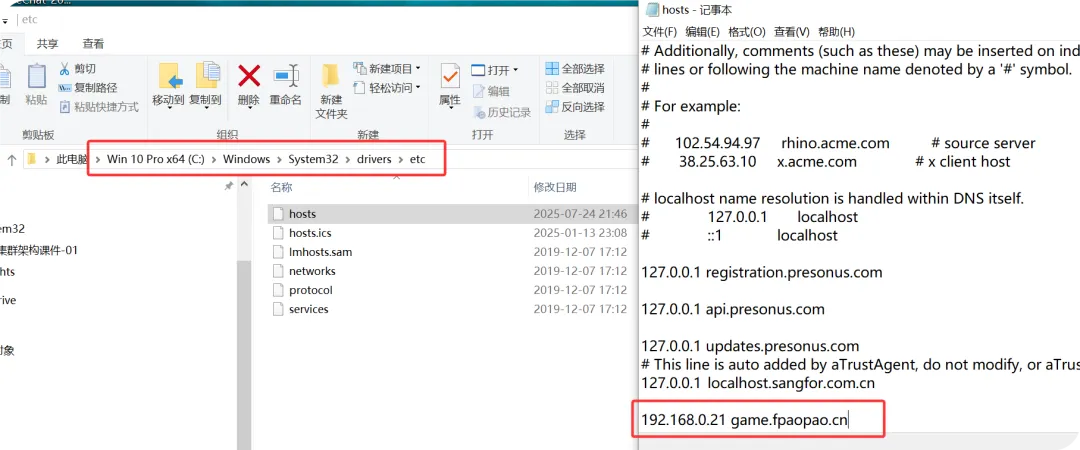
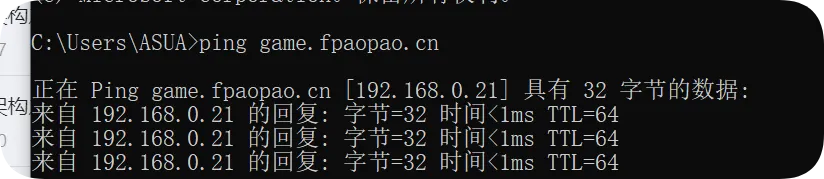
编写 Nginx 配置文件 源码文件下载链接通过网盘分享的文件:https://pan.baidu.com/s/1VSpHDUaTb3d2uuwLoh0uTQ 提取码: ur2a
[root@web01_0.21[ ~] mkdir /code //创建存放代码的路径[root@web01_0.21[ /tools] rz -y //上传游戏网站源码[root@web01_0.21[ /tools]# ls -l总用量 92-rw-r--r-- 1 root root 91014 7月 24 21:38 xiaoniaofeifei.zip//解压[root@web01_0.21[ /tools] unzip xiaoniaofeifei.zip -d /code/ //解压文件到指定录Archive: xiaoniaofeifei.zip inflating: /code/sound1.mp3 creating: /code/img/ inflating: /code/img/bg1.jpg inflating: /code/img/bg2.jpg inflating: /code/img/number1.png inflating: /code/img/number2.png inflating: /code/img/s1.png inflating: /code/img/s2.png inflating: /code/21.js inflating: /code/2000.png inflating: /code/icon.png inflating: /code/index.html[root@web01_0.21[ /tools]# ls -l /code/总用量 140-rw-r--r-- 1 root root 15329 8月 2 2014 2000.png-rw-r--r-- 1 root root 51562 8月 2 2014 21.js-rw-r--r-- 1 root root 254 8月 2 2014 icon.pngdrwxr-xr-x 2 root root 102 8月 8 2014 img-rw-r--r-- 1 root root 3049 8月 2 2014 index.html-rw-r--r-- 1 root root 63008 8月 2 2014 sound1.mp3//编辑网站配置文件//文件名和域名相关联,方便阅读维护[root@web01_0.21[ /code]# vim /etc/nginx/conf.d/game.fpaopao.cn.conf[root@web01_0.21[ /code]# cat /etc/nginx/conf.d/game.fpaopao.cn.confserver { listen 80; server_name game.fpaopao.cn; location / { root /code; index index.html; }}//检查语法,平滑重启[root@web01_0.21[ /tools] nginx -tnginx: the configuration file /etc/nginx/nginx.conf syntax is oknginx: configuration file /etc/nginx/nginx.conf test is successful[root@web01_0.21[ /tools]# systemctl reload nginx通过浏览器输入域名方式

Nginx 构建网站之二 (微信页面小游戏)
修改本地 hotsts 文件,类似 dns 劫持
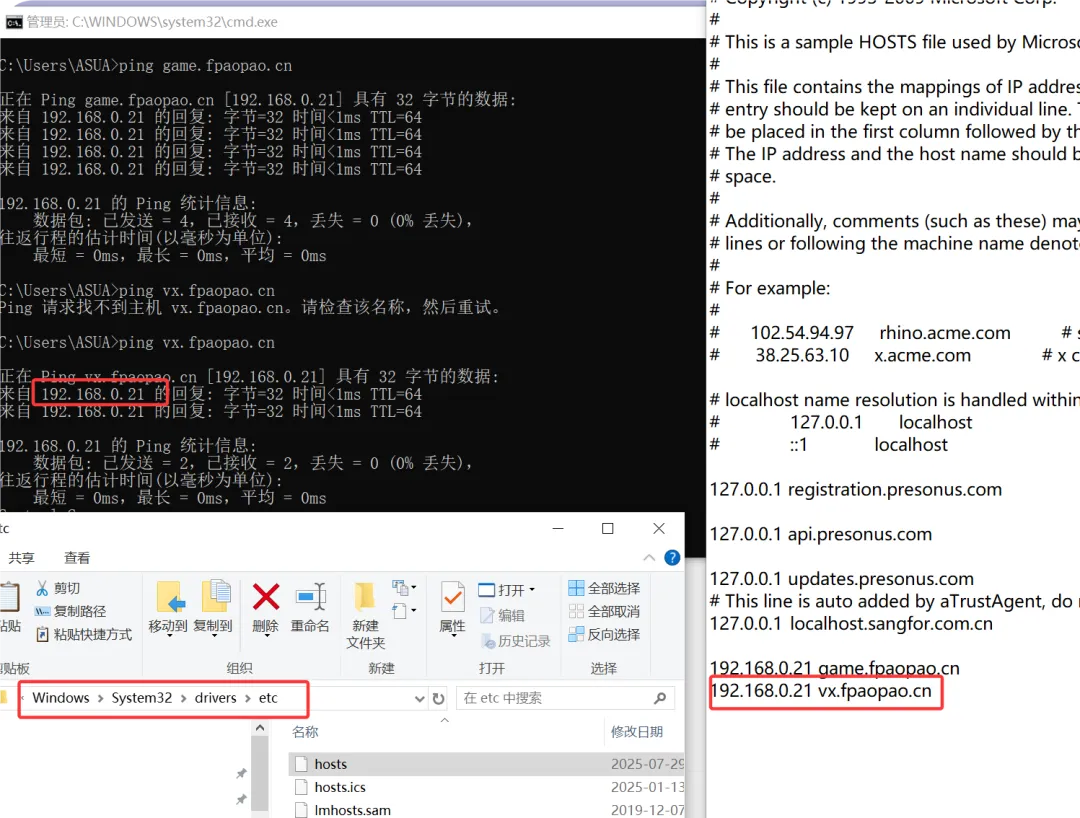
创建存放源码文件,配置 nginx 目录
链接: https://pan.baidu.com/s/1hZWPpPW-kTqCJJ5mMnddNQ 提取码: rfvy
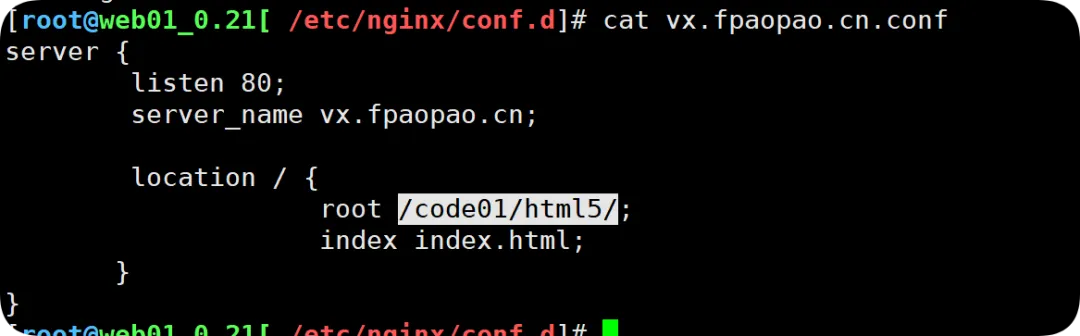
//创建存放源码文件路径[root@web01_0.21[ /code] mkdir /code01[root@web01_0.21[ /code01] rz -y //上传游戏源码文件[root@web01_0.21[ /code01]# ls -l总用量 18452-rw-r--r-- 1 root root 18891168 7月 29 20:26 Day48-老男孩Linux77期html小游戏项目.zip[root@web01_0.21[ /code01] unzip Day48-老男孩Linux77期html小游戏项目.zip -d /code01/ //解压文件到指定目录Archive: Day48-老男孩Linux77期html小游戏项目.zip creating: /code01/html5/ creating: /code01/html5/ceshi/ creating: /code01/html5/ceshi/anli...// nginx站点配置文件名关联[root@web01_0.21[ /code01/html5]# vim /etc/nginx/conf.d/vx.fpaopao.cn.confserver { listen 80; server_name vx.fpaopao.cn; location / { root /code01/html5/; index index.html; }}//检查语法并平滑重启[root@web01_0.21[ /code01/html5]# nginx -tnginx: the configuration file /etc/nginx/nginx.conf syntax is oknginx: configuration file /etc/nginx/nginx.conf test is successful[root@web01_0.21[ /code01/html5]# systemctl reload nginx浏览器域名访问
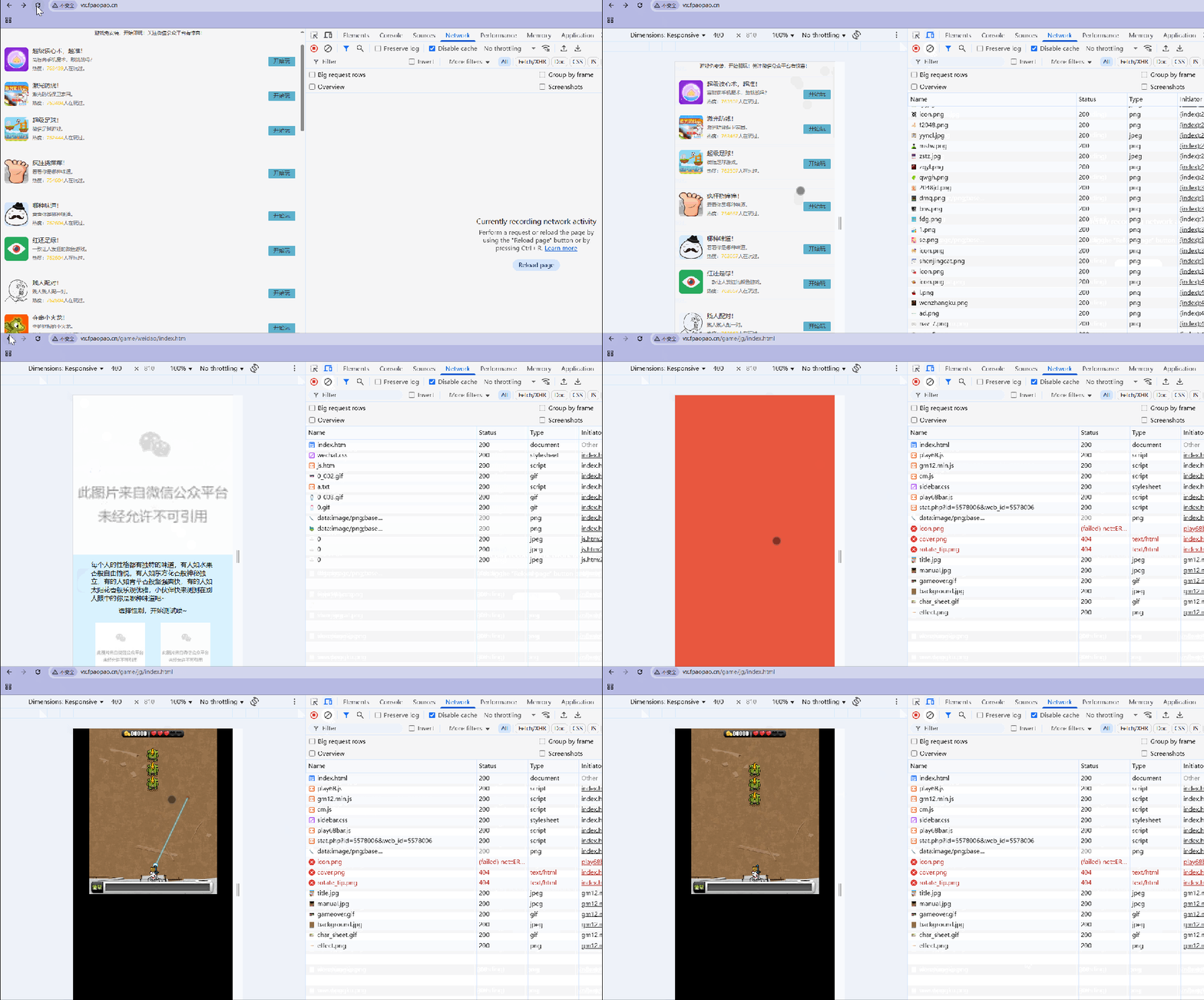
当使用 IP 地址进行浏览访问,结果显示为默认的欢迎界面,这就需要了解 nginx 的访问原理了。
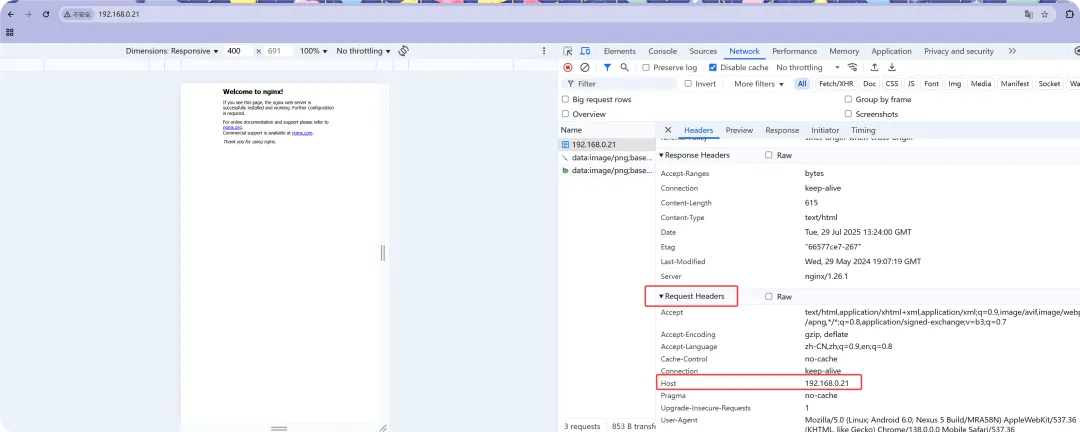
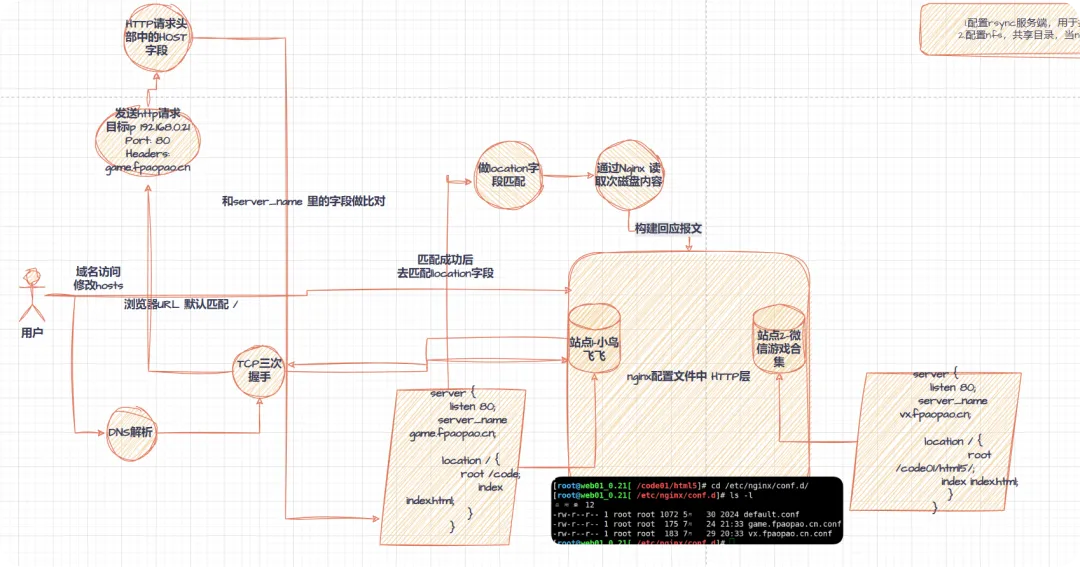
nginx 访问原理
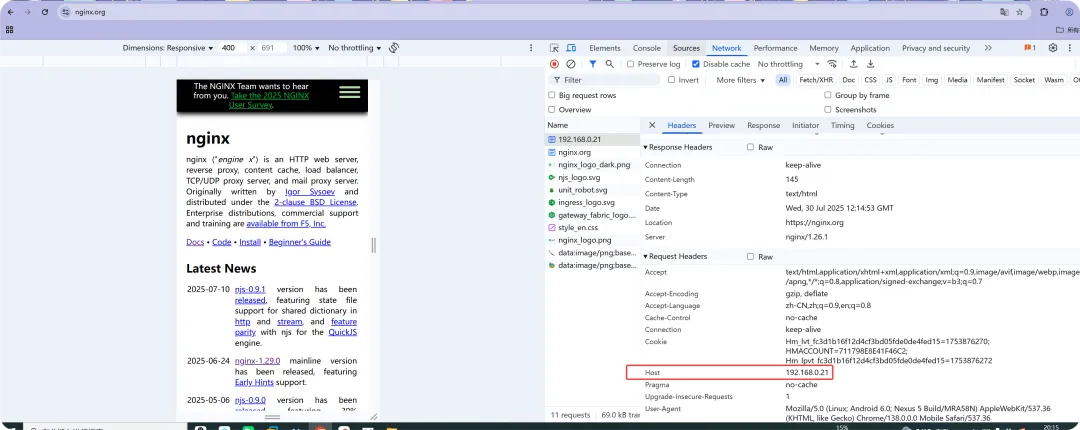
server 层包含了 Location 层; 请求头部中的 host 字段中的内容十分重要,用来依次匹配 server 层里的 server_name,locatoin 作比对;
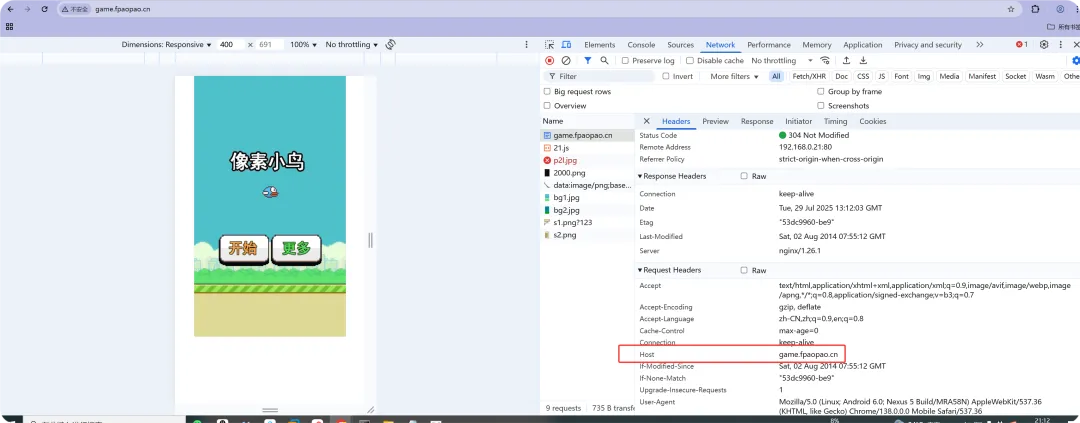
原因在于,当输入 IP 地址访问,请求头部中的 Host 字段都没有匹配到 server 层里的 server_name,locatoin,结果会随机返回一个站点的页面(随机的顺序是谁的配置文件在前,返回谁的站点页面)
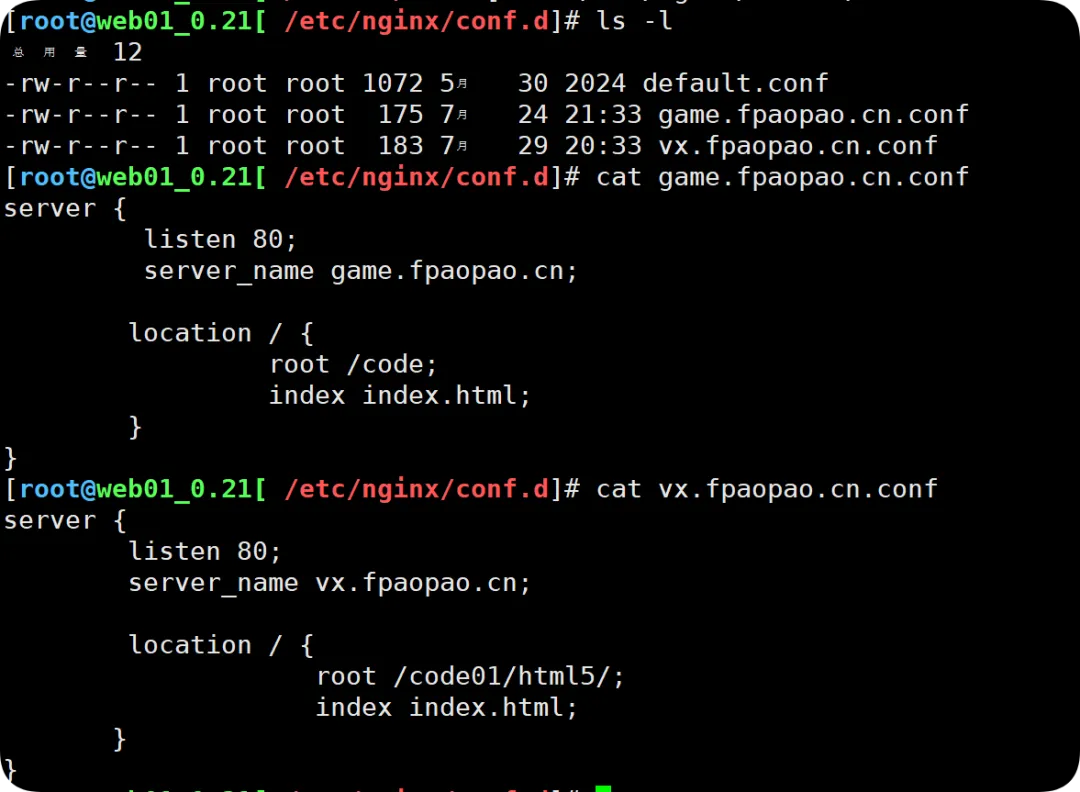
通过配置文件顺序,指定默认站点页面配置
//将某个配置文件上移[root@web01_0.21[ /etc/nginx/conf.d] mv game.fpaopao.cn.conf agame.fpaopao.cn.conf[root@web01_0.21[ /etc/nginx/conf.d]# ls -l总用量 12-rw-r--r-- 1 root root 175 7月 24 21:33 agame.fpaopao.cn.conf //最前面-rw-r--r-- 1 root root 1072 5月 30 2024 default.conf-rw-r--r-- 1 root root 183 7月 29 20:33 vx.fpaopao.cn.conf[root@web01_0.21[ /etc/nginx/conf.d]# systemctl reload nginx //平滑重启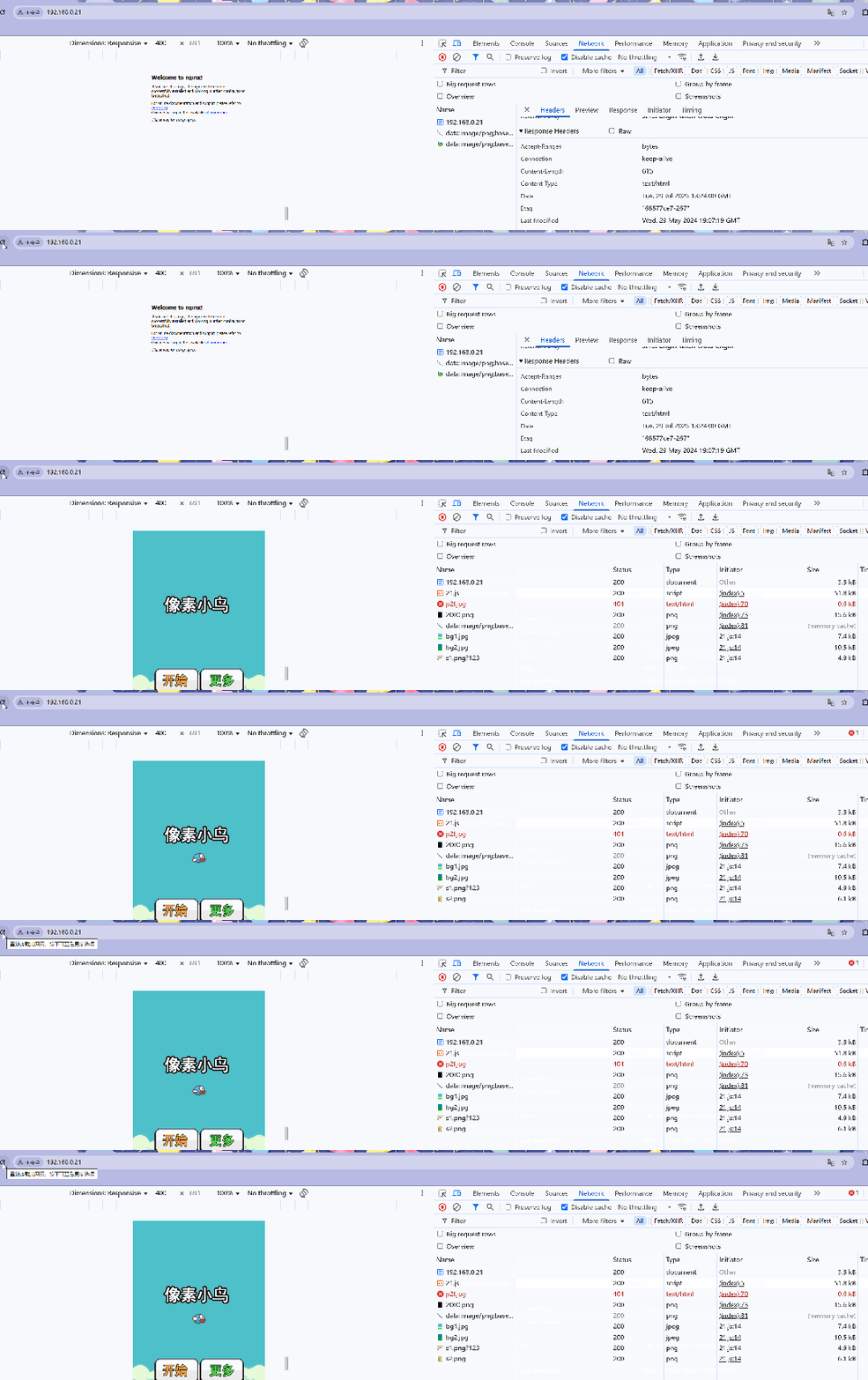
明确指定访问默认页面配置
//在不修改配置文件名的前提下,让vx.fpaopao.cn这个站点优先返回默认页面[root@web01_0.21[ ~]# cd /etc/nginx/conf.d/[root@web01_0.21[ /etc/nginx/conf.d]# ls -l总用量 12-rw-r--r-- 1 root root 175 7月 24 21:33 agame.fpaopao.cn.conf-rw-r--r-- 1 root root 1072 5月 30 2024 default.conf-rw-r--r-- 1 root root 183 7月 29 20:33 vx.fpaopao.cn.conf[root@web01_0.21[ /etc/nginx/conf.d]# cat vx.fpaopao.cn.confserver { listen 80 default_server; //在这里面加入default_server内容 server_name vx.fpaopao.cn; location / { root /code01/html5/; index index.html; }}//检查语法重载[root@web01_0.21[ /etc/nginx/conf.d] nginx -tnginx: the configuration file /etc/nginx/nginx.conf syntax is oknginx: configuration file /etc/nginx/nginx.conf test is successful[root@web01_0.21[ /etc/nginx/conf.d] systemctl reload nginx
拒绝通过 IP 访问配置 (用户体验不好,建议使用强制跳转)
//将之前的vx.fpaopao.cn里配置文件的default_server字段中删掉,不明确指定//新建一个站点配置文件[root@web01_0.21[ /etc/nginx/conf.d]# cat localhots.confserver { listen 80 default_server;return 504; //这状态吗可以肆意写}//检查语法,平滑重启[root@web01_0.21[ /etc/nginx/conf.d]# nginx -tnginx: the configuration file /etc/nginx/nginx.conf syntax is oknginx: configuration file /etc/nginx/nginx.conf test is successful[root@web01_0.21[ /etc/nginx/conf.d]# systemctl reload nginx
强制跳转某个站点页面(通过 IP 地址方式访问)
//修改禁止访问IP访问的配置文件,强制跳转到nginx网站[root@web01_0.21[ /etc/nginx/conf.d] vim localhots.confserver { listen 80 default_server;return 302 https://nginx.org;}[root@web01_0.21[ /etc/nginx/conf.d]# nginx -tnginx: the configuration file /etc/nginx/nginx.conf syntax is oknginx: configuration file /etc/nginx/nginx.conf test is successful[root@web01_0.21[ /etc/nginx/conf.d]# systemctl reload nginx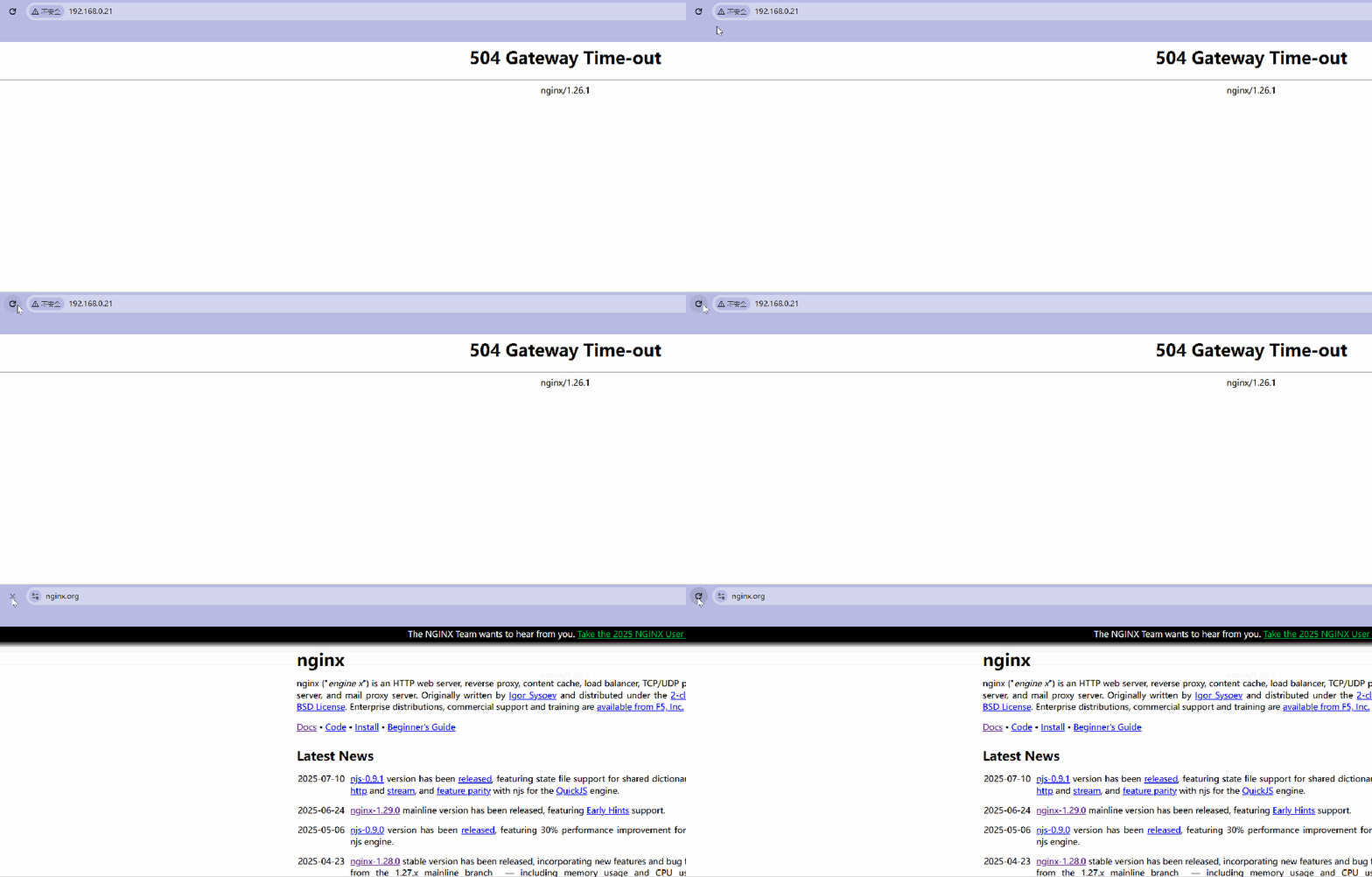

//核对服务器中的路径[root@web01_0.21[ /etc/nginx/conf.d]# cd /code01/html5/game/jg/[root@web01_0.21[ /code01/html5/game/jg]# ls -l总用量 4drwxr-xr-x 2 root root 123 8月 8 2014 ds-rw-r--r-- 1 root root 1888 8月 2 2014 index.htmldrwxr-xr-x 2 root root 134 8月 8 2014 static虚拟主机
虚拟主机产生背景
通常在企业中可能会有很多业务系统,那么多套业务服务在 Nginx 配置中,可以在一台服务器上运行多个网站;
Nginx 配置虚拟主机有如下三种方式:
基于主机多 IP 方式 基于端口的配置方式 基于多个 hosts 名称方式(多域名方式);
基于主机多 IP 方式
在站点配置文件中,若是只写 80 端口,只代表了监听了服务器中所有的网卡
server { listen 80; //只写80端口,意味着,只要通过这个域名访问80.匹配到的location主机/下的内容都是一样的 server_name game.fpaopao.cn; location / { root /code; index index.html; }}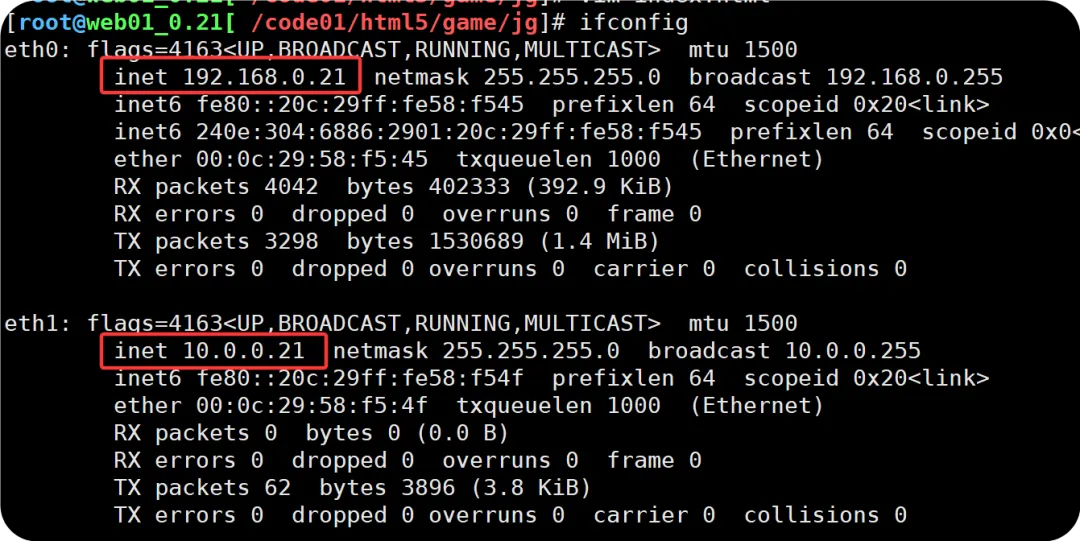
基于主机多 IP 方式配置(场景较少)
//基于主机多IP配置[root@web01_0.21[ /etc/nginx/conf.d]# cd /[root@web01_0.21[ /] mkdir -p /ip/outip //创建站点文件路径[root@web01_0.21[ /]# cd /ip/outip/ //外网IP站点路径[root@web01_0.21[ /ip/outip] echo"this is out_ip.site~ 192.168.0.21:well come." >index.html[root@web01_0.21[ /ip/outip]# cat /etc/nginx/conf.d/out_ip.conf //外网IP站点配置文件server { listen 192.168.0.21:80; location { root /ip/outip; index index.html; }}[root@web01_0.21[ /ip]# pwd/ip[root@web01_0.21[ /ip]# mkdir intip //创建内网IP站点路径[root@web01_0.21[ /etc/nginx/conf.d]# cat int_ip.conf //创建内网IP站点配置文件server { listen 10.0.0.21:80; location / { root /ip/intip; index index.html; }}//检查语法并重载[root@web01_0.21[ /ip/intip]# nginx -tnginx: the configuration file /etc/nginx/nginx.conf syntax is oknginx: configuration file /etc/nginx/nginx.conf test is successful[root@web01_0.21[ /ip/intip]# systemctl reload nginx不同IP捆绑在不同的主机之中;
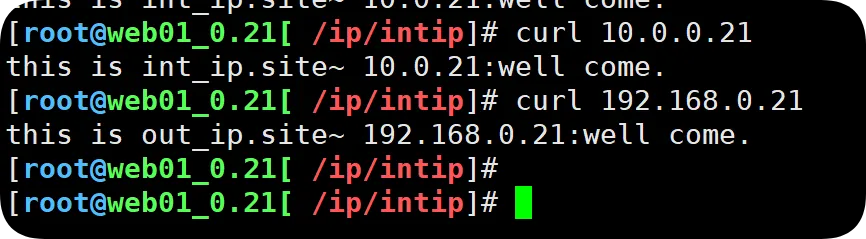
基于多端口配置方式(用的较多)
同IP,不同端口,端口用来区分业务; 用的场景较多,是因为一台服务器端口是有限的,比如某个进程占用80端口,其他进程就无法使用了;
虚拟主机多端口配置
//创建多端口站点目录[root@web01_0.21[ /]# mkdir -p /server/port01//编写对应的测试页[root@web01_0.21[ /]# cd /server/port01/[root@web01_0.21[ /server/port01]# echo "this is 8066 port01.well to come~" >index.html//创建虚拟主机多站点配置文件[root@web01_0.21[ /]# cat /etc/nginx/conf.d/port01.conf server { listen 8066; location / { root /server/port01; index index.html; }}//检查语法并重载[root@web01_0.21[ /ip/intip]# nginx -tnginx: the configuration file /etc/nginx/nginx.conf syntax is oknginx: configuration file /etc/nginx/nginx.conf test is successful[root@web01_0.21[ /ip/intip]# systemctl reload nginx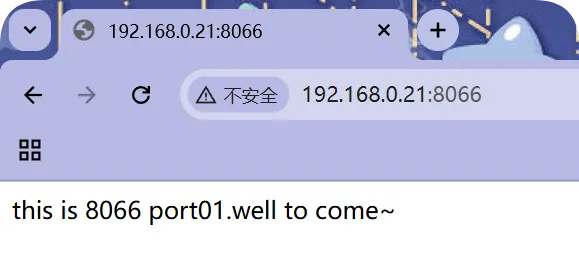
基于多个 hosts 名称方式(多域名方式);
企业场景中用的最多,相同端口,不同的主机来区分一台服务器运行多个站点;
虚拟主机多域名配置
//修改hosts文件,类似DNS劫持C:\Windows\System32\drivers\etc --->hosts192.168.0.21 game001.fpaopao.cn//创建另外一个站点名录 (和game.fpaopao.cn站点内容保持一致)[root@web01_0.21[ /tools]# mkdir /game001[root@web01_0.21[ /tools]# cp xiaoniaofeifei.zip /game001///解压源码文件root@web01_0.21[ /tools]# cd /game001/[root@web01_0.21[ /game001]# ls -l总用量 92-rw-r--r-- 1 root root 91014 7月 31 20:28 xiaoniaofeifei.zip[root@web01_0.21[ /game001]# unzip xiaoniaofeifei.zip Archive: xiaoniaofeifei.zip inflating: sound1.mp3 creating: img/ inflating: img/bg1.jpg inflating: img/bg2.jpg inflating: img/number1.png inflating: img/number2.png inflating: img/s1.png inflating: img/s2.png inflating: 21.js inflating: 2000.png inflating: icon.png inflating: index.html //创建另外一个域名站点[root@web01_0.21[ /etc/nginx/conf.d]# cat /etc/nginx/conf.d/game001.fpaopao.cn.conf server { listen 80; server_name game001.fpaopao.cn; location / { root /game001; index index.html; }}//重启并加载[root@web01_0.21[ /etc/nginx/conf.d]# nginx -tnginx: the configuration file /etc/nginx/nginx.conf syntax is oknginx: configuration file /etc/nginx/nginx.conf test is successful[root@web01_0.21[ /etc/nginx/conf.d]# systemctl reload nginx

随机文章
-
 10个月宝宝每天需要喝多少奶粉?
- 在 Linux 与 Windows 上使用 Unsloth 运行 Qwen3CoderNext
- 一天一个Python知识点——Day 154:Keras基础
- 嵌入式Linux“文件系统挂载”的“只读异常”陷阱——镁光嵌入式面试题
- 车轮上的Linux:揭秘车载Camera驱动开发的核心技术与框架⑤-V4L2 用户空间启动Stream
- Linux & Rust:内核集成完成 - 稳定与生态加速
- Bye!古董的M1 Mini Linux
- 从零开始学Python:创建第一个Python程序
- 春招_python基础_p7_赋值与表达式
- Linux系统swap满的影响与处理
- 26个Python自动化项目:拒绝加班!