《嵌入式AI筑基笔记02:Python数据类型02,从C的“硬核”到Python的“包容”》
- 2026-09-10 23:39:04
《嵌入式AI筑基笔记02:Python数据类型02,从C的“硬核”到Python的“包容”》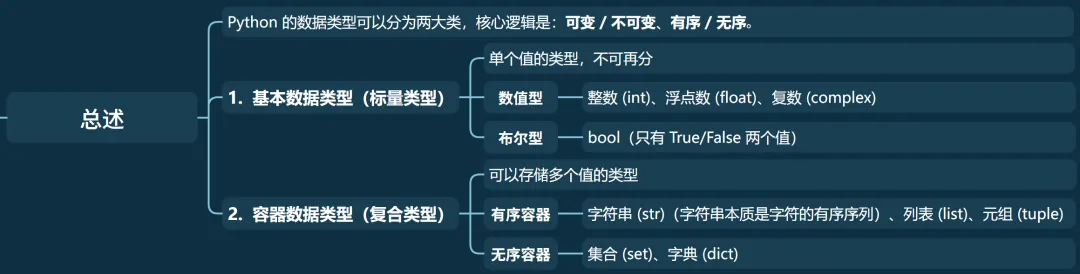
Python 的数据类型可以分为两大类,核心逻辑是:可变 / 不可变、有序 / 无序: 基本数据类型(标量类型):单个值的类型,不可再分 • 数值型:整数 (int)、浮点数 (float)、复数 (complex) • 布尔型:bool(只有 True/False 两个值) • 字符串:str(字符的序列) 容器数据类型(复合类型):可以存储多个值的类型 • 有序容器:列表 (list)、元组 (tuple)、字符串 (str)(字符串本质是字符的有序序列) • 无序容器:集合 (set)、字典 (dict)
特点
• 可变性:创建后可直接修改、添加、删除元素(区别于字符串的不可变); • 有序性:元素按插入顺序存储,支持索引和切片; • 包容性:可存储任意类型数据(数字、字符串、列表、字典等),甚至混合类型; • 可迭代性:支持遍历、推导式等迭代操作。 基本操作
• 索引 • 长度 • 成员 • 遍历 • 切片 • 拼接与重复 增加操作
• 添加元素 • 批量添加 • 插入元素 • 示例代码 删除操作
• 移除元素 • 弹出元素 • 删除元素 • 清空列表 • 批量删除 • 示例代码 查询统计
• 统计次数 • 查找元素 • 是否存在 • 示例代码 排序反转
• 排序 • 反转 • 示例代码 其它操作
• 浅拷贝 • 安全查找 • 列表推导式 • 示例代码 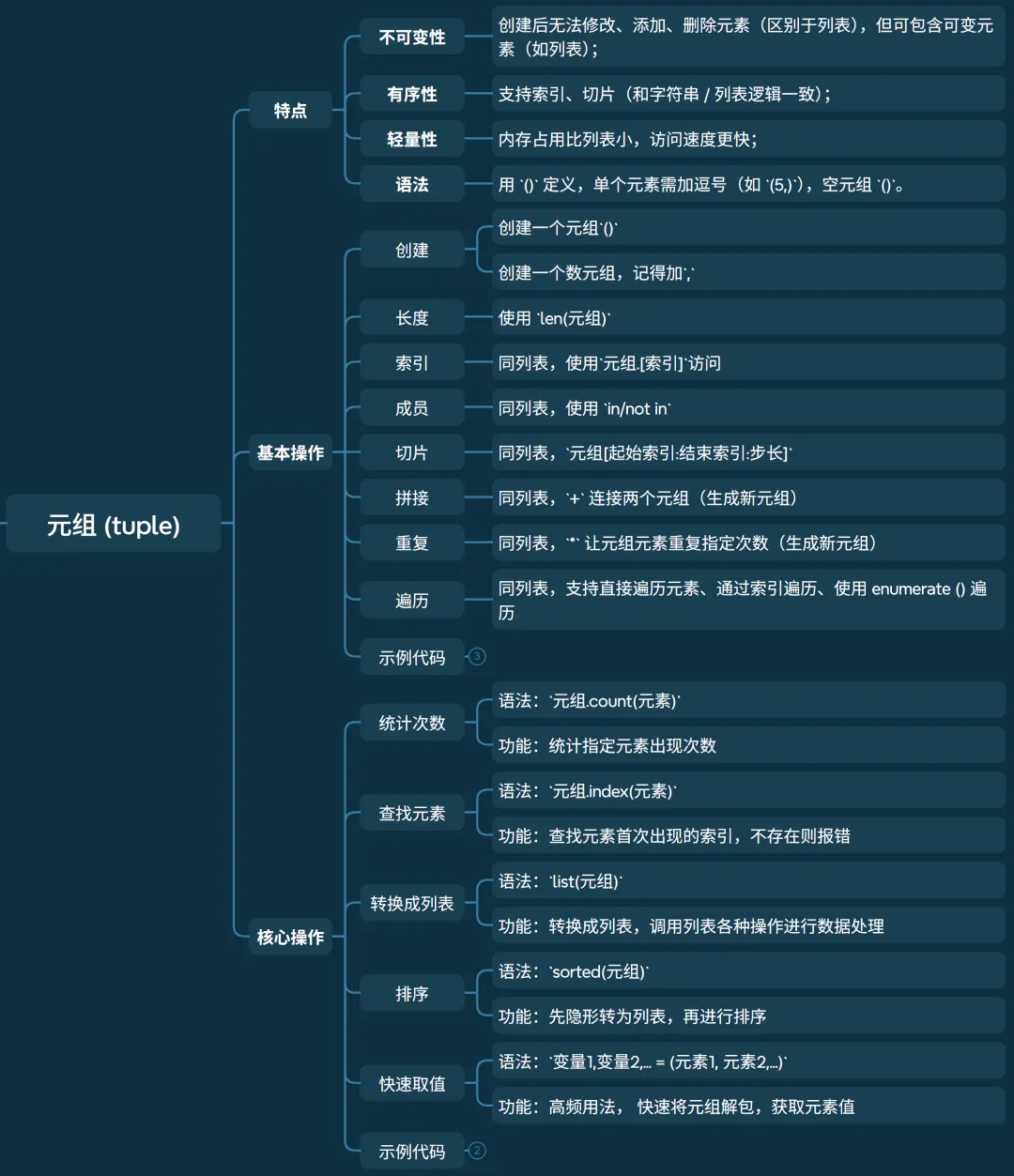
特点
• 不可变性:创建后无法修改、添加、删除元素(区别于列表),但可包含可变元素(如列表); • 有序性:支持索引、切片(和字符串 / 列表逻辑一致); • 轻量性:内存占用比列表小,访问速度更快; • 语法:用 () 定义,单个元素需加逗号(如 (5,)),空元组 () 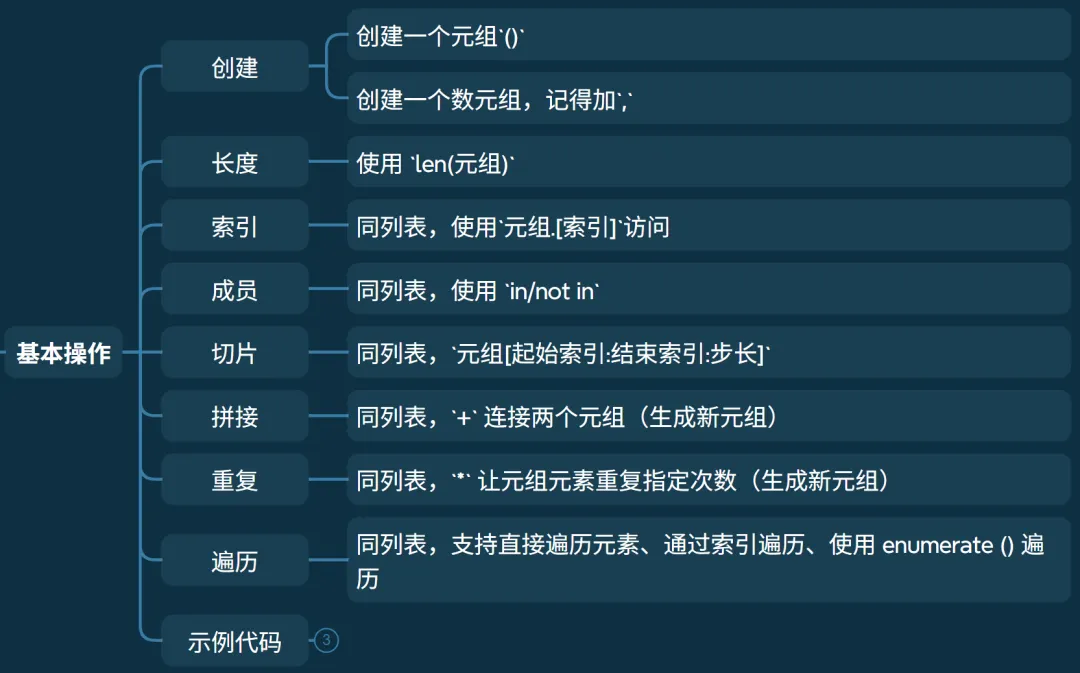
• 创建 • 长度 • 索引 • 成员 • 切片 • 拼接 • 重复 • 遍历 • 示例代码 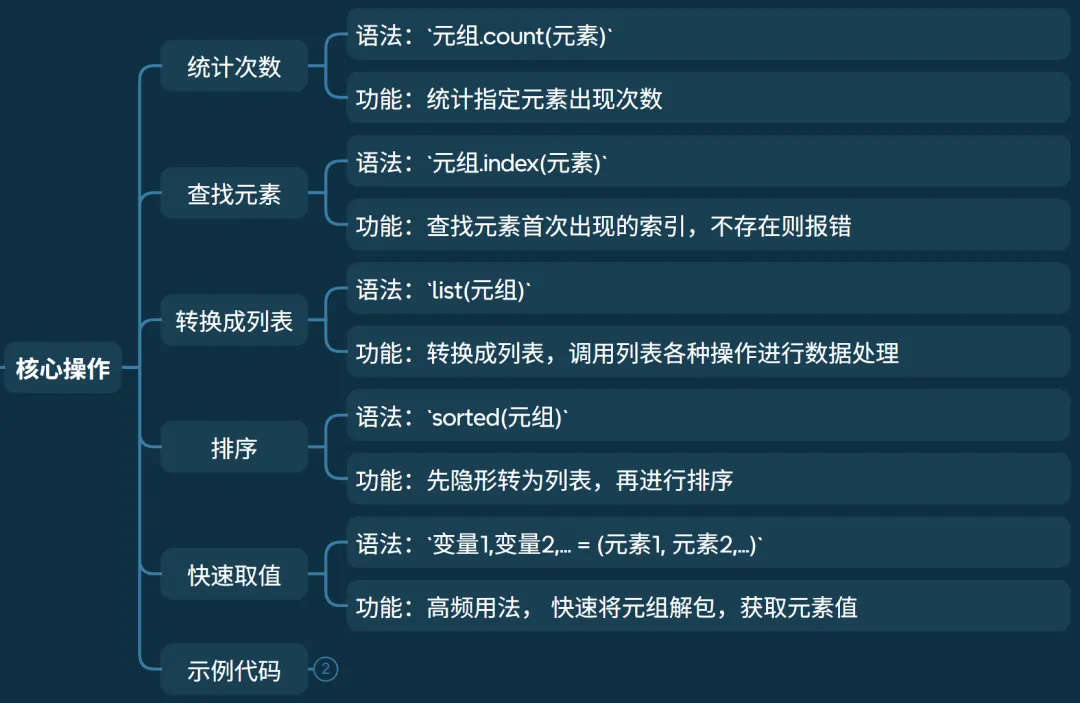
• 统计次数 • 查找元素 • 转换成列表 • 排序 • 快速取值 • 示例代码 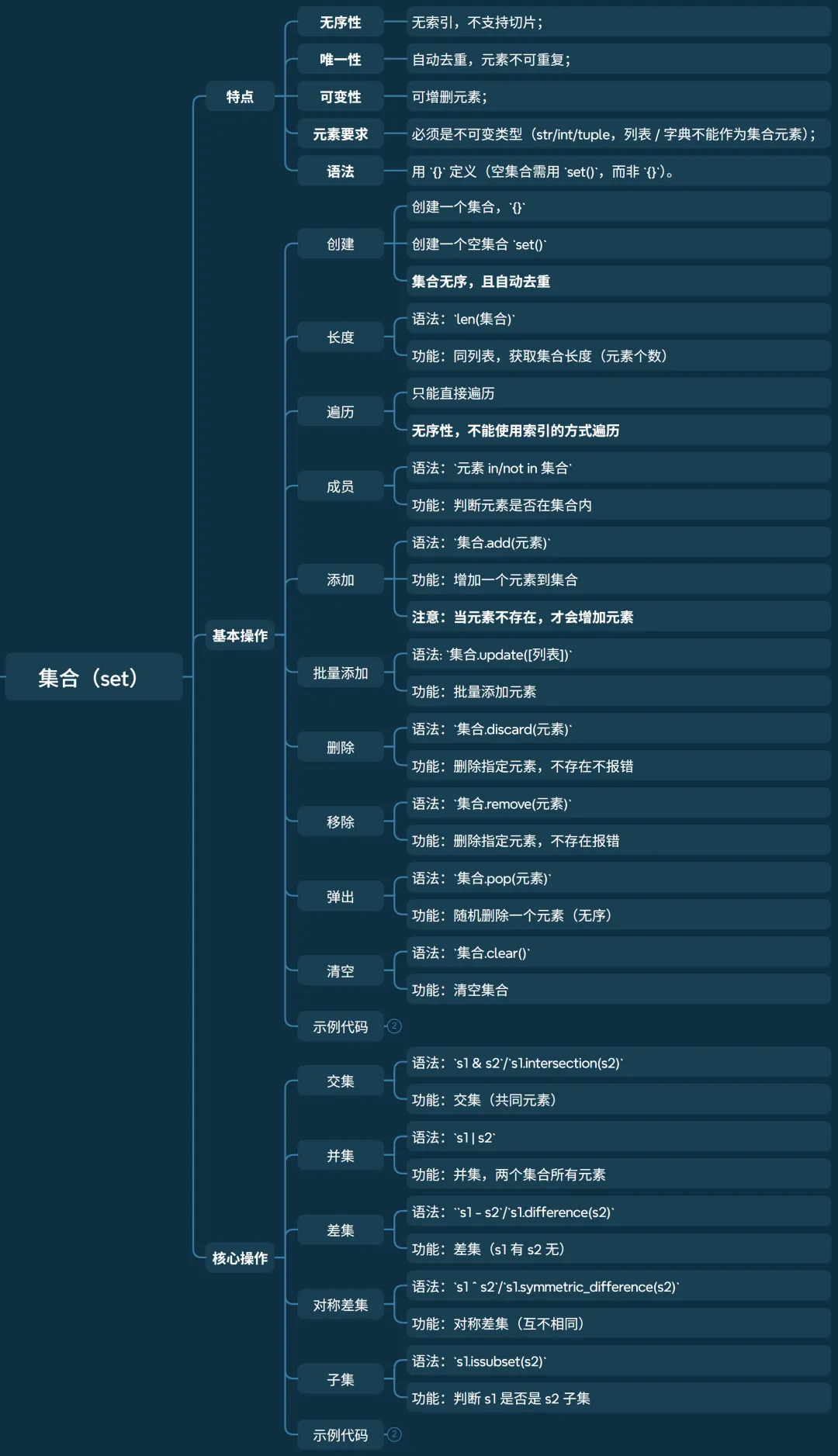
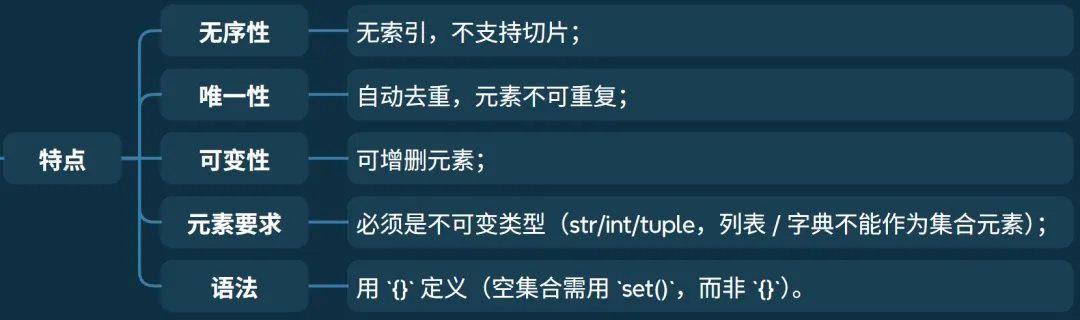
• 可变性:可增删元素; • 无序性:无索引,不支持切片; • 唯一性:自动去重,元素不可重复; • 元素要求:必须是不可变类型(str/int/tuple,列表 / 字典不能作为集合元素); • 语法:用 {}定义(空集合需用 set(),而非 {})。 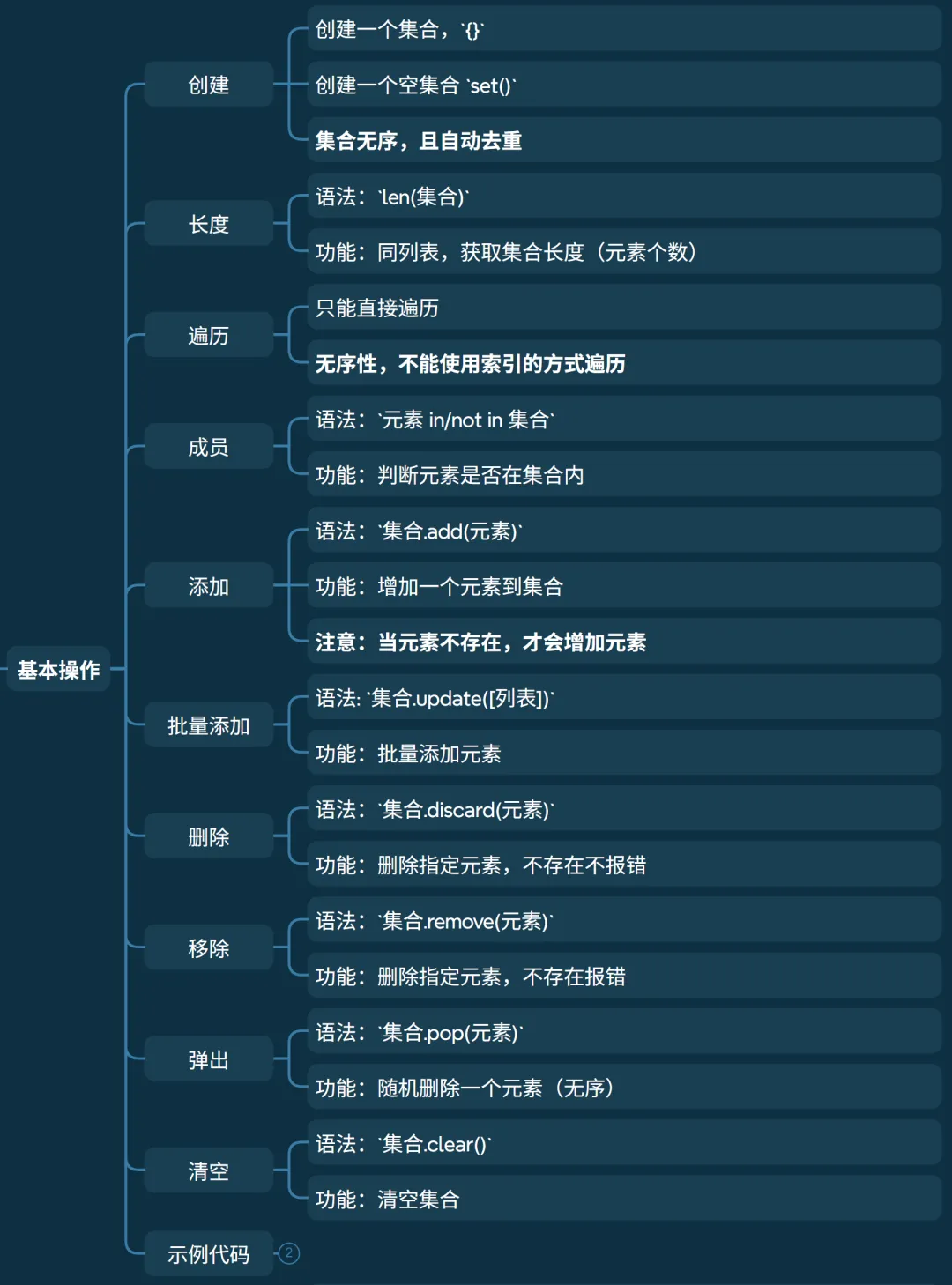
• 创建 • 长度 • 遍历 • 成员 • 添加 • 批量添加 • 删除 • 移除 • 弹出 • 清空 • 示例代码 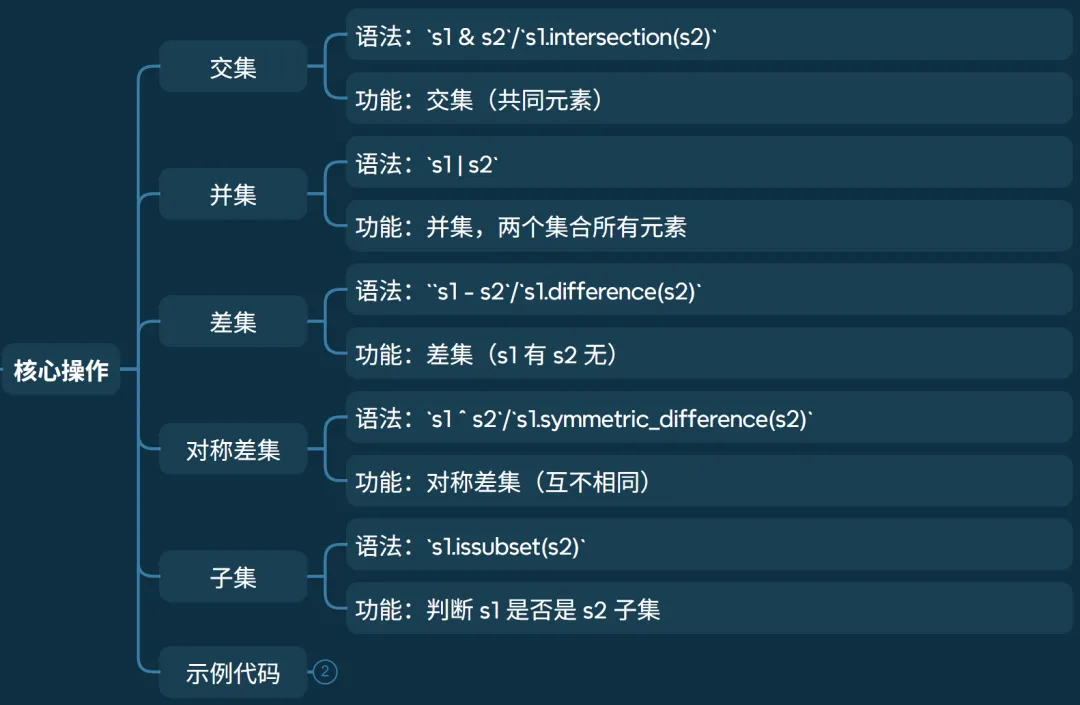
• 交集 • 并集 • 差集 • 对称差集 • 子集 • 示例代码 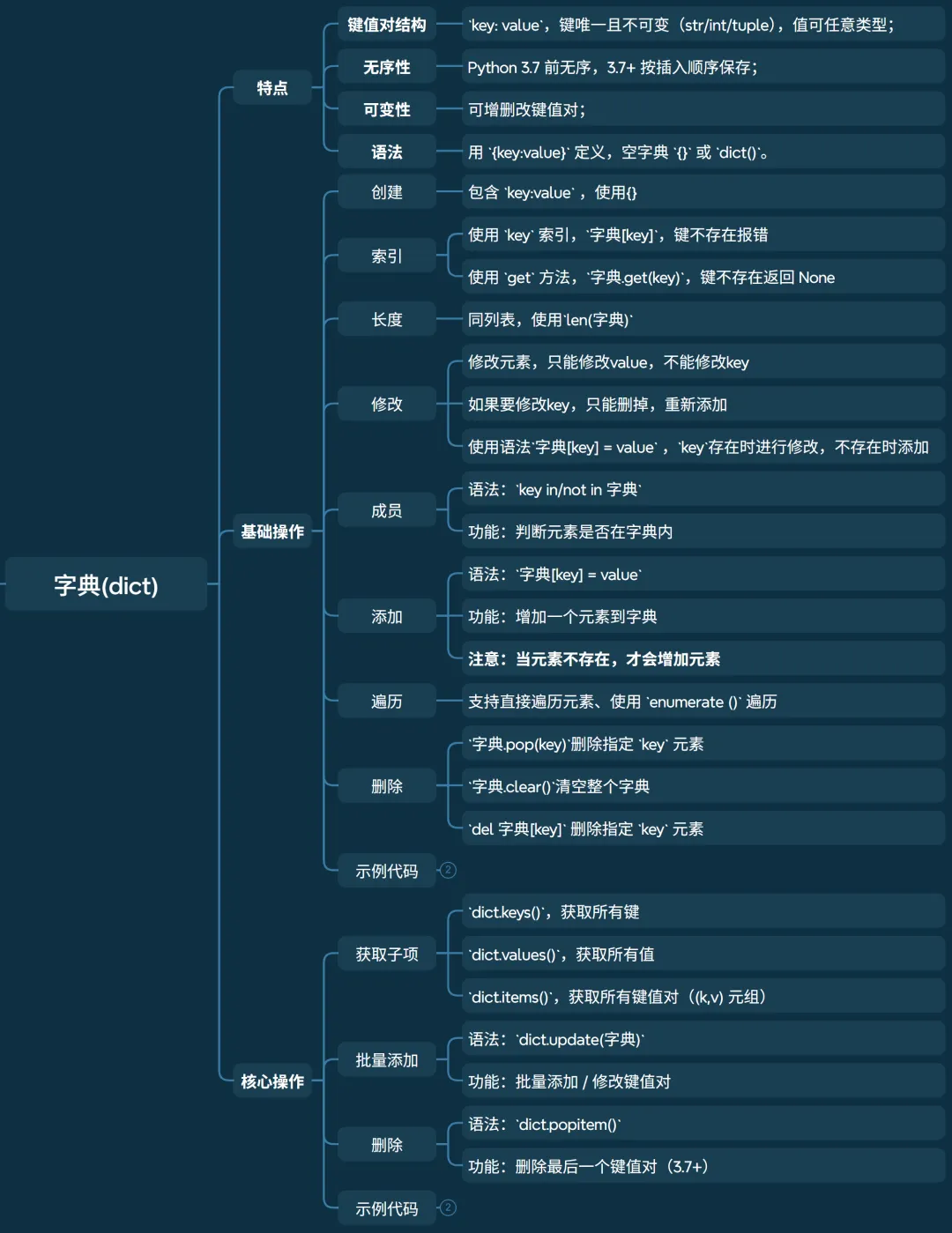
特点
• 可变性:可增删改键值对; • 无序性:Python 3.7 前无序,3.7+ 按插入顺序保存; • 键值对结构:key: value,键唯一且不可变(str/int/tuple),值可任意类型; • 语法:用 {key:value}定义,空字典 {}或 dict()。 基础操作
• 创建 • 索引 • 长度 • 修改 • 成员 • 添加 • 删除 • 示例代码 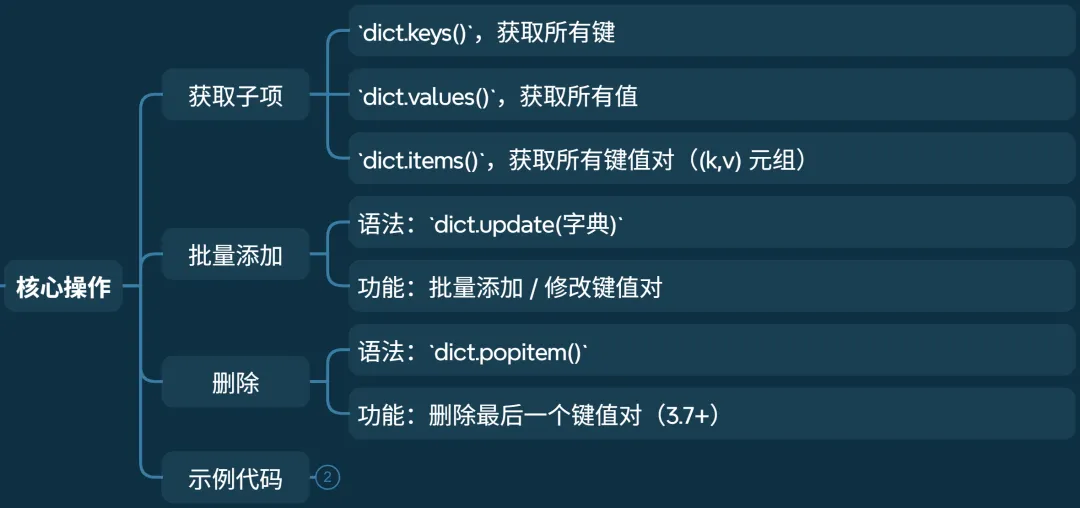
• 获取子项 • 批量添加 • 删除 • 示例代码
《嵌入式AI筑基笔记02:Python数据类型02,从C的“硬核”到Python的“包容”》
前言
数据类型是编程的基石。Python的数据类型虽灵活,但遵循着可变/不可变、有序/无序两大核心规则。理解它们,就能掌握字符串、列表、元组、字典、集合的精髓。
接上回,本文介绍复合类型。关于标量类型的介绍,请参看《嵌入式AI筑基笔记02:Python数据类型01,从C的“硬核”到Python的“包容”》。
列表(list)
列表(list)
特点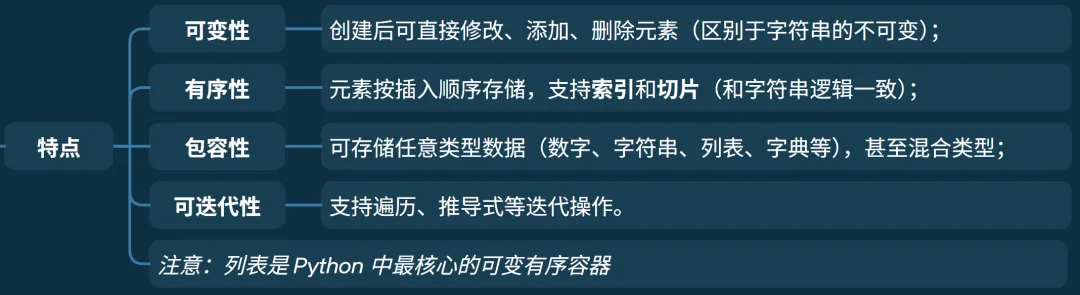
注意:列表是 Python 中最核心的可变有序容器
基本操作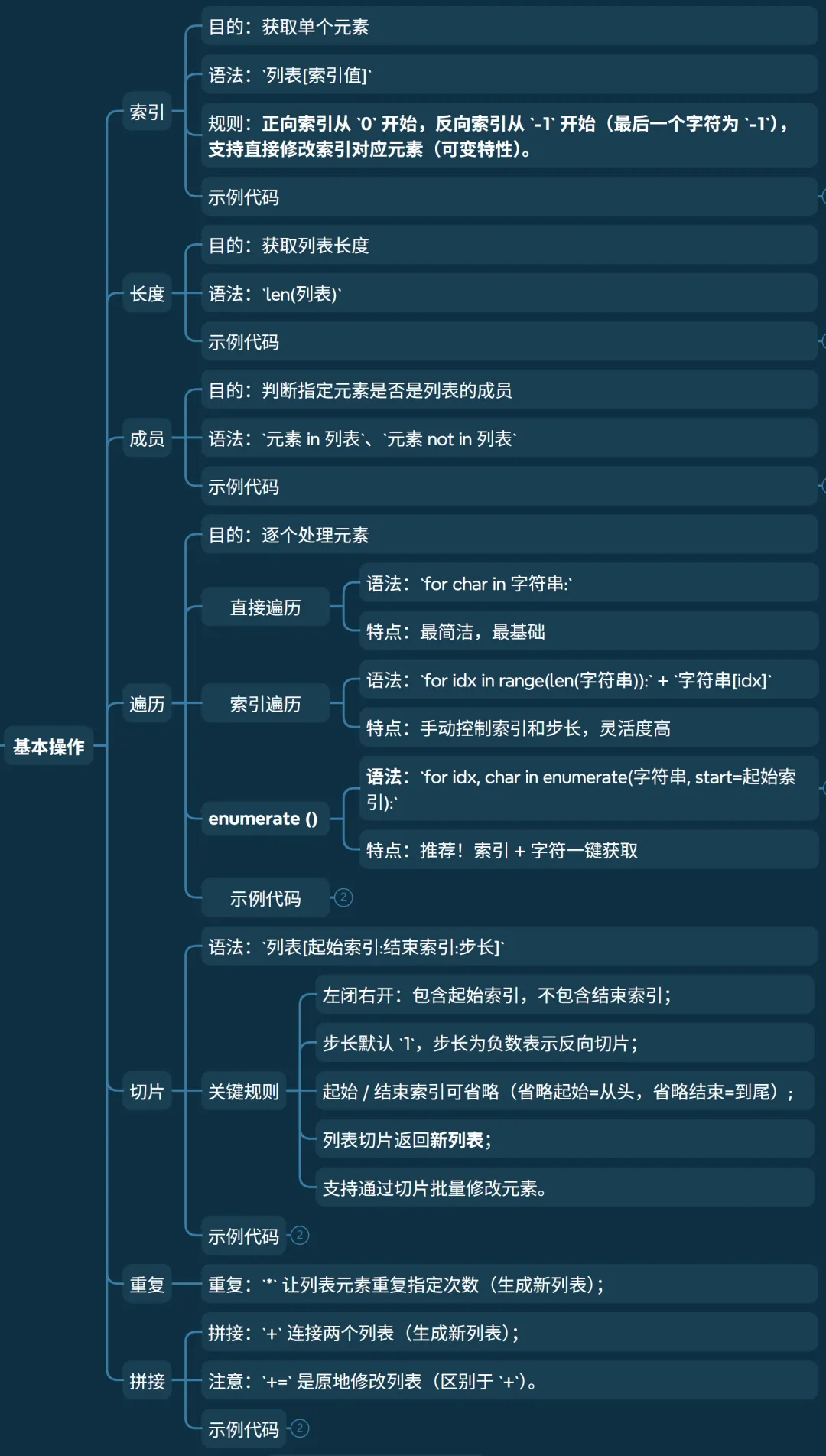
• 功能:获取单个元素 • 语法: 列表[索引值]• 规则:正向索引从 0开始,反向索引从-1开始(最后一个字符为-1),支持直接修改索引对应元素(可变特性)。• 示例代码 # 索引:获取单个字符# 正向索引从0开始,反向索引从-1开始# 支持直接修改索引对应元素(可变特性)lst = [10, "Python", 3.14, [1,2]]print(lst[1], lst[-1]) # 索引取值 Python [1, 2]lst[0] = 100 # 直接修改元素print(lst) # [100, 'Python', 3.14, [1,2]]
• 功能:获取列表长度 • 语法: len(列表)• 示例代码 # 长度 len()lst = [10, "Python", 3.14, [1,2]]print(len(lst), lst) # 获取列表长度 4 [10, 'Python', 3.14, [1, 2]]
• 功能:判断指定元素是否是列表的成员 • 语法: 元素 in 列表、元素 not in 列表• 示例代码 # 成员 in/not inlst = [10, "Python", 3.14, [1,2]]print(10 in lst) # 10 是 lst 的成员 Trueprint(10 not in lst) # 10 是 lst 的成员 Falseprint('Python' in lst) # 'Python' 是 lst 的成员 True
• 功能:逐个处理元素 • 直接遍历元素
• 语法: for char in 字符串:• 特点:最简洁,最基础
• 通过索引遍历
• 语法: for idx in range(len(字符串)):+字符串[idx]• 特点:手动控制索引和步长,灵活度高。
• 使用 enumerate () 遍历 • 语法: for idx, char in enumerate(字符串, start=起始索引):• enumerate()会返回一个迭代器,每个元素是(索引, 字符)的元组;• start参数可选,默认从 0 开始,可指定起始索引(如 start=1)。
• 特点:推荐!索引 + 字符一键获取。
• 示例代码 # 直接遍历# 特点:最简洁,最基础lst = [10, "Python", 3.14, [1,2]]for l in lst: print(l, end=' ') # 10 Python 3.14 [1, 2]print()# 通过索引遍历# 手动控制索引和步长,灵活度高for i in range(len(lst)): print(lst[i], end=' ') # 10 Python 3.14 [1, 2]print()# 使用 enumerate () 遍历# 推荐!索引 + 字符一键获取for i, l in enumerate(lst): print(i, l, end='|') # 0 10|1 Python|2 3.14|3 [1, 2]|print()
• 语法: 列表[起始索引:结束索引:步长]
• 左闭右开:包含起始索引,不包含结束索引; • 步长默认 1,步长为负数表示反向切片;• 起始 / 结束索引可省略(省略起始 = 从开头,省略结束 = 到末尾);
• 列表切片返回新列表; • 支持通过切片批量修改元素。 • 示例代码 # 切片lst = [1, 2, 3, 4, 5, 6]print(lst[1:5]) # 取[1,5)的元素 [2,3,4,5]print(lst[:2]) # 取[0,2)的元素 [1, 2]print(lst[::-1]) # 反向切片:反转列表 [6,5,4,3,2,1]lst[2:4] = [30,40] # 切片批量修改 修改元素2、3的值print(lst) # [1,2,30,40,5,6]lst[2:4] = [] # 切片删除元素(赋值为空列表)print(lst) # [1,2,5,6]
• 拼接: +连接两个列表(生成新列表);• 重复: *让列表元素重复指定次数(生成新列表);• 注意: +=是原地修改列表(区别于+)。• 示例代码 # 拼接与重复 + * +=lst1 = [1,2,3]lst2 = [4,5,6]print(lst1 + lst2) # 拼接(生成新列表) [1,2,3,4,5,6]print(lst1 * 2) # 重复 [1,2,3,1,2,3]lst1 += lst2 # 原地拼接(修改原列表)print(lst1) # [1,2,3,4,5,6]
增加操作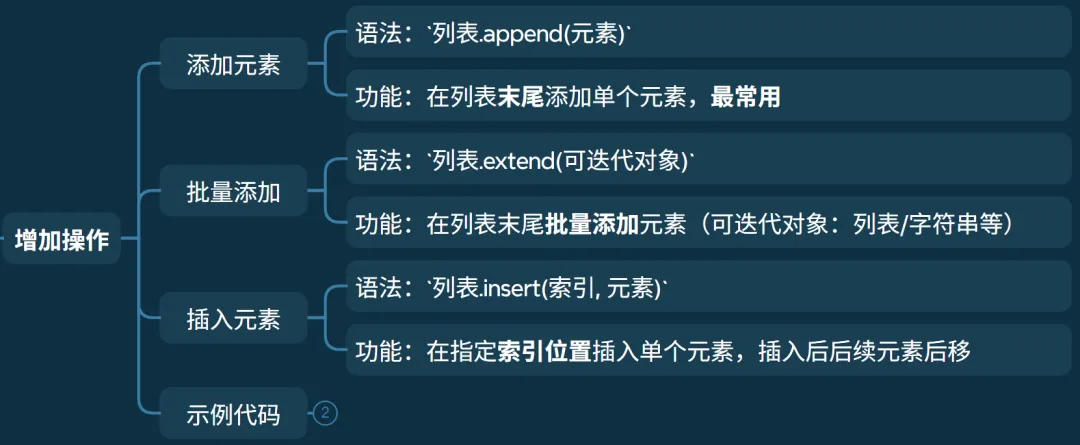
• 语法: 列表.append(元素)• 功能:在列表末尾添加单个元素,最常用
• 语法: 列表.extend(可迭代对象)• 功能:在列表末尾批量添加元素(可迭代对象:列表 / 字符串 / 元组等)
• 语法: 列表.insert(索引, 元素)• 功能:在指定索引位置插入单个元素,插入后后续元素后移
# 增加元素# append()lst = [1,2,3]lst.append(4) # append:末尾加单个元素print(lst) # [1,2,3,4]lst.append([5,6]) # 注意:append会把列表作为单个元素添加print(lst) # [1,2,3,4,[5,6]]# extend()lst = [1,2,3]lst.extend([4,5]) # extend:批量添加(拆分可迭代对象)print(lst) # [1,2,3,4,5]lst.extend("67") # 字符串会拆分为单个字符print(lst) # [1,2,3,4,5,'6','7']# insert:指定位置插入lst = [1,2,3]lst.insert(1, 10) # 索引1位置插入10print(lst) # [1,10,2,3]删除操作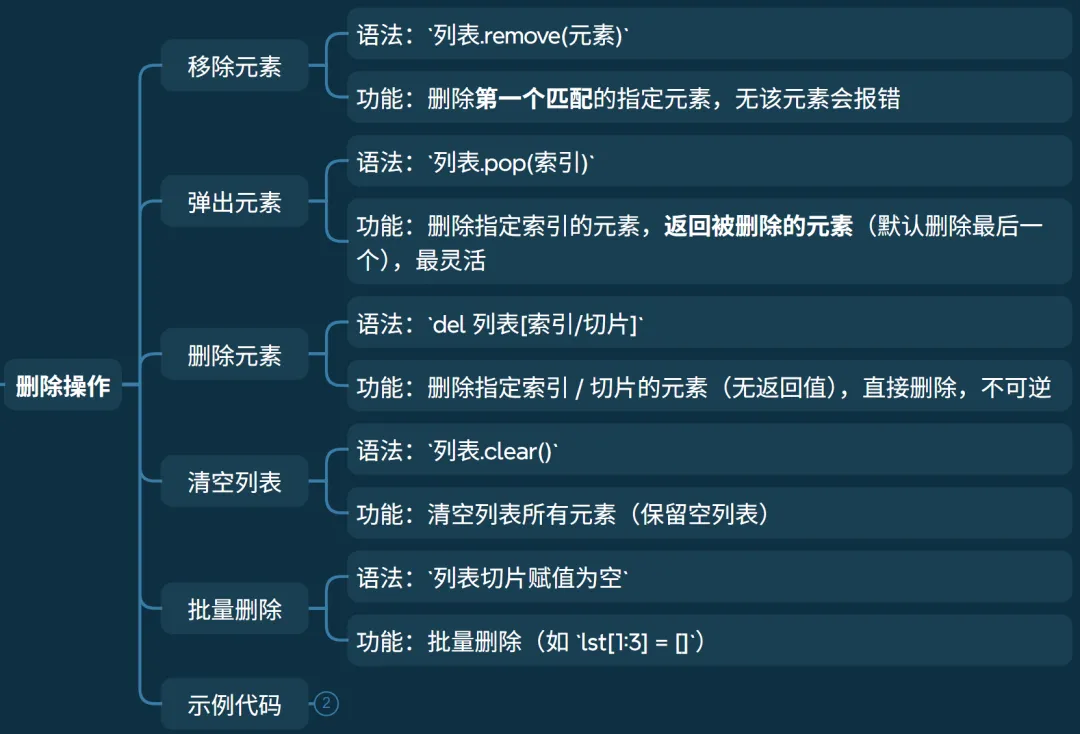
• 语法: 列表.remove(元素)• 功能:删除第一个匹配的指定元素,无该元素会报错。
• 语法: 列表.pop(索引)• 功能:删除指定索引的元素,返回被删除的元素(默认删除最后一个),最灵活。
• 语法: del 列表[索引/切片]• 功能:删除指定索引 / 切片的元素(无返回值),直接删除,不可逆。
• 语法: 列表.clear()• 功能:清空列表所有元素(保留空列表)。
• 语法: 列表切片赋值为空• 功能:批量删除(如 lst[1:3] = [])。
# 删除lst = [1,2,3,2,4]lst.remove(2) # remove:删除第一个匹配的2print(lst) # [1,3,2,4]# lst.remove(5) # # 报错:ValueError: list.remove(x): x not in list# pop()deleted = lst.pop(1) # pop:删除索引1的元素,返回3print(lst, deleted) # [1,2,4] 3lst.pop() # 默认删除最后一个元素print(lst) # [1,2]# dellst = [1,2,3]del lst[0] # del:删除索引0的元素print(lst) # [2,3]del lst[1:] # 删除切片(索引1到末尾)print(lst) # [2]# clear:清空列表lst = [1,2,3,4]lst[:2] = [] # 批量删除前两个print(lst) # [3, 4]lst.clear() # clear:清空列表print(lst) # []查询统计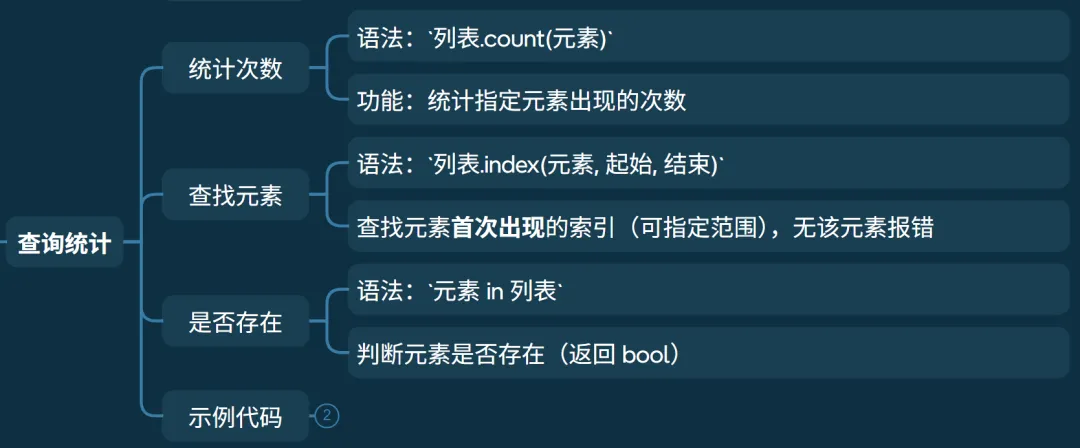
• 语法: 列表.count(元素)• 功能:统计指定元素出现的次数
• 语法: 列表.index(元素, 起始, 结束)• 查找元素首次出现的索引(可指定范围),无该元素报错
• 语法: 元素 in 列表• 判断元素是否存在(返回 bool)
# 查询操作lst = [1,2,3,2,4,2]print(lst.count(2)) # count:统计2出现的次数 3print(lst.index(3)) # index:查找3的索引 2# 查找2在索引2到5范围内首次出现的索引print(lst.index(2, 2, 5)) # 3# in:判断元素是否存在print(4 in lst) # Trueprint(5 in lst) # False排序反转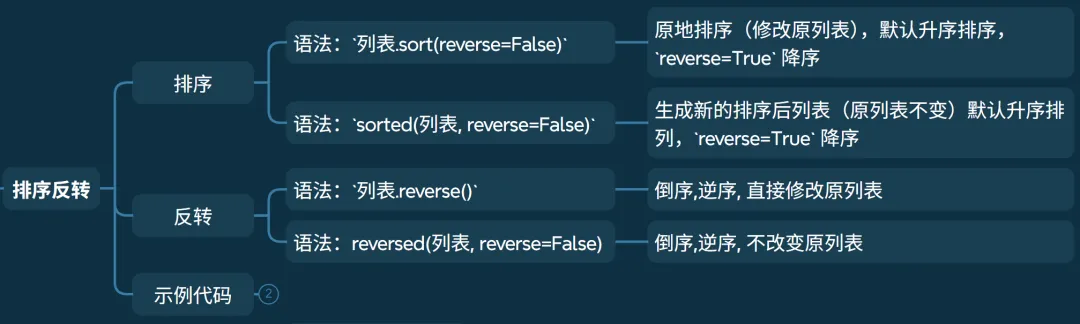
• 语法: 列表.sort(reverse=False)• 原地排序(修改原列表),默认升序排序, reverse=True降序
• 语法: sorted(列表, reverse=False)• 生成新的排序后列表(原列表不变)默认升序排列, reverse=True降序
• 语法: 列表.reverse()• 倒序,逆序, 直接修改原列表
• 语法: reversed(列表, reverse=False)
• 倒序,逆序, 不改变原列表
# 排序操作lst = [3,1,4,2,5]lst.sort() # sort:原地升序排序print(lst) # [1, 2, 3, 4, 5]lst.sort(reverse=True) # sort:原地降序排序print(lst) # [5, 4, 3, 2, 1]# sorted:生成新列表,原列表不变lst = [3,1,4,2,5]new_lst = sorted(lst)print(lst, new_lst) # [3, 1, 4, 2, 5] [1, 2, 3, 4, 5]# reverse:原地反转lst.reverse()print(lst) # [5, 2, 4, 1, 3]# sorted:生成新列表,原列表不变new_lst = list(reversed(lst))print(lst, new_lst) # [5, 2, 4, 1, 3] [3, 1, 4, 2, 5]# 切片反转(生成新列表,原列表不变)print(lst[::-1]) # [3, 1, 4, 2, 5]其它操作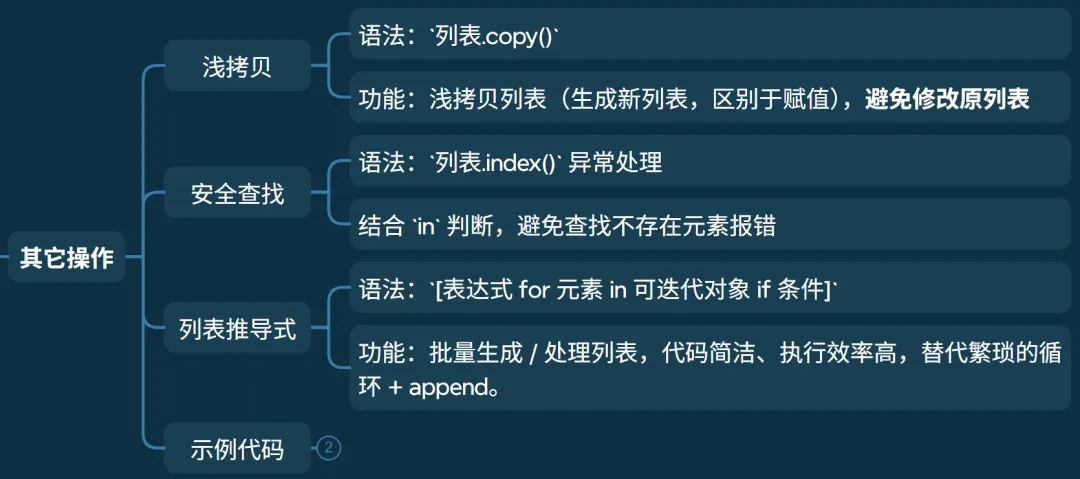
• 语法: 列表.copy()• 功能:浅拷贝列表(生成新列表,区别于赋值),避免修改原列表
• 语法: 列表.index()异常处理• 结合 in判断,避免查找不存在元素报错
• 语法: [表达式 for 元素 in 可迭代对象 if 条件]• 功能:批量生成 / 处理列表,代码简洁、执行效率高,替代繁琐的循环 + append。
# copy:浅拷贝lst1 = [1,2,3]lst2 = lst1.copy() # 新列表lst2[0] = 100print(lst1, lst2) # [1, 2, 3] [100, 2, 3]# 安全查找元素索引lst = [1,2,3]target = 4if target in lst: print(lst.index(target))else: print(f"{target} 不存在") # 4 不存在# # 列表推导式:用一行代码快速生成新列表# i 表示列表元素取值,for表示i推导公式 if做筛选print([i for i in range(1, 6)]) # [1, 2, 3, 4, 5]print([i*2 for i in range(1, 6)]) # [2, 4, 6, 8, 10]print([i for i in range(1, 10) if i%2]) # 奇数列表 [1, 3, 5, 7, 9]print([i for i in range(1, 10) if i%2 and i%3==0]) # [3, 9]print([i for i in range(1, 10) if i%2 if i%3==0]) # [3, 9]# ['A1', 'A2', 'A3', 'B1', 'B2', 'B3', 'C1', 'C2', 'C3']print([i+j for i in "ABC" for j in "123"]) # 循环嵌套元组(tuple)
特点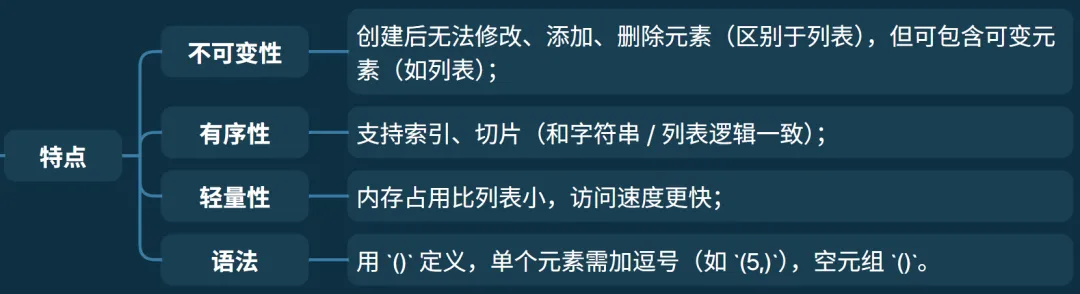
基本操作
• 创建一个元组 ()• 创建一个数元组,记得加 ,
• 使用 len(元组)
• 同列表,使用 元组.[索引]访问
• 同列表,使用 in/not in
• 同列表, 元组[起始索引:结束索引:步长]
• 同列表, +连接两个元组(生成新元组)
• 同列表, *让元组元素重复指定次数(生成新元组)
• 同列表,支持直接遍历元素、通过索引遍历、使用 enumerate () 遍历
# 创建元组t1 = (1, 2, "Python", [3,4]) # 包含可变元素(列表)t2 = (5) # 括号当做运算符处理,所以 t2 为整数t3 = (5,) # 单个元素必须加逗号,否则视为普通括号print(t1, type(t1)) # (1, 2, 'Python', [3, 4]) <class 'tuple'>print(t2, type(t2)) # 5 <class 'int'>print(t3, type(t3)) # (5,) <class 'tuple'>print(len(t1), t1) # len获取长度 4 (1, 2, 'Python', [3, 4])# 索引/切片(仅取值,不可修改)print(t1[2], t1[1:3]) # Python (2, 'Python')# t1[0] = 100 # 报错:TypeError(不可变)t1[3][0] = 30 # 但元组内的可变元素可修改print(t1) # (1, 2, 'Python', [30, 4])# 遍历同列表# 直接遍历t1 = (1, 2, "Python", [3,4])for t in t1: print(t, end=" ") # 1 2 Python [3, 4]print()# 通过索引遍历# 手动控制索引和步长,灵活度高for i in range(len(t1)): print(t1[i], end=' ') # 1 2 Python [3, 4]print()# 使用 enumerate () 遍历# t1[0] = 1 t1[1] = 2 t1[2] = Python t1[3] = [3, 4]for i, t in enumerate(t1): print(f't1[{i}] = {t}', end="\t")print()# 拼接/重复(生成新元组)t4 = (1,2) + (3,4)print(t4) # (1, 2, 3, 4)print(t4 * 2) # (1, 2, 3, 4, 1, 2, 3, 4)# 成员列表 in/not int1 = (1, 2, "Python", [3,4]) # 包含可变元素(列表)print(1 in t1) # Trueprint(5 in t1) # False核心操作
• 语法: 元组.count(元素)• 功能:统计指定元素出现次数
• 语法: 元组.index(元素)• 功能:查找元素首次出现的索引,不存在则报错
• 语法: list(元组)• 功能:转换成列表,调用列表各种操作进行数据处理
• 语法: sorted(元组)• 功能:先隐形转为列表,再进行排序
• 语法: 变量1,变量2,... = (元素1, 元素2,...)• 功能:高频用法, 快速将元组解包,获取元素值
t = (1, 3, 5, 6, 3, 3)print(t.count(3)) # 统计 3 出现的次数 3print(t.index(3)) # 元素 3 首次出现的索引 1print(list(t)) # 转换成列表 [1, 3, 5, 6, 3, 3]t = (1, 3, 5, 6, 3, 3)print(sorted(t)) # 先隐形转为列表,再进行排序 [1, 3, 3, 3, 5, 6]a, b, c = (1, 3, 7)print(a, b, c) # 将元组解包 1 3 7_, a = (3, 6) # _为变量名,有时候我们不想要某个参数,可以用_占位print(a) # 取第 2 个值 6a, _ = (12, 3.6)print(a) # 取第 1 个值 12集合(set)
特点
基本操作
• 创建一个集合, {}• 创建一个空集合 set()• 集合无序,且自动去重
• 语法: len(集合)• 功能:同列表,获取集合长度(元素个数)
• 只能直接遍历 • 无序性,不能使用索引的方式遍历
• 语法: 元素 in/not in 集合• 功能:判断元素是否在集合内
• 语法: 集合.add(元素)• 功能:增加一个元素到集合 • 注意:当元素不存在,才会增加元素
• 语法: 集合.update([列表])• 功能:批量添加元素
• 语法: 集合.discard(元素)• 功能:删除指定元素,不存在不报错
• 语法: 集合.remove(元素)• 功能:删除指定元素,不存在报错
• 语法: 集合.pop(元素)• 功能:随机删除一个元素(无序)
• 语法: 集合.clear()• 功能:清空集合
# 定义集合(自动去重)s1 = {1, 2, 2, 3, "apple"}print(s1, type(s1)) # {'apple', 1, 2, 3} <class 'set'>s2 = set([1,2,3,3]) # 列表转集合(去重)print(s2) # {1, 2, 3}# 空集合和空字典s = {} # 默认空字典print(s, type(s)) # {} <class 'dict'>s1 = set() # 空集合print(s1, type(s1)) # set() <class 'set'>s1 = {1, 2, 2, 3, "apple"}print("apple" in s1, 2 not in s1) # True False# 添加元素s1.add(4) # 添加单个元素s1.update([5,6]) # 批量添加print(s1) # {1, 2, 3, 4, 5, 6, 'apple'}# 删除元素s1.remove(2) # 删除指定元素,不存在报错s1.discard(10) # 删除指定元素,不存在不报错deleted = s1.pop() # 随机删除一个元素(无序)print(s1, deleted) # {3, 4, 5, 6, 'apple'} 1s1.clear() # 清空集合print(s1) # set()核心操作
• 语法: s1 & s2/s1.intersection(s2)• 功能:交集(共同元素)
• 语法: s1 | s2• 功能:并集,两个集合所有元素
• 语法: s1 - s2/s1.difference(s2)• 功能:差集(s1 有 s2 无)
• 语法: s1 ^ s2/s1.symmetric_difference(s2)• 功能:对称差集(互不相同)
• 语法: s1.issubset(s2)• 功能:判断 s1 是否是 s2 子集
# 集合的操作s1 = {1, 3, 5}s2 = {1, 2 ,4}print(s1 & s2) # 交集 {1}print(s1.intersection(s2)) # 交集 {1}print(s1 | s2) # 并集 {1, 2, 3, 4, 5}print(s1 - s2) # 差集 {3, 5}print(s1.difference(s2)) # 差集 {3, 5}print(s1.symmetric_difference(s2)) # 对称差集 {2, 3, 4, 5}print(s1 ^ s2) # 对称差集,只在一个集合不同时在两个集合的元素 {2, 3, 4, 5}print(s1 >= s2) # 包含关系,S1包含S2下为True Falseprint({1,4}.issubset(s2)) # 子集 True字典(dict)
特点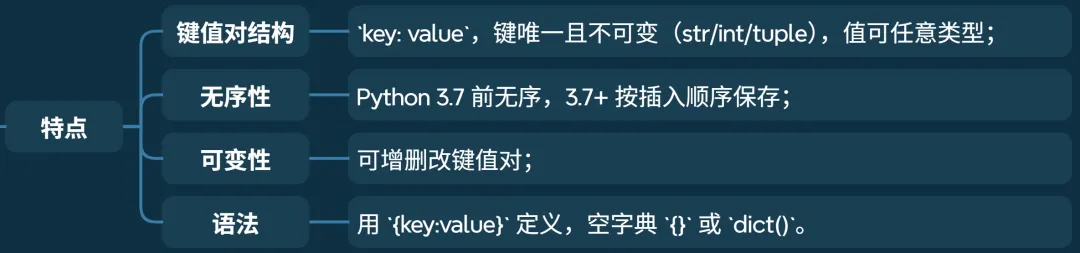
基础操作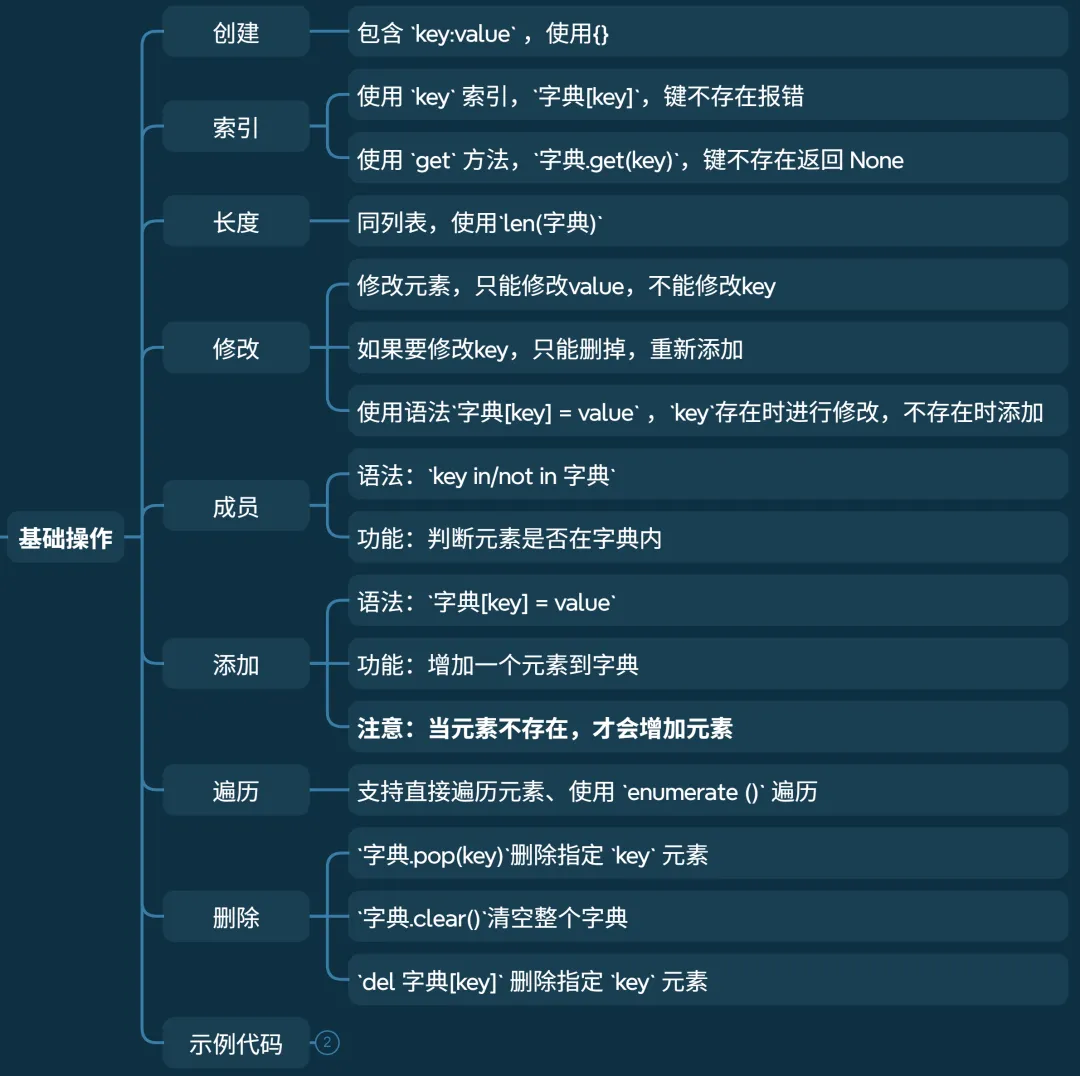
• 包含 key:value,使用{}
• 使用 key索引,字典[key],键不存在报错• 使用 get方法,字典.get(key),键不存在返回 None
• 同列表,使用 len(字典)
• 修改元素,只能修改value,不能修改key • 如果要修改key,只能删掉,重新添加 • 使用语法 字典[key] = value,key存在时进行修改,不存在时添加
• 语法: key in/not in 字典• 功能:判断元素是否在字典内
• 语法: 字典[key] = value• 功能:增加一个元素到字典 • 注意:当元素不存在,才会增加元素
• 字典.pop(key)删除指定key元素• 字典.clear()清空整个字典• del 字典[key]删除指定key元素
# 定义字典 key:valueuser = dict(name="李四", age=21) # 关键字参数创建print(user) # {'name': '李四', 'age': 21}# 访问值(两种方式)print(user["name"]) # 李四(键不存在报错)print(user.get("age")) # 21(推荐,键不存在返回None)print(user.get("phone", "13800138000")) # 不存在返回默认值 13800138000print(len(user)) # 获取字典长度 2# 修改/添加键值对user["age"] = 18 # key存在 修改已有键user["phone"] = "13800138000" # key不存在 添加新键值对print(user) # {'name': '李四', 'age': 18, 'phone': '13800138000'}# 成员 in/not inprint("name" in user, "phone" not in user) # True False# 删除键值对del user["phone"] # 删除指定键deleted = user.pop("age") # 删除并返回值print(user, deleted) # {'name': '李四'} 18user.clear() # 清空字典print(user) # {}核心操作
• dict.keys(),获取所有键• dict.values(),获取所有值• dict.items(),获取所有键值对((k,v) 元组)
• 语法: dict.update(字典)• 功能:批量添加 / 修改键值对
• 语法: dict.popitem()• 功能:删除最后一个键值对(3.7+)
# 获取子项user = {"name": "张三", "age": 20}print(user.keys()) # 获取所有的key dict_keys(['name', 'age'])print(list(user.keys())) # ['name', 'age']print(user.values()) # 获取所有的value dict_values(['张三', 20])print(list(user.values())) # ['张三', 20]print(user.items()) # 获取所有的item dict_items([('name', '张三'), ('age', 20)])print(list(user.items())) # ['张三', 20]# 遍历键值对(最常用)for k, v in user.items(): print(f"{k}: {v}", end='\t') # name: 张三 age: 20print()# 批量更新user.update({"age": 21, "city": "上海"})print(user) # {'name': '张三', 'age': 21, 'city': '上海'}# 删除user.popitem() # 删除最后一个键值对(3.7+)print(user) # {'name': '张三', 'age': 21}结束语
从C到Python,最大的变化不是语法,而是思维,python世界里内存自动管理,数据结构开箱即用,代码行数大幅减少。但自由的背后是规则——理解可变与不可变、有序与无序,才能真正用好Python的数据结构。下一篇流程控制,继续探索Python的简洁之美。
接下来学什么
按照计划,后面还有:
第一篇:语法规则(与 C 的对比) ✅ 已完成第二篇:数据结构:列表、元组、字典、集合 ✅ 已完成第三篇:流程控制:条件、循环、推导式 ⏳ 准备中第四篇:函数与模块:定义、参数、作用域 ⏳第五篇:对象和类:Class ⏳第六篇:文件操作与异常处理 ⏳第七篇:NumPy 入门:像操作内存一样操作数据 ⏳第八篇:Pandas 基础:给数据“做表格” ⏳
一步一步来,不急。
完整代码
''' * @Filename : python_data_struct.py * @Revision : $Revision: 1.00 $ * @Author : Feng(更多编程相关的知识和源码见微信公众号:不只会拍照的程序猿,欢迎订阅) * @Description : python 数据结构:列表、元组、字典、集合'''# ###################### 基本数据类型 ###################### ## 整数 可正可负,无位数限制a = 4b = -1000000000000000000000print(a, type(a)) # 4 <class 'int'>print(b, type(b)) # -1000000000000000000000 <class 'int'># 浮点数 带小数部分,可能有精度限制f1 = 3.1415926f2 = -2.3e-3print(f1, type(f1)) # 3.1415926 <class 'float'>print(f2, type(f2)) # -0.0023 <class 'float'># 复数 (complex)# 形如 `a + bj` 的数(a 是实部,b 是虚部)# 主要用于科学计算comp = 3 + 4jprint(comp, type(comp)) # (3+4j) <class 'complex'>print(comp.real, type(comp.real)) # 实部 3.0 <class 'float'>print(comp.imag, type(comp.imag)) # 虚部 4.0 <class 'float'># 布尔型 (bool)# 只有两个值:`True`(真,等价于 1)、`False`(假,等价于 0)# 主要用于条件判断# Python 中除了 `0`、`""`、`[]`、`{}`、`None` 等空值,其他值都被视为 `True`b = Trueprint(b, type(b)) # True <class 'bool'>print(b and False, b or False, not b) # False True Falseprint(bool([]), bool(None), bool("")) # False False False# ###################### 字符串 ###################### ## 字符串 (str)# 字符的有序序列# 不可变(一旦创建,内容无法修改)# 用单引号 / 双引号 / 三引号包裹# 基本操作# 创建# 使用单引号或双引号括起来s = "hello"f = 'seven'print(s, f, type(s)) # hello seven <class 'str'># 索引# 使用下标索引s = "hello"print(s[1], s[-1]) # 第二个元素和最后一个元素 e o# 长度# 使用len()s = "hello"print(s, len(s)) # hello 5# 成员s = "hello"print('1' in s) # 1 不是 s 的成员 Falseprint('1' not in s) # 1 不是 s 的成员 Trueprint('o' in s) # o 是 s 的成员 True# 遍历# 直接遍历字符#特点:最简洁,最基础s = "hello"for char in s: print(char, end='') # helloprint()# 通过索引遍历# 手动控制索引和步长,灵活度高for i in range(len(s)): print(s[i], end='') # helloprint()# 使用 enumerate () 遍历# 推荐!索引 + 字符一键获取for i, char in enumerate(s): print(i, char, end='|') # 0 h|1 e|2 l|3 l|4 o|print()# 切片# 获取子串s = "hello"print(s[1:3]) # 取[1,3)的字符 elprint(s[:2]) # 取[0,2)的字符 heprint(s[2:]) # 取[2,4]的字符 lloprint(s[::2]) # 隔2位取所有字符 hloprint(s[-4:-2]) # 取[-4,-2)的字符 elprint(s[::-1]) # 反向取所有字符 olleh# 拼接和重复s = "hello"s1 = ',feng!'print(s+s1) # 拼接 hello,feng!print(s*2) # 重复 hellohello# 判断操作print("hello".isupper(), "HELLO".isupper()) # 判断全为大写 False Trueprint("HELLO".islower(), "hello".islower()) # 判断全为小写 False Trueprint("HE12O".isalpha(), "hello".isalpha()) # 判断全为字母 False Trueprint("hello".isdigit(), "12345".isdigit()) # 判断全为数字 False Trueprint("HELLO".isspace(), " ".isspace()) # 判断为空格字符串 False Trueprint("he_lo".isalnum(), "HE12O".isalnum()) # 判断全为字母或数字 False Trueprint("hello".istitle(), "Hello".istitle()) # 判断首字母大写 False Trueprint("hello".startswith("ll"), "HELLO".startswith("HE")) # 判断前缀 False Trueprint("hello".endswith("ll"), "HELLO".endswith("LO")) # 判断后缀 False True# 转换操作print("hello".upper(), "H12LO".upper()) # 转为大写 HELLO H12LOprint("HELLO".lower(), "hELlo".lower()) # 转为小写 hello helloprint(int("+12343323"), int("-15324")) # 转为整数 12343323 -15324print(float("3.141592"),float("-12.3")) # 转为浮点数 3.141592 -12.3print("HELLO".title(), "heLLo".title()) # 首字母大写 Hello Helloprint("hLo".swapcase(), "HL12O".swapcase()) # 大小写反转 HlO hl12o# 对齐操作s = "hello"print(s.center(10)) # 居中对齐 " hello "print(s.ljust(10)) # 左对齐 "hello "print(s.rjust(10)) # 右对齐 " hello"print(s.zfill(10)) # 靠右补0 "00000hello"# 拆分操作# split() : 拆分s = "hello seven world"print(s.split()) # 默认使用空格拆分,多空格合并 ['hello', 'seven', 'world']print(s.split(' ')) # 指定使用空格拆分, 多空格不合并 ['hello', '', '', '', 'seven', 'world']print(s.split('lo')) # 指定使用”lo"拆分 ['hel', ' seven world']print(s.split('123')) # 指定使用”123"拆分,未找到,不分割 ['hello seven world']print(s.rsplit(maxsplit=1)) # 从右开始按空格拆分1次, ['hello seven', 'world']# splitlines(): 按行拆分s ='''hello sevenworld'''print(s.splitlines()) # 按行拆分,多空格不合并 ['hello ', 'seven', 'world']print(s.split('\n')) # 按行拆分,多空格不合并 ['hello ', 'seven', 'world']# 合并: join : 会得到字符串类型# join 将列表中的字符串拼接s = ['hello', 'world', 'seven']print('\n'.join(s)) # 以换行符合并字符串 hello\nworld\nsevenprint('\t'.join(s)) # 以制表符合并字符串 hello world sevenprint(''.join(s)) # 直接合并字符串 helloworldseven# 查找和替换# count(): 统计字符出现个数s = "hello hello"print(s.count('l')) # 'l' 出现次数 4print(s.count('e')) # 'e' 出现次数 2print(s.count('ll')) # 'll' 出现次数 2print(s.count('e', 5, 10) ) # [5, 10)中'e'出现次数 1# find()/rfind(): 查找指定子串第一次出现的下标位置,如果不存在则返回-1s = "124 hello world hello 1234"print(s.find('hello')) # 4print(s.rfind('l')) # 从右向左查找 19print(s.rfind('x')) # 不存在 -1# index(): 查找子串首次出现的索引,找不到报错(区别于 find)s = "124 hello world hello 1234"print(s.index('hello')) # 4# 替换: replace() : 默认替换所有匹配的字符s = 'hello world seven'print(s.replace('l', 'm')) # 将’l‘替换成'm' hemmo wormd sevenprint(s.replace('l', 'nn')) # 将’l‘替换成'nn' hennnno wornnd sevenprint(s.replace('x', '2')) # 将’x‘替换成'2',未找到 hello world seven# strip() : 去除两边的指定字符(默认去除空格) (了解)s = ' --hello feng-- seven-- 'print(s.strip()) # 去掉两边空格 "--hello feng-- seven--"print(s.strip(' -')) # 去掉两边空格和- "hello feng-- seven"print(s.lstrip()) # 去掉左边空格 "--hello feng-- seven-- "print(s.rstrip()) # 去掉右边空格 " --hello feng-- seven--"# 编码解码# 编码: encode() 将 字符串 => 二进制# 解码: decode() 将 二进制 => 字符串s = "hello 你好"b = s.encode("utf-8") # 编码,使用“utf-8” b'hello \xe4\xbd\xa0\xe5\xa5\xbd'b1 = s.encode("gbk") # 编码,使用“gbk” b'hello \xc4\xe3\xba\xc3'print(b)print(b1)x = b.decode("utf-8") # 解码,使用“utf-8” hello 你好x1 = b1.decode("gbk") # 解码,使用“gbk” hello 你好print(x)print(x1)# ###################### 列表 ###################### ## 列表 list[]# 索引:获取单个字符# 正向索引从0开始,反向索引从-1开始# 支持直接修改索引对应元素(可变特性)lst = [10, "Python", 3.14, [1,2]]print(lst[1], lst[-1]) # 索引取值 Python [1, 2]lst[0] = 100 # 直接修改元素print(lst) # [100, 'Python', 3.14, [1,2]]# 长度 len()lst = [10, "Python", 3.14, [1,2]]print(len(lst), lst) # 获取列表长度 4 [10, 'Python', 3.14, [1, 2]]# 成员 in/not inlst = [10, "Python", 3.14, [1,2]]print(10 in lst) # 10 是 lst 的成员 Trueprint(10 not in lst) # 10 是 lst 的成员 Falseprint('Python' in lst) # 'Python' 是 lst 的成员 True# 遍历# 直接遍历# 特点:最简洁,最基础lst = [10, "Python", 3.14, [1,2]]for l in lst: print(l, end=' ') # 10 Python 3.14 [1, 2]print()# 通过索引遍历# 手动控制索引和步长,灵活度高for i in range(len(lst)): print(lst[i], end=' ') # 10 Python 3.14 [1, 2]print()# 使用 enumerate () 遍历# 推荐!索引 + 字符一键获取for i, l in enumerate(lst): print(i, l, end='|') # 0 10|1 Python|2 3.14|3 [1, 2]|print()# 切片lst = [1, 2, 3, 4, 5, 6]print(lst[1:5]) # 取[1,5)的元素 [2,3,4,5]print(lst[:2]) # 取[0,2)的元素 [1, 2]print(lst[::-1]) # 反向切片:反转列表 [6,5,4,3,2,1]lst[2:4] = [30,40] # 切片批量修改 修改元素2、3的值print(lst) # [1,2,30,40,5,6]lst[2:4] = [] # 切片删除元素(赋值为空列表)print(lst) # [1,2,5,6]# 拼接与重复 + * +=lst1 = [1,2,3]lst2 = [4,5,6]print(lst1 + lst2) # 拼接(生成新列表) [1,2,3,4,5,6]print(lst1 * 2) # 重复 [1,2,3,1,2,3]lst1 += lst2 # 原地拼接(修改原列表)print(lst1) # [1,2,3,4,5,6]# 增加元素# append()lst = [1,2,3]lst.append(4) # append:末尾加单个元素print(lst) # [1,2,3,4]lst.append([5,6]) # 注意:append会把列表作为单个元素添加print(lst) # [1,2,3,4,[5,6]]# extend()lst = [1,2,3]lst.extend([4,5]) # extend:批量添加(拆分可迭代对象)print(lst) # [1,2,3,4,5]lst.extend("67") # 字符串会拆分为单个字符print(lst) # [1,2,3,4,5,'6','7']# insert:指定位置插入lst = [1,2,3]lst.insert(1, 10) # 索引1位置插入10print(lst) # [1,10,2,3]# 删除lst = [1,2,3,2,4]lst.remove(2) # remove:删除第一个匹配的2print(lst) # [1,3,2,4]# lst.remove(5) # # 报错:ValueError: list.remove(x): x not in list# pop()deleted = lst.pop(1) # pop:删除索引1的元素,返回3print(lst, deleted) # [1,2,4] 3lst.pop() # 默认删除最后一个元素print(lst) # [1,2]# dellst = [1,2,3]del lst[0] # del:删除索引0的元素print(lst) # [2,3]del lst[1:] # 删除切片(索引1到末尾)print(lst) # [2]# clear:清空列表lst = [1,2,3,4]lst[:2] = [] # 批量删除前两个print(lst) # [3, 4]lst.clear() # clear:清空列表print(lst) # []# 查询操作lst = [1,2,3,2,4,2]print(lst.count(2)) # count:统计2出现的次数 3print(lst.index(3)) # index:查找3的索引 2# 查找2在索引2到5范围内首次出现的索引print(lst.index(2, 2, 5)) # 3# in:判断元素是否存在print(4 in lst) # Trueprint(5 in lst) # False# 排序操作lst = [3,1,4,2,5]lst.sort() # sort:原地升序排序print(lst) # [1, 2, 3, 4, 5]lst.sort(reverse=True) # sort:原地降序排序print(lst) # [5, 4, 3, 2, 1]# sorted:生成新列表,原列表不变lst = [3,1,4,2,5]new_lst = sorted(lst)print(lst, new_lst) # [3, 1, 4, 2, 5] [1, 2, 3, 4, 5]# reverse:原地反转lst.reverse()print(lst) # [5, 2, 4, 1, 3]# sorted:生成新列表,原列表不变new_lst = list(reversed(lst))print(lst, new_lst) # [5, 2, 4, 1, 3] [3, 1, 4, 2, 5]# 切片反转(生成新列表,原列表不变)print(lst[::-1]) # [3, 1, 4, 2, 5]# copy:浅拷贝lst1 = [1,2,3]lst2 = lst1.copy() # 新列表lst2[0] = 100print(lst1, lst2) # [1, 2, 3] [100, 2, 3]# 安全查找元素索引lst = [1,2,3]target = 4if target in lst: print(lst.index(target))else: print(f"{target} 不存在") # 4 不存在# # 列表推导式:用一行代码快速生成新列表# i 表示列表元素取值,for表示i推导公式 if做筛选print([i for i in range(1, 6)]) # [1, 2, 3, 4, 5]print([i*2 for i in range(1, 6)]) # [2, 4, 6, 8, 10]print([i for i in range(1, 10) if i%2]) # 奇数列表 [1, 3, 5, 7, 9]print([i for i in range(1, 10) if i%2 and i%3==0]) # [3, 9]print([i for i in range(1, 10) if i%2 if i%3==0]) # [3, 9]# ['A1', 'A2', 'A3', 'B1', 'B2', 'B3', 'C1', 'C2', 'C3']print([i+j for i in "ABC" for j in "123"]) # 循环嵌套# ###################### 元组 ###################### ## 创建元组t1 = (1, 2, "Python", [3,4]) # 包含可变元素(列表)t2 = (5) # 括号当做运算符处理,所以 t2 为整数t3 = (5,) # 单个元素必须加逗号,否则视为普通括号print(t1, type(t1)) # (1, 2, 'Python', [3, 4]) <class 'tuple'>print(t2, type(t2)) # 5 <class 'int'>print(t3, type(t3)) # (5,) <class 'tuple'>print(len(t1), t1) # len获取长度 4 (1, 2, 'Python', [3, 4])# 索引/切片(仅取值,不可修改)print(t1[2], t1[1:3]) # Python (2, 'Python')# t1[0] = 100 # 报错:TypeError(不可变)t1[3][0] = 30 # 但元组内的可变元素可修改print(t1) # (1, 2, 'Python', [30, 4])# 拼接/重复(生成新元组)t4 = (1,2) + (3,4)print(t4) # (1, 2, 3, 4)print(t4 * 2) # (1, 2, 3, 4, 1, 2, 3, 4)# 成员列表 in/not int1 = (1, 2, "Python", [3,4]) # 包含可变元素(列表)print(1 in t1) # Trueprint(5 in t1) # False# 遍历同列表# 直接遍历t1 = (1, 2, "Python", [3,4])for t in t1: print(t, end=" ") # 1 2 Python [3, 4]print()# 通过索引遍历# 手动控制索引和步长,灵活度高for i in range(len(t1)): print(t1[i], end=' ') # 1 2 Python [3, 4]print()# 使用 enumerate () 遍历# t1[0] = 1 t1[1] = 2 t1[2] = Python t1[3] = [3, 4]for i, t in enumerate(t1): print(f't1[{i}] = {t}', end="\t")print()t = (1, 3, 5, 6, 3, 3)print(t.count(3)) # 统计 3 出现的次数 3print(t.index(3)) # 元素 3 首次出现的索引 1print(list(t)) # 转换成列表 [1, 3, 5, 6, 3, 3]t = (1, 3, 5, 6, 3, 3)print(sorted(t)) # 先隐形转为列表,再进行排序 [1, 3, 3, 3, 5, 6]a, b, c = (1, 3, 7)print(a, b, c) # 将元组解包 1 3 7_, a = (3, 6) # _为变量名,有时候我们不想要某个参数,可以用_占位print(a) # 取第 2 个值 6a, _ = (12, 3.6)print(a) # 取第 1 个值 12# ###################### 集合 ###################### ## 定义集合(自动去重)s1 = {1, 2, 2, 3, "apple"}print(s1, type(s1)) # {'apple', 1, 2, 3} <class 'set'>s2 = set([1,2,3,3]) # 列表转集合(去重)print(s2) # {1, 2, 3}# 空集合和空字典s = {} # 默认空字典print(s, type(s)) # {} <class 'dict'>s1 = set() # 空集合print(s1, type(s1)) # set() <class 'set'>s1 = {1, 2, 2, 3, "apple"}print("apple" in s1, 2 not in s1) # True False# 添加元素s1.add(4) # 添加单个元素s1.update([5,6]) # 批量添加print(s1) # {1, 2, 3, 4, 5, 6, 'apple'}# 删除元素s1.remove(2) # 删除指定元素,不存在报错s1.discard(10) # 删除指定元素,不存在不报错deleted = s1.pop() # 随机删除一个元素(无序)print(s1, deleted) # {3, 4, 5, 6, 'apple'} 1s1.clear() # 清空集合print(s1) # set()# 集合的操作s1 = {1, 3, 5}s2 = {1, 2 ,4}print(s1 & s2) # 交集 {1}print(s1.intersection(s2)) # 交集 {1}print(s1 | s2) # 并集 {1, 2, 3, 4, 5}print(s1 - s2) # 差集 {3, 5}print(s1.difference(s2)) # 差集 {3, 5}print(s1.symmetric_difference(s2)) # 对称差集 {2, 3, 4, 5}print(s1 ^ s2) # 对称差集,只在一个集合不同时在两个集合的元素 {2, 3, 4, 5}print(s1 >= s2) # 包含关系,S1包含S2下为True Falseprint({1,4}.issubset(s2)) # 子集 True# ###################### 字典 ###################### ## 定义字典 key:valueuser = dict(name="李四", age=21) # 关键字参数创建print(user, type(user)) # {'name': '李四', 'age': 21}# 访问值(两种方式)print(user["name"]) # 李四(键不存在报错)print(user.get("age")) # 21(推荐,键不存在返回None)print(user.get("phone", "13800138000")) # 不存在返回默认值 13800138000print(len(user)) # 获取字典长度 2# 修改/添加键值对user["age"] = 18 # key存在 修改已有键user["phone"] = "13800138000" # key不存在 添加新键值对print(user) # {'name': '李四', 'age': 18, 'phone': '13800138000'}# 成员 in/not inprint("name" in user, "phone" not in user) # True False# 删除键值对del user["phone"] # 删除指定键deleted = user.pop("age") # 删除并返回值print(user, deleted) # {'name': '李四'} 18user.clear() # 清空字典print(user) # {}# 获取子项user = {"name": "张三", "age": 20}print(user.keys()) # 获取所有的key dict_keys(['name', 'age'])print(list(user.keys())) # ['name', 'age']print(user.values()) # 获取所有的value dict_values(['张三', 20])print(list(user.values())) # ['张三', 20]print(user.items()) # 获取所有的item dict_items([('name', '张三'), ('age', 20)])print(list(user.items())) # ['张三', 20]# 遍历键值对(最常用)for k, v in user.items(): print(f"{k}: {v}", end='\t') # name: 张三 age: 20print()# 批量更新user.update({"age": 21, "city": "上海"})print(user) # {'name': '张三', 'age': 21, 'city': '上海'}# 删除user.popitem() # 删除最后一个键值对(3.7+)print(user) # {'name': '张三', 'age': 21}
本文来自网友投稿或网络内容,如有侵犯您的权益请联系我们删除,联系邮箱:596563534@qq.com 。
