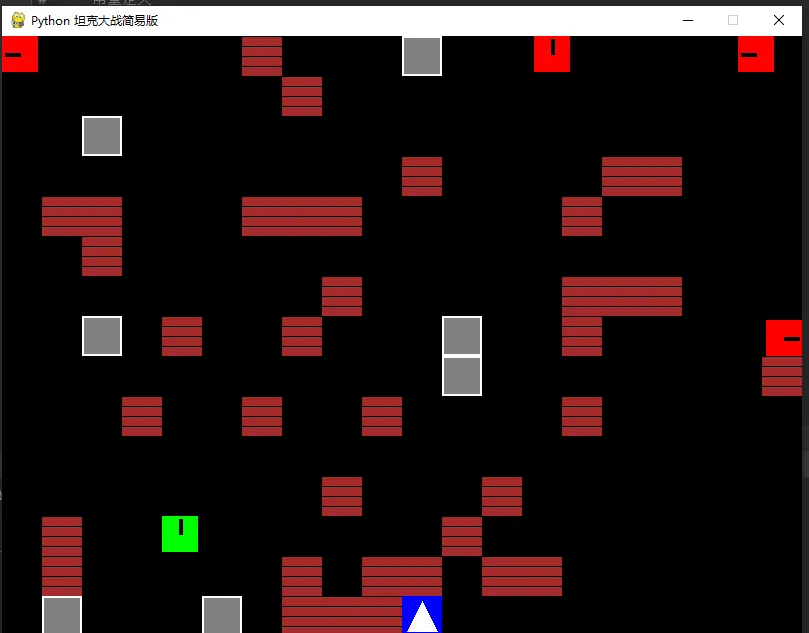
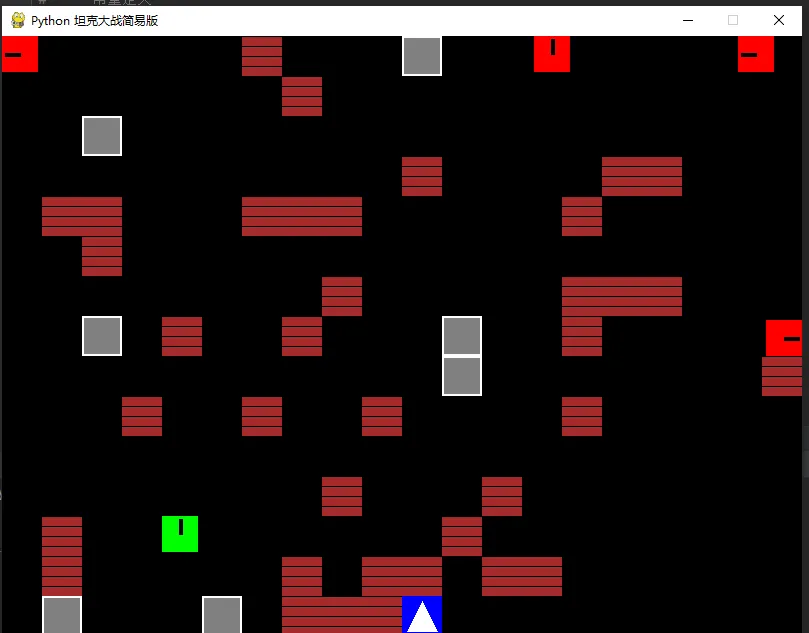
import pygameimport randomimport sys# --- 常量定义 ---SCREEN_WIDTH = 800SCREEN_HEIGHT = 600FPS = 60BLOCK_SIZE = 40 # 坦克和墙壁的大小# 颜色定义BLACK = (0, 0, 0)WHITE = (255, 255, 255)GREEN = (0, 255, 0) # 玩家颜色RED = (255, 0, 0) # 敌人颜色GRAY = (128, 128, 128) # 钢墙BROWN = (165, 42, 42) # 砖墙BLUE = (0, 0, 255) # 基地YELLOW = (255, 255, 0) # 子弹# 方向定义UP = 0DOWN = 1LEFT = 2RIGHT = 3# --- 类定义 ---class Bullet(pygame.sprite.Sprite): def __init__(self, x, y, direction, owner): super().__init__() self.image = pygame.Surface((6, 6)) self.image.fill(YELLOW) self.rect = self.image.get_rect() self.rect.center = (x, y) self.direction = direction self.speed = 7 self.owner = owner # 'player' or 'enemy' def update(self): if self.direction == UP: self.rect.y -= self.speed elif self.direction == DOWN: self.rect.y += self.speed elif self.direction == LEFT: self.rect.x -= self.speed elif self.direction == RIGHT: self.rect.x += self.speed # 超出屏幕移除 if (self.rect.bottom < 0 or self.rect.top > SCREEN_HEIGHT or self.rect.right < 0 or self.rect.left > SCREEN_WIDTH): self.kill()class Tank(pygame.sprite.Sprite): def __init__(self, x, y, color, is_player=True): super().__init__() self.image = pygame.Surface((BLOCK_SIZE - 4, BLOCK_SIZE - 4)) self.image.fill(color) self.rect = self.image.get_rect() self.rect.topleft = (x, y) self.color = color self.is_player = is_player self.speed = 3 self.direction = UP self.cooldown = 0 self.original_image = self.image.copy() # 绘制一个简单的炮管指示方向 self._draw_barrel() def _draw_barrel(self): self.image = self.original_image.copy() center = (self.image.get_width() // 2, self.image.get_height() // 2) if self.direction == UP: pygame.draw.line(self.image, BLACK, center, (center[0], center[1] - 15), 4) elif self.direction == DOWN: pygame.draw.line(self.image, BLACK, center, (center[0], center[1] + 15), 4) elif self.direction == LEFT: pygame.draw.line(self.image, BLACK, center, (center[0] - 15, center[1]), 4) elif self.direction == RIGHT: pygame.draw.line(self.image, BLACK, center, (center[0] + 15, center[1]), 4) def move(self, dx, dy, direction, walls): old_x, old_y = self.rect.x, self.rect.y self.direction = direction self.rect.x += dx self.rect.y += dy # 边界检查 if self.rect.left < 0: self.rect.left = 0 if self.rect.right > SCREEN_WIDTH: self.rect.right = SCREEN_WIDTH if self.rect.top < 0: self.rect.top = 0 if self.rect.bottom > SCREEN_HEIGHT: self.rect.bottom = SCREEN_HEIGHT # 墙壁碰撞检查 hit_list = pygame.sprite.spritecollide(self, walls, False) if hit_list: self.rect.x, self.rect.y = old_x, old_y return False # 移动失败 self._draw_barrel() return True # 移动成功 def shoot(self): if self.cooldown == 0: self.cooldown = 30 # 射击冷却帧数 center_x = self.rect.centerx center_y = self.rect.centery return Bullet(center_x, center_y, self.direction, 'player' if self.is_player else 'enemy') return None def update(self): if self.cooldown > 0: self.cooldown -= 1class Player(Tank): def __init__(self, x, y): super().__init__(x, y, GREEN, is_player=True) self.speed = 4 def update(self, keys, walls): super().update() dx, dy = 0, 0 moved = False if keys[pygame.K_UP]: dy = -self.speed self.move(0, dy, UP, walls) moved = True elif keys[pygame.K_DOWN]: dy = self.speed self.move(0, dy, DOWN, walls) moved = True elif keys[pygame.K_LEFT]: dx = -self.speed self.move(dx, 0, LEFT, walls) moved = True elif keys[pygame.K_RIGHT]: dx = self.speed self.move(dx, 0, RIGHT, walls) moved = True # 如果没有按键,保持当前朝向但不移动(可选逻辑,这里为了流畅性不做处理)class Enemy(Tank): def __init__(self, x, y): super().__init__(x, y, RED, is_player=False) self.speed = 2 self.move_timer = 0 self.current_move_duration = 0 def ai_move(self, walls): super().update() if self.move_timer <= 0: # 改变方向和移动时长 self.direction = random.choice([UP, DOWN, LEFT, RIGHT]) self.current_move_duration = random.randint(30, 90) self.move_timer = self.current_move_duration self._draw_barrel() dx, dy = 0, 0 if self.direction == UP: dy = -self.speed elif self.direction == DOWN: dy = self.speed elif self.direction == LEFT: dx = -self.speed elif self.direction == RIGHT: dx = self.speed if not self.move(dx, dy, self.direction, walls): # 撞墙了,立即换方向 self.move_timer = 0 self.move_timer -= 1class Wall(pygame.sprite.Sprite): def __init__(self, x, y, type='brick'): super().__init__() self.type = type self.image = pygame.Surface((BLOCK_SIZE, BLOCK_SIZE)) if type == 'steel': self.image.fill(GRAY) # 画个边框表示钢墙 pygame.draw.rect(self.image, WHITE, (0,0, BLOCK_SIZE, BLOCK_SIZE), 2) else: # brick self.image.fill(BROWN) # 画点砖块纹理 for i in range(0, BLOCK_SIZE, 10): pygame.draw.line(self.image, BLACK, (0, i), (BLOCK_SIZE, i)) self.rect = self.image.get_rect() self.rect.topleft = (x, y)class Base(pygame.sprite.Sprite): def __init__(self, x, y): super().__init__() self.image = pygame.Surface((BLOCK_SIZE, BLOCK_SIZE)) self.image.fill(BLUE) # 画个星星或标志 pygame.draw.polygon(self.image, WHITE, [(20, 5), (35, 35), (5, 35)]) self.rect = self.image.get_rect() self.rect.topleft = (x, y) self.alive = True# --- 主游戏逻辑 ---def create_map(): walls = pygame.sprite.Group() # 简单的地图布局 # 0: 空, 1: 砖, 2: 钢 layout = [ "00000000000000000000", "01100110000011001100", "01100110000011001100", "01100110022001100110", "00000000022000000000", "01100110000011001100", "01100110000011001100", "00000000000000000000", "01100001111000001100", "01100001001000001100", "000000010B0100000000", # B is base placeholder "00000001111100000000", ] # 由于布局较小,我们重复填充或拉伸以适应屏幕,这里简单生成 # 重新设计一个适合 800x600 (20x15 blocks) 的地图 map_data = [] for r in range(15): row = "" for c in range(20): if r == 14 and 9 <= c <= 10: # 基地位置 if c == 9: continue # 左边围墙 if c == 10: continue # 右边围墙 if r == 13 and 9 <= c <= 10: # 基地上方 row += "1" elif r == 14 and c == 9: # 基地左护墙 row += "1" elif r == 14 and c == 10: # 基地右护墙 row += "1" elif r == 14 and c == 8: # 基地左侧 row += "1" elif r == 14 and c == 11: # 基地右侧 row += "1" elif r == 14 and c == 9: # 基地本身 handled separately pass else: if random.random() < 0.15: row += "2" if random.random() < 0.2 else "1" else: row += "0" map_data.append(row) # 手动修正基地区域 base_x, base_y = 10 * BLOCK_SIZE, 14 * BLOCK_SIZE for r, row in enumerate(map_data): for c, cell in enumerate(row): x, y = c * BLOCK_SIZE, r * BLOCK_SIZE if cell == '1': walls.add(Wall(x, y, 'brick')) elif cell == '2': walls.add(Wall(x, y, 'steel')) return walls, Base(base_x, base_y)def main(): pygame.init() screen = pygame.display.set_mode((SCREEN_WIDTH, SCREEN_HEIGHT)) pygame.display.set_caption("Python 坦克大战简易版") clock = pygame.time.Clock() # 精灵组 all_sprites = pygame.sprite.Group() walls = pygame.sprite.Group() bullets = pygame.sprite.Group() enemies = pygame.sprite.Group() # 创建地图和基地 walls, base = create_map() all_sprites.add(walls) all_sprites.add(base) # 创建玩家 player = Player(4 * BLOCK_SIZE, 12 * BLOCK_SIZE) all_sprites.add(player) # 敌人生成计时器 enemy_spawn_timer = 0 enemy_spawn_interval = 180 # 每3秒生成一个敌人 running = True game_over = False win = False while running: clock.tick(FPS) # 1. 事件处理 for event in pygame.event.get(): if event.type == pygame.QUIT: running = False if event.type == pygame.KEYDOWN: if event.key == pygame.K_SPACE and not game_over: bullet = player.shoot() if bullet: bullets.add(bullet) all_sprites.add(bullet) if event.key == pygame.K_r and game_over: # 重启游戏 main() return if not game_over: # 2. 更新逻辑 # 玩家移动 keys = pygame.key.get_pressed() player.update(keys, walls) # 敌人生成 enemy_spawn_timer += 1 if enemy_spawn_timer >= enemy_spawn_interval and len(enemies) < 4: spawn_x = random.choice([0, SCREEN_WIDTH - BLOCK_SIZE, SCREEN_WIDTH//2]) enemy = Enemy(spawn_x, 0) # 防止生成在墙上 if not pygame.sprite.spritecollide(enemy, walls, False) and not pygame.sprite.spritecollide(enemy, all_sprites, False): enemies.add(enemy) all_sprites.add(enemy) enemy_spawn_timer = 0 else: enemy.kill() # 敌人行动 for enemy in enemies: enemy.ai_move(walls) # 敌人射击 if random.randint(0, 100) < 2: # 2% 概率每帧射击 bullet = enemy.shoot() if bullet: bullets.add(bullet) all_sprites.add(bullet) bullets.update() # 3. 碰撞检测 # 子弹击中墙壁 for bullet in bullets: hit_walls = pygame.sprite.spritecollide(bullet, walls, False) for wall in hit_walls: if wall.type == 'brick': wall.kill() bullet.kill() elif wall.type == 'steel': bullet.kill() # 钢墙不毁,只毁子弹 # 子弹击中坦克 # 玩家子弹击毁敌人 for bullet in bullets: if bullet.owner == 'player': hits = pygame.sprite.spritecollide(bullet, enemies, True) # True 表示销毁敌人 if hits: bullet.kill() # 敌人子弹击毁玩家 if bullet.owner == 'enemy': if pygame.sprite.collide_rect(bullet, player): player.kill() bullet.kill() game_over = True # 子弹击中基地 for bullet in bullets: if pygame.sprite.collide_rect(bullet, base): base.kill() bullet.kill() base.alive = False game_over = True # 敌人撞到基地 (虽然少见,但也算输) if pygame.sprite.spritecollide(base, enemies, False): base.kill() base.alive = False game_over = True # 胜利条件:消灭一定数量的敌人(这里简化为存活且无敌人,或者无限模式) # 这里设为无限模式,直到玩家死或基地爆 # 4. 绘图 screen.fill(BLACK) all_sprites.draw(screen) # 绘制UI font = pygame.font.SysFont('Arial', 24) if game_over: if not base.alive or player.alive == False: text = font.render("GAME OVER - Press 'R' to Restart", True, WHITE) text_rect = text.get_rect(center=(SCREEN_WIDTH/2, SCREEN_HEIGHT/2)) screen.blit(text, text_rect) pygame.display.flip() pygame.quit() sys.exit()if __name__ == "__main__": main()