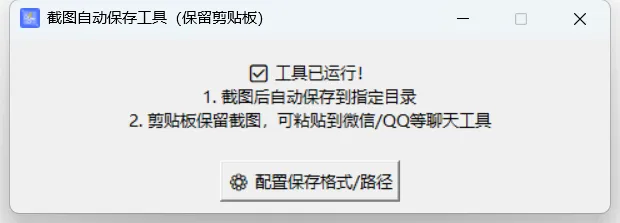
import win32clipboardfrom PIL import Image, ImageGrab, ImageDrawimport tkinter as tkfrom tkinter import ttk, filedialogimport configparserimport osimport ioimport hashlibfrom datetime import datetimeimport pystrayfrom pystray import MenuItem as itemimport loggingfrom typing import Optional, Union, Set# 配置日志logging.basicConfig( level=logging.INFO, format='%(asctime)s - %(name)s - %(levelname)s - %(message)s', handlers=[ logging.FileHandler('screenshot_tool.log'), logging.StreamHandler() ])logger = logging.getLogger(__name__)# -------------------------- 全局变量(防重复保存 + 剪贴板保护) --------------------------LAST_IMAGE_HASH = None # 记录上一次保存的截图哈希值SAVED_HASHES_FILE = "saved_hashes.txt" # 存储已保存图片哈希值的文件CLIPBOARD_FORMAT = win32clipboard.CF_DIB # 截图的剪贴板格式# 全局变量:主窗口和托盘图标root = Nonetray_icon = None# 已保存的图片哈希值集合saved_hashes = set()# -------------------------- 配置文件处理 --------------------------CONFIG_FILE = "screenshot_saver_config.ini"config = configparser.ConfigParser()# -------------------------- 窗口居中函数 --------------------------def center_window(window, width, height): # 获取屏幕宽高 screen_width = window.winfo_screenwidth() screen_height = window.winfo_screenheight() # 计算窗口左上角坐标 x = (screen_width - width) // 2 y = (screen_height - height) // 2 # 设置窗口位置 window.geometry(f"{width}x{height}+{x}+{y}")# -------------------------- 自定义消息框函数 --------------------------def custom_messagebox(title, message, icon=None, open_path=None): # 创建独立的窗口 msg_win = tk.Toplevel() msg_win.title(title) msg_win.resizable(False, False) msg_win.transient() # 设置为主窗口的临时窗口 msg_win.grab_set() # 模态窗口,阻止其他窗口操作 # 计算消息框大小 message_lines = message.split('\n') max_line_length = max(len(line) for line in message_lines) # 增加最小宽度和高度,确保完整显示内容 width = min(500, max(400, max_line_length * 7)) height = min(250, 120 + len(message_lines) * 22) # 居中显示 center_window(msg_win, width, height) # 添加消息内容 msg_label = tk.Label(msg_win, text=message, font=("微软雅黑", 9), justify="left", padx=20, pady=20) msg_label.pack(fill=tk.BOTH, expand=True) # 添加按钮框架 button_frame = tk.Frame(msg_win) button_frame.pack(pady=10) # 关闭窗口函数 def close_window(): msg_win.grab_release() msg_win.destroy() # 打开文件夹函数 def open_folder(): if open_path: os.startfile(os.path.dirname(open_path)) close_window() # 打开图片函数 def open_image(): if open_path: os.startfile(open_path) close_window() # 添加确定按钮 ok_button = tk.Button(button_frame, text="确定", command=close_window, font=("微软雅黑", 9), width=10) ok_button.pack(side=tk.RIGHT, padx=5) # 添加打开按钮(如果提供了路径) if open_path: open_image_button = tk.Button(button_frame, text="打开图片", command=open_image, font=("微软雅黑", 9), width=10) open_image_button.pack(side=tk.RIGHT, padx=5) # 绑定回车键 msg_win.bind('<Return>', lambda e: close_window()) # 等待窗口关闭 msg_win.wait_window()# 初始化配置(首次运行自动创建)def init_config() -> None: default_save_path = os.path.abspath("./screenshots") # 默认保存到工具目录下的screenshots文件夹 if not os.path.exists(CONFIG_FILE): logger.info("配置文件不存在,创建默认配置") config["DEFAULT"] = { "image_format": "PNG", # 默认格式:PNG/JPG/WEBP "quality": "95", # JPG/WEBP质量(1-100) "save_path": default_save_path # 默认保存路径 } try: with open(CONFIG_FILE, "w", encoding="utf-8") as f: config.write(f) logger.info(f"配置文件已创建:{CONFIG_FILE}") except Exception as e: logger.error(f"创建配置文件失败: {str(e)}") else: try: config.read(CONFIG_FILE, encoding="utf-8") logger.info(f"配置文件已加载:{CONFIG_FILE}") except Exception as e: logger.error(f"读取配置文件失败: {str(e)}") # 自动创建保存目录(不存在则创建) try: save_path = config["DEFAULT"]["save_path"] if not os.path.exists(save_path): os.makedirs(save_path) logger.info(f"保存目录已创建:{save_path}") except Exception as e: logger.error(f"创建保存目录失败: {str(e)}")# 保存配置def save_config(new_format: str, quality: str, new_save_path: str) -> None: config["DEFAULT"]["image_format"] = new_format config["DEFAULT"]["quality"] = quality config["DEFAULT"]["save_path"] = new_save_path try: with open(CONFIG_FILE, "w", encoding="utf-8") as f: config.write(f) logger.info(f"配置已保存:格式={new_format}, 质量={quality}, 路径={new_save_path}") except Exception as e: logger.error(f"保存配置文件失败: {str(e)}") # 确保新路径存在 try: if not os.path.exists(new_save_path): os.makedirs(new_save_path) logger.info(f"保存目录已创建:{new_save_path}") except Exception as e: logger.error(f"创建保存目录失败: {str(e)}")# 加载已保存的哈希值def load_saved_hashes(): global saved_hashes try: if os.path.exists(SAVED_HASHES_FILE): with open(SAVED_HASHES_FILE, "r", encoding="utf-8") as f: saved_hashes = set(line.strip() for line in f if line.strip()) logger.info(f"加载了 {len(saved_hashes)} 个已保存的图片哈希值") else: logger.info("未找到哈希值文件,使用空集合") except Exception as e: logger.error(f"加载哈希值文件失败: {str(e)}") saved_hashes = set() # 忽略错误,使用空集合# 保存哈希值到文件def save_hash_to_file(img_hash): global saved_hashes saved_hashes.add(img_hash) try: with open(SAVED_HASHES_FILE, "w", encoding="utf-8") as f: for hash_val in saved_hashes: f.write(hash_val + "\n") logger.debug(f"已保存哈希值: {img_hash}") except Exception as e: logger.error(f"保存哈希值文件失败: {str(e)}") # 忽略错误,继续执行# -------------------------- 剪贴板处理(核心:保留剪贴板内容) --------------------------# 获取图片哈希值(防重复保存)def get_image_hash(img): # 统一转换为RGB模式,确保颜色模式一致 if img.mode != 'RGB': img = img.convert('RGB') img_bytes = img.tobytes() return hashlib.md5(img_bytes).hexdigest()# 安全读取剪贴板图片(不修改剪贴板内容)def read_clipboard_image_safely() -> Optional[Image.Image]: img = None try: # 方法1:优先用PIL读取(兼容Win+Shift+S/QQ/微信截图) img = ImageGrab.grabclipboard() if isinstance(img, Image.Image): logger.debug("使用PIL成功读取剪贴板图片") return img.copy() # 复制图片,不影响原剪贴板 # 方法2:兼容其他截图工具(读取DIB格式,不修改剪贴板) win32clipboard.OpenClipboard() try: if win32clipboard.IsClipboardFormatAvailable(CLIPBOARD_FORMAT): dib_data = win32clipboard.GetClipboardData(CLIPBOARD_FORMAT) # 读取数据但不清空剪贴板 img = Image.open(io.BytesIO(dib_data)) img = img.copy() # 复制图片对象 logger.debug("使用DIB格式成功读取剪贴板图片") else: logger.debug("剪贴板中没有DIB格式图片") finally: win32clipboard.CloseClipboard() # 必须关闭剪贴板,且不调用EmptyClipboard except Exception as e: logger.error(f"读取剪贴板失败: {str(e)}") pass # 无图片时静默忽略 # 确保返回的是图像对象 if not isinstance(img, Image.Image): return None return img# 自动保存图片(保留剪贴板)def auto_save_screenshot() -> None: global LAST_IMAGE_HASH # 1. 安全读取剪贴板图片(不修改剪贴板) img = read_clipboard_image_safely() if img is None: return # 2. 防重复保存(同一截图只保存一次) img_hash = get_image_hash(img) if img_hash == LAST_IMAGE_HASH or img_hash in saved_hashes: logger.debug(f"图片已保存过,哈希值:{img_hash}") return LAST_IMAGE_HASH = img_hash # 保存哈希值到集合和文件 save_hash_to_file(img_hash) # 3. 读取配置(确保配置已初始化) try: img_format = config["DEFAULT"]["image_format"].upper() quality = int(config["DEFAULT"]["quality"]) save_path = config["DEFAULT"]["save_path"] except (KeyError, ValueError) as e: # 配置未初始化,使用默认值 logger.warning(f"配置读取失败: {str(e)},使用默认值") img_format = "PNG" quality = 95 save_path = os.path.abspath("./screenshots") # 确保保存路径存在 if not os.path.exists(save_path): os.makedirs(save_path) logger.info(f"创建保存目录: {save_path}") # 4. 生成毫秒级时间戳文件名(绝对不重复) timestamp = datetime.now().strftime("%Y%m%d_%H%M%S_%f")[:-3] filename = f"screenshot_{timestamp}.{img_format.lower()}" full_path = os.path.join(save_path, filename) # 5. 按格式保存图片 try: if img_format == "JPG": img = img.convert("RGB") # JPG不支持透明通道 img.save(full_path, format=img_format, quality=quality) elif img_format == "WEBP": img.save(full_path, format=img_format, quality=quality) else: # PNG(无损,保留透明通道) img.save(full_path, format=img_format) logger.info(f"截图已保存:{full_path}") # 异步提示(不阻塞监听,不影响剪贴板) custom_messagebox("保存成功", f"截图已自动保存:\n{full_path}\n✓ 剪贴板截图仍可粘贴到聊天工具", open_path=full_path) except Exception as e: logger.error(f"保存图片失败: {str(e)}") custom_messagebox("保存失败", f"错误:{str(e)}\n请检查保存路径权限")# -------------------------- 配置界面 --------------------------def open_config_window(): config_win = tk.Toplevel() config_win.title("截图保存配置") center_window(config_win, 420, 240) config_win.resizable(False, False) # 读取当前配置 current_format = config["DEFAULT"]["image_format"] current_quality = config["DEFAULT"]["quality"] current_save_path = config["DEFAULT"]["save_path"] # 1. 图片格式选择 tk.Label(config_win, text="图片格式:", font=("微软雅黑", 9)).grid(row=0, column=0, padx=10, pady=8, sticky="w") format_var = tk.StringVar(value=current_format) format_combo = ttk.Combobox(config_win, textvariable=format_var, values=["PNG", "JPG", "WEBP"], state="readonly", width=15) format_combo.grid(row=0, column=1, padx=10, pady=8) # 2. 图片质量设置 tk.Label(config_win, text="图片质量(1-100):", font=("微软雅黑", 9)).grid(row=1, column=0, padx=10, pady=8, sticky="w") quality_entry = tk.Entry(config_win, width=18) quality_entry.insert(0, current_quality) quality_entry.grid(row=1, column=1, padx=10, pady=8) # 3. 保存路径选择 tk.Label(config_win, text="自动保存路径:", font=("微软雅黑", 9)).grid(row=2, column=0, padx=10, pady=8, sticky="w") path_var = tk.StringVar(value=current_save_path) path_entry = tk.Entry(config_win, textvariable=path_var, width=18) path_entry.grid(row=2, column=1, padx=10, pady=8) # 路径选择按钮 def select_path(): folder = filedialog.askdirectory(title="选择截图自动保存文件夹") if folder: path_var.set(folder) tk.Button(config_win, text="📁 选择文件夹", command=select_path, font=("微软雅黑", 8)).grid(row=2, column=2, padx=5, pady=8) # 保存配置按钮 def confirm_config(): new_format = format_var.get() new_quality = quality_entry.get() new_save_path = path_var.get() # 验证参数 if not new_quality.isdigit() or not (1 <= int(new_quality) <= 100): custom_messagebox("提示", "质量必须是1-100的数字!") return # 保存配置并创建路径 save_config(new_format, new_quality, new_save_path) custom_messagebox("配置成功", "新配置已生效!下次截图将按此设置保存") config_win.destroy() tk.Button(config_win, text="保存配置", command=confirm_config, font=("微软雅黑", 9)).grid(row=3, column=0, columnspan=3, pady=10)# -------------------------- 主程序 --------------------------# 显示窗口def show_window(): global root, tray_icon if root: root.deiconify() # 显示窗口 root.lift() # 置于顶层# 退出程序def exit_program(): global root, tray_icon if tray_icon: tray_icon.stop() # 停止托盘图标 if root: root.destroy() # 销毁窗口# 设置托盘图标def setup_tray_icon() -> None: global root, tray_icon # 尝试加载app_ico.ico作为托盘图标 try: # 尝试多种路径获取图标文件 import sys import os # 检查当前目录 icon_path = "app_ico.ico" if not os.path.exists(icon_path): # 检查可执行文件所在目录(打包后) if hasattr(sys, '_MEIPASS'): icon_path = os.path.join(sys._MEIPASS, "app_ico.ico") if os.path.exists(icon_path): image = Image.open(icon_path) logger.info(f"已加载托盘图标:{icon_path}") else: raise FileNotFoundError(f"图标文件不存在:{icon_path}") except Exception as e: logger.warning(f"加载图标失败: {str(e)},使用默认图标") # 如果图标文件不存在,创建一个简单的图标 image = Image.new('RGB', (64, 64), color=(255, 255, 255)) draw = ImageDraw.Draw(image) draw.rectangle([10, 10, 54, 54], fill=(0, 128, 255)) draw.text([20, 20], "截图", fill=(255, 255, 255)) # 打开图片目录 def open_image_dir(): try: save_path = config["DEFAULT"]["save_path"] os.startfile(save_path) logger.info(f"已打开图片目录:{save_path}") except Exception as e: logger.error(f"打开图片目录失败: {str(e)}") custom_messagebox("错误", f"打开图片目录失败:{str(e)}") # 创建菜单 menu = ( item('显示窗口', show_window), item('打开图片目录', open_image_dir), item('退出', exit_program) ) # 创建托盘图标 try: tray_icon = pystray.Icon("screenshot_tool", image, "截图自动保存工具", menu) # 启动托盘图标 import threading threading.Thread(target=tray_icon.run, daemon=True).start() logger.info("托盘图标已启动") except Exception as e: logger.error(f"启动托盘图标失败: {str(e)}")def main(): global root # 快速创建主窗口 root = tk.Tk() # 立即隐藏窗口,避免初始闪烁 root.withdraw() # 设置窗口标题 root.title("截图自动保存工具(保留剪贴板)") # 设置窗口大小和位置 center_window(root, 480, 140) root.resizable(False, False) # 快速显示窗口框架 # 状态提示 status_label = tk.Label( root, text="✅ 工具启动中...", font=("微软雅黑", 10), justify="center" ) status_label.pack(pady=15) # 配置按钮(暂时禁用) config_button = tk.Button(root, text="⚙️ 配置保存格式/路径", command=open_config_window, font=("微软雅黑", 10), state=tk.DISABLED) config_button.pack(pady=5) # 确保窗口完全准备好后再显示 root.update_idletasks() # 显示窗口 root.deiconify() # 加载已保存的哈希值(在主线程中执行,确保在监听开始前完成) load_saved_hashes() # 循环监听剪贴板(200ms检测一次,响应更快) def loop_listen(): auto_save_screenshot() root.after(200, loop_listen) # 200ms检测一次,不占用系统资源 # 启动监听 loop_listen() # 修改关闭按钮行为,最小化到托盘 def on_closing(): root.withdraw() # 隐藏窗口 root.protocol("WM_DELETE_WINDOW", on_closing) # 后台初始化函数 def background_init(): # 初始化配置和保存目录 init_config() # 设置窗口图标 try: import sys import os # 尝试多种路径获取图标文件 icon_path = "app_ico.ico" if not os.path.exists(icon_path): # 检查可执行文件所在目录(打包后) if hasattr(sys, '_MEIPASS'): icon_path = os.path.join(sys._MEIPASS, "app_ico.ico") root.iconbitmap(icon_path) except: pass # 如果图标文件不存在,忽略错误 # 更新状态提示 status_label.config(text="✅ 工具已运行!\n1. 截图后自动保存到指定目录\n2. 剪贴板保留截图,可粘贴到微信/QQ等聊天工具") # 启用配置按钮 config_button.config(state=tk.NORMAL) # 设置托盘图标 setup_tray_icon() # 在后台线程中执行初始化操作 import threading threading.Thread(target=background_init, daemon=True).start() # 运行主窗口 root.mainloop()if __name__ == "__main__": main()
 10个月宝宝每天需要喝多少奶粉?