10分钟快速了解HyperMesh Python 二次开发(附源码-创建一个4节点shell单元)
- 2026-09-04 13:53:57
10分钟快速了解HyperMesh Python 二次开发(附源码-创建一个4节点shell单元)

往期文章 HyperView Python 二次开发之突显某零件在模型全局位置(附完整源码) 仿真软件二次开发基础之Python 条件判断 Python 函数的返回值 Python 函数的定义及函数的参数
「CAE仿真记」
愿与您一同,用代码提升效率!
各位CAE工程师朋友,世上无难事,只要肯攀登!
二次开发其实就是只“纸老虎”——工作中很多的二次开发需求,都是靠基础API+简单逻辑就能实现。今天用10分钟,从“创建4节点shell单元”这个小案例,快速上手HyperMesh Python二次开发。下图为dyna中*element_shell关键字。
从关键字看出,想要创建这个单元,需要四个节点,一个pid,作为CAE工程师,看到pid自然就想到还需要material_id和property_id,梳理下创建这个单元的流程:
1.创建component(部件);
2.创建material(材料);
3.创建property(属性);
4.创建4个节点;
5.创建shell 单元。
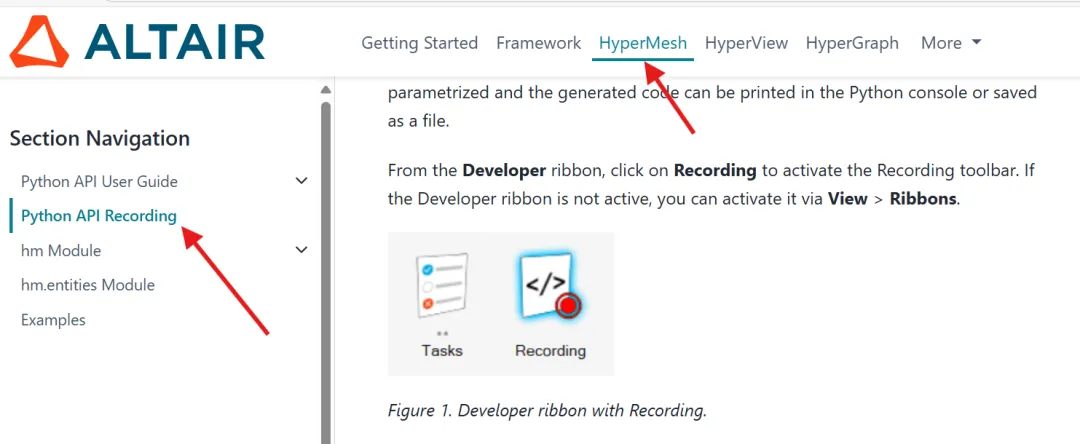
HyperMesh的API可以用「录制功能」获取,结合帮助文档就能了解具体参数的含义。
下面我们按流程来创建完成这个过程:
1.创建component,为了避免component名字重复,会涉及到用Python 中列表list储存所有已有component名字,if来做条件判断新名字是否在列表list中,while循环来修改component名字,直到不重复,为了让创建component这个功能一直能用,用def来定义一个函数,并让函数返回component id供后续使用。
# 导入hm和hm.entities 模块# 导入这两个模块就能使用HyperMesh中的API了import hmimport hm.entities as ent# 定义一个创建component的函数,# 参数是component 名# 返回 component iddef create_component(compname):# 获取model model = hm.Model()# 使用hm API 【hm.Collection】创建一个集合,# 集合是模型中所有的 component对象 allcomponentcol = hm.Collection(model, ent.Component)# 判断模型是否有component# 如果没有component 直接创建# 如果有 判断新输入的component name是否存在# len() 是python内容,返回「可迭代对象的元素个数 / 长度」if len(allcomponentcol) == 0:# 使用API 创建一个component component = ent.Component(model, cardimage="Part", name=compname)if len(allcomponentcol) > 0:# 使用遍历循环,将所有component name 用append方法存放all_comp_name_list列表中 all_comp_name_list = []for comp in allcomponentcol: all_comp_name_list.append(comp.name)# 判断component name 是否在all_comp_name_list列表中# 初始化循环条件 current_compname = compname i = 1# 循环判断,获取独立的component namewhile current_compname in all_comp_name_list: current_compname = f"{compname}_{i}" i += 1 component = ent.Component(model, cardimage="Part", name=current_compname)# 返回 component idreturn component.id# 创建componentcreate_component("user_defined_name")2.创建material和property,代码逻辑与创建component相同。
# 定义创建材料函数,传入参数为材料名# 返回 material id# cardimage/RGO等参数也可以定义为函数的参数def create_material(materialname): model = hm.Model() allmaterialcol = hm.Collection(model, ent.Material)# 判断模型是否有material# 如果没有material 直接创建# 如果有 判断新输入的material name是否存在if len(allmaterialcol) == 0: material = ent.Material(model, cardimage="MATL1", name=materialname) material.Rho = 7.85e-06 material.E = 210 material.Nu = 0.3if len(allmaterialcol) > 0:# 使用遍历循环,将所有material name 存放all_mat_name_list列表中 all_mat_name_list = []for mat in allmaterialcol: all_mat_name_list.append(mat.name)# 判断material name 是否在all_mat_name_list列表中# 初始化循环条件 current_matname = materialname i = 1# 循环判断,获取独立的material namewhile current_matname in all_mat_name_list: current_matname = f"{materialname}_{i}" i += 1 material = ent.Material(model, cardimage="MATL1", name=current_matname) material.Rho = 7.85e-06 material.E = 210 material.Nu = 0.3# 返回 mat idreturn material.id#创建一个弹性材料 MATL1 名字为DC01create_material("DC01")# 定义创建property函数,传入参数为property名# 返回property id# property中的 elform/SHRF/NIP/T1 # 都可以设置为函数的参数,这里为方便只传入名字def create_property(propertyname): model = hm.Model() allpropertycol = hm.Collection(model, ent.Property)# 判断模型是否有property# 如果没有property 直接创建# 如果有 判断新输入的property name是否存在if len(allpropertycol) == 0: property = ent.Property(model, cardimage="SectShll", name=propertyname) property.LSD_ELFORM = 16 property.LSD_SHRF = 0.8333 property.LSD_NIP = 5 property.LSD_T1 = 2.5if len(allpropertycol) > 0:# 使用遍历循环,将所有property name 存放all_property_name_list列表中 all_property_name_list = []for prop in allpropertycol: all_property_name_list.append(prop.name)# 判断Property name 是否在all_property_name_list列表中# 初始化循环条件 current_prop_name = propertyname i = 1# 循环判断,获取独立的Property namewhile current_prop_name in all_property_name_list: current_prop_name = f"{propertyname}_{i}" i += 1 property = ent.Property(model, cardimage="SectShll", name=current_prop_name) property.LSD_ELFORM = 16 property.LSD_SHRF = 0.8333 property.LSD_NIP = 5 property.LSD_T1 = 2.5# 返回 prop idreturn property.id# 创建 property create_property("Shell_16_T2.5")3.将新建的component置为当前激活状态
# 新建make current函数def make_comp_current(comp_id): model = hm.Model()# 依据component id 获取component 对象,用于后续获取component名字# 因为model.currentcollector这个API 只识别名字,不认id component = ent.Component(model, uid=comp_id)# 执行make current model.currentcollector(entity_type=ent.Component, name=f"{component.name}")# 使用说明# 这个示例中comp_id 是函数create_component()的返回值make_comp_current(comp_id)4.将material和Propert与component绑定。
# 定义component 与material和property 绑定函数def assign_prop_and_mat_for_component(compId,MATID,PropId): model = hm.Model()# 获取component component = ent.Component(model, compId)# 获取property propertyid = ent.Property(model, PropId)# 绑定property component.propertyid = propertyid# 获取 material materialid = ent.Material(model, MATID)# 绑定material component.materialid = materialid# 使用说明 # compID 是函数create_component()的返回值# MATID 是函数create_material()的返回值# PropId 是函数create_property()的返回值assign_prop_and_mat_for_component(compId,MATID,PropId)5.创建节点
# 定义创建节点函数,参数是 XYZ坐标# 函数返回节点IDdef create_node(x,y,z): model = hm.Model() node = ent.Node(model, coordinates=[x,y,z])return node.id6.创建4节点单元
# 定义创建单元函数,参数是4个节点# 返回单元 id# 这里有个特别地方 创建node 和element 用的方法不同,# 不能直接用element.id获取单元id# 借用了model.hm_entityrecorder功能def create_quad_element(n1,n2,n3,n4): model = hm.Model() nodelist = hm.EntityList(ent.Node.fulltype, hm.hwUIntList([n1,n2,n3,n4]))# 使用 recorder 记录新建单元的id 首先是 打开recorder on model.hm_entityrecorder(entity_type=ent.Element,option="on") model.createelement(config=104, type=1, list=nodelist, auto_order=1)# 关闭 recorder off model.hm_entityrecorder(entity_type=ent.Element,option="off")# Model Class Query Functions 命令一般以hm_开始,该类方法执行后有两个返回值,第一个返回# 值记录的是命令返回的状态信息,第二个值记录的是查询的数据# 查询新建单元id recorder参数改为 ids res = model.hm_entityrecorder(entity_type=ent.Element,option="ids") status,array = res# array.keys # 返回 ['entities']# array["entities"]# 返回 [<hm.mdi.entities.Element; proxy of <Swig Object of type 'hwDescriptor::Metaobject *' at 0x0000014AE9FE3AB0> >]# array["entities"].id# 返回 AttributeError: 'list' object has no attribute 'id'# array["entities"][0] # 获取列表第一个元素# 返回 <hm.mdi.entities.Element; proxy of <Swig Object of type 'hwDescriptor::Metaobject *' at 0x0000014AE9FE3B40> ># array["entities"][0].id# 返回 4 # 这里返回的就是新建单元idreturn array["entities"][0].id# 这里直接将 create_node()函数作为参数传入create_quad_element()函数e1 = create_quad_element(create_node(0,0,0), create_node(0,10,0), create_node(10,0,0),create_node(10,10,0))
本文来自网友投稿或网络内容,如有侵犯您的权益请联系我们删除,联系邮箱:596563534@qq.com 。
随机文章
-
 10个月宝宝每天需要喝多少奶粉?
- 192. Linux中国象棋 Pikafish 皮卡鱼引擎2026-3-01 最新版(DEB 安装包,搭配260209权重文件)
- Linux基金会获六大厂商资助,应对AI生成漏洞报告“噪音”
- linux常用命令 :基础文件操作命令20条
- Linux基础 | export 命令使用指南:搞懂环境变量“生效范围”的核心
- 开源情报调查作战室:Tsurugi Linux 深度解析与实战指南
- GEE(Python)一键制作几十种不同高级版本的SCI论文专题图
- 大模型开发入门第五讲:Python 容器数据类型!
- Python真的很难吗?
- Python | 分享16个Excel自动化脚本,一定有你需要的!
- linux Shell 中命令分隔与执⾏逻辑详解