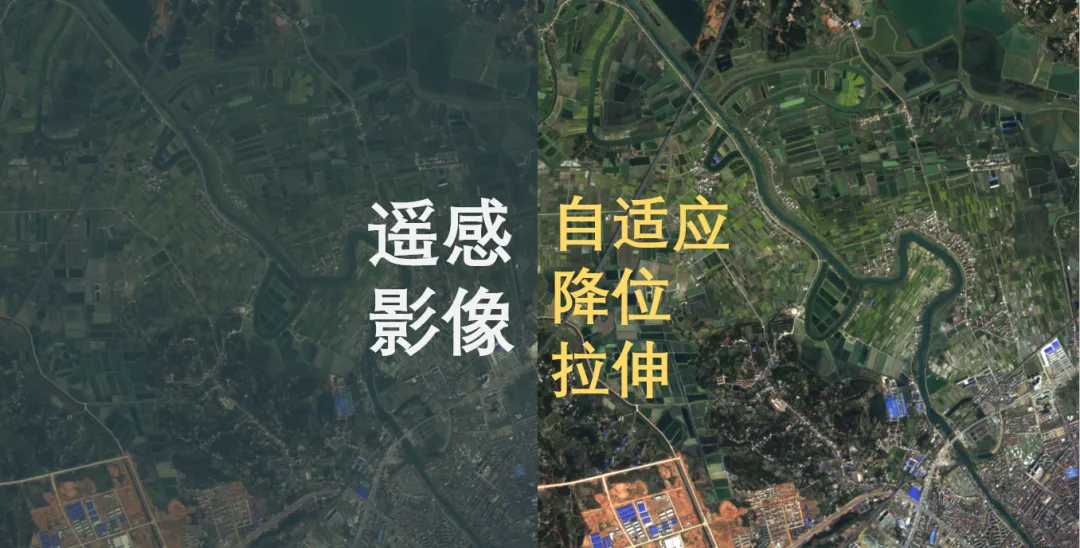
卫星遥感影像通常为16位,如何将影像降位拉伸为8位?简单粗暴的方法是直接进行降位处理:
A_min,A_max = A_16bit.min(),A_16bit.max()A_8bit = (A_16bit - A_min) / (A_max - A_min)
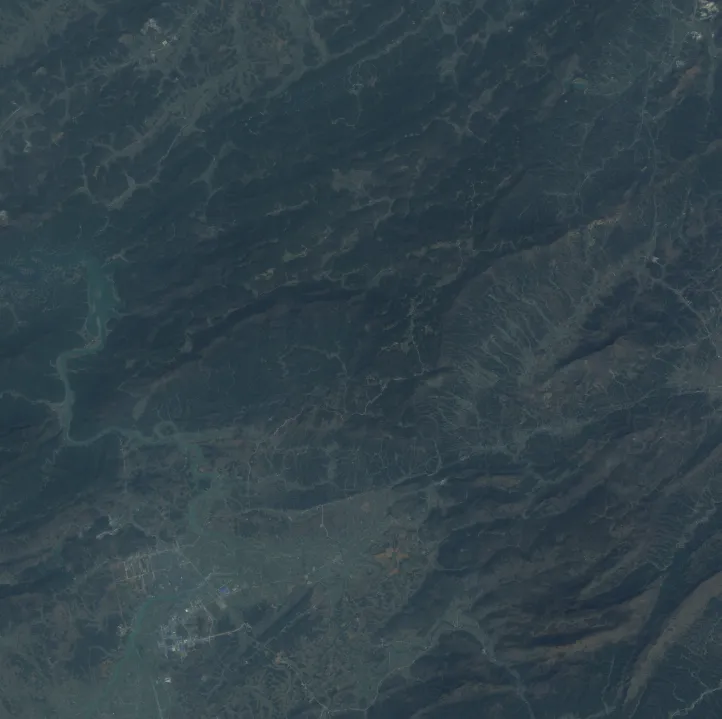
这种办法对于所有的影像都适用。缺点在于,经过处理后的影像要么太亮,要么太暗,信息严重损失。这是由于影像上可能存在少量亮度异常的噪点,进行拉伸处理时这些异常点也参与计算。
直接降位处理效果为:
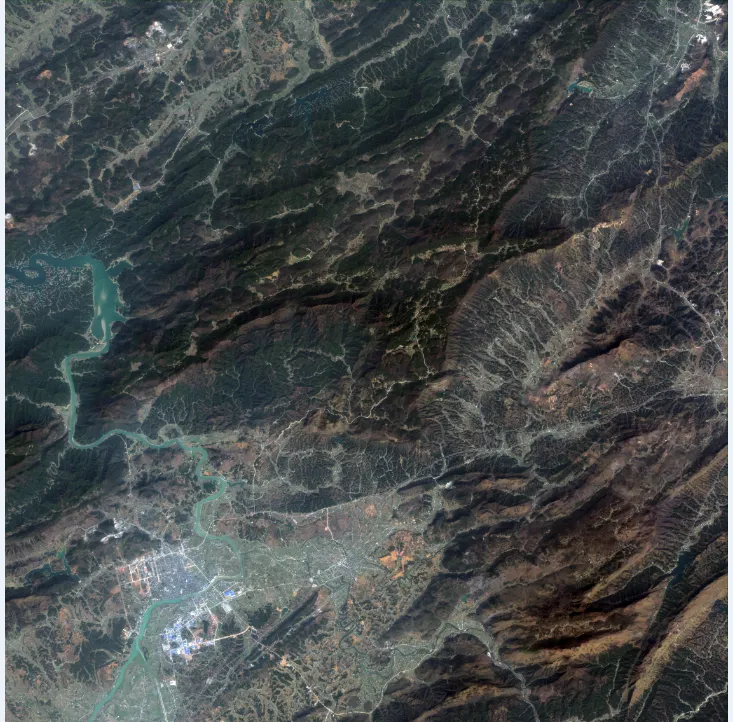
为了提升降位处理后影像质量,让影像亮度更合理,需要引入直方图拉伸算法。直方图拉伸算法首先统计影像直方图。基于累积直方图,截掉直方图两侧占比很少的像素,保留中间部分,对这部分影像进行拉伸处理。
以下是利用python进行遥感影像自适应降位处理流程。
需要引入的库文件:
import osimport sysimport globfrom osgeo import gdalimport numpy as npimport cv2
1.统计影像直方图
输入:影像数据,numpy矩阵
返回:影像直方图
代码:
def CalHistogram(img): img_dtype = img.dtype img_hist = img.reshape(-1) img_min,img_max = img_hist.min(),img_hist.max() n_bins = 2 ** 16 if (img_dtype == np.uint8 ): n_bins = 256 if (img_dtype == np.uint16 ): n_bins = 2**16 elif (img_dtype == np.uint32): n_bins = 2**32 if (img_dtype == np.uint8 ) or (img_dtype == np.uint16 ) or (img_dtype == np.uint32): hist = np.bincount(img_hist,minlength = n_bins) hist[0] = 0 hist[-1] = 0 s_values = np.arange(n_bins) else: hist,s_values= np.histogram(img_hist,bins = n_bins,range = (img_min,img_max)) hist[0] = 0 hist[-1] = 0 img_hist = None return hist,s_values
2.获取影像拉伸点像素值
输入:影像数据,左侧(图像较暗部分)图像截取的比例,0.001表示0.1%,右侧(图像较亮部分)图像截取值比例
返回:图像拉伸点对应的像素值
代码:
def GetPercentStretchValue(img,left_clip = 0.001,right_clip = 0.001): right_clip = 1.0 - right_clip hist,s_values = CalHistogram(img) s_quantiles = np.cumsum(hist).astype(np.float64) s_quantiles /= (s_quantiles[-1] + 1.0E-5) left_clip_index = np.argmin(np.abs(s_quantiles-left_clip)) right_clip_index = np.argmin(np.abs(s_quantiles-right_clip)) img_min_clip,img_max_clip = s_values[[left_clip_index,right_clip_index]] return img_min_clip,img_max_clip
3.图像拉伸
def percent_stretch_image(input_image_data, left_clip = 0.001,right_clip = 0.001,left_mask = None, right_mask = None ): if input_image_data is None: return None n_dim = input_image_data.ndim img_bands = 1 if n_dim == 2 else input_image_data.shape[n_dim-1] xsize = input_image_data.shape[1] ysize = input_image_data.shape[0] indtype = input_image_data.dtype if indtype == np.uint8: to_8bit = True if img_bands > 1: out_8bit_data = np.zeros((ysize,xsize,img_bands),dtype = np.uint8) else: out_8bit_data = np.zeros((ysize,xsize),dtype = np.uint8) for i_band in range(img_bands): if img_bands == 1: input_image_data_raw = input_image_data#[:,:,i_band] else: input_image_data_raw = input_image_data[:,:,i_band] img_clip_min,img_clip_max = GetPercentStretchValue(input_image_data_raw,left_clip=left_clip,right_clip = right_clip) input_image_data_raw = np.clip(input_image_data_raw,img_clip_min,img_clip_max) input_image_data_raw = (input_image_data_raw - img_clip_min)/(img_clip_max - img_clip_min) * 255 input_image_data_raw = input_image_data_raw.astype(np.uint8) if img_bands > 1: out_8bit_data[:,:,i_band] = input_image_data_raw else: out_8bit_data = input_image_data_raw return out_8bit_data
4.tif格式影像读写
def read_tif(file_path): tif_f = file_path ds = gdal.Open(tif_f) if ds == None: print("Error || Can't open {0} as tif file.".format(tif_f)) return cols = ds.RasterXSize rows = ds.RasterYSize bands = ds.RasterCount pro = ds.GetProjection() data_set = np.zeros((rows, cols, bands)) for i in range(bands): band = ds.GetRasterBand(i + 1) data_type = gdal.GetDataTypeName(band.DataType).lower() data_set[:, :, i] = band.ReadAsArray() data_set = np.array(data_set, dtype = data_type) del ds return data_set, prodef write_tif(file_path, data, transform = None, projection = None): out_file = file_path w_data = data if len(w_data.shape) == 2: w_data = w_data.reshape(w_data.shape[0],w_data.shape[1],1) if transform is not None: tra = transform if projection is not None: pro = projection if w_data.dtype == np.uint8:#"int8": datatype = gdal.GDT_Byte elif w_data.dtype == np.uint16:#"int16": datatype = gdal.GDT_UInt16 else: datatype = gdal.GDT_Float32
5.测试
in_file = 'a.tif' img,_ = read_tif(in_file) n_dim = img.ndim img_bands = 1 if n_dim == 2 else img.shape[n_dim-1] print(img.min(),img.mean(),img.max()) img_raw_s = (img - img.min()) / (img.max() - img.min())*255 print('img raw s:',img_raw_s.min(),img_raw_s.mean(),img_raw_s.max()) img = percent_stretch_image(img) out_file = os.path.join(out_path,os.path.basename(in_file)) write_tif(out_file,img.astype(np.uint8)) write_tif(out_file + '_raw.tif',img_raw_s.astype(np.uint8)) if img_bands > 3: write_tif(out_file + '_RGB.tif',img[:,:,[2,1,0]].astype(np.uint8)) write_tif(out_file + '_RGB_raw.tif',img_raw_s[:,:,[2,1,0]].astype(np.uint8))
处理后效果为:
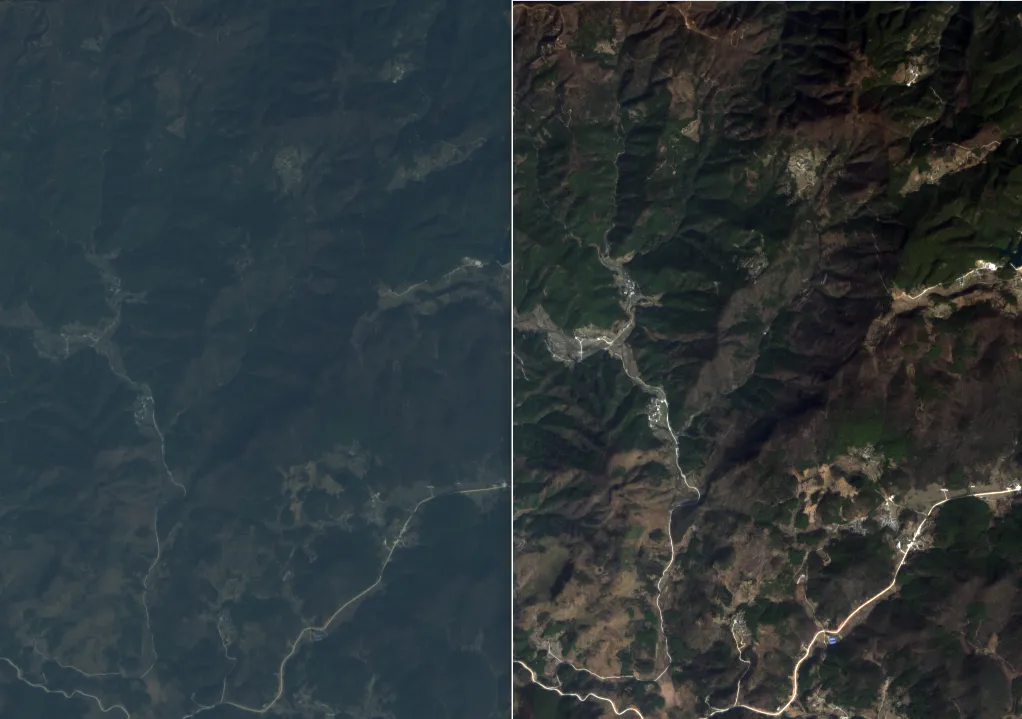
细节对比效果:
测试影像下载地址:
https://pan.baidu.com/s/17wLYyQzK3DAW2rP5gSRxZA?pwd=aiwe
 10个月宝宝每天需要喝多少奶粉?