Linux杂记 -- 检测 Linux 发行版名称和版本
- 2026-09-11 17:19:22
Linux杂记 -- 检测 Linux 发行版名称和版本只需执行 lsb_release: 在 Debian 上: 在 Ubuntu 上: 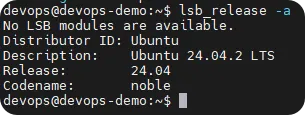
如果你没有安装 lsb_release,你可以尝试一些猜测。例如,有一个文件 /etc/issue 通常包含发行版名称。例如,在 Ubuntu 上: 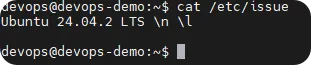
不要使用文件 /etc/debian_version,因为它的内容与发行版名称不匹配! 注意,这也适用于非 Debian 家族的发行版,如 Fedora、RHEL 或 openSUSE —— 但 lsb_release 可能未安装。 此方法适用于现代版本的 Arch、CentOS、CoreOS、Debian、Fedora、Mageia、openSUSE、Red Hat Enterprise Linux、SUSE Linux Enterprise Server、Ubuntu 等。这种广泛的适用性使其成为首选方法,如果需要识别较旧的系统,可以回退到其他方法。 具体地,查看 /etc/os-release 中的变量 NAME、VERSION、ID、VERSION_ID。 在 Fedora 上,此文件可能如下所示: 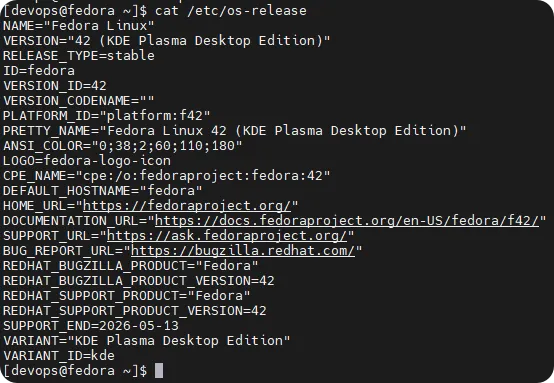
在 CentOS 上,此文件可能如下所示: 此文件在 freedesktop 网站上有文档说明;原则上,它不是 systemd 特有的 —— 但它会存在于所有基于 systemd 的发行版上。 在 bash shell 中,可以源引(source)/etc/os-release 文件,然后直接使用各种变量,如下所示: 
查看 /etc/redhat-release 的内容: 以下是 Fedora 42 机器的输出: 如基于 Debian 的响应中所述,你也可以使用 lsb_release -a 命令,它在 Fedora 24 机器上输出如下: 
Uname 是 unix name 的缩写。只需在控制台中输入 uname 即可获取操作系统的信息。 如果没有指定选项,uname 假设使用 -s 选项。 -a 或 --all - 打印所有信息,如果信息未知则省略 -p 和 -i。 示例: 所有选项: 只需执行 uname。 在 Arch 上: GNU coreutils 应该在所有基于 Linux 的系统上都可用(如果我错了请纠正我)。 如果你不知道自己在使用什么系统,你可能无法直接跳转到上面的某个示例,因此这可能是你的第一站。 在我的系统上,这给了我: 在这里你可以看到以下内容: 欢迎其他人添加 RHEL 和 SuSe 的结果。 大多数 Linux 发行版将其版本信息存储在 /etc/lsb-release(Debian)或 /etc/redhat-release(基于 RPM)文件中。使用下面的通用命令应该能让你通过大多数 Debian 和 RPM 衍生版(如 Linux Mint 和 CentOS)。 在 Ubuntu 机器上的示例: 输出: 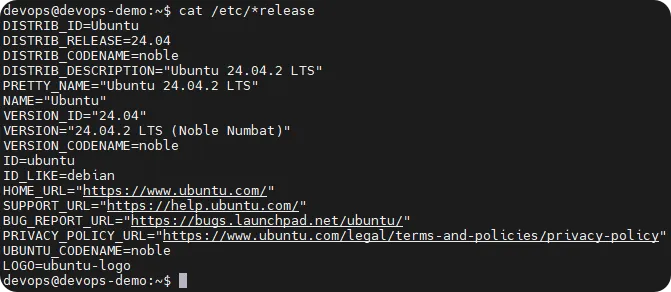
2.1 检测你正在使用的基于 Debian 的发行版
$ lsb_release-aNo LSB modules are available.Distributor ID: DebianDescription: Debian GNU/Linux testing (stretch)Release: testingCodename: stretch
$ lsb_release-aNo LSB modules are available.Distributor ID: UbuntuDescription: Ubuntu 24.04.2 LTSRelease: 24.04Codename: noble
$ cat /etc/issueUbuntu 24.04.2 LTS \n \l
2.2 检测你正在使用的基于 systemd 的发行版
NAME="Fedora Linux"VERSION="42 (KDE Plasma Desktop Edition)"RELEASE_TYPE=stableID=fedoraVERSION_ID=42VERSION_CODENAME=""PLATFORM_ID="platform:f42"PRETTY_NAME="Fedora Linux 42 (KDE Plasma Desktop Edition)"ANSI_COLOR="0;38;2;60;110;180"LOGO=fedora-logo-iconCPE_NAME="cpe:/o:fedoraproject:fedora:42"DEFAULT_HOSTNAME="fedora"HOME_URL="https://fedoraproject.org/"DOCUMENTATION_URL="https://docs.fedoraproject.org/en-US/fedora/f42/"SUPPORT_URL="https://ask.fedoraproject.org/"BUG_REPORT_URL="https://bugzilla.redhat.com/"REDHAT_BUGZILLA_PRODUCT="Fedora"REDHAT_BUGZILLA_PRODUCT_VERSION=42REDHAT_SUPPORT_PRODUCT="Fedora"REDHAT_SUPPORT_PRODUCT_VERSION=42SUPPORT_END=2026-05-13VARIANT="KDE Plasma Desktop Edition"VARIANT_ID=kde
NAME="CentOS Linux"VERSION="7 (Core)"ID="centos"ID_LIKE="rhel fedora"VERSION_ID="7"PRETTY_NAME="CentOS Linux 7 (Core)"ANSI_COLOR="0;31"CPE_NAME="cpe:/o:centos:centos:7"CENTOS_MANTISBT_PROJECT="CentOS-7"CENTOS_MANTISBT_PROJECT_VERSION="7"REDHAT_SUPPORT_PRODUCT="centos"REDHAT_SUPPORT_PRODUCT_VERSION="7"
$ echo $(source /etc/os-release && echo "$PRETTY_NAME")Fedora Linux 42 (KDE Plasma Desktop Edition)
2.3 检测你正在使用的 RHEL / CentOS / Fedora 发行版
cat /etc/redhat-releaseFedora release 42 (Adams)LSB Version: n/aDistributor ID: FedoraDescription: Fedora Linux 42 (KDE Plasma Desktop Edition)Release: 42Codename: n/a
2.4 Uname - 打印当前系统信息
uname [OPTION]> uname -aLinux fedora 6.16.8-200.fc42.x86_64#1SMP PREEMPT_DYNAMIC Fri Sep 19 17:47:18 UTC 2025 x86_64 GNU/Linux
-s, --kernel-name - 打印内核名称 -n, --nodename - 打印网络节点主机名 -r, --kernel-release - 打印内核发行版本 -v, --kernel-version - 打印内核版本 -m, --machine - 打印机器硬件名称 -p, --processor - 打印处理器类型,或 "unknown" -i, --hardware-platform - 打印硬件平台,或 "unknown" -o, --operating-system - 打印操作系统 --help - 显示帮助信息并退出 --version - 显示版本信息并退出
2.5 检测发行版的基本信息
$ uname -aLinux archlinux 6.18.7-arch1-1 #1 SMP PREEMPT_DYNAMIC Sat, 24 Jan 2026 00:47:39 +0000 x86_64 GNU/Linux
2.6 使用 GNU coreutils
# $ uname -aLinux fedora 6.18.7-100.fc42.x86_64 #1 SMP PREEMPT_DYNAMIC Fri Jan 23 15:37:26 UTC 2026 x86_64 GNU/Linuxfedora:我的电脑名称 6.18.7-100.fc42.x86_64:内核和架构 SMP Debian 3.16.7-CKT25-2+deb8u3:告诉我我正在运行 Debian,内核版本为 3.16 最后一部分表明我正在运行 Debian 8(更新)
2.7 查找你的 Linux 操作系统(Debian 和 RPM 都适用)名称和发行版本号
cat /etc/*releaseDISTRIB_ID=UbuntuDISTRIB_RELEASE=24.04DISTRIB_CODENAME=nobleDISTRIB_DESCRIPTION="Ubuntu 24.04.2 LTS"PRETTY_NAME="Ubuntu 24.04.2 LTS"NAME="Ubuntu"VERSION_ID="24.04"VERSION="24.04.2 LTS (Noble Numbat)"VERSION_CODENAME=nobleID=ubuntuID_LIKE=debianHOME_URL="https://www.ubuntu.com/"SUPPORT_URL="https://help.ubuntu.com/"BUG_REPORT_URL="https://bugs.launchpad.net/ubuntu/"PRIVACY_POLICY_URL="https://www.ubuntu.com/legal/terms-and-policies/privacy-policy"UBUNTU_CODENAME=nobleLOGO=ubuntu-logo
本文来自网友投稿或网络内容,如有侵犯您的权益请联系我们删除,联系邮箱:596563534@qq.com 。
随机文章
-
 10个月宝宝每天需要喝多少奶粉?
- 2026年,锋哥又开始收Python+AI大模型学员了!目前活动,送AI编程+Java编程 VIP
- Python自动化办公|必装10大模块
- VMware安装Rocky Linux
- “再见,微软!”法国宣布全面转向Linux:这场主权保卫战,AI才是终极底牌
- Linux 服务器裸奔?这 5 个安全加固动作救过我的命
- 嵌入式Linux--Linux并发与竞争实验
- 临时定时任务别用 crontab!Linux at 命令轻松搞定
- 学习嵌入式Linux,有哪些开发板可以选择?
- Python自动化办公|七天入门手册
- 【避坑指南】在 Linux 安装 .deb 包,如何优雅避开“依赖报错”与“幽灵代理”的连环坑?