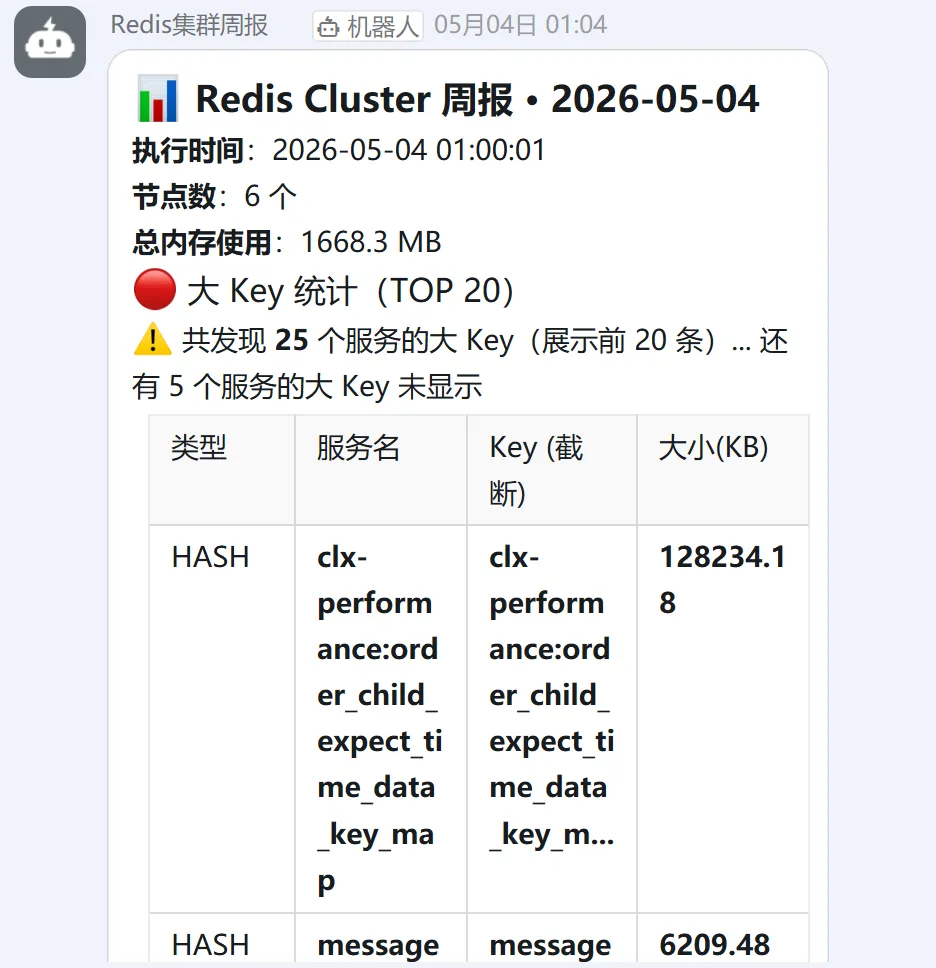
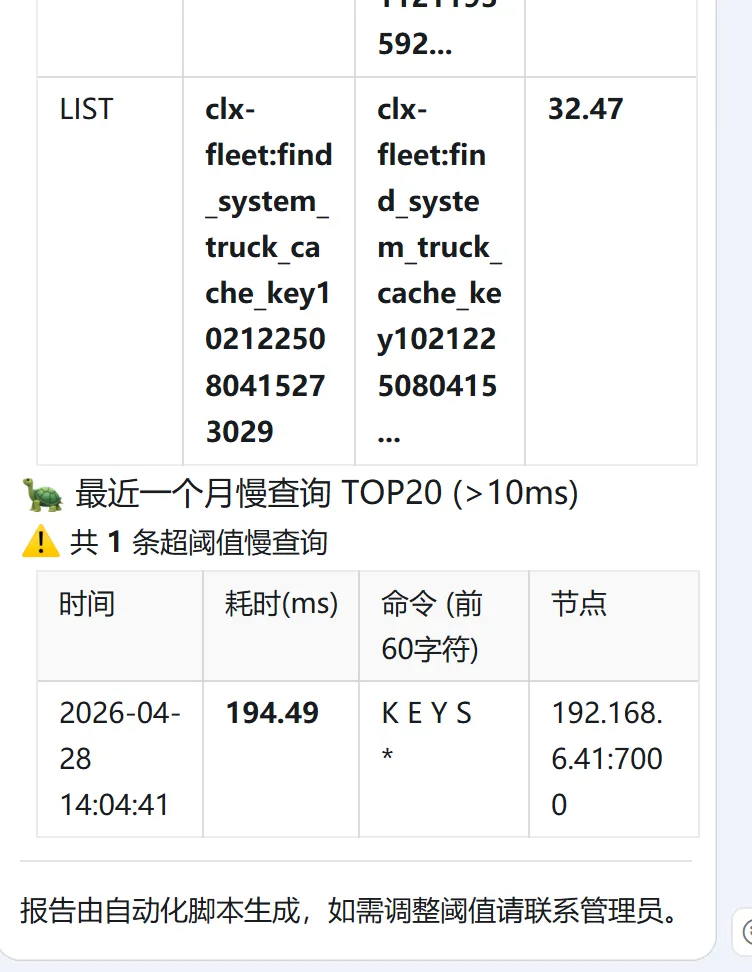
#!/usr/bin/env python3# -*- coding: utf-8 -*-"""Redis Cluster 周报扫描脚本(最终修复:遍历所有节点慢查询)- 大 Key: MEMORY USAGE + 服务名前缀截取 + 每个服务最高一条 + TOP 20- 慢查询: 遍历所有节点(不区分 master/slave) + 最近一个月 >10ms + TOP 20- 前台静默,日志完整记录"""import timeimport datetimeimport requestsimport sysfrom collections import defaultdictfrom rediscluster import RedisClusterimport redis # 用于逐节点连接# ==================== 配置 ====================REDIS_PASSWORD = "xxxxxxxxxx"STARTUP_NODES = [ {"host": "192.168.6.40", "port": 7000}, {"host": "192.168.6.41", "port": 7001}, {"host": "192.168.6.42", "port": 7002},]BIGKEY_THRESHOLD_BYTES = 10 * 1024 # > 10KB (内存占用)SLOW_QUERY_THRESHOLD_US = 10000 # > 10msSLOWLOG_LIMIT = 1000 # 每节点最多取 1000 条SLOWLOG_RECENT_SECONDS = 30 * 24 * 3600 # 最近一个月#这里需要接入钉钉的机器人 DINGTALK_WEBHOOK = "https://oapi.dingtalk.com/robot/send?access_token=1e4f060ca8f3fdc5466324b460c1d749a95c2255b53836c2c6278b6e16473df8"SCAN_COUNT = 1000SCAN_SLEEP = 0.005DANGEROUS_CMDS = ["KEYS", "HGETALL", "SMEMBERS", "LRANGE", "FLUSHDB", "FLUSHALL"]LOG_FILE = "redis_weekly_report.log"KEY_DISPLAY_MAX_LEN = 50 # Key 显示最大长度# ==================== 日志重定向 ====================class SilentLogger: def __init__(self, filename): self.log = open(filename, "a", encoding="utf-8") def write(self, message): self.log.write(message) self.log.flush() def flush(self): self.log.flush()sys.stdout = SilentLogger(LOG_FILE)sys.stderr = SilentLogger(LOG_FILE)# ==================== 钉钉发送 ====================def send_dingtalk_markdown(title, text): payload = { "msgtype": "markdown", "markdown": {"title": title, "text": text}, "at": {"isAtAll": False} } try: r = requests.post(DINGTALK_WEBHOOK, json=payload, timeout=10) result = r.json() if result.get("errcode") == 0: print("钉钉周报发送成功") else: print("钉钉发送失败:", result) except Exception as e: print("钉钉异常:", str(e))# ==================== 危险命令高亮 ====================def highlight_command(cmd_list): parts = [] for x in cmd_list: if isinstance(x, bytes): parts.append(x.decode("utf-8", errors="ignore")) else: parts.append(str(x)) cmd = " ".join(parts).upper() if any(cmd.startswith(d) for d in DANGEROUS_CMDS): return f"⚠️ {cmd}" return cmd# ==================== 提取服务名前缀 ====================def get_service_prefix(key): parts = key.split(":", 2) if len(parts) >= 2: return ":".join(parts[:2]) return key# ==================== 大key扫描(统一 MEMORY USAGE) ====================def scan_bigkeys(rc): bigkeys = [] scanned = 0 print(f"开始全集群 BigKey 扫描 {datetime.datetime.now().strftime('%Y-%m-%d %H:%M:%S')}") try: for key in rc.scan_iter(count=SCAN_COUNT): scanned += 1 try: key_str = key.decode("utf-8", errors="ignore") if isinstance(key, bytes) else str(key) typ = rc.type(key) typ = typ.decode("utf-8") if isinstance(typ, bytes) else typ size_bytes = rc.memory_usage(key) if size_bytes is None or size_bytes < BIGKEY_THRESHOLD_BYTES: continue size_kb = round(size_bytes / 1024, 2) service_prefix = get_service_prefix(key_str) bigkeys.append({ "service": service_prefix, "key": key_str, "type": typ.upper(), "size": size_kb, "unit": "KB" }) print(f"发现大 {typ.upper()}: {key_str} ({size_kb} KB)") except Exception as e: print(f"处理 key 异常: {e}") continue time.sleep(SCAN_SLEEP) except Exception as e: print(f"scan_iter 失败: {str(e)}") print(f"扫描完成,总计 {scanned} 个 key,发现 {len(bigkeys)} 个大 Key") # 按服务分组,取每个服务最高的那条 service_max = defaultdict(lambda: None) for bk in bigkeys: service = bk["service"] if service_max[service] is None or bk["size"] > service_max[service]["size"]: service_max[service] = bk grouped_bigkeys = list(service_max.values()) grouped_bigkeys.sort(key=lambda x: x["size"], reverse=True) return grouped_bigkeys# ==================== 慢查询(遍历所有节点独立连接) ====================def get_cluster_slowlogs(rc): all_slow = [] month_ago = int(time.time()) - SLOWLOG_RECENT_SECONDS print("开始获取最近一个月慢查询...") # 遍历所有节点(不区分 master/slave) nodes = list(rc.connection_pool.nodes.all_nodes()) print(f"发现 {len(nodes)} 个节点") for node in nodes: host = node["host"] port = node["port"] node_id = f"{host}:{port}" try: r = redis.Redis( host=host, port=port, password=REDIS_PASSWORD, decode_responses=True, socket_timeout=5 ) logs = r.slowlog_get(SLOWLOG_LIMIT) print(f"节点 {node_id} slowlog 条数: {len(logs)}") for log in logs: start_time = log.get("start_time", 0) duration = log.get("duration", 0) command = log.get("command", []) if start_time < month_ago or duration < SLOW_QUERY_THRESHOLD_US: continue cmd = highlight_command(command) all_slow.append({ "time": datetime.datetime.fromtimestamp(start_time).strftime("%Y-%m-%d %H:%M:%S"), "duration_ms": round(duration / 1000, 2), "command": cmd, "node": node_id }) except Exception as e: print(f"节点 {node_id} 获取慢查询失败: {e}") finally: if 'r' in locals(): r.close() all_slow.sort(key=lambda x: x["duration_ms"], reverse=True) print(f"最近一个月慢查询总数: {len(all_slow)}(取 TOP20)") return all_slow[:20]# ==================== Markdown 生成 ====================def generate_report_md(now_str, total_mem_mb, bigkeys, slowlogs, node_count): md = f"### 📊 Redis Cluster 周报 · {now_str.split()[0]}\n\n" md += f"**执行时间**:{now_str} \n" md += f"**节点数**:{node_count} 个 \n" md += f"**总内存使用**:{total_mem_mb:.1f} MB \n\n" md += "#### 🔴 大 Key 统计(TOP 20)\n" if not bigkeys: md += "✅ 未发现超阈值大 Key\n\n" else: md += f"⚠️ 共发现 **{len(bigkeys)}** 个服务的大 Key(展示前 20 条)\n\n" md += "| 类型 | 服务名 | Key (截断) | 大小(KB) |\n" md += "|------|--------|------------|----------|\n" for bk in bigkeys[:20]: key_display = bk['key'][:50] + "..." if len(bk['key']) > 50 else bk['key'] md += f"| {bk['type']} | `{bk['service']}` | `{key_display}` | **{bk['size']}** |\n" if len(bigkeys) > 20: md += f"\n... 还有 {len(bigkeys)-20} 个服务的大 Key 未显示\n" md += "\n#### 🐢 最近一个月慢查询 TOP20 (>10ms)\n" if not slowlogs: md += "✅ 未发现慢查询\n" else: md += f"⚠️ 共 **{len(slowlogs)}** 条超阈值慢查询\n\n" md += "| 时间 | 耗时(ms) | 命令 (前60字符) | 节点 |\n" md += "|------------------|----------|-------------------|------|\n" for s in slowlogs: cmd_short = s['command'][:60] + '...' if len(s['command']) > 60 else s['command'] md += f"| {s['time']} | **{s['duration_ms']}** | {cmd_short} | {s['node']} |\n" md += "\n---\n报告由自动化脚本生成,如需调整阈值请联系管理员。" return md# ==================== 主流程 ====================def main(): now_str = datetime.datetime.now().strftime("%Y-%m-%d %H:%M:%S") print(f"开始生成 Redis 集群周报 {now_str}") rc = RedisCluster( startup_nodes=STARTUP_NODES, password=REDIS_PASSWORD, decode_responses=False, skip_full_coverage_check=True ) node_count = len(list(rc.connection_pool.nodes.all_nodes())) total_mem = 0 try: infos = rc.info("memory") for info in infos.values(): if isinstance(info, dict): total_mem += info.get("used_memory", 0) except Exception as e: print("内存统计失败:", e) total_mem_mb = total_mem / (1024 * 1024) all_bigkeys = scan_bigkeys(rc) all_slowlogs = get_cluster_slowlogs(rc) report_md = generate_report_md(now_str, total_mem_mb, all_bigkeys, all_slowlogs, node_count) print(f"\n{'='*60}") print(f"Redis Cluster 周报 - {now_str}") print(f"节点数: {node_count}") print(f"总内存: {total_mem_mb:.1f} MB") print(f"大Key 服务数量: {len(all_bigkeys)}") print(f"慢查询 TOP20: {len(all_slowlogs)}") print(f"{'='*60}\n") send_dingtalk_markdown( title=f"Redis Cluster 周报 {now_str.split()[0]}", text=report_md )if __name__ == "__main__": main()



 10个月宝宝每天需要喝多少奶粉?