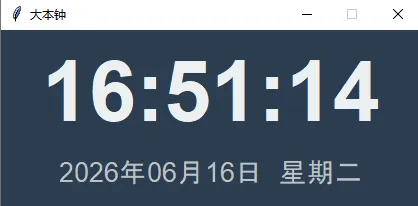
import tkinter as tkfrom tkinter import ttkimport datetimeclass ClockApp: def __init__(self, root): self.root = root self.root.title("大本钟") self.root.geometry("420x180") self.root.configure(bg='#2c3e50') # 设置窗口居中 root.eval('tk::PlaceWindow . center') root.resizable(False, False) # 样式 style = ttk.Style() style.theme_use('clam') # 时间标签(大号数字) self.time_label = tk.Label( root, font=('Helvetica', 64, 'bold'), fg='#ecf0f1', bg='#2c3e50' ) self.time_label.pack(pady=10) # 日期与星期标签 self.date_label = tk.Label( root, font=('Helvetica', 20), fg='#bdc3c7', bg='#2c3e50' ) self.date_label.pack() # 每秒更新时间 self.update_clock() def update_clock(self): now = datetime.datetime.now() # 时:分:秒 time_str = now.strftime("%H:%M:%S") # 日期 + 星期 weekdays = ['一', '二', '三', '四', '五', '六', '日'] weekday_str = f"星期{weekdays[now.weekday()]}" date_str = now.strftime(f"%Y年%m月%d日 {weekday_str}") self.time_label.config(text=time_str) self.date_label.config(text=date_str) # 每隔 1000 毫秒(1 秒)更新一次 self.root.after(1000, self.update_clock)if __name__ == "__main__": root = tk.Tk() app = ClockApp(root) root.mainloop()
 10个月宝宝每天需要喝多少奶粉?