有个需求,需要在虚机上测试 kafka 性能,使用 kafka-python 包编写 python 多线程程序发送 kafka 数据,每次测试数据发送一段时间会出现超时。Connection lost:KafkaConnectionError:Connection timed outRequestTimedOutError: Request timed out after 3791 ms
查看 kafka 日志和状态,没有任何异常😓,经过一番调研,是 python GIL 机制造成客户端自身超时。排查过程
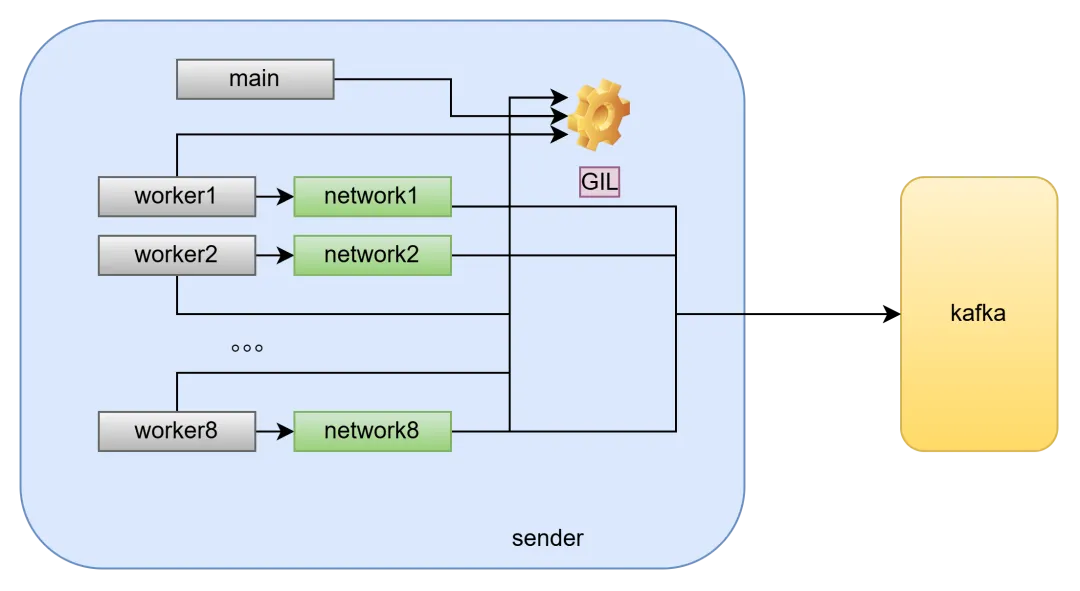
启动 kafka 客户端进程发送数据,这里给它绑定8个 CPU 核16~23,启动8个发送任务,最终创建17个线程。1个主线程,8个 work 线程用于生成数据并 json 序列化,8 个 network 线程用于 lz4 压缩数据并发送给 kafka。# DUR=15000 ./run_experiments.sh############ 环境快照 ############2026-08-02 16:53:23kafka-python 3.0.8 | confluent librdkafka 2.15.0sender cpuset=16-23 时长=15000s 本机 72 核broker: Up 2 days 0.0.0.0:39092->9092/tcp, [::]:39092->9092/tcp############ 场景:1 进程 × 8 kafka-python 线程(一把 GIL) ############2026-08-02 16:53:24>>> 对活着的进程 pid=221875 采集 GIL 四手段证据
首先使用 py-spy 抓拍线程状态,看谁持 GIL ,网络线程是否被饿。检查发现只有一个 线程是 active 状态,其他都是 idle,真是够闲的。# venv/bin/py-spy dump --pid 221875 | tee /tmp/py-spy.dumpProcess 221875: /test/python-gil/venv/bin/python -u sender.py --bootstrap localhost:39092 --topic gil-test --max-message-bytes 8192 --measurepoints 200 --compression-type lz4 --acks 1 --request-timeout-ms 30000 --max-pending 2500 --out-dir /test/python-gil/results --report-interval 30 --client kafka-python --tasks 8 --duration 15000 --tag APython v3.11.15 (/test/.local/share/uv/python/cpython-3.11.15-linux-x86_64-gnu/bin/python3.11)Thread 221875 (idle): "MainThread" main (sender.py:445) <module> (sender.py:486)Thread 221886 (idle): "worker-0" enter (threading.py:272) acquire (threading.py:468) worker (sender.py:333) 。。。省略部分内容。。。Thread 221953 (active+gil): "A-t8-network-thread" crc_update (kafka/record/_crc32c.py:130) crc (kafka/record/_crc32c.py:153) calc_crc32c (kafka/record/util.py:128)# grep -oE '((idle|active<span class="code-snippet__operator">+gil|active))' /tmp/py-spy.dump(idle)(idle)(idle)(idle)(idle)(idle)(idle)(idle)(idle)(active+gil)(idle)(idle)(idle)(idle)(idle)(idle)(idle)
查看客户端进程使用了多少 CPU,16个线程仅用了1个多点。即使我们在启动程序时给它绑定了8个 CPU 核16-23。# pidstat -p 221875 1Linux 5.15.0-139-generic (EnDSCPU) 08/02/2026 _x86_64_ (72 CPU)05:28:35 PM UID PID %usr %system %guest %wait %CPU CPU Command05:28:36 PM 1005 221875 100.00 3.00 0.00 0.00 103.00 19 python05:28:37 PM 1005 221875 100.00 4.00 0.00 0.00 104.00 19 python05:28:38 PM 1005 221875 97.00 7.00 0.00 0.00 104.00 19 python
# pidstat -p 221875 -t 1Linux 5.15.0-139-generic (EnDSCPU) 08/02/2026 x86_64 (72 CPU)05:43:51 PM UID TGID TID %usr %system %guest %wait %CPU CPU Command05:43:52 PM 1005 221875 - 98.00 7.00 0.00 0.00 105.00 22 python05:43:52 PM 1005 - 221875 0.00 0.00 0.00 0.00 0.00 22 |__python05:43:52 PM 1005 - 221886 5.00 0.00 0.00 1.00 5.00 17 |__python05:43:52 PM 1005 - 221887 5.00 0.00 0.00 0.00 5.00 16 |__python05:43:52 PM 1005 - 221888 4.00 1.00 0.00 0.00 5.00 16 |__python05:43:52 PM 1005 - 221889 4.00 1.00 0.00 1.00 5.00 16 |__python05:43:52 PM 1005 - 221890 5.00 0.00 0.00 0.00 5.00 16 |__python05:43:52 PM 1005 - 221891 5.00 0.00 0.00 0.00 5.00 16 |__python05:43:52 PM 1005 - 221892 5.00 0.00 0.00 0.00 5.00 21 |__python05:43:52 PM 1005 - 221893 5.00 0.00 0.00 0.00 5.00 17 |__python05:43:52 PM 1005 - 221934 7.00 1.00 0.00 0.00 8.00 20 |__python05:43:52 PM 1005 - 221935 6.00 0.00 0.00 0.00 6.00 16 |__python05:43:52 PM 1005 - 221938 7.00 1.00 0.00 0.00 8.00 23 |__python05:43:52 PM 1005 - 221940 8.00 0.00 0.00 1.00 8.00 22 |__python05:43:52 PM 1005 - 221941 7.00 1.00 0.00 1.00 8.00 16 |__python05:43:52 PM 1005 - 221942 8.00 0.00 0.00 0.00 8.00 18 |__python05:43:52 PM 1005 - 221943 7.00 1.00 0.00 1.00 8.00 17 |__python05:43:52 PM 1005 - 221953 7.00 0.00 0.00 0.00 7.00 19 |__python
strace 抓包看下,客户端进程到底干啥。原来绝大部分时间耗在 futex 系统调用,futex 用于内核完成线程阻塞/唤醒。即客户端进程大部分系统调用花在线程切换上了。# sudo -n timeout -s INT 8 strace -f -p 221875 -c \ -e trace=futex,sendto,recvfrom,poll,epoll_wait 2>&1 | tail -20strace: Process 221890 detached。。。% time seconds usecs/call calls errors syscall------ ----------- ----------- --------- --------- ---------------- 99.86 9.395245 166 56578 4663 futex 0.10 0.009588 4 2092 sendto 0.03 0.002415 2 820 240 recvfrom 0.01 0.001368 2 619 epoll_wait------ ----------- ----------- --------- --------- ----------------100.00 9.408616 60109 4903 total
总结原因
本文客户端进程使用 kafka-python 开发是纯 python 实现,受 GIL(Global Interpreter Lock,全局解释器锁) 限制,同一个进程内,任意时刻最多只有1个线程执行 python 字节码。这样进程内生成数据并 json 序列化的8个 work 线程,使用 lz4 压缩数据的8个 network 线程串行在一把 GIL 上。由于 json 序列化和 lz4 压缩都是高负载 CPU 操作,占用 CPU 时间长,造成线程间互相争抢 GIL。即使 network 线程发送数据的 I/O 操作占用 CPU 时间短会主动释放 GIL,它的 I/O 操作也可能被上面的高负载 CPU 操作饿死。
纯 python 进程若同时包含高负载 CPU 操作 和 IO 操作,使用多线程方式执行时受 GIL 限制会造成 I/O 操作饿死。此情况使用多进程单线程会更好,少了线程切换开销,又充分利用多核 cpu。
 10个月宝宝每天需要喝多少奶粉?