当前位置:首页>python>Python-Requests与BeautifulSoup实战

Python-Requests与BeautifulSoup实战

  • 2026-08-18 23:11:50
Python-Requests与BeautifulSoup实战

Requests 基本使用库

Python 提供了多个用来编写爬虫程序的库,有一个重要网络请求库就是 Requests 库,这个库的宗旨是"让 HTTP 服务于人类"。

Requests 是 Python 的第三方库,它的安装非常简便,如下所示:

pip install requests

Requests 库是在 urllib 的基础上开发而来,它使用 Python 语言编写,并且采用了 Apache2 Licensed(一种开源协议)的 HTTP 库。与 urllib 相比,Requests 更加方便、快捷,因此在编写爬虫程序时 Requests 库使用较多,接下来我们一起来学习requests库。

常用请求方法

requests.get()

该方法用于 GET 请求,表示向网站发起请求,获取页面响应对象。语法如下:

res = requests.get(url, headers=headers, params, timeout)

参数说明如下:

  • url:要抓取的 url 地址。
  • headers:用于包装请求头信息。
  • params:请求时携带的查询字符串参数。
  • timeout:超时时间,超过时间会抛出异常。

具体使用示比如下:

import requestsurl = 'http://baidu.com'response = requests.get(url)print(response)# print(response.text)  可以查看请求具体的返回数据信息

输出结果:

<Response [200]>

200 是请求返回状态码,表示请求成功。

如果我们想要请求时带上请求参数,使用也非常的简单,这里使用到了 http://httpbin.org,当我们请求http://httpbin.org/get 时会返回具体的请求信息,示比如下所示:

import requestsdata = {'name''渣男教父''url'"www.ybf.com"}response = requests.get('http://httpbin.org/get', params=data)  # 直接拼接参数也可以# response = requests.get('http://httpbin.org/get?name=ybf&age=33')# 调用响应对象text属性,获取文本信息print(response.text)

输出结果:

{  "args": {    "name": "\u6709\u9738\u592b",    "url": "www.ybf.com"  },  "headers": {    "Accept": "*/*",    "Accept-Encoding": "gzip, deflate",    "Host": "httpbin.org",    "User-Agent": "python-requests/2.25.1",    "X-Amzn-Trace-Id": "Root=1-62216f84-2054fe065f625d4928c77cfa"  },  "origin": "175.0.53.160",  "url": "http://httpbin.org/get?name=\u6709\u9738\u592b&url=www.ybf.com"}

requests.post()

该方法用于 POST 请求,先由用户向目标 url 提交数据,然后服务器返回一个 HttpResponse 响应对象,语法如下:

response = requests.post(url, data={请求体的字典})

示比如下所示:

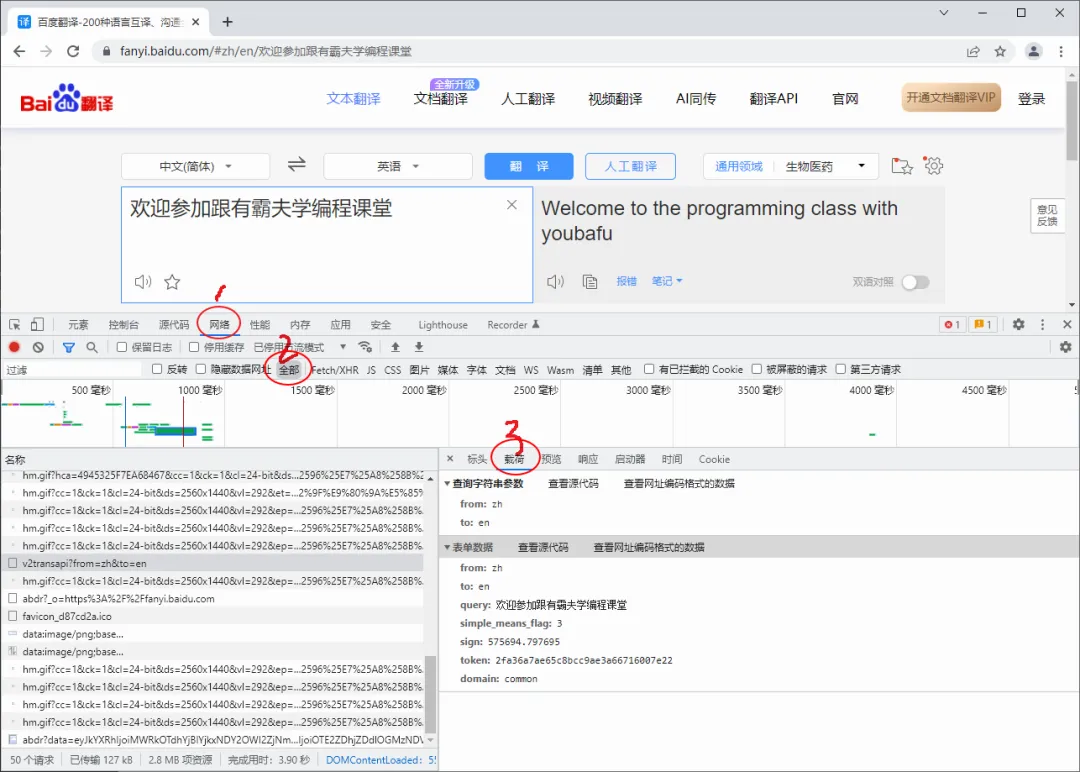
import requestsurl = 'https://fanyi.baidu.com'  # 百度翻译# post请求体携带的参数,可通过开发者调试工具查看# 查看步骤:NetWork选项->Headers选项->Form Datadata = {'from''zh''to''en''query''欢迎参加跟渣男教父学编程课堂'}response = requests.post(url, data=data)print(response)# print(response.text)  可以查看请求具体的返回数据信息

输出结果:

<Response [200]>

chrome中查看 Form Data 的步骤非常的简单,如下图所示:

响应对象属性

当我们使用 Requests 模块向一个 URL 发起请求后会返回一个 HttpResponse 响应对象,该对象具有以下常用属性:

常用属性
说明
encoding
查看或者指定响应字符编码
status_code
返回HTTP响应码
url
查看请求的 url 地址
headers
查看请求头信息
cookies
查看cookies 信息
text
以字符串形式输出
content
以字节流形式输出,若要保存下载图片需使用该属性。

使用示比如下所示:

import requestsresponse = requests.get('http://www.baidu.com')print(response.encoding)response.encoding = "utf-8"  # 更改为utf-8编码print(response.status_code)  # 打印状态码print(response.url)          # 打印请求urlprint(response.headers)      # 打印头信息print(response.cookies)      # 打印cookie信息print(response.text)         # 以字符串形式打印网页源码print(response.content)      # 以字节流形式打印

输出结果:

# 编码格式ISO-8859-1# 响应码200# url地址http://www.baidu.com/# 请求头信息{'Cache-Control''private, no-cache, no-store, proxy-revalidate, no-transform''Connection''keep-alive''Content-Encoding''gzip''Content-Type''text/html''Date''Fri, 04 Mar 2022 02:04:36 GMT''Last-Modified''Mon, 23 Jan 2017 13:27:57 GMT''Pragma''no-cache''Server''bfe/1.0.8.18''Set-Cookie''BDORZ=27315; max-age=86400; domain=.baidu.com; path=/''Transfer-Encoding''chunked'}# 查看cookies信息<RequestsCookieJar[<Cookie BDORZ=27315 for .baidu.com/>]>...内容过长,此处省略后两项输出

在使用 requests请求网页时,我们可以很方便的拿到响应对象的各种信息,实际使用中可以很灵活的进行操作。

实用请求参数

SSL认证-verify参数

SSL 证书是数字证书的一种,类似于驾驶证、护照和营业执照。因为配置在服务器上,也称为 SSL 服务器证书。SSL 证书遵守 SSL 协议,由受信任的数字证书颁发机构 CA(电子认证服务)颁发。 SSL 具有服务器身份验证和数据传输加密功能。

verify 参数的作用是检查 SSL 证书认证,参数的默认值为 True,如果设置为 False 则表示不检查 SSL证书,此参数适用于没有经过 CA 机构认证的 HTTPS 类型的网站。其使用格式如下:

response = requests.get(url=url, params=params, headers=headers, verify=False)

代理IP-proxies参数

一些网站为了限制爬虫从而设置了很多反爬策略,其中一项就是针对 IP 地址设置的。比如,访问网站超过规定次数导致流量异常,或者某个时间段内频繁地更换浏览器访问,存在上述行为的 IP 极有可能被网站封杀掉。

代理 IP 就是解决上述问题的,它突破了 IP 地址的访问限制,隐藏了本地网络的真实 IP,而使用第三方 IP 代替自己去访问网站。

1. 代理IP池

通过构建代理 IP 池可以让你编写的爬虫程序更加稳定,从 IP 池中随机选择一个 IP 去访问网站,而不使用固定的真实 IP。总之将爬虫程序伪装的越像人,它就越不容易被网站封杀。当然代理 IP 也不是完全不能被察觉,通过端口探测技等术识仍然可以辨别。其实爬虫与反爬虫永远相互斗争的,就看谁的技术更加厉害。

2. proxies参数

Requests 提供了一个代理 IP 参数proxies ,该参数的语法结构如下:

proxies = {     '协议类型(http/https)': '协议类型://IP地址:端口号' }

下面构建了两个协议版本的代理 IP,示比如下:

proxies = {     'http': 'http://IP:端口号',     'https': 'https://IP:端口号' }

3. 代理IP使用

下面通过简单演示如何使用proxies 参数,示比如下:

import requestsurl = 'http://httpbin.org/get'headers = {'User-Agent''Mozilla/5.0'}proxies = {'http''http://1.194.238.242:3828'}  # 网上找的免费代理iphtml = requests.get(url, proxies=proxies, headers=headers, timeout=10).textprint(html)

输出结果:

{  "args": {},  "headers": {    "Accept": "*/*",    "Accept-Encoding": "gzip, deflate",    "Cache-Control": "max-age=259200",    "Host": "httpbin.org",    "User-Agent": "Mozilla/5.0",    "X-Amzn-Trace-Id": "Root=1-622b1032-3ef292bc349cd9ca3d57e39f"  },  "origin": "1.194.238.242",  "url": "http://httpbin.org/get"}

由于上述示例使用的是免费代理 IP,因此其质量、稳定性较差,可能会随时失效。如果想构建一个稳定的代理 IP 池,就需要花费成本。

4. 付费代理IP

网上有许多提供代理 IP 服务的网站,比如快代理、携趣代理等。这些网站也提供了相关文档说明,以及 API 接口,爬虫程序通过访问 API 接口,就可以构建自己的代理 IP 池。

付费代理 IP 按照资源类型可划分为:开发代理、私密代理、隧道代理、独享代理,其中最常使用的是开放代理与私密代理。

  • 开放代理
    :开放代理是从公网收集的代理服务器,具有 IP 数量大,使用成本低的特点,全年超过 80% 的时间都能有 3000 个以上的代理 IP 可供提取使用。
  • 私密代理
    :私密代理是基于云主机构建的高品质代理服务器,为您提供高速、可信赖的网络代理服务。私密代理每天可用 IP 数量超过 20 万个,可用率在 95 %以上,1 次可提取 IP 数量超过 700 个,可以为爬虫业务提供强大的助力。

付费代理的收费标准根据 IP 使用的时间长短,以及 IP 的质量高低,从几元到几百元不等,网上有很多提供免费代理 IP 的网站,不过想找到一个质量较高的免费代理好比大海捞针。

用户认证-auth参数

Requests 提供了一个auth 参数,该参数的支持用户认证功能,也就是适合那些需要验证用户名、密码的网站。auth 的参数形式是一个元组,其格式如下:

auth = ('username', 'password')

其使用示比如下所示:

import requests  # 导入requests模块# 定义请求地址url = 'http://sck.rjkflm.com:666/spider/auth/'ah = ('admin''admin')response = requests.get(url=url, auth=ah)if response.status_code == 200:    print(response.text)

Requests 库实战应用

接下来我们学习使用 Requests 库下载图片。

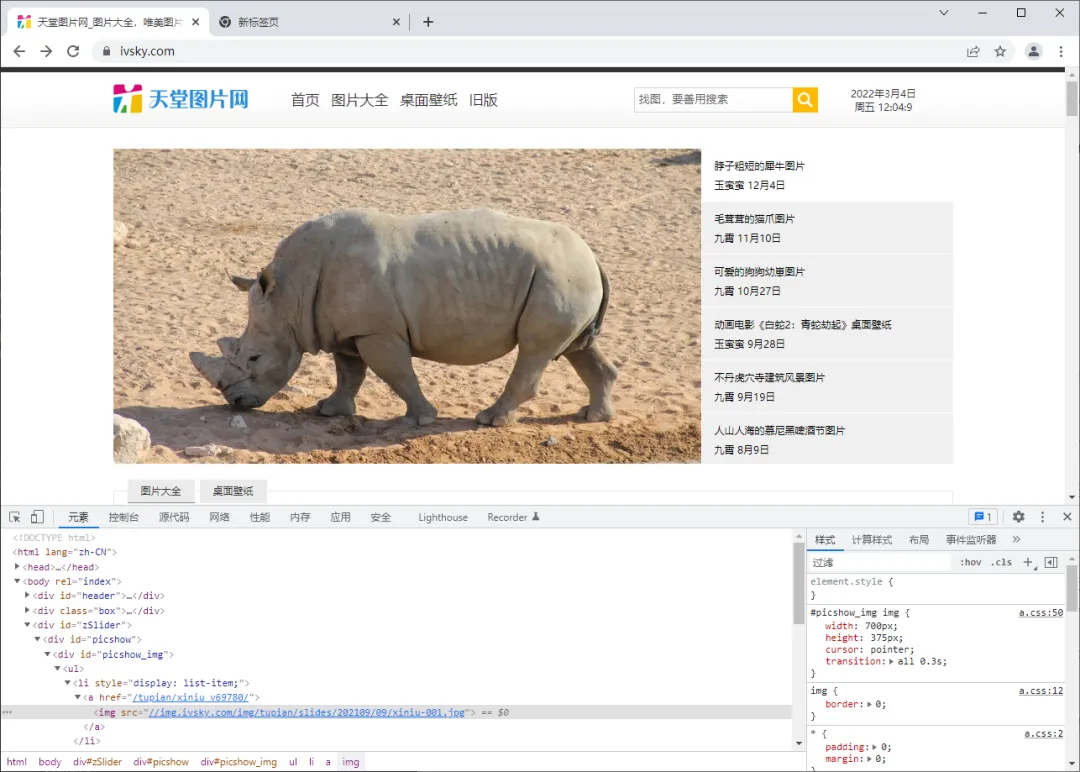
首先打开天堂图片网(https://www.ivsky.com/),然后使用 Chrome 开发者工具随意查看一张图片的源地址,如下图所示:

图片地址为:

<imgsrc="//img.ivsky.com/img/tupian/slides/202109/09/xiniu-001.jpg">

可以将上述 url 粘贴至浏览器地址栏进行验证。当我们确定图片地址后,就可以使用 requests 库进行编码了:

import requestsurl = 'https://img.ivsky.com/img/tupian/slides/202109/09/xiniu-001.jpg'headers = {'User-Agent''Mozilla/4.0'}html = requests.get(url=url, headers=headers).content  # 读取图片需要使用content属性with open('D:/requests_img.jpg''wb'as f:  # 以二进制的方式下载图片    f.write(html)

最后,在D盘目录下可以找到已经下载好的图片。

网页解析 BeautifulSoup 库

BeautifulSoup 简称 BS4(其中 4 表示版本号)是一个 Python 第三方库,它可以从 HTML 或 XML 文档中快速地提取指定的数据。Beautiful Soup 语法简单,使用方便,并且容易理解,可以快速地学习并掌握它。

下面我们讲解 BS4 的基本语法。

由于 BeautifulSoup 是第三方库,因此需要单独下载,下载方式非常简单,执行以下命令即可安装:

pip install bs4

由于 BS4 解析页面时需要依赖文档解析器,所以还需要安装 lxml 作为解析库:

pip install lxml

Python 也自带了一个文档解析库 html.parser,但是其解析速度要稍慢于 lxml。除了上述解析器外,还可以使用 html5lib 解析器,安装方式如下:

pip install html5lib

该解析器生成 HTML 格式的文档,但速度较慢。

BS4解析对象

创建 BS4 解析对象是万事开头的第一步,这非常地简单,语法格式如下所示:

# 导入解析包from bs4 import BeautifulSoup# 创建beautifulsoup解析对象soup = BeautifulSoup(html_doc, 'html.parser')

上述代码中,html_doc 表示要解析的文档,而 html.parser 表示解析文档时所用的解析器,此处的解析器也可以是 'lxml' 或者 'html5lib',示例代码如下所示:

# -*- coding: UTF-8 -*-from bs4 import BeautifulSouphtml_doc = """<html><head><title>"跟渣男教父学编程"</title></head><body><pclass="title"><b>www.youbafu.com</b></p><pclass="website">跟渣男教父学编程<ahref="http://youbafu.com/python/"id="link1">python教程</a><ahref="http://youbafu.com/c/"id="link2">c语言教程</a>"""soup = BeautifulSoup(html_doc, 'html.parser')# prettify()用于格式化输出html/xml文档print(soup.prettify())

输出结果:

<html> <head>  <title>   "跟渣男教父学编程"  </title> </head> <body>  <pclass="title">   <b>    www.youbafu.com   </b>  </p>  <pclass="website">   跟渣男教父学编程   <ahref="http://youbafu.com/python/"id="link1">    python教程   </a>   <ahref="http://youbafu.com/c/"id="link2">    c语言教程   </a>  </p> </body></html>

如果是外部文档,您也可以通过 open() 的方式打开读取,语法格式如下:

soup = BeautifulSoup(open('html_doc.html', encoding='utf8'), 'lxml')

BS4常用语法

接下来一起学习一下爬虫中经常用到的 BS4 解析方法。

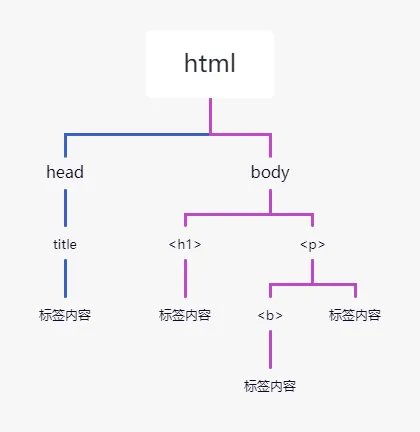
Beautiful Soup 将 HTML 文档转换成一个树形结构,该结构有利于快速地遍历和搜索 HTML 文档。下面使用树状结构来描述一段 HTML 文档:

<html>    <head><title>跟渣男教父学编程</title></head>    <body>        <h1>www.bpsend.net</h1>        <p><b>一个学习编程的网站</b></p>    </body></html>

文档树中的每个节点都是 Python 对象,这些对象大致分为四类:Tag , NavigableString , BeautifulSoup , Comment 。其中使用最多的是 Tag 和 NavigableString。

  • Tag
    :标签类,HTML 文档中所有的标签都可以看做 Tag 对象。
  • NavigableString
    :字符串类,指的是标签中的文本内容,使用 text、string、strings 来获取文本内容。
  • BeautifulSoup
    :表示一个 HTML 文档的全部内容,您可以把它当作一个人特殊的 Tag 对象。
  • Comment
    :表示 HTML 文档中的注释内容以及特殊字符串,它是一个特殊的 NavigableString。

Tag节点

标签(Tag)是组成 HTML 文档的基本元素。在 BS4 中,通过标签名和标签属性可以提取出想要的内容。看一组简单的示例:

from bs4 import BeautifulSoupsoup = BeautifulSoup('<p class="Web site url"><b>www.youbafu.com</b></p>''html.parser')# 获取整个p标签的html代码print(soup.p)  # 获取p标签print(soup.p.b)  # 获取b标签print(soup.p.text)  # 获取p标签内容,使用NavigableString类中的string、text、get_text()print(soup.p.attrs)  # 返回一个字典,里面是多有属性和值print(type(soup.p))  # 查看返回的数据类型print(soup.p['class'])  # 根据属性,获取标签的属性值,返回值为列表soup.p['class'] = ['Web''Site']  # 给class属性赋值,此时属性值由列表转换为字符串print(soup.p)

输出结果如下:

soup.p输出结果:<pclass="Web site url"><b>www.bpsend.net</b></p>soup.p.b输出结果:<b>www.bpsend.net</b>soup.p.text输出结果:www.bpsend.netsoup.p.attrs输出结果:{'class': ['Web''site''url']}type(soup.p)输出结果:<class 'bs4.element.Tag'>soup.p['class']输出结果:['Web''site''url']class属性重新赋值:<p class="Web site url"><b>www.bpsend.net</b></p>

遍历节点

Tag 对象提供了许多遍历 tag 节点的属性,比如 contents、children 用来遍历子节点;parent 与 parents 用来遍历父节点;而 next_sibling 与 previous_sibling 则用来遍历兄弟节点 。示比如下:

html_doc = """<html><head><title>"跟渣男教父学编程"</title></head><body><pclass="title"><b>www.youbafu.com</b></p><pclass="website">一个学习编程的网站</p><ahref="http://www.bpsend.net/python/"id="link1">python教程</a><ahref="http://www.bpsend.net/c/"id="link2">c语言教程</a></body></html>"""soup = BeautifulSoup(html_doc, 'html.parser')body_tag = soup.bodyprint(body_tag)print(body_tag.contents)  # 以列表的形式输出,所有子节点

输出结果:

<body><pclass="title"><b>www.youbafu.com</b></p><pclass="website">一个学习编程的网站</p><ahref="http://www.youbafu.com/python/"id="link1">python教程</a><ahref="http://www.youbafu.com/c/"id="link2">c语言教程</a></body># 以列表的形式输出[<pclass="title"><b>www.youbafu.com</b></p><pclass="website">一个学习编程的网站</p><ahref="http://www.youbafu.com/python/"id="link1">python教程</a>, '\n', <ahref="http://www.youbafu.com/c/"id="link2">c语言教程</a>, ' ']

Tag 的 children 属性会生成一个可迭代对象,可以用来遍历子节点,示比如下:

for child in body_tag.children:     print(child)

输出结果:

<pclass="title"><b>www.youbafu.com</b></p><pclass="website">一个学习编程的网站</p><ahref="http://www.youbafu.com/python/"id="link1">python教程</a><ahref="http://www.youbafu.com/c/"id="link2">c语言教程</a>

find_all() 与 find()

find_all() 与 find() 是解析 HTML 文档的常用方法,它们可以在 HTML 文档中按照一定的条件(相当于过滤器)查找所需内容。find() 与 find_all() 的语法格式相似,希望大家在学习的时候,可以举一反三。

BS4 库中定义了许多用于搜索的方法,find() 与 find_all() 是最为关键的两个方法,其余方法的参数和使用与其类似。

find_all()

find_all() 方法用来搜索当前 tag 的所有子节点,并判断这些节点是否符合过滤条件,最后以列表形式将符合条件的内容返回,语法格式如下:

find_all(name, attrs, recursive, text, limit)

参数说明:

  • name:查找所有名字为 name 的 tag 标签,字符串对象会被自动忽略。
  • attrs:按照属性名和属性值搜索 tag 标签,注意由于 class 是 Python 的关键字,所以要使用 "class_"。
  • recursive:find_all() 会搜索 tag 的所有子孙节点,设置 recursive=False 可以只搜索 tag 的直接子节点。
  • text:用来搜文档中的字符串内容,该参数可以接受字符串 、正则表达式 、列表、True。
  • limit:由于 find_all() 会返回所有的搜索结果,这样会影响执行效率,通过 limit 参数可以限制返回结果的数量。

find_all() 使用示比如下:

from bs4 import BeautifulSouphtml_doc = """<html><head><title>"跟渣男教父学编程"</title></head><body><pclass="title"><b>www.bpsend.net</b></p><pclass="website">一个学习编程的网站</p><ahref="http://www.bpsend.net/python/"id="link1">python教程</a><ahref="http://www.bpsend.net/c/"id="link2">c语言教程</a><ahref="http://www.bpsend.net/django/"id="link3">django教程</a><pclass="vip">加入我们阅读所有教程</p><ahref="http://www.bpsend.net/vip"id="link4">成为vip</a>"""# 创建soup解析对象soup = BeautifulSoup(html_doc, 'html.parser')print(soup.find_all("a"))  # 查找所有a标签并返回print(soup.find_all("a", limit=2))  # 查找前两条a标签并返回

按照标签属性以及属性值查找 HTML 文档,如下所示:

print(soup.find_all("p", class_="website")) print(soup.find_all(id="link4"))

正则表达式、列表,以及 True 也可以当做过滤条件,使用示比如下:

import re# 查找tag标签print(soup.find_all(['b''a']))# 正则表达式匹配id属性值print(soup.find_all('a'id=re.compile(r'.\d')))print(soup.find_all(id=True))  # True可以匹配任何值,下面代码会查找所有tag,并返回相应的tag名称for tag in soup.find_all(True):    print(tag.name, end=" ")# 输出所有以b开始的tag标签

BS4 为了简化代码,为 find_all() 提供了一种简化写法,如下所示:

soup.find_all("a")

上述两种的方法的输出结果是相同的。

find()

find() 方法与 find_all() 方法类似,不同之处在于 find() 只返回第一个匹配的元素,而不是列表。语法格式如下:

find(name, attrs, recursive, text)

文档总结

一、核心知识点回顾

1. Requests 库到底能做什么?

Requests 就是帮你"向网站要数据"的工具。

打个比方:

  • 你去餐厅点菜,服务员帮你下单 → Requests 帮你向服务器发请求
  • 服务员把菜端给你 → Requests 把网页内容返回给你

核心功能:

requests.get()    → 获取网页(最常用)requests.post()   → 提交数据(登录、搜索等)response.text     → 拿到文本(HTMLJSONresponse.content  → 拿到二进制(图片、文件)

2. GET vs POST 请求

对比项
GET
POST
用途
获取数据
提交数据
参数位置
URL 里(?key=value)
请求体里
参数参数
params={}data={}
例子
搜索、浏览页面
登录、发表评论
长度限制
有(URL长度限制)

使用场景:

  • 浏览网页、搜索商品 → GET
  • 登录账号、提交表单 → POST

3. 响应对象常用属性

response = requests.get(url)  response.status_code   # 状态码:200成功、404找不到、403禁止 response.text          # 文本内容(字符串) response.content       # 二进制内容(下载图片用) response.url           # 实际请求的URL(可能有跳转) response.headers       # 响应头信息 response.encoding      # 编码格式 response.cookies       # Cookie信息

状态码速查:

  • 200
     —— 成功
  • 301/302
     —— 重定向(跳转了)
  • 400
     —— 请求参数错误
  • 403
     —— 被拒绝(可能触发反爬)
  • 404
     —— 页面不存在
  • 500
     —— 服务器错误

4. 实用请求参数

参数
作用
示例
headers
伪装浏览器
{'User-Agent': '...'}
params
GET 请求参数
{'wd': 'python'}
data
POST 请求参数
{'username': 'xxx'}
timeout
超时时间
timeout=10
proxies
代理 IP
{'http': 'http://IP:端口'}
verify
SSL 认证
verify=False
(跳过证书检查)
auth
用户认证
auth=('user', 'pass')

5. BeautifulSoup 基础

BS4 就是帮你"从 HTML 里找数据"的工具。

创建解析对象:

from bs4 import BeautifulSoup soup = BeautifulSoup(html, 'html.parser')  # 或 'lxml'

四大对象:

  • Tag
     —— 标签(<a><div> 等)
  • NavigableString
     —— 标签里的文本
  • BeautifulSoup
     —— 整个文档
  • Comment
     —— 注释内容

6. BS4 查找元素

方法
作用
返回值
find()
找第一个匹配的
Tag 对象
find_all()
找所有匹配的
列表
select()
CSS 选择器
列表

常用查找方式:

# 按标签名soup.find('a')soup.find_all('a')# 按 classsoup.find('div', class_='item')soup.find_all('div', class_='item')# 按 idsoup.find(id='kw')# 按属性soup.find('a', href='http://example.com')# 获取文本tag.texttag.get_text()tag.string# 获取属性tag['href']tag['src']tag.get('class')find() vs find_all():# find() 只返回第一个result = soup.find('a')print(result)  # <a href="...">第一个链接</a># find_all() 返回所有(列表)results = soup.find_all('a')print(results)  # [<a...>, <a...>, <a...>]# 限制数量results = soup.find_all('a'limit=3)  # 只返回前3个

7. 下载图片/文件

import requests# 下载图片url = 'https://example.com/image.jpg'response = requests.get(url)# 用 content(二进制),不是 text!with open('image.jpg''wb'as f:    f.write(response.content)

关键点:

  • 下载图片/文件 → 用 response.content
  • 获取网页文本 → 用 response.text
  • 打开文件用 'wb' 模式(二进制写入)

二、常见坑与解决方案

坑1:response.text 乱码

症状:打印出来是乱码原因:编码识别错误(默认 ISO-8859-1解决:response.encoding = 'utf-8' 或 response.apparent_encoding

坑2:下载图片打不开

症状:下载的图片无法打开原因:用了 response.text 而不是 response.content解决:下载二进制文件必须用 .content

坑3:find_all() 返回空列表

症状:soup.find_all('div', class_='item') 返回 []原因1class 名写错了原因2:HTML 结构和你想的不一样解决:先 print(soup) 看看实际 HTML 长什么样

坑4:class 是 Python 关键字

症状:soup.find('div'class='item') 报错原因:class 是 Python 保留字解决:用 class_(加下划线)

坑5:代理 IP 不可用

症状:requests.get() 超时或报错原因:免费代理经常失效解决:换代理,或设置 timeout 避免卡死

坑6:忘记加 User-Agent

症状:返回 403 或空内容原因:网站识别出你是爬虫解决:加 headers={'User-Agent''...'}

三、学习建议

  1. Requests 优先于 urllib
     —— 代码简洁,功能强大
  2. BS4 适合新手
     —— 比正则直观,比 lxml 简单
  3. 先打印 response
     —— 看看状态码和内容,再决定怎么处理
  4. 下载文件用 content
     —— 别用 text,否则文件会损坏
  5. 加 timeout 保平安
     —— 避免程序永远卡住
  6. 先找单个再找多个
     —— 先用 find() 测试,再用 find_all() 批量

最新文章

随机文章

基本 文件 流程 错误 SQL 调试
  1. 请求信息 : 2026-08-21 14:40:19 HTTP/2.0 GET : https://f.mffb.com.cn/a/509423.html
  2. 运行时间 : 0.128621s [ 吞吐率:7.77req/s ] 内存消耗:4,795.61kb 文件加载:140
  3. 缓存信息 : 0 reads,0 writes
  4. 会话信息 : SESSION_ID=2e18be28697160abc189a8dfb95bdaf4
  1. /yingpanguazai/ssd/ssd1/www/f.mffb.com.cn/public/index.php ( 0.79 KB )
  2. /yingpanguazai/ssd/ssd1/www/f.mffb.com.cn/vendor/autoload.php ( 0.17 KB )
  3. /yingpanguazai/ssd/ssd1/www/f.mffb.com.cn/vendor/composer/autoload_real.php ( 2.49 KB )
  4. /yingpanguazai/ssd/ssd1/www/f.mffb.com.cn/vendor/composer/platform_check.php ( 0.90 KB )
  5. /yingpanguazai/ssd/ssd1/www/f.mffb.com.cn/vendor/composer/ClassLoader.php ( 14.03 KB )
  6. /yingpanguazai/ssd/ssd1/www/f.mffb.com.cn/vendor/composer/autoload_static.php ( 4.90 KB )
  7. /yingpanguazai/ssd/ssd1/www/f.mffb.com.cn/vendor/topthink/think-helper/src/helper.php ( 8.34 KB )
  8. /yingpanguazai/ssd/ssd1/www/f.mffb.com.cn/vendor/topthink/think-validate/src/helper.php ( 2.19 KB )
  9. /yingpanguazai/ssd/ssd1/www/f.mffb.com.cn/vendor/topthink/think-orm/src/helper.php ( 1.47 KB )
  10. /yingpanguazai/ssd/ssd1/www/f.mffb.com.cn/vendor/topthink/think-orm/stubs/load_stubs.php ( 0.16 KB )
  11. /yingpanguazai/ssd/ssd1/www/f.mffb.com.cn/vendor/topthink/framework/src/think/Exception.php ( 1.69 KB )
  12. /yingpanguazai/ssd/ssd1/www/f.mffb.com.cn/vendor/topthink/think-container/src/Facade.php ( 2.71 KB )
  13. /yingpanguazai/ssd/ssd1/www/f.mffb.com.cn/vendor/symfony/deprecation-contracts/function.php ( 0.99 KB )
  14. /yingpanguazai/ssd/ssd1/www/f.mffb.com.cn/vendor/symfony/polyfill-mbstring/bootstrap.php ( 8.26 KB )
  15. /yingpanguazai/ssd/ssd1/www/f.mffb.com.cn/vendor/symfony/polyfill-mbstring/bootstrap80.php ( 9.78 KB )
  16. /yingpanguazai/ssd/ssd1/www/f.mffb.com.cn/vendor/symfony/var-dumper/Resources/functions/dump.php ( 1.49 KB )
  17. /yingpanguazai/ssd/ssd1/www/f.mffb.com.cn/vendor/topthink/think-dumper/src/helper.php ( 0.18 KB )
  18. /yingpanguazai/ssd/ssd1/www/f.mffb.com.cn/vendor/symfony/var-dumper/VarDumper.php ( 4.30 KB )
  19. /yingpanguazai/ssd/ssd1/www/f.mffb.com.cn/vendor/topthink/framework/src/think/App.php ( 15.30 KB )
  20. /yingpanguazai/ssd/ssd1/www/f.mffb.com.cn/vendor/topthink/think-container/src/Container.php ( 15.76 KB )
  21. /yingpanguazai/ssd/ssd1/www/f.mffb.com.cn/vendor/psr/container/src/ContainerInterface.php ( 1.02 KB )
  22. /yingpanguazai/ssd/ssd1/www/f.mffb.com.cn/app/provider.php ( 0.19 KB )
  23. /yingpanguazai/ssd/ssd1/www/f.mffb.com.cn/vendor/topthink/framework/src/think/Http.php ( 6.04 KB )
  24. /yingpanguazai/ssd/ssd1/www/f.mffb.com.cn/vendor/topthink/think-helper/src/helper/Str.php ( 7.29 KB )
  25. /yingpanguazai/ssd/ssd1/www/f.mffb.com.cn/vendor/topthink/framework/src/think/Env.php ( 4.68 KB )
  26. /yingpanguazai/ssd/ssd1/www/f.mffb.com.cn/app/common.php ( 0.03 KB )
  27. /yingpanguazai/ssd/ssd1/www/f.mffb.com.cn/vendor/topthink/framework/src/helper.php ( 18.78 KB )
  28. /yingpanguazai/ssd/ssd1/www/f.mffb.com.cn/vendor/topthink/framework/src/think/Config.php ( 5.54 KB )
  29. /yingpanguazai/ssd/ssd1/www/f.mffb.com.cn/config/app.php ( 0.95 KB )
  30. /yingpanguazai/ssd/ssd1/www/f.mffb.com.cn/config/cache.php ( 0.78 KB )
  31. /yingpanguazai/ssd/ssd1/www/f.mffb.com.cn/config/console.php ( 0.23 KB )
  32. /yingpanguazai/ssd/ssd1/www/f.mffb.com.cn/config/cookie.php ( 0.56 KB )
  33. /yingpanguazai/ssd/ssd1/www/f.mffb.com.cn/config/database.php ( 2.48 KB )
  34. /yingpanguazai/ssd/ssd1/www/f.mffb.com.cn/vendor/topthink/framework/src/think/facade/Env.php ( 1.67 KB )
  35. /yingpanguazai/ssd/ssd1/www/f.mffb.com.cn/config/filesystem.php ( 0.61 KB )
  36. /yingpanguazai/ssd/ssd1/www/f.mffb.com.cn/config/lang.php ( 0.91 KB )
  37. /yingpanguazai/ssd/ssd1/www/f.mffb.com.cn/config/log.php ( 1.35 KB )
  38. /yingpanguazai/ssd/ssd1/www/f.mffb.com.cn/config/middleware.php ( 0.19 KB )
  39. /yingpanguazai/ssd/ssd1/www/f.mffb.com.cn/config/route.php ( 1.89 KB )
  40. /yingpanguazai/ssd/ssd1/www/f.mffb.com.cn/config/session.php ( 0.57 KB )
  41. /yingpanguazai/ssd/ssd1/www/f.mffb.com.cn/config/trace.php ( 0.34 KB )
  42. /yingpanguazai/ssd/ssd1/www/f.mffb.com.cn/config/view.php ( 0.82 KB )
  43. /yingpanguazai/ssd/ssd1/www/f.mffb.com.cn/app/event.php ( 0.25 KB )
  44. /yingpanguazai/ssd/ssd1/www/f.mffb.com.cn/vendor/topthink/framework/src/think/Event.php ( 7.67 KB )
  45. /yingpanguazai/ssd/ssd1/www/f.mffb.com.cn/app/service.php ( 0.13 KB )
  46. /yingpanguazai/ssd/ssd1/www/f.mffb.com.cn/app/AppService.php ( 0.26 KB )
  47. /yingpanguazai/ssd/ssd1/www/f.mffb.com.cn/vendor/topthink/framework/src/think/Service.php ( 1.64 KB )
  48. /yingpanguazai/ssd/ssd1/www/f.mffb.com.cn/vendor/topthink/framework/src/think/Lang.php ( 7.35 KB )
  49. /yingpanguazai/ssd/ssd1/www/f.mffb.com.cn/vendor/topthink/framework/src/lang/zh-cn.php ( 13.70 KB )
  50. /yingpanguazai/ssd/ssd1/www/f.mffb.com.cn/vendor/topthink/framework/src/think/initializer/Error.php ( 3.31 KB )
  51. /yingpanguazai/ssd/ssd1/www/f.mffb.com.cn/vendor/topthink/framework/src/think/initializer/RegisterService.php ( 1.33 KB )
  52. /yingpanguazai/ssd/ssd1/www/f.mffb.com.cn/vendor/services.php ( 0.14 KB )
  53. /yingpanguazai/ssd/ssd1/www/f.mffb.com.cn/vendor/topthink/framework/src/think/service/PaginatorService.php ( 1.52 KB )
  54. /yingpanguazai/ssd/ssd1/www/f.mffb.com.cn/vendor/topthink/framework/src/think/service/ValidateService.php ( 0.99 KB )
  55. /yingpanguazai/ssd/ssd1/www/f.mffb.com.cn/vendor/topthink/framework/src/think/service/ModelService.php ( 2.04 KB )
  56. /yingpanguazai/ssd/ssd1/www/f.mffb.com.cn/vendor/topthink/think-trace/src/Service.php ( 0.77 KB )
  57. /yingpanguazai/ssd/ssd1/www/f.mffb.com.cn/vendor/topthink/framework/src/think/Middleware.php ( 6.72 KB )
  58. /yingpanguazai/ssd/ssd1/www/f.mffb.com.cn/vendor/topthink/framework/src/think/initializer/BootService.php ( 0.77 KB )
  59. /yingpanguazai/ssd/ssd1/www/f.mffb.com.cn/vendor/topthink/think-orm/src/Paginator.php ( 11.86 KB )
  60. /yingpanguazai/ssd/ssd1/www/f.mffb.com.cn/vendor/topthink/think-validate/src/Validate.php ( 63.20 KB )
  61. /yingpanguazai/ssd/ssd1/www/f.mffb.com.cn/vendor/topthink/think-orm/src/Model.php ( 23.55 KB )
  62. /yingpanguazai/ssd/ssd1/www/f.mffb.com.cn/vendor/topthink/think-orm/src/model/concern/Attribute.php ( 21.05 KB )
  63. /yingpanguazai/ssd/ssd1/www/f.mffb.com.cn/vendor/topthink/think-orm/src/model/concern/AutoWriteData.php ( 4.21 KB )
  64. /yingpanguazai/ssd/ssd1/www/f.mffb.com.cn/vendor/topthink/think-orm/src/model/concern/Conversion.php ( 6.44 KB )
  65. /yingpanguazai/ssd/ssd1/www/f.mffb.com.cn/vendor/topthink/think-orm/src/model/concern/DbConnect.php ( 5.16 KB )
  66. /yingpanguazai/ssd/ssd1/www/f.mffb.com.cn/vendor/topthink/think-orm/src/model/concern/ModelEvent.php ( 2.33 KB )
  67. /yingpanguazai/ssd/ssd1/www/f.mffb.com.cn/vendor/topthink/think-orm/src/model/concern/RelationShip.php ( 28.29 KB )
  68. /yingpanguazai/ssd/ssd1/www/f.mffb.com.cn/vendor/topthink/think-helper/src/contract/Arrayable.php ( 0.09 KB )
  69. /yingpanguazai/ssd/ssd1/www/f.mffb.com.cn/vendor/topthink/think-helper/src/contract/Jsonable.php ( 0.13 KB )
  70. /yingpanguazai/ssd/ssd1/www/f.mffb.com.cn/vendor/topthink/think-orm/src/model/contract/Modelable.php ( 0.09 KB )
  71. /yingpanguazai/ssd/ssd1/www/f.mffb.com.cn/vendor/topthink/framework/src/think/Db.php ( 2.88 KB )
  72. /yingpanguazai/ssd/ssd1/www/f.mffb.com.cn/vendor/topthink/think-orm/src/DbManager.php ( 8.52 KB )
  73. /yingpanguazai/ssd/ssd1/www/f.mffb.com.cn/vendor/topthink/framework/src/think/Log.php ( 6.28 KB )
  74. /yingpanguazai/ssd/ssd1/www/f.mffb.com.cn/vendor/topthink/framework/src/think/Manager.php ( 3.92 KB )
  75. /yingpanguazai/ssd/ssd1/www/f.mffb.com.cn/vendor/psr/log/src/LoggerTrait.php ( 2.69 KB )
  76. /yingpanguazai/ssd/ssd1/www/f.mffb.com.cn/vendor/psr/log/src/LoggerInterface.php ( 2.71 KB )
  77. /yingpanguazai/ssd/ssd1/www/f.mffb.com.cn/vendor/topthink/framework/src/think/Cache.php ( 4.92 KB )
  78. /yingpanguazai/ssd/ssd1/www/f.mffb.com.cn/vendor/psr/simple-cache/src/CacheInterface.php ( 4.71 KB )
  79. /yingpanguazai/ssd/ssd1/www/f.mffb.com.cn/vendor/topthink/think-helper/src/helper/Arr.php ( 16.63 KB )
  80. /yingpanguazai/ssd/ssd1/www/f.mffb.com.cn/vendor/topthink/framework/src/think/cache/driver/File.php ( 7.84 KB )
  81. /yingpanguazai/ssd/ssd1/www/f.mffb.com.cn/vendor/topthink/framework/src/think/cache/Driver.php ( 9.03 KB )
  82. /yingpanguazai/ssd/ssd1/www/f.mffb.com.cn/vendor/topthink/framework/src/think/contract/CacheHandlerInterface.php ( 1.99 KB )
  83. /yingpanguazai/ssd/ssd1/www/f.mffb.com.cn/app/Request.php ( 0.09 KB )
  84. /yingpanguazai/ssd/ssd1/www/f.mffb.com.cn/vendor/topthink/framework/src/think/Request.php ( 55.78 KB )
  85. /yingpanguazai/ssd/ssd1/www/f.mffb.com.cn/app/middleware.php ( 0.25 KB )
  86. /yingpanguazai/ssd/ssd1/www/f.mffb.com.cn/vendor/topthink/framework/src/think/Pipeline.php ( 2.61 KB )
  87. /yingpanguazai/ssd/ssd1/www/f.mffb.com.cn/vendor/topthink/think-trace/src/TraceDebug.php ( 3.40 KB )
  88. /yingpanguazai/ssd/ssd1/www/f.mffb.com.cn/vendor/topthink/framework/src/think/middleware/SessionInit.php ( 1.94 KB )
  89. /yingpanguazai/ssd/ssd1/www/f.mffb.com.cn/vendor/topthink/framework/src/think/Session.php ( 1.80 KB )
  90. /yingpanguazai/ssd/ssd1/www/f.mffb.com.cn/vendor/topthink/framework/src/think/session/driver/File.php ( 6.27 KB )
  91. /yingpanguazai/ssd/ssd1/www/f.mffb.com.cn/vendor/topthink/framework/src/think/contract/SessionHandlerInterface.php ( 0.87 KB )
  92. /yingpanguazai/ssd/ssd1/www/f.mffb.com.cn/vendor/topthink/framework/src/think/session/Store.php ( 7.12 KB )
  93. /yingpanguazai/ssd/ssd1/www/f.mffb.com.cn/vendor/topthink/framework/src/think/Route.php ( 23.73 KB )
  94. /yingpanguazai/ssd/ssd1/www/f.mffb.com.cn/vendor/topthink/framework/src/think/route/RuleName.php ( 5.75 KB )
  95. /yingpanguazai/ssd/ssd1/www/f.mffb.com.cn/vendor/topthink/framework/src/think/route/Domain.php ( 2.53 KB )
  96. /yingpanguazai/ssd/ssd1/www/f.mffb.com.cn/vendor/topthink/framework/src/think/route/RuleGroup.php ( 22.43 KB )
  97. /yingpanguazai/ssd/ssd1/www/f.mffb.com.cn/vendor/topthink/framework/src/think/route/Rule.php ( 26.95 KB )
  98. /yingpanguazai/ssd/ssd1/www/f.mffb.com.cn/vendor/topthink/framework/src/think/route/RuleItem.php ( 9.78 KB )
  99. /yingpanguazai/ssd/ssd1/www/f.mffb.com.cn/route/app.php ( 1.72 KB )
  100. /yingpanguazai/ssd/ssd1/www/f.mffb.com.cn/vendor/topthink/framework/src/think/facade/Route.php ( 4.70 KB )
  101. /yingpanguazai/ssd/ssd1/www/f.mffb.com.cn/vendor/topthink/framework/src/think/route/dispatch/Controller.php ( 4.74 KB )
  102. /yingpanguazai/ssd/ssd1/www/f.mffb.com.cn/vendor/topthink/framework/src/think/route/Dispatch.php ( 10.44 KB )
  103. /yingpanguazai/ssd/ssd1/www/f.mffb.com.cn/app/controller/Index.php ( 4.81 KB )
  104. /yingpanguazai/ssd/ssd1/www/f.mffb.com.cn/app/BaseController.php ( 2.05 KB )
  105. /yingpanguazai/ssd/ssd1/www/f.mffb.com.cn/vendor/topthink/think-orm/src/facade/Db.php ( 0.93 KB )
  106. /yingpanguazai/ssd/ssd1/www/f.mffb.com.cn/vendor/topthink/think-orm/src/db/connector/Mysql.php ( 5.44 KB )
  107. /yingpanguazai/ssd/ssd1/www/f.mffb.com.cn/vendor/topthink/think-orm/src/db/PDOConnection.php ( 52.47 KB )
  108. /yingpanguazai/ssd/ssd1/www/f.mffb.com.cn/vendor/topthink/think-orm/src/db/Connection.php ( 8.39 KB )
  109. /yingpanguazai/ssd/ssd1/www/f.mffb.com.cn/vendor/topthink/think-orm/src/db/ConnectionInterface.php ( 4.57 KB )
  110. /yingpanguazai/ssd/ssd1/www/f.mffb.com.cn/vendor/topthink/think-orm/src/db/builder/Mysql.php ( 16.58 KB )
  111. /yingpanguazai/ssd/ssd1/www/f.mffb.com.cn/vendor/topthink/think-orm/src/db/Builder.php ( 24.06 KB )
  112. /yingpanguazai/ssd/ssd1/www/f.mffb.com.cn/vendor/topthink/think-orm/src/db/BaseBuilder.php ( 27.50 KB )
  113. /yingpanguazai/ssd/ssd1/www/f.mffb.com.cn/vendor/topthink/think-orm/src/db/Query.php ( 15.71 KB )
  114. /yingpanguazai/ssd/ssd1/www/f.mffb.com.cn/vendor/topthink/think-orm/src/db/BaseQuery.php ( 45.13 KB )
  115. /yingpanguazai/ssd/ssd1/www/f.mffb.com.cn/vendor/topthink/think-orm/src/db/concern/TimeFieldQuery.php ( 7.43 KB )
  116. /yingpanguazai/ssd/ssd1/www/f.mffb.com.cn/vendor/topthink/think-orm/src/db/concern/AggregateQuery.php ( 3.26 KB )
  117. /yingpanguazai/ssd/ssd1/www/f.mffb.com.cn/vendor/topthink/think-orm/src/db/concern/ModelRelationQuery.php ( 20.07 KB )
  118. /yingpanguazai/ssd/ssd1/www/f.mffb.com.cn/vendor/topthink/think-orm/src/db/concern/ParamsBind.php ( 3.66 KB )
  119. /yingpanguazai/ssd/ssd1/www/f.mffb.com.cn/vendor/topthink/think-orm/src/db/concern/ResultOperation.php ( 7.01 KB )
  120. /yingpanguazai/ssd/ssd1/www/f.mffb.com.cn/vendor/topthink/think-orm/src/db/concern/WhereQuery.php ( 19.37 KB )
  121. /yingpanguazai/ssd/ssd1/www/f.mffb.com.cn/vendor/topthink/think-orm/src/db/concern/JoinAndViewQuery.php ( 7.11 KB )
  122. /yingpanguazai/ssd/ssd1/www/f.mffb.com.cn/vendor/topthink/think-orm/src/db/concern/TableFieldInfo.php ( 2.63 KB )
  123. /yingpanguazai/ssd/ssd1/www/f.mffb.com.cn/vendor/topthink/think-orm/src/db/concern/Transaction.php ( 2.77 KB )
  124. /yingpanguazai/ssd/ssd1/www/f.mffb.com.cn/vendor/topthink/framework/src/think/log/driver/File.php ( 5.96 KB )
  125. /yingpanguazai/ssd/ssd1/www/f.mffb.com.cn/vendor/topthink/framework/src/think/contract/LogHandlerInterface.php ( 0.86 KB )
  126. /yingpanguazai/ssd/ssd1/www/f.mffb.com.cn/vendor/topthink/framework/src/think/log/Channel.php ( 3.89 KB )
  127. /yingpanguazai/ssd/ssd1/www/f.mffb.com.cn/vendor/topthink/framework/src/think/event/LogRecord.php ( 1.02 KB )
  128. /yingpanguazai/ssd/ssd1/www/f.mffb.com.cn/vendor/topthink/think-helper/src/Collection.php ( 16.47 KB )
  129. /yingpanguazai/ssd/ssd1/www/f.mffb.com.cn/vendor/topthink/framework/src/think/facade/View.php ( 1.70 KB )
  130. /yingpanguazai/ssd/ssd1/www/f.mffb.com.cn/vendor/topthink/framework/src/think/View.php ( 4.39 KB )
  131. /yingpanguazai/ssd/ssd1/www/f.mffb.com.cn/vendor/topthink/framework/src/think/Response.php ( 8.81 KB )
  132. /yingpanguazai/ssd/ssd1/www/f.mffb.com.cn/vendor/topthink/framework/src/think/response/View.php ( 3.29 KB )
  133. /yingpanguazai/ssd/ssd1/www/f.mffb.com.cn/vendor/topthink/framework/src/think/Cookie.php ( 6.06 KB )
  134. /yingpanguazai/ssd/ssd1/www/f.mffb.com.cn/vendor/topthink/think-view/src/Think.php ( 8.38 KB )
  135. /yingpanguazai/ssd/ssd1/www/f.mffb.com.cn/vendor/topthink/framework/src/think/contract/TemplateHandlerInterface.php ( 1.60 KB )
  136. /yingpanguazai/ssd/ssd1/www/f.mffb.com.cn/vendor/topthink/think-template/src/Template.php ( 46.61 KB )
  137. /yingpanguazai/ssd/ssd1/www/f.mffb.com.cn/vendor/topthink/think-template/src/template/driver/File.php ( 2.41 KB )
  138. /yingpanguazai/ssd/ssd1/www/f.mffb.com.cn/vendor/topthink/think-template/src/template/contract/DriverInterface.php ( 0.86 KB )
  139. /yingpanguazai/ssd/ssd1/www/f.mffb.com.cn/runtime/temp/067d451b9a0c665040f3f1bdd3293d68.php ( 11.98 KB )
  140. /yingpanguazai/ssd/ssd1/www/f.mffb.com.cn/vendor/topthink/think-trace/src/Html.php ( 4.42 KB )
  1. CONNECT:[ UseTime:0.000428s ] mysql:host=127.0.0.1;port=3306;dbname=f_mffb;charset=utf8mb4
  2. SHOW FULL COLUMNS FROM `fenlei` [ RunTime:0.000689s ]
  3. SELECT * FROM `fenlei` WHERE `fid` = 0 [ RunTime:0.004984s ]
  4. SELECT * FROM `fenlei` WHERE `fid` = 63 [ RunTime:0.004286s ]
  5. SHOW FULL COLUMNS FROM `set` [ RunTime:0.000540s ]
  6. SELECT * FROM `set` [ RunTime:0.000189s ]
  7. SHOW FULL COLUMNS FROM `article` [ RunTime:0.000524s ]
  8. SELECT * FROM `article` WHERE `id` = 509423 LIMIT 1 [ RunTime:0.000706s ]
  9. UPDATE `article` SET `lasttime` = 1787294419 WHERE `id` = 509423 [ RunTime:0.026416s ]
  10. SELECT * FROM `fenlei` WHERE `id` = 66 LIMIT 1 [ RunTime:0.018417s ]
  11. SELECT * FROM `article` WHERE `id` < 509423 ORDER BY `id` DESC LIMIT 1 [ RunTime:0.000606s ]
  12. SELECT * FROM `article` WHERE `id` > 509423 ORDER BY `id` ASC LIMIT 1 [ RunTime:0.000529s ]
  13. SELECT * FROM `article` WHERE `id` < 509423 ORDER BY `id` DESC LIMIT 10 [ RunTime:0.000953s ]
  14. SELECT * FROM `article` WHERE `id` < 509423 ORDER BY `id` DESC LIMIT 10,10 [ RunTime:0.000940s ]
  15. SELECT * FROM `article` WHERE `id` < 509423 ORDER BY `id` DESC LIMIT 20,10 [ RunTime:0.000848s ]
0.130143s