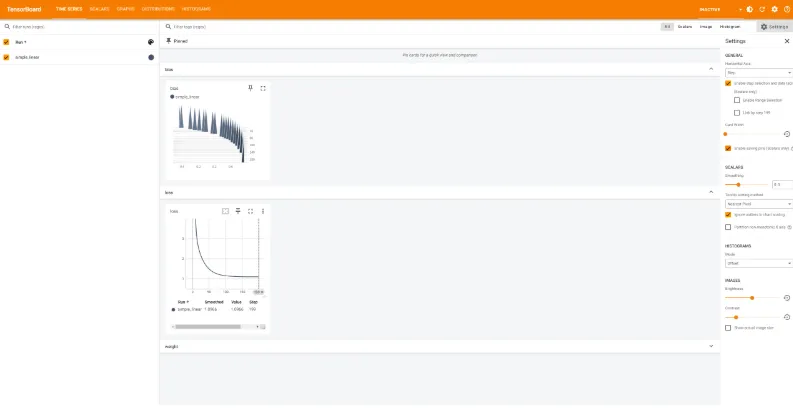
大家好,我是python222_锋哥,最近更新 PyTorch2 Python深度学习视频教程系列课程,感谢大家支持。
B站连载更新地址:
https://www.bilibili.com/video/BV1eqxNzXEYc/
基于前面的机器学习Scikit-learn,深度学习Tensorflow2课程,我们继续讲解深度学习PyTorch2,所以有些机器学习,深度学习基本概念就不再重复讲解,大家务必学习好前面两个课程。本课程主要讲解基于PyTorch2的深度学习核心知识,主要讲解包括PyTorch2框架入门知识,环境搭建,张量,自动微分,数据加载与预处理,模型训练与优化,以及卷积神经网络(CNN),循环神经网络(RNN),生成对抗网络(GAN),模型保存与加载等。
PyTorch2 简介
PyTorch 2 是由 Meta(原 Facebook)AI 团队 于 2023 年正式推出的深度学习框架新版本,是经典 PyTorch 的重大升级。它在保持 易用性和灵活性 的基础上,通过引入一系列新的编译和优化技术,实现了 高性能计算、自动加速与高效部署 的统一。PyTorch 2 代表了从传统动态图框架向 动态图 + 编译优化混合架构 的进化。PyTorch最新版本 2.9。
pytorch官网:https://pytorch.org/
学习指南:https://docs.pytorch.org/tutorials/beginner/basics/quickstart_tutorial.htmlAPI文档:https://docs.pytorch.org/docs/stable/pytorch-api.html
一、PyTorch 2 的核心理念
PyTorch 一直以“Pythonic、灵活、易调试”著称,深受研究者和开发者欢迎。而 PyTorch 2 的目标是:
“让你的模型在不修改一行代码的情况下,跑得更快、更高效。”
为此,PyTorch 2 引入了新的 编译栈(TorchDynamo、AOTAutograd、TorchInductor),实现对 Python 代码的 图捕获、自动优化与硬件级编译。
二、主要创新特性
1. TorchDynamo:动态图编译核心
TorchDynamo 是一个动态跟踪器,能在运行时捕获 Python 模型的执行图,并将其转化为可优化的中间表示(IR)。
它的最大优势在于:用户无需修改原始 PyTorch 代码,通过简单调用 torch.compile() 即可触发编译。
示例:
pythonmodel = torch.compile(model)
output = model(input)
这样模型会自动使用 TorchInductor 编译执行,速度通常可提升30%~200%。
2. AOTAutograd(Ahead-of-Time Autograd)
3. TorchInductor:新一代深度编译器
4. 更好的多设备与分布式支持
5. TorchExport 与 TorchDynamo 配合部署
三、PyTorch 2 的体系架构
PyTorch 2 的核心架构分为三层:
前端(Frontend)用户级 API,包括 torch, torch.nn, torch.optim, torch.utils.data 等。
中间层(Compiler Stack)
后端(Backend)
四、性能与兼容性
| 特性 | PyTorch 1.x | PyTorch 2 |
|---|
| 执行方式 | 动态解释执行 | 动态 + 编译优化 |
| 编译器 | TorchScript (静态) | TorchDynamo + Inductor (动态) |
| 训练速度 | 较慢 | 提升 30%~2倍 |
| 调试难度 | 低 | 保持一致 |
| 分布式支持 | 较成熟 | 更高性能 |
| 混合精度 | 支持 | 优化更好 |
五、典型应用领域
计算机视觉(CV):图像分类、目标检测、生成模型(如 Stable Diffusion)。
自然语言处理(NLP):Transformer、LLM(如 GPT、BERT 等)。
强化学习(RL):与 Gym、RLlib 等结合实现智能体训练。
科学计算与量子机器学习:通过 TorchQuantum 等库扩展。
PyTorch2安装与环境配置
PyTorch2安装环境适用于 Windows、Linux、macOS,PyTorch2和Tensorflow2一样,模型都可以跑CPU和GPU。
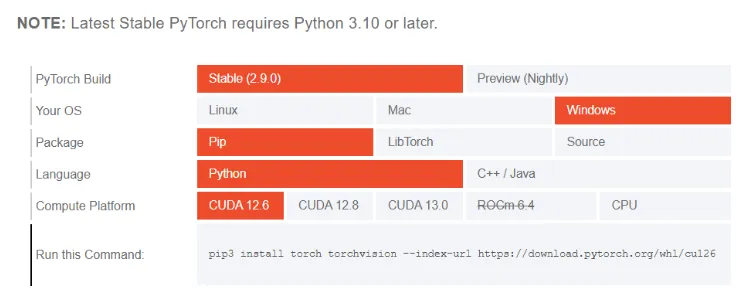
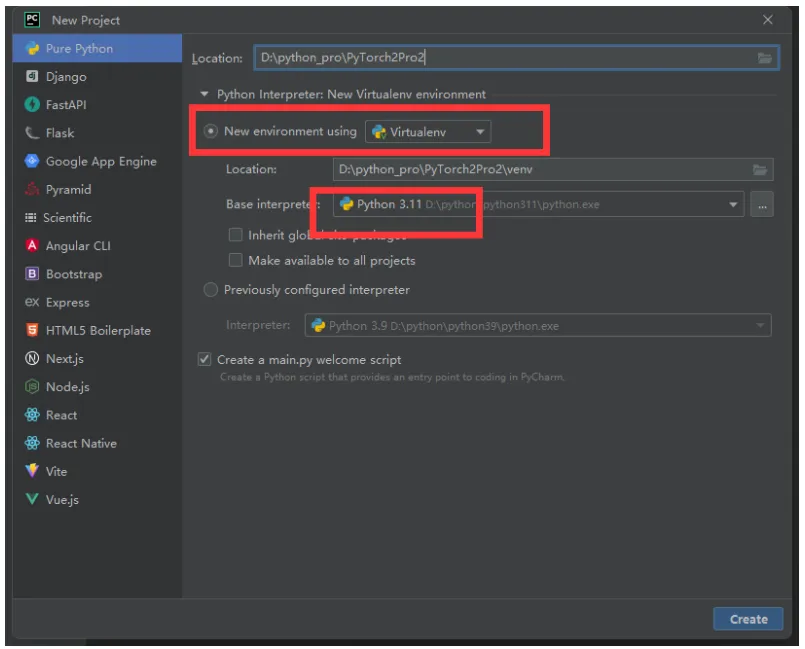
我们安装以Windows操作系统和跑CPU为例讲解。首先新建项目,Python版本用3.11,以及使用虚拟环境创建。
安装命令:
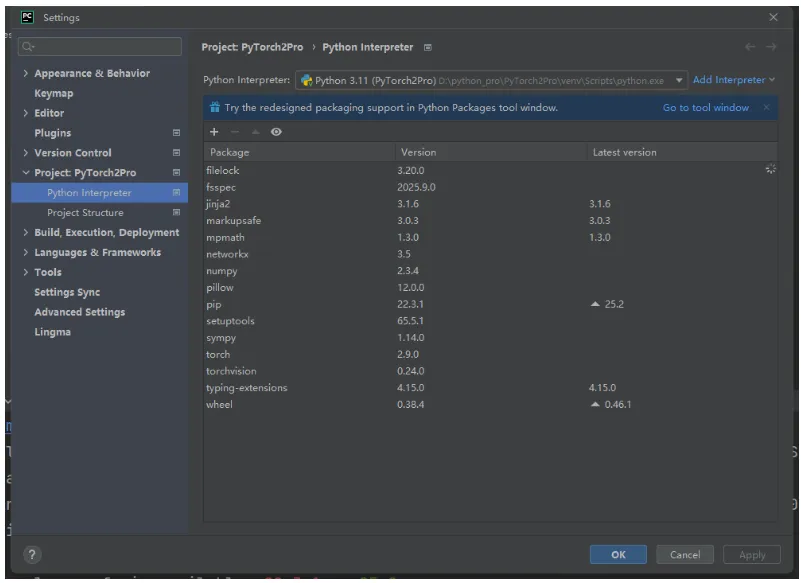
pip install torch torchvision -i https://pypi.tuna.tsinghua.edu.cn/simple
pytorch:主框架;
torchvision:用于计算机视觉任务;
安装完后:
我们来验证下是否安装成功:
importtorch
print('PyTorch版本:', torch.__version__)print('是否可用CPU:', torch.cpu.is_available())print('设备类型:', torch.device('cpu'))
运行结果:
PyTorch版本: 2.9.0+cpu
是否可用CPU: True
设备类型: cpu
初识PyTorch2,实现一个简单的线性神经网络
我们用 PyTorch 2 训练一个简单的神经网络,拟合函数,y=2x+1
让模型学会从输入 x 预测输出 y。
我们使用PyTorch2里的nn.Linear()来实现线性神经网络。
nn.Linear(in_features, out_features, bias=True)
核心参数:
in_features
类型: int
作用: 指定输入特征的数量(输入维度)
说明: 每个输入样本的特征向量长度
out_features
类型: int
作用: 指定输出特征的数量(输出维度)
说明: 该线性层将产生的输出向量长度
bias
类型: bool
默认值: True
作用: 决定是否在变换中使用偏置项
说明:
如果 True,层会学习一个偏置参数 b
如果 False,层只进行线性变换而不加偏置
示例代码:
importtorch
fromtorchimportnn, optim
# 1,构造训练数据:y=2x+1
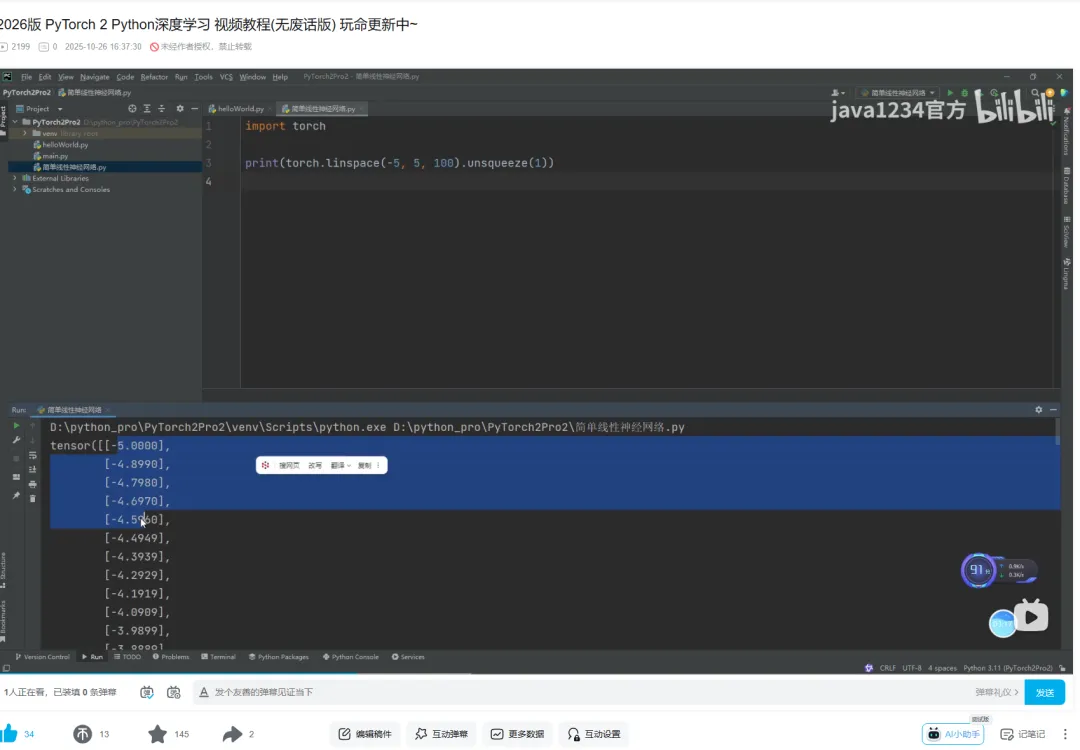
x = torch.linspace(-5, 5, 100).unsqueeze(1) # 100的样本,维度[100,1]
print(x, x.shape)
y = 2*x+1+torch.randn(x.size()) # 添加噪声
# 2,定义简单的线性模型
model = nn.Linear(1, 1)
# 3, 定义损失函数与优化器
criterion = nn.MSELoss() # 均方误差
optimizer = optim.SGD(model.parameters(), lr=0.01)
# 4,训练模型
epochs = 2000
forepochinrange(epochs):
y_pred = model(x) # 前向传播
loss = criterion(y_pred, y) # 计算损失
optimizer.zero_grad() # 清空梯度
loss.backward() # 反向传播
optimizer.step() # 更新参数
print(f'epoch: {epoch}, loss: {loss.item()}')
# 5,查看结果
[w, b] = model.parameters()
print(f'训练结果:w: {w}, b: {b}')
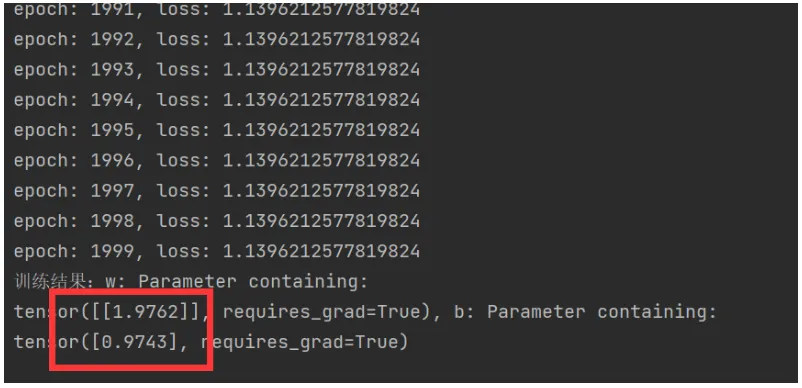
运行结果,已经非常接近2,1了。
TensorBoard可视化工具
TensorBoard是可视化工具包,Tensorflow2和PyTorch2都可以用,可以帮助开发者理解、调试和优化机器学习模型。下面详细介绍PyTorch2的使用方法,包含完整示例。
官方网站:https://www.tensorflow.org/tensorboard?hl=zh-cn
1. TensorBoard核心功能
标量可视化 - 损失函数、准确率等指标
图表可视化 - 模型计算图
直方图 - 权重和偏置的分布
投影器 - 高维数据降维可视化
图像可视化 - 输入图像和生成图像
文本可视化 - 文本数据
超参数调优 - 超参数对模型性能的影响
首先我们来安装下TensorBoard库:
pip install tensorboard -i https://pypi.tuna.tsinghua.edu.cn/simple
前面一节的简单线性神经网络我们加下TensorBoard支持:
importtorch
fromtorchimportnn, optim
fromtorch.utils.tensorboardimportSummaryWriter
# 创建SummaryWriter对象 指定日志目录
writer = SummaryWriter(log_dir='runs/simple_linear')
# 1,构造训练数据:y=2x+1
x = torch.linspace(-5, 5, 100).unsqueeze(1) # 100的样本,维度[100,1]
print(x, x.shape)
y = 2*x+1+torch.randn(x.size()) # 添加噪声
# 2,定义简单的线性模型
model = nn.Linear(1, 1)
# 3, 定义损失函数与优化器
criterion = nn.MSELoss() # 均方误差
optimizer = optim.SGD(model.parameters(), lr=0.01)
# 4,训练模型
epochs = 200
forepochinrange(epochs):
y_pred = model(x) # 前向传播
loss = criterion(y_pred, y) # 计算损失
optimizer.zero_grad() # 清空梯度
loss.backward() # 反向传播
optimizer.step() # 更新参数
print(f'epoch: {epoch}, loss: {loss.item()}')
# 记录模型参数
forname, paraminmodel.named_parameters():
print('参数:', name, param)writer.add_histogram(name, param, epoch)
# 记录损失
writer.add_scalar('loss', loss.item(), epoch)
# 记录模型结果 示例性的输入数据
dummy_input = torch.randn(x.size())
writer.add_graph(model, dummy_input)
# 训练结束后,关闭SummaryWriter对象
writer.close()
# 5,查看结果
[w, b] = model.parameters()
print(f'训练结果:w: {w}, b: {b}')
运行完后,我们在终端执行:
tensorboard --logdir=./runs --port=6006
然后浏览器运行 http://localhost:6006/
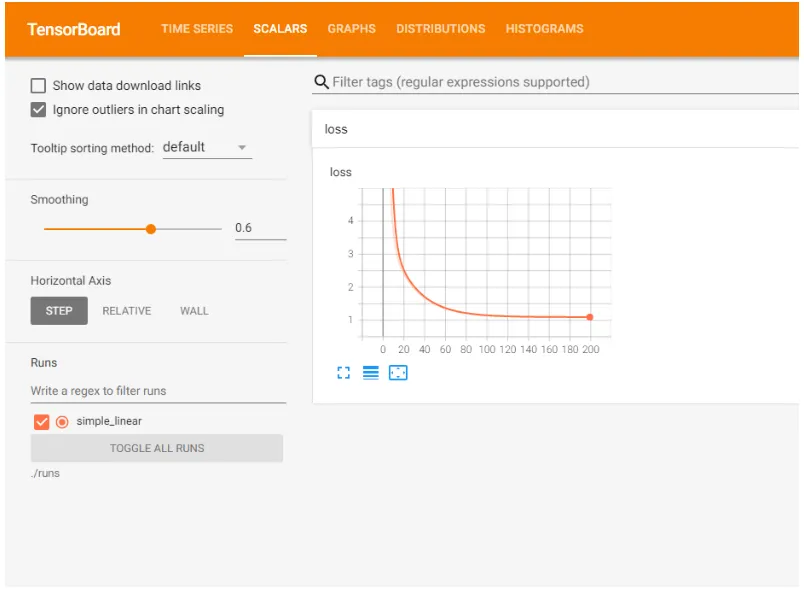
我们可以看到标量可视化,损失函数的变化曲线图
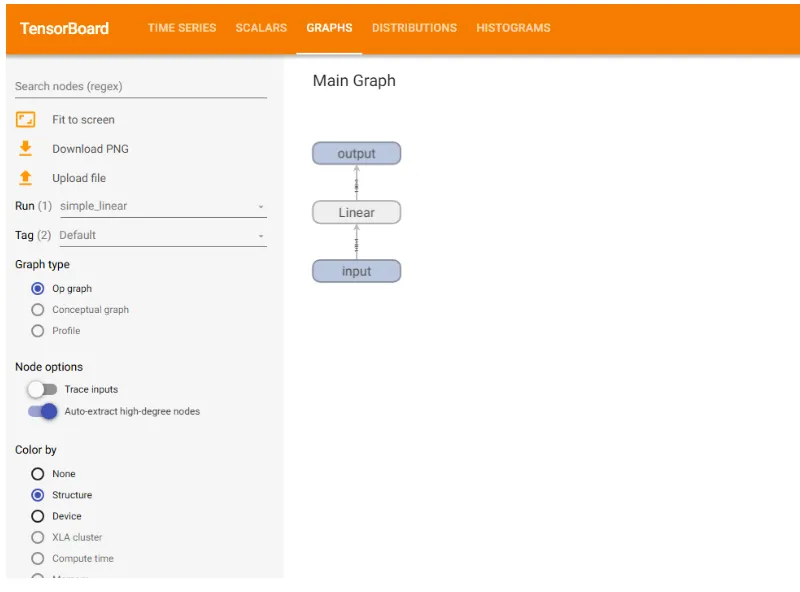
线性神经网络模型计算图:
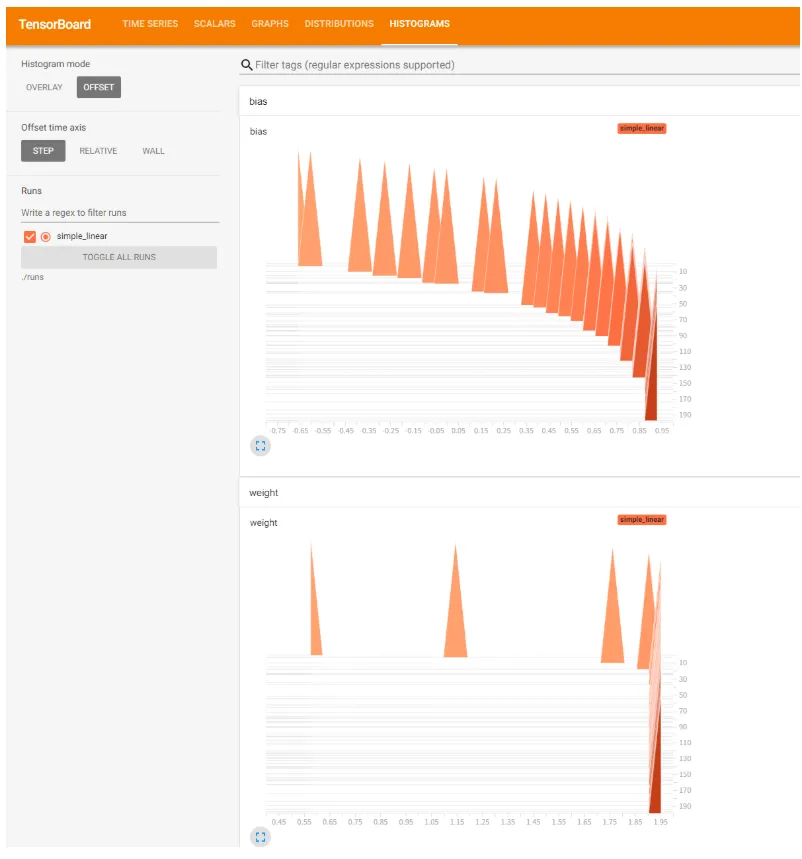
包括模型参数(权重,偏置)根据步长的变化图:
张量(Tensor)的定义与操作
张量是一种特殊的数据结构,与数组和矩阵非常相似。在 PyTorch2 中,我们使用张量来定义模型的输入和输出,以及模型的参数。
1,张量的定义
张量是一个具有相同数据类型的元素的多维矩阵。张量的维度被称为“秩”(rank),张量的形状(shape)决定了它的维度。例如:
标量:零维张量(0D)
向量:一维张量(1D)
矩阵:二维张量(2D)
多维数组:三维或更高维的张量(3D+)
2,创建张量
可以通过多种方式来创建张量,常见的有从列表创建,使用 torch.zeros 创建全零张量,使用 torch.ones 创建全一张量,使用 torch.rand 创建随机张量,从 NumPy 数组转换,下面是示例:
importtorch
# 从 Python 列表创建一个一维张量
tensor_1d = torch.tensor([1, 2, 3, 4, 5])
print(tensor_1d) # 输出:tensor([1, 2, 3, 4, 5])
# 从嵌套列表创建二维张量
tensor_2d = torch.tensor([[1, 2], [3, 4], [5, 6]])
print(tensor_2d) # 输出:tensor([[1, 2], [3, 4], [5, 6]])
# 创建一个形状为 (2, 3) 的全零张量
tensor_zeros = torch.zeros(2, 3)
print(tensor_zeros) # 输出:tensor([[0., 0., 0.], [0., 0., 0.]])
# 创建一个形状为 (3, 3) 的全一张量
tensor_ones = torch.ones(3, 3)
print(tensor_ones) # 输出:tensor([[1., 1., 1.], [1., 1., 1.], [1., 1., 1.]])
# 创建一个形状为 (2, 2) 的随机张量,元素值在 [0, 1) 范围内 torch.randn() 是 PyTorch 中用于生成服从标准正态分布(均值为 0,标准差为 1)的随机张量的函数。
tensor_rand = torch.rand(2, 2)
print(tensor_rand) # 输出:tensor([[0.1353, 0.7184], [0.5225, 0.8931]])
importnumpyasnp
# 创建一个 NumPy 数组
np_array = np.array([1, 2, 3])
# 将 NumPy 数组转换为 PyTorch 张量
tensor_from_numpy = torch.tensor(np_array)
print(tensor_from_numpy) # 输出:tensor([1, 2, 3])
运行输出:
tensor([1, 2, 3, 4, 5])
tensor([[1, 2],
[3, 4],
[5, 6]])
tensor([[0., 0., 0.],
[0., 0., 0.]])
tensor([[1., 1., 1.],
[1., 1., 1.],
[1., 1., 1.]])
tensor([[0.5516, 0.5451],
[0.2829, 0.1066]])
tensor([1, 2, 3])
3,张量的常见操作
张量的常见操作有张量加法,张量乘法,张量维度变换,张量转置,张量拼接,张量切片等。下面是示例:
importtorch
# 两个张量相加
tensor_a = torch.tensor([1, 2, 3])
tensor_b = torch.tensor([4, 5, 6])
sum_tensor = tensor_a+tensor_b
print(sum_tensor) # 输出:tensor([5, 7, 9])
# 张量元素级别的乘法
product_tensor = tensor_a*tensor_b
print(product_tensor) # 输出:tensor([4, 10, 18])
# 矩阵乘法
matrix_a = torch.tensor([[1, 2], [3, 4]])
matrix_b = torch.tensor([[5, 6], [7, 8]])
matrix_product = torch.matmul(matrix_a, matrix_b)
print(matrix_product)
# 改变张量的形状(例如,1D → 2D)
tensor_1d = torch.tensor([1, 2, 3, 4, 5, 6])
reshaped_tensor = tensor_1d.view(2, 3) # 变换为2行3列的矩阵
print(reshaped_tensor) # 输出:tensor([[1, 2, 3], [4, 5, 6]])
# 对一个二维张量进行转置
tensor_2d = torch.tensor([[1, 2], [3, 4], [5, 6]])
transposed_tensor = tensor_2d.T
print(transposed_tensor) # 输出:tensor([[1, 3, 5], [2, 4, 6]])
# 按维度拼接两个张量
tensor_a = torch.tensor([1, 2])
tensor_b = torch.tensor([3, 4])
concatenated_tensor = torch.cat((tensor_a, tensor_b), dim=0)
print(concatenated_tensor) # 输出:tensor([1, 2, 3, 4])
# 获取张量的切片
tensor = torch.tensor([[1, 2, 3], [4, 5, 6], [7, 8, 9]])
print(tensor)
slice_tensor = tensor[1:, 1:]
print(slice_tensor) # 输出:tensor([[5, 6], [8, 9]])
运行输出:
tensor([5, 7, 9])
tensor([ 4, 10, 18])
tensor([[19, 22],
[43, 50]])
tensor([[1, 2, 3],
[4, 5, 6]])
tensor([[1, 3, 5],
[2, 4, 6]])
tensor([1, 2, 3, 4])
tensor([[1, 2, 3],
[4, 5, 6],
[7, 8, 9]])
tensor([[5, 6],
[8, 9]])
4,张量的常见属性
tensor.shape: 返回张量的形状(即维度)
tensor.size(): 返回张量的尺寸,和 .shape 类似
tensor.device: 返回张量所在的设备(CPU 或 GPU)
tensor.dtype: 返回张量的数据类型
示例:
importtorch
tensor_2d = torch.tensor([[1, 2], [3, 4]], dtype=torch.float32)
print(tensor_2d.shape) # 输出:torch.Size([2, 2])
print(tensor_2d.device) # 输出:cpu
print(tensor_2d.dtype) # 输出:torch.float32
运行输出:
torch.Size([2, 2])
cpu
torch.float32
自动微分(Autograd)与梯度优化
在PyTorch2中, 自动微分(Autograd)机制, 是 PyTorch 的核心功能之一,用于自动计算张量的导数(梯度)。
它的主要用途是:在神经网络反向传播过程中自动计算参数的梯度。
在 PyTorch 中,只要一个张量的属性 requires_grad=True,系统就会跟踪它的所有运算,从而可以在反向传播时自动求出梯度。
基本原理
计算图(Computational Graph):PyTorch 会动态构建一张有向无环图(DAG),图的节点是张量,边是函数(如加法、乘法等)。反向传播时,PyTorch 会沿着这张图从输出向输入依次计算梯度。
反向传播(Backpropagation):调用 loss.backward() 时,PyTorch 会自动计算所有参与计算的 requires_grad=True 张量的梯度。
梯度存储:计算出的梯度会存放在每个张量的 .grad 属性中。
简单示例
importtorch
# 创建一个张量并启用自动求导
x = torch.tensor(3.0, requires_grad=True)
# 构建一个函数 y = x^2
y = x**2
# 自动求导(反向传播)
y.backward()
# 查看梯度 dy/dx
print(x.grad) # 输出:tensor(6.)
print(x.grad.item())
运行输出:
神经网络训练中使用 Autograd
importtorch
fromtorchimportnn, optim
# 1,构造训练数据:y=2x+1
x = torch.linspace(-5, 5, 100).unsqueeze(1) # 100的样本,维度[100,1]
print(x, x.shape)
y = 2*x+1+torch.randn(x.size()) # 添加噪声
# 2,定义简单的线性模型
model = nn.Linear(1, 1)
# 3, 定义损失函数与优化器
criterion = nn.MSELoss() # 均方误差
optimizer = optim.SGD(model.parameters(), lr=0.01)
# 4,训练模型
epochs = 2000
forepochinrange(epochs):
y_pred = model(x) # 前向传播
loss = criterion(y_pred, y) # 计算损失
optimizer.zero_grad() # 清空梯度
loss.backward() # 反向传播
optimizer.step() # 更新参数
print(f'epoch: {epoch}, loss: {loss.item()}')
# 5,查看结果
[w, b] = model.parameters()
print(f'训练结果:w: {w}, b: {b}')
流程说明:
forward() 前向传播,构建计算图
loss.backward() 反向传播,自动求出参数梯度
optimizer.step() 更新模型参数
数据集与数据加载
在 PyTorch 的训练流程中,数据读取与预处理 通常分为两部分:
Dataset(数据集类)负责定义样本获取方式,即“如何读一条数据”。
DataLoader(数据加载器)负责批量加载与并行加速,即“如何读多条数据”。
这两者的配合实现了高效的数据输入管线。
PyTorch 领域库提供了许多预加载的数据集(例如 FashionMNIST),这些数据集可以子类化torch.utils.data.Dataset并实现特定于特定数据的函数。它们可用于对模型进行原型设计和基准测试。
1,加载数据
以下是如何从 TorchVision 加载Fashion-MNIST数据集的示例。Fashion-MNIST 是 Zalando 商品图片的数据集,包含 60,000 个训练样本和 10,000 个测试样本。每个样本包含一张 28×28 的灰度图像以及 10 个类别中对应类别的标签。
Dataset 是一个抽象类。 自定义数据集时需重写两个关键方法:
| 方法 | 作用 |
|---|
__len__(self) | 返回数据集中样本数量 |
__getitem__(self, index) | 根据索引返回单个样本 (data, label) |
示例代码:
importtorch
fromtorch.utils.dataimportDataset
fromtorchvisionimportdatasets
training_data = datasets.FashionMNIST(
root="data",
train=True,
download=True
)
print('训练集:')print(training_data.__len__())
print(training_data.__getitem__(0))
print(training_data.targets)
test_data = datasets.FashionMNIST(
root="data",
train=False,
download=True
)
print('测试集:')print(test_data.__len__())
print(test_data.__getitem__(0))
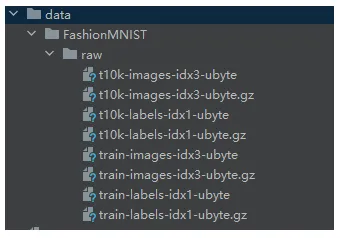
运行后,下载数据集到相对目录
运行输出:
训练集:
60000
(<PIL.Image.Image image mode=L size=28x28 at 0x1601FE917D0>, 9)
tensor([9, 0, 0, ..., 3, 0, 5])
测试集:
10000
(<PIL.Image.Image image mode=L size=28x28 at 0x1602387ED90>, 9)
2,遍历和可视化数据
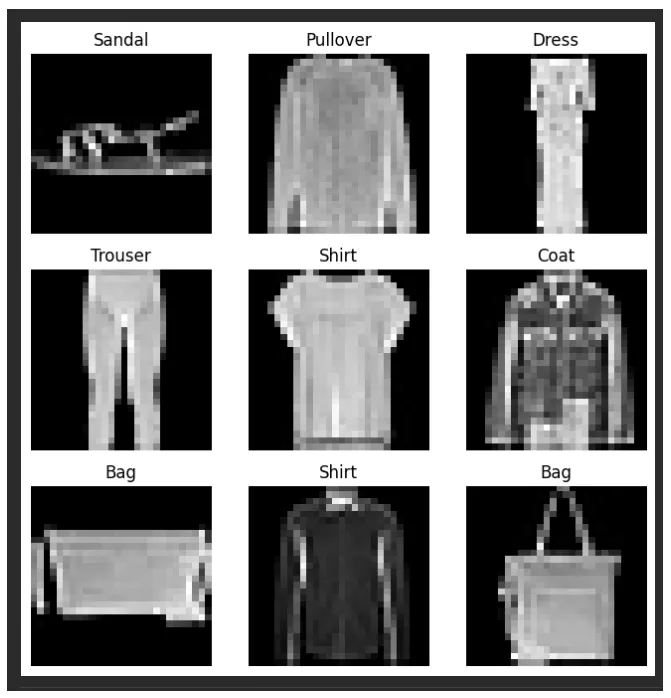
Datasets我们可以像列表一样手动索引: training_data[index]。我们用它matplotlib来可视化训练数据中的某些样本。
我们先安装下matplotlib,和 jupyter
pip install matplotlib -i https://pypi.tuna.tsinghua.edu.cn/simple
pip install jupyter -i https://pypi.tuna.tsinghua.edu.cn/simple
示例:
importmatplotlib.pyplotasplt
labels_map = {0: "T-Shirt",
1: "Trouser",
2: "Pullover",
3: "Dress",
4: "Coat",
5: "Sandal",
6: "Shirt",
7: "Sneaker",
8: "Bag",
9: "Ankle Boot",
}
figure = plt.figure(figsize=(8, 8))
cols, rows = 3, 3
foriinrange(1, cols*rows+1):
sample_idx = torch.randint(len(training_data), size=(1,)).item()
img, label = training_data[sample_idx]
figure.add_subplot(rows, cols, i)
plt.title(labels_map[label])
plt.axis("off")plt.imshow(img, cmap="gray")
plt.show()
运行输出:
3,使用 DataLoaders 准备训练
它Dataset会检索数据集的特征,并一次标记一个样本。在训练模型时,我们通常希望以“小批量”的形式传递样本,在每个周期重新调整数据以减少模型过拟合,并使用 Pythonmultiprocessing来加速数据检索。
DataLoader是一个可迭代对象,它通过一个简单的 API 为我们抽象了这种复杂性。
DataLoader是PyTorch中用于批量加载数据的工具类,它将training_data数据集按照指定的batch_size=64进行分批处理,并通过shuffle=True参数在每个训练周期开始时随机打乱数据顺序,以提高模型训练效果。
train_dataloader = DataLoader(training_data, batch_size=64, shuffle=True)
test_dataloader = DataLoader(test_data, batch_size=64, shuffle=True)
transform预处理转换模块
PyTorch 2 的 transform 模块 —— 它是图像预处理与增强中非常核心的部分。
🧠 一、transform 是什么?
在 PyTorch 中,尤其是使用 torchvision 进行图像任务时,数据的输入通常需要经过预处理才能喂入神经网络。 这些预处理操作(如缩放、裁剪、归一化、数据增强等)就是通过 torchvision.transforms 模块实现的。
PyTorch 2 中该模块更加灵活、可组合,支持 PIL 图像、Tensor、NumPy 数组 等多种格式。
🧩 二、torchvision.transforms 的主要功能分类
| 功能类别 | 常用 Transform | 作用说明 |
|---|
| 图像格式转换 | ToTensor(), ToPILImage() | PIL ↔ Tensor 互转 |
| 几何变换 | Resize(), CenterCrop(), RandomCrop(), RandomRotation(), RandomHorizontalFlip() | 改变图像尺寸、角度、位置等 |
| 颜色变换 | ColorJitter(), Grayscale(), RandomAdjustSharpness() | 调整亮度、对比度、饱和度等 |
| 数据增强 | RandomResizedCrop(), RandomAffine() | 随机扰动图像,提高模型泛化能力 |
| 数值标准化 | Normalize(mean, std) | 将像素值标准化,提升训练稳定性 |
| 组合操作 | transforms.Compose([...]) | 将多个变换按顺序组合 |
⚙️ 三、基本使用示例
我们把上一节的实例改下:
importtorch
fromtorch.utils.dataimportDataset
fromtorchvisionimportdatasets
fromtorchvision.transforms.v2importToTensor
training_data = datasets.FashionMNIST(
root="data",
train=True,
download=True,
transform=ToTensor() # 将图像的像素强度值缩放到 [0., 1.] 范围内 归一化
)
print('训练集:')print(training_data.__len__())
print(training_data.__getitem__(0))
print(training_data.targets)
运行输出:
训练集:
60000
(tensor([[[0.0000, 0.0000, 0.0000, 0.0000, 0.0000, 0.0000, 0.0000, 0.0000,
0.0000, 0.0000, 0.0000, 0.0000, 0.0000, 0.0000, 0.0000, 0.0000,
0.0000, 0.0000, 0.0000, 0.0000, 0.0000, 0.0000, 0.0000, 0.0000,
0.0000, 0.0000, 0.0000, 0.0000],
[0.0000, 0.0000, 0.0000, 0.0000, 0.0000, 0.0000, 0.0000, 0.0000,
0.0000, 0.0000, 0.0000, 0.0000, 0.0000, 0.0000, 0.0000, 0.0000,
0.0000, 0.0000, 0.0000, 0.0000, 0.0000, 0.0000, 0.0000, 0.0000,
0.0000, 0.0000, 0.0000, 0.0000],
[0.0000, 0.0000, 0.0000, 0.0000, 0.0000, 0.0000, 0.0000, 0.0000,
0.0000, 0.0000, 0.0000, 0.0000, 0.0000, 0.0000, 0.0000, 0.0000,
0.0000, 0.0000, 0.0000, 0.0000, 0.0000, 0.0000, 0.0000, 0.0000,
0.0000, 0.0000, 0.0000, 0.0000],
[0.0000, 0.0000, 0.0000, 0.0000, 0.0000, 0.0000, 0.0000, 0.0000,
0.0000, 0.0000, 0.0000, 0.0000, 0.0039, 0.0000, 0.0000, 0.0510,
0.2863, 0.0000, 0.0000, 0.0039, 0.0157, 0.0000, 0.0000, 0.0000,
0.0000, 0.0039, 0.0039, 0.0000],
[0.0000, 0.0000, 0.0000, 0.0000, 0.0000, 0.0000, 0.0000, 0.0000,
0.0000, 0.0000, 0.0000, 0.0000, 0.0118, 0.0000, 0.1412, 0.5333,
0.4980, 0.2431, 0.2118, 0.0000, 0.0000, 0.0000, 0.0039, 0.0118,
0.0157, 0.0000, 0.0000, 0.0118],
[0.0000, 0.0000, 0.0000, 0.0000, 0.0000, 0.0000, 0.0000, 0.0000,
0.0000, 0.0000, 0.0000, 0.0000, 0.0235, 0.0000, 0.4000, 0.8000,
0.6902, 0.5255, 0.5647, 0.4824, 0.0902, 0.0000, 0.0000, 0.0000,
0.0000, 0.0471, 0.0392, 0.0000],
[0.0000, 0.0000, 0.0000, 0.0000, 0.0000, 0.0000, 0.0000, 0.0000,
0.0000, 0.0000, 0.0000, 0.0000, 0.0000, 0.0000, 0.6078, 0.9255,
0.8118, 0.6980, 0.4196, 0.6118, 0.6314, 0.4275, 0.2510, 0.0902,
0.3020, 0.5098, 0.2824, 0.0588],
[0.0000, 0.0000, 0.0000, 0.0000, 0.0000, 0.0000, 0.0000, 0.0000,
0.0000, 0.0000, 0.0000, 0.0039, 0.0000, 0.2706, 0.8118, 0.8745,
0.8549, 0.8471, 0.8471, 0.6392, 0.4980, 0.4745, 0.4784, 0.5725,
0.5529, 0.3451, 0.6745, 0.2588],
[0.0000, 0.0000, 0.0000, 0.0000, 0.0000, 0.0000, 0.0000, 0.0000,
0.0000, 0.0039, 0.0039, 0.0039, 0.0000, 0.7843, 0.9098, 0.9098,
0.9137, 0.8980, 0.8745, 0.8745, 0.8431, 0.8353, 0.6431, 0.4980,
0.4824, 0.7686, 0.8980, 0.0000],
[0.0000, 0.0000, 0.0000, 0.0000, 0.0000, 0.0000, 0.0000, 0.0000,
0.0000, 0.0000, 0.0000, 0.0000, 0.0000, 0.7176, 0.8824, 0.8471,
0.8745, 0.8941, 0.9216, 0.8902, 0.8784, 0.8706, 0.8784, 0.8667,
0.8745, 0.9608, 0.6784, 0.0000],
[0.0000, 0.0000, 0.0000, 0.0000, 0.0000, 0.0000, 0.0000, 0.0000,
0.0000, 0.0000, 0.0000, 0.0000, 0.0000, 0.7569, 0.8941, 0.8549,
0.8353, 0.7765, 0.7059, 0.8314, 0.8235, 0.8275, 0.8353, 0.8745,
0.8627, 0.9529, 0.7922, 0.0000],
[0.0000, 0.0000, 0.0000, 0.0000, 0.0000, 0.0000, 0.0000, 0.0000,
0.0000, 0.0039, 0.0118, 0.0000, 0.0471, 0.8588, 0.8627, 0.8314,
0.8549, 0.7529, 0.6627, 0.8902, 0.8157, 0.8549, 0.8784, 0.8314,
0.8863, 0.7725, 0.8196, 0.2039],
[0.0000, 0.0000, 0.0000, 0.0000, 0.0000, 0.0000, 0.0000, 0.0000,
0.0000, 0.0000, 0.0235, 0.0000, 0.3882, 0.9569, 0.8706, 0.8627,
0.8549, 0.7961, 0.7765, 0.8667, 0.8431, 0.8353, 0.8706, 0.8627,
0.9608, 0.4667, 0.6549, 0.2196],
[0.0000, 0.0000, 0.0000, 0.0000, 0.0000, 0.0000, 0.0000, 0.0000,
0.0000, 0.0157, 0.0000, 0.0000, 0.2157, 0.9255, 0.8941, 0.9020,
0.8941, 0.9412, 0.9098, 0.8353, 0.8549, 0.8745, 0.9176, 0.8510,
0.8510, 0.8196, 0.3608, 0.0000],
[0.0000, 0.0000, 0.0039, 0.0157, 0.0235, 0.0275, 0.0078, 0.0000,
0.0000, 0.0000, 0.0000, 0.0000, 0.9294, 0.8863, 0.8510, 0.8745,
0.8706, 0.8588, 0.8706, 0.8667, 0.8471, 0.8745, 0.8980, 0.8431,
0.8549, 1.0000, 0.3020, 0.0000],
[0.0000, 0.0118, 0.0000, 0.0000, 0.0000, 0.0000, 0.0000, 0.0000,
0.0000, 0.2431, 0.5686, 0.8000, 0.8941, 0.8118, 0.8353, 0.8667,
0.8549, 0.8157, 0.8275, 0.8549, 0.8784, 0.8745, 0.8588, 0.8431,
0.8784, 0.9569, 0.6235, 0.0000],
[0.0000, 0.0000, 0.0000, 0.0000, 0.0706, 0.1725, 0.3216, 0.4196,
0.7412, 0.8941, 0.8627, 0.8706, 0.8510, 0.8863, 0.7843, 0.8039,
0.8275, 0.9020, 0.8784, 0.9176, 0.6902, 0.7373, 0.9804, 0.9725,
0.9137, 0.9333, 0.8431, 0.0000],
[0.0000, 0.2235, 0.7333, 0.8157, 0.8784, 0.8667, 0.8784, 0.8157,
0.8000, 0.8392, 0.8157, 0.8196, 0.7843, 0.6235, 0.9608, 0.7569,
0.8078, 0.8745, 1.0000, 1.0000, 0.8667, 0.9176, 0.8667, 0.8275,
0.8627, 0.9098, 0.9647, 0.0000],
[0.0118, 0.7922, 0.8941, 0.8784, 0.8667, 0.8275, 0.8275, 0.8392,
0.8039, 0.8039, 0.8039, 0.8627, 0.9412, 0.3137, 0.5882, 1.0000,
0.8980, 0.8667, 0.7373, 0.6039, 0.7490, 0.8235, 0.8000, 0.8196,
0.8706, 0.8941, 0.8824, 0.0000],
[0.3843, 0.9137, 0.7765, 0.8235, 0.8706, 0.8980, 0.8980, 0.9176,
0.9765, 0.8627, 0.7608, 0.8431, 0.8510, 0.9451, 0.2549, 0.2863,
0.4157, 0.4588, 0.6588, 0.8588, 0.8667, 0.8431, 0.8510, 0.8745,
0.8745, 0.8784, 0.8980, 0.1137],
[0.2941, 0.8000, 0.8314, 0.8000, 0.7569, 0.8039, 0.8275, 0.8824,
0.8471, 0.7255, 0.7725, 0.8078, 0.7765, 0.8353, 0.9412, 0.7647,
0.8902, 0.9608, 0.9373, 0.8745, 0.8549, 0.8314, 0.8196, 0.8706,
0.8627, 0.8667, 0.9020, 0.2627],
[0.1882, 0.7961, 0.7176, 0.7608, 0.8353, 0.7725, 0.7255, 0.7451,
0.7608, 0.7529, 0.7922, 0.8392, 0.8588, 0.8667, 0.8627, 0.9255,
0.8824, 0.8471, 0.7804, 0.8078, 0.7294, 0.7098, 0.6941, 0.6745,
0.7098, 0.8039, 0.8078, 0.4510],
[0.0000, 0.4784, 0.8588, 0.7569, 0.7020, 0.6706, 0.7176, 0.7686,
0.8000, 0.8235, 0.8353, 0.8118, 0.8275, 0.8235, 0.7843, 0.7686,
0.7608, 0.7490, 0.7647, 0.7490, 0.7765, 0.7529, 0.6902, 0.6118,
0.6549, 0.6941, 0.8235, 0.3608],
[0.0000, 0.0000, 0.2902, 0.7412, 0.8314, 0.7490, 0.6863, 0.6745,
0.6863, 0.7098, 0.7255, 0.7373, 0.7412, 0.7373, 0.7569, 0.7765,
0.8000, 0.8196, 0.8235, 0.8235, 0.8275, 0.7373, 0.7373, 0.7608,
0.7529, 0.8471, 0.6667, 0.0000],
[0.0078, 0.0000, 0.0000, 0.0000, 0.2588, 0.7843, 0.8706, 0.9294,
0.9373, 0.9490, 0.9647, 0.9529, 0.9569, 0.8667, 0.8627, 0.7569,
0.7490, 0.7020, 0.7137, 0.7137, 0.7098, 0.6902, 0.6510, 0.6588,
0.3882, 0.2275, 0.0000, 0.0000],
[0.0000, 0.0000, 0.0000, 0.0000, 0.0000, 0.0000, 0.0000, 0.1569,
0.2392, 0.1725, 0.2824, 0.1608, 0.1373, 0.0000, 0.0000, 0.0000,
0.0000, 0.0000, 0.0000, 0.0000, 0.0000, 0.0000, 0.0000, 0.0000,
0.0000, 0.0000, 0.0000, 0.0000],
[0.0000, 0.0000, 0.0000, 0.0000, 0.0000, 0.0000, 0.0000, 0.0000,
0.0000, 0.0000, 0.0000, 0.0000, 0.0000, 0.0000, 0.0000, 0.0000,
0.0000, 0.0000, 0.0000, 0.0000, 0.0000, 0.0000, 0.0000, 0.0000,
0.0000, 0.0000, 0.0000, 0.0000],
[0.0000, 0.0000, 0.0000, 0.0000, 0.0000, 0.0000, 0.0000, 0.0000,
0.0000, 0.0000, 0.0000, 0.0000, 0.0000, 0.0000, 0.0000, 0.0000,
0.0000, 0.0000, 0.0000, 0.0000, 0.0000, 0.0000, 0.0000, 0.0000,
0.0000, 0.0000, 0.0000, 0.0000]]]), 9)
tensor([9, 0, 0, ..., 3, 0, 5])