Linux部署TLQ 管理控制台
Linux 平台命令行安装
将管理控制台安装包 Install_TLQManageConsole8.1.xx.x.bin 上传至服务器上,
执行: chmod +x Install_TLQManageConsole8.1*.bin 赋予执行权限。
注:无论界面或命令行,如果想使用中文安装,都需要设置 Linux 平台编码 LANG 为 zh_CN.gbk
执行命令过程
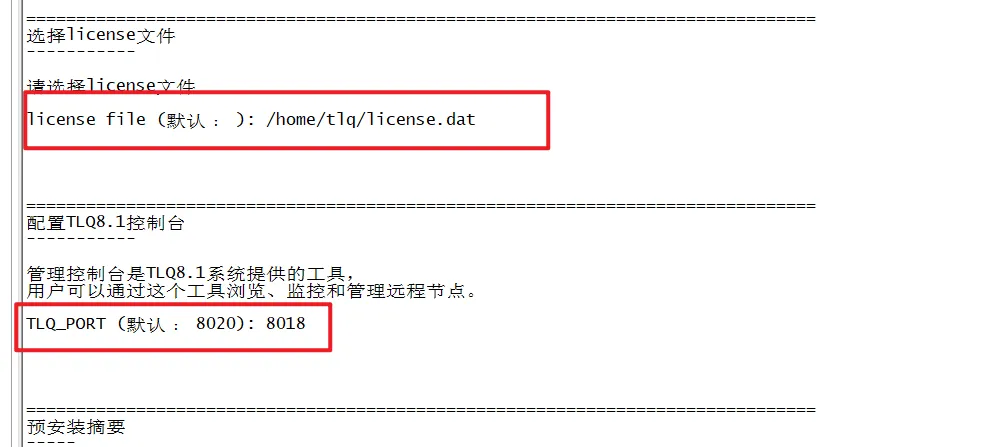
[tlq@s2hdBXU910 ~]$ [tlq@s2hdBXU910 ~]$ ./Install_TLQManageConsole8.1.15.12.bin -i console正在准备进行安装正在从安装程序档案中提取安装资源...配置该系统环境的安装程序...正在启动安装程序...===============================================================================选择区域...------- 1- English ->2- 简体中文按编号选择区域: ===============================================================================TLQ8.1_ManageConsole (使用 InstallAnywhere 创建)-------------------------------------------------------------------------------正在准备控制台模式安装...===============================================================================简介--InstallAnywhere 将指导您完成 TLQ8.1_ManageConsole 的安装。建议您在继续本次安装前,退出所有程序。如果要回到前一屏幕进行更改,可输入“back”。如果要取消本次安装,可随时输入“quit”。请按 <ENTER> 键继续: ===============================================================================选择安装文件夹-------请为本次安装选择一个目的文件夹。您想在哪一位置安装? 缺省安装文件夹: /home/tlq/TLQ8.1_ManageConsole输入一个绝对路径,或按 <ENTER> 键以接受缺省路径 : ===============================================================================选择链接位置------您想在哪一位置创建链接? ->1- 缺省位置: /home/tlq 2- 在您的主文件夹中 3- 另选一个位置... 4- 不创建链接输入上述选项的号码,或按 <ENTER> 键接受缺省位置 : ===============================================================================选择license文件-----------请选择license文件license file (默认﹕ ): /home/tlq/license.dat===============================================================================配置TLQ8.1控制台-----------管理控制台是TLQ8.1系统提供的工具,用户可以通过这个工具浏览、监控和管理远程节点。TLQ_PORT (默认﹕ 8020): 8018===============================================================================预安装摘要-----按 <ENTER> 键继续。如果所列信息有误,请输入“BACK”,然后进行更改产品名: TLQ8.1_ManageConsole安装文件夹: /home/tlq/TLQ8.1_ManageConsole链接文件夹: /home/tlq磁盘空间信息(用于安装目标): 所需空间: 309,988,773 字节 可用空间: 78,685,954,048 字节请按 <ENTER> 键继续: ===============================================================================正在安装...------- [==================|==================|==================|==================] [------------------|------------------|------------------|------------------]===============================================================================安装完成----恭喜!TLQ8.1_ManageConsole 已成功地安装到: /home/tlq/TLQ8.1_ManageConsole按 <ENTER> 键以退出安装程序: [tlq@s2hdBXU910 ~]$ [tlq@s2hdBXU910 ~]$ ll总用量 256332-rwxr-xr-x 1 tlq tlq 262476095 12月 20 16:19 Install_TLQManageConsole8.1.15.12.bin-rwxr-xr-x 1 tlq tlq 1608 12月 21 08:47 license.datlrwxrwxrwx 1 tlq tlq 49 12月 22 00:55 StartTLQ8.1_ManageConsoleServer -> /home/tlq/TLQ8.1_ManageConsole/bin/startserver.shlrwxrwxrwx 1 tlq tlq 48 12月 22 00:55 StopTLQ8.1_ManageConsoleServer -> /home/tlq/TLQ8.1_ManageConsole/bin/stopserver.shdrwxrwxr-x 17 tlq tlq 287 12月 22 00:55 TLQ8.1_ManageConsolelrwxrwxrwx 1 tlq tlq 77 12月 22 00:55 Uninstall -> '/home/tlq/TLQ8.1_ManageConsole/UninstallerData/Uninstall TLQ8.1_ManageConsole'[tlq@s2hdBXU910 ~]$
验证启动
[tlq@s2hdBXU910 ~]$ ./StartTLQ8.1_ManageConsoleServer
第一次启动BUG说明
部署完成后,第一次启动暂时发现启动存在两个小BUG
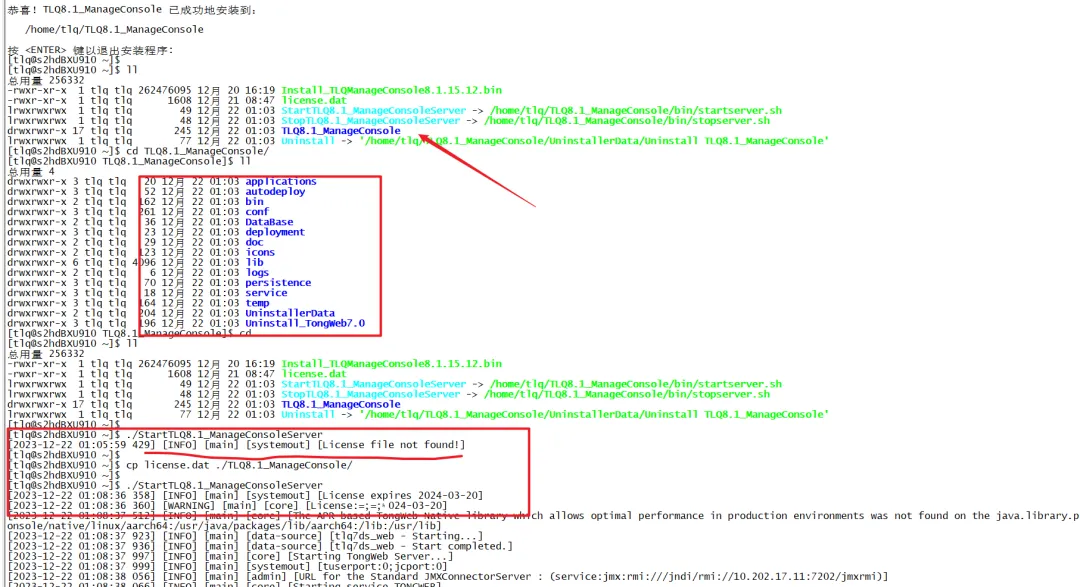
1.提示License file not found 错误
这个原因就是因为没把License 放到TLQ8.1_ManageConsole下,但部署过程是指定了License 文件,安装程序未进行cp到部署目录,需要手动复制
[tlq@s2hdBXU910 ~]$ [tlq@s2hdBXU910 ~]$ ll总用量 256332-rwxr-xr-x 1 tlq tlq 262476095 12月 20 16:19 Install_TLQManageConsole8.1.15.12.bin-rwxr-xr-x 1 tlq tlq 1608 12月 21 08:47 license.datlrwxrwxrwx 1 tlq tlq 49 12月 22 01:03 StartTLQ8.1_ManageConsoleServer -> /home/tlq/TLQ8.1_ManageConsole/bin/startserver.shlrwxrwxrwx 1 tlq tlq 48 12月 22 01:03 StopTLQ8.1_ManageConsoleServer -> /home/tlq/TLQ8.1_ManageConsole/bin/stopserver.shdrwxrwxr-x 17 tlq tlq 245 12月 22 01:03 TLQ8.1_ManageConsolelrwxrwxrwx 1 tlq tlq 77 12月 22 01:03 Uninstall -> '/home/tlq/TLQ8.1_ManageConsole/UninstallerData/Uninstall TLQ8.1_ManageConsole'[tlq@s2hdBXU910 ~]$ cd TLQ8.1_ManageConsole/[tlq@s2hdBXU910 TLQ8.1_ManageConsole]$ ll总用量 4drwxrwxr-x 3 tlq tlq 20 12月 22 01:03 applicationsdrwxrwxr-x 3 tlq tlq 52 12月 22 01:03 autodeploydrwxrwxr-x 2 tlq tlq 162 12月 22 01:03 bindrwxrwxr-x 3 tlq tlq 261 12月 22 01:03 confdrwxrwxr-x 2 tlq tlq 36 12月 22 01:03 DataBasedrwxrwxr-x 3 tlq tlq 23 12月 22 01:03 deploymentdrwxrwxr-x 2 tlq tlq 29 12月 22 01:03 docdrwxrwxr-x 2 tlq tlq 123 12月 22 01:03 iconsdrwxrwxr-x 6 tlq tlq 4096 12月 22 01:03 libdrwxrwxr-x 2 tlq tlq 6 12月 22 01:03 logsdrwxrwxr-x 3 tlq tlq 70 12月 22 01:03 persistencedrwxrwxr-x 3 tlq tlq 18 12月 22 01:03 servicedrwxrwxr-x 3 tlq tlq 164 12月 22 01:03 tempdrwxrwxr-x 2 tlq tlq 204 12月 22 01:03 UninstallerDatadrwxrwxr-x 3 tlq tlq 196 12月 22 01:03 Uninstall_TongWeb7.0[tlq@s2hdBXU910 TLQ8.1_ManageConsole]$ cd ..[tlq@s2hdBXU910 ~]$ ll总用量 256332-rwxr-xr-x 1 tlq tlq 262476095 12月 20 16:19 Install_TLQManageConsole8.1.15.12.bin-rwxr-xr-x 1 tlq tlq 1608 12月 21 08:47 license.datlrwxrwxrwx 1 tlq tlq 49 12月 22 01:03 StartTLQ8.1_ManageConsoleServer -> /home/tlq/TLQ8.1_ManageConsole/bin/startserver.shlrwxrwxrwx 1 tlq tlq 48 12月 22 01:03 StopTLQ8.1_ManageConsoleServer -> /home/tlq/TLQ8.1_ManageConsole/bin/stopserver.shdrwxrwxr-x 17 tlq tlq 245 12月 22 01:03 TLQ8.1_ManageConsolelrwxrwxrwx 1 tlq tlq 77 12月 22 01:03 Uninstall -> '/home/tlq/TLQ8.1_ManageConsole/UninstallerData/Uninstall TLQ8.1_ManageConsole'[tlq@s2hdBXU910 ~]$ [tlq@s2hdBXU910 ~]$ ./StartTLQ8.1_ManageConsoleServer [2023-12-22 01:05:59 429] [INFO] [main] [systemout] [License file not found!][tlq@s2hdBXU910 ~]$ [tlq@s2hdBXU910 ~]$ cp license.dat ./TLQ8.1_ManageConsole/[tlq@s2hdBXU910 ~]$ [tlq@s2hdBXU910 ~]$ ./StartTLQ8.1_ManageConsoleServer [2023-12-22 01:08:36 358] [INFO] [main] [systemout] [License expires 2024-03-20][2023-12-22 01:08:36 360] [WARNING] [main] [core] [License:=;=;ʱ024-03-20][2023-12-22 01:08:37 512] [INFO] [main] [core] [The APR based TongWeb Native library which allows optimal performance in production environments was not found on the java.library.path: /AppHome/TLQ8/lib:/home/tlq/TLQ8.1_ManageConsole/native/linux/aarch64:/usr/java/packages/lib/aarch64:/lib:/usr/lib][2023-12-22 01:08:37 923] [INFO] [main] [data-source] [tlq7ds_web - Starting...][2023-12-22 01:08:37 936] [INFO] [main] [data-source] [tlq7ds_web - Start completed.][2023-12-22 01:08:37 997] [INFO] [main] [core] [Starting TongWeb Server...][2023-12-22 01:08:37 999] [INFO] [main] [systemout] [tuserport:0;jcport:0][2023-12-22 01:08:38 056] [INFO] [main] [admin] [URL for the Standard JMXConnectorServer : (service:jmx:rmi:///jndi/rmi://10.202.17.11:7202/jmxrmi)][2023-12-22 01:08:38 066] [INFO] [main] [core] [Starting service TONGWEB][2023-12-22 01:08:38 067] [INFO] [main] [core] [Starting Servlet Engine: TongWeb][2023-12-22 01:08:38 079] [INFO] [main] [web-container] [Starting ProtocolHandler [http-nio2-0.0.0.0-9062]][2023-12-22 01:08:38 080] [INFO] [main] [web-container] [Starting ProtocolHandl
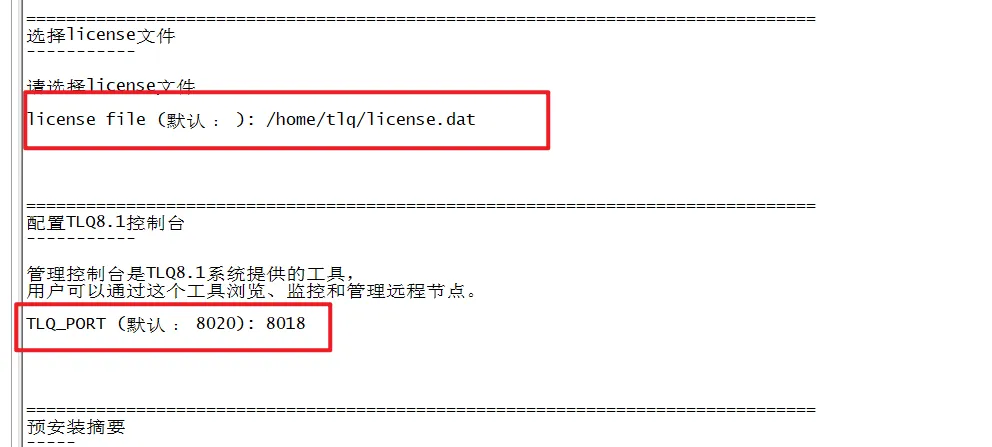
2.安装过程指定端口未生效
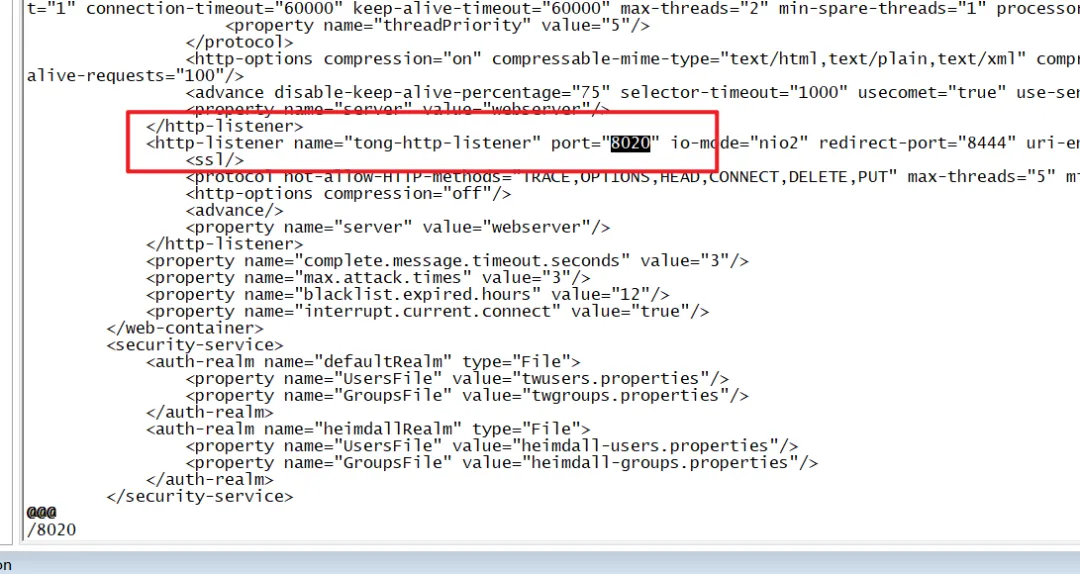
如果指定了启动端口,但是还是默认8020这个默认端口
解决
修改配置文件/home/tlq/TLQ8.1_ManageConsole/conf/tongweb.xml把8020修改成您想要的端口即可
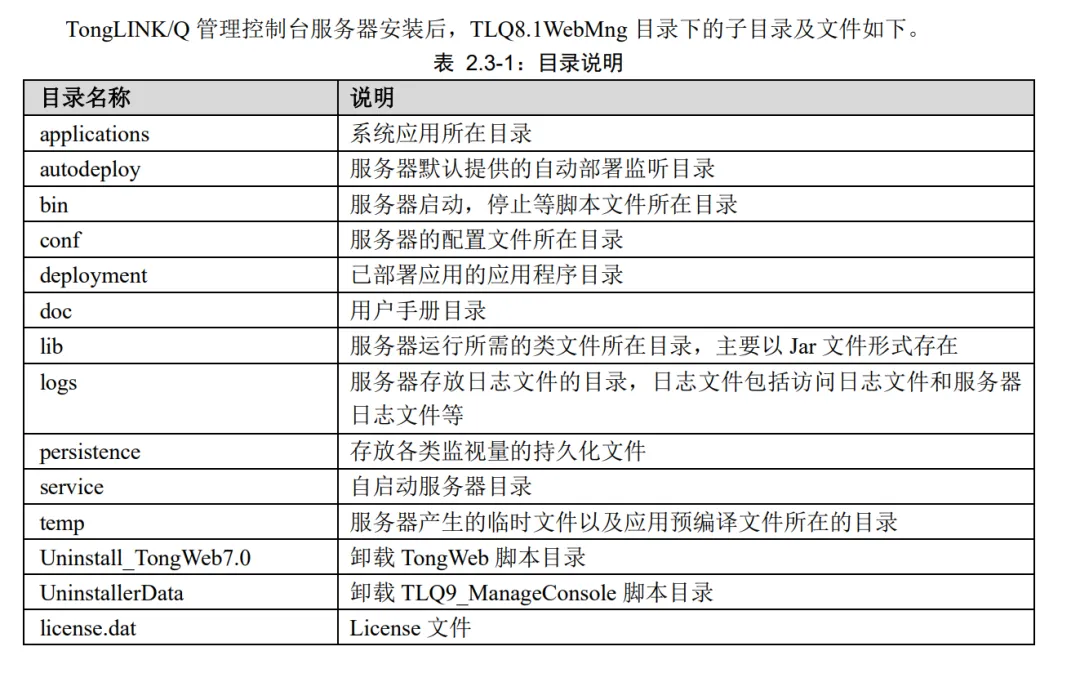
目录说明
TLQ 控制台启动及停止
控制台启动
在安装路径(例如:/home/xxx)下运行./StartTLQ8.1_ManageConsoleServer,以前台运行的方式 启动
也可以在TLQ8.1_ManageConsole/bin目录下运行./startserver.sh,以前台运行的方式启动
还可以在TLQ8.1_ManageConsole/bin目录下运行./startservernohup.sh,以后台运行的方式启动
查看日志:tail -f TLQ8.1_ManageConsole/logs/server.log
停止管理控制台
在安装路径(例如:/home/xxx)下执行./StopTLQ8.1_ManageConsoleServer
在TLQ9_ManageConsole/bin目录下运行./stopserver.sh
TLQ 管理控制台登录
登录的地址是: http://ip:port/WebManage/login.jsp
在登录界面中输入默认用户名admin 密码 Admin@123.com
tongweb.xml 默认端口说明