Python文件操作
- 2026-10-21 13:28:01
写在前面
一、文件编码
编码技术(密码本)。计算机的主流编码类型有UTF-8、GBK5、Big5、ANSI等。例如在文本文件另存的时候就可以选择编码格式: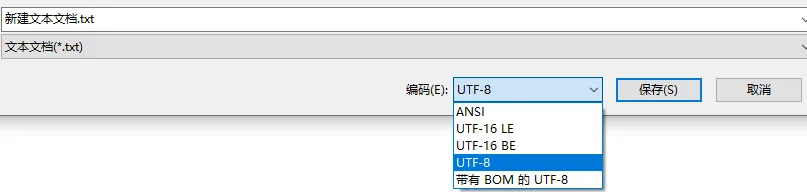
目前主流的编码格式为UTF-8,可支持英文、中文、韩文等多种语言。
二、文件基本操作
11.2.1 文件打开
通过open函数可以打开一个已经存在的文件,并返回一个文件对象。若操作的文件不存在,则创建一个新文件。语法为:open(name,mode,encoding)name为打开目标文件名的具体路径,mode为打开文件的模式:只读r:以只读方式打开文件,文件的指针会放在文件的开头,r为默认模式(即不指定mode值时生效)。写入w:打开一个文件只用于写入,若文件存在则打开文件,并从文件开头进行写入,即原有内容会被删除。若文件不存在,则自动创建新文件用于写入。追加a:打开一个文件用于追加,若文件已存在,则新写入的内容会被追加至原文件的末尾。若文件不存在,则创建新文件进行写入。例如我想在家目录中打开一个叫做Biomamba.txt的文件(预先创建好的):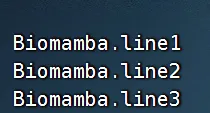
myfile =open(file='./Biomamba.txt',mode ='r',encoding ="UTF-8")11.2.2 文件读取
文件对象.read(num)num表示从文件中读取的长度(以字节为单位),若num没有传入,那么就表示读取文件中的所有数据。
# 读取文件的前十个字节:fir_file = myfile.read(10)print(fir_file)## Biomamba.l# 返回对象是一个字符串 print(type(fir_file))## <class 'str'># 第二次读取sec_file =print(myfile.read(10))## ine1## Biomaprint(sec_file) # 可以看出第二次读取默认从第一次读取后的末尾开始读取:## None# 读取剩下的内容remain_file =print(myfile.read())## mba.line2## Biomamba.line3print(remain_file)## None文件对象.readlines()一次性读取文件中的全部行,返回值是一个列表,其中每一行的数据为一个元素。
myfile =open(file='./Biomamba.txt',mode ='r',encoding ="UTF-8")my_context = myfile.readlines()print(my_context)# 可以看到我们在文件中写入的三行文件均被读取出来,且特殊字符也会被读入# 例如下面的换行符\n## ['Biomamba.line1\n', 'Biomamba.line2\n', 'Biomamba.line3\n']print(type(my_context))# 返回对象是一个列表## <class 'list'>文件对象.readline()可以逐行读写数据,我们可以配合while循环来演示结果:
myfile =open(file='./Biomamba.txt',mode ='r',encoding ="UTF-8")# 逐行读取文件的前三行并打印出来:temp_num =1while temp_num <=3: temp_context = myfile.readline()print(f"---------第{temp_num}行的数据----------")print(temp_context) temp_num +=1## ---------第1行的数据----------## Biomamba.line1## ## ---------第2行的数据----------## Biomamba.line2## ## ---------第3行的数据----------## Biomamba.line3for循环文件对象也可逐行获取文件内容:
myfile =open(file='./Biomamba.txt',mode ='r',encoding ="UTF-8")for temp_file in myfile:print(temp_file)## Biomamba.line1## ## Biomamba.line2## ## Biomamba.line311.2.3 文件关闭
如果文件不关闭,则文件处于被占用的状态,无法进行移动、删除等操作。语法:文件对象.close例如:
myfile.close()11.2.4 with open() as
通过这种语句可以在所属代码块运行完毕后自动关闭文件,例如:
withopen(file="./Biomamba.txt",mode='r',encoding="UTF-8") as myfile:for temp_line in myfile:print(temp_line)## Biomamba.line1## ## Biomamba.line2## ## Biomamba.line3做点复杂的操作,通过读取Biomamba.txt文件并统计文本中Biomamba出现的次数:
withopen(file="./Biomamba.txt",mode='r',encoding="UTF-8") as myfile: file_context = myfile.read() my_times = file_context.count('Biomamba')print(f"Biomamba字符串在文件中出现的次数为{my_times}")## Biomamba字符串在文件中出现的次数为311.2.5 写入文件
主要分为文件打开、文件写入、文件内容刷新三个步骤:
# 1、打开文件myfile =open("my.new_file.txt",'w')# 2、写入文件(写在内存缓冲区中)myfile.write("I am a new file")# 3、刷新文件(真正的写入并更新文件)## 15myfile.flush()# 我们把刚才创建的文件读入打印检查一下withopen(file="my.new_file.txt",mode='r',encoding="UTF-8") as new_file:print(new_file.read())# 成功输出刚才的内容:## I am a new file# close方法也可以自动刷新文件,例如:myfile =open("noflush_file.txt",'w')myfile.write("I am a noflush file")# myfile.flush() #这里我们不刷新文件## 19myfile.close()# 我们把刚才创建的文件读入打印检查一下withopen(file="noflush_file.txt",mode='r',encoding="UTF-8") as noflush_file:print(noflush_file.read())# 成功输出内容,可以看出close方法确实可以完成硬盘写入操作:## I am a noflush file# w模式会清空原有内容并写入新文件:myfile =open("noflush_file.txt",'w')myfile.write("我被清空并且重写")## 8myfile.close()withopen(file="noflush_file.txt",mode='r',encoding="UTF-8") as noflush_file:print(noflush_file.read())# 可以看出原有内容被清空,文件里出现的是新写入的内容:## 我被清空并且重写11.2.6 追加文件
a模式与w模式类似,仅仅是模式的不同,操作文件时不会清空原有内容,而是在原文末尾进行追加。
# 1、打开文件myfile =open("noflush_file.txt",'a')# 2、写入内容myfile.write("我是一个追加内容")# 3、关闭文件## 8myfile.close()# 查看内容追加情况withopen(file="noflush_file.txt",mode='r',encoding="UTF-8") as noflush_file:print(noflush_file.read())# 可以看出新写入的内容被直接追加到文件末尾(没有自动换行)## 我被清空并且重写我是一个追加内容# 加入一个换行符# 1、打开文件myfile =open("noflush_file.txt",'a')# 2、写入内容myfile.write("\n我是一个换行内容")# 3、关闭文件## 9myfile.close()# 查看内容追加情况withopen(file="noflush_file.txt",mode='r',encoding="UTF-8") as noflush_file:print(noflush_file.read())# 可以看出换行内容被追加在下一行## 我被清空并且重写我是一个追加内容## 我是一个换行内容往期回顾

如何联系我们


已有生信基地联系方式的同学无需重复添加


随机文章
-
 10个月宝宝每天需要喝多少奶粉?
- 开源 AI 编程宝藏组合 OpenCode + Oh My OpenCode 完整上手攻略
- ai编程入门怎么学
- 【国联民生计算机】AI编程重要动态及行业数据更新(2026/1/16)
- 嵌入式Linux“看门狗定时器”的“喂狗”陷阱——大疆无人机嵌入式面试题
- Python编程:二分查找
- 新手深信不疑的7个Linux误区!你中招了嘛?
- 在Tulip创意电脑上,用Python玩音乐和写游戏是什么体验?
- Python之数据库实体类作为参数动态传输
- 浙江大学内部Python教程(教材PDF, PPT课件, 源码)
- 告别枯燥编程!Scratch启蒙课,让孩子在创作中玩转未来能力