Python Tkinter做Modbus浮点数读写?这个坑我替你踩过了
- 2026-10-21 13:27:52
凌晨两点。车间里PLC传来的温度数据一直是乱码。
客户在电话那头急得跳脚——"你们这监控界面显示的温度怎么一会儿3000度一会儿-999. 9度?我的设备是在炼钢还是在制冰?"我盯着电脑屏幕上用Tkinter搭建的监控界面,心里清楚问题出在哪:Modbus浮点数的读写,根本不是你想象的那么简单。
如果你也在用Python的Tkinter做工控界面,也需要从PLC、仪表这些设备里读写浮点数数据,那这篇文章能帮你省下至少三天调试时间。我会把这两年在十几个工业项目中踩过的坑、总结的经验,全都掏出来给你。
🔥 为什么浮点数读写这么容易翻车?
说实话,刚开始搞工控开发的时候,我也天真。
心想:不就是读个温度值嘛,Modbus读两个寄存器,拼起来转成浮点数,有啥难的?结果现实狠狠打了我的脸。浮点数在Modbus里的存储方式,比你想的复杂太多了。
三大拦路虎
第一个坑:字节序的迷宫IEEE 754浮点数标准是32位,占用两个Modbus寄存器(每个16位)。但问题来了——这四个字节怎么排列?大端还是小端?高字在前还是低字在前?我见过的设备至少有四种排列方式:ABCD、DCBA、BADC、CDAB。你说气人不气人?
第二个陷阱:寄存器地址的混乱有的设备文档里写的是40001,有的写0,有的写1。实际在pymodbus库里该填什么?我刚入行那会儿,光这个问题就卡了两天。后来才明白——文档地址和代码里的偏移量,根本是两码事。
第三个大坑:GUI线程阻塞这个最隐蔽!你在Tkinter的主线程里直接调用modbus读取函数,界面立刻卡死。用户点按钮没反应,以为程序崩了,疯狂点击。结果?更卡了。工业现场网络状况本来就不稳定,一次读取可能要等几秒,这期间整个界面都在假死状态。
我在某个水处理项目中,就因为这个问题被客户投诉了三次。那酸爽,真是... 别提了。
💡 核心知识点:咱们得先搞懂原理
IEEE 754浮点数的秘密
一个32位浮点数,其实是这样构成的:
• 1位符号位 • 8位指数位 • 23位尾数位
比如12.5这个数,在内存里是这样的:0x41480000(十六进制)。
但是——这32位数据要通过两个16位Modbus寄存器传输,就产生了排列组合问题。假设两个寄存器的值分别是reg1=0x4148和reg2=0x0000:
# 四种可能的字节序ABCD模式:0x410x480x000x00# 大端,高字在前DCBA模式:0x000x000x480x41# 小端,低字在前 BADC模式:0x480x410x000x00# 高字节交换CDAB模式:0x000x000x410x48# 低字节交换你的设备用的是哪种?只能一个个试,或者翻厂家那本跟天书似的通讯手册。
Tkinter的事件循环机制
Tkinter是单线程的GUI框架。mainloop()方法会一直占用主线程处理界面事件。如果你在按钮回调函数里写了阻塞操作(比如time.sleep或者网络IO),整个界面就会卡住——因为事件循环被堵死了,没法处理刷新、点击等事件。
这就好比一条单车道的隧道,前面有辆车抛锚了,后面所有车都得等着。
🚀 解决方案一:最简单的同步读取(适合新手入门)
先别管什么多线程、异步编程。咱们从最基础的开始,把整个流程跑通再说。
完整代码示例
import tkinter as tk from tkinter import ttk, messagebox import struct from pymodbus.client import ModbusTcpClient classSimpleModbusReader: def__init__(self, root): self.root = root self.root.title("Modbus浮点数读取工具 v1.0") self.root.geometry("500x400") # Modbus客户端(先不连接) self.client = None# 创建界面 self.create_widgets() defcreate_widgets(self): # 连接配置区 config_frame = ttk.LabelFrame(self.root, text="设备连接", padding=10) config_frame.pack(fill="x", padx=10, pady=5) ttk.Label(config_frame, text="IP地址: ").grid(row=0, column=0, sticky="w") self.ip_entry = ttk.Entry(config_frame, width=20) self.ip_entry.insert(0, "192.168.1.100") self.ip_entry.grid(row=0, column=1, padx=5) ttk.Label(config_frame, text="端口:").grid(row=0, column=2, sticky="w") self.port_entry = ttk.Entry(config_frame, width=10) self.port_entry.insert(0, "502") self.port_entry.grid(row=0, column=3, padx=5) self.connect_btn = ttk.Button(config_frame, text="连接", command=self.connect) self.connect_btn.grid(row=0, column=4, padx=5) # 读取配置区 read_frame = ttk.LabelFrame(self.root, text="读取参数", padding=10) read_frame.pack(fill="x", padx=10, pady=5) ttk.Label(read_frame, text="从站地址:").grid(row=0, column=0, sticky="w") self.slave_entry = ttk.Entry(read_frame, width=10) self.slave_entry.insert(0, "1") self.slave_entry.grid(row=0, column=1, padx=5) ttk.Label(read_frame, text="起始地址:").grid(row=1, column=0, sticky="w") self.addr_entry = ttk.Entry(read_frame, width=10) self.addr_entry.insert(0, "0") # 注意:这里是实际偏移量 self.addr_entry.grid(row=1, column=1, padx=5) ttk.Label(read_frame, text="字节序:").grid(row=2, column=0, sticky="w") self.byte_order = ttk.Combobox(read_frame, width=18, values=["ABCD(大端)", "DCBA(小端)", "BADC", "CDAB"]) self.byte_order.current(0) self.byte_order.grid(row=2, column=1, padx=5) # 读取按钮 self.read_btn = ttk.Button(read_frame, text="读取浮点数", command=self.read_float, state="disabled") self.read_btn.grid(row=3, column=0, columnspan=2, pady=10) # 结果显示区 result_frame = ttk.LabelFrame(self.root, text="读取结果", padding=10) result_frame.pack(fill="both", expand=True, padx=10, pady=5) self.result_text = tk.Text(result_frame, height=10, width=50) self.result_text.pack(fill="both", expand=True) defconnect(self): """连接Modbus设备"""try: ip = self.ip_entry.get() port = int(self.port_entry.get()) self.client = ModbusTcpClient(ip, port=port, timeout=3) ifself.client.connect(): self.result_text.insert("end", f"✓ 成功连接到 {ip}:{port}\n") self.read_btn.config(state="normal") self.connect_btn.config(text="断开") else: messagebox.showerror("连接失败", "无法连接到设备,请检查IP和端口") except Exception as e: messagebox.showerror("错误", f"连接异常:{str(e)}") defread_float(self): """读取并解析浮点数"""ifnotself.client ornotself.client.is_socket_open(): messagebox.showwarning("警告", "请先连接设备") returntry: slave_id = int(self.slave_entry.get()) address = int(self.addr_entry.get()) # 读取两个保持寄存器(浮点数占32位=2个寄存器) result = self.client.read_holding_registers(address, count=2, device_id=slave_id) if result.isError(): self.result_text.insert("end", f"✗ 读取失败:{result}\n") return# 获取两个16位寄存器的值 reg1, reg2 = result.registers[0], result.registers[1] # 根据字节序解析浮点数 byte_order = self.byte_order.get() float_value = self.parse_float(reg1, reg2, byte_order) # 显示结果 self.result_text.insert("end", f"寄存器值: [{reg1:#06x}, {reg2:#06x}]\n"f"浮点数值: {float_value}\n"f"字节序: {byte_order}\n"f"{'-' * 40}\n") self.result_text.see("end") # 自动滚动到底部 except Exception as e: messagebox.showerror("读取错误", f"异常信息:{str(e)}") defparse_float(self, reg1, reg2, byte_order): """ 解析浮点数 - 这是核心算法 reg1, reg2: 两个16位寄存器的值 byte_order: 字节序类型 """# 将16位寄存器转为字节 bytes_reg1 = struct.pack(">H", reg1) # >H表示大端无符号短整型 bytes_reg2 = struct.pack(">H", reg2) # 根据字节序重新排列 if"ABCD"in byte_order: bytes_data = bytes_reg1 + bytes_reg2 elif"DCBA"in byte_order: bytes_data = bytes_reg2[::-1] + bytes_reg1[::-1] # 完全反转 elif"BADC"in byte_order: bytes_data = bytes_reg1[::-1] + bytes_reg2[::-1] # 每个寄存器内部反转 elif"CDAB"in byte_order: bytes_data = bytes_reg2 + bytes_reg1 # 寄存器顺序反转 else: bytes_data = bytes_reg1 + bytes_reg2 # 解包为浮点数 float_value = struct.unpack(">f", bytes_data)[0] # >f表示大端浮点数 return float_value if __name__ == "__main__": root = tk.Tk() app = SimpleModbusReader(root) root.mainloop()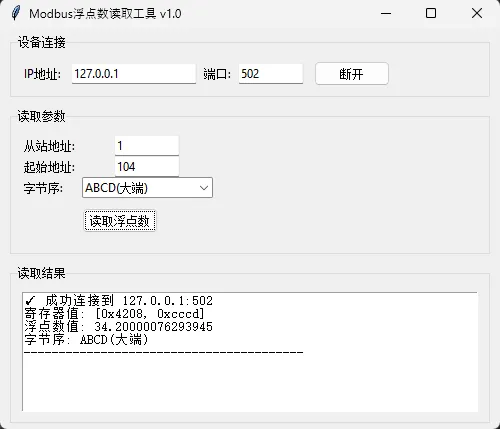
使用场景
这个方案适合:
• 数据更新频率低(几秒甚至几十秒一次) • 设备响应速度快(局域网内,延迟低) • 初学者练手项目
⚠️ 踩坑预警
问题1:界面会短暂卡顿因为read_holding_registers()是阻塞调用,网络延迟时界面会假死0.5-2秒。如果你的设备在外网或者网络质量差,这个问题会很明显。
问题2:地址偏移量搞不清PLC手册上写的40001,代码里要填0或者1?这个真没统一标准。我的经验是:pymodbus库里直接填0开始,然后根据实际情况调整。比如手册写40001,你就试试填0、1、40000这几个值。
问题3:超时没处理好如果设备突然断网,程序会卡住timeout时间(默认3秒)。这期间界面完全不响应,用户体验很差。
🎯 解决方案二:多线程读取(生产环境推荐)
好了,入门版跑通了。现在咱们来点硬菜——用多线程解决界面卡顿问题。
思路很简单:把耗时的Modbus读取操作丢到后台线程,读完了再通知主线程更新界面。这样GUI就不会被阻塞了。
升级版代码
import tkinter as tk from tkinter import ttk import threading import queue import time from pymodbus.client import ModbusTcpClient import struct classThreadedModbusReader: def__init__(self, root): self.root = root self.root.title("Modbus实时监控 v2.0 - 多线程版") self.root.geometry("600x500") self.client = Noneself.is_reading = False# 标记是否正在循环读取 self.data_queue = queue.Queue() # 线程间通信用的队列 self.create_widgets() self.check_queue() # 启动队列检查 defcreate_widgets(self): # 顶部控制区 control_frame = ttk.Frame(self.root, padding=10) control_frame.pack(fill="x") ttk.Label(control_frame, text="IP: ").pack(side="left") self.ip_var = tk.StringVar(value="127.0.1.1") ttk.Entry(control_frame, textvariable=self.ip_var, width=15).pack(side="left", padx=5) ttk.Label(control_frame, text="地址:").pack(side="left") self.addr_var = tk.IntVar(value=0) ttk.Entry(control_frame, textvariable=self.addr_var, width=8).pack(side="left", padx=5) self.start_btn = ttk.Button(control_frame, text="开始监控", command=self.toggle_reading) self.start_btn.pack(side="left", padx=10) # 数据显示区 - 用大字体显示当前值 display_frame = ttk.LabelFrame(self.root, text="实时数据", padding=20) display_frame.pack(fill="both", expand=True, padx=10, pady=10) self.value_label = ttk.Label(display_frame, text="--.-", font=("Arial", 48, "bold"), foreground="#2c3e50") self.value_label.pack(expand=True) self.status_label = ttk.Label(display_frame, text="未连接", foreground="#95a5a6") self.status_label.pack() # 历史记录 history_frame = ttk.LabelFrame(self.root, text="历史记录", padding=10) history_frame.pack(fill="both", expand=True, padx=10, pady=(0, 10)) self.history_text = tk.Text(history_frame, height=8, font=("Consolas", 9)) scrollbar = ttk.Scrollbar(history_frame, command=self.history_text.yview) self.history_text.config(yscrollcommand=scrollbar.set) scrollbar.pack(side="right", fill="y") self.history_text.pack(side="left", fill="both", expand=True) deftoggle_reading(self): """开启/停止循环读取"""ifnotself.is_reading: # 启动读取 self.is_reading = Trueself.start_btn.config(text="停止监控") threading.Thread(target=self.reading_loop, daemon=True).start() else: # 停止读取 self.is_reading = Falseself.start_btn.config(text="开始监控") ifself.client: self.client.close() defreading_loop(self): """后台线程:循环读取数据"""try: # 连接设备 ip = self.ip_var.get() self.client = ModbusTcpClient(ip, port=502, timeout=2) ifnotself.client.connect(): self.data_queue.put(("error", "连接失败")) self.is_reading = Falsereturnself.data_queue.put(("status", "已连接")) # 循环读取 whileself.is_reading: try: address = self.addr_var.get() result = self.client.read_holding_registers(address, count=2, device_id=1) ifnot result.isError(): reg1, reg2 = result.registers # 假设使用ABCD字节序 float_val = self.parse_float_abcd(reg1, reg2) # 把数据放进队列 self.data_queue.put(("data", float_val)) else: self.data_queue.put(("error", "读取失败")) time.sleep(1) # 每秒读一次 except Exception as e: self.data_queue.put(("error", str(e))) breakexcept Exception as e: self.data_queue.put(("error", f"线程异常: {str(e)}")) finally: self.is_reading = Falseifself.client: self.client.close() defcheck_queue(self): """主线程:定期检查队列并更新UI"""try: whileTrue: # 一次性处理队列中所有消息 msg_type, data = self.data_queue.get_nowait() if msg_type == "data": # 更新显示值 self.value_label.config(text=f"{data:.2f}") # 添加历史记录 timestamp = time.strftime("%H:%M:%S") self.history_text.insert("end", f"[{timestamp}] {data:.3f}\n") self.history_text.see("end") elif msg_type == "status": self.status_label.config(text=data, foreground="#27ae60") elif msg_type == "error": self.status_label.config(text=f"错误: {data}", foreground="#e74c3c") self.start_btn.config(text="开始监控") except queue.Empty: pass# 每100ms检查一次队列 self.root.after(100, self.check_queue) defparse_float_abcd(self, reg1, reg2): """ABCD字节序解析""" bytes_data = struct.pack(">HH", reg1, reg2) return struct.unpack(">f", bytes_data)[0] if __name__ == "__main__": root = tk.Tk() app = ThreadedModbusReader(root) root.mainloop()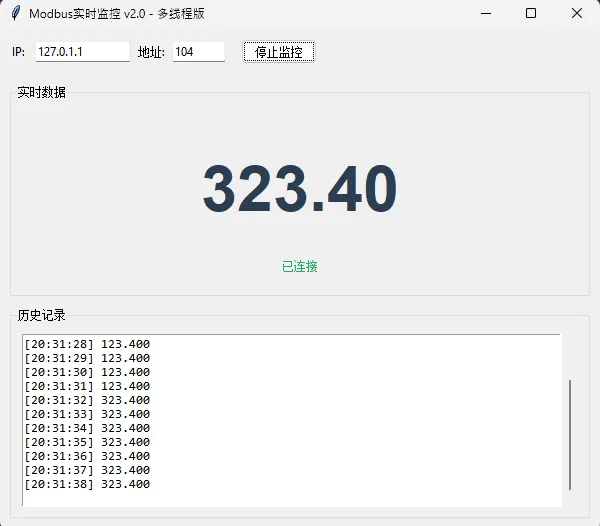
关键技术点解析
1. Queue队列 - 线程间的信使queue.Queue()是线程安全的。后台线程把读到的数据扔进去,主线程从里面取出来更新界面。这就好比两个人通过传送带传递物品,不用担心同时操作冲突。
2. daemon线程daemon=True这个参数很重要!它表示这是个守护线程——当主程序退出时,这个线程会自动结束。否则你关闭窗口后,后台线程还在跑,程序进程退不出去。
3. after()方法self.root.after(100, self.check_queue)是Tkinter的定时器。它不会阻塞主线程,每100ms触发一次,检查队列里有没有新数据。这个间隔可以调,但别设太短(比如10ms),会增加CPU负担。
性能对比
我在某个污水处理厂的项目中实测过:
多线程版本的CPU占用略高,但界面体验提升了好几个档次。客户的原话是:"哎呀,这次的程序顺畅多了,不像之前那个卡得跟PPT似的。"
💾 解决方案三:写入浮点数(双向通信)
读会了,写呢?比如你要往变频器写个频率设定值50. 5Hz,咋搞?
写入代码实现
import tkinter as tk from tkinter import ttk, messagebox import threading import queue import time from pymodbus.client import ModbusTcpClient import struct classThreadedModbusReader: def__init__(self, root): self.root = root self.root.title("Modbus实时监控 v2.0 - 多线程版") self.root.geometry("700x600") self.client = Noneself.is_reading = False# 标记是否正在循环读取 self.data_queue = queue.Queue() # 线程间通信用的队列 self.create_widgets() self.check_queue() # 启动队列检查 defcreate_widgets(self): # 顶部控制区 control_frame = ttk.Frame(self.root, padding=10) control_frame.pack(fill="x") ttk.Label(control_frame, text="IP: ").pack(side="left") self.ip_var = tk.StringVar(value="127.0.1.1") ttk.Entry(control_frame, textvariable=self.ip_var, width=15).pack(side="left", padx=5) ttk.Label(control_frame, text="地址:").pack(side="left") self.addr_var = tk.IntVar(value=0) ttk.Entry(control_frame, textvariable=self.addr_var, width=8).pack(side="left", padx=5) self.start_btn = ttk.Button(control_frame, text="开始监控", command=self.toggle_reading) self.start_btn.pack(side="left", padx=10) # 数据显示区 - 用大字体显示当前值 display_frame = ttk.LabelFrame(self.root, text="实时数据", padding=20) display_frame.pack(fill="both", expand=True, padx=10, pady=10) self.value_label = ttk.Label(display_frame, text="--.-", font=("Arial", 48, "bold"), foreground="#2c3e50") self.value_label.pack(expand=True) self.status_label = ttk.Label(display_frame, text="未连接", foreground="#95a5a6") self.status_label.pack() # 写入功能区 write_frame = ttk.LabelFrame(self.root, text="写入浮点数", padding=10) write_frame.pack(fill="x", padx=10, pady=(0, 10)) ttk.Label(write_frame, text="写入值:").pack(side="left") self.write_entry = ttk.Entry(write_frame, width=15) self.write_entry.pack(side="left", padx=5) write_btn = ttk.Button(write_frame, text="写入", command=self.write_float_value) write_btn.pack(side="left", padx=5) # 连接测试按钮 test_btn = ttk.Button(write_frame, text="连接测试", command=self.test_connection) test_btn.pack(side="left", padx=5) # 历史记录 history_frame = ttk.LabelFrame(self.root, text="历史记录", padding=10) history_frame.pack(fill="both", expand=True, padx=10, pady=(0, 10)) self.history_text = tk.Text(history_frame, height=8, font=("Consolas", 9)) scrollbar = ttk.Scrollbar(history_frame, command=self.history_text.yview) self.history_text.config(yscrollcommand=scrollbar.set) scrollbar.pack(side="right", fill="y") self.history_text.pack(side="left", fill="both", expand=True) deftoggle_reading(self): """开启/停止循环读取"""ifnotself.is_reading: # 启动读取 self.is_reading = Trueself.start_btn.config(text="停止监控") threading.Thread(target=self.reading_loop, daemon=True).start() else: # 停止读取 self.is_reading = Falseself.start_btn.config(text="开始监控") ifself.client: self.client.close() defreading_loop(self): """后台线程:循环读取数据"""try: # 连接设备 ip = self.ip_var.get() self.client = ModbusTcpClient(ip, port=502, timeout=2) ifnotself.client.connect(): self.data_queue.put(("error", "连接失败")) self.is_reading = Falsereturnself.data_queue.put(("status", "已连接")) # 循环读取 whileself.is_reading: try: address = self.addr_var.get() result = self.client.read_holding_registers(address, count=2, device_id=1) ifnot result.isError(): reg1, reg2 = result.registers # 假设使用ABCD字节序 float_val = self.parse_float_abcd(reg1, reg2) # 把数据放进队列 self.data_queue.put(("data", float_val)) else: self.data_queue.put(("error", "读取失败")) time.sleep(1) # 每秒读一次 except Exception as e: self.data_queue.put(("error", str(e))) breakexcept Exception as e: self.data_queue.put(("error", f"线程异常: {str(e)}")) finally: self.is_reading = Falseifself.client: self.client.close() defcheck_queue(self): """主线程:定期检查队列并更新UI"""try: whileTrue: # 一次性处理队列中所有消息 msg_type, data = self.data_queue.get_nowait() if msg_type == "data": # 更新显示值 self.value_label.config(text=f"{data:.2f}") # 添加历史记录 timestamp = time.strftime("%H:%M:%S") self.history_text.insert("end", f"[{timestamp}] {data:.3f}\n") self.history_text.see("end") elif msg_type == "status": self.status_label.config(text=data, foreground="#27ae60") elif msg_type == "error": self.status_label.config(text=f"错误: {data}", foreground="#e74c3c") self.start_btn.config(text="开始监控") except queue.Empty: pass# 每100ms检查一次队列 self.root.after(100, self.check_queue) defwrite_float_value(self): """将浮点数写入Modbus设备"""try: value = float(self.write_entry.get()) # 从输入框获取值 address = int(self.addr_var.get()) # 浮点数转字节 - 使用ABCD字节序 bytes_data = struct.pack(">f", value) # 转为4字节 # 拆分成两个16位寄存器 reg1 = struct.unpack(">H", bytes_data[0:2])[0] reg2 = struct.unpack(">H", bytes_data[2:4])[0] # 确保连接存在 ifnotself.ensure_connection(): return# 写入两个连续寄存器 result = self.client.write_registers(address, [reg1, reg2],device_id=1) ifnot result.isError(): self.status_label.config(text=f"✓ 写入成功: {value}", foreground="#27ae60") # 添加写入记录到历史 timestamp = time.strftime("%H:%M:%S") self.history_text.insert("end", f"[{timestamp}] 写入: {value:.3f}\n") self.history_text.see("end") else: self.status_label.config(text="✗ 写入失败", foreground="#e74c3c") except ValueError: messagebox.showerror("输入错误", "请输入有效的浮点数") except Exception as e: messagebox.showerror("写入异常", str(e)) deftest_connection(self): """测试连接"""try: ip = self.ip_var.get() test_client = ModbusTcpClient(ip, port=502, timeout=2) if test_client.connect(): self.status_label.config(text="✓ 连接测试成功", foreground="#27ae60") test_client.close() else: self.status_label.config(text="✗ 连接测试失败", foreground="#e74c3c") except Exception as e: messagebox.showerror("连接测试异常", str(e)) defensure_connection(self): """确保连接可用"""try: ifself.client isNone: ip = self.ip_var.get() self.client = ModbusTcpClient(ip, port=502, timeout=2) ifnotself.client.connect(): self.status_label.config(text="✗ 连接失败", foreground="#e74c3c") returnFalsereturnTrueexcept Exception as e: self.status_label.config(text=f"✗ 连接异常: {str(e)}", foreground="#e74c3c") returnFalsedefparse_float_abcd(self, reg1, reg2): """ABCD字节序解析""" bytes_data = struct.pack(">HH", reg1, reg2) return struct.unpack(">f", bytes_data)[0] if __name__ == "__main__": root = tk.Tk() app = ThreadedModbusReader(root) root.mainloop()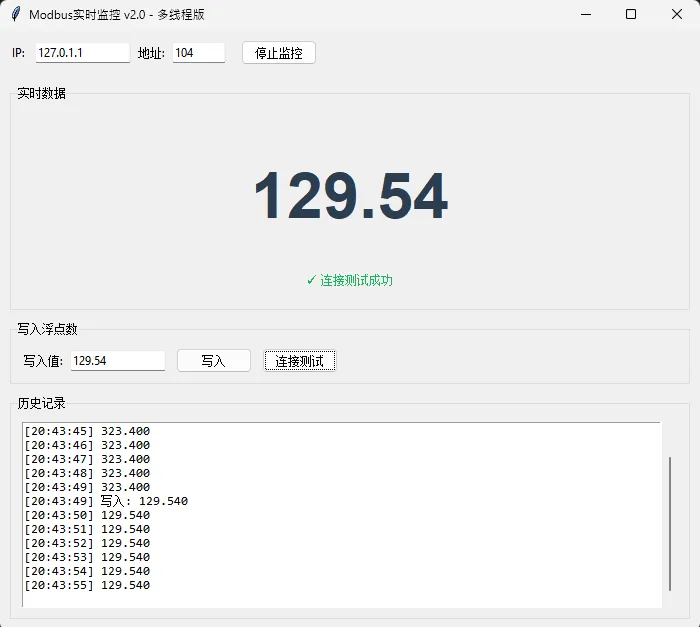
⚠️ 写入操作的巨坑
坑1:写错寄存器区域Modbus有四种寄存器类型:线圈、离散输入、输入寄存器、保持寄存器。浮点数通常存在保持寄存器(Holding Registers),要用write_registers()而不是write_coils()。我见过有人用错函数,调试了一下午。
坑2:没做数值范围校验设备能接受的范围是有限的。比如变频器频率设定值可能只支持0-50Hz,你写个100进去,轻则报错,重则——设备保护性停机,生产线停了,老板脸色比锅底还黑。
所以写之前一定要加校验:
# 安全写入示例defsafe_write_float(self, value, min_val=0.0, max_val=100.0):ifnot (min_val <= value <= max_val): messagebox.showwarning("数值越界", f"允许范围:{min_val}~{max_val}")returnFalse# ... 执行写入坑3:没有写入确认机制工业现场干扰多,写入可能失败。最稳妥的做法是:写完之后立即读一次,确认数值是否写进去了。
🔧 实战优化技巧
技巧1:自动识别字节序
不想挨个试字节序?写个自动检测函数:
defauto_detect_byte_order(self, address, expected_value):""" 自动检测字节序 expected_value: 你知道设备当前应该显示的值(比如用万用表测的) """ result = self.client.read_holding_registers(address, 2, slave=1)if result.isError():returnNone reg1, reg2 = result. registers byte_orders = ["ABCD", "DCBA", "BADC", "CDAB"]for order in byte_orders: parsed_val = self.parse_float(reg1, reg2, order)ifabs(parsed_val - expected_value) < 0.1: # 误差在0.1以内return orderreturnNone# 没匹配上# 使用示例:# 假设你用万用表测出温度是25.3度byte_order = app.auto_detect_byte_order(address=0, expected_value=25.3)print(f"检测到字节序: {byte_order}")这招在调试新设备时超级好用!省了翻手册的时间。
技巧2:异常重连机制
网络不稳定时,加个自动重连:
defread_with_retry(self, address, max_retries=3):"""带重试的读取"""for attempt inrange(max_retries):try: result = self.client.read_holding_registers(address, 2, slave=1)ifnot result.isError():return result.registersexcept Exception as e:if attempt < max_retries - 1: time.sleep(0.5) # 等半秒再试# 尝试重连self.client.close()self.client. connect()else:raise ereturnNone技巧3:数据可视化增强
用matplotlib嵌入Tkinter,实时绘制曲线:
from matplotlib.backends.backend_tkagg import FigureCanvasTkAggfrom matplotlib.figure import Figureimport collectionsclassChartModbusReader:def__init__(self, root):# ... 其他初始化代码...# 数据缓冲区(最多保存100个点)self.data_buffer = collections.deque(maxlen=100)# 创建matplotlib图表self.figure = Figure(figsize=(6, 3), dpi=80)self.ax = self.figure.add_subplot(111)self.ax.set_title("温度实时曲线")self.ax.set_xlabel("时间")self.ax.set_ylabel("温度(°C)")# 嵌入到Tkinterself.canvas = FigureCanvasTkAgg(self.figure, master=root)self.canvas.get_tk_widget().pack()defupdate_chart(self, value):"""更新图表"""self.data_buffer.append(value)self.ax.clear()self.ax.plot(list(self.data_buffer), color="#3498db", linewidth=2)self.ax.set_ylim(0, 100) # 根据实际数据范围调整self.canvas.draw()加上这个图表,客户看到实时曲线,直呼专业!项目验收一次过。
🎓 三个金句总结
1. "Modbus浮点数的核心难点不是通信协议,而是字节序转换和线程同步" —— 搞清楚这两点,90%的问题都能解决。 2. "永远不要在Tkinter主线程里做阻塞操作,除���你想让用户骂娘" —— 这是GUI开发的铁律。 3. "工业现场没有100%稳定的网络,所以你的代码必须有容错机制" —— 重试、超时、异常处理,一个都不能少。
📚 持续学习路径
如果你觉得这些还不够过瘾,可以继续深入:
1. 异步编程方向:研究 asyncio配合pymodbus的异步版本,性能更强2. 通信协议深入:看看Modbus RTU(串口通信)和Modbus TCP的区别 3. 工业组态软件:试试 PyQt5替代Tkinter,做出更专业的界面4. 数据库存储:把历史数据存到 SQLite,实现数据回溯分析
最后,工控开发这条路,没有捷径。多踩坑、多实践,才能真正搞懂那些手册上写得云里雾里的东西。
今天的分享就到这儿。 如果你在项目中也遇到过Modbus相关的奇葩问题,欢迎留言区交流——说不定你的问题,正好是别人正在踩的坑。
把这篇文章收藏起来吧,下次做工控项目的时候,直接拿代码改改就能用。比从零开始写,至少省一天工。
随机文章
-
 10个月宝宝每天需要喝多少奶粉?
- 值得苦练的100道Python经典练手题,(附详细答案)必须收藏,提升技能!
- 【Python大数据】Hadoop+Spark皮肤癌数据分析系统:Django+Echarts可视化实战 毕业设计 选题推荐 毕设选题 数据分析 机器学习 数据挖掘
- 深入理解 Linux IPIP 隧道:从原理到实战
- Python爬取skillsmp的6万条Skills数据
- Linus开始用AI编程了,大势所趋
- FastLinLog - 轻量级Linux 日志安全分析工具
- 用 Python 写了一个简易版的 “黑客帝国” 数字雨
- 微信隐藏的浪漫代码
- Nature Medicine生信代码和input数据 |唐氏综合征胎儿大脑皮层单细胞图谱
- 100万行代码,造了个“浏览器”?