Python+tkinter程序使用ttk.Style为ttk.Menubutton组件设置样式
- 2026-10-21 13:27:17
==============
ttk.Menubutton组件与tkinter.Menubutton功能类似,但可以定义更丰富的样式。ttk.Menubutton组件支持的选项有class、compound、cursor、direction、image、menu、padding、state、style、takefocus、text、textvariable、underline、width,其中direction指定菜单与按钮的相对位置(值可以为'above'、'below'、'left'、'right'、'flush'),menu指定与按钮绑定的菜单。
ttk.Menubutton组件在所有标准主题中支持Toolbutton样式,使用ttk.Style为其定义样式时,其默认样式的类名为TMenubutton,支持的动态状态有'active'、'disabled'、'readonly',支持的样式选项有arrowsize、background、compound、foreground、font、padding、relief、width。
Menubutton组件从ttk.Widget类中继承了方法identify(x, y)、instate(statespec, callback=None, *args, **kw)、state(statespec=None),从tkinter.BaseWidget类中继承了方法destroy(),从tkinter.Misc、tkinter.Pack、tkinter.Place、tkinter.Grid中继承了大量方法,没有新增自定义方法。
任务描述:
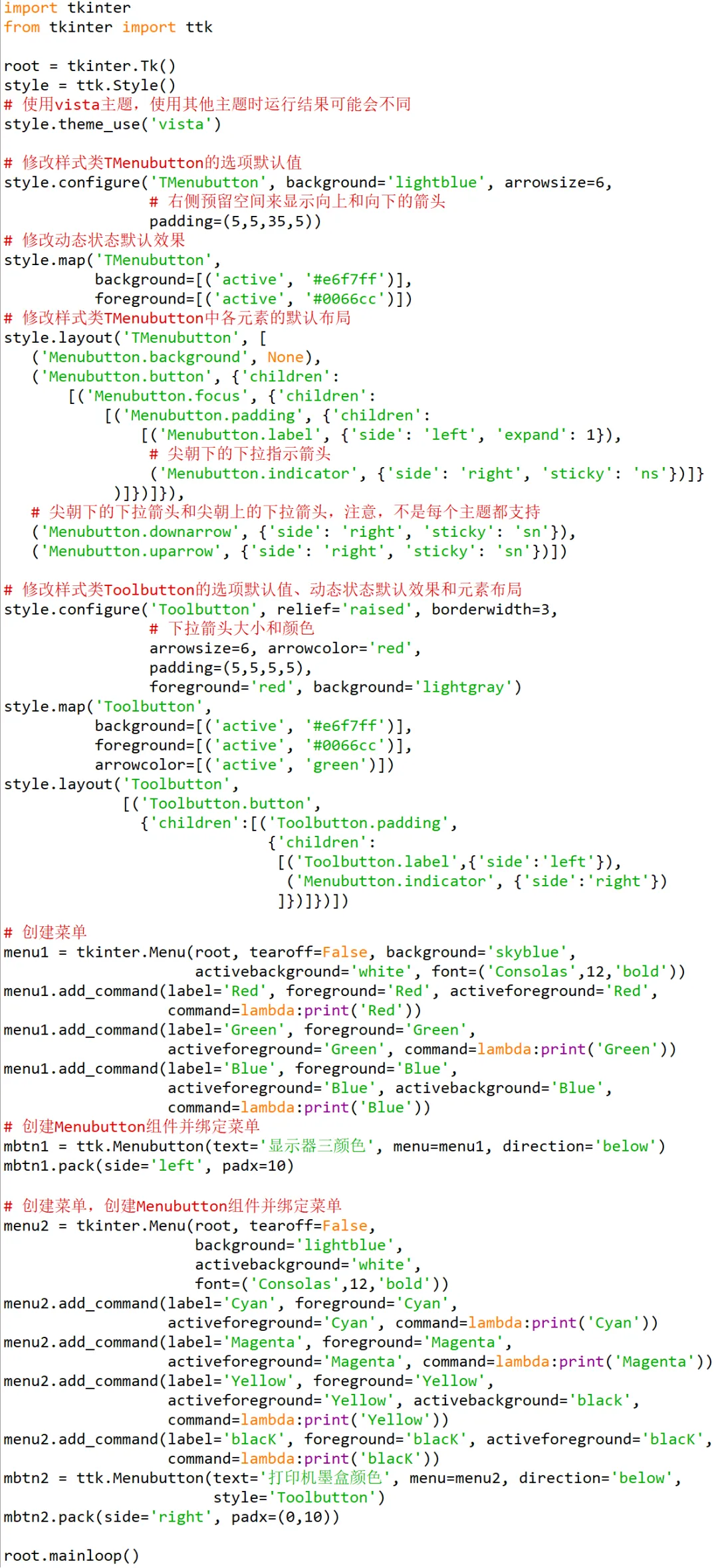
编写Python程序,演示使用ttk.Style为ttk.Menubutton组件设计样式的用法。
=================
