Web前端实现的模拟黑客终端[附完整代码]
- 2026-08-27 10:48:46
Web前端实现的模拟黑客终端[附完整代码]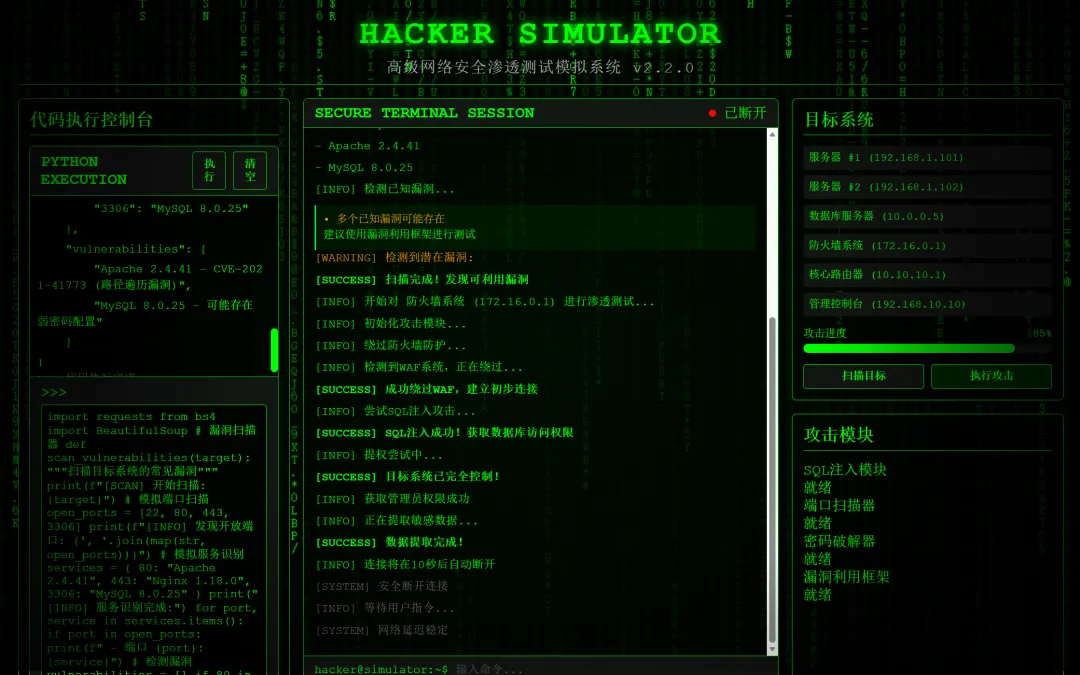
网页效果如下: 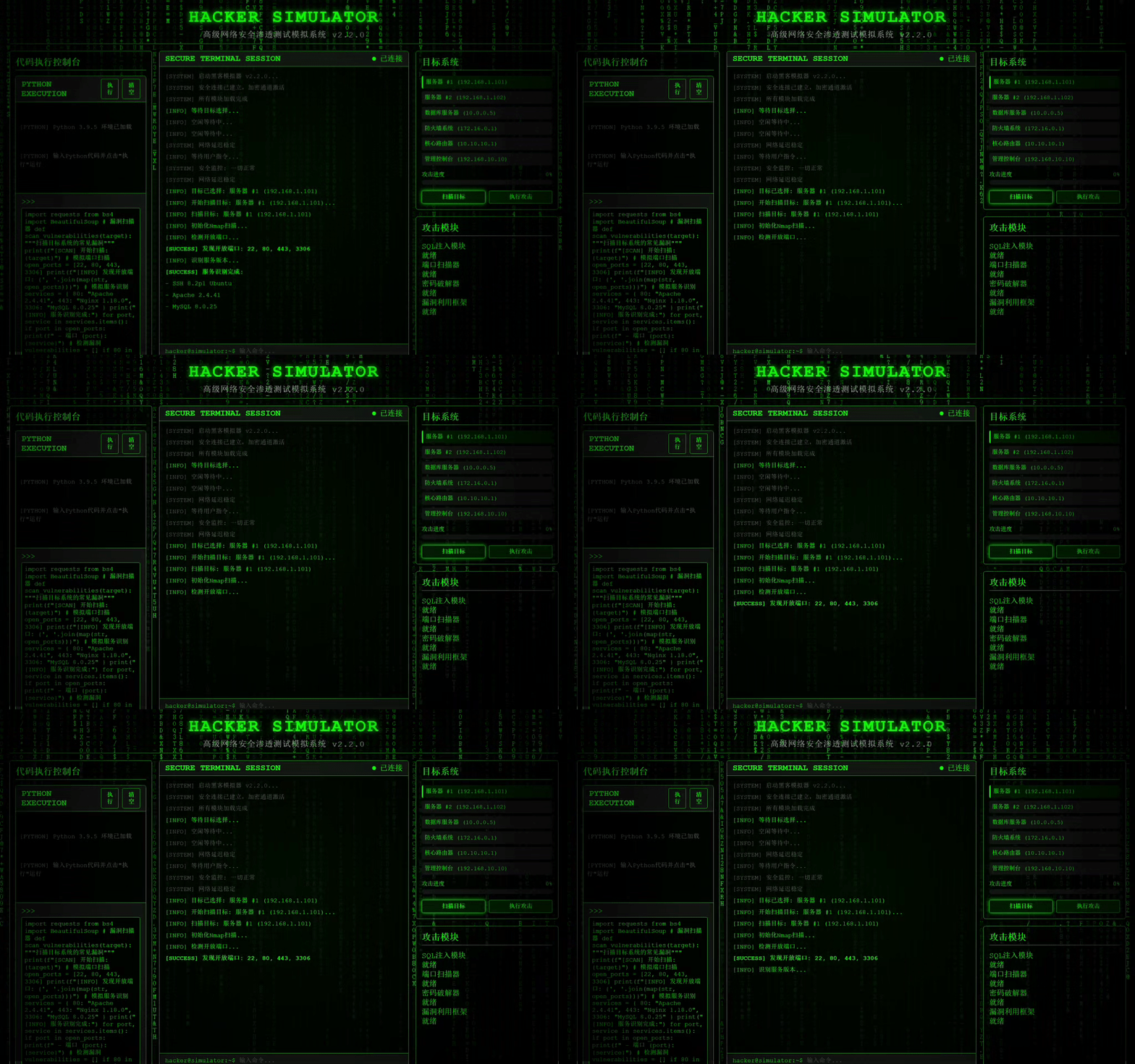
核心代码: 1.Canvas实现的黑客帝国风格[代码雨] 2.打印结构化代码的伪Python解释器 3.响应式Flexbox 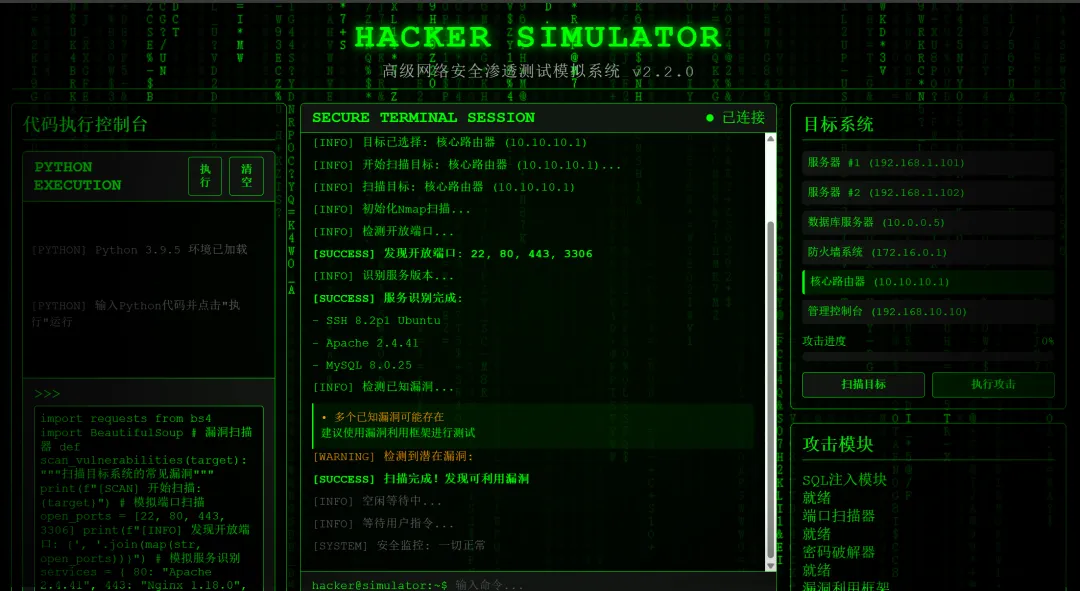
基于原生的Web技术栈构建的简易的模拟黑客控制终端,不依赖React/Vue/Angular等Web框架,实现出模拟黑客攻击的视觉效果。
编程语言:HTML5/CSS3/JavaScript(ES6+)
采用Canvas API作为图形渲染,实现了黑客帝国中的"代码雨"画面。
// 绘制代码雨functiondrawMatrix() {// 半透明背景创建拖尾效果 ctx.fillStyle = 'rgba(0, 0, 0, 0.05)'; ctx.fillRect(0, 0, canvas.width, canvas.height); ctx.fillStyle = '#0f0'; ctx.font = `${fontSize}px monospace`;for (let i = 0; i < drops.length; i++) {const text = charSet.charAt(Math.floor(Math.random() * charSet.length));const x = i * fontSize;const y = drops[i] * fontSize; ctx.fillText(text, x, y);// 重置位置当字符到达底部if (drops[i] * fontSize > canvas.height && Math.random() > 0.975) { drops[i] = 0; // 重置雨滴位置 }// 更新雨滴下落位置 drops[i]++; }// 60fps 平滑动画 requestAnimationFrame(drawMatrix);}defscan_vulnerabilities(target):"""扫描目标系统的常见漏洞""" print(f"[SCAN] 开始扫描: {target}")# 模拟端口扫描 open_ports = [22, 80, 443, 3306] print(f"[INFO] 发现开放端口: {', '.join(map(str, open_ports))}")# 模拟服务识别 services = {80: "Apache 2.4.41",443: "Nginx 1.18.0",3306: "MySQL 8.0.25" } print("[INFO] 服务识别完成:")for port, service in services.items():if port in open_ports: print(f" - 端口 {port}: {service}")# 检测漏洞 vulnerabilities = []if80in open_ports and"Apache"in services[80]: vulnerabilities.append("Apache 2.4.41 - CVE-2021-41773 (路径遍历漏洞)")if3306in open_ports: vulnerabilities.append("MySQL 8.0.25 - 可能存在弱密码配置")if vulnerabilities: print("[WARNING] 检测到潜在漏洞:")for i, vuln in enumerate(vulnerabilities, 1): print(f" {i}. {vuln}")else: print("[INFO] 未发现已知漏洞")return {"target": target,"open_ports": open_ports,"services": services,"vulnerabilities": vulnerabilities }.main-content {display: flex; flex: 1; gap: 15px; height: calc(100% - 65px);}/* 左侧代码台 */.code-console-container { width: 300px; } /* 中间主终端(弹性伸缩) */.console-container { flex: 1; } /* 右侧目标选择器 */.control-panels { width: 300px; } 完整的HTML网页代码如下:
<!DOCTYPE html><htmllang="zh-CN"><head><metacharset="UTF-8"><metaname="viewport"content="width=device-width, initial-scale=1.0"><title>在线黑客攻击模拟器</title><style>* {margin: 0;padding: 0;box-sizing: border-box;font-family: 'Courier New', monospace;}body {background-color: #000;color: #0f0;height: 100vh;overflow: hidden;position: relative;}#matrixCanvas {position: absolute;top: 0;left: 0;width: 100%;height: 100%;z-index: -1;}.terminal-overlay {position: absolute;top: 0;left: 0;width: 100%;height: 100%;background: radial-gradient(circle, transparent 50%, rgba(0,0,0,0.8) 100%);pointer-events: none;z-index: 1;}.container {max-width: 1200px;margin: 0 auto;padding: 15px 20px 20px 20px;height: 100vh;display: flex;flex-direction: column;}header {text-align: center;margin-bottom: 15px;padding: 8px 0;border-bottom: 1px solid #0f0;}header h1 {font-size: 2.3em;letter-spacing: 3px;text-shadow: 0 0 10px #0f0;margin-bottom: 5px;}header .subtitle {font-size: 1.1em;color: #aaa;letter-spacing: 1px;}.main-content {display: flex;flex: 1;gap: 15px;height: calc(100% - 65px);}/* 新的三列布局 */.code-console-container {width: 300px;display: flex;flex-direction: column;}.console-container {flex: 1;background: rgba(0, 0, 0, 0.7);border: 1px solid #0f0;border-radius: 5px;overflow: hidden;display: flex;flex-direction: column;}.control-panels {width: 300px;display: flex;flex-direction: column;gap: 15px;}.console-header {background: #111;padding: 6px 12px;border-bottom: 1px solid #0f0;display: flex;justify-content: space-between;align-items: center;}.console-title {font-weight: bold;color: #0f0;font-size: 1.1em;}.console-status {display: flex;align-items: center;gap: 8px;}.status-indicator {width: 8px;height: 8px;border-radius: 50%;background-color: #0f0;}.console-body {flex: 1;padding: 12px;overflow-y: auto;font-size: 13px;line-height: 1.4;background-color: rgba(0, 0, 0, 0.5);}.console-input {background: #111;padding: 8px 12px;border-top: 1px solid #0f0;display: flex;}.prompt {color: #0f0;margin-right: 8px;font-size: 13px;}#commandInput {flex: 1;background: transparent;border: none;color: #fff;font-family: 'Courier New', monospace;font-size: 13px;outline: none;}#commandInput::placeholder {color: #555;}.controls {width: 300px;display: flex;flex-direction: column;gap: 12px;}.control-panel {background: rgba(0, 0, 0, 0.7);border: 1px solid #0f0;border-radius: 5px;padding: 12px;flex: 1;display: flex;flex-direction: column;}.control-panel h2 {color: #0f0;margin-bottom: 12px;font-size: 1.2em;border-bottom: 1px solid #0f0;padding-bottom: 4px;}.target-selection {margin-bottom: 12px;flex: 1;overflow-y: auto;}.target-list {display: grid;grid-template-columns: 1fr;gap: 6px;}.target-item {background: #111;padding: 6px;border-radius: 3px;cursor: pointer;transition: all 0.2s;font-size: 12px;}.target-item:hover {background: #222;border-left: 3px solid #0f0;}.target-item.selected {background: #001a00;border-left: 3px solid #0f0;}.progress-container {margin-bottom: 12px;}.progress-label {display: flex;justify-content: space-between;margin-bottom: 4px;font-size: 12px;}.progress-bar {height: 10px;background: #111;border-radius: 5px;overflow: hidden;}.progress-fill {height: 100%;background: linear-gradient(90deg, #0f0, #00ff00aa);width: 0%;border-radius: 5px;transition: width 0.5s ease;}.attack-buttons {display: grid;grid-template-columns: 1fr 1fr;gap: 8px;}button {background: #111;color: #0f0;border: 1px solid #0f0;padding: 6px;border-radius: 3px;cursor: pointer;font-family: 'Courier New', monospace;font-size: 12px;font-weight: bold;transition: all 0.2s;}button:hover {background: #001a00;box-shadow: 0 0 8px #0f0;}button:active {transform: scale(0.98);}button.attack-btn {background: #002200;border-color: #00ff00;}button.attack-btn:hover {background: #003300;}.log-entry {margin-bottom: 6px;opacity: 0;transform: translateY(10px);transition: opacity 0.3s, transform 0.3s;}.log-entry.show {opacity: 1;transform: translateY(0);}.log-info {color: #0f0;}.log-success {color: #0f0;font-weight: bold;}.log-warning {color: #ff9900;}.log-error {color: #ff0000;}.log-system {color: #666;}.scan-result {margin-top: 8px;padding: 8px;background: rgba(0, 50, 0, 0.3);border-left: 2px solid #0f0;border-radius: 0 4px 4px 0;font-size: 12px;}.hidden {display: none;}.footer {text-align: center;padding: 12px 0;font-size: 0.85em;color: #555;border-top: 1px solid #111;margin-top: 15px;}.matrix-glow {position: fixed;top: 0;left: 0;width: 100%;height: 100%;pointer-events: none;background: radial-gradient(circle at center, rgba(0, 255, 0, 0.05) 0%, transparent 70%);z-index: 0;}/* 代码控制台样式 - 优化滚动体验 */.code-console {background: #000;border: 1px solid #0f0;border-radius: 5px;overflow: hidden;flex: 1;display: flex;flex-direction: column;}.code-header {background: #111;padding: 6px 12px;border-bottom: 1px solid #0f0;display: flex;justify-content: space-between;align-items: center;}.code-actions {display: flex;gap: 8px;}.code-body {flex: 1;padding: 8px;overflow-y: auto; /* 允许垂直滚动 */background: #000;font-family: 'Courier New', monospace;font-size: 13px;line-height: 1.4;white-space: pre-wrap;word-break: break-all;max-height: 200px; /* 限制最大高度,确保滚动条出现 */scroll-behavior: smooth; /* 平滑滚动 */}/* 自定义滚动条样式 */.code-body::-webkit-scrollbar {width: 8px;}.code-body::-webkit-scrollbar-track {background: #000;}.code-body::-webkit-scrollbar-thumb {background: #0f0;border-radius: 4px;}.code-body::-webkit-scrollbar-thumb:hover {background: #00ff00;}.code-input {background: #111;padding: 8px 12px;border-top: 1px solid #0f0;display: flex;flex-direction: column;}.code-prompt {display: flex;align-items: center;margin-bottom: 4px;}.code-prompt-label {color: #0f0;margin-right: 8px;}.code-editor {width: 100%;min-height: 70px;background: #000;color: #0f0;border: 1px solid #0f0;border-radius: 3px;padding: 6px;resize: vertical;font-family: 'Courier New', monospace;font-size: 13px;outline: none;overflow: auto;scroll-behavior: smooth;}.token.keyword { color: #ff0; }.token.string { color: #0f0; }.token.number { color: #0ff; }.token.comment { color: #555; }.token.function { color: #f0f; }.token.operator { color: #ff0; }.token.variable { color: #0af; }.token.output { color: #0f0; margin-top: 4px; }.token.error { color: #f00; }.token.info { color: #666; }/* 滚动打印效果 */.typewriter {border-right: 1px solid #0f0;white-space: nowrap;overflow: hidden;animation: blink-caret 0.75s step-end infinite;}@keyframes blink-caret {from, to { border-color: transparent; }50% { border-color: #0f0; }}</style></head><body><canvasid="matrixCanvas"></canvas><divclass="terminal-overlay"></div><divclass="matrix-glow"></div><divclass="container"><header><h1>HACKER SIMULATOR</h1><divclass="subtitle">高级网络安全渗透测试模拟系统 v2.2.0</div></header><divclass="main-content"><!-- 左侧:代码执行控制台 --><divclass="code-console-container"><divclass="control-panel"><h2>代码执行控制台</h2><divclass="code-console"><divclass="code-header"><divclass="console-title">PYTHON EXECUTION</div><divclass="code-actions"><buttonid="runCodeBtn">执行</button><buttonid="clearCodeBtn">清空</button></div></div><divclass="code-body"id="codeOutput"><divclass="log-entry log-system show">[PYTHON] Python 3.9.5 环境已加载</div><divclass="log-entry log-system show">[PYTHON] 输入Python代码并点击"执行"运行</div></div><divclass="code-input"><divclass="code-prompt"><divclass="code-prompt-label">>>> </div></div><divclass="code-editor"id="codeEditor"contenteditable="true"spellcheck="false">import requestsfrom bs4 import BeautifulSoup# 漏洞扫描器def scan_vulnerabilities(target):"""扫描目标系统的常见漏洞"""print(f"[SCAN] 开始扫描: {target}")# 模拟端口扫描open_ports = [22, 80, 443, 3306]print(f"[INFO] 发现开放端口: {', '.join(map(str, open_ports))}")# 模拟服务识别services = {80: "Apache 2.4.41",443: "Nginx 1.18.0",3306: "MySQL 8.0.25"}print("[INFO] 服务识别完成:")for port, service in services.items():if port in open_ports:print(f" - 端口 {port}: {service}")# 检测漏洞vulnerabilities = []if 80 in open_ports and "Apache" in services[80]:vulnerabilities.append("Apache 2.4.41 - CVE-2021-41773 (路径遍历漏洞)")if 3306 in open_ports:vulnerabilities.append("MySQL 8.0.25 - 可能存在弱密码配置")if vulnerabilities:print("[WARNING] 检测到潜在漏洞:")for i, vuln in enumerate(vulnerabilities, 1):print(f" {i}. {vuln}")else:print("[INFO] 未发现已知漏洞")return {"target": target,"open_ports": open_ports,"services": services,"vulnerabilities": vulnerabilities}# 执行扫描scan_vulnerabilities("192.168.1.101")</div></div></div></div></div><!-- 中间:主控制台 --><divclass="console-container"><divclass="console-header"><divclass="console-title">SECURE TERMINAL SESSION</div><divclass="console-status"><divclass="status-indicator"id="connectionStatus"></div><spanid="connectionText">已连接</span></div></div><divclass="console-body"id="consoleOutput"><divclass="log-entry log-system show">[SYSTEM] 启动黑客模拟器 v2.2.0...</div><divclass="log-entry log-system show">[SYSTEM] 安全连接已建立,加密通道激活</div><divclass="log-entry log-system show">[SYSTEM] 所有模块加载完成</div><divclass="log-entry log-info show">[INFO] 等待目标选择...</div></div><divclass="console-input"><divclass="prompt">hacker@simulator:~$</div><inputtype="text"id="commandInput"placeholder="输入命令..."autofocus></div></div><!-- 右侧:目标系统和其他控制面板 --><divclass="control-panels"><divclass="control-panel"><h2>目标系统</h2><divclass="target-selection"><divclass="target-list"><divclass="target-item"data-target="server1">服务器 #1 (192.168.1.101)</div><divclass="target-item"data-target="server2">服务器 #2 (192.168.1.102)</div><divclass="target-item"data-target="database">数据库服务器 (10.0.0.5)</div><divclass="target-item"data-target="firewall">防火墙系统 (172.16.0.1)</div><divclass="target-item"data-target="router">核心路由器 (10.10.10.1)</div><divclass="target-item"data-target="admin">管理控制台 (192.168.10.10)</div></div></div><divclass="progress-container"><divclass="progress-label"><span>攻击进度</span><spanid="progressPercent">0%</span></div><divclass="progress-bar"><divclass="progress-fill"id="progressFill"></div></div></div><divclass="attack-buttons"><buttonid="scanBtn">扫描目标</button><buttonid="attackBtn"class="attack-btn"disabled>执行攻击</button></div></div><divclass="control-panel"><h2>攻击模块</h2><divclass="module-list"><divclass="module-item"><divclass="module-name">SQL注入模块</div><divclass="module-status">就绪</div></div><divclass="module-item"><divclass="module-name">端口扫描器</div><divclass="module-status">就绪</div></div><divclass="module-item"><divclass="module-name">密码破解器</div><divclass="module-status">就绪</div></div><divclass="module-item"><divclass="module-name">漏洞利用框架</div><divclass="module-status">就绪</div></div></div></div></div></div><divclass="footer"><p>© 2023 黑客模拟器 | 本系统仅用于教育和网络安全培训目的 | 所有活动均在隔离环境中进行</p></div></div><script>document.addEventListener('DOMContentLoaded', () => {// 初始化Canvasconst canvas = document.getElementById('matrixCanvas');const ctx = canvas.getContext('2d');canvas.width = window.innerWidth;canvas.height = window.innerHeight;// 代码雨设置const fontSize = 14;let columns = Math.floor(canvas.width / fontSize);let drops = [];// 初始化雨滴位置for (let i = 0; i < columns; i++) {drops[i] = Math.floor(Math.random() * -canvas.height);}// 代码字符集const charSet = 'ABCDEFGHIJKLMNOPQRSTUVWXYZ0123456789$%&@*+=-_.?/';// 绘制代码雨function drawMatrix() {// 半透明背景创建拖尾效果ctx.fillStyle = 'rgba(0, 0, 0, 0.05)';ctx.fillRect(0, 0, canvas.width, canvas.height);ctx.fillStyle = '#0f0';ctx.font = `${fontSize}px monospace`;for (let i = 0; i < drops.length; i++) {const text = charSet.charAt(Math.floor(Math.random() * charSet.length));const x = i * fontSize;const y = drops[i] * fontSize;ctx.fillText(text, x, y);// 重置位置当字符到达底部if (drops[i] * fontSize > canvas.height && Math.random() > 0.975) {drops[i] = 0; // 重置雨滴位置}// 更新雨滴下落位置drops[i]++;}// 60fps 平滑动画requestAnimationFrame(drawMatrix);}// 控制台功能const consoleOutput = document.getElementById('consoleOutput');const commandInput = document.getElementById('commandInput');const scanBtn = document.getElementById('scanBtn');const attackBtn = document.getElementById('attackBtn');const progressFill = document.getElementById('progressFill');const progressPercent = document.getElementById('progressPercent');const connectionStatus = document.getElementById('connectionStatus');const connectionText = document.getElementById('connectionText');// 代码控制台功能const codeEditor = document.getElementById('codeEditor');const codeOutput = document.getElementById('codeOutput');const runCodeBtn = document.getElementById('runCodeBtn');const clearCodeBtn = document.getElementById('clearCodeBtn');let selectedTarget = null;let currentProgress = 0;let attackInterval = null;let isAttacking = false;let isScanning = false;let isExecutingCode = false;// 检查是否在底部function isAtBottom(element) {return element.scrollHeight - element.scrollTop <= element.clientHeight + 10;}// 添加日志条目function addLog(message, type = 'info', delay = 0) {const logEntry = document.createElement('div');logEntry.className = `log-entry log-${type} show`;logEntry.textContent = message;setTimeout(() => {consoleOutput.appendChild(logEntry);// 滚动到底部consoleOutput.scrollTop = consoleOutput.scrollHeight;}, delay);}// 逐字符打印效果function typeWriter(element, text, callback, speed = 30, delay = 0) {setTimeout(() => {element.textContent = '';let i = 0;function type() {if (i < text.length) {element.textContent += text.charAt(i);i++;setTimeout(type, speed);} else if (callback) {setTimeout(callback, 100);}}type();}, delay);}// 添加代码输出(带打字机效果)function addCodeOutput(content, type = 'output', speed = 25) {const outputLine = document.createElement('div');outputLine.className = `token ${type}`;// 如果是长内容,使用打字机效果if (content.length > 30 && speed > 0) {outputLine.classList.add('typewriter');codeOutput.appendChild(outputLine);// 仅在用户处于底部时才滚动到底部const shouldScroll = isAtBottom(codeOutput);typeWriter(outputLine, content, () => {outputLine.classList.remove('typewriter');// 如果用户在底部,则滚动到底部if (shouldScroll) {codeOutput.scrollTop = codeOutput.scrollHeight;}}, speed);} else {outputLine.textContent = content;codeOutput.appendChild(outputLine);// 如果用户在底部,则滚动到底部if (isAtBottom(codeOutput)) {codeOutput.scrollTop = codeOutput.scrollHeight;}}}// 语法高亮处理function highlightCode(code) {// Python关键字const keywords = ['and', 'as', 'assert', 'break', 'class', 'continue', 'def', 'del', 'elif', 'else', 'except','False', 'finally', 'for', 'from', 'global', 'if', 'import', 'in', 'is', 'lambda', 'None','nonlocal', 'not', 'or', 'pass', 'raise', 'return', 'True', 'try', 'while', 'with', 'yield'];// 函数名(简单检测)const functions = ['print', 'len', 'range', 'input', 'int', 'str', 'float', 'list', 'dict', 'set', 'tuple','scan_vulnerabilities', 'requests', 'BeautifulSoup'];// 处理字符串code = code.replace(/("[^"]*"|'[^']*')/g, '<span class="token string">$1</span>');// 处理注释code = code.replace(/(#.*)/g, '<span class="token comment">$1</span>');// 处理数字code = code.replace(/\b(\d+)\b/g, '<span class="token number">$1</span>');// 处理操作符code = code.replace(/([+\-*/=<>!&|^%]+)/g, '<span class="token operator">$1</span>');// 处理关键字keywords.forEach(keyword => {const regex = new RegExp(`\\b${keyword}\\b`, 'g');code = code.replace(regex, `<span class="token keyword">${keyword}</span>`);});// 处理函数functions.forEach(func => {const regex = new RegExp(`\\b${func}\\b(?=\\()`, 'g');code = code.replace(regex, `<span class="token function">${func}</span>`);});return code;}// 更新进度条function updateProgress(percent) {currentProgress = percent;progressFill.style.width = `${percent}%`;progressPercent.textContent = `${percent}%`;// 如果达到100%,攻击完成if (percent >= 100 && isAttacking) {setTimeout(() => {addLog('[SUCCESS] 目标系统已完全控制!', 'success', 300);addLog('[INFO] 获取管理员权限成功', 'info', 500);addLog('[INFO] 正在提取敏感数据...', 'info', 700);setTimeout(() => {addLog('[SUCCESS] 数据提取完成!', 'success');addLog('[INFO] 连接将在10秒后自动断开', 'info');isAttacking = false;attackBtn.disabled = true;attackBtn.textContent = '执行攻击';// 模拟断开连接setTimeout(() => {addLog('[SYSTEM] 安全断开连接', 'system');connectionStatus.style.backgroundColor = '#ff0000';connectionText.textContent = '已断开';scanBtn.disabled = false;selectedTarget = null;// 重置目标选择document.querySelectorAll('.target-item').forEach(item => {item.classList.remove('selected');});}, 10000);}, 2000);}, 500);}}// 模拟攻击过程function startAttack() {if (!selectedTarget || isAttacking) return;isAttacking = true;attackBtn.textContent = '停止攻击';addLog(`[INFO] 开始对 ${selectedTarget} 进行渗透测试...`, 'info');addLog('[INFO] 初始化攻击模块...', 'info');// 模拟攻击阶段setTimeout(() => {addLog('[INFO] 绕过防火墙防护...', 'info');updateProgress(15);}, 500);setTimeout(() => {addLog('[INFO] 检测到WAF系统,正在绕过...', 'info');updateProgress(30);}, 1500);setTimeout(() => {addLog('[SUCCESS] 成功绕过WAF,建立初步连接', 'success');updateProgress(45);}, 2500);setTimeout(() => {addLog('[INFO] 尝试SQL注入攻击...', 'info');updateProgress(60);}, 3500);setTimeout(() => {addLog('[SUCCESS] SQL注入成功!获取数据库访问权限', 'success');updateProgress(75);}, 4500);setTimeout(() => {addLog('[INFO] 提权尝试中...', 'info');updateProgress(85);}, 5500);// 进度条动态更新let progress = 75;attackInterval = setInterval(() => {if (progress >= 100 || !isAttacking) {clearInterval(attackInterval);return;}progress += Math.random() * 3;updateProgress(Math.min(progress, 100));}, 300);}// 停止攻击function stopAttack() {if (!isAttacking) return;isAttacking = false;clearInterval(attackInterval);attackBtn.textContent = '执行攻击';addLog('[WARNING] 攻击已手动中止', 'warning');updateProgress(0);}// 模拟扫描目标function scanTarget(target) {if (isScanning) return;isScanning = true;scanBtn.disabled = true;selectedTarget = target;addLog(`[INFO] 开始扫描目标: ${target}...`, 'info');// 模拟扫描过程setTimeout(() => {addLog(`[INFO] 扫描目标: ${target}`, 'info');addLog('[INFO] 初始化Nmap扫描...', 'info');}, 300);setTimeout(() => {addLog('[INFO] 检测开放端口...', 'info');}, 1000);setTimeout(() => {addLog('[SUCCESS] 发现开放端口: 22, 80, 443, 3306', 'success');}, 2000);setTimeout(() => {addLog('[INFO] 识别服务版本...', 'info');}, 3000);setTimeout(() => {addLog('[SUCCESS] 服务识别完成:', 'success');addLog(' - SSH 8.2p1 Ubuntu', 'info');addLog(' - Apache 2.4.41', 'info');addLog(' - MySQL 8.0.25', 'info');}, 4000);setTimeout(() => {addLog('[INFO] 检测已知漏洞...', 'info');}, 5000);setTimeout(() => {addLog('[WARNING] 检测到潜在漏洞:', 'warning');const scanResult = document.createElement('div');scanResult.className = 'scan-result';if (target.includes('server')) {scanResult.innerHTML = `<div class="log-warning">• Apache 2.4.41 - CVE-2021-41773 (路径遍历漏洞)</div><div class="log-warning">• MySQL 8.0.25 - 可能存在弱密码配置</div><div class="log-info">建议使用SQL注入模块进行进一步测试</div>`;} else if (target.includes('database')) {scanResult.innerHTML = `<div class="log-warning">• MySQL 8.0.25 - 未启用SSL连接</div><div class="log-warning">• 存在默认账户: admin/password</div><div class="log-info">建议使用密码破解器进行测试</div>`;} else if (target.includes('firewall')) {scanResult.innerHTML = `<div class="log-warning">• 防火墙规则可能存在绕过漏洞</div><div class="log-info">建议使用端口扫描器进行详细测试</div>`;} else {scanResult.innerHTML = `<div class="log-warning">• 多个已知漏洞可能存在</div><div class="log-info">建议使用漏洞利用框架进行测试</div>`;}consoleOutput.appendChild(scanResult);scanResult.classList.add('show');consoleOutput.scrollTop = consoleOutput.scrollHeight;}, 6000);setTimeout(() => {addLog('[SUCCESS] 扫描完成!发现可利用漏洞', 'success');attackBtn.disabled = false;isScanning = false;scanBtn.disabled = false;}, 7000);}// 执行代码function executeCode() {if (isExecutingCode) return;isExecutingCode = true;const code = codeEditor.textContent;if (!code.trim()) {addCodeOutput('错误: 代码不能为空', 'error', 0);isExecutingCode = false;return;}addCodeOutput('>>> 正在执行代码...', 'info', 0);// 模拟代码执行过程setTimeout(() => {addCodeOutput('[SCAN] 开始扫描: 192.168.1.101');}, 300);setTimeout(() => {addCodeOutput('[INFO] 发现开放端口: 22, 80, 443, 3306');}, 800);setTimeout(() => {addCodeOutput('[INFO] 服务识别完成:');}, 1300);setTimeout(() => {addCodeOutput(' - 端口 80: Apache 2.4.41');}, 1600);setTimeout(() => {addCodeOutput(' - 端口 443: Nginx 1.18.0');}, 1900);setTimeout(() => {addCodeOutput(' - 端口 3306: MySQL 8.0.25');}, 2200);setTimeout(() => {addCodeOutput('[WARNING] 检测到潜在漏洞:');}, 2500);setTimeout(() => {addCodeOutput(' 1. Apache 2.4.41 - CVE-2021-41773 (路径遍历漏洞)');}, 2800);setTimeout(() => {addCodeOutput(' 2. MySQL 8.0.25 - 可能存在弱密码配置');}, 3100);setTimeout(() => {addCodeOutput('{');}, 3400);setTimeout(() => {addCodeOutput(' "target": "192.168.1.101",');}, 3600);setTimeout(() => {addCodeOutput(' "open_ports": [22, 80, 443, 3306],');}, 3800);setTimeout(() => {addCodeOutput(' "services": {');}, 4000);setTimeout(() => {addCodeOutput(' "80": "Apache 2.4.41",');}, 4200);setTimeout(() => {addCodeOutput(' "443": "Nginx 1.18.0",');}, 4400);setTimeout(() => {addCodeOutput(' "3306": "MySQL 8.0.25"');}, 4600);setTimeout(() => {addCodeOutput(' },');}, 4800);setTimeout(() => {addCodeOutput(' "vulnerabilities": [');}, 5000);setTimeout(() => {addCodeOutput(' "Apache 2.4.41 - CVE-2021-41773 (路径遍历漏洞)",');}, 5200);setTimeout(() => {addCodeOutput(' "MySQL 8.0.25 - 可能存在弱密码配置"');}, 5400);setTimeout(() => {addCodeOutput(' ]');}, 5600);setTimeout(() => {addCodeOutput('}');}, 5800);setTimeout(() => {addCodeOutput('>>> 代码执行完成', 'info', 0);isExecutingCode = false;}, 6200);}// 事件监听器// 目标选择document.querySelectorAll('.target-item').forEach(item => {item.addEventListener('click', function() {if (isScanning || isAttacking) return;document.querySelectorAll('.target-item').forEach(i => i.classList.remove('selected'));this.classList.add('selected');const targetName = this.textContent;addLog(`[INFO] 目标已选择: ${targetName}`, 'info');});});// 扫描按钮scanBtn.addEventListener('click', () => {const selected = document.querySelector('.target-item.selected');if (!selected) {addLog('[ERROR] 请先选择一个目标系统', 'error');return;}const targetName = selected.textContent;scanTarget(targetName);});// 攻击按钮attackBtn.addEventListener('click', () => {if (isAttacking) {stopAttack();} else {startAttack();}});// 代码执行按钮runCodeBtn.addEventListener('click', executeCode);// 清空代码控制台clearCodeBtn.addEventListener('click', () => {codeOutput.innerHTML = '<div class="log-entry log-system show">[PYTHON] Python 3.9.5 环境已加载</div>' +'<div class="log-entry log-system show">[PYTHON] 输入Python代码并点击"执行"运行</div>';});// 命令输入commandInput.addEventListener('keypress', (e) => {if (e.key === 'Enter') {const command = commandInput.value.trim();commandInput.value = '';if (command) {addLog(`hacker@simulator:~$ ${command}`, 'system');// 处理命令if (command === 'help') {addLog('[INFO] 可用命令:', 'info');addLog(' scan - 扫描选定的目标系统', 'info');addLog(' attack - 执行攻击', 'info');addLog(' clear - 清空控制台', 'info');addLog(' help - 显示帮助信息', 'info');} else if (command === 'scan') {scanBtn.click();} else if (command === 'attack') {attackBtn.click();} else if (command === 'clear') {consoleOutput.innerHTML = '';addLog('[SYSTEM] 控制台已清空', 'system');} else if (command === 'exit') {addLog('[SYSTEM] 正在断开连接...', 'system');setTimeout(() => {addLog('[SYSTEM] 连接已断开', 'system');connectionStatus.style.backgroundColor = '#ff0000';connectionText.textContent = '已断开';}, 500);} else if (command.startsWith('connect ')) {const target = command.split(' ')[1];addLog(`[INFO] 尝试连接到 ${target}...`, 'info');setTimeout(() => {addLog('[SUCCESS] 连接成功!', 'success');connectionStatus.style.backgroundColor = '#0f0';connectionText.textContent = '已连接';addLog('[INFO] 选择目标系统进行扫描', 'info');}, 1000);} else if (command === 'status') {addLog('[INFO] 系统状态:', 'info');addLog(` 目标: ${selectedTarget || '未选择'}`, 'info');addLog(` 进度: ${currentProgress}%`, 'info');addLog(` 状态: ${isAttacking ? '攻击中' : isScanning ? '扫描中' : '空闲'}`, 'info');} else {addLog(`[ERROR] 未知命令: ${command}`, 'error');}}}});// 代码编辑器回车处理codeEditor.addEventListener('keydown', (e) => {if (e.key === 'Enter') {// 允许默认换行行为setTimeout(() => {// 自动缩进(如果上一行有缩进)const selection = window.getSelection();const range = selection.getRangeAt(0);const preLine = range.startContainer.textContent.substring(0, range.startOffset);const indentMatch = preLine.match(/^(\s*)/);if (indentMatch && indentMatch[1]) {document.execCommand('insertText', false, indentMatch[1]);}}, 0);} else if (e.key === 'Tab') {e.preventDefault();document.execCommand('insertText', false, ' ');}});// 窗口大小调整处理window.addEventListener('resize', () => {canvas.width = window.innerWidth;canvas.height = window.innerHeight;columns = Math.floor(canvas.width / fontSize);drops = [];for (let i = 0; i < columns; i++) {drops[i] = Math.floor(Math.random() * -canvas.height);}});// 开始代码雨动画drawMatrix();// 模拟随机系统消息setInterval(() => {if (Math.random() > 0.7 && !isAttacking && !isScanning && !isExecutingCode) {const messages = ['[SYSTEM] 安全监控: 一切正常','[INFO] 空闲等待中...','[SYSTEM] 网络延迟稳定','[INFO] 等待用户指令...','[SYSTEM] 加密隧道保持活动'];addLog(messages[Math.floor(Math.random() * messages.length)], 'system');}}, 5000);});</script></body></html>
本文来自网友投稿或网络内容,如有侵犯您的权益请联系我们删除,联系邮箱:596563534@qq.com 。
