当前位置:首页>python>《快递录入烦死了?Python调用百度OCR大模型API批量识别快递面单,一键导出Excel,终于解脱了!》

《快递录入烦死了?Python调用百度OCR大模型API批量识别快递面单,一键导出Excel,终于解脱了!》

  • 2026-02-28 01:16:30
《快递录入烦死了?Python调用百度OCR大模型API批量识别快递面单,一键导出Excel,终于解脱了!》

“带你横跨办公自动化的数据江海”

@摸鱼

闻道有先后,术业有专攻。各位大佬们大家好!~我是你们的老朋友摸鱼~,本人在十多年的日常工作中摸爬滚打攒了不少Python办公自动化的实用项目技巧,自创立"码海听潮"公众号以来,已经陆续分享70多篇原创文章啦!里面满满的办公实操干货,希望能与各位大佬共同探讨办公效率提升之道,实现不加班自由。

好叻,多了不说,少了不唠,咱直接上干货。

办公需求场景

从崩溃到优雅的进化

有一个神秘的快递面单图片文件夹,里面有多个快递面单图片,现在的需求是快递面单里的'快递单号','收件人','收件人电话','收件人地址','寄件人','寄件人电话','寄件人地址'这些快递信息提取出来并保存在excel表格里,要是这种类似的需求你的Big Boss安排你去完成,请问阁下该如何应对?

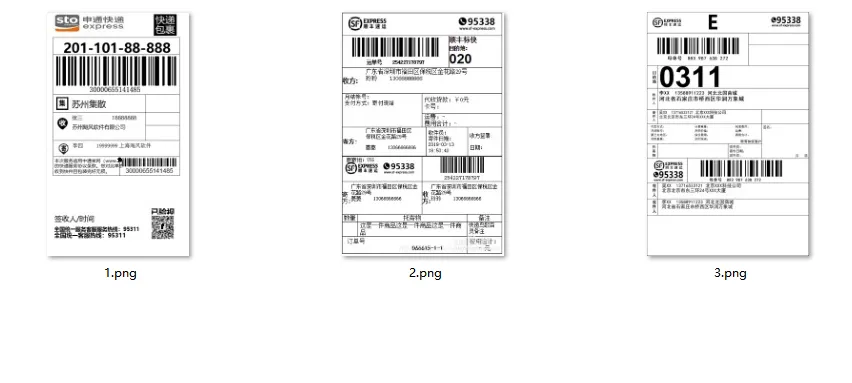
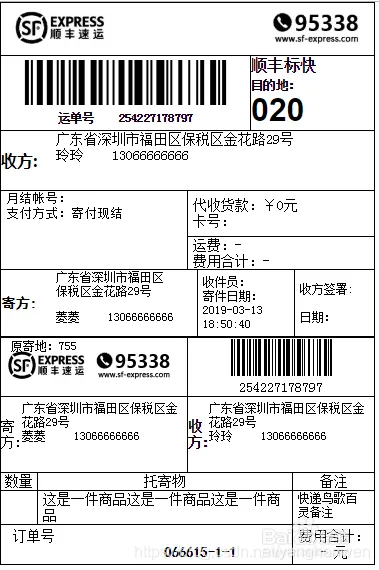
需求的快递面单文件夹和快递面单图片如下图:

  • 需求图片文件夹

  • 快递面单图片

办公痛点分析

01

 痛点1:效率极低,时间黑洞

    • 据行业统计,纯靠肉眼识别和手工键盘敲入,处理一张快递面单平均需要 2-3分钟。如果一个文件夹里有几百张图片,那就意味着好几个小时甚至一整天都得耗在这件枯燥重复的事情上。在业务高峰期,这种处理速度往往会成为整个流程的瓶颈

    02

     痛点2:准确率堪忧,错漏百出

      • 单号、手机号输错一位:导致物流信息无法追踪,或者快递员联系不上收件人;地址漏字、错字:包裹可能被错分甚至寄丢;信息张冠李戴:把寄件人和收件人信息填反。传统人工录入的错误率可能高达 5%-8%,这些错误最终都会转化为时间、金钱和客户满意度的损失

      03

      痛点3:格式杂乱,手动适配难

      • 快递面单的版式五花八门。不同快递公司(顺丰、圆通、中通等)的模板不同,同一家公司的老版和新版也不一样,还有手写单、电子单、热敏纸上的模糊字迹等。手动处理时,你得在脑海中不停切换“识别模式”,无形中增加了认知负担和处理时间。

      由此可见若操作成百上千个快递面单图片的话整个操作流程繁琐且耗时,高频次的鼠标点击和键盘输入使操作者手指疲劳,堪称"键盘敲冒烟"式的体力劳动,加上人工疲劳操作极易导致遗漏文件夹。于是乎这时候,按以往的 “解题套路”,Python 的专属 BGM 该响起来了 ——go~ go~ go~,救苦救难的大救星这不就来了!!

      @摸鱼

      问题拆解思路

      1.遍历图片文件夹→

      2.调用百度OCR大模型api对快递面单进行结构化识别对应的信息

      4.把识别的信息保存为excel

      下面,我就用python代码让excel见识一下,什么叫"传统文化遇上赛博效率"(仅展示部分代码,非完整代码,需完整代码看文章末尾说明~)

      # encoding:utf-8import sysimport osfrom datetime import datetimefrom typing import List, Dict, Optionalfrom PyQt6.QtWidgets import *from PyQt6.QtCore import *from PyQt6.QtGui import *class ModernMessageBox(QDialog):    """现代化的消息对话框"""    def __init__(self, title, message, icon_type="info", parent=None):        super().__init__(parent)        self.setWindowTitle(title)        self.setWindowFlags(Qt.WindowType.FramelessWindowHint | Qt.WindowType.Dialog)        self.setAttribute(Qt.WidgetAttribute.WA_TranslucentBackground)        self.setModal(True)        # 设置对话框大小        self.setFixedSize(380180)        # 创建主布局        layout = QVBoxLayout(self)        layout.setContentsMargins(0000)        # 创建圆角卡片        card = QFrame()        card.setObjectName("card")        card.setStyleSheet("""#card {                background-color: white;                border-radius: 12px;                border: 1px solid #e0e0e0;            }        """)        card_layout = QVBoxLayout(card)        card_layout.setSpacing(15)        # 图标和标题        icon_label = QLabel()        icon_label.setFixedSize(4040)        icon_label.setAlignment(Qt.AlignmentFlag.AlignCenter)        if icon_type == "info":            icon_label.setText("ℹ️")            icon_label.setStyleSheet("font-size: 24px; color: #2196F3;")        elif icon_type == "success":            icon_label.setText("✅")            icon_label.setStyleSheet("font-size: 24px; color: #4CAF50;")        elif icon_type == "warning":            icon_label.setText("⚠️")            icon_label.setStyleSheet("font-size: 24px; color: #FF9800;")        elif icon_type == "error":            icon_label.setText("❌")            icon_label.setStyleSheet("font-size: 24px; color: #f44336;")        # 消息文本        message_label = QLabel(message)        message_label.setWordWrap(True)        message_label.setAlignment(Qt.AlignmentFlag.AlignCenter)        message_label.setStyleSheet("font-size: 13px; color: #333; padding: 0 15px;")        # 按钮        button = QPushButton("确定")        button.setFixedSize(10035)        button.setCursor(Qt.CursorShape.PointingHandCursor)        button.setStyleSheet("""            QPushButton {                background-color: #2196F3;                color: white;                border: none;                border-radius: 6px;                font-size: 13px;                font-weight: bold;            }            QPushButton:hover {                background-color: #1976D2;            }            QPushButton:pressed {                background-color: #0D47A1;            }        """)        button.clicked.connect(self.accept)        # 添加到布局        card_layout.addWidget(icon_label, 0Qt.AlignmentFlag.AlignCenter)        card_layout.addWidget(message_label)        button_layout = QHBoxLayout()        button_layout.addStretch()        button_layout.addWidget(button)        button_layout.addStretch()        card_layout.addLayout(button_layout)        layout.addWidget(card)        # 添加阴影效果        shadow = QGraphicsDropShadowEffect()        shadow.setBlurRadius(15)        shadow.setColor(QColor(00040))        shadow.setOffset(03)        card.setGraphicsEffect(shadow)class ModernSwitch(QCheckBox):    """现代化的开关按钮"""    def __init__(self, parent=None):        super().__init__(parent)        self.setFixedSize(5024)        self.setCursor(Qt.CursorShape.PointingHandCursor)    def paintEvent(self, event):        painter = QPainter(self)        painter.setRenderHint(QPainter.RenderHint.Antialiasing)        # 绘制背景        rect = QRect(005024)        if self.isChecked():            painter.setBrush(QColor(7617580))            painter.setPen(Qt.PenStyle.NoPen)            painter.drawRoundedRect(rect, 1212)            # 绘制圆点            painter.setBrush(QColor(255255255))            painter.drawEllipse(2941616)        else:            painter.setBrush(QColor(200200200))            painter.setPen(Qt.PenStyle.NoPen)            painter.drawRoundedRect(rect, 1212)            # 绘制圆点            painter.setBrush(QColor(255255255))            painter.drawEllipse(541616)class ModernLineEdit(QLineEdit):    """现代化的输入框"""    def __init__(self, placeholder="", parent=None):        super().__init__(parent)        self.setPlaceholderText(placeholder)        self.setFixedHeight(35)        self.setStyleSheet("""            QLineEdit {                border: 1px solid #e0e0e0;                border-radius: 6px;                padding: 0 12px;                font-size: 13px;                background-color: white;            }            QLineEdit:focus {                border: 2px solid #2196F3;            }        """)class ModernComboBox(QComboBox):    """现代化的下拉框"""    def __init__(self, parent=None):        super().__init__(parent)        self.setFixedHeight(35)        self.setStyleSheet("""            QComboBox {                border: 1px solid #e0e0e0;                border-radius: 6px;                padding: 0 12px;                font-size: 13px;                background-color: white;            }            QComboBox::drop-down {                border: none;                width: 25px;            }            QComboBox::down-arrow {                width: 10px;                height: 10px;            }            QComboBox:hover {                border: 2px solid #2196F3;            }        """)class ModernPushButton(QPushButton):    """现代化的按钮"""    def __init__(self, text, icon=None, primary=True, parent=None):        super().__init__(text, parent)        self.setCursor(Qt.CursorShape.PointingHandCursor)        self.setFixedHeight(38)        if primary:            self.setStyleSheet("""                QPushButton {                    background-color: #2196F3;                    color: white;                    border: none;                    border-radius: 6px;                    font-size: 13px;                    font-weight: bold;                    padding: 0 15px;                }                QPushButton:hover {                    background-color: #1976D2;                }                QPushButton:pressed {                    background-color: #0D47A1;                }                QPushButton:disabled {                    background-color: #e0e0e0;                    color: #999;                }            """)        else:            self.setStyleSheet("""                QPushButton {                    background-color: white;                    color: #333;                    border: 1px solid #e0e0e0;                    border-radius: 6px;                    font-size: 13px;                    font-weight: bold;                    padding: 0 15px;                }                QPushButton:hover {                    background-color: #f5f5f5;                    border: 2px solid #2196F3;                }                QPushButton:pressed {                    background-color: #e0e0e0;                }                QPushButton:disabled {                    background-color: #f5f5f5;                    color: #999;                    border: 1px solid #e0e0e0;                }            """)        if icon:            self.setIcon(QIcon(icon))            self.setIconSize(QSize(1818))class ModernProgressBar(QProgressBar):    """现代化的进度条"""    def __init__(self, parent=None):        super().__init__(parent)        self.setFixedHeight(16)        self.setTextVisible(False)        self.setStyleSheet("""            QProgressBar {                border: none;                background-color: #f0f0f0;                border-radius: 8px;            }            QProgressBar::chunk {                background-color: qlineargradient(x1:0, y1:0, x2:1, y2:0,                    stop:0 #2196F3, stop:1 #64B5F6);                border-radius: 8px;            }        """)class MainWindow(QMainWindow):    """主窗口"""    def __init__(self):        super().__init__()        self.setWindowTitle("百度OCR大模型快递面单批量识别工具(欢迎关注微信公众号:码海听潮)")        self.setMinimumSize(900650)        self.resize(900650)        # 设置窗口图标        self.setWindowIcon(self.create_window_icon())        # 设置全局样式        self.setStyleSheet("""            QMainWindow {                background-color: #f5f7fa;            }            QLabel {                color: #333;                font-size: 12px;            }            QGroupBox {                font-weight: bold;                font-size: 13px;                border: 1px solid #e0e0e0;                border-radius: 8px;                margin-top: 8px;                padding-top: 8px;            }            QGroupBox::title {                subcontrol-origin: margin;                left: 8px;                padding: 0 5px 0 5px;            }            QTableWidget {                border: 1px solid #e0e0e0;                border-radius: 8px;                background-color: white;                gridline-color: #f0f0f0;            }            QTableWidget::item {                padding: 4px;            }            QTableWidget::item:selected {                background-color: #E3F2FD;                color: #333;            }            QHeaderView::section {                background-color: #f5f5f5;                padding: 6px;                border: none;                border-right: 1px solid #e0e0e0;                border-bottom: 1px solid #e0e0e0;                font-weight: bold;                font-size: 12px;            }            QScrollBar:vertical {                border: none;                background-color: #f5f5f5;                width: 8px;                border-radius: 4px;            }            QScrollBar::handle:vertical {                background-color: #c0c0c0;                border-radius: 4px;            }            QScrollBar::handle:vertical:hover {                background-color: #a0a0a0;            }            QScrollBar::add-line:vertical, QScrollBar::sub-line:vertical {                border: none;                background: none;            }        """)        # 初始化变量        self.results = []        # 创建UI        self.setup_ui()    def create_window_icon(self):        """创建窗口图标"""        icon = QIcon()        pixmap = QPixmap(4848)        pixmap.fill(Qt.GlobalColor.transparent)        painter = QPainter(pixmap)        painter.setRenderHint(QPainter.RenderHint.Antialiasing)        # 绘制一个现代化的图标        painter.setBrush(QColor(33150243))        painter.setPen(Qt.PenStyle.NoPen)        painter.drawRoundedRect(0048481010)        painter.setPen(QPen(QColor(255255255), 2))        painter.setFont(QFont("Arial"20QFont.Weight.Bold))        painter.drawText(pixmap.rect(), Qt.AlignmentFlag.AlignCenter"OCR")        painter.end()        icon.addPixmap(pixmap)        return icon    def setup_ui(self):        """设置UI"""        # 创建中央部件        central_widget = QWidget()        self.setCentralWidget(central_widget)        # 创建主布局        main_layout = QHBoxLayout(central_widget)        main_layout.setContentsMargins(15151515)        main_layout.setSpacing(15)        # 左侧面板(设置区域)        left_panel = self.create_left_panel()        main_layout.addWidget(left_panel, 35)        # 右侧面板(表格区域)        right_panel = self.create_right_panel()        main_layout.addWidget(right_panel, 65)    def create_left_panel(self):        """创建左侧面板"""        panel = QFrame()        panel.setObjectName("leftPanel")        panel.setStyleSheet("""#leftPanel {                background-color: white;                border-radius: 12px;                border: 1px solid #e0e0e0;            }        """)        # 使用QVBoxLayout作为主布局        layout = QVBoxLayout(panel)        layout.setSpacing(12)        layout.setContentsMargins(15151515)        # API设置组        api_group = QGroupBox("API 设置")        api_group.setStyleSheet("""            QGroupBox {                font-size: 13px;                font-weight: bold;                border: 1px solid #e0e0e0;                border-radius: 8px;                margin-top: 8px;                padding-top: 12px;            }            QGroupBox::title {                subcontrol-origin: margin;                left: 8px;                padding: 0 8px 0 8px;                color: #2196F3;            }        """)        api_layout = QVBoxLayout(api_group)        api_layout.setSpacing(10)        api_layout.setContentsMargins(12121212)        # API Key        api_key_label = QLabel("API Key:")        api_key_label.setStyleSheet("font-weight: bold; font-size: 12px;")        self.api_key_edit = ModernLineEdit("请输入您的API Key")        api_layout.addWidget(api_key_label)        api_layout.addWidget(self.api_key_edit)        # Secret Key        secret_key_label = QLabel("Secret Key:")        secret_key_label.setStyleSheet("font-weight: bold; font-size: 12px;")        self.secret_key_edit = ModernLineEdit("请输入您的Secret Key")        self.secret_key_edit.setEchoMode(QLineEdit.EchoMode.Password)        api_layout.addWidget(secret_key_label)        api_layout.addWidget(self.secret_key_edit)        # 保存API密钥按钮        save_api_btn = ModernPushButton("保存API密钥", primary=False)        save_api_btn.clicked.connect(self.save_api_keys)        api_layout.addWidget(save_api_btn)        layout.addWidget(api_group)        # ===== Token状态组 =====        token_group = QGroupBox("Token 状态")        token_group.setStyleSheet(api_group.styleSheet())        token_layout = QVBoxLayout(token_group)        token_layout.setSpacing(8)        token_layout.setContentsMargins(12121212)        self.token_status_label = QLabel("Token状态: 未获取")        self.token_status_label.setStyleSheet("color: #f44336; font-weight: bold; font-size: 12px;")        token_layout.addWidget(self.token_status_label)        self.token_expire_label = QLabel("过期时间: --")        self.token_expire_label.setStyleSheet("font-size: 12px;")        token_layout.addWidget(self.token_expire_label)        self.token_remaining_label = QLabel("剩余天数: --")        self.token_remaining_label.setStyleSheet("font-size: 12px;")        token_layout.addWidget(self.token_remaining_label)        # 刷新Token按钮        refresh_token_btn = ModernPushButton("刷新Token", primary=False)        refresh_token_btn.clicked.connect(self.refresh_token)        token_layout.addWidget(refresh_token_btn)        layout.addWidget(token_group)        # ===== 文件夹选择组 =====        folder_group = QGroupBox("文件夹设置")        folder_group.setStyleSheet(api_group.styleSheet())        folder_layout = QVBoxLayout(folder_group)        folder_layout.setSpacing(10)        folder_layout.setContentsMargins(12121212)        # 文件夹路径        folder_path_label = QLabel("图片文件夹路径:")        folder_path_label.setStyleSheet("font-weight: bold; font-size: 12px;")        self.folder_path_edit = ModernLineEdit("请选择包含图片的文件夹")        folder_layout.addWidget(folder_path_label)        folder_layout.addWidget(self.folder_path_edit)        # 选择文件夹按钮        select_folder_btn = ModernPushButton("选择文件夹", primary=False)        select_folder_btn.clicked.connect(self.select_folder)        folder_layout.addWidget(select_folder_btn)        layout.addWidget(folder_group)        # 操作按钮        button_layout = QHBoxLayout()        button_layout.setSpacing(8)        self.start_btn = ModernPushButton("▶ 开始处理")        self.start_btn.clicked.connect(self.start_processing)        button_layout.addWidget(self.start_btn)        self.stop_btn = ModernPushButton("■ 停止处理", primary=False)        self.stop_btn.setEnabled(False)        self.stop_btn.clicked.connect(self.stop_processing)        button_layout.addWidget(self.stop_btn)        layout.addLayout(button_layout)        # 添加弹性空间        layout.addStretch()        return panel    def create_right_panel(self):        """创建右侧面板"""        panel = QFrame()        panel.setObjectName("rightPanel")        panel.setStyleSheet("""#rightPanel {                background-color: white;                border-radius: 12px;                border: 1px solid #e0e0e0;            }        """)        layout = QVBoxLayout(panel)        layout.setSpacing(12)        layout.setContentsMargins(15151515)        # 统计标签        self.stats_label = QLabel("总计: 0 | 成功: 0 | 失败: 0")        self.stats_label.setStyleSheet("""            background-color: #f5f5f5;            padding: 6px 12px;            border-radius: 12px;            font-weight: bold;            color: #666;            font-size: 13px;        """)        self.stats_label.setAlignment(Qt.AlignmentFlag.AlignCenter)        layout.addWidget(self.stats_label, 0Qt.AlignmentFlag.AlignCenter)        # 结果表格        self.table = QTableWidget()        self.table.setAlternatingRowColors(True)        self.table.setSortingEnabled(True)        self.table.horizontalHeader().setStretchLastSection(True)        layout.addWidget(self.table, 1)        # 导出按钮        export_btn = ModernPushButton("📥 导出Excel", primary=False)        export_btn.clicked.connect(self.export_excel)        layout.addWidget(export_btn, 0Qt.AlignmentFlag.AlignRight)        return panel    def save_api_keys(self):        """保存API密钥"""        api_key = self.api_key_edit.text().strip()        secret_key = self.secret_key_edit.text().strip()        if not api_key or not secret_key:            ModernMessageBox("错误""请输入完整的API Key和Secret Key""error"self).exec()            return        # 模拟保存成功        self.token_status_label.setText("Token状态: ✅ 有效")        self.token_status_label.setStyleSheet("color: #4CAF50; font-weight: bold; font-size: 12px;")        self.token_expire_label.setText(f"过期时间: {(datetime.now().replace(hour=0, minute=0, second=0) + timedelta(days=30)).strftime('%Y-%m-%d %H:%M:%S')}")        self.token_remaining_label.setText("剩余天数: 30 天")        ModernMessageBox("成功""API密钥保存成功!""success"self).exec()    def refresh_token(self):        """刷新Token"""        if not self.api_key_edit.text() or not self.secret_key_edit.text():            ModernMessageBox("错误""请先输入API Key和Secret Key""error"self).exec()            return        # 模拟刷新成功        ModernMessageBox("成功""Token刷新成功!""success"self).exec()    def select_folder(self):        """选择文件夹"""        folder_path = QFileDialog.getExistingDirectory(            self,            "选择图片文件夹",            os.path.expanduser("~"),            QFileDialog.Option.ShowDirsOnly        )        if folder_path:            self.folder_path_edit.setText(folder_path)    def start_processing(self):        """开始处理"""        # 验证输入        folder_path = self.folder_path_edit.text().strip()        if not folder_path or not os.path.exists(folder_path):            ModernMessageBox("错误""请选择有效的文件夹""error"self).exec()            return        api_key = self.api_key_edit.text().strip()        secret_key = self.secret_key_edit.text().strip()        if not api_key or not secret_key:            ModernMessageBox("错误""请输入API Key和Secret Key""error"self).exec()            return        # 清空表格        self.table.setRowCount(0)        self.table.setColumnCount(0)        self.results = []        # 更新UI状态        self.start_btn.setEnabled(False)        self.stop_btn.setEnabled(True)        # 模拟处理过程        self.simulate_processing()    def simulate_processing(self):        """模拟处理过程(仅用于界面演示)"""        # 这里只是界面演示,不实际调用OCR        ModernMessageBox("提示""这是一个界面演示版本,不包含实际的OCR功能。\n\n如需完整功能,请集成百度OCR API。""info"self).exec()        # 恢复按钮状态        self.start_btn.setEnabled(True)        self.stop_btn.setEnabled(False)    def stop_processing(self):        """停止处理"""        self.start_btn.setEnabled(True)        self.stop_btn.setEnabled(False)    def export_excel(self):        """导出Excel"""        if not self.results:            ModernMessageBox("提示""没有数据可导出""info"self).exec()            return        # 选择保存路径        file_path, _ = QFileDialog.getSaveFileName(            self,            "保存Excel文件",            os.path.join(os.path.expanduser("~"), "Desktop", f"快递面单识别结果_{datetime.now().strftime('%Y%m%d_%H%M%S')}.xlsx"),            "Excel文件 (*.xlsx)"        )        if file_path:            ModernMessageBox("成功", f"Excel文件已保存到:\n{file_path}""success"self).exec()def main():    """主函数"""    app = QApplication(sys.argv)    # 设置应用程序样式    app.setStyle('Fusion')    # 设置字体    font = QFont("Microsoft YaHei"9)    app.setFont(font)    # 创建并显示主窗口    window = MainWindow()    window.show()    sys.exit(app.exec())if __name__ == "__main__":    main()

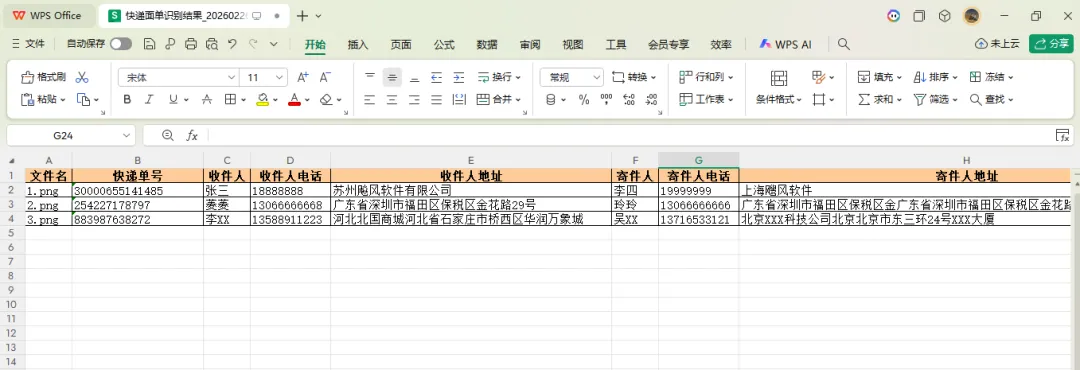
      最终将所有的快递面单图片上信息全部提取出来保存到excel,实现了之前既定的需求....

      通过上面Python自动化脚本,仅用几分钟的时间就完成原需手动操作数小时的工作任务。从最初准备手动人工机械操作的麻木到用python实现高效自动化的畅快,工作效率获得指数级提升,终于实现了不加班熬夜的自由!

      大佬们也可以举一反三,参照上面的代码思路根据自己工作中的实际情况来具体问题具体分析,实现自己定制化的需求。

      结语

      当Python遇见办公,牛马打工人终于笑出了猪叫声

      【职场人必看】每天早上一睁眼,想到又要面对:

      1.📊 堆积如山的Excel表格

      2.📑 机械重复的复制粘贴

      3.✍️ 永远改不完的各类文档

      4.诸如此类的更多........

      是不是连Ctrl+Alt+Delete的心都有了?

      别慌!别急,摸鱼这位“职场外挂”已经带着Python代码来拯救你了!

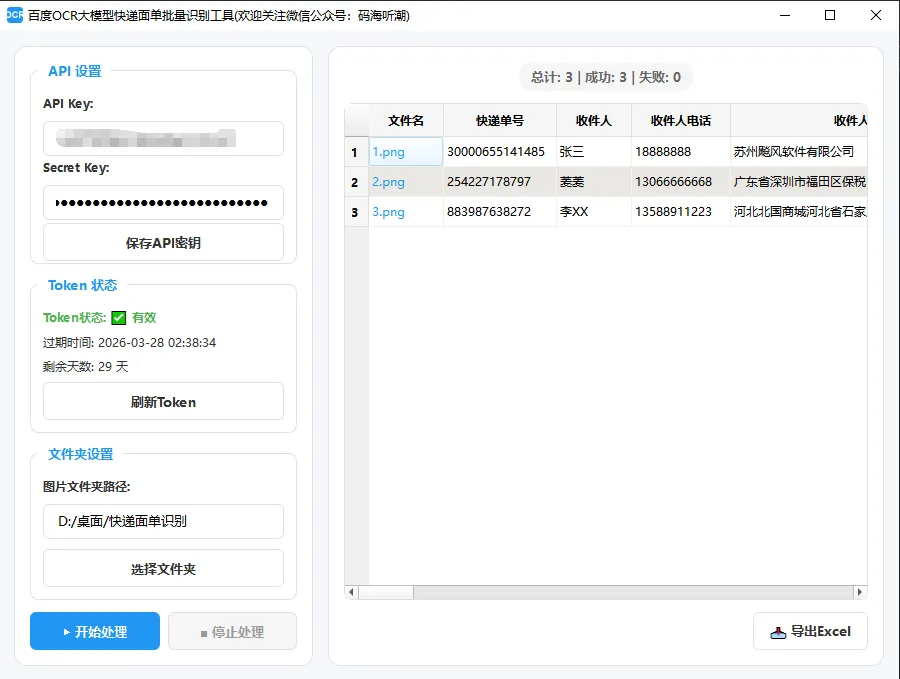
      友情提示:考虑到没有python环境的朋友需要打包好的成品exe,摸鱼早已贴心打包好,本篇文章代码打包的exe截图如下:

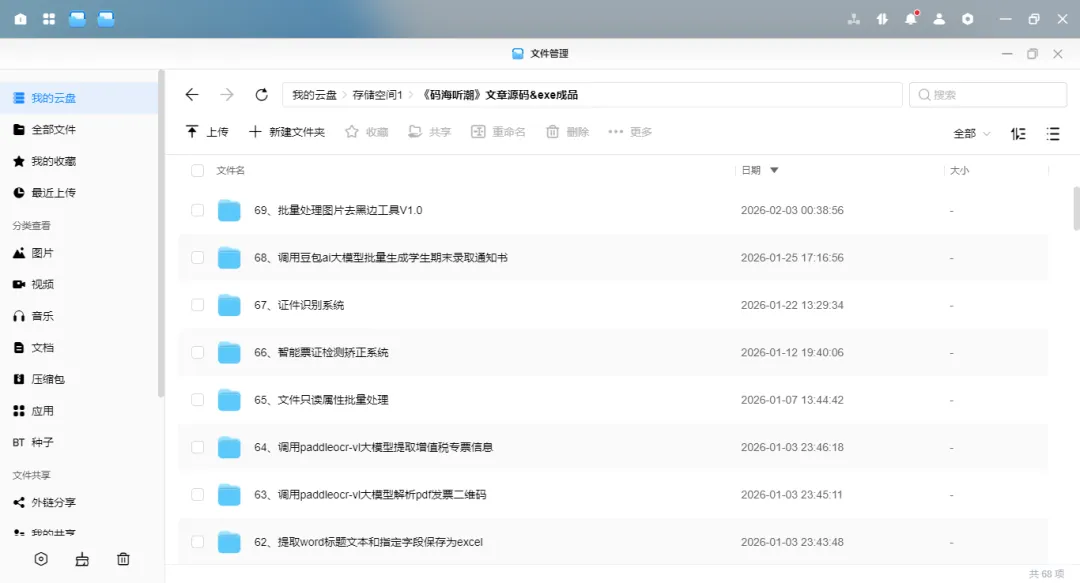
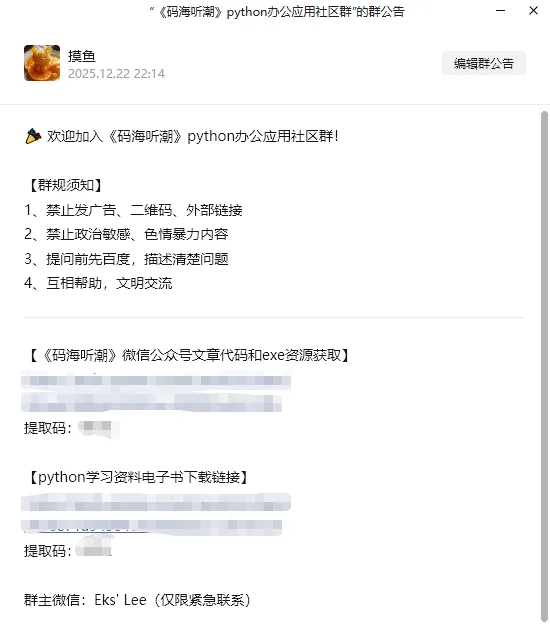
      另外,《码海听潮》公众号所有文章码和exe程序已打包好上传绿联nas私有云,有需要的大佬扫一扫上面博主的个人微信二维码,需要的大佬需支付9.9元永久拥有公众号资源(写原创干货费时费力,属实不易),邀请您进入社区群获取下载链接!!,群内提供python办公自动化交流问题,解决问题,且码海听潮微信公众号文章发布会第一时间会更新到群里,非诚勿扰哈!

      码海听潮官方社区群如下:

      赶紧微信扫一扫下方二维码添加摸鱼君微信

      最新文章

      随机文章

      基本 文件 流程 错误 SQL 调试
      1. 请求信息 : 2026-02-28 08:56:44 HTTP/2.0 GET : https://f.mffb.com.cn/a/477155.html
      2. 运行时间 : 0.160762s [ 吞吐率:6.22req/s ] 内存消耗:4,975.74kb 文件加载:140
      3. 缓存信息 : 0 reads,0 writes
      4. 会话信息 : SESSION_ID=fe8539626d756dedd11011b92729ae72
      1. /yingpanguazai/ssd/ssd1/www/f.mffb.com.cn/public/index.php ( 0.79 KB )
      2. /yingpanguazai/ssd/ssd1/www/f.mffb.com.cn/vendor/autoload.php ( 0.17 KB )
      3. /yingpanguazai/ssd/ssd1/www/f.mffb.com.cn/vendor/composer/autoload_real.php ( 2.49 KB )
      4. /yingpanguazai/ssd/ssd1/www/f.mffb.com.cn/vendor/composer/platform_check.php ( 0.90 KB )
      5. /yingpanguazai/ssd/ssd1/www/f.mffb.com.cn/vendor/composer/ClassLoader.php ( 14.03 KB )
      6. /yingpanguazai/ssd/ssd1/www/f.mffb.com.cn/vendor/composer/autoload_static.php ( 4.90 KB )
      7. /yingpanguazai/ssd/ssd1/www/f.mffb.com.cn/vendor/topthink/think-helper/src/helper.php ( 8.34 KB )
      8. /yingpanguazai/ssd/ssd1/www/f.mffb.com.cn/vendor/topthink/think-validate/src/helper.php ( 2.19 KB )
      9. /yingpanguazai/ssd/ssd1/www/f.mffb.com.cn/vendor/topthink/think-orm/src/helper.php ( 1.47 KB )
      10. /yingpanguazai/ssd/ssd1/www/f.mffb.com.cn/vendor/topthink/think-orm/stubs/load_stubs.php ( 0.16 KB )
      11. /yingpanguazai/ssd/ssd1/www/f.mffb.com.cn/vendor/topthink/framework/src/think/Exception.php ( 1.69 KB )
      12. /yingpanguazai/ssd/ssd1/www/f.mffb.com.cn/vendor/topthink/think-container/src/Facade.php ( 2.71 KB )
      13. /yingpanguazai/ssd/ssd1/www/f.mffb.com.cn/vendor/symfony/deprecation-contracts/function.php ( 0.99 KB )
      14. /yingpanguazai/ssd/ssd1/www/f.mffb.com.cn/vendor/symfony/polyfill-mbstring/bootstrap.php ( 8.26 KB )
      15. /yingpanguazai/ssd/ssd1/www/f.mffb.com.cn/vendor/symfony/polyfill-mbstring/bootstrap80.php ( 9.78 KB )
      16. /yingpanguazai/ssd/ssd1/www/f.mffb.com.cn/vendor/symfony/var-dumper/Resources/functions/dump.php ( 1.49 KB )
      17. /yingpanguazai/ssd/ssd1/www/f.mffb.com.cn/vendor/topthink/think-dumper/src/helper.php ( 0.18 KB )
      18. /yingpanguazai/ssd/ssd1/www/f.mffb.com.cn/vendor/symfony/var-dumper/VarDumper.php ( 4.30 KB )
      19. /yingpanguazai/ssd/ssd1/www/f.mffb.com.cn/vendor/topthink/framework/src/think/App.php ( 15.30 KB )
      20. /yingpanguazai/ssd/ssd1/www/f.mffb.com.cn/vendor/topthink/think-container/src/Container.php ( 15.76 KB )
      21. /yingpanguazai/ssd/ssd1/www/f.mffb.com.cn/vendor/psr/container/src/ContainerInterface.php ( 1.02 KB )
      22. /yingpanguazai/ssd/ssd1/www/f.mffb.com.cn/app/provider.php ( 0.19 KB )
      23. /yingpanguazai/ssd/ssd1/www/f.mffb.com.cn/vendor/topthink/framework/src/think/Http.php ( 6.04 KB )
      24. /yingpanguazai/ssd/ssd1/www/f.mffb.com.cn/vendor/topthink/think-helper/src/helper/Str.php ( 7.29 KB )
      25. /yingpanguazai/ssd/ssd1/www/f.mffb.com.cn/vendor/topthink/framework/src/think/Env.php ( 4.68 KB )
      26. /yingpanguazai/ssd/ssd1/www/f.mffb.com.cn/app/common.php ( 0.03 KB )
      27. /yingpanguazai/ssd/ssd1/www/f.mffb.com.cn/vendor/topthink/framework/src/helper.php ( 18.78 KB )
      28. /yingpanguazai/ssd/ssd1/www/f.mffb.com.cn/vendor/topthink/framework/src/think/Config.php ( 5.54 KB )
      29. /yingpanguazai/ssd/ssd1/www/f.mffb.com.cn/config/app.php ( 0.95 KB )
      30. /yingpanguazai/ssd/ssd1/www/f.mffb.com.cn/config/cache.php ( 0.78 KB )
      31. /yingpanguazai/ssd/ssd1/www/f.mffb.com.cn/config/console.php ( 0.23 KB )
      32. /yingpanguazai/ssd/ssd1/www/f.mffb.com.cn/config/cookie.php ( 0.56 KB )
      33. /yingpanguazai/ssd/ssd1/www/f.mffb.com.cn/config/database.php ( 2.48 KB )
      34. /yingpanguazai/ssd/ssd1/www/f.mffb.com.cn/vendor/topthink/framework/src/think/facade/Env.php ( 1.67 KB )
      35. /yingpanguazai/ssd/ssd1/www/f.mffb.com.cn/config/filesystem.php ( 0.61 KB )
      36. /yingpanguazai/ssd/ssd1/www/f.mffb.com.cn/config/lang.php ( 0.91 KB )
      37. /yingpanguazai/ssd/ssd1/www/f.mffb.com.cn/config/log.php ( 1.35 KB )
      38. /yingpanguazai/ssd/ssd1/www/f.mffb.com.cn/config/middleware.php ( 0.19 KB )
      39. /yingpanguazai/ssd/ssd1/www/f.mffb.com.cn/config/route.php ( 1.89 KB )
      40. /yingpanguazai/ssd/ssd1/www/f.mffb.com.cn/config/session.php ( 0.57 KB )
      41. /yingpanguazai/ssd/ssd1/www/f.mffb.com.cn/config/trace.php ( 0.34 KB )
      42. /yingpanguazai/ssd/ssd1/www/f.mffb.com.cn/config/view.php ( 0.82 KB )
      43. /yingpanguazai/ssd/ssd1/www/f.mffb.com.cn/app/event.php ( 0.25 KB )
      44. /yingpanguazai/ssd/ssd1/www/f.mffb.com.cn/vendor/topthink/framework/src/think/Event.php ( 7.67 KB )
      45. /yingpanguazai/ssd/ssd1/www/f.mffb.com.cn/app/service.php ( 0.13 KB )
      46. /yingpanguazai/ssd/ssd1/www/f.mffb.com.cn/app/AppService.php ( 0.26 KB )
      47. /yingpanguazai/ssd/ssd1/www/f.mffb.com.cn/vendor/topthink/framework/src/think/Service.php ( 1.64 KB )
      48. /yingpanguazai/ssd/ssd1/www/f.mffb.com.cn/vendor/topthink/framework/src/think/Lang.php ( 7.35 KB )
      49. /yingpanguazai/ssd/ssd1/www/f.mffb.com.cn/vendor/topthink/framework/src/lang/zh-cn.php ( 13.70 KB )
      50. /yingpanguazai/ssd/ssd1/www/f.mffb.com.cn/vendor/topthink/framework/src/think/initializer/Error.php ( 3.31 KB )
      51. /yingpanguazai/ssd/ssd1/www/f.mffb.com.cn/vendor/topthink/framework/src/think/initializer/RegisterService.php ( 1.33 KB )
      52. /yingpanguazai/ssd/ssd1/www/f.mffb.com.cn/vendor/services.php ( 0.14 KB )
      53. /yingpanguazai/ssd/ssd1/www/f.mffb.com.cn/vendor/topthink/framework/src/think/service/PaginatorService.php ( 1.52 KB )
      54. /yingpanguazai/ssd/ssd1/www/f.mffb.com.cn/vendor/topthink/framework/src/think/service/ValidateService.php ( 0.99 KB )
      55. /yingpanguazai/ssd/ssd1/www/f.mffb.com.cn/vendor/topthink/framework/src/think/service/ModelService.php ( 2.04 KB )
      56. /yingpanguazai/ssd/ssd1/www/f.mffb.com.cn/vendor/topthink/think-trace/src/Service.php ( 0.77 KB )
      57. /yingpanguazai/ssd/ssd1/www/f.mffb.com.cn/vendor/topthink/framework/src/think/Middleware.php ( 6.72 KB )
      58. /yingpanguazai/ssd/ssd1/www/f.mffb.com.cn/vendor/topthink/framework/src/think/initializer/BootService.php ( 0.77 KB )
      59. /yingpanguazai/ssd/ssd1/www/f.mffb.com.cn/vendor/topthink/think-orm/src/Paginator.php ( 11.86 KB )
      60. /yingpanguazai/ssd/ssd1/www/f.mffb.com.cn/vendor/topthink/think-validate/src/Validate.php ( 63.20 KB )
      61. /yingpanguazai/ssd/ssd1/www/f.mffb.com.cn/vendor/topthink/think-orm/src/Model.php ( 23.55 KB )
      62. /yingpanguazai/ssd/ssd1/www/f.mffb.com.cn/vendor/topthink/think-orm/src/model/concern/Attribute.php ( 21.05 KB )
      63. /yingpanguazai/ssd/ssd1/www/f.mffb.com.cn/vendor/topthink/think-orm/src/model/concern/AutoWriteData.php ( 4.21 KB )
      64. /yingpanguazai/ssd/ssd1/www/f.mffb.com.cn/vendor/topthink/think-orm/src/model/concern/Conversion.php ( 6.44 KB )
      65. /yingpanguazai/ssd/ssd1/www/f.mffb.com.cn/vendor/topthink/think-orm/src/model/concern/DbConnect.php ( 5.16 KB )
      66. /yingpanguazai/ssd/ssd1/www/f.mffb.com.cn/vendor/topthink/think-orm/src/model/concern/ModelEvent.php ( 2.33 KB )
      67. /yingpanguazai/ssd/ssd1/www/f.mffb.com.cn/vendor/topthink/think-orm/src/model/concern/RelationShip.php ( 28.29 KB )
      68. /yingpanguazai/ssd/ssd1/www/f.mffb.com.cn/vendor/topthink/think-helper/src/contract/Arrayable.php ( 0.09 KB )
      69. /yingpanguazai/ssd/ssd1/www/f.mffb.com.cn/vendor/topthink/think-helper/src/contract/Jsonable.php ( 0.13 KB )
      70. /yingpanguazai/ssd/ssd1/www/f.mffb.com.cn/vendor/topthink/think-orm/src/model/contract/Modelable.php ( 0.09 KB )
      71. /yingpanguazai/ssd/ssd1/www/f.mffb.com.cn/vendor/topthink/framework/src/think/Db.php ( 2.88 KB )
      72. /yingpanguazai/ssd/ssd1/www/f.mffb.com.cn/vendor/topthink/think-orm/src/DbManager.php ( 8.52 KB )
      73. /yingpanguazai/ssd/ssd1/www/f.mffb.com.cn/vendor/topthink/framework/src/think/Log.php ( 6.28 KB )
      74. /yingpanguazai/ssd/ssd1/www/f.mffb.com.cn/vendor/topthink/framework/src/think/Manager.php ( 3.92 KB )
      75. /yingpanguazai/ssd/ssd1/www/f.mffb.com.cn/vendor/psr/log/src/LoggerTrait.php ( 2.69 KB )
      76. /yingpanguazai/ssd/ssd1/www/f.mffb.com.cn/vendor/psr/log/src/LoggerInterface.php ( 2.71 KB )
      77. /yingpanguazai/ssd/ssd1/www/f.mffb.com.cn/vendor/topthink/framework/src/think/Cache.php ( 4.92 KB )
      78. /yingpanguazai/ssd/ssd1/www/f.mffb.com.cn/vendor/psr/simple-cache/src/CacheInterface.php ( 4.71 KB )
      79. /yingpanguazai/ssd/ssd1/www/f.mffb.com.cn/vendor/topthink/think-helper/src/helper/Arr.php ( 16.63 KB )
      80. /yingpanguazai/ssd/ssd1/www/f.mffb.com.cn/vendor/topthink/framework/src/think/cache/driver/File.php ( 7.84 KB )
      81. /yingpanguazai/ssd/ssd1/www/f.mffb.com.cn/vendor/topthink/framework/src/think/cache/Driver.php ( 9.03 KB )
      82. /yingpanguazai/ssd/ssd1/www/f.mffb.com.cn/vendor/topthink/framework/src/think/contract/CacheHandlerInterface.php ( 1.99 KB )
      83. /yingpanguazai/ssd/ssd1/www/f.mffb.com.cn/app/Request.php ( 0.09 KB )
      84. /yingpanguazai/ssd/ssd1/www/f.mffb.com.cn/vendor/topthink/framework/src/think/Request.php ( 55.78 KB )
      85. /yingpanguazai/ssd/ssd1/www/f.mffb.com.cn/app/middleware.php ( 0.25 KB )
      86. /yingpanguazai/ssd/ssd1/www/f.mffb.com.cn/vendor/topthink/framework/src/think/Pipeline.php ( 2.61 KB )
      87. /yingpanguazai/ssd/ssd1/www/f.mffb.com.cn/vendor/topthink/think-trace/src/TraceDebug.php ( 3.40 KB )
      88. /yingpanguazai/ssd/ssd1/www/f.mffb.com.cn/vendor/topthink/framework/src/think/middleware/SessionInit.php ( 1.94 KB )
      89. /yingpanguazai/ssd/ssd1/www/f.mffb.com.cn/vendor/topthink/framework/src/think/Session.php ( 1.80 KB )
      90. /yingpanguazai/ssd/ssd1/www/f.mffb.com.cn/vendor/topthink/framework/src/think/session/driver/File.php ( 6.27 KB )
      91. /yingpanguazai/ssd/ssd1/www/f.mffb.com.cn/vendor/topthink/framework/src/think/contract/SessionHandlerInterface.php ( 0.87 KB )
      92. /yingpanguazai/ssd/ssd1/www/f.mffb.com.cn/vendor/topthink/framework/src/think/session/Store.php ( 7.12 KB )
      93. /yingpanguazai/ssd/ssd1/www/f.mffb.com.cn/vendor/topthink/framework/src/think/Route.php ( 23.73 KB )
      94. /yingpanguazai/ssd/ssd1/www/f.mffb.com.cn/vendor/topthink/framework/src/think/route/RuleName.php ( 5.75 KB )
      95. /yingpanguazai/ssd/ssd1/www/f.mffb.com.cn/vendor/topthink/framework/src/think/route/Domain.php ( 2.53 KB )
      96. /yingpanguazai/ssd/ssd1/www/f.mffb.com.cn/vendor/topthink/framework/src/think/route/RuleGroup.php ( 22.43 KB )
      97. /yingpanguazai/ssd/ssd1/www/f.mffb.com.cn/vendor/topthink/framework/src/think/route/Rule.php ( 26.95 KB )
      98. /yingpanguazai/ssd/ssd1/www/f.mffb.com.cn/vendor/topthink/framework/src/think/route/RuleItem.php ( 9.78 KB )
      99. /yingpanguazai/ssd/ssd1/www/f.mffb.com.cn/route/app.php ( 1.72 KB )
      100. /yingpanguazai/ssd/ssd1/www/f.mffb.com.cn/vendor/topthink/framework/src/think/facade/Route.php ( 4.70 KB )
      101. /yingpanguazai/ssd/ssd1/www/f.mffb.com.cn/vendor/topthink/framework/src/think/route/dispatch/Controller.php ( 4.74 KB )
      102. /yingpanguazai/ssd/ssd1/www/f.mffb.com.cn/vendor/topthink/framework/src/think/route/Dispatch.php ( 10.44 KB )
      103. /yingpanguazai/ssd/ssd1/www/f.mffb.com.cn/app/controller/Index.php ( 4.81 KB )
      104. /yingpanguazai/ssd/ssd1/www/f.mffb.com.cn/app/BaseController.php ( 2.05 KB )
      105. /yingpanguazai/ssd/ssd1/www/f.mffb.com.cn/vendor/topthink/think-orm/src/facade/Db.php ( 0.93 KB )
      106. /yingpanguazai/ssd/ssd1/www/f.mffb.com.cn/vendor/topthink/think-orm/src/db/connector/Mysql.php ( 5.44 KB )
      107. /yingpanguazai/ssd/ssd1/www/f.mffb.com.cn/vendor/topthink/think-orm/src/db/PDOConnection.php ( 52.47 KB )
      108. /yingpanguazai/ssd/ssd1/www/f.mffb.com.cn/vendor/topthink/think-orm/src/db/Connection.php ( 8.39 KB )
      109. /yingpanguazai/ssd/ssd1/www/f.mffb.com.cn/vendor/topthink/think-orm/src/db/ConnectionInterface.php ( 4.57 KB )
      110. /yingpanguazai/ssd/ssd1/www/f.mffb.com.cn/vendor/topthink/think-orm/src/db/builder/Mysql.php ( 16.58 KB )
      111. /yingpanguazai/ssd/ssd1/www/f.mffb.com.cn/vendor/topthink/think-orm/src/db/Builder.php ( 24.06 KB )
      112. /yingpanguazai/ssd/ssd1/www/f.mffb.com.cn/vendor/topthink/think-orm/src/db/BaseBuilder.php ( 27.50 KB )
      113. /yingpanguazai/ssd/ssd1/www/f.mffb.com.cn/vendor/topthink/think-orm/src/db/Query.php ( 15.71 KB )
      114. /yingpanguazai/ssd/ssd1/www/f.mffb.com.cn/vendor/topthink/think-orm/src/db/BaseQuery.php ( 45.13 KB )
      115. /yingpanguazai/ssd/ssd1/www/f.mffb.com.cn/vendor/topthink/think-orm/src/db/concern/TimeFieldQuery.php ( 7.43 KB )
      116. /yingpanguazai/ssd/ssd1/www/f.mffb.com.cn/vendor/topthink/think-orm/src/db/concern/AggregateQuery.php ( 3.26 KB )
      117. /yingpanguazai/ssd/ssd1/www/f.mffb.com.cn/vendor/topthink/think-orm/src/db/concern/ModelRelationQuery.php ( 20.07 KB )
      118. /yingpanguazai/ssd/ssd1/www/f.mffb.com.cn/vendor/topthink/think-orm/src/db/concern/ParamsBind.php ( 3.66 KB )
      119. /yingpanguazai/ssd/ssd1/www/f.mffb.com.cn/vendor/topthink/think-orm/src/db/concern/ResultOperation.php ( 7.01 KB )
      120. /yingpanguazai/ssd/ssd1/www/f.mffb.com.cn/vendor/topthink/think-orm/src/db/concern/WhereQuery.php ( 19.37 KB )
      121. /yingpanguazai/ssd/ssd1/www/f.mffb.com.cn/vendor/topthink/think-orm/src/db/concern/JoinAndViewQuery.php ( 7.11 KB )
      122. /yingpanguazai/ssd/ssd1/www/f.mffb.com.cn/vendor/topthink/think-orm/src/db/concern/TableFieldInfo.php ( 2.63 KB )
      123. /yingpanguazai/ssd/ssd1/www/f.mffb.com.cn/vendor/topthink/think-orm/src/db/concern/Transaction.php ( 2.77 KB )
      124. /yingpanguazai/ssd/ssd1/www/f.mffb.com.cn/vendor/topthink/framework/src/think/log/driver/File.php ( 5.96 KB )
      125. /yingpanguazai/ssd/ssd1/www/f.mffb.com.cn/vendor/topthink/framework/src/think/contract/LogHandlerInterface.php ( 0.86 KB )
      126. /yingpanguazai/ssd/ssd1/www/f.mffb.com.cn/vendor/topthink/framework/src/think/log/Channel.php ( 3.89 KB )
      127. /yingpanguazai/ssd/ssd1/www/f.mffb.com.cn/vendor/topthink/framework/src/think/event/LogRecord.php ( 1.02 KB )
      128. /yingpanguazai/ssd/ssd1/www/f.mffb.com.cn/vendor/topthink/think-helper/src/Collection.php ( 16.47 KB )
      129. /yingpanguazai/ssd/ssd1/www/f.mffb.com.cn/vendor/topthink/framework/src/think/facade/View.php ( 1.70 KB )
      130. /yingpanguazai/ssd/ssd1/www/f.mffb.com.cn/vendor/topthink/framework/src/think/View.php ( 4.39 KB )
      131. /yingpanguazai/ssd/ssd1/www/f.mffb.com.cn/vendor/topthink/framework/src/think/Response.php ( 8.81 KB )
      132. /yingpanguazai/ssd/ssd1/www/f.mffb.com.cn/vendor/topthink/framework/src/think/response/View.php ( 3.29 KB )
      133. /yingpanguazai/ssd/ssd1/www/f.mffb.com.cn/vendor/topthink/framework/src/think/Cookie.php ( 6.06 KB )
      134. /yingpanguazai/ssd/ssd1/www/f.mffb.com.cn/vendor/topthink/think-view/src/Think.php ( 8.38 KB )
      135. /yingpanguazai/ssd/ssd1/www/f.mffb.com.cn/vendor/topthink/framework/src/think/contract/TemplateHandlerInterface.php ( 1.60 KB )
      136. /yingpanguazai/ssd/ssd1/www/f.mffb.com.cn/vendor/topthink/think-template/src/Template.php ( 46.61 KB )
      137. /yingpanguazai/ssd/ssd1/www/f.mffb.com.cn/vendor/topthink/think-template/src/template/driver/File.php ( 2.41 KB )
      138. /yingpanguazai/ssd/ssd1/www/f.mffb.com.cn/vendor/topthink/think-template/src/template/contract/DriverInterface.php ( 0.86 KB )
      139. /yingpanguazai/ssd/ssd1/www/f.mffb.com.cn/runtime/temp/067d451b9a0c665040f3f1bdd3293d68.php ( 11.98 KB )
      140. /yingpanguazai/ssd/ssd1/www/f.mffb.com.cn/vendor/topthink/think-trace/src/Html.php ( 4.42 KB )
      1. CONNECT:[ UseTime:0.000993s ] mysql:host=127.0.0.1;port=3306;dbname=f_mffb;charset=utf8mb4
      2. SHOW FULL COLUMNS FROM `fenlei` [ RunTime:0.001611s ]
      3. SELECT * FROM `fenlei` WHERE `fid` = 0 [ RunTime:0.001704s ]
      4. SELECT * FROM `fenlei` WHERE `fid` = 63 [ RunTime:0.006613s ]
      5. SHOW FULL COLUMNS FROM `set` [ RunTime:0.001546s ]
      6. SELECT * FROM `set` [ RunTime:0.000654s ]
      7. SHOW FULL COLUMNS FROM `article` [ RunTime:0.001582s ]
      8. SELECT * FROM `article` WHERE `id` = 477155 LIMIT 1 [ RunTime:0.001538s ]
      9. UPDATE `article` SET `lasttime` = 1772240205 WHERE `id` = 477155 [ RunTime:0.025340s ]
      10. SELECT * FROM `fenlei` WHERE `id` = 66 LIMIT 1 [ RunTime:0.005749s ]
      11. SELECT * FROM `article` WHERE `id` < 477155 ORDER BY `id` DESC LIMIT 1 [ RunTime:0.001570s ]
      12. SELECT * FROM `article` WHERE `id` > 477155 ORDER BY `id` ASC LIMIT 1 [ RunTime:0.001021s ]
      13. SELECT * FROM `article` WHERE `id` < 477155 ORDER BY `id` DESC LIMIT 10 [ RunTime:0.005812s ]
      14. SELECT * FROM `article` WHERE `id` < 477155 ORDER BY `id` DESC LIMIT 10,10 [ RunTime:0.004603s ]
      15. SELECT * FROM `article` WHERE `id` < 477155 ORDER BY `id` DESC LIMIT 20,10 [ RunTime:0.013841s ]
      0.162430s