Python编程小技巧--桑基图(Sankey Diagram)
- 2026-09-09 04:17:18
Python编程小技巧--桑基图(Sankey Diagram)
下面是一个互联网行业常见的用户流向的桑基图,比如可以看到从加购物车到实际支付的转化率,用户流失率等,视觉效果还是比较酷炫的吧~ 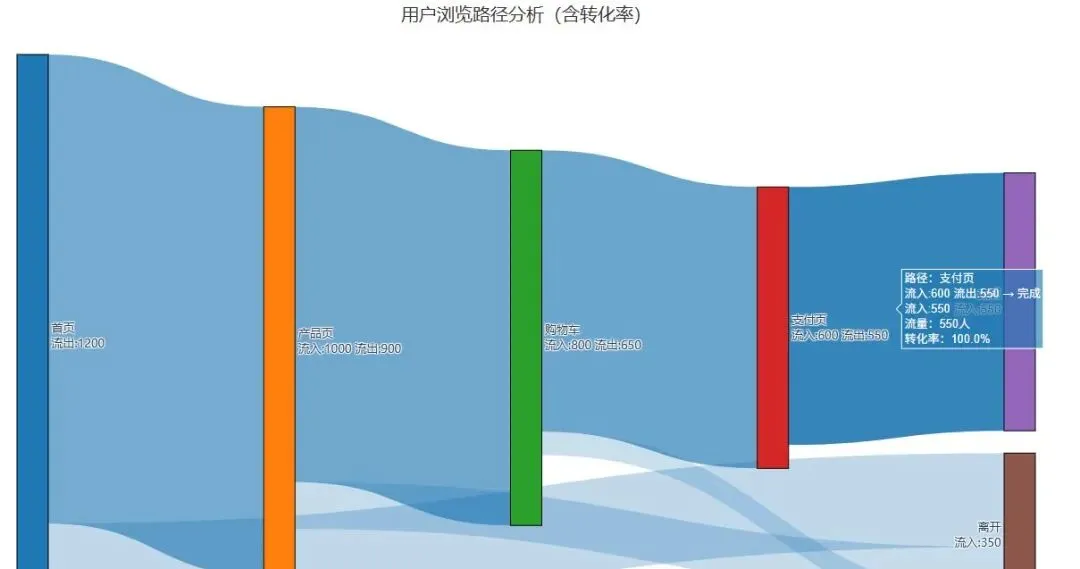
采用python代码绘制,可直接运行。只需要修改第8到12行的数据准备部分,即可实现自定义你自己的桑基图了~最终保存为html格式,可以使用chrome浏览器打开,而且当鼠标悬停的时候,会显示额外信息,这便是交互式图表的特点之一(主要来自plotly的功能)。
过往文章/合集
桑基图是一种特殊的流程图,用于展示流量、能量或数据的流向和分布。其特点是:
- 箭头宽度与流量大小成正比
- 清晰展示从源到目标的转移关系
- 适合表现多对多的流转关系
常见使用场景比如
场景 | 说明 |
|---|---|
资金流向 | 显示预算分配或资金转移 |
用户路径 | 分析用户在网站/APP的浏览路径 |
物料流转 | 展示供应链中的物料流动 |
数据迁移 | 显示数据在不同系统间的转移 |
# -*- coding: utf-8 -*-import plotly.graph_objects as goimport webbrowserimport osfrom collections import defaultdict# ================= 数据准备 =================labels = ["首页", "产品页", "购物车", "支付页", "完成", "离开"]colors = ["#1f77b4", "#ff7f0e", "#2ca02c", "#d62728", "#9467bd", "#8c564b"]source = [0, 0, 1, 1, 2, 2, 3]target = [1, 5, 2, 5, 3, 5, 4]values = [1000, 200, 800, 100, 600, 50, 550]# ================= 转化率计算 =================# 1. 计算每个源节点的总流出量outflow_sum = defaultdict(int)for s, v in zip(source, values):outflow_sum[s] += v# 2. 计算每个连接的转化率 = 当前值 / 源节点总流出量conversion_rates = []for s, v in zip(source, values):rate = v / outflow_sum[s] * 100conversion_rates.append(rate)# 3. 生成连线标签:显示人数 + 转化率link_labels = [f"{v}人\n{rate:.1f}%" for v, rate in zip(values, conversion_rates)]# 4. 计算每个节点的总流入量(用于节点标签)inflow_sum = defaultdict(int)for t, v in zip(target, values):inflow_sum[t] += vnode_labels_with_count = []for i, label in enumerate(labels):inflow = inflow_sum.get(i, 0)outflow = outflow_sum.get(i, 0)if inflow > 0 and outflow > 0:node_labels_with_count.append(f"{label}<br>流入:{inflow} 流出:{outflow}")elif inflow > 0:node_labels_with_count.append(f"{label}<br>流入:{inflow}")elif outflow > 0:node_labels_with_count.append(f"{label}<br>流出:{outflow}")else:node_labels_with_count.append(label)# ================= 创建桑基图 =================fig = go.Figure(data=[go.Sankey(node=dict(pad=25,thickness=35,line=dict(color="black", width=1),label=node_labels_with_count, # 节点显示流入流出量color=colors,hovertemplate="节点:%{label}<br> 流量:%{value}人<extra></extra>"),link=dict(source=source,target=target,value=values,# 连线颜色:根据转化率设置深浅(转化率高=颜色深)color=[f"rgba(31, 119, 180, {0.2 + rate/200})" for rate in conversion_rates],label=link_labels, # 显示人数+转化率hovertemplate=("路径:%{source.label} → %{target.label}<br>""流量:%{value}人<br>""转化率:%{customdata:.1f}%<extra></extra>"),customdata=conversion_rates # 传递转化率数据用于悬停显示))])# ================= 布局优化 =================fig.update_layout(title=dict(text="用户浏览路径分析(含转化率)",font_size=20,font_color="#333333",x=0.5,xanchor="center",y=0.95,yanchor="top"),font=dict(size=13, family="Microsoft YaHei, SimHei, sans-serif"),height=750,width=1200,plot_bgcolor="white",paper_bgcolor="white",margin=dict(l=30, r=30, t=90, b=30))# ================= 添加图例说明 =================fig.add_annotation(text="提示:连线标签显示「人数 + 转化率」,悬停查看详细信息",xref="paper", yref="paper",x=0.5, y=-0.08,showarrow=False,font=dict(size=11, color="#666666"))# 添加转化率图例(颜色深浅示意)fig.add_annotation(text="颜色深浅 = 转化率高低",xref="paper", yref="paper",x=0.98, y=0.02,showarrow=False,font=dict(size=10, color="#999999"),xanchor="right")# ================= 保存并打开 =================output_file = os.path.abspath("sankey_with_conversion.html")fig.write_html(output_file)
上面代码较难理解的地方在于 source 和 target 使用的是数字索引,而不是文字名称。节点索引映射表如下
索引 (ID) | 节点名称 (Label) |
|---|---|
0 | 首页(流量起点) |
1 | 产品页(中间环节) |
2 | 购物车(中间环节) |
3 | 支付页(中间环节) |
4 | 完成(最终转化) |
5 | 离开(流失节点) |
连线逻辑解读
代码中的 source, target, values 是按列对应的,我们可以把它拆解为 7 条具体的流向:
0 → 1(值 1000): 1000 人从 首页 进入 产品页。0 → 5(值 200): 200 人从 首页 直接 离开 (跳出)。1 → 2(值 800): 800 人从 产品页 加入 购物车。1 → 5(值 100): 100 人从 产品页离开。2 → 3(值 600): 600 人从 购物车 进入 支付页。2 → 5(值 50): 50 人从 购物车离开。3 → 4(值 550): 550 人从 支付页 最终 完成 订单。
视觉效果分析
打开运行这段代码后生成的html文件,你会看到:
- 流向从左到右:默认布局是水平方向,左侧是起点(首页),右侧是终点(完成/离开)。
- 线条粗细代表人数:
- 最粗的线条应该是
首页 → 产品页(1000 人)。 - 较细的线条是
购物车 → 离开(50 人)。 - 颜色区分:每个节点(矩形块)会有不同的颜色,方便区分不同的页面阶段。
- 交互性:Plotly 生成的图是交互式的,鼠标悬停在线条上时,会显示具体的数值和百分比。
合集 | 文章 |
|---|---|
本文来自网友投稿或网络内容,如有侵犯您的权益请联系我们删除,联系邮箱:596563534@qq.com 。
随机文章
-
 10个月宝宝每天需要喝多少奶粉?
- Python Matplotlib绘制二维矢量场图
- linux中设备树插件 (Device Tree Overlays)
- PHP Agentic 框架 Neuron V3.0 正式发布!
- 《快递录入烦死了?Python调用百度OCR大模型API批量识别快递面单,一键导出Excel,终于解脱了!》
- AI 教父吴恩达教授教初学者写 Python,是种什么体验
- 这就是Python最好的工作流 ZQ-Platform Workflow
- Linux大神都不会告诉你的秘密:一行命令秒查硬件配置!
- Linux CentOS 下载及安装教程
- Linux进阶 | ftpd服务配置实战指南(FTP 文件传输服务搭建)
- Linux 发行版家族·完整版选型表(2026 市场主流)