当前位置:首页>python>数学建模与Python:共享单车系统建模-从简单模拟到参数优化

数学建模与Python:共享单车系统建模-从简单模拟到参数优化

  • 2026-03-10 20:24:59
数学建模与Python:共享单车系统建模-从简单模拟到参数优化

本系列受到 Allen B. Downey 的《Modeling and Simulation in Python》https://greenteapress.com/wp/modsimpy/ 的启发,本节内容直接参考自其中的二三四三章,旨在通过 Python 编程语言,帮助新手同学来探索数学建模的基础内容。

知识背景

在开始探索如何用代码模拟现实世界之前,我们需要先了解几个核心概念。建模(Modeling) 是对现实系统的抽象和简化,目的是为了理解系统的运作机制或预测未来的行为。仿真(Simulation) 则是基于模型,通过计算机程序来模拟系统随时间演变的过程。

在本篇文章中,我们将使用 Python 语言来构建模型。如果你对 Python 的函数定义、条件判断(if)、循环(for)以及基本的变量操作有一定了解,那么你已经具备了阅读本文的基础。我们将从最简单的状态记录开始,一步步构建出一个能够评估共享单车系统服务质量的完整模型。

概念介绍

想象一下,有两个地点——校园(Campus)地铁站(Metro Station),它们之间有一套共享单车系统。人们可以在一个地点借车,骑到另一个地点还车。

为了模拟这个系统,我们需要关注以下几个关键点:

  1. 状态(State):系统在某一时刻的样子。这里主要指校园和地铁站当前停放的单车数量。
  2. 时间步(Time Step):模拟时间的最小单位。我们可以假设每分钟是一个时间步。
  3. 事件(Event):在每个时间步内可能发生的事情,比如有人从校园借车骑去地铁站。
  4. 随机性(Randomness):现实中人流到达的时刻是不确定的,我们需要用概率来模拟这种随机性。
  5. 度量指标(Metrics):用来评价系统好坏的标准,例如有多少人因为没车而无法出行(不满意的客户)。

模型构建与代码实现

1. 初始模型:记录单车位置

首先,我们定义系统的初始状态。为了更符合现实情况,我们假设共有 120 辆单车,初始时校园有 100 辆,地铁站有 20 辆。

# 初始化状态:字典是最简单的数据结构state = {'campus'100'metro'20}

如果有一个人把车从校园骑到了地铁站,校园的车会少一辆,地铁站的车会多一辆。我们可以写一个简单的函数来描述这个过程:

defbike_to_metro(state):"""将一辆车从校园移动到地铁站"""    state['campus'] -= 1    state['metro'] += 1

同理,我们也可以定义 bike_to_campus 函数。

2. 引入随机性:模拟人流

现实中,人们不会按照固定的时间表出现。我们可以假设每一分钟内:

  • 校园有一个人取车去地铁站的概率是 p1 (例如 0.5)。
  • 地铁站有一个人取车去校园的概率是 p2 (例如 0.4)。

利用 numpy.random.random() 函数,我们可以模拟这种随机事件。如果 random() < p1,说明这一分钟内有人要从校园出发。

import numpy as npdefstep(state, p1, p2):"""模拟一个时间步(例如一分钟)"""# 模拟从校园出发if np.random.random() < p1:        bike_to_metro(state)# 模拟从地铁站出发if np.random.random() < p2:        bike_to_campus(state)

3. 时间演变:运行模拟

有了单步模拟函数 step,我们就可以通过循环来模拟一段时间(比如一小时,即 60 分钟)内系统的变化。

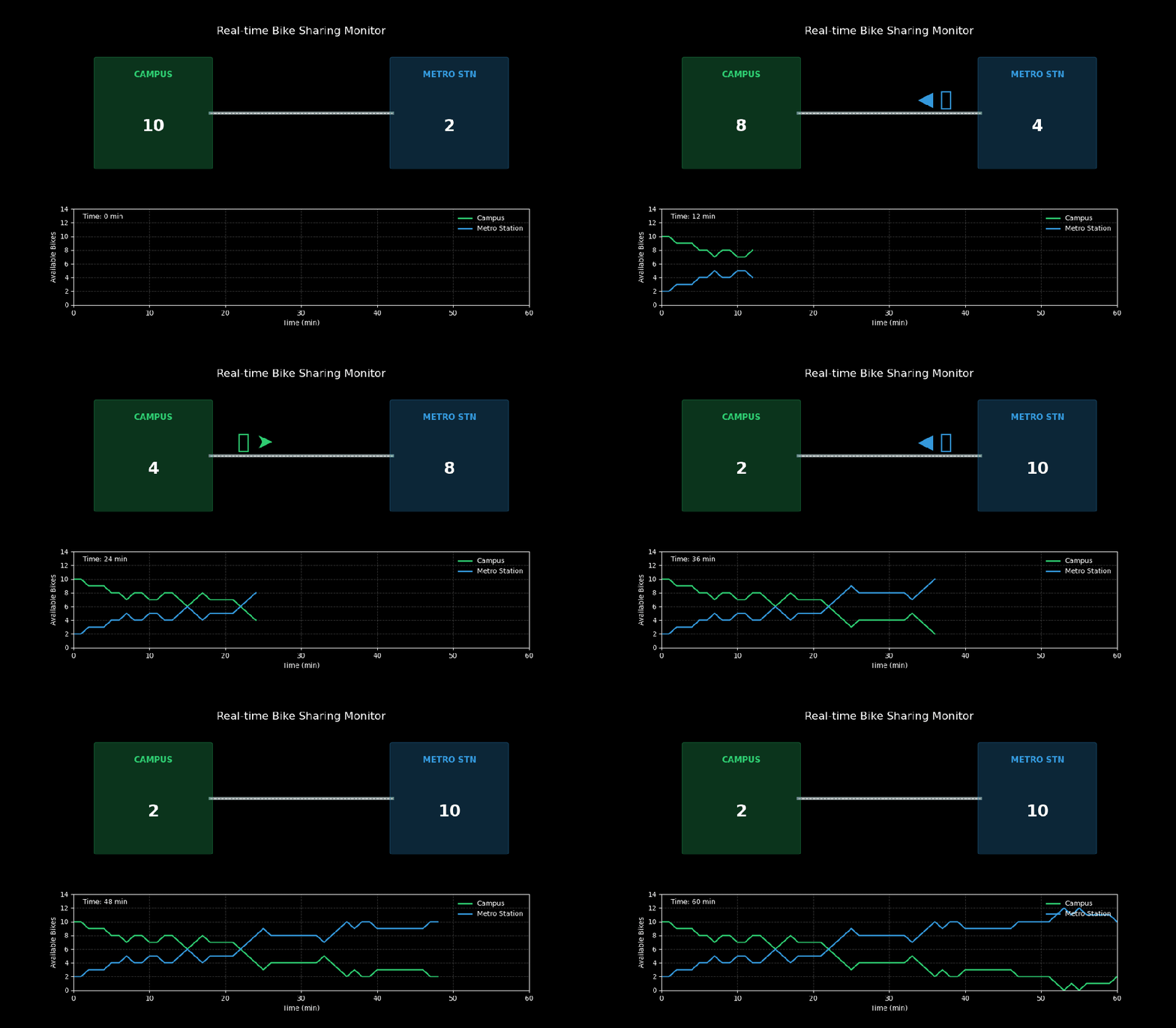
为了更直观地观察这个过程,我们制作了一个动态的可视化演示。在这个演示中,你可以实时看到单车数量的变化以及骑行者的移动。

你可以直接用代码来生成这个动画,完整代码如下:

import numpy as npimport matplotlib.pyplot as pltfrom matplotlib.animation import FuncAnimationimport matplotlib.patches as patches# ==========================================# 共享单车系统仿真模型# ==========================================# 1. 系统参数TOTAL_BIKES = 12P_CAMPUS_TO_METRO = 0.5# 校园 -> 地铁站 的概率 (每分钟)P_METRO_TO_CAMPUS = 0.4# 地铁站 -> 校园 的概率 (每分钟)DURATION = 60# 模拟时长 (分钟)# 2. 初始化状态# bikes_campus: 校园里的单车数# bikes_metro: 地铁站里的单车数state = {'campus'10'metro'2,'campus_history': [],'metro_history': [],'movements': [] # 记录每一帧的移动事件: None, 'c2m', 'm2c'}# 3. 模拟函数defrun_step(current_state):# 记录历史    current_state['campus_history'].append(current_state['campus'])    current_state['metro_history'].append(current_state['metro'])# 模拟移动    move = None# 检查从校园到地铁站的借车请求if np.random.random() < P_CAMPUS_TO_METRO:if current_state['campus'] > 0:            current_state['campus'] -= 1            current_state['metro'] += 1            move = 'c2m'# 检查从地铁站到校园的借车请求if np.random.random() < P_METRO_TO_CAMPUS:if current_state['metro'] > 0:            current_state['metro'] -= 1            current_state['campus'] += 1            move = 'm2c'    current_state['movements'].append(move)# 运行完整模拟以获取数据np.random.seed(42# 固定种子保证结果可复现sim_data = {'campus': [10],'metro': [2],'movements': [None]}temp_state = {'campus'10'metro'2'campus_history': [], 'metro_history': [], 'movements': []}for _ in range(DURATION):    run_step(temp_state)sim_data['campus'].extend(temp_state['campus_history'])sim_data['metro'].extend(temp_state['metro_history'])sim_data['movements'].extend(temp_state['movements'])# ==========================================# 动态可视化 (Dashboard 风格)# ==========================================plt.style.use('dark_background')fig = plt.figure(figsize=(127))gs = fig.add_gridspec(22, height_ratios=[1.51])# --- 上半部分:实时场景模拟 ---ax_map = fig.add_subplot(gs[0, :])ax_map.set_xlim(0100)ax_map.set_ylim(040)ax_map.set_title("Real-time Bike Sharing Monitor", color='white', fontsize=16, pad=10)ax_map.axis('off')# 绘制地点# 校园 (左侧)campus_rect = patches.FancyBboxPatch((55), 2530, boxstyle="round,pad=0.5"                                   fc='#27ae60', ec='#2ecc71', alpha=0.3)ax_map.add_patch(campus_rect)ax_map.text(17.530"CAMPUS", ha='center', color='#2ecc71', fontsize=12, fontweight='bold')text_campus_count = ax_map.text(17.515"", ha='center', color='white', fontsize=24, fontweight='bold')# 地铁站 (右侧)metro_rect = patches.FancyBboxPatch((705), 2530, boxstyle="round,pad=0.5"                                  fc='#2980b9', ec='#3498db', alpha=0.3)ax_map.add_patch(metro_rect)ax_map.text(82.530"METRO STN", ha='center', color='#3498db', fontsize=12, fontweight='bold')text_metro_count = ax_map.text(82.515"", ha='center', color='white', fontsize=24, fontweight='bold')# 道路ax_map.plot([3070], [2020], '-', color='#7f8c8d', lw=4, zorder=0)ax_map.plot([3070], [2020], '--', color='white', lw=1, zorder=0)# 骑行者图标 (初始隐藏)rider = ax_map.text(5022"🚴", ha='center', fontsize=30, color='#f1c40f', alpha=0)# --- 下半部分:数据图表 ---# 校园单车数量曲线ax_chart = fig.add_subplot(gs[1, :])ax_chart.set_xlim(0, DURATION)ax_chart.set_ylim(0, TOTAL_BIKES + 2)ax_chart.set_xlabel("Time (min)")ax_chart.set_ylabel("Available Bikes")ax_chart.grid(True, linestyle='--', alpha=0.2)line_campus, = ax_chart.plot([], [], '-', color='#2ecc71', lw=2, label='Campus')line_metro, = ax_chart.plot([], [], '-', color='#3498db', lw=2, label='Metro Station')ax_chart.legend(loc='upper right', frameon=False)# 时间指示器time_text = ax_chart.text(0.020.9"", transform=ax_chart.transAxes, color='white')defupdate(frame):# 1. 更新计数文本    c_count = sim_data['campus'][frame]    m_count = sim_data['metro'][frame]    text_campus_count.set_text(f"{c_count}")    text_metro_count.set_text(f"{m_count}")# 2. 更新骑行动画# 获取当前分钟发生的移动事件    move = sim_data['movements'][frame]if move == 'c2m'# 校园 -> 地铁        rider.set_text("🚴 ➤")        rider.set_x(40# 简化的位置示意        rider.set_alpha(1)        rider.set_color('#2ecc71'# 绿色代表来自校园elif move == 'm2c'# 地铁 -> 校园        rider.set_text("◀ 🚴")        rider.set_x(60)        rider.set_alpha(1)        rider.set_color('#3498db'# 蓝色代表来自地铁else:        rider.set_alpha(0# 没人骑车# 3. 更新曲线图    line_campus.set_data(range(frame+1), sim_data['campus'][:frame+1])    line_metro.set_data(range(frame+1), sim_data['metro'][:frame+1])    time_text.set_text(f"Time: {frame} min")return text_campus_count, text_metro_count, rider, line_campus, line_metro, time_text# 生成动画ani = FuncAnimation(fig, update, frames=DURATION+1, interval=100, blit=True)ani.save('../images/02_bike_share_dynamic.gif', writer='pillow', fps=10)print("Animation saved to ../images/02_bike_share_dynamic.gif")

动态演示效果:

共享单车系统实时监控
  • 上半部分:展示了校园(左)和地铁站(右)的实时场景。中间的骑行者图标表示正在发生的移动事件。
  • 下半部分:展示了两个地点单车数量随时间的实时变化曲线。

4. 完善模型:处理“无车可用”的情况

上面的模型有一个明显的漏洞:如果校园已经没车了(Campus = 0),函数 bike_to_MetroStn 仍然会执行减一操作,导致车数变成负数。这在物理上是不可能的。

我们需要修改移动车辆的函数,加入检查逻辑。如果没车了,就记录一次“不满意的客户”(Unsatisfied Customer),直接返回,不再减车。

defbike_to_MetroStn(state):"""尝试将一辆车从校园移动到地铁站"""if state.Campus == 0:        state.Campus_empty += 1# 记录不满意的客户return    state.Campus -= 1    state.MetroStn += 1

这样,Campus_empty 和 MetroStn_empty 就成了我们评估系统服务质量的重要指标。

可视化展示与参数扫视

模拟结果可视化

运行 run_simulation(0.3, 0.2, 60),我们可以得到一张图表,显示校园校园内单车数量随时间的变化。由于引入了随机性,每次运行生成的曲线都会有所不同,呈锯齿状波动。

参数扫视(Parameter Sweep)

仅仅运行一次模拟是不够的。我们想知道,不同的借车概率(p1)对系统服务质量到底有多大影响?比如,当校园的借车需求增加时,不满意的客户数量会如何变化?

这就需要进行参数扫视。我们让 p1 从 0 到 0.8 逐步变化,观察“校园不满意的客户数”这个指标。为了减少随机波动,我们在每个参数点上重复运行 20 次模拟取平均值。

你可以运行代码来生成参数扫视的动态演示,完整代码如下:

import numpy as npimport matplotlib.pyplot as pltfrom matplotlib.animation import FuncAnimation# ==========================================# 参数扫视模拟# ==========================================TOTAL_BIKES = 12DURATION = 60NUM_SIMULATIONS = 20# 每个参数值重复模拟的次数 (用于平滑曲线)P2 = 0.4# 地铁站 -> 校园 的固定概率# 借车概率 (校园 -> 地铁) 范围:0 到 0.8p1_array = np.linspace(00.841)# 存储结果:每个 p1 对应的不满意客户数 (平均值)sweep_results = []current_p1_index = 0defrun_simulation(p1, p2, num_steps):    state = {'campus'10'metro'2'unhappy'0}for _ in range(num_steps):# 校园 -> 地铁if np.random.random() < p1:if state['campus'] > 0:                state['campus'] -= 1                state['metro'] += 1else:                state['unhappy'] += 1# 地铁 -> 校园if np.random.random() < p2:if state['metro'] > 0:                state['metro'] -= 1                state['campus'] += 1# 这里简化,不统计地铁站的不满意客户return state['unhappy']# ==========================================# 动态可视化# ==========================================plt.style.use('dark_background')fig, ax = plt.subplots(figsize=(106))ax.set_xlim(00.8)ax.set_ylim(015)ax.set_xlabel("Request Rate at Campus (p1)")ax.set_ylabel("Average Unhappy Customers")ax.set_title("Impact of Request Rate on Service Quality", fontsize=14, color='white', pad=20)ax.grid(True, linestyle='--', alpha=0.3)# 绘制曲线line, = ax.plot([], [], 'o-', color='#e74c3c', lw=2, markersize=6, label='Unhappy Customers')ax.legend(loc='upper left', frameon=False)# 动态文本text_param = ax.text(0.050.8"", transform=ax.transAxes, color='white', fontsize=12)text_result = ax.text(0.050.75"", transform=ax.transAxes, color='#e74c3c', fontsize=14, fontweight='bold')# 进度条背景ax_progress = fig.add_axes([0.150.020.70.03]) # [left, bottom, width, height]ax_progress.set_xlim(01)ax_progress.set_ylim(01)ax_progress.axis('off')rect_bg = plt.Rectangle((00), 11, fc='#34495e', ec=None)ax_progress.add_patch(rect_bg)rect_progress = plt.Rectangle((00), 01, fc='#2ecc71', ec=None)ax_progress.add_patch(rect_progress)ax_progress.text(0.50.5"Simulation Progress", ha='center', va='center', color='white', fontsize=8)defupdate(frame):global current_p1_indexif current_p1_index < len(p1_array):        p1 = p1_array[current_p1_index]# 运行多次模拟取平均值        total_unhappy = 0for _ in range(NUM_SIMULATIONS):            total_unhappy += run_simulation(p1, P2, DURATION)        avg_unhappy = total_unhappy / NUM_SIMULATIONS        sweep_results.append(avg_unhappy)# 更新曲线        line.set_data(p1_array[:len(sweep_results)], sweep_results)# 更新文本        text_param.set_text(f"Current p1 (Campus->Metro): {p1:.2f}")        text_result.set_text(f"Unhappy Customers: {avg_unhappy:.1f}")# 更新进度条        progress = (current_p1_index + 1) / len(p1_array)        rect_progress.set_width(progress)        current_p1_index += 1return line, text_param, text_result, rect_progress# 生成动画ani = FuncAnimation(fig, update, frames=len(p1_array)+10, interval=100, blit=True)ani.save('../images/02_bike_share_sweep.gif', writer='pillow', fps=10)print("Animation saved to ../images/02_bike_share_sweep.gif")

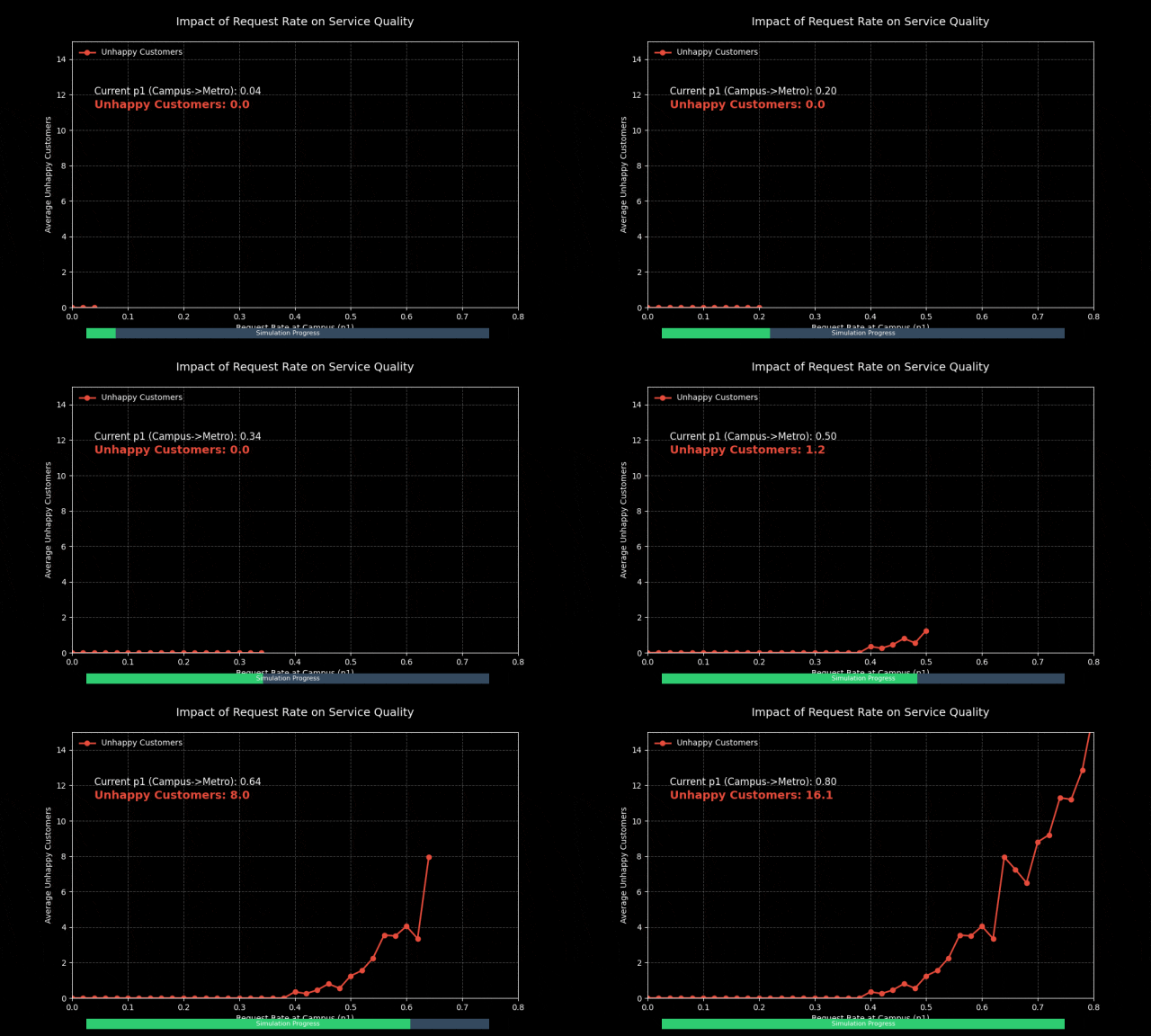
动态参数扫视效果:

参数扫视演示

通过这张动态图,我们可以清晰地看到:

  1. 当 p1 较小时(需求低),不满意客户数维持在 0 附近。
  2. 随着 p1 增大,曲线开始出现非线性上升。这意味着一旦需求超过某个临界点,服务质量会急剧下降。
  3. 这种“相变”现象提示我们,在设计系统容量时,必须留有足够的余量来应对高峰需求。

总结

通过这个共享单车系统的案例,我们完整地体验了建模的过程:

  1. 从简单开始:先建立一个能跑通的最小模型(State 和基本移动函数)。
  2. 迭代改进:发现问题(负数车辆),修改代码(增加条件判断),引入度量指标(不满意客户)。
  3. 探索分析:使用参数扫视来分析系统行为随参数变化的规律。

这种迭代式建模(Iterative Modeling) 的方法,不仅适用于简单的共享单车系统,也是解决复杂工程和科学问题的有效路径。

最新文章

随机文章

基本 文件 流程 错误 SQL 调试
  1. 请求信息 : 2026-03-27 14:54:17 HTTP/2.0 GET : https://f.mffb.com.cn/a/479022.html
  2. 运行时间 : 0.188447s [ 吞吐率:5.31req/s ] 内存消耗:4,551.09kb 文件加载:140
  3. 缓存信息 : 0 reads,0 writes
  4. 会话信息 : SESSION_ID=c947db91f10c1e0f13df2c52397182ec
  1. /yingpanguazai/ssd/ssd1/www/f.mffb.com.cn/public/index.php ( 0.79 KB )
  2. /yingpanguazai/ssd/ssd1/www/f.mffb.com.cn/vendor/autoload.php ( 0.17 KB )
  3. /yingpanguazai/ssd/ssd1/www/f.mffb.com.cn/vendor/composer/autoload_real.php ( 2.49 KB )
  4. /yingpanguazai/ssd/ssd1/www/f.mffb.com.cn/vendor/composer/platform_check.php ( 0.90 KB )
  5. /yingpanguazai/ssd/ssd1/www/f.mffb.com.cn/vendor/composer/ClassLoader.php ( 14.03 KB )
  6. /yingpanguazai/ssd/ssd1/www/f.mffb.com.cn/vendor/composer/autoload_static.php ( 4.90 KB )
  7. /yingpanguazai/ssd/ssd1/www/f.mffb.com.cn/vendor/topthink/think-helper/src/helper.php ( 8.34 KB )
  8. /yingpanguazai/ssd/ssd1/www/f.mffb.com.cn/vendor/topthink/think-validate/src/helper.php ( 2.19 KB )
  9. /yingpanguazai/ssd/ssd1/www/f.mffb.com.cn/vendor/topthink/think-orm/src/helper.php ( 1.47 KB )
  10. /yingpanguazai/ssd/ssd1/www/f.mffb.com.cn/vendor/topthink/think-orm/stubs/load_stubs.php ( 0.16 KB )
  11. /yingpanguazai/ssd/ssd1/www/f.mffb.com.cn/vendor/topthink/framework/src/think/Exception.php ( 1.69 KB )
  12. /yingpanguazai/ssd/ssd1/www/f.mffb.com.cn/vendor/topthink/think-container/src/Facade.php ( 2.71 KB )
  13. /yingpanguazai/ssd/ssd1/www/f.mffb.com.cn/vendor/symfony/deprecation-contracts/function.php ( 0.99 KB )
  14. /yingpanguazai/ssd/ssd1/www/f.mffb.com.cn/vendor/symfony/polyfill-mbstring/bootstrap.php ( 8.26 KB )
  15. /yingpanguazai/ssd/ssd1/www/f.mffb.com.cn/vendor/symfony/polyfill-mbstring/bootstrap80.php ( 9.78 KB )
  16. /yingpanguazai/ssd/ssd1/www/f.mffb.com.cn/vendor/symfony/var-dumper/Resources/functions/dump.php ( 1.49 KB )
  17. /yingpanguazai/ssd/ssd1/www/f.mffb.com.cn/vendor/topthink/think-dumper/src/helper.php ( 0.18 KB )
  18. /yingpanguazai/ssd/ssd1/www/f.mffb.com.cn/vendor/symfony/var-dumper/VarDumper.php ( 4.30 KB )
  19. /yingpanguazai/ssd/ssd1/www/f.mffb.com.cn/vendor/topthink/framework/src/think/App.php ( 15.30 KB )
  20. /yingpanguazai/ssd/ssd1/www/f.mffb.com.cn/vendor/topthink/think-container/src/Container.php ( 15.76 KB )
  21. /yingpanguazai/ssd/ssd1/www/f.mffb.com.cn/vendor/psr/container/src/ContainerInterface.php ( 1.02 KB )
  22. /yingpanguazai/ssd/ssd1/www/f.mffb.com.cn/app/provider.php ( 0.19 KB )
  23. /yingpanguazai/ssd/ssd1/www/f.mffb.com.cn/vendor/topthink/framework/src/think/Http.php ( 6.04 KB )
  24. /yingpanguazai/ssd/ssd1/www/f.mffb.com.cn/vendor/topthink/think-helper/src/helper/Str.php ( 7.29 KB )
  25. /yingpanguazai/ssd/ssd1/www/f.mffb.com.cn/vendor/topthink/framework/src/think/Env.php ( 4.68 KB )
  26. /yingpanguazai/ssd/ssd1/www/f.mffb.com.cn/app/common.php ( 0.03 KB )
  27. /yingpanguazai/ssd/ssd1/www/f.mffb.com.cn/vendor/topthink/framework/src/helper.php ( 18.78 KB )
  28. /yingpanguazai/ssd/ssd1/www/f.mffb.com.cn/vendor/topthink/framework/src/think/Config.php ( 5.54 KB )
  29. /yingpanguazai/ssd/ssd1/www/f.mffb.com.cn/config/app.php ( 0.95 KB )
  30. /yingpanguazai/ssd/ssd1/www/f.mffb.com.cn/config/cache.php ( 0.78 KB )
  31. /yingpanguazai/ssd/ssd1/www/f.mffb.com.cn/config/console.php ( 0.23 KB )
  32. /yingpanguazai/ssd/ssd1/www/f.mffb.com.cn/config/cookie.php ( 0.56 KB )
  33. /yingpanguazai/ssd/ssd1/www/f.mffb.com.cn/config/database.php ( 2.48 KB )
  34. /yingpanguazai/ssd/ssd1/www/f.mffb.com.cn/vendor/topthink/framework/src/think/facade/Env.php ( 1.67 KB )
  35. /yingpanguazai/ssd/ssd1/www/f.mffb.com.cn/config/filesystem.php ( 0.61 KB )
  36. /yingpanguazai/ssd/ssd1/www/f.mffb.com.cn/config/lang.php ( 0.91 KB )
  37. /yingpanguazai/ssd/ssd1/www/f.mffb.com.cn/config/log.php ( 1.35 KB )
  38. /yingpanguazai/ssd/ssd1/www/f.mffb.com.cn/config/middleware.php ( 0.19 KB )
  39. /yingpanguazai/ssd/ssd1/www/f.mffb.com.cn/config/route.php ( 1.89 KB )
  40. /yingpanguazai/ssd/ssd1/www/f.mffb.com.cn/config/session.php ( 0.57 KB )
  41. /yingpanguazai/ssd/ssd1/www/f.mffb.com.cn/config/trace.php ( 0.34 KB )
  42. /yingpanguazai/ssd/ssd1/www/f.mffb.com.cn/config/view.php ( 0.82 KB )
  43. /yingpanguazai/ssd/ssd1/www/f.mffb.com.cn/app/event.php ( 0.25 KB )
  44. /yingpanguazai/ssd/ssd1/www/f.mffb.com.cn/vendor/topthink/framework/src/think/Event.php ( 7.67 KB )
  45. /yingpanguazai/ssd/ssd1/www/f.mffb.com.cn/app/service.php ( 0.13 KB )
  46. /yingpanguazai/ssd/ssd1/www/f.mffb.com.cn/app/AppService.php ( 0.26 KB )
  47. /yingpanguazai/ssd/ssd1/www/f.mffb.com.cn/vendor/topthink/framework/src/think/Service.php ( 1.64 KB )
  48. /yingpanguazai/ssd/ssd1/www/f.mffb.com.cn/vendor/topthink/framework/src/think/Lang.php ( 7.35 KB )
  49. /yingpanguazai/ssd/ssd1/www/f.mffb.com.cn/vendor/topthink/framework/src/lang/zh-cn.php ( 13.70 KB )
  50. /yingpanguazai/ssd/ssd1/www/f.mffb.com.cn/vendor/topthink/framework/src/think/initializer/Error.php ( 3.31 KB )
  51. /yingpanguazai/ssd/ssd1/www/f.mffb.com.cn/vendor/topthink/framework/src/think/initializer/RegisterService.php ( 1.33 KB )
  52. /yingpanguazai/ssd/ssd1/www/f.mffb.com.cn/vendor/services.php ( 0.14 KB )
  53. /yingpanguazai/ssd/ssd1/www/f.mffb.com.cn/vendor/topthink/framework/src/think/service/PaginatorService.php ( 1.52 KB )
  54. /yingpanguazai/ssd/ssd1/www/f.mffb.com.cn/vendor/topthink/framework/src/think/service/ValidateService.php ( 0.99 KB )
  55. /yingpanguazai/ssd/ssd1/www/f.mffb.com.cn/vendor/topthink/framework/src/think/service/ModelService.php ( 2.04 KB )
  56. /yingpanguazai/ssd/ssd1/www/f.mffb.com.cn/vendor/topthink/think-trace/src/Service.php ( 0.77 KB )
  57. /yingpanguazai/ssd/ssd1/www/f.mffb.com.cn/vendor/topthink/framework/src/think/Middleware.php ( 6.72 KB )
  58. /yingpanguazai/ssd/ssd1/www/f.mffb.com.cn/vendor/topthink/framework/src/think/initializer/BootService.php ( 0.77 KB )
  59. /yingpanguazai/ssd/ssd1/www/f.mffb.com.cn/vendor/topthink/think-orm/src/Paginator.php ( 11.86 KB )
  60. /yingpanguazai/ssd/ssd1/www/f.mffb.com.cn/vendor/topthink/think-validate/src/Validate.php ( 63.20 KB )
  61. /yingpanguazai/ssd/ssd1/www/f.mffb.com.cn/vendor/topthink/think-orm/src/Model.php ( 23.55 KB )
  62. /yingpanguazai/ssd/ssd1/www/f.mffb.com.cn/vendor/topthink/think-orm/src/model/concern/Attribute.php ( 21.05 KB )
  63. /yingpanguazai/ssd/ssd1/www/f.mffb.com.cn/vendor/topthink/think-orm/src/model/concern/AutoWriteData.php ( 4.21 KB )
  64. /yingpanguazai/ssd/ssd1/www/f.mffb.com.cn/vendor/topthink/think-orm/src/model/concern/Conversion.php ( 6.44 KB )
  65. /yingpanguazai/ssd/ssd1/www/f.mffb.com.cn/vendor/topthink/think-orm/src/model/concern/DbConnect.php ( 5.16 KB )
  66. /yingpanguazai/ssd/ssd1/www/f.mffb.com.cn/vendor/topthink/think-orm/src/model/concern/ModelEvent.php ( 2.33 KB )
  67. /yingpanguazai/ssd/ssd1/www/f.mffb.com.cn/vendor/topthink/think-orm/src/model/concern/RelationShip.php ( 28.29 KB )
  68. /yingpanguazai/ssd/ssd1/www/f.mffb.com.cn/vendor/topthink/think-helper/src/contract/Arrayable.php ( 0.09 KB )
  69. /yingpanguazai/ssd/ssd1/www/f.mffb.com.cn/vendor/topthink/think-helper/src/contract/Jsonable.php ( 0.13 KB )
  70. /yingpanguazai/ssd/ssd1/www/f.mffb.com.cn/vendor/topthink/think-orm/src/model/contract/Modelable.php ( 0.09 KB )
  71. /yingpanguazai/ssd/ssd1/www/f.mffb.com.cn/vendor/topthink/framework/src/think/Db.php ( 2.88 KB )
  72. /yingpanguazai/ssd/ssd1/www/f.mffb.com.cn/vendor/topthink/think-orm/src/DbManager.php ( 8.52 KB )
  73. /yingpanguazai/ssd/ssd1/www/f.mffb.com.cn/vendor/topthink/framework/src/think/Log.php ( 6.28 KB )
  74. /yingpanguazai/ssd/ssd1/www/f.mffb.com.cn/vendor/topthink/framework/src/think/Manager.php ( 3.92 KB )
  75. /yingpanguazai/ssd/ssd1/www/f.mffb.com.cn/vendor/psr/log/src/LoggerTrait.php ( 2.69 KB )
  76. /yingpanguazai/ssd/ssd1/www/f.mffb.com.cn/vendor/psr/log/src/LoggerInterface.php ( 2.71 KB )
  77. /yingpanguazai/ssd/ssd1/www/f.mffb.com.cn/vendor/topthink/framework/src/think/Cache.php ( 4.92 KB )
  78. /yingpanguazai/ssd/ssd1/www/f.mffb.com.cn/vendor/psr/simple-cache/src/CacheInterface.php ( 4.71 KB )
  79. /yingpanguazai/ssd/ssd1/www/f.mffb.com.cn/vendor/topthink/think-helper/src/helper/Arr.php ( 16.63 KB )
  80. /yingpanguazai/ssd/ssd1/www/f.mffb.com.cn/vendor/topthink/framework/src/think/cache/driver/File.php ( 7.84 KB )
  81. /yingpanguazai/ssd/ssd1/www/f.mffb.com.cn/vendor/topthink/framework/src/think/cache/Driver.php ( 9.03 KB )
  82. /yingpanguazai/ssd/ssd1/www/f.mffb.com.cn/vendor/topthink/framework/src/think/contract/CacheHandlerInterface.php ( 1.99 KB )
  83. /yingpanguazai/ssd/ssd1/www/f.mffb.com.cn/app/Request.php ( 0.09 KB )
  84. /yingpanguazai/ssd/ssd1/www/f.mffb.com.cn/vendor/topthink/framework/src/think/Request.php ( 55.78 KB )
  85. /yingpanguazai/ssd/ssd1/www/f.mffb.com.cn/app/middleware.php ( 0.25 KB )
  86. /yingpanguazai/ssd/ssd1/www/f.mffb.com.cn/vendor/topthink/framework/src/think/Pipeline.php ( 2.61 KB )
  87. /yingpanguazai/ssd/ssd1/www/f.mffb.com.cn/vendor/topthink/think-trace/src/TraceDebug.php ( 3.40 KB )
  88. /yingpanguazai/ssd/ssd1/www/f.mffb.com.cn/vendor/topthink/framework/src/think/middleware/SessionInit.php ( 1.94 KB )
  89. /yingpanguazai/ssd/ssd1/www/f.mffb.com.cn/vendor/topthink/framework/src/think/Session.php ( 1.80 KB )
  90. /yingpanguazai/ssd/ssd1/www/f.mffb.com.cn/vendor/topthink/framework/src/think/session/driver/File.php ( 6.27 KB )
  91. /yingpanguazai/ssd/ssd1/www/f.mffb.com.cn/vendor/topthink/framework/src/think/contract/SessionHandlerInterface.php ( 0.87 KB )
  92. /yingpanguazai/ssd/ssd1/www/f.mffb.com.cn/vendor/topthink/framework/src/think/session/Store.php ( 7.12 KB )
  93. /yingpanguazai/ssd/ssd1/www/f.mffb.com.cn/vendor/topthink/framework/src/think/Route.php ( 23.73 KB )
  94. /yingpanguazai/ssd/ssd1/www/f.mffb.com.cn/vendor/topthink/framework/src/think/route/RuleName.php ( 5.75 KB )
  95. /yingpanguazai/ssd/ssd1/www/f.mffb.com.cn/vendor/topthink/framework/src/think/route/Domain.php ( 2.53 KB )
  96. /yingpanguazai/ssd/ssd1/www/f.mffb.com.cn/vendor/topthink/framework/src/think/route/RuleGroup.php ( 22.43 KB )
  97. /yingpanguazai/ssd/ssd1/www/f.mffb.com.cn/vendor/topthink/framework/src/think/route/Rule.php ( 26.95 KB )
  98. /yingpanguazai/ssd/ssd1/www/f.mffb.com.cn/vendor/topthink/framework/src/think/route/RuleItem.php ( 9.78 KB )
  99. /yingpanguazai/ssd/ssd1/www/f.mffb.com.cn/route/app.php ( 1.72 KB )
  100. /yingpanguazai/ssd/ssd1/www/f.mffb.com.cn/vendor/topthink/framework/src/think/facade/Route.php ( 4.70 KB )
  101. /yingpanguazai/ssd/ssd1/www/f.mffb.com.cn/vendor/topthink/framework/src/think/route/dispatch/Controller.php ( 4.74 KB )
  102. /yingpanguazai/ssd/ssd1/www/f.mffb.com.cn/vendor/topthink/framework/src/think/route/Dispatch.php ( 10.44 KB )
  103. /yingpanguazai/ssd/ssd1/www/f.mffb.com.cn/app/controller/Index.php ( 4.81 KB )
  104. /yingpanguazai/ssd/ssd1/www/f.mffb.com.cn/app/BaseController.php ( 2.05 KB )
  105. /yingpanguazai/ssd/ssd1/www/f.mffb.com.cn/vendor/topthink/think-orm/src/facade/Db.php ( 0.93 KB )
  106. /yingpanguazai/ssd/ssd1/www/f.mffb.com.cn/vendor/topthink/think-orm/src/db/connector/Mysql.php ( 5.44 KB )
  107. /yingpanguazai/ssd/ssd1/www/f.mffb.com.cn/vendor/topthink/think-orm/src/db/PDOConnection.php ( 52.47 KB )
  108. /yingpanguazai/ssd/ssd1/www/f.mffb.com.cn/vendor/topthink/think-orm/src/db/Connection.php ( 8.39 KB )
  109. /yingpanguazai/ssd/ssd1/www/f.mffb.com.cn/vendor/topthink/think-orm/src/db/ConnectionInterface.php ( 4.57 KB )
  110. /yingpanguazai/ssd/ssd1/www/f.mffb.com.cn/vendor/topthink/think-orm/src/db/builder/Mysql.php ( 16.58 KB )
  111. /yingpanguazai/ssd/ssd1/www/f.mffb.com.cn/vendor/topthink/think-orm/src/db/Builder.php ( 24.06 KB )
  112. /yingpanguazai/ssd/ssd1/www/f.mffb.com.cn/vendor/topthink/think-orm/src/db/BaseBuilder.php ( 27.50 KB )
  113. /yingpanguazai/ssd/ssd1/www/f.mffb.com.cn/vendor/topthink/think-orm/src/db/Query.php ( 15.71 KB )
  114. /yingpanguazai/ssd/ssd1/www/f.mffb.com.cn/vendor/topthink/think-orm/src/db/BaseQuery.php ( 45.13 KB )
  115. /yingpanguazai/ssd/ssd1/www/f.mffb.com.cn/vendor/topthink/think-orm/src/db/concern/TimeFieldQuery.php ( 7.43 KB )
  116. /yingpanguazai/ssd/ssd1/www/f.mffb.com.cn/vendor/topthink/think-orm/src/db/concern/AggregateQuery.php ( 3.26 KB )
  117. /yingpanguazai/ssd/ssd1/www/f.mffb.com.cn/vendor/topthink/think-orm/src/db/concern/ModelRelationQuery.php ( 20.07 KB )
  118. /yingpanguazai/ssd/ssd1/www/f.mffb.com.cn/vendor/topthink/think-orm/src/db/concern/ParamsBind.php ( 3.66 KB )
  119. /yingpanguazai/ssd/ssd1/www/f.mffb.com.cn/vendor/topthink/think-orm/src/db/concern/ResultOperation.php ( 7.01 KB )
  120. /yingpanguazai/ssd/ssd1/www/f.mffb.com.cn/vendor/topthink/think-orm/src/db/concern/WhereQuery.php ( 19.37 KB )
  121. /yingpanguazai/ssd/ssd1/www/f.mffb.com.cn/vendor/topthink/think-orm/src/db/concern/JoinAndViewQuery.php ( 7.11 KB )
  122. /yingpanguazai/ssd/ssd1/www/f.mffb.com.cn/vendor/topthink/think-orm/src/db/concern/TableFieldInfo.php ( 2.63 KB )
  123. /yingpanguazai/ssd/ssd1/www/f.mffb.com.cn/vendor/topthink/think-orm/src/db/concern/Transaction.php ( 2.77 KB )
  124. /yingpanguazai/ssd/ssd1/www/f.mffb.com.cn/vendor/topthink/framework/src/think/log/driver/File.php ( 5.96 KB )
  125. /yingpanguazai/ssd/ssd1/www/f.mffb.com.cn/vendor/topthink/framework/src/think/contract/LogHandlerInterface.php ( 0.86 KB )
  126. /yingpanguazai/ssd/ssd1/www/f.mffb.com.cn/vendor/topthink/framework/src/think/log/Channel.php ( 3.89 KB )
  127. /yingpanguazai/ssd/ssd1/www/f.mffb.com.cn/vendor/topthink/framework/src/think/event/LogRecord.php ( 1.02 KB )
  128. /yingpanguazai/ssd/ssd1/www/f.mffb.com.cn/vendor/topthink/think-helper/src/Collection.php ( 16.47 KB )
  129. /yingpanguazai/ssd/ssd1/www/f.mffb.com.cn/vendor/topthink/framework/src/think/facade/View.php ( 1.70 KB )
  130. /yingpanguazai/ssd/ssd1/www/f.mffb.com.cn/vendor/topthink/framework/src/think/View.php ( 4.39 KB )
  131. /yingpanguazai/ssd/ssd1/www/f.mffb.com.cn/vendor/topthink/framework/src/think/Response.php ( 8.81 KB )
  132. /yingpanguazai/ssd/ssd1/www/f.mffb.com.cn/vendor/topthink/framework/src/think/response/View.php ( 3.29 KB )
  133. /yingpanguazai/ssd/ssd1/www/f.mffb.com.cn/vendor/topthink/framework/src/think/Cookie.php ( 6.06 KB )
  134. /yingpanguazai/ssd/ssd1/www/f.mffb.com.cn/vendor/topthink/think-view/src/Think.php ( 8.38 KB )
  135. /yingpanguazai/ssd/ssd1/www/f.mffb.com.cn/vendor/topthink/framework/src/think/contract/TemplateHandlerInterface.php ( 1.60 KB )
  136. /yingpanguazai/ssd/ssd1/www/f.mffb.com.cn/vendor/topthink/think-template/src/Template.php ( 46.61 KB )
  137. /yingpanguazai/ssd/ssd1/www/f.mffb.com.cn/vendor/topthink/think-template/src/template/driver/File.php ( 2.41 KB )
  138. /yingpanguazai/ssd/ssd1/www/f.mffb.com.cn/vendor/topthink/think-template/src/template/contract/DriverInterface.php ( 0.86 KB )
  139. /yingpanguazai/ssd/ssd1/www/f.mffb.com.cn/runtime/temp/067d451b9a0c665040f3f1bdd3293d68.php ( 11.98 KB )
  140. /yingpanguazai/ssd/ssd1/www/f.mffb.com.cn/vendor/topthink/think-trace/src/Html.php ( 4.42 KB )
  1. CONNECT:[ UseTime:0.001071s ] mysql:host=127.0.0.1;port=3306;dbname=f_mffb;charset=utf8mb4
  2. SHOW FULL COLUMNS FROM `fenlei` [ RunTime:0.001653s ]
  3. SELECT * FROM `fenlei` WHERE `fid` = 0 [ RunTime:0.000711s ]
  4. SELECT * FROM `fenlei` WHERE `fid` = 63 [ RunTime:0.000665s ]
  5. SHOW FULL COLUMNS FROM `set` [ RunTime:0.001203s ]
  6. SELECT * FROM `set` [ RunTime:0.000488s ]
  7. SHOW FULL COLUMNS FROM `article` [ RunTime:0.001266s ]
  8. SELECT * FROM `article` WHERE `id` = 479022 LIMIT 1 [ RunTime:0.003149s ]
  9. UPDATE `article` SET `lasttime` = 1774594457 WHERE `id` = 479022 [ RunTime:0.003490s ]
  10. SELECT * FROM `fenlei` WHERE `id` = 66 LIMIT 1 [ RunTime:0.000574s ]
  11. SELECT * FROM `article` WHERE `id` < 479022 ORDER BY `id` DESC LIMIT 1 [ RunTime:0.001212s ]
  12. SELECT * FROM `article` WHERE `id` > 479022 ORDER BY `id` ASC LIMIT 1 [ RunTime:0.002942s ]
  13. SELECT * FROM `article` WHERE `id` < 479022 ORDER BY `id` DESC LIMIT 10 [ RunTime:0.003616s ]
  14. SELECT * FROM `article` WHERE `id` < 479022 ORDER BY `id` DESC LIMIT 10,10 [ RunTime:0.002279s ]
  15. SELECT * FROM `article` WHERE `id` < 479022 ORDER BY `id` DESC LIMIT 20,10 [ RunTime:0.005851s ]
0.192190s