太棒了!现在我们来完整实现你的简易博客系统(Flask 版) —— MiniBlog!
✅ 无需数据库✅ 纯文件存储(JSON)✅ 包含首页、写文章、详情页三大功能✅ 代码简洁,适合学习和扩展
📁 第一步:创建项目目录结构
在你的工作区创建如下结构:
miniblog/├── app.py├── data/ # (运行后自动生成)└── templates/ ├── base.html ├── index.html ├── post.html └── write.html
💡 data/ 目录会在首次运行时自动创建,无需手动新建。
📄 第二步:编写核心应用 app.py
# app.pyimport osimport jsonfrom datetime import datetimefrom flask import Flask, render_template, request, redirect, url_forapp = Flask(__name__)DATA_FILE = "data/posts.json"def load_posts(): """从 JSON 文件加载所有文章""" if not os.path.exists(DATA_FILE): return [] with open(DATA_FILE, "r", encoding="utf-8") as f: return json.load(f)def save_posts(posts): """将文章列表保存到 JSON 文件""" os.makedirs(os.path.dirname(DATA_FILE), exist_ok=True) with open(DATA_FILE, "w", encoding="utf-8") as f: json.dump(posts, f, ensure_ascii=False, indent=2)def get_next_id(posts): """获取下一个文章 ID""" if not posts: return 1 return max(post["id"] for post in posts) + 1@app.route("/")def index(): """首页:显示所有文章(倒序)""" posts = load_posts() # 按时间倒序(最新在前) posts.sort(key=lambda x: x["created_at"], reverse=True) return render_template("index.html", posts=posts)@app.route("/write", methods=["GET", "POST"])def write(): """写文章页面""" if request.method == "POST": title = request.form.get("title", "").strip() content = request.form.get("content", "").strip() if not title or not content: return "标题和内容不能为空!", 400 posts = load_posts() new_post = { "id": get_next_id(posts), "title": title, "content": content, "created_at": datetime.now().strftime("%Y-%m-%d %H:%M") } posts.append(new_post) save_posts(posts) return redirect(url_for("index")) return render_template("write.html")@app.route("/post/<int:post_id>")def post(post_id): """文章详情页""" posts = load_posts() post = next((p for p in posts if p["id"] == post_id), None) if not post: return "文章未找到", 404 return render_template("post.html", post=post)if __name__ == "__main__": app.run(debug=True)
🖼️ 第三步:创建模板文件
1. templates/base.html(基础布局)
<!-- templates/base.html --><!DOCTYPE html><htmllang="zh-CN"><head> <metacharset="UTF-8"> <metaname="viewport"content="width=device-width, initial-scale=1.0"> <title>{% block title %}MiniBlog{% endblock %}</title> <style> body { font-family: Arial, sans-serif; max-width: 800px; margin: 0 auto; padding: 20px; } header { display: flex; justify-content: space-between; align-items: center; border-bottom: 1px solid #eee; padding-bottom: 10px; margin-bottom: 20px; } .post { margin-bottom: 30px; padding-bottom: 20px; border-bottom: 1px dashed #ccc; } .post-meta { color: #666; font-size: 0.9em; } textarea, input[type=text] { width: 100%; padding: 8px; margin: 5px 0; box-sizing: border-box; } button { background: #4CAF50; color: white; padding: 10px 20px; border: none; cursor: pointer; } button:hover { background: #45a049; } a { color: #2196F3; text-decoration: none; } a:hover { text-decoration: underline; } </style></head><body> <header> <h1><ahref="{{ url_for('index') }}">MiniBlog</a></h1> <ahref="{{ url_for('write') }}">✍️ 写文章</a> </header> {% block content %}{% endblock %}</body></html>
2. templates/index.html(首页 - 文章列表)
<!-- templates/index.html -->{% extends "base.html" %}{% block content %}{% if posts %} {% for post in posts %} <divclass="post"> <h2><ahref="{{ url_for('post', post_id=post.id) }}">{{ post.title }}</a></h2> <divclass="post-meta">{{ post.created_at }}</div> <p>{{ post.content[:100] }}{% if post.content|length > 100 %}...{% endif %}</p> </div> {% endfor %}{% else %} <p>📭 还没有文章,<ahref="{{ url_for('write') }}">去写一篇吧</a>!</p>{% endif %}{% endblock %}
3. templates/write.html(写文章表单)
<!-- templates/write.html -->{% extends "base.html" %}{% block title %}写文章 - MiniBlog{% endblock %}{% block content %}<h2>✍️ 写新文章</h2><formmethod="POST"> <labelfor="title">标题:</label> <inputtype="text"id="title"name="title"required> <labelfor="content">内容:</label> <textareaid="content"name="content"rows="10"required></textarea> <buttontype="submit">发布文章</button> <ahref="{{ url_for('index') }}"style="margin-left: 10px;">取消</a></form>{% endblock %}
4. templates/post.html(文章详情)
<!-- templates/post.html -->{% extends "base.html" %}{% block title %}{{ post.title }} - MiniBlog{% endblock %}{% block content %}<ahref="{{ url_for('index') }}">← 返回首页</a><h2>{{ post.title }}</h2><divclass="post-meta">{{ post.created_at }}</div><divstyle="margin-top: 20px; line-height: 1.6;"> {{ post.content.replace('\n', '<br>')|safe }}</div>{% endblock %}
🔒 安全说明:{{ ... |safe }} 表示信任内容(因为我们自己写的文章)。若未来支持用户评论,需改用自动转义!
▶️ 第四步:运行项目
确保已安装 Flask:
启动应用:
访问:
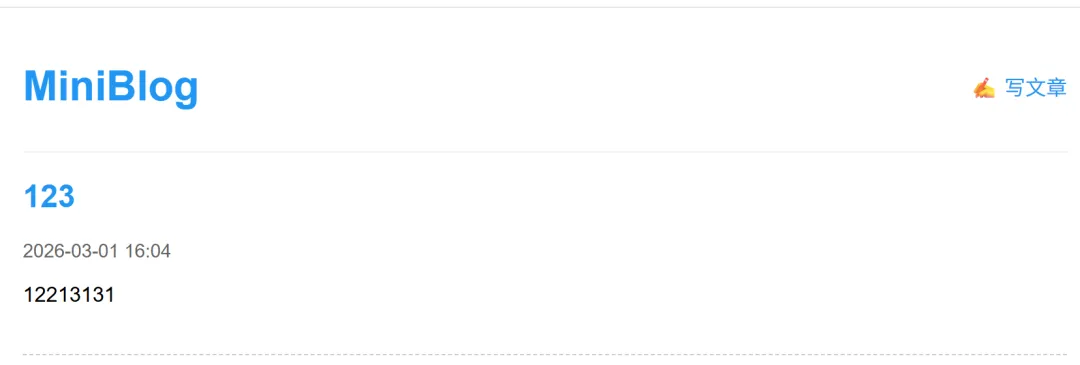
🧪 运行效果图及测试流程
- 点击“写文章” → 填写标题和内容 → 点击“发布”
- 点击文章标题 → 进入详情页,显示完整内容(保留换行)
✅ 首次运行后,data/posts.json 会自动生成并保存数据!
📝 项目亮点总结
| |
|---|
| 无数据库 | |
| 自动 ID 生成 | max(id) + 1 |
| 时间戳 | datetime.now().strftime() |
| 安全 HTML 输出 | |
| 响应式样式 | |
🚀 后续可扩展方向(学有余力可尝试)
- 添加 Markdown 支持
# 安装: pip install markdownimport markdownhtml_content = markdown.markdown(post['content'])
- 增加文章编辑/删除功能
- 分页显示文章
- 部署到云服务器(如 PythonAnywhere)
🎉 恭喜!你的 MiniBlog 已成功运行!
现在,去写你的第一篇博客吧!比如:《我的 Python 学习之旅》✨😊