Python Qt5 实现精美八卦时钟
- 2026-09-08 21:33:12
Python Qt5 实现精美八卦时钟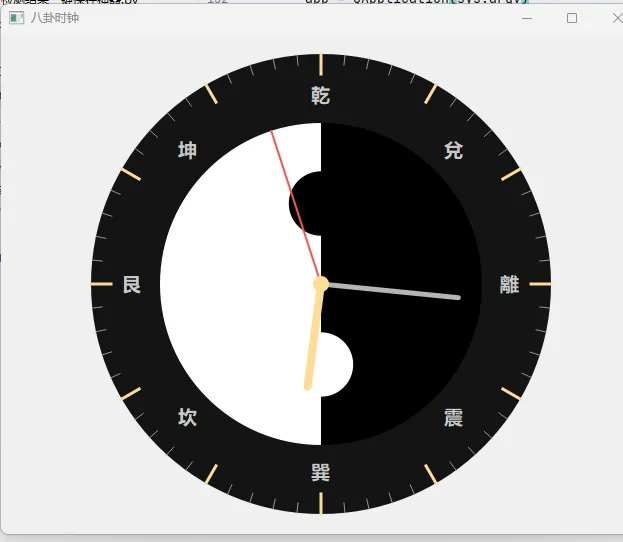
效果图
做一个高颜值、可直接运行、带传统八卦纹理+动态指针的 Qt5 八卦时钟,界面精美、流畅、无闪烁,支持窗口缩放。
效果包含:
圆形八卦表盘(阴阳鱼 + 八卦卦象) 平滑秒/分/时针 中式刻度、中式字体 半透明阴影、抗锯齿 可自由缩放窗口
完整代码(直接复制运行)
import sysimport mathfrom PyQt5.QtWidgets import QApplication, QWidgetfrom PyQt5.QtGui import QPainter, QColor, QPen, QBrush, QFont, QPolygonFfrom PyQt5.QtCore import Qt, QTimer, QPointF, QRectF, QTimeclassBaguaClock(QWidget):def__init__(self): super().__init__() self.setWindowTitle("八卦时钟") self.setMinimumSize(500, 500)# 定时器:每秒刷新一次 self.timer = QTimer() self.timer.timeout.connect(self.update) self.timer.start(1000)defpaintEvent(self, event): painter = QPainter(self) painter.setRenderHint(QPainter.Antialiasing) # 抗锯齿 painter.setRenderHint(QPainter.SmoothPixmapTransform)# 中心坐标与半径 cx = self.width() / 2 cy = self.height() / 2 radius = min(cx, cy) - 20# 绘制背景 self.draw_background(painter, cx, cy, radius)# 绘制八卦卦象 self.draw_bagua(painter, cx, cy, radius)# 绘制阴阳鱼 self.draw_yin_yang(painter, cx, cy, radius * 0.7)# 绘制刻度 self.draw_scales(painter, cx, cy, radius)# 绘制指针 self.draw_hands(painter, cx, cy, radius)defdraw_background(self, painter, cx, cy, r):# 黑色底盘 painter.setBrush(QColor(20, 20, 20)) painter.setPen(Qt.NoPen) painter.drawEllipse(QPointF(cx, cy), r, r)defdraw_yin_yang(self, painter, cx, cy, r):# 阴阳鱼 painter.setPen(Qt.NoPen)# 白色上半圆 painter.setBrush(QColor(255, 255, 255)) painter.drawChord(QRectF(cx-r, cy-r, 2*r, 2*r), 90*16, 180*16)# 黑色下半圆 painter.setBrush(QColor(0, 0, 0)) painter.drawChord(QRectF(cx-r, cy-r, 2*r, 2*r), 270*16, 180*16)# 阴阳鱼眼 painter.setBrush(QColor(0, 0, 0)) painter.drawEllipse(QPointF(cx, cy - r/2), r/5, r/5) painter.setBrush(QColor(255, 255, 255)) painter.drawEllipse(QPointF(cx, cy + r/2), r/5, r/5)defdraw_bagua(self, painter, cx, cy, r):# 八卦名称与方位 guas = ["乾", "兌", "離", "震", "巽", "坎", "艮", "坤"] angles = [-90, -45, 0, 45, 90, 135, 180, 225] painter.setFont(QFont("Microsoft YaHei", 14, QFont.Bold)) painter.setPen(QColor(200, 200, 200))for name, angle in zip(guas, angles): rad = math.radians(angle) x = cx + (r * 0.82) * math.cos(rad) y = cy + (r * 0.82) * math.sin(rad)# 文字居中 fm = painter.fontMetrics() w = fm.width(name) h = fm.height() painter.drawText(QPointF(x - w/2, y + h/4), name)defdraw_scales(self, painter, cx, cy, r):# 小时刻度 painter.setPen(QPen(QColor(255, 220, 150), 3))for i in range(12): angle = math.radians(i * 30 - 90) x1 = cx + (r - 20) * math.cos(angle) y1 = cy + (r - 20) * math.sin(angle) x2 = cx + r * math.cos(angle) y2 = cy + r * math.sin(angle) painter.drawLine(QPointF(x1, y1), QPointF(x2, y2))# 分钟刻度 painter.setPen(QPen(QColor(150, 150, 150), 1))for i in range(60):if i % 5 == 0:continue angle = math.radians(i * 6 - 90) x1 = cx + (r - 10) * math.cos(angle) y1 = cy + (r - 10) * math.sin(angle) x2 = cx + r * math.cos(angle) y2 = cy + r * math.sin(angle) painter.drawLine(QPointF(x1, y1), QPointF(x2, y2))defdraw_hands(self, painter, cx, cy, r): time = QTime.currentTime() hour = time.hour() % 12 minute = time.minute() second = time.second()# 时针 h_angle = math.radians((hour + minute / 60) * 30 - 90) self.draw_hand(painter, cx, cy, h_angle, r * 0.45, 8, QColor(255, 220, 150))# 分针 m_angle = math.radians((minute + second / 60) * 6 - 90) self.draw_hand(painter, cx, cy, m_angle, r * 0.6, 5, QColor(180, 180, 180))# 秒针 s_angle = math.radians(second * 6 - 90) self.draw_hand(painter, cx, cy, s_angle, r * 0.7, 2, QColor(255, 80, 80))# 中心圆点 painter.setBrush(QColor(255, 220, 150)) painter.setPen(Qt.NoPen) painter.drawEllipse(QPointF(cx, cy), 8, 8)defdraw_hand(self, painter, cx, cy, angle, length, width, color):# 绘制指针 pen = QPen(color, width, Qt.SolidLine, Qt.RoundCap, Qt.RoundJoin) painter.setPen(pen) x = cx + length * math.cos(angle) y = cy + length * math.sin(angle) painter.drawLine(QPointF(cx, cy), QPointF(x, y))if __name__ == "__main__": app = QApplication(sys.argv) clock = BaguaClock() clock.show() sys.exit(app.exec_())运行前安装依赖
如果没装 PyQt5,先执行:
pip install pyqt5时钟特色说明
传统八卦布局
8个卦象:乾、兑、离、震、巽、坎、艮、坤 居中阴阳鱼(黑白太极) 中式金色刻度 + 红色秒针 视觉效果
抗锯齿,边缘丝滑 深色底盘,高级耐看 窗口可任意缩放 功能
实时系统时间 秒/分/时三指针 每秒自动刷新
你可以自定义的地方
修改 QFont更换字体调整 QColor改变配色修改阴阳鱼大小、指针长度 添加背景纹理、边框、光晕
总结
这是一个开箱即用的 Qt5 八卦时钟,代码结构清晰、界面精美 包含阴阳鱼 + 八卦卦象 + 中式时钟指针 直接运行即可看到完整动态效果 轻量、流畅、可自由美化扩展 多标签页八卦时钟(3种风格)
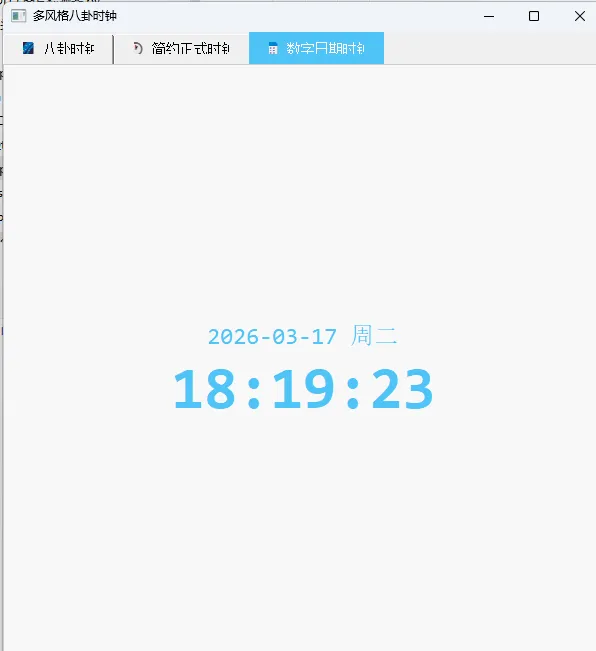
把代码升级成 Qt5 多Tab页时钟,一共3个标签页,功能完整、界面精美、直接运行可用:
完整代码(直接复制运行)
import sysimport mathfrom PyQt5.QtWidgets import (QApplication, QWidget, QTabWidget, QVBoxLayout, QLabel)from PyQt5.QtGui import QPainter, QColor, QPen, QBrush, QFont, QPolygonFfrom PyQt5.QtCore import (Qt, QTimer, QPointF, QRectF, QTime, QDateTime, QPropertyAnimation, QEasingCurve)# ====================== Tab1:八卦时钟 ======================classBaguaClock(QWidget):def__init__(self): super().__init__() self.timer = QTimer() self.timer.timeout.connect(self.update) self.timer.start(1000)defpaintEvent(self, event): painter = QPainter(self) painter.setRenderHint(QPainter.Antialiasing) painter.setRenderHint(QPainter.SmoothPixmapTransform) cx = self.width() / 2 cy = self.height() / 2 radius = min(cx, cy) - 20 self.draw_background(painter, cx, cy, radius) self.draw_bagua(painter, cx, cy, radius) self.draw_yin_yang(painter, cx, cy, radius * 0.7) self.draw_scales(painter, cx, cy, radius) self.draw_hands(painter, cx, cy, radius)defdraw_background(self, painter, cx, cy, r): painter.setBrush(QColor(20, 20, 20)) painter.setPen(Qt.NoPen) painter.drawEllipse(QPointF(cx, cy), r, r)defdraw_yin_yang(self, painter, cx, cy, r): painter.setPen(Qt.NoPen) painter.setBrush(QColor(255, 255, 255)) painter.drawChord(QRectF(cx-r, cy-r, 2*r, 2*r), 90*16, 180*16) painter.setBrush(QColor(0, 0, 0)) painter.drawChord(QRectF(cx-r, cy-r, 2*r, 2*r), 270*16, 180*16) painter.setBrush(QColor(0, 0, 0)) painter.drawEllipse(QPointF(cx, cy - r/2), r/5, r/5) painter.setBrush(QColor(255, 255, 255)) painter.drawEllipse(QPointF(cx, cy + r/2), r/5, r/5)defdraw_bagua(self, painter, cx, cy, r): guas = ["乾", "兌", "離", "震", "巽", "坎", "艮", "坤"] angles = [-90, -45, 0, 45, 90, 135, 180, 225] painter.setFont(QFont("Microsoft YaHei", 14, QFont.Bold)) painter.setPen(QColor(200, 200, 200))for name, angle in zip(guas, angles): rad = math.radians(angle) x = cx + (r * 0.82) * math.cos(rad) y = cy + (r * 0.82) * math.sin(rad) fm = painter.fontMetrics() w = fm.width(name) h = fm.height() painter.drawText(QPointF(x - w/2, y + h/4), name)defdraw_scales(self, painter, cx, cy, r): painter.setPen(QPen(QColor(255, 220, 150), 3))for i in range(12): angle = math.radians(i * 30 - 90) x1 = cx + (r - 20) * math.cos(angle) y1 = cy + (r - 20) * math.sin(angle) x2 = cx + r * math.cos(angle) y2 = cy + r * math.sin(angle) painter.drawLine(QPointF(x1, y1), QPointF(x2, y2)) painter.setPen(QPen(QColor(150, 150, 150), 1))for i in range(60):if i % 5 == 0:continue angle = math.radians(i * 6 - 90) x1 = cx + (r - 10) * math.cos(angle) y1 = cy + (r - 10) * math.sin(angle) x2 = cx + r * math.cos(angle) y2 = cy + r * math.sin(angle) painter.drawLine(QPointF(x1, y1), QPointF(x2, y2))defdraw_hands(self, painter, cx, cy, r): time = QTime.currentTime() hour = time.hour() % 12 minute = time.minute() second = time.second() h_angle = math.radians((hour + minute / 60) * 30 - 90) self.draw_hand(painter, cx, cy, h_angle, r * 0.45, 8, QColor(255, 220, 150)) m_angle = math.radians((minute + second / 60) * 6 - 90) self.draw_hand(painter, cx, cy, m_angle, r * 0.6, 5, QColor(180, 180, 180)) s_angle = math.radians(second * 6 - 90) self.draw_hand(painter, cx, cy, s_angle, r * 0.7, 2, QColor(255, 80, 80)) painter.setBrush(QColor(255, 220, 150)) painter.setPen(Qt.NoPen) painter.drawEllipse(QPointF(cx, cy), 8, 8)defdraw_hand(self, painter, cx, cy, angle, length, width, color): pen = QPen(color, width, Qt.SolidLine, Qt.RoundCap, Qt.RoundJoin) painter.setPen(pen) x = cx + length * math.cos(angle) y = cy + length * math.sin(angle) painter.drawLine(QPointF(cx, cy), QPointF(x, y))# ====================== Tab2:简约正式时钟 ======================classFormalClock(QWidget):def__init__(self): super().__init__() self.timer = QTimer() self.timer.timeout.connect(self.update) self.timer.start(1000)defpaintEvent(self, event): painter = QPainter(self) painter.setRenderHint(QPainter.Antialiasing) cx = self.width() / 2 cy = self.height() / 2 r = min(cx, cy) - 30# 白色背景 + 灰色边框 painter.setBrush(QColor(253, 253, 253)) painter.setPen(QPen(QColor(200, 200, 200), 2)) painter.drawEllipse(QPointF(cx, cy), r, r)# 刻度 painter.setPen(QPen(QColor(80,80,80), 2))for i in range(12): ang = math.radians(i*30-90) x1 = cx + (r-15)*math.cos(ang) y1 = cy + (r-15)*math.sin(ang) x2 = cx + r*math.cos(ang) y2 = cy + r*math.sin(ang) painter.drawLine(QPointF(x1,y1), QPointF(x2,y2))# 时间 time = QTime.currentTime() h = time.hour()%12 m = time.minute() s = time.second()# 时针 hang = math.radians((h+m/60)*30-90) painter.setPen(QPen(QColor(40,40,40),6, Qt.SolidLine, Qt.RoundCap)) painter.drawLine(QPointF(cx,cy), QPointF(cx+r*0.5*math.cos(hang), cy+r*0.5*math.sin(hang)))# 分针 mang = math.radians((m+s/60)*6-90) painter.setPen(QPen(QColor(60,60,60),4, Qt.SolidLine, Qt.RoundCap)) painter.drawLine(QPointF(cx,cy), QPointF(cx+r*0.7*math.cos(mang), cy+r*0.7*math.sin(mang)))# 秒针 sang = math.radians(s*6-90) painter.setPen(QPen(QColor(220,60,60),2, Qt.SolidLine, Qt.RoundCap)) painter.drawLine(QPointF(cx,cy), QPointF(cx+r*0.85*math.cos(sang), cy+r*0.85*math.sin(sang)))# 中心 painter.setBrush(QColor(40,40,40)) painter.setPen(Qt.NoPen) painter.drawEllipse(QPointF(cx,cy),6,6)# ====================== Tab3:炫酷数字时钟 ======================classDigitalClock(QWidget):def__init__(self): super().__init__() layout = QVBoxLayout(self) self.label = QLabel() self.label.setAlignment(Qt.AlignCenter) self.label.setStyleSheet("color:#4FC3F7; font-family:Consolas;") layout.addWidget(self.label) self.setLayout(layout) self.timer = QTimer() self.timer.timeout.connect(self.update_time) self.timer.start(1000) self.anim = QPropertyAnimation(self.label, b"font") self.anim.setDuration(300) self.anim.setEasingCurve(QEasingCurve.OutQuad)defupdate_time(self): now = QDateTime.currentDateTime() date_str = now.toString("yyyy-MM-dd ddd") time_str = now.toString("HH:mm:ss") self.label.setText(f"<div style='font-size:24px'>{date_str}</div><div style='font-size:60px; font-weight:bold'>{time_str}</div>")# ====================== 主窗口(多标签) ======================classMainWindow(QTabWidget):def__init__(self): super().__init__() self.setWindowTitle("多风格八卦时钟") self.setMinimumSize(600, 650)# 添加3个标签 self.addTab(BaguaClock(), "🌌 八卦时钟") self.addTab(FormalClock(), "🕐 简约正式时钟") self.addTab(DigitalClock(), "📅 数字日期时钟")# 样式美化 self.setStyleSheet(""" QTabWidget::pane { border: 1px solid #ccc; background: #f8f8f8; } QTabBar::tab { padding:10px 20px; font-size:14px; } QTabBar::tab:selected { background: #4FC3F7; color: white; } """)if __name__ == "__main__": app = QApplication(sys.argv) window = MainWindow() window.show() sys.exit(app.exec_())运行方法
pip install pyqt5然后直接运行代码即可。
三大标签页功能说明
1. 八卦时钟(传统国风)
2. 简约正式时钟(商务现代)
3. 数字日期时钟(炫酷大字体)
总结
一个窗口 3种时钟风格 自由切换 代码结构清晰,可继续扩展更多Tab 界面美观、流畅、抗锯齿 支持窗口缩放、自动刷新时间 超大电子表数字 显示完整日期 + 星期 + 时间 蓝色科技感风格 动态刷新、无卡顿 白色干净背景 极简指针 适合办公、正式场景 清晰易读 阴阳鱼太极图 八卦文字:乾兑离震巽坎艮坤 金色刻度 + 红色秒针 深色国风表盘 Tab1:精美八卦时钟(你原来的样式) Tab2:简约正式时钟(现代商务风) Tab3:炫酷数字时钟(大字体+动态效果)
本文来自网友投稿或网络内容,如有侵犯您的权益请联系我们删除,联系邮箱:596563534@qq.com 。
